Website display error - websites became centered

Jonguy30

New member
Local time
6:50 PM
Messages
160
Hello, I have a problem that is bothering me.

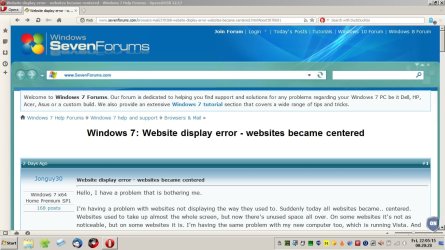
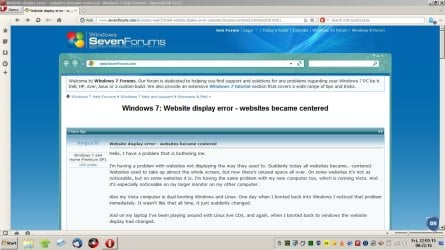
I'm having a problem with websites not displaying the way they used to. Suddenly today all websites became.. centered. Websites used to take up almost the whole screen, but now there's unused space all over. On some websites it's not as noticeable, but on some websites it is. I'm having the same problem with my new computer too, which is running Vista. And it's especially noticeable on my larger monitor on my other computer.

Also my Vista computer is dual booting Windows and Linux. One day when I booted back into Windows I noticed that problem immediately. It wasn't like that all time, it just suddenly changed.

And on my laptop I've been playing around with Linux live CDs, and again, when I booted back to windows the website display had changed.

As I said, websites are kind of smaller, and centered on the browser screen. And lots of unused space, it used to be wide and take up pretty much the whole screen. And some elements on websites are not the way they're supposed to be, it makes it look weird.

Below are a couple screenshots to show you.
http://postimg.org/image/rgntrmb8d/
It might not show up very well on the second screenshot but it's very noticeable on the first one.

I'm hoping I can solve this. :confused:
 

Attachments

  • website display wrong.PNG
    website display wrong.PNG
    76.6 KB · Views: 1
  • website display wrong 2.PNG
    website display wrong 2.PNG
    116.7 KB · Views: 2
Last edited:

My Computer

Computer type
Laptop
Computer Manufacturer/Model Number
HP
OS
Windows 7 x64 Home Premium SP1
CPU
Intel Pentium 6100 dual core
Memory
4GB
Graphics Card(s)
ATI mobility radeon 5470, 512 MB RAM
Screen Resolution
1366 x 768
Mouse
Logitech M100
Internet Speed
42 Mbps Dual Carrier 4G
Antivirus
Microsoft security essentials, MSE
Browser
Palemoon
Some more information. I'm using Pale Moon as my web browser, and this issue happens on all of my browsers. Including Internet Explorer.

Has anyone else experienced something similar?

All websites look weird.
 

My Computer

Computer type
Laptop
Computer Manufacturer/Model Number
HP
OS
Windows 7 x64 Home Premium SP1
CPU
Intel Pentium 6100 dual core
Memory
4GB
Graphics Card(s)
ATI mobility radeon 5470, 512 MB RAM
Screen Resolution
1366 x 768
Mouse
Logitech M100
Internet Speed
42 Mbps Dual Carrier 4G
Antivirus
Microsoft security essentials, MSE
Browser
Palemoon

My Computer

Computer type
PC/Desktop
Computer Manufacturer/Model Number
Custom Build
OS
Windows 7 Ultimate x64 SP1
CPU
AMD Phenom 2 1090T
Motherboard
Gigabyte GA-890FXA-UD5
Memory
2x8GB Kingston HyperX Fury Black 1600Mhz Unganged
Graphics Card(s)
MSI GTX 970 Gaming 4G
Sound Card
Realtek On-Board HD 7.1 Audio / Logitech G35
Monitor(s) Displays
3xAcer GD245HQ
Screen Resolution
1920x1080
Hard Drives
Samsung 850 Pro 512GB SSD - OS /
WD Caviar Black SATA 3 - 1 TBx2 - Dynamic RAID 0 /
WD Caviar Green SATA 2 - 640GBx2 - Dynamic RAID 0 /
WD Caviar Green SATA 2 - 640GB - Internal Backup /
Seagate Barracude SATA 3 - 3TB - External Backup/ Sync
PSU
HighPower 1000W
Case
Cooler Master HAF 932
Cooling
Noctua NH-D14
Keyboard
Logitech G19
Mouse
Logitech G500
Internet Speed
100/4 Mbit Cable (100GB quota)
Antivirus
ZoneAlarm Extreme Security / MBAM Pro / MBAE Free / SAS Free
Browser
IE 11 - Firefox - Chrome
Other Info
Logitech F710/ G27/ G940/ Z5500 // TrackIR 5 // Nvidia 3D Surround Vision
Ok, done.
 

My Computer

Computer type
Laptop
Computer Manufacturer/Model Number
HP
OS
Windows 7 x64 Home Premium SP1
CPU
Intel Pentium 6100 dual core
Memory
4GB
Graphics Card(s)
ATI mobility radeon 5470, 512 MB RAM
Screen Resolution
1366 x 768
Mouse
Logitech M100
Internet Speed
42 Mbps Dual Carrier 4G
Antivirus
Microsoft security essentials, MSE
Browser
Palemoon
I can't see anything wrong with your screenshots. I have the same space on sides.

For IE, enable Status Bar (right click title bar) and set zoom to, say, 125%.

Hope this helps.
 

My Computer

Computer type
PC/Desktop
Computer Manufacturer/Model Number
Custom Build
OS
Windows 7 Ultimate x64 SP1
CPU
AMD Phenom 2 1090T
Motherboard
Gigabyte GA-890FXA-UD5
Memory
2x8GB Kingston HyperX Fury Black 1600Mhz Unganged
Graphics Card(s)
MSI GTX 970 Gaming 4G
Sound Card
Realtek On-Board HD 7.1 Audio / Logitech G35
Monitor(s) Displays
3xAcer GD245HQ
Screen Resolution
1920x1080
Hard Drives
Samsung 850 Pro 512GB SSD - OS /
WD Caviar Black SATA 3 - 1 TBx2 - Dynamic RAID 0 /
WD Caviar Green SATA 2 - 640GBx2 - Dynamic RAID 0 /
WD Caviar Green SATA 2 - 640GB - Internal Backup /
Seagate Barracude SATA 3 - 3TB - External Backup/ Sync
PSU
HighPower 1000W
Case
Cooler Master HAF 932
Cooling
Noctua NH-D14
Keyboard
Logitech G19
Mouse
Logitech G500
Internet Speed
100/4 Mbit Cable (100GB quota)
Antivirus
ZoneAlarm Extreme Security / MBAM Pro / MBAE Free / SAS Free
Browser
IE 11 - Firefox - Chrome
Other Info
Logitech F710/ G27/ G940/ Z5500 // TrackIR 5 // Nvidia 3D Surround Vision
Thing is it didn't used to be this way. I've tried zooming and all it does is make the webpage look fuzzy. I have status bar on IE enabled. And I've tried changing some about:config entries in Pale Moon and they didn't help.

Websites used to be widescreen.
 

My Computer

Computer type
Laptop
Computer Manufacturer/Model Number
HP
OS
Windows 7 x64 Home Premium SP1
CPU
Intel Pentium 6100 dual core
Memory
4GB
Graphics Card(s)
ATI mobility radeon 5470, 512 MB RAM
Screen Resolution
1366 x 768
Mouse
Logitech M100
Internet Speed
42 Mbps Dual Carrier 4G
Antivirus
Microsoft security essentials, MSE
Browser
Palemoon
I apologize in advance if this suggestion is too simplistic, but could you have inadvertently changed your monitor/display settings?
 

My Computer

Computer Manufacturer/Model Number
Dell Inspiron 580s
OS
Windows 7 Home Premium SP1
CPU
i3
Memory
6 GB
Graphics Card(s)
ATI Radeon
Nope. Resolution is 1366 x 768 as it's always been. Also, today I updated my graphics display driver to see if it would change, but no, nothing. And dpi is 100%.
 

My Computer

Computer type
Laptop
Computer Manufacturer/Model Number
HP
OS
Windows 7 x64 Home Premium SP1
CPU
Intel Pentium 6100 dual core
Memory
4GB
Graphics Card(s)
ATI mobility radeon 5470, 512 MB RAM
Screen Resolution
1366 x 768
Mouse
Logitech M100
Internet Speed
42 Mbps Dual Carrier 4G
Antivirus
Microsoft security essentials, MSE
Browser
Palemoon
Hey again,

Accidentally found something that I don't normally use, or notice for that matter.

For sevenforums, scroll to the very bottom, on the right side (below facebook, twitter shortcuts) there is a option box. Chose sf - wide

I am not sure if this would be what you are looking for and it wouldn't work for all pages of course.

Check for yourself.
 

My Computer

Computer type
PC/Desktop
Computer Manufacturer/Model Number
Custom Build
OS
Windows 7 Ultimate x64 SP1
CPU
AMD Phenom 2 1090T
Motherboard
Gigabyte GA-890FXA-UD5
Memory
2x8GB Kingston HyperX Fury Black 1600Mhz Unganged
Graphics Card(s)
MSI GTX 970 Gaming 4G
Sound Card
Realtek On-Board HD 7.1 Audio / Logitech G35
Monitor(s) Displays
3xAcer GD245HQ
Screen Resolution
1920x1080
Hard Drives
Samsung 850 Pro 512GB SSD - OS /
WD Caviar Black SATA 3 - 1 TBx2 - Dynamic RAID 0 /
WD Caviar Green SATA 2 - 640GBx2 - Dynamic RAID 0 /
WD Caviar Green SATA 2 - 640GB - Internal Backup /
Seagate Barracude SATA 3 - 3TB - External Backup/ Sync
PSU
HighPower 1000W
Case
Cooler Master HAF 932
Cooling
Noctua NH-D14
Keyboard
Logitech G19
Mouse
Logitech G500
Internet Speed
100/4 Mbit Cable (100GB quota)
Antivirus
ZoneAlarm Extreme Security / MBAM Pro / MBAE Free / SAS Free
Browser
IE 11 - Firefox - Chrome
Other Info
Logitech F710/ G27/ G940/ Z5500 // TrackIR 5 // Nvidia 3D Surround Vision
Widescreen view

Is this what you mean? Compare the two screenshots.


Fill whole screen - larger text
Screenshot 1.jpg

Smaller text and bars each side
Screenshot 2.jpg

If so just try:

Ctrl and +
Ctrl and -

or on some laptops

Ctrl and Shift and +
Ctrl and Shift and -

Press all keys at the same time.

Or if you have a mousewheel:

Ctrl and spin the mousewheel.
 

My Computer

Computer type
Laptop
Computer Manufacturer/Model Number
ASUS
OS
Microsoft Windows 7 Home Premium 64-bit 7601 Multiprocessor Free Service Pack 1
CPU
AMD C-60 APU with Radeon(tm) HD Graphics
Motherboard
ASUSTeK COMPUTER INC. X501U
Memory
4.00 GB
Graphics Card(s)
AMD Radeon HD 6290 Graphics
Sound Card
(1) AMD High Definition Audio Device (2) Realtek High Defi
Screen Resolution
1366 x 768 x 32 bits (4294967296 colors) @ 60 Hz
Hard Drives
Hitachi HTS545050A7E380 SATA Disk Device
Antivirus
Comodo CIS & FW, SecureAplus App Whitelisting, Threatfire
Browser
Cyberfox 64bit, Opera 64bit, Airfox
Other Info
Spy-The-Spy, HitmanPro.Alert, Norton Connect Safe, MJRegWatcher, BitDefender TrafficLight, Voodoo Shield, Zemana AntiMalware
Yeah, the wide style does help a bit. It also appears this is not limited to just the web browser and webpages. It's almost as if things appear more "flat" than usual. I opened up other software in my computer and they too appeared differently. Don't know what's going on.

I also checked my dad's PC and he appears to have the same thing (also running win7 sp1). Maybe this is how it's supposed to be, heh. And zooming in doesn't help, it just increases the size of everything, text and other elements etc.

But perhaps I can just deal with it, lol.

Anyone still have other ideas?
 

My Computer

Computer type
Laptop
Computer Manufacturer/Model Number
HP
OS
Windows 7 x64 Home Premium SP1
CPU
Intel Pentium 6100 dual core
Memory
4GB
Graphics Card(s)
ATI mobility radeon 5470, 512 MB RAM
Screen Resolution
1366 x 768
Mouse
Logitech M100
Internet Speed
42 Mbps Dual Carrier 4G
Antivirus
Microsoft security essentials, MSE
Browser
Palemoon

My Computer

Computer type
Laptop
Computer Manufacturer/Model Number
ASUS
OS
Microsoft Windows 7 Home Premium 64-bit 7601 Multiprocessor Free Service Pack 1
CPU
AMD C-60 APU with Radeon(tm) HD Graphics
Motherboard
ASUSTeK COMPUTER INC. X501U
Memory
4.00 GB
Graphics Card(s)
AMD Radeon HD 6290 Graphics
Sound Card
(1) AMD High Definition Audio Device (2) Realtek High Defi
Screen Resolution
1366 x 768 x 32 bits (4294967296 colors) @ 60 Hz
Hard Drives
Hitachi HTS545050A7E380 SATA Disk Device
Antivirus
Comodo CIS & FW, SecureAplus App Whitelisting, Threatfire
Browser
Cyberfox 64bit, Opera 64bit, Airfox
Other Info
Spy-The-Spy, HitmanPro.Alert, Norton Connect Safe, MJRegWatcher, BitDefender TrafficLight, Voodoo Shield, Zemana AntiMalware
Nope. I changed screen resolution back and forth and also changed dpi, didn't change anything.

I think I'm going to close this issue as I'm just going to deal with it.

Thank you everyone for your attention and concern. Shall I mark this solved or just leave it?
 

My Computer

Computer type
Laptop
Computer Manufacturer/Model Number
HP
OS
Windows 7 x64 Home Premium SP1
CPU
Intel Pentium 6100 dual core
Memory
4GB
Graphics Card(s)
ATI mobility radeon 5470, 512 MB RAM
Screen Resolution
1366 x 768
Mouse
Logitech M100
Internet Speed
42 Mbps Dual Carrier 4G
Antivirus
Microsoft security essentials, MSE
Browser
Palemoon
Back
Top