WEI problem

Tyderion

New member
Member
Local time
7:25 PM
Messages
49
Hello

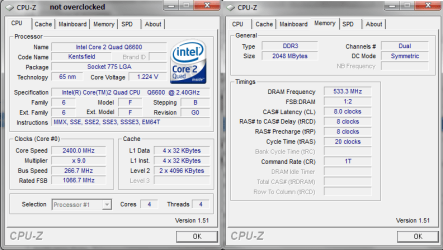
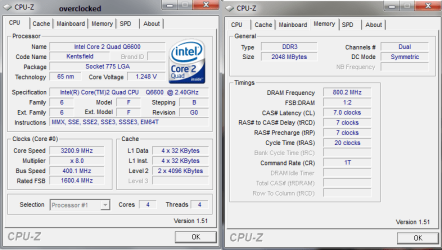
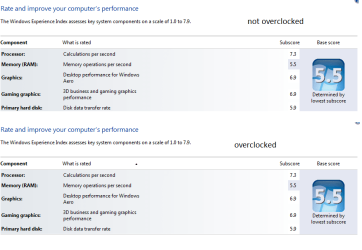
Regardless of an overclock the score stays the same (at least in 64bit Windows 7 RTM Build 7600)

Before, when I was using the RC 32bit (Build 7100) my scores were as following (before overclocking):
CPU: 7.1 (Q6600 G0 @2.4ghz (9x266)
RAM: 5.5 (ddr3 533mhz 8-8-8-20 CR:1T)
Graphics: 6.3 (GF8800GT @ 625mhz coreclock, 900 mhz memory clock)
Gaming: 6.3 (same)
HD: 5.9 (WD Raptor 10000rpm)

after overclocking they were like this:
CPU: 7.3 (Q6600 G0 @3.2ghz (8x400)
RAM: 5.5 (ddr3 800mhz 7-7-7-20 CR:1T)
Graphics: 6.9 (GF8800GT @ 707mhz core (shader linked), 1030 mhz memory clock)
gaming: 6.9 (same)
HD: 5.9 (WD Raptor 10000rpm)

My FSB:RAM Ratio was always 1:2

But now I am using Windows 7 RTM 64bit (Build 7600) and I first measured the scores with the OC in place and the Score was the same as in the RC (7.3, 5.5, 6.9, 6.9, 5.9) but then I used stock Bios settings and didn't overclock my Graphics Card anymore but the WEI-score didnt decrease back to the pre-OC levels.

Two things I don't understand:

1. Why didn't my RAM score go up when I OC'ed it to 1600mhz 7-7-7-20?
2. Why didn't the score go down again after using stock settings?

I attached a picture of the WEI as well as a screen of CPU-Z before and after showing the memory Timings as well as the CPU Speed.

btw. while measuring the WEI I never had open any other programs.

Thanks for helping me understanding this.
 

Attachments
  • WEI.png
    WEI.png
    26.8 KB · Views: 71
  • CPUZ_noOC.png
    CPUZ_noOC.png
    27 KB · Views: 43
  • CPUZ_OC.png
    CPUZ_OC.png
    25.4 KB · Views: 35

My Computer

OS
Windows 7 Professional x64
CPU
Intel i7 930 2.8 Ghz
Motherboard
Gigabyte GA-EX58-UD5
Memory
Mushkin Redline 3x2GB, DDR3-1600 CL6-8-6-24
Graphics Card(s)
Sapphire HD 5770 1G
Sound Card
Creative X-Fi XtremeGamer Fatal1ty Pro Series
Monitor(s) Displays
Samsung SyncMaster 226BW
Hard Drives
1x 500 GB System
2x 1TB
1x 1.5 TB
2x 2TB
PSU
be quiet! DARK POWER PRO, P8 900W
Case
Lian Li PCB-70 Black
Cooling
stock
Keyboard
Logitech G15 Blue Backlight
Mouse
Logitech G5 Laser Mouse
Internet Speed
100 mbit
Hello

Regardless of an overclock the score stays the same (at least in 64bit Windows 7 RTM Build 7600)

Before, when I was using the RC 32bit (Build 7100) my scores were as following (before overclocking):
CPU: 7.1 (Q6600 G0 @2.4ghz (9x266)
RAM: 5.5 (ddr3 533mhz 8-8-8-20 CR:1T)
Graphics: 6.3 (GF8800GT @ 625mhz coreclock, 900 mhz memory clock)
Gaming: 6.3 (same)
HD: 5.9 (WD Raptor 10000rpm)

after overclocking they were like this:
CPU: 7.3 (Q6600 G0 @3.2ghz (8x400)
RAM: 5.5 (ddr3 800mhz 7-7-7-20 CR:1T)
Graphics: 6.9 (GF8800GT @ 707mhz core (shader linked), 1030 mhz memory clock)
gaming: 6.9 (same)
HD: 5.9 (WD Raptor 10000rpm)

My FSB:RAM Ratio was always 1:2

But now I am using Windows 7 RTM 64bit (Build 7600) and I first measured the scores with the OC in place and the Score was the same as in the RC (7.3, 5.5, 6.9, 6.9, 5.9) but then I used stock Bios settings and didn't overclock my Graphics Card anymore but the WEI-score didnt decrease back to the pre-OC levels.

Two things I don't understand:

1. Why didn't my RAM score go up when I OC'ed it to 1600mhz 7-7-7-20?
2. Why didn't the score go down again after using stock settings?

I attached a picture of the WEI as well as a screen of CPU-Z before and after showing the memory Timings as well as the CPU Speed.

btw. while measuring the WEI I never had open any other programs.

Thanks for helping me understanding this.

1. Why didn't my RAM score go up when I OC'e
2. Why didn't the score go down again after using stock settings?


I think because amount of RAM is more weighted than speed. If you only have 4GB, i think the WEI will go up as you go up in amount of RAM. I have seen the same results on my RAM, and I have 6GB. When I OC'd from 1066 to 1600, I did see a jump, but it was only like .2.

I have 7.4 right now for my RAM and it is not OC'd at all. 6GB triple channel, OC'ing it only got me to 7.5.
 

My Computer

Computer Manufacturer/Model Number
Built Myself
OS
Windows 7 7600.16384 x64
CPU
Intel Core i7 OC'd to 3.20 GHz
Motherboard
Gigabyte
Memory
6GB GSkillz Triple Channel DDR3 OC'd to 1600 MHz
Graphics Card(s)
Nvidia GTX 280
Sound Card
X-Fi Platinum
Monitor(s) Displays
Dual 2001FWP
Screen Resolution
1680x1050 x 2
Hard Drives
System - Dual 150GB Raptors Raid0
Doc Storage - 1TB SATA 32MB cache Samsung
TV Recordings - 1TB SATA 32MB cache Samsung
PSU
Gigawatt Antec
Case
Antec 900
Keyboard
Saitek
Mouse
logitech MX 10000
Internet Speed
30 mb/s
wait, do you have 4GB or 6?
 

My Computer

Computer Manufacturer/Model Number
Built Myself
OS
Windows 7 7600.16384 x64
CPU
Intel Core i7 OC'd to 3.20 GHz
Motherboard
Gigabyte
Memory
6GB GSkillz Triple Channel DDR3 OC'd to 1600 MHz
Graphics Card(s)
Nvidia GTX 280
Sound Card
X-Fi Platinum
Monitor(s) Displays
Dual 2001FWP
Screen Resolution
1680x1050 x 2
Hard Drives
System - Dual 150GB Raptors Raid0
Doc Storage - 1TB SATA 32MB cache Samsung
TV Recordings - 1TB SATA 32MB cache Samsung
PSU
Gigawatt Antec
Case
Antec 900
Keyboard
Saitek
Mouse
logitech MX 10000
Internet Speed
30 mb/s
2 ... i only got 2 GB of ram....

i didn't upgrade the ram, i just timed and clocked it with its tested speed. on the dimms there is label: tested at 1600mhz@7-7-7-20 with 1.8V. (or something similar, the numbers are right)
 

My Computer

OS
Windows 7 Professional x64
CPU
Intel i7 930 2.8 Ghz
Motherboard
Gigabyte GA-EX58-UD5
Memory
Mushkin Redline 3x2GB, DDR3-1600 CL6-8-6-24
Graphics Card(s)
Sapphire HD 5770 1G
Sound Card
Creative X-Fi XtremeGamer Fatal1ty Pro Series
Monitor(s) Displays
Samsung SyncMaster 226BW
Hard Drives
1x 500 GB System
2x 1TB
1x 1.5 TB
2x 2TB
PSU
be quiet! DARK POWER PRO, P8 900W
Case
Lian Li PCB-70 Black
Cooling
stock
Keyboard
Logitech G15 Blue Backlight
Mouse
Logitech G5 Laser Mouse
Internet Speed
100 mbit
2 ... i only got 2 GB of ram....


that'syour problem. WEI weighs low ram over higher speed. If you add another 2g you willl shoot up tremendously.

I think their thought process is, that your performance is degraded with 2GB of RAM, and a faster RAM clock won't really increase performance.
 

My Computer

Computer Manufacturer/Model Number
Built Myself
OS
Windows 7 7600.16384 x64
CPU
Intel Core i7 OC'd to 3.20 GHz
Motherboard
Gigabyte
Memory
6GB GSkillz Triple Channel DDR3 OC'd to 1600 MHz
Graphics Card(s)
Nvidia GTX 280
Sound Card
X-Fi Platinum
Monitor(s) Displays
Dual 2001FWP
Screen Resolution
1680x1050 x 2
Hard Drives
System - Dual 150GB Raptors Raid0
Doc Storage - 1TB SATA 32MB cache Samsung
TV Recordings - 1TB SATA 32MB cache Samsung
PSU
Gigawatt Antec
Case
Antec 900
Keyboard
Saitek
Mouse
logitech MX 10000
Internet Speed
30 mb/s
you mean, faster ram DOES NOT increase performance :D
my system is a lot "snappier" after the OC than before, but that could just be related to the faster FSB and CPU (even though that should also be visible in the RAM score).

Yeah I was thinking about buying 2 more dimms (of the same type to be able to have the same timing/speed settings for all of them). Thanks :)
I'm just thinking about that and I don't know what would be more useful... 2x1GB more (total: 4x1GB) or to buy 2x2GB new (2x2GB total). but those 2GB dimms i can buy here (in switzerland without using amazon and buying it from the usa or something) have timings I don't like (9-9-9-24) ... any help? :)


Now I'm only wondering why my score didn't go back down to the original value after using stock settings (CPU/Graphics Score) ... when I was using build 7100 it went up/down accordingly ... but now it just stays the same ... it just stays at the OC'ed values...
 

My Computer

OS
Windows 7 Professional x64
CPU
Intel i7 930 2.8 Ghz
Motherboard
Gigabyte GA-EX58-UD5
Memory
Mushkin Redline 3x2GB, DDR3-1600 CL6-8-6-24
Graphics Card(s)
Sapphire HD 5770 1G
Sound Card
Creative X-Fi XtremeGamer Fatal1ty Pro Series
Monitor(s) Displays
Samsung SyncMaster 226BW
Hard Drives
1x 500 GB System
2x 1TB
1x 1.5 TB
2x 2TB
PSU
be quiet! DARK POWER PRO, P8 900W
Case
Lian Li PCB-70 Black
Cooling
stock
Keyboard
Logitech G15 Blue Backlight
Mouse
Logitech G5 Laser Mouse
Internet Speed
100 mbit
I am sure it probably is snappier, specially when it comes to RAM OC's. i just have seen WEI for RAM in the past lay heavily on the amount of RAM over the speed.
 

My Computer

Computer Manufacturer/Model Number
Built Myself
OS
Windows 7 7600.16384 x64
CPU
Intel Core i7 OC'd to 3.20 GHz
Motherboard
Gigabyte
Memory
6GB GSkillz Triple Channel DDR3 OC'd to 1600 MHz
Graphics Card(s)
Nvidia GTX 280
Sound Card
X-Fi Platinum
Monitor(s) Displays
Dual 2001FWP
Screen Resolution
1680x1050 x 2
Hard Drives
System - Dual 150GB Raptors Raid0
Doc Storage - 1TB SATA 32MB cache Samsung
TV Recordings - 1TB SATA 32MB cache Samsung
PSU
Gigawatt Antec
Case
Antec 900
Keyboard
Saitek
Mouse
logitech MX 10000
Internet Speed
30 mb/s
thanks :)

what would you recommend?
2x2GB @ 1600mhz 9-9-9-24
or
4x1GB @ 1600mhz 7-7-7-20
?

i'd go for the second option ... for two reasons:
1. i already got one pair
2. i won't need more than 4 GB anytime soon (maybe if I upgrade to i7 but my pc is by far fast enough for me...)
 

My Computer

OS
Windows 7 Professional x64
CPU
Intel i7 930 2.8 Ghz
Motherboard
Gigabyte GA-EX58-UD5
Memory
Mushkin Redline 3x2GB, DDR3-1600 CL6-8-6-24
Graphics Card(s)
Sapphire HD 5770 1G
Sound Card
Creative X-Fi XtremeGamer Fatal1ty Pro Series
Monitor(s) Displays
Samsung SyncMaster 226BW
Hard Drives
1x 500 GB System
2x 1TB
1x 1.5 TB
2x 2TB
PSU
be quiet! DARK POWER PRO, P8 900W
Case
Lian Li PCB-70 Black
Cooling
stock
Keyboard
Logitech G15 Blue Backlight
Mouse
Logitech G5 Laser Mouse
Internet Speed
100 mbit
thanks :)

what would you recommend?
2x2GB @ 1600mhz 9-9-9-24
or
4x1GB @ 1600mhz 7-7-7-20
?

i'd go for the second option ... for two reasons:
1. i already got one pair
2. i won't need more than 4 GB anytime soon (maybe if I upgrade to i7 but my pc is by far fast enough for me...)


yeah for sure. Use what you have and add more.

If you upgrade to an i7 you can then use triple channel memory and do a 3x2GB or even 3x4GB.
 

My Computer

Computer Manufacturer/Model Number
Built Myself
OS
Windows 7 7600.16384 x64
CPU
Intel Core i7 OC'd to 3.20 GHz
Motherboard
Gigabyte
Memory
6GB GSkillz Triple Channel DDR3 OC'd to 1600 MHz
Graphics Card(s)
Nvidia GTX 280
Sound Card
X-Fi Platinum
Monitor(s) Displays
Dual 2001FWP
Screen Resolution
1680x1050 x 2
Hard Drives
System - Dual 150GB Raptors Raid0
Doc Storage - 1TB SATA 32MB cache Samsung
TV Recordings - 1TB SATA 32MB cache Samsung
PSU
Gigawatt Antec
Case
Antec 900
Keyboard
Saitek
Mouse
logitech MX 10000
Internet Speed
30 mb/s
thanks for helping me ... i'm quite new to the overclocking :) I always knew I had a system I could OC but I never did it...

but you've also got no idea why my WEI score isn't changing anymore?
I mean ... after "downgrading" to stock settings (slower ram, slower cpu, slower fsb, slower gpu) my score should go down to the original values... so i'm kinda ... confused...

lol your signature :D
 

My Computer

OS
Windows 7 Professional x64
CPU
Intel i7 930 2.8 Ghz
Motherboard
Gigabyte GA-EX58-UD5
Memory
Mushkin Redline 3x2GB, DDR3-1600 CL6-8-6-24
Graphics Card(s)
Sapphire HD 5770 1G
Sound Card
Creative X-Fi XtremeGamer Fatal1ty Pro Series
Monitor(s) Displays
Samsung SyncMaster 226BW
Hard Drives
1x 500 GB System
2x 1TB
1x 1.5 TB
2x 2TB
PSU
be quiet! DARK POWER PRO, P8 900W
Case
Lian Li PCB-70 Black
Cooling
stock
Keyboard
Logitech G15 Blue Backlight
Mouse
Logitech G5 Laser Mouse
Internet Speed
100 mbit
thanks for helping me ... i'm quite new to the overclocking :) I always knew I had a system I could OC but I never did it...

but you've also got no idea why my WEI score isn't changing anymore?
I mean ... after "downgrading" to stock settings (slower ram, slower cpu, slower fsb, slower gpu) my score should go down to the original values... so i'm kinda ... confused...

lol your signature :D


Did you re-run the assessment after clocking it back?
 

My Computer

Computer Manufacturer/Model Number
Built Myself
OS
Windows 7 7600.16384 x64
CPU
Intel Core i7 OC'd to 3.20 GHz
Motherboard
Gigabyte
Memory
6GB GSkillz Triple Channel DDR3 OC'd to 1600 MHz
Graphics Card(s)
Nvidia GTX 280
Sound Card
X-Fi Platinum
Monitor(s) Displays
Dual 2001FWP
Screen Resolution
1680x1050 x 2
Hard Drives
System - Dual 150GB Raptors Raid0
Doc Storage - 1TB SATA 32MB cache Samsung
TV Recordings - 1TB SATA 32MB cache Samsung
PSU
Gigawatt Antec
Case
Antec 900
Keyboard
Saitek
Mouse
logitech MX 10000
Internet Speed
30 mb/s
sure ... without that it would be quite pointless to say it didn't change ....
i reran the assessment (like always, not having opened any other programs)
but it didn't change...
maybe I will re-re-assess the score again later to see if it really doesn't change but ...
 

My Computer

OS
Windows 7 Professional x64
CPU
Intel i7 930 2.8 Ghz
Motherboard
Gigabyte GA-EX58-UD5
Memory
Mushkin Redline 3x2GB, DDR3-1600 CL6-8-6-24
Graphics Card(s)
Sapphire HD 5770 1G
Sound Card
Creative X-Fi XtremeGamer Fatal1ty Pro Series
Monitor(s) Displays
Samsung SyncMaster 226BW
Hard Drives
1x 500 GB System
2x 1TB
1x 1.5 TB
2x 2TB
PSU
be quiet! DARK POWER PRO, P8 900W
Case
Lian Li PCB-70 Black
Cooling
stock
Keyboard
Logitech G15 Blue Backlight
Mouse
Logitech G5 Laser Mouse
Internet Speed
100 mbit
duh! Sorry for that dumb question. Well WEI is pretty basic. If you want to benchmark at a more granular level, get 3DMARK. The basic version is free. You can then see the benefits of the tweaks you do.

Futuremark - Benchmarks - 3DMark06 - Download
 

My Computer

Computer Manufacturer/Model Number
Built Myself
OS
Windows 7 7600.16384 x64
CPU
Intel Core i7 OC'd to 3.20 GHz
Motherboard
Gigabyte
Memory
6GB GSkillz Triple Channel DDR3 OC'd to 1600 MHz
Graphics Card(s)
Nvidia GTX 280
Sound Card
X-Fi Platinum
Monitor(s) Displays
Dual 2001FWP
Screen Resolution
1680x1050 x 2
Hard Drives
System - Dual 150GB Raptors Raid0
Doc Storage - 1TB SATA 32MB cache Samsung
TV Recordings - 1TB SATA 32MB cache Samsung
PSU
Gigawatt Antec
Case
Antec 900
Keyboard
Saitek
Mouse
logitech MX 10000
Internet Speed
30 mb/s
i know that it's not about benchmarking or anything ... i know my pc is a lot faster and "snappier" OC'ed than not OC'ed ... (I used 3DMark Vantage as well as PCMark Vantage) ... i just thought maybe this happened to other people too to know it's not my Win7 Version or something which ... messes it up.
I was just curious if somebody knew the cause of that...
up to now I thought WEI was basic, but at least more or less according to the specs (so to say, faster cpu means higher score, same for gpu, hd etc) but well ... it seems there are some bugs when reassessing.... and some strange RAM-performance assessment :D
maybe i'll reinstall onto a different HD to see if I can reproduce that ... bug?

thanks for the links and the help nonetheless :)
 

My Computer

OS
Windows 7 Professional x64
CPU
Intel i7 930 2.8 Ghz
Motherboard
Gigabyte GA-EX58-UD5
Memory
Mushkin Redline 3x2GB, DDR3-1600 CL6-8-6-24
Graphics Card(s)
Sapphire HD 5770 1G
Sound Card
Creative X-Fi XtremeGamer Fatal1ty Pro Series
Monitor(s) Displays
Samsung SyncMaster 226BW
Hard Drives
1x 500 GB System
2x 1TB
1x 1.5 TB
2x 2TB
PSU
be quiet! DARK POWER PRO, P8 900W
Case
Lian Li PCB-70 Black
Cooling
stock
Keyboard
Logitech G15 Blue Backlight
Mouse
Logitech G5 Laser Mouse
Internet Speed
100 mbit

My Computer

OS
Windows 7 Professional x64
CPU
Intel i7 930 2.8 Ghz
Motherboard
Gigabyte GA-EX58-UD5
Memory
Mushkin Redline 3x2GB, DDR3-1600 CL6-8-6-24
Graphics Card(s)
Sapphire HD 5770 1G
Sound Card
Creative X-Fi XtremeGamer Fatal1ty Pro Series
Monitor(s) Displays
Samsung SyncMaster 226BW
Hard Drives
1x 500 GB System
2x 1TB
1x 1.5 TB
2x 2TB
PSU
be quiet! DARK POWER PRO, P8 900W
Case
Lian Li PCB-70 Black
Cooling
stock
Keyboard
Logitech G15 Blue Backlight
Mouse
Logitech G5 Laser Mouse
Internet Speed
100 mbit
i know that it's not about benchmarking or anything ... i know my pc is a lot faster and "snappier" OC'ed than not OC'ed ... (I used 3DMark Vantage as well as PCMark Vantage) ... i just thought maybe this happened to other people too to know it's not my Win7 Version or something which ... messes it up.
I was just curious if somebody knew the cause of that...
up to now I thought WEI was basic, but at least more or less according to the specs (so to say, faster cpu means higher score, same for gpu, hd etc) but well ... it seems there are some bugs when reassessing.... and some strange RAM-performance assessment :D
maybe i'll reinstall onto a different HD to see if I can reproduce that ... bug?

thanks for the links and the help nonetheless :)


Ah... sweet. No problem. Let me know if you need anything else, I'll be on all day... again... lol
 

My Computer

Computer Manufacturer/Model Number
Built Myself
OS
Windows 7 7600.16384 x64
CPU
Intel Core i7 OC'd to 3.20 GHz
Motherboard
Gigabyte
Memory
6GB GSkillz Triple Channel DDR3 OC'd to 1600 MHz
Graphics Card(s)
Nvidia GTX 280
Sound Card
X-Fi Platinum
Monitor(s) Displays
Dual 2001FWP
Screen Resolution
1680x1050 x 2
Hard Drives
System - Dual 150GB Raptors Raid0
Doc Storage - 1TB SATA 32MB cache Samsung
TV Recordings - 1TB SATA 32MB cache Samsung
PSU
Gigawatt Antec
Case
Antec 900
Keyboard
Saitek
Mouse
logitech MX 10000
Internet Speed
30 mb/s
Back
Top