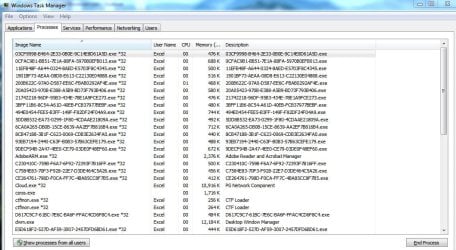
Can someone please tell explain what these weird alpha numeric names are in my Task Manager?
Please see the attached image.
I don't think I should have these running in the background and I don't know where they are coming from. Is there some way to permanently get rid of these things?
Thanks!
Check msconfig. Type it into the Start Orb should get you there. Then check Startup. Unchecking Excel and rebooting should stop Excel from running in the background when not needed.
Jack
My Computer
Computer type
PC/Desktop
Computer Manufacturer/Model Number
Home made Desktop
OS
Windows 10 Pro. 64/ version 1709 Windows 7 Pro/64
CPU
Intel i7-6800K @ 4.3
Motherboard
ASUS X-99 Deluxe II
Memory
Corsair Platinum 16 gig @2400
Graphics Card(s)
EVGA GTX 1070 OC
Monitor(s) Displays
Asus 27" LED LCD/VE278Q
Screen Resolution
1920-1080 or 1280-720 HDMI
Hard Drives
INTEL SSD 730-240 Gb Sata 3.0/
PSU
EVGA Platium 1200W
Case
Phanteks Luxe Tempered Glass 8 fans/ one radiator
Cooling
XSPC/ Water Cooled CPU
Keyboard
Das 4 Professional
Mouse
Logitech M705/MX Anywhere 2-S
Internet Speed
100 mbits
Antivirus
Microsoft Security Essentials/ Malwarebytes Premium 3.0/ SAS
Browser
I.E. 11 default/Firefox/ ISP Time Warner Cable/Spectrum
Other Info
LG BluRay Burner/
Sound system-KLipsch-THX/
Icy Dock ssd Hot Swap bays.
Ok, I never really figure out what that stuff was, but I found the folder where they were all located and I deleted all of those things. Thanks everyone!
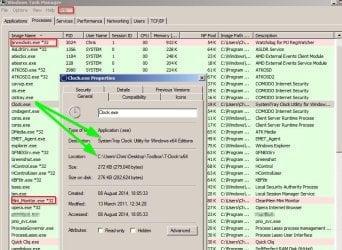
You might be interested in TaskManager addon - Prio. I've been using it for a few years as a way of quickly checking if unsigned processes are running. They are highlighted in red. Unsigned doesn't automatically mean bad but unsigned running processes need some research. If legit they can be assigned "Treat as valid" and thus will appear in green.
If you right click a process you get the file path.
With prio you get the same info presented in a balloon by hovering the mouse over the process name.