Weird file association prob: wrong progam selected after 'Browse'

Angstony

New member
Local time
5:16 PM
Messages
6
For various reasons I like to open picture files in Firefox, but something must have changed recently as jpegs suddenly started opening in MSO Picture Manager. `No problem,´ I thought. `I'll just re-select Firefox as the default.´ So I right-clicked on a .jpg file and selected 'Open with→Choose default program...'. I was quite surprised that Firefox wasn't already listed as on option – not even under the 'Other Programs' header – but again thought that shouldn't be a problem as I could just browse to it. So off I toodled to 'C:\Program Files\Mozilla Firefox' and double-clicked 'Firefox.exe'... but what's this? Instead of 'Firefox' getting added as an option in the list of 'Open with' programs, a second 'Notepad++' icon appeared! :confused: The first Notepad++ icon is listed under the 'Recommended Programs' header, so I guess that should be Firefox too, as it doesn't make much sense to have a text editor opening picture files – not unless you're some kind of hacker or programming guru, I guess.

Anyway, I've gotten around the immediate problem by using the excellent Default Programs Editor. But I really don't like having the standard method still acting weirdly like that, so I would appreciate any help in fixing it.
 

My Computer My Computer

Computer type
Laptop
Computer Manufacturer/Model Number
Dell
OS
Windows 7 Pro 32 bit
CPU
Intel duel T7300-2GHz
Memory
4GB
Graphics Card(s)
Nvidea GeForce 8600M GT
Hard Drives
320 GB Samsung
120 GB Fujitsu
Antivirus
MSE + Malwarebytes
Browser
Firefox

My Computer My Computer

Computer type
PC/Desktop
Computer Manufacturer/Model Number
Gateway DX4831-01e (Mid-Tower Desktop)
OS
Originally Win 7 Hm Prem x64 Ver 6.1.7600 Build 7601-SP1 | Upgraded to Windows 10 December 14, 2019
CPU
Intel i3 530 2.93GHz, 2933MHz 2 Cores 4 Logical Processors
Motherboard
Gateway H57M01 133 megahertz
Memory
6GB of 1,333MHz DDR3 SDRAM
Graphics Card(s)
32MB Intel Graphics Media Accelerator HD IGChip
Sound Card
Realtek High Definition Audio
Monitor(s) Displays
Gateway HX2000 20inch TFT active matrix TN
Screen Resolution
1600 x 900 x 59 hertz
Hard Drives
WDC WD10EADS-00M2B0 [HDD] (1000.20 GB) -- drive 0,
HL-DT-ST DVDRAM GH41N [CD-ROM dr]
Four card readers, and Four USB 2.0
PSU
300watts.
Case
Mid-Tower Desktop
Cooling
Stock from Gateway
Keyboard
Natural Ergonomic Keyboard 4000, see Other Info
Mouse
Orig. Gateway wore out now using Insignia USB wired optical
Internet Speed
Vz FIOS 10ms png 57.64Mbps down 65.53Mbps up Speedtest.org
Antivirus
Zamana Anti-logger with Anti-malware, MSE, Windows Firewall,
Browser
IE11.0.9600.19399-Upd ver11.0.135, Firefox 68.0.1 x64
Other Info
System Specs by Belarc.

BIOS: American Megatrends Inc. P01-A0 11/17/2009

Replaced the MS 'Natural' Standard PS/2 Enhanced 101-102 Keyboard with a new Natural Ergonomic Keyboard 4000 on August 1st 2014.

Canon Pixma MG3222 Printer.

Updated to IE11 on 12102015 | Fios Quantum Router g1100

Additional AV: SpywareBlaster, manual Mbam, SAS
Hi Anak, thanks for the welcome.

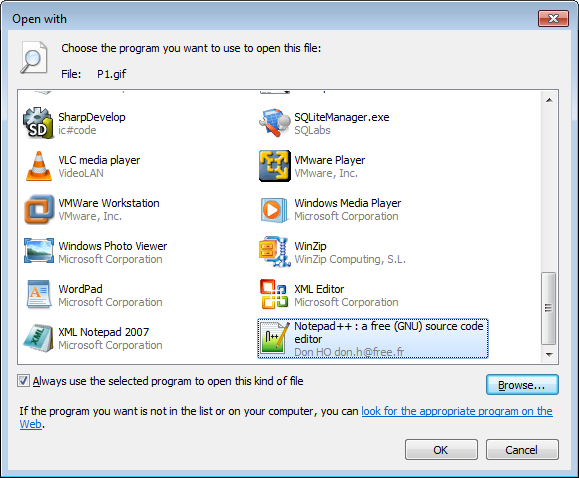
My problem isn't really to do with incorrect file associations – although it was an incorrect file association that brought it to light. No, it's the fact that when I select a particular program – in this case Firefox – to become the default for opening a file type, its icon doesn't get put into the list of programs to open the file type with. Instead another program's icon is shown – in this case Notepad++.

See, this is how my 'Open with' dialog looks immediately after I've clicked 'Browse' and navigated to Firefox.exe:

pggfOwV.png
 

My Computer My Computer

Computer type
Laptop
Computer Manufacturer/Model Number
Dell
OS
Windows 7 Pro 32 bit
CPU
Intel duel T7300-2GHz
Memory
4GB
Graphics Card(s)
Nvidea GeForce 8600M GT
Hard Drives
320 GB Samsung
120 GB Fujitsu
Antivirus
MSE + Malwarebytes
Browser
Firefox
Hello Angstony, and welcome to Seven Forums.

Odd. You might see if reinstalling Firefox may help.
 

My Computer My Computer

Computer type
PC/Desktop
Computer Manufacturer/Model Number
Self built custom
OS
64-bit Windows 11 Pro for Workstations
CPU
Intel i7-8700K OC'd to 5 GHz
Motherboard
ASUS ROG Maximus XI Formula Z390
Memory
64 GB (4x16GB) G.SKILL TridentZ RGB DDR4 3600 MHz
Graphics Card(s)
ASUS ROG-STRIX-GTX1080TI-O11G-GAMING
Sound Card
Integrated
Monitor(s) Displays
2 x Samsung Odyssey G7 27"
Screen Resolution
2560x1440
Hard Drives
1TB Samsung 990 PRO M.2,
4TB Samsung 990 PRO PRO M.2,
TerraMaster F8 SSD Plus NAS
PSU
Seasonic Prime Titanium 850W
Case
Thermaltake Core P3
Cooling
Corsair Hydro H115i
Keyboard
Logitech wireless K800
Mouse
Logitech MX Master 4
Internet Speed
2 Gb/s Download and 100 Mb/s Upload
Antivirus
Malwarebyte Anti-Malware Premium
Browser
Google Chrome
Other Info
Logitech Z625 speaker system,
Logitech BRIO 4K Pro webcam,
HP Color LaserJet Pro MFP M477fdn,
APC SMART-UPS RT 1000 XL - SURT1000XLI,
Galaxy S23 Plus phone
Your welcome,

I need to ask.

1.) Are you seeing any error messages such as: No Such Interface Supported.

2.) Do you have any add-ons/extensions or plug-ins in Firefox (FF) to facilitate the opening of .jpeg files, if you do are they up to date?

3.) Is your FF up to date? Version 26.0 is the latest stable as of this posting.

4.) If you do in #2, and FF is up to date try disabling them, and test.


If you're not seeing a message or #4 doesn't help there could be several things going on here.

  • Are you sure you do not have any malware infection?


  • A problem with the registry specifically at:
    Code:
    HKEY_CURRENT_USER\Software\Microsoft\Windows\CurrentVersion\Explorer\FileExts\.jpeg\OpenWithList
    and right below it
    Code:
    HKEY_CURRENT_USER\Software\Microsoft\Windows\CurrentVersion\Explorer\FileExts\.jpg\OpenWithList
    How comfortable are you with working with the registry? You could navigate there to see if FF is listed, Use Registry Editor - Find and Find Next and type OpenWithList or UserChoice in the Find Box. FF would more likely be in OpenWithList than UserChoice.


  • It could be a problem with unregistered system files.


My Computer My Computer

Computer type
PC/Desktop
Computer Manufacturer/Model Number
Gateway DX4831-01e (Mid-Tower Desktop)
OS
Originally Win 7 Hm Prem x64 Ver 6.1.7600 Build 7601-SP1 | Upgraded to Windows 10 December 14, 2019
CPU
Intel i3 530 2.93GHz, 2933MHz 2 Cores 4 Logical Processors
Motherboard
Gateway H57M01 133 megahertz
Memory
6GB of 1,333MHz DDR3 SDRAM
Graphics Card(s)
32MB Intel Graphics Media Accelerator HD IGChip
Sound Card
Realtek High Definition Audio
Monitor(s) Displays
Gateway HX2000 20inch TFT active matrix TN
Screen Resolution
1600 x 900 x 59 hertz
Hard Drives
WDC WD10EADS-00M2B0 [HDD] (1000.20 GB) -- drive 0,
HL-DT-ST DVDRAM GH41N [CD-ROM dr]
Four card readers, and Four USB 2.0
PSU
300watts.
Case
Mid-Tower Desktop
Cooling
Stock from Gateway
Keyboard
Natural Ergonomic Keyboard 4000, see Other Info
Mouse
Orig. Gateway wore out now using Insignia USB wired optical
Internet Speed
Vz FIOS 10ms png 57.64Mbps down 65.53Mbps up Speedtest.org
Antivirus
Zamana Anti-logger with Anti-malware, MSE, Windows Firewall,
Browser
IE11.0.9600.19399-Upd ver11.0.135, Firefox 68.0.1 x64
Other Info
System Specs by Belarc.

BIOS: American Megatrends Inc. P01-A0 11/17/2009

Replaced the MS 'Natural' Standard PS/2 Enhanced 101-102 Keyboard with a new Natural Ergonomic Keyboard 4000 on August 1st 2014.

Canon Pixma MG3222 Printer.

Updated to IE11 on 12102015 | Fios Quantum Router g1100

Additional AV: SpywareBlaster, manual Mbam, SAS
Hello Angstony, and welcome to Seven Forums.

Odd. You might see if reinstalling Firefox may help.
Hi Brink, thanks for the welcome.

Yes, I've just tried that but it's made no difference. I've also tried reinstalling Notepad++, but I think that may be a red-herring because I've just realized it's the icon of whichever program is currently set to open a file type that gets added after a browse. I've been checking against .gif files as I'd already fixed the .jpg association using the Default Programs Editor utility. Although I've got no idea why gifs are associated to Notepad++.

1.) Are you seeing any error messages such as: No Such Interface Supported.
No.

2.) Do you have any add-ons/extensions or plug-ins in Firefox (FF) to facilitate the opening of .jpeg files, if you do are they up to date?
Well I have a Greasemonkey script that allows me to drag to resize picture files. But I've tried disabling Greasemonkey altogether – in fact I've created a blank FF profile with no extensions and used that, but it's still the same.

3.) Is your FF up to date? Version 26.0 is the latest stable as of this posting.
Yes, I have it update automatically.

Are you sure you do not have any malware infection?
Well, as sure as I can be. MSE and SuperAntiSpyware are set to do full scans every alternate night, and neither of them has reported anything untoward.

I will check out your other suggestions some time over this weekend. I've got a bunch of work to get done now, so I can't afford to break off from that for too long. I can tell you I've tried running a registry cleaner (Wise Registry Cleaner 7) and although it reportedly found and fixed a lot of problem, it didn't fix this one.

Thanks for all your help so far.
 

My Computer My Computer

Computer type
Laptop
Computer Manufacturer/Model Number
Dell
OS
Windows 7 Pro 32 bit
CPU
Intel duel T7300-2GHz
Memory
4GB
Graphics Card(s)
Nvidea GeForce 8600M GT
Hard Drives
320 GB Samsung
120 GB Fujitsu
Antivirus
MSE + Malwarebytes
Browser
Firefox
I'm trying to understand the timeline, did you use the registry cleaner before you joined SevenForums and made your first post here?

Did you or did the registry cleaner make a backup of the registry before you cleaned it?
 

My Computer My Computer

Computer type
PC/Desktop
Computer Manufacturer/Model Number
Gateway DX4831-01e (Mid-Tower Desktop)
OS
Originally Win 7 Hm Prem x64 Ver 6.1.7600 Build 7601-SP1 | Upgraded to Windows 10 December 14, 2019
CPU
Intel i3 530 2.93GHz, 2933MHz 2 Cores 4 Logical Processors
Motherboard
Gateway H57M01 133 megahertz
Memory
6GB of 1,333MHz DDR3 SDRAM
Graphics Card(s)
32MB Intel Graphics Media Accelerator HD IGChip
Sound Card
Realtek High Definition Audio
Monitor(s) Displays
Gateway HX2000 20inch TFT active matrix TN
Screen Resolution
1600 x 900 x 59 hertz
Hard Drives
WDC WD10EADS-00M2B0 [HDD] (1000.20 GB) -- drive 0,
HL-DT-ST DVDRAM GH41N [CD-ROM dr]
Four card readers, and Four USB 2.0
PSU
300watts.
Case
Mid-Tower Desktop
Cooling
Stock from Gateway
Keyboard
Natural Ergonomic Keyboard 4000, see Other Info
Mouse
Orig. Gateway wore out now using Insignia USB wired optical
Internet Speed
Vz FIOS 10ms png 57.64Mbps down 65.53Mbps up Speedtest.org
Antivirus
Zamana Anti-logger with Anti-malware, MSE, Windows Firewall,
Browser
IE11.0.9600.19399-Upd ver11.0.135, Firefox 68.0.1 x64
Other Info
System Specs by Belarc.

BIOS: American Megatrends Inc. P01-A0 11/17/2009

Replaced the MS 'Natural' Standard PS/2 Enhanced 101-102 Keyboard with a new Natural Ergonomic Keyboard 4000 on August 1st 2014.

Canon Pixma MG3222 Printer.

Updated to IE11 on 12102015 | Fios Quantum Router g1100

Additional AV: SpywareBlaster, manual Mbam, SAS
I ran the registry cleaner after my second post before seeing any more replies. And yes, the Wise registry cleaner has a backup function built in, so I used that before trying the clean up.
 

My Computer My Computer

Computer type
Laptop
Computer Manufacturer/Model Number
Dell
OS
Windows 7 Pro 32 bit
CPU
Intel duel T7300-2GHz
Memory
4GB
Graphics Card(s)
Nvidea GeForce 8600M GT
Hard Drives
320 GB Samsung
120 GB Fujitsu
Antivirus
MSE + Malwarebytes
Browser
Firefox

My Computer My Computer

Computer type
PC/Desktop
Computer Manufacturer/Model Number
Gateway DX4831-01e (Mid-Tower Desktop)
OS
Originally Win 7 Hm Prem x64 Ver 6.1.7600 Build 7601-SP1 | Upgraded to Windows 10 December 14, 2019
CPU
Intel i3 530 2.93GHz, 2933MHz 2 Cores 4 Logical Processors
Motherboard
Gateway H57M01 133 megahertz
Memory
6GB of 1,333MHz DDR3 SDRAM
Graphics Card(s)
32MB Intel Graphics Media Accelerator HD IGChip
Sound Card
Realtek High Definition Audio
Monitor(s) Displays
Gateway HX2000 20inch TFT active matrix TN
Screen Resolution
1600 x 900 x 59 hertz
Hard Drives
WDC WD10EADS-00M2B0 [HDD] (1000.20 GB) -- drive 0,
HL-DT-ST DVDRAM GH41N [CD-ROM dr]
Four card readers, and Four USB 2.0
PSU
300watts.
Case
Mid-Tower Desktop
Cooling
Stock from Gateway
Keyboard
Natural Ergonomic Keyboard 4000, see Other Info
Mouse
Orig. Gateway wore out now using Insignia USB wired optical
Internet Speed
Vz FIOS 10ms png 57.64Mbps down 65.53Mbps up Speedtest.org
Antivirus
Zamana Anti-logger with Anti-malware, MSE, Windows Firewall,
Browser
IE11.0.9600.19399-Upd ver11.0.135, Firefox 68.0.1 x64
Other Info
System Specs by Belarc.

BIOS: American Megatrends Inc. P01-A0 11/17/2009

Replaced the MS 'Natural' Standard PS/2 Enhanced 101-102 Keyboard with a new Natural Ergonomic Keyboard 4000 on August 1st 2014.

Canon Pixma MG3222 Printer.

Updated to IE11 on 12102015 | Fios Quantum Router g1100

Additional AV: SpywareBlaster, manual Mbam, SAS
Okay, I've tried all of your suggestions now. The SFC scan found nothing wrong and booting to the last known good configuration didn't help. However, I think you may be on to something with it being a user account issue, as the problem doesn't exist within the test account I created.

I might just live with it for the time being as I've put a lot of work into configuring my profile to work just how I like it, so I'm reluctant to start over unless it's absolutely necessary.

Thanks for all your help.
 

My Computer My Computer

Computer type
Laptop
Computer Manufacturer/Model Number
Dell
OS
Windows 7 Pro 32 bit
CPU
Intel duel T7300-2GHz
Memory
4GB
Graphics Card(s)
Nvidea GeForce 8600M GT
Hard Drives
320 GB Samsung
120 GB Fujitsu
Antivirus
MSE + Malwarebytes
Browser
Firefox
Your welcome,

I can understand your apprehension with changing your user account.

If you change your mind and would like to finish that new account there are two ways that you can migrate your old settings to the new.

First up is a: http://www.sevenforums.com/tutorials/3413-repair-install.html Not actually a migration, but it will try to repair your user account.

Second is: Fix a corrupted user profile - Microsoft Windows Help
If you run into a problem with Ownership and permissions you will have to take ownership of the files: Take Ownership of a File or Folder, and set the permissions: Set, View, Change, or Remove Permissions on Files and Folders

For certain programs you will need to export/import them separately such as:
If you have e‑mail messages in an e‑mail program, you must import your e‑mail messages and addresses to the new user profile before you delete the old profile. If everything is working properly, you can delete the old profile.

Source, near the bottom: Fix a corrupted user profile - Microsoft Windows Help
This should go without saying, but it would be prudent to have an image of your HDD before you start, we here at Sevenforums usually suggest http://www.sevenforums.com/tutorials/73828-imaging-free-macrium.html, but that choice is certainly up to you as to which imaging program you would like to use.

You would still have the boogered account to start over from square one, but it is good insurance if something went wrong.

I will stay subscribed to your thread in case you need further assistance.
 

My Computer My Computer

Computer type
PC/Desktop
Computer Manufacturer/Model Number
Gateway DX4831-01e (Mid-Tower Desktop)
OS
Originally Win 7 Hm Prem x64 Ver 6.1.7600 Build 7601-SP1 | Upgraded to Windows 10 December 14, 2019
CPU
Intel i3 530 2.93GHz, 2933MHz 2 Cores 4 Logical Processors
Motherboard
Gateway H57M01 133 megahertz
Memory
6GB of 1,333MHz DDR3 SDRAM
Graphics Card(s)
32MB Intel Graphics Media Accelerator HD IGChip
Sound Card
Realtek High Definition Audio
Monitor(s) Displays
Gateway HX2000 20inch TFT active matrix TN
Screen Resolution
1600 x 900 x 59 hertz
Hard Drives
WDC WD10EADS-00M2B0 [HDD] (1000.20 GB) -- drive 0,
HL-DT-ST DVDRAM GH41N [CD-ROM dr]
Four card readers, and Four USB 2.0
PSU
300watts.
Case
Mid-Tower Desktop
Cooling
Stock from Gateway
Keyboard
Natural Ergonomic Keyboard 4000, see Other Info
Mouse
Orig. Gateway wore out now using Insignia USB wired optical
Internet Speed
Vz FIOS 10ms png 57.64Mbps down 65.53Mbps up Speedtest.org
Antivirus
Zamana Anti-logger with Anti-malware, MSE, Windows Firewall,
Browser
IE11.0.9600.19399-Upd ver11.0.135, Firefox 68.0.1 x64
Other Info
System Specs by Belarc.

BIOS: American Megatrends Inc. P01-A0 11/17/2009

Replaced the MS 'Natural' Standard PS/2 Enhanced 101-102 Keyboard with a new Natural Ergonomic Keyboard 4000 on August 1st 2014.

Canon Pixma MG3222 Printer.

Updated to IE11 on 12102015 | Fios Quantum Router g1100

Additional AV: SpywareBlaster, manual Mbam, SAS
Thanks Anak.

The solutions are all a bit drastic for such a seemingly simple problem. Anyway, I've gotten around the problem for now by using the 'Default Programs Editor' utility, so at least it's behaving more-or-less how I want it to. I just can't change them quickly or easily from the right-click context menu. It seems to be just picture files that are affected, because both Chrome and Firefox appear as options on all other file types, as far as I can tell. Whereas with picture files it seems I can have either Firefox or Chrome listed in the options, but not both.

Oh well, as I say, I think I'll just live with it for now, and maybe try one of those solutions if I notice any other weird behaviour from here on out.
 

My Computer My Computer

Computer type
Laptop
Computer Manufacturer/Model Number
Dell
OS
Windows 7 Pro 32 bit
CPU
Intel duel T7300-2GHz
Memory
4GB
Graphics Card(s)
Nvidea GeForce 8600M GT
Hard Drives
320 GB Samsung
120 GB Fujitsu
Antivirus
MSE + Malwarebytes
Browser
Firefox
Your welcome,

It's a shame the how to set Default Programs links in my first post - your #2 - didn't work. If I can find an easier way to repair your user account I'll post back.


EDIT:


You said:
but something must have changed recently
Did you make any changes in any of the default's for your Office programs?
 
Last edited:

My Computer My Computer

Computer type
PC/Desktop
Computer Manufacturer/Model Number
Gateway DX4831-01e (Mid-Tower Desktop)
OS
Originally Win 7 Hm Prem x64 Ver 6.1.7600 Build 7601-SP1 | Upgraded to Windows 10 December 14, 2019
CPU
Intel i3 530 2.93GHz, 2933MHz 2 Cores 4 Logical Processors
Motherboard
Gateway H57M01 133 megahertz
Memory
6GB of 1,333MHz DDR3 SDRAM
Graphics Card(s)
32MB Intel Graphics Media Accelerator HD IGChip
Sound Card
Realtek High Definition Audio
Monitor(s) Displays
Gateway HX2000 20inch TFT active matrix TN
Screen Resolution
1600 x 900 x 59 hertz
Hard Drives
WDC WD10EADS-00M2B0 [HDD] (1000.20 GB) -- drive 0,
HL-DT-ST DVDRAM GH41N [CD-ROM dr]
Four card readers, and Four USB 2.0
PSU
300watts.
Case
Mid-Tower Desktop
Cooling
Stock from Gateway
Keyboard
Natural Ergonomic Keyboard 4000, see Other Info
Mouse
Orig. Gateway wore out now using Insignia USB wired optical
Internet Speed
Vz FIOS 10ms png 57.64Mbps down 65.53Mbps up Speedtest.org
Antivirus
Zamana Anti-logger with Anti-malware, MSE, Windows Firewall,
Browser
IE11.0.9600.19399-Upd ver11.0.135, Firefox 68.0.1 x64
Other Info
System Specs by Belarc.

BIOS: American Megatrends Inc. P01-A0 11/17/2009

Replaced the MS 'Natural' Standard PS/2 Enhanced 101-102 Keyboard with a new Natural Ergonomic Keyboard 4000 on August 1st 2014.

Canon Pixma MG3222 Printer.

Updated to IE11 on 12102015 | Fios Quantum Router g1100

Additional AV: SpywareBlaster, manual Mbam, SAS
Back
Top