Solved Weird screen while gaming CPU or GPU problem?

Sygron

New member
Member
Local time
2:38 PM
Messages
59
Hello all,

I have had several problems before with my computer thought they where all sound issue`s.
Now it seems there is a different problem.
Recently downloaded Tomb Raider the newest original download nothing illegal to start with.
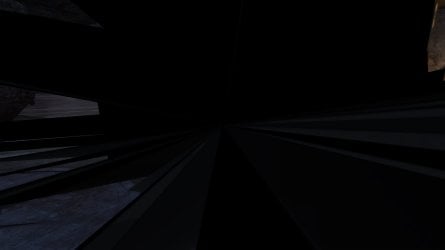
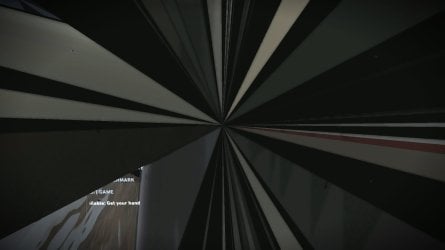
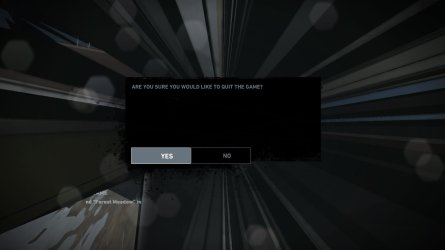
First I could play the game without any problems last time I had a weird screen.
Now stopped for a few days I played again today and the same screen came back after about 15 minutes of play.

Does anyone know what causes the screens added them.
 

Attachments

  • TombRaider 1.jpg
    TombRaider 1.jpg
    317.5 KB · Views: 1
  • TombRaider 2.jpg
    TombRaider 2.jpg
    101.1 KB · Views: 1
  • TombRaider 3.jpg
    TombRaider 3.jpg
    323.8 KB · Views: 1
  • TombRaider 4.jpg
    TombRaider 4.jpg
    232 KB · Views: 0
  • TombRaider 5.jpg
    TombRaider 5.jpg
    179.4 KB · Views: 0

My Computer

Computer type
PC/Desktop
Computer Manufacturer/Model Number
Custom build
OS
Windows 7 Ultimate Edition (64-bit) Service Pack 1
CPU
Intel(R) Core(TM) i7 CPU 4820K @ 3.70GHz
Motherboard
Asus X79 Deluxe
Memory
16 GB
Graphics Card(s)
NVIDIA GeForce GTX 760
Sound Card
None
Monitor(s) Displays
SyncMaster P2270HD
Screen Resolution
1920 x 1080
Hard Drives
C:\ 128 GB SSD
D:\ 2 TB HDD
PSU
550 Watt
Cooling
Water Cooling
Keyboard
Microsoft Natural Ergonomic Keyboard 4000
Mouse
8 Button Wheel Mouse Present
Internet Speed
Low
Antivirus
Microsoft security essentials
Browser
IE11
That's artifacting. Your GPU looks like it's on its way out.
 

My Computer

Computer type
PC/Desktop
Computer Manufacturer/Model Number
Custom Build
OS
W7 Pro x64 SP1 | W10 Pro IP x64 | W8.1 Pro x64 VM | Linux Mint VM
CPU
i7-4790k @ 4GHz (4.4GHz Boost)
Motherboard
ASUS Sabertooth Z87 (BIOS Rev 2004)
Memory
16GB DDR3 Kingston HyperX Fury @ 1600MHz CL 9-9-9-27
Graphics Card(s)
EVGA GTX 980 Classified
Sound Card
Realtek Onboard
Monitor(s) Displays
Samsung S27D390
Screen Resolution
1920 x 1080
Hard Drives
240GB Intel 520 Series SSD |
Samsung 850 EVO 120GB SSD |
2TB WD Caviar Black |
2TB WD Caviar Green
PSU
Corsair HX850-80 Gold Modular
Case
Cooler Master Silencio 650
Cooling
Corsair H80i w/2 x Corsair SP120 | 2 x 120mm Noctua NF-S12B
Keyboard
Microsoft Sidewinder X4
Mouse
Gigabyte M6900 optical
Internet Speed
152mb
Antivirus
F-Secure
Browser
Firefox 38.0
Other Info
Backup Rig: Win 7 Pro 64-bit | AMD A10-5800k | ASUS F2A85-V Pro | 8GB Samsung DDR3 @1600MHz | 120GB Toshiba SDD | 2TB Seagate HDD | Cooler Master Silencio 550
Normal English please artifecting?

On the way out, you mean broken?
 

My Computer

Computer type
PC/Desktop
Computer Manufacturer/Model Number
Custom build
OS
Windows 7 Ultimate Edition (64-bit) Service Pack 1
CPU
Intel(R) Core(TM) i7 CPU 4820K @ 3.70GHz
Motherboard
Asus X79 Deluxe
Memory
16 GB
Graphics Card(s)
NVIDIA GeForce GTX 760
Sound Card
None
Monitor(s) Displays
SyncMaster P2270HD
Screen Resolution
1920 x 1080
Hard Drives
C:\ 128 GB SSD
D:\ 2 TB HDD
PSU
550 Watt
Cooling
Water Cooling
Keyboard
Microsoft Natural Ergonomic Keyboard 4000
Mouse
8 Button Wheel Mouse Present
Internet Speed
Low
Antivirus
Microsoft security essentials
Browser
IE11
Artifacting is what's happening on the screen, that's what it's known as. And yes, sorry, I mean it looks like the card is broken. I had to replace mine when that happened.
 

My Computer

Computer type
PC/Desktop
Computer Manufacturer/Model Number
Custom Build
OS
W7 Pro x64 SP1 | W10 Pro IP x64 | W8.1 Pro x64 VM | Linux Mint VM
CPU
i7-4790k @ 4GHz (4.4GHz Boost)
Motherboard
ASUS Sabertooth Z87 (BIOS Rev 2004)
Memory
16GB DDR3 Kingston HyperX Fury @ 1600MHz CL 9-9-9-27
Graphics Card(s)
EVGA GTX 980 Classified
Sound Card
Realtek Onboard
Monitor(s) Displays
Samsung S27D390
Screen Resolution
1920 x 1080
Hard Drives
240GB Intel 520 Series SSD |
Samsung 850 EVO 120GB SSD |
2TB WD Caviar Black |
2TB WD Caviar Green
PSU
Corsair HX850-80 Gold Modular
Case
Cooler Master Silencio 650
Cooling
Corsair H80i w/2 x Corsair SP120 | 2 x 120mm Noctua NF-S12B
Keyboard
Microsoft Sidewinder X4
Mouse
Gigabyte M6900 optical
Internet Speed
152mb
Antivirus
F-Secure
Browser
Firefox 38.0
Other Info
Backup Rig: Win 7 Pro 64-bit | AMD A10-5800k | ASUS F2A85-V Pro | 8GB Samsung DDR3 @1600MHz | 120GB Toshiba SDD | 2TB Seagate HDD | Cooler Master Silencio 550
Oke then a side question if the graphic card is broken can this have some influence on the sound as well before the game itself freezes? like some crackling noises.

Maybe known like you get an incoming message on your phone while near the boxes, but then worse.
 

My Computer

Computer type
PC/Desktop
Computer Manufacturer/Model Number
Custom build
OS
Windows 7 Ultimate Edition (64-bit) Service Pack 1
CPU
Intel(R) Core(TM) i7 CPU 4820K @ 3.70GHz
Motherboard
Asus X79 Deluxe
Memory
16 GB
Graphics Card(s)
NVIDIA GeForce GTX 760
Sound Card
None
Monitor(s) Displays
SyncMaster P2270HD
Screen Resolution
1920 x 1080
Hard Drives
C:\ 128 GB SSD
D:\ 2 TB HDD
PSU
550 Watt
Cooling
Water Cooling
Keyboard
Microsoft Natural Ergonomic Keyboard 4000
Mouse
8 Button Wheel Mouse Present
Internet Speed
Low
Antivirus
Microsoft security essentials
Browser
IE11
Are you using an HDMI cable from your GPU or is your sound coming from a separate source (onboard sound or soundcard)?
 

My Computer

Computer type
PC/Desktop
Computer Manufacturer/Model Number
Custom Build
OS
W7 Pro x64 SP1 | W10 Pro IP x64 | W8.1 Pro x64 VM | Linux Mint VM
CPU
i7-4790k @ 4GHz (4.4GHz Boost)
Motherboard
ASUS Sabertooth Z87 (BIOS Rev 2004)
Memory
16GB DDR3 Kingston HyperX Fury @ 1600MHz CL 9-9-9-27
Graphics Card(s)
EVGA GTX 980 Classified
Sound Card
Realtek Onboard
Monitor(s) Displays
Samsung S27D390
Screen Resolution
1920 x 1080
Hard Drives
240GB Intel 520 Series SSD |
Samsung 850 EVO 120GB SSD |
2TB WD Caviar Black |
2TB WD Caviar Green
PSU
Corsair HX850-80 Gold Modular
Case
Cooler Master Silencio 650
Cooling
Corsair H80i w/2 x Corsair SP120 | 2 x 120mm Noctua NF-S12B
Keyboard
Microsoft Sidewinder X4
Mouse
Gigabyte M6900 optical
Internet Speed
152mb
Antivirus
F-Secure
Browser
Firefox 38.0
Other Info
Backup Rig: Win 7 Pro 64-bit | AMD A10-5800k | ASUS F2A85-V Pro | 8GB Samsung DDR3 @1600MHz | 120GB Toshiba SDD | 2TB Seagate HDD | Cooler Master Silencio 550
I have a DVI cable from my graphic card to the monitor.
Also have a separate sound card for my boxes.

But the weird thing is that makes me question it`s the sound card and it may be the graphic card is this.

When I play a game, sound from the boxes trough the sound card I hear the crackling noises.
But I also play games with my headset, USB connection and I hear the exact same crackling.

So could this also end up with my graphic card?

As when I play a movie, the sound is crystal clear...
 

My Computer

Computer type
PC/Desktop
Computer Manufacturer/Model Number
Custom build
OS
Windows 7 Ultimate Edition (64-bit) Service Pack 1
CPU
Intel(R) Core(TM) i7 CPU 4820K @ 3.70GHz
Motherboard
Asus X79 Deluxe
Memory
16 GB
Graphics Card(s)
NVIDIA GeForce GTX 760
Sound Card
None
Monitor(s) Displays
SyncMaster P2270HD
Screen Resolution
1920 x 1080
Hard Drives
C:\ 128 GB SSD
D:\ 2 TB HDD
PSU
550 Watt
Cooling
Water Cooling
Keyboard
Microsoft Natural Ergonomic Keyboard 4000
Mouse
8 Button Wheel Mouse Present
Internet Speed
Low
Antivirus
Microsoft security essentials
Browser
IE11
Before you go nuking your gpu, how about uninstalling your audio and video drivers correctly, getting the newest drivers and installing those correctly as well... perhaps you can get back to playing.

If that fails, we will be more than glad to spend your money suggesting a new card ;)
 

My Computer

Computer type
PC/Desktop
Computer Manufacturer/Model Number
Custom Built... Intel/Nvidia/ASRock
OS
Windows 7 x64 (Ultimate)
CPU
Intel i5-4670K
Motherboard
ASRock Z87 Extreme 6
Memory
8GBs Ripjaws 2133Mhz
Graphics Card(s)
Asus GTX660 (2GBs)
Sound Card
Onboard Realtek HD
Monitor(s) Displays
Acer AL2216W
Screen Resolution
1680 x 1050
Hard Drives
Samsung 840 SSD 120GBs
Samsung 750GB 32MB cache
1.5 TB
PSU
PC Cooling 750w Silencer
Case
Thermaltake Spedo Advance
Cooling
Std Cooler
Keyboard
Logitech G15
Mouse
Logitech G9
Internet Speed
Comcast 20Mbit
Antivirus
Avast
Browser
Firefox
update audio drivers, gpu drivers.... if its still happening, clean out all the dust inside the case of your computer. if its still happening, then you most likely need a new gpu
 

My Computer

Computer type
PC/Desktop
Computer Manufacturer/Model Number
Weekend Warrior Rig
OS
Windows 10 Pro
CPU
Intel i7-3770K 4.4GHz
Motherboard
ASUS P8Z77-V Pro
Memory
8GB G.SKILL Ripjaws 1866 MHz
Graphics Card(s)
EVGA GTX 980 Classified
Monitor(s) Displays
Asus VH238H 23" 2ms
Screen Resolution
1920x1080
Hard Drives
Intel 330 120GB SSD /
WD Blue 1TB /
WD Black 500GB
PSU
Corsair CX750M
Case
NZXT H440
Cooling
Corsair H80i- CPU / Corsair H90- GPU
Keyboard
Logitech K360 LE
Mouse
Logitech G500
Antivirus
Avast
Browser
Chrome
Other Info
1200W 2.1 Surround Sound Audio
Jinx! :D
 

My Computer

Computer type
PC/Desktop
Computer Manufacturer/Model Number
Custom Built... Intel/Nvidia/ASRock
OS
Windows 7 x64 (Ultimate)
CPU
Intel i5-4670K
Motherboard
ASRock Z87 Extreme 6
Memory
8GBs Ripjaws 2133Mhz
Graphics Card(s)
Asus GTX660 (2GBs)
Sound Card
Onboard Realtek HD
Monitor(s) Displays
Acer AL2216W
Screen Resolution
1680 x 1050
Hard Drives
Samsung 840 SSD 120GBs
Samsung 750GB 32MB cache
1.5 TB
PSU
PC Cooling 750w Silencer
Case
Thermaltake Spedo Advance
Cooling
Std Cooler
Keyboard
Logitech G15
Mouse
Logitech G9
Internet Speed
Comcast 20Mbit
Antivirus
Avast
Browser
Firefox

i posted first but dident hit the "submit button" as fast as you. im on a laptop, and it takes me longer to move my mouse. i am also over a wifi connection, so a few seconds of delay are there too :confused::D lol jkjk
 

My Computer

Computer type
PC/Desktop
Computer Manufacturer/Model Number
Weekend Warrior Rig
OS
Windows 10 Pro
CPU
Intel i7-3770K 4.4GHz
Motherboard
ASUS P8Z77-V Pro
Memory
8GB G.SKILL Ripjaws 1866 MHz
Graphics Card(s)
EVGA GTX 980 Classified
Monitor(s) Displays
Asus VH238H 23" 2ms
Screen Resolution
1920x1080
Hard Drives
Intel 330 120GB SSD /
WD Blue 1TB /
WD Black 500GB
PSU
Corsair CX750M
Case
NZXT H440
Cooling
Corsair H80i- CPU / Corsair H90- GPU
Keyboard
Logitech K360 LE
Mouse
Logitech G500
Antivirus
Avast
Browser
Chrome
Other Info
1200W 2.1 Surround Sound Audio
It may be an idea to uninstall the card and physically remove it and give it a good clean with canned air or a soft brush before reinstalling the drivers. It's an outside possibility that a build of of dust is causing it.
 

My Computer

Computer type
PC/Desktop
Computer Manufacturer/Model Number
Custom Build
OS
W7 Pro x64 SP1 | W10 Pro IP x64 | W8.1 Pro x64 VM | Linux Mint VM
CPU
i7-4790k @ 4GHz (4.4GHz Boost)
Motherboard
ASUS Sabertooth Z87 (BIOS Rev 2004)
Memory
16GB DDR3 Kingston HyperX Fury @ 1600MHz CL 9-9-9-27
Graphics Card(s)
EVGA GTX 980 Classified
Sound Card
Realtek Onboard
Monitor(s) Displays
Samsung S27D390
Screen Resolution
1920 x 1080
Hard Drives
240GB Intel 520 Series SSD |
Samsung 850 EVO 120GB SSD |
2TB WD Caviar Black |
2TB WD Caviar Green
PSU
Corsair HX850-80 Gold Modular
Case
Cooler Master Silencio 650
Cooling
Corsair H80i w/2 x Corsair SP120 | 2 x 120mm Noctua NF-S12B
Keyboard
Microsoft Sidewinder X4
Mouse
Gigabyte M6900 optical
Internet Speed
152mb
Antivirus
F-Secure
Browser
Firefox 38.0
Other Info
Backup Rig: Win 7 Pro 64-bit | AMD A10-5800k | ASUS F2A85-V Pro | 8GB Samsung DDR3 @1600MHz | 120GB Toshiba SDD | 2TB Seagate HDD | Cooler Master Silencio 550
Well Just played again for a while and it seems my problem is over.
I uninstalled every driver of NVidia including audio I had version 314.22 thoughd it was the newest.
Now I really installed the newest driver 327.23.

And in the short time I played now my audio issue seems over and the artifecting is also over.
Now I hope it stays this way.

Thx all for the help didn`t need a new graphic card after all.
 

My Computer

Computer type
PC/Desktop
Computer Manufacturer/Model Number
Custom build
OS
Windows 7 Ultimate Edition (64-bit) Service Pack 1
CPU
Intel(R) Core(TM) i7 CPU 4820K @ 3.70GHz
Motherboard
Asus X79 Deluxe
Memory
16 GB
Graphics Card(s)
NVIDIA GeForce GTX 760
Sound Card
None
Monitor(s) Displays
SyncMaster P2270HD
Screen Resolution
1920 x 1080
Hard Drives
C:\ 128 GB SSD
D:\ 2 TB HDD
PSU
550 Watt
Cooling
Water Cooling
Keyboard
Microsoft Natural Ergonomic Keyboard 4000
Mouse
8 Button Wheel Mouse Present
Internet Speed
Low
Antivirus
Microsoft security essentials
Browser
IE11
Good to hear... enjoy the sound! :D
 

My Computer

Computer type
PC/Desktop
Computer Manufacturer/Model Number
Custom Built... Intel/Nvidia/ASRock
OS
Windows 7 x64 (Ultimate)
CPU
Intel i5-4670K
Motherboard
ASRock Z87 Extreme 6
Memory
8GBs Ripjaws 2133Mhz
Graphics Card(s)
Asus GTX660 (2GBs)
Sound Card
Onboard Realtek HD
Monitor(s) Displays
Acer AL2216W
Screen Resolution
1680 x 1050
Hard Drives
Samsung 840 SSD 120GBs
Samsung 750GB 32MB cache
1.5 TB
PSU
PC Cooling 750w Silencer
Case
Thermaltake Spedo Advance
Cooling
Std Cooler
Keyboard
Logitech G15
Mouse
Logitech G9
Internet Speed
Comcast 20Mbit
Antivirus
Avast
Browser
Firefox
Sygron said:
Thx all for the help didn`t need a new graphic card after all.

Glad to hear you got it sorted and the GPU is fine, and apologies for causing any undue alarm. Personal experiences with artifacting in the past have led to replacing GPUs unfortunately, hence me jumping to conclusions.
 

My Computer

Computer type
PC/Desktop
Computer Manufacturer/Model Number
Custom Build
OS
W7 Pro x64 SP1 | W10 Pro IP x64 | W8.1 Pro x64 VM | Linux Mint VM
CPU
i7-4790k @ 4GHz (4.4GHz Boost)
Motherboard
ASUS Sabertooth Z87 (BIOS Rev 2004)
Memory
16GB DDR3 Kingston HyperX Fury @ 1600MHz CL 9-9-9-27
Graphics Card(s)
EVGA GTX 980 Classified
Sound Card
Realtek Onboard
Monitor(s) Displays
Samsung S27D390
Screen Resolution
1920 x 1080
Hard Drives
240GB Intel 520 Series SSD |
Samsung 850 EVO 120GB SSD |
2TB WD Caviar Black |
2TB WD Caviar Green
PSU
Corsair HX850-80 Gold Modular
Case
Cooler Master Silencio 650
Cooling
Corsair H80i w/2 x Corsair SP120 | 2 x 120mm Noctua NF-S12B
Keyboard
Microsoft Sidewinder X4
Mouse
Gigabyte M6900 optical
Internet Speed
152mb
Antivirus
F-Secure
Browser
Firefox 38.0
Other Info
Backup Rig: Win 7 Pro 64-bit | AMD A10-5800k | ASUS F2A85-V Pro | 8GB Samsung DDR3 @1600MHz | 120GB Toshiba SDD | 2TB Seagate HDD | Cooler Master Silencio 550
Back
Top