So I just upgraded from a GTX 550 TI to a GTX 980 and since upgrading my computer will crash after 5-15 minutes of playing any game. The screen will go black and ill be able to hear some audio for a short period of time before it turns into a loud buzzing sound and then the computer resets. As soon as I log back in it gives me the "Windows Has Recovered From An Unexpected Shutdown" dialog. I tried several different fixes, I reinstalled all my drivers (doing a clean install), I've made sure they are the most recent version, I've replaced and tested the RAM (went and bought new RAM and tried playing with it, still crashes). I've taken the 980 out and put the 550 TI back in and tried to play the same games, no crashes whatsoever on the 550 TI. As soon as I put the 980 back in, crashes resume. I've tried a non-destructive reinstall of Windows 7.
And after a month of trying everything I can possibly find on it, I RMAed the card assuming it was a bad card. I finally got the replacement card from NewEgg just last week, and the first game I tried to play it did the same exact crash.
I figured it had to be some kind of driver issue, that somehow some old driver or something was still hiding somewhere on my install, so I did a completely fresh install, formatted the drive, and tried again.
Borderlands 2 went for 67 minutes before I decided to quit playing, and Call of Duty Ghosts went for ~30 minutes before crashing with the black screen and then resetting.
Here is the report that it gave me for the most recent crash:
Blue Screen Viewer gave me this:
I attached the dump file in the zip below.
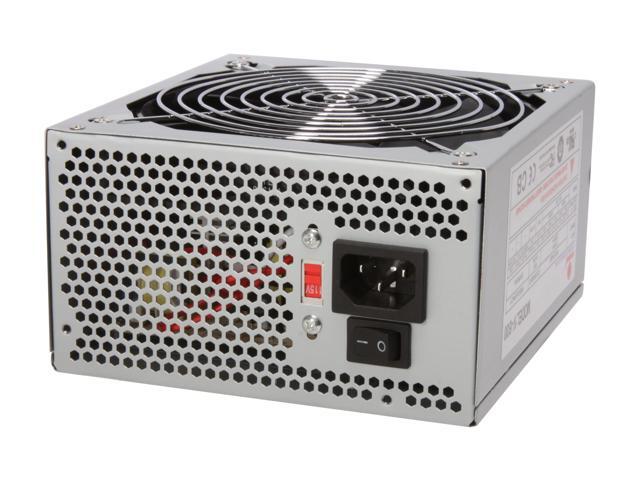
I've looked around and done a bit of research and another possibility I've heard of is that it could be a bad PSU? I don't think it's that the PSU doesn't have enough power, I've checked several PSU calculator sites to make sure and all of them say I could even make it by with a 400W
Here are the computer specs if they help at all:
Any ideas on what it could be? Did I just end up with another bad card? Should I replace the PSU? I honestly have no idea what else to do at this point.
And after a month of trying everything I can possibly find on it, I RMAed the card assuming it was a bad card. I finally got the replacement card from NewEgg just last week, and the first game I tried to play it did the same exact crash.
I figured it had to be some kind of driver issue, that somehow some old driver or something was still hiding somewhere on my install, so I did a completely fresh install, formatted the drive, and tried again.
Borderlands 2 went for 67 minutes before I decided to quit playing, and Call of Duty Ghosts went for ~30 minutes before crashing with the black screen and then resetting.
Here is the report that it gave me for the most recent crash:
Code:
  BCCode:	116
  BCP1:	FFFFFA800D9054E0
  BCP2:	FFFFF88011979828
  BCP3:	FFFFFFFFC000009A
  BCP4:	0000000000000004
  OS Version:	6_1_7601
  Service Pack:	1_0
  Product:	256_1
Blue Screen Viewer gave me this:
Code:
==================================================
Dump File         : 121614-31200-01.dmp
Crash Time        : 12/16/2014 8:46:45 AM
Bug Check String  :
Bug Check Code    : 0x00000116
Parameter 1       : fffffa80`0d9054e0
Parameter 2       : fffff880`11979828
Parameter 3       : ffffffff`c000009a
Parameter 4       : 00000000`00000004
Caused By Driver  : dxgkrnl.sys
Caused By Address : dxgkrnl.sys+5d140
File Description  : DirectX Graphics Kernel
Product Name      : Microsoft® Windows® Operating System
Company           : Microsoft Corporation
File Version      : 6.1.7601.18228 (win7sp1_gdr.130731-2222)
Processor         : x64
Crash Address     : ntoskrnl.exe+75bc0
Stack Address 1   :
Stack Address 2   :
Stack Address 3   :
Computer Name     :
Full Path         : C:\Windows\Minidump\121614-31200-01.dmp
Processors Count  : 6
Major Version     : 15
Minor Version     : 7601
Dump File Size    : 780,120
Dump File Time    : 12/16/2014 8:48:00 AM
==================================================
I attached the dump file in the zip below.
I've looked around and done a bit of research and another possibility I've heard of is that it could be a bad PSU? I don't think it's that the PSU doesn't have enough power, I've checked several PSU calculator sites to make sure and all of them say I could even make it by with a 400W
Here are the computer specs if they help at all:
Code:
CPU: AMD Phenom II x6 1045T @ 2.7GHz
RAM: 16GB 1600 DDR3, 8GB of G.Skill, 8GB of Ballistix
HDD: Western Digital 1TB 2.5"
GPU: PNY GTX 980
Motherboard: Asus M5A97 R2.0
PSU: 600W DiabloTek
Cooler: Corsair H110
Any ideas on what it could be? Did I just end up with another bad card? Should I replace the PSU? I honestly have no idea what else to do at this point.
Attachments
My Computer
- Computer type
- PC/Desktop
- Computer Manufacturer/Model Number
- Custom Build
- OS
- Windows 7 Ultimate 64-Bit
- CPU
- AMD Phenom II x6 1045T
- Motherboard
- Asus M5A97 R2.0
- Memory
- G.Skill 1600 8GB & Ballistix 1600 8GB
- Graphics Card(s)
- PNY GTX 980
- Hard Drives
- Western Digital 2.5 1TB
- Antivirus
- N/A
- Browser
- Chrome