weird services console issue

sevenuser2011

New member
Local time
1:43 PM
Messages
5
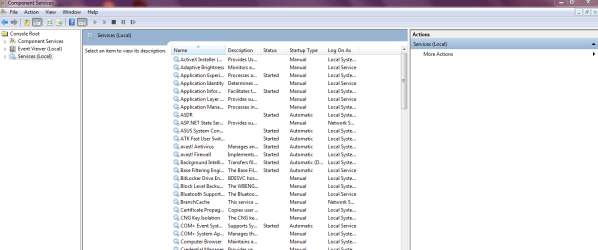
Anyone know how to fix this? It happened randomly and I cant even pinpoint when. I dont want to format my OS if i can avoid it, so any ideas welcomed.

oQyEw.png
 
Last edited by a moderator:

My Computer

OS
Windows 7 Professional x86
The image is a list of services.
You haven't told us what the problem is?
 

My Computer

Computer Manufacturer/Model Number
Hopalong/ Godzilla
OS
Windows7 Pro 64bit SP-1; Windows XP Pro 32bit
CPU
Intel Core i7-870 Lynnfield 2.93GHz LGA 1156 95W Quad-Core
Motherboard
ASUS P7P55D-E PRO
Memory
8GB@1400MHz Crucial Ballistix DDR3-1600 4x2GB
Graphics Card(s)
ASUS ENGTX460 DirectCU/2DI/1GD5 1GB 256-bit GDDR5
Sound Card
VIA Onboard
Monitor(s) Displays
Asus VS248H-P 24"; Samsung SyncMaster 941BW 19"ws
Screen Resolution
1920x1080; 1440x900
Hard Drives
Samsung 830 120GB SSD
Intel 320 120GB SSD
Western Digital Caviar Black WD7501AALS 750GB 7200 RPM SATA 3.0Gb/s
Western Digital Caviar Black WD6401AALS 640GB 7200 RPM SATA 3.0Gb/s
PSU
COOLER MASTER Silent Pro RS850-AMBAJ3-US 850W Modular
Case
COOLER MASTER HAF 932 RC-932-KKN5-GP Black
Cooling
Scythe "Mugen-2 Rev.B" (2 ScytheKaze-Jyuni PWM fans)
Keyboard
Logitech K-320
Mouse
Kensington
Antivirus
Avast Inernet Suite
Browser
IE 9 ; Chrome
I assume he means the stretched blue bar at the top, although I have no idea what would cause it. It isn't part of the items you can adjust in appearance.
 

My Computer

Computer Manufacturer/Model Number
Custom
OS
Windows 7 Ultimate RTM (Technet)
CPU
3.00 gigahertz Intel Core2 Duo E8400
Motherboard
ASUSTeK Computer INC. P5K/EPU Rev 1.xx
Memory
4GB
Graphics Card(s)
ATI Radeon X1950 Pro
Sound Card
Built in HD Audio
Monitor(s) Displays
22" Gateway LCD
Screen Resolution
1920 x 1200
Hard Drives
ST3160023A [Hard drive] (160.04 GB) -- drive 0, rev 8.01, ST3500630AS [Hard drive] (500.11 GB) -- drive 2, rev 3.AAK
ST3500630AS [Hard drive] (500.11 GB) -- drive 1, rev 3.AAK
Keyboard
Logitech G11
Mouse
Microsoft Wireless Laser Mouse 5000
Internet Speed
13.44 Mbps
Mine looks the same if that is the problem.
 

Attachments

  • Services.PNG
    Services.PNG
    30.7 KB · Views: 9

My Computer

Computer Manufacturer/Model Number
Hopalong/ Godzilla
OS
Windows7 Pro 64bit SP-1; Windows XP Pro 32bit
CPU
Intel Core i7-870 Lynnfield 2.93GHz LGA 1156 95W Quad-Core
Motherboard
ASUS P7P55D-E PRO
Memory
8GB@1400MHz Crucial Ballistix DDR3-1600 4x2GB
Graphics Card(s)
ASUS ENGTX460 DirectCU/2DI/1GD5 1GB 256-bit GDDR5
Sound Card
VIA Onboard
Monitor(s) Displays
Asus VS248H-P 24"; Samsung SyncMaster 941BW 19"ws
Screen Resolution
1920x1080; 1440x900
Hard Drives
Samsung 830 120GB SSD
Intel 320 120GB SSD
Western Digital Caviar Black WD7501AALS 750GB 7200 RPM SATA 3.0Gb/s
Western Digital Caviar Black WD6401AALS 640GB 7200 RPM SATA 3.0Gb/s
PSU
COOLER MASTER Silent Pro RS850-AMBAJ3-US 850W Modular
Case
COOLER MASTER HAF 932 RC-932-KKN5-GP Black
Cooling
Scythe "Mugen-2 Rev.B" (2 ScytheKaze-Jyuni PWM fans)
Keyboard
Logitech K-320
Mouse
Kensington
Antivirus
Avast Inernet Suite
Browser
IE 9 ; Chrome
i mean the huge blue bar at the top. its suppoed to be smaller like in Hopalong's screenshot
 

My Computer

OS
Windows 7 Professional x86
Click the button circled in yellow below. The button adds/removes side panel right.

Hover cursor over the buttons and it will tell you what they do.

Click the picture to enlarge. :D
Mike
 

Attachments

  • Services2.PNG
    Services2.PNG
    20.7 KB · Views: 11

My Computer

Computer Manufacturer/Model Number
Hopalong/ Godzilla
OS
Windows7 Pro 64bit SP-1; Windows XP Pro 32bit
CPU
Intel Core i7-870 Lynnfield 2.93GHz LGA 1156 95W Quad-Core
Motherboard
ASUS P7P55D-E PRO
Memory
8GB@1400MHz Crucial Ballistix DDR3-1600 4x2GB
Graphics Card(s)
ASUS ENGTX460 DirectCU/2DI/1GD5 1GB 256-bit GDDR5
Sound Card
VIA Onboard
Monitor(s) Displays
Asus VS248H-P 24"; Samsung SyncMaster 941BW 19"ws
Screen Resolution
1920x1080; 1440x900
Hard Drives
Samsung 830 120GB SSD
Intel 320 120GB SSD
Western Digital Caviar Black WD7501AALS 750GB 7200 RPM SATA 3.0Gb/s
Western Digital Caviar Black WD6401AALS 640GB 7200 RPM SATA 3.0Gb/s
PSU
COOLER MASTER Silent Pro RS850-AMBAJ3-US 850W Modular
Case
COOLER MASTER HAF 932 RC-932-KKN5-GP Black
Cooling
Scythe "Mugen-2 Rev.B" (2 ScytheKaze-Jyuni PWM fans)
Keyboard
Logitech K-320
Mouse
Kensington
Antivirus
Avast Inernet Suite
Browser
IE 9 ; Chrome
Click the button circled in yellow below. The button adds/removes side panel right.

Hover cursor over the buttons and it will tell you what they do.

Click the picture to enlarge. :D
Mike

That isnt it
 

My Computer

OS
Windows 7 Professional x86
Well if you want it smaller that is how to add the side panel.
Otherwise mine is big like yours when I click to remove side panel.
 

My Computer

Computer Manufacturer/Model Number
Hopalong/ Godzilla
OS
Windows7 Pro 64bit SP-1; Windows XP Pro 32bit
CPU
Intel Core i7-870 Lynnfield 2.93GHz LGA 1156 95W Quad-Core
Motherboard
ASUS P7P55D-E PRO
Memory
8GB@1400MHz Crucial Ballistix DDR3-1600 4x2GB
Graphics Card(s)
ASUS ENGTX460 DirectCU/2DI/1GD5 1GB 256-bit GDDR5
Sound Card
VIA Onboard
Monitor(s) Displays
Asus VS248H-P 24"; Samsung SyncMaster 941BW 19"ws
Screen Resolution
1920x1080; 1440x900
Hard Drives
Samsung 830 120GB SSD
Intel 320 120GB SSD
Western Digital Caviar Black WD7501AALS 750GB 7200 RPM SATA 3.0Gb/s
Western Digital Caviar Black WD6401AALS 640GB 7200 RPM SATA 3.0Gb/s
PSU
COOLER MASTER Silent Pro RS850-AMBAJ3-US 850W Modular
Case
COOLER MASTER HAF 932 RC-932-KKN5-GP Black
Cooling
Scythe "Mugen-2 Rev.B" (2 ScytheKaze-Jyuni PWM fans)
Keyboard
Logitech K-320
Mouse
Kensington
Antivirus
Avast Inernet Suite
Browser
IE 9 ; Chrome
Well if you want it smaller that is how to add the side panel.
Otherwise mine is big like yours when I click to remove side panel.

Oh my god...look at the original again, please. BIG BLUE BOX at the top....nothing to do with a side panel.
 

My Computer

Computer Manufacturer/Model Number
Custom
OS
Windows 7 Ultimate RTM (Technet)
CPU
3.00 gigahertz Intel Core2 Duo E8400
Motherboard
ASUSTeK Computer INC. P5K/EPU Rev 1.xx
Memory
4GB
Graphics Card(s)
ATI Radeon X1950 Pro
Sound Card
Built in HD Audio
Monitor(s) Displays
22" Gateway LCD
Screen Resolution
1920 x 1200
Hard Drives
ST3160023A [Hard drive] (160.04 GB) -- drive 0, rev 8.01, ST3500630AS [Hard drive] (500.11 GB) -- drive 2, rev 3.AAK
ST3500630AS [Hard drive] (500.11 GB) -- drive 1, rev 3.AAK
Keyboard
Logitech G11
Mouse
Microsoft Wireless Laser Mouse 5000
Internet Speed
13.44 Mbps
Well if you want it smaller that is how to add the side panel.
Otherwise mine is big like yours when I click to remove side panel.

Oh my god...look at the original again, please. BIG BLUE BOX at the top....nothing to do with a side panel.

Exactly! This is the issue nothing to do with the side at all. The header got stretched way too much vertically.
 

My Computer

OS
Windows 7 Professional x86
Going to look at my Service Console page, I found that I have the same issue as well O.o, so this certainly isn't an isolated incident.
 

My Computer

OS
7x64 SP1
CPU
Intel 2600K
Motherboard
Intel DZ77GA-70K
Memory
8GB Samsung
Graphics Card(s)
MSI 670
Sound Card
HT Omega Striker 7.1
Monitor(s) Displays
Dell U2412M
Screen Resolution
1920x1200
Hard Drives
2x 3TB WD Green
1x 4TB Hitachi
1x Intel 330 Series 180GB SSD
PSU
Corsair HX850
Going to look at my Service Console page, I found that I have the same issue as well O.o, so this certainly isn't an isolated incident.

Could it be something with SP1 that caused it? I don't recall the issue before then and my desktop that isn't upgraded to SP1 yet is fine. But glad to know I am not the only one with the issue.
 

My Computer

OS
Windows 7 Professional x86
I don't recall seeing it before SP1 but then again I don't usually pay much attention to my Service Console page, normally only need to go there if something's misbehaving.
 

My Computer

OS
7x64 SP1
CPU
Intel 2600K
Motherboard
Intel DZ77GA-70K
Memory
8GB Samsung
Graphics Card(s)
MSI 670
Sound Card
HT Omega Striker 7.1
Monitor(s) Displays
Dell U2412M
Screen Resolution
1920x1200
Hard Drives
2x 3TB WD Green
1x 4TB Hitachi
1x Intel 330 Series 180GB SSD
PSU
Corsair HX850
Back
Top