Weird video playback issue!

shakazulu89

New member
Local time
11:46 AM
Messages
8
So im having this weird issue. Hope someone here can help

When i play a video (any format) in VLC it works just fine, but when i try to make the window smaller than the original size of the file i get lines, like a grid, over the picture and the colors get messed up. When i drag it back to original, or larger or full screen, size its back to normal.
Another issue that might help point to the cause: when i play a video in WMP 12 (avi, mov, wmv formats) i get the first frame of the video in a small square in the middle of the player, sound works just fine, but its just stuck on that first frame! When i play MPEG format i get "Windows Media Player encountered a problem while playing the file."
When i play the winsat.wmv file i get "Windows Media Player cannot play the file because there is a problem with your sound device. There might not be a sound device installed on your computer, it might be in use by another program, or it might not be functioning properly." which is even weirder because my sound works just fine!

Anyways ive already tried updating and reinstalling to latest nvidia drivers, ive tried the sfc/scannow (no issues were found there), ive tried resetting settings and reinstalling vlc, tried to turn off overlay and tried the various video output options people were suggesting. Also tried a few of the popular codecs packages. Nothing made a difference.

One thing i noticed is when i turn off "video scaling" the video is fine when i make the window smaller, but then again the actual video is not being changed since scaling is off.

Also, another error i get when i try to refresh Windows index experience i get this message: "windows experience index could not measure video playback performance"

BTW everything was working just fine up until about 2 weeks ago, the only change that caused this that i can think of is some recent windows update/ But ive looked at the recent updates and doesnt seem like there was any update that can be related to this...

PLEASE any help would be appreciated this is driving me nuts! Cant think of anything more to try or what might be the cause of this!!

Thanks for any help to come!

specs:
asus S73
intel i7 2630QM
windows 7 64bit
nvidia gt540M
 
Last edited:

My Computer My Computer

At a glance

windows 7 64 bit
OS
windows 7 64 bit
Update your video drivers :)
 

My Computer My Computer

At a glance

Windows 7 Home Premium x64Core i7 2600K4GB DDR3 Kingston HyperXGigabyte GTX 670
Computer Manufacturer/Model Number
Homebuilt
OS
Windows 7 Home Premium x64
CPU
Core i7 2600K
Motherboard
Asus P8Z77-V LX
Memory
4GB DDR3 Kingston HyperX
Graphics Card(s)
Gigabyte GTX 670
Sound Card
Realtek HD Audio
Monitor(s) Displays
Delium Monitor
Screen Resolution
1360 x 768
Hard Drives
C: (500GB)
PSU
Corsair 620W
Case
Antec
Cooling
Cooling Master
Keyboard
Logitech
Mouse
Logitech wireless mouse M 505
Internet Speed
60MBPS
Clean Install Option?

Note:
The word d-r-i-v-e-r disappears from my posts when I log out.
confused.gif


I know you said that you updated your NVidia d-r-i-v-e-r, but I'd consider trying to update it again.
Did you choose the "clean install" option?

I always have trouble with NVidia updates.
Recently I tried to update XP with the latest d-r-i-v-e-r and it hosed my Windows 7 and XP operating systems! :mad:
I couldn't boot into either OS, even using the various "Safe Mode" options.

With some trepidation I tried updating it again (a couple of days ago, using the same installer) and it worked perfectly. :confused:
 
Last edited:

My Computer My Computer

At a glance

W7 Ultimate SP1, LM19.2 MATE, W10 Home 1703, ...AMD Phenom II x6 1100T, 3.3 GHz12GB DDR3 1333 G-Skill (4GB x 2), G-Skill (2G...NVIDIA GeForce GTX 660
Computer type
PC/Desktop
Computer Manufacturer/Model Number
n/a
OS
W7 Ultimate SP1, LM19.2 MATE, W10 Home 1703, W10 Pro 1703 VM, #All 64 bit
CPU
AMD Phenom II x6 1100T, 3.3 GHz
Motherboard
ASUS M4A88T-M/USB3 (AM3)
Memory
12GB DDR3 1333 G-Skill (4GB x 2), G-Skill (2GB x 2)
Graphics Card(s)
NVIDIA GeForce GTX 660
Sound Card
Realtek?
Monitor(s) Displays
Samsung S23B350
Screen Resolution
1920x1080
Hard Drives
WD Green 2TB (SATA), WD Green 3TB (SATA), WD Blue 4TB (SATA), WD Blue 6TB (SATA)
PSU
Cooler Master
Case
Antec GX300 Tower
Cooling
3x Antec TRICOOL 120mm Fans
Mouse
Wired Optical
Internet Speed
DSL
Antivirus
Avast
Browser
Pale Moon (64 bit)
Other Info
2018-12-27 Upgraded HDDs
2015-12-10 Upgraded case, graphics card, storage
2015-08-15 Upgraded motherboard & RAM
2015-07-15 Upgraded LM17.1 to LM17.2
Yes ive tried a clean install. Tried uninstalling and installing again, twice. Nothing changed :cry:
 

My Computer My Computer

At a glance

windows 7 64 bit
OS
windows 7 64 bit
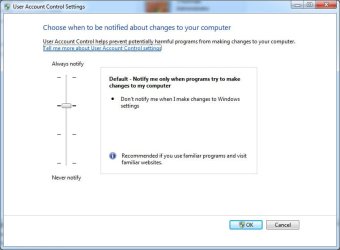
Try re-enabling UAC to its default position.
 

Attachments

  • UAC.jpg
    UAC.jpg
    46.6 KB · Views: 45

My Computer My Computer

At a glance

Windows 7 Ultimate 64biti7 2600k16GB (4x4) corsair vengeanceIntel HD3000 iGPU / AMD HD6870 1024MB
Computer Manufacturer/Model Number
Selfbuilt
OS
Windows 7 Ultimate 64bit
CPU
i7 2600k
Motherboard
asus P8Z68-V LE
Memory
16GB (4x4) corsair vengeance
Graphics Card(s)
Intel HD3000 iGPU / AMD HD6870 1024MB
Sound Card
bitstreamed to an Onkyo 609
Monitor(s) Displays
Asus VE278 27" LED / Bravia EX7 60" LED
Screen Resolution
native 1080p x2
Hard Drives
4x 2TB int. + 2x 2TB external and a SSD for the boot drive.
PSU
650w Antec
Case
NZXT tempest evo
Cooling
air/stock
Keyboard
Dell
Mouse
logitech m505
Internet Speed
dual: cable/blackberry tether for travel use
Other Info
BD re-writer //
asus notebook G73Jw
intresting idea ... how will that help?
ill give it a try!
 

My Computer My Computer

At a glance

windows 7 64 bit
OS
windows 7 64 bit
tried defaulting the user account settings .. no go ..
anyone have any idea why i get "windows experience index could not measure video playback performance" during the "assessing windows media decoding performance" stage of refreshing my WEI? ... i have almost 30 gigs left on my ssd.
 

My Computer My Computer

At a glance

windows 7 64 bit
OS
windows 7 64 bit
Hardware Problem?

It sounds (to me) like it might be some sort of hardware problem.

Are all of your cables and components, properly seated (not loose) in your machine?
 

My Computer My Computer

At a glance

W7 Ultimate SP1, LM19.2 MATE, W10 Home 1703, ...AMD Phenom II x6 1100T, 3.3 GHz12GB DDR3 1333 G-Skill (4GB x 2), G-Skill (2G...NVIDIA GeForce GTX 660
Computer type
PC/Desktop
Computer Manufacturer/Model Number
n/a
OS
W7 Ultimate SP1, LM19.2 MATE, W10 Home 1703, W10 Pro 1703 VM, #All 64 bit
CPU
AMD Phenom II x6 1100T, 3.3 GHz
Motherboard
ASUS M4A88T-M/USB3 (AM3)
Memory
12GB DDR3 1333 G-Skill (4GB x 2), G-Skill (2GB x 2)
Graphics Card(s)
NVIDIA GeForce GTX 660
Sound Card
Realtek?
Monitor(s) Displays
Samsung S23B350
Screen Resolution
1920x1080
Hard Drives
WD Green 2TB (SATA), WD Green 3TB (SATA), WD Blue 4TB (SATA), WD Blue 6TB (SATA)
PSU
Cooler Master
Case
Antec GX300 Tower
Cooling
3x Antec TRICOOL 120mm Fans
Mouse
Wired Optical
Internet Speed
DSL
Antivirus
Avast
Browser
Pale Moon (64 bit)
Other Info
2018-12-27 Upgraded HDDs
2015-12-10 Upgraded case, graphics card, storage
2015-08-15 Upgraded motherboard & RAM
2015-07-15 Upgraded LM17.1 to LM17.2
its a laptop.. asus n73.. i did replace one of the HDDs with a SSD but that went smoothly and these problems were showing up before that ... i was also thinking something happened to the video card, but id really like to think it didnt :/ ... is there any software you recommend that can find a hardware or software malfunction with the video card? like a stress test or something?
 

My Computer My Computer

At a glance

windows 7 64 bit
OS
windows 7 64 bit
Manufacturer?

Have you checked the manufacturer's website for software tools?

The problem only occurs with video playback?
Can you resize pictures without problems?
Windows Explorer (or other software) doesn't glitch if you resize the window?
 

My Computer My Computer

At a glance

W7 Ultimate SP1, LM19.2 MATE, W10 Home 1703, ...AMD Phenom II x6 1100T, 3.3 GHz12GB DDR3 1333 G-Skill (4GB x 2), G-Skill (2G...NVIDIA GeForce GTX 660
Computer type
PC/Desktop
Computer Manufacturer/Model Number
n/a
OS
W7 Ultimate SP1, LM19.2 MATE, W10 Home 1703, W10 Pro 1703 VM, #All 64 bit
CPU
AMD Phenom II x6 1100T, 3.3 GHz
Motherboard
ASUS M4A88T-M/USB3 (AM3)
Memory
12GB DDR3 1333 G-Skill (4GB x 2), G-Skill (2GB x 2)
Graphics Card(s)
NVIDIA GeForce GTX 660
Sound Card
Realtek?
Monitor(s) Displays
Samsung S23B350
Screen Resolution
1920x1080
Hard Drives
WD Green 2TB (SATA), WD Green 3TB (SATA), WD Blue 4TB (SATA), WD Blue 6TB (SATA)
PSU
Cooler Master
Case
Antec GX300 Tower
Cooling
3x Antec TRICOOL 120mm Fans
Mouse
Wired Optical
Internet Speed
DSL
Antivirus
Avast
Browser
Pale Moon (64 bit)
Other Info
2018-12-27 Upgraded HDDs
2015-12-10 Upgraded case, graphics card, storage
2015-08-15 Upgraded motherboard & RAM
2015-07-15 Upgraded LM17.1 to LM17.2
yea only video play back .. images IE and firefox are ok .. also another thing: i tried to install nba 2k12 and install went fine but when it tries to open it gets stuck (not responding) on the windowed black screen .. later i will try to install another game see if same thing happens...

didnt find any software in asus website to test the video card .. any suggestions anyone?
 

My Computer My Computer

At a glance

windows 7 64 bit
OS
windows 7 64 bit
Sorry my bad.
I meant tools for your video card.

I'm not sure if ATI or Nvidia even have diagnostic/testing tools though.
 

My Computer My Computer

At a glance

W7 Ultimate SP1, LM19.2 MATE, W10 Home 1703, ...AMD Phenom II x6 1100T, 3.3 GHz12GB DDR3 1333 G-Skill (4GB x 2), G-Skill (2G...NVIDIA GeForce GTX 660
Computer type
PC/Desktop
Computer Manufacturer/Model Number
n/a
OS
W7 Ultimate SP1, LM19.2 MATE, W10 Home 1703, W10 Pro 1703 VM, #All 64 bit
CPU
AMD Phenom II x6 1100T, 3.3 GHz
Motherboard
ASUS M4A88T-M/USB3 (AM3)
Memory
12GB DDR3 1333 G-Skill (4GB x 2), G-Skill (2GB x 2)
Graphics Card(s)
NVIDIA GeForce GTX 660
Sound Card
Realtek?
Monitor(s) Displays
Samsung S23B350
Screen Resolution
1920x1080
Hard Drives
WD Green 2TB (SATA), WD Green 3TB (SATA), WD Blue 4TB (SATA), WD Blue 6TB (SATA)
PSU
Cooler Master
Case
Antec GX300 Tower
Cooling
3x Antec TRICOOL 120mm Fans
Mouse
Wired Optical
Internet Speed
DSL
Antivirus
Avast
Browser
Pale Moon (64 bit)
Other Info
2018-12-27 Upgraded HDDs
2015-12-10 Upgraded case, graphics card, storage
2015-08-15 Upgraded motherboard & RAM
2015-07-15 Upgraded LM17.1 to LM17.2
does anybody know of a third party diagnostic tool for nvidia video card? how do i tell if this is a hardware problem??
 

My Computer My Computer

At a glance

windows 7 64 bit
OS
windows 7 64 bit
Back
Top