Weird "Windows Security" Log-in Screen?!?!?

michaelsp9

Banned
Local time
3:25 AM
Messages
86
Ok this is what it looks like :

34grhgm.png


"Connecting to portal.peelschools.org"

This is kind of weird because my school is in the Peel Board in Ontario, Canada. And this is my personal computer with nothing to do with school servers or anything like that.

This basically started happening when I wanted to see what "Microsoft SharePoint" is. It turns out it is some software in which you can share information, data, and files in your "SharePoint" network. It's mainly for businesses and just 1 of the many useless programs Microsoft puts in their Office Suites.

After I opened it for the first time, I started seeing a weird sidebar in most windows. That got really annoying so I uninstalled it by going to :

Control Panel -> Uninstall -> Microsoft Office Professorial Plus 2010 -> Change

and through the Microsoft Office's uninstaller, I just specifically uninstalled SharePoint.

I restarted my computer and this is now what I am getting.

It will happen maybe twice every two hours.

If someone would help me out, I'd greatly appreciate it!

Thanks,
Michael.
 

My Computer My Computer

At a glance

Windows 7 Home Premium 32-bit .4 GB DDR3NVidia Gefore Graphics
Computer Manufacturer/Model Number
Samsung R580
OS
Windows 7 Home Premium 32-bit .
Memory
4 GB DDR3
Graphics Card(s)
NVidia Gefore Graphics
System Restore to a point before you did all of this.

Open Network and Sharing Center to Change Adapter settings. Disable any listing for the school board. Enable your preferred adapter and connect to your correct network.

If any questions arise, post back a screenshot using Snipping Tool in Start menu.

Others will have additional suggestions.
 
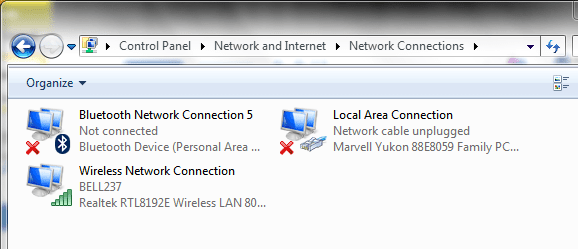
When I go into Network and Sharing Center -> Change adapter Settings

It shows this :

http://i52.tinypic.com/2agns60.png

It looks rather normal. My wi-fi network is selected (Bell237) and I don't know what the other ones are but they are not connected so it doesn't matter.


Please Note : I have Kaspersky Internet Security 2012 and I do not have any viruses or malware.
 

Attachments

  • Capture.PNG
    Capture.PNG
    16.5 KB · Views: 9

My Computer My Computer

At a glance

Windows 7 Home Premium 32-bit .4 GB DDR3NVidia Gefore Graphics
Computer Manufacturer/Model Number
Samsung R580
OS
Windows 7 Home Premium 32-bit .
Memory
4 GB DDR3
Graphics Card(s)
NVidia Gefore Graphics
Oh and I sadly do not have any System Restore Points before this event. =/
 

My Computer My Computer

At a glance

Windows 7 Home Premium 32-bit .4 GB DDR3NVidia Gefore Graphics
Computer Manufacturer/Model Number
Samsung R580
OS
Windows 7 Home Premium 32-bit .
Memory
4 GB DDR3
Graphics Card(s)
NVidia Gefore Graphics
Why are there no System Restore points? Is it turned on? Issues such as this are easily reversed by System Restore.

It seems you now have a Server. Someone familar with Servers will have to help you disconnect from it. I've asked for more help in our Guru lounge.

What is listed under Control Panel>User Accounts?

And under Computer>Properties has anything changed about the Computer Name or other associated listings?

Look closely at the Control Panel>Firewall settings as well.
 
@gregrocker

When I tried to enable system restore points this is the error I get :
9hma89.png


In User Accounts under Control Panel this is what is looks like :
2bcguh.png


For my Computer Properties nothing that I notice has changed :
2db41vd.png


And my Firewall settings :
33li3ap.png
 

My Computer My Computer

At a glance

Windows 7 Home Premium 32-bit .4 GB DDR3NVidia Gefore Graphics
Computer Manufacturer/Model Number
Samsung R580
OS
Windows 7 Home Premium 32-bit .
Memory
4 GB DDR3
Graphics Card(s)
NVidia Gefore Graphics
This MS bulletin appears to address your problem which is a known bug: http://support.microsoft.com/kb/943280

Here are some steps to address the System Restore failure:

Type services.msc in Start Search box, try starting the "Microsoft Software Shadow Copy Provider" service.

Now try starting System Restore at Computer>Properties>Advanced Options>System Protection. If it won't start what drives are listed to be protected? Are any labeled "Recovered?" Post a screenshot if so.

Next try running SFC -SCANNOW Command.
 
Last edited:
@gregrocker

No I am the only user on this Computer.
And, thanks. The System Restore thing now works !!!
 

My Computer My Computer

At a glance

Windows 7 Home Premium 32-bit .4 GB DDR3NVidia Gefore Graphics
Computer Manufacturer/Model Number
Samsung R580
OS
Windows 7 Home Premium 32-bit .
Memory
4 GB DDR3
Graphics Card(s)
NVidia Gefore Graphics
I did the /scannow thing aswell. It found some corrupt files and is going to repair them as soon as I reboot my PC.
 

My Computer My Computer

At a glance

Windows 7 Home Premium 32-bit .4 GB DDR3NVidia Gefore Graphics
Computer Manufacturer/Model Number
Samsung R580
OS
Windows 7 Home Premium 32-bit .
Memory
4 GB DDR3
Graphics Card(s)
NVidia Gefore Graphics
You may need to run SFC up to 3 times to repair all of the files. Irreparable System Files may require a Repair Install.

First I would do the repairs given in the MS KB for your Server Authentication issue.
 
I did that quite a few times and encountered a big error when my PC failed to boot up. I was prompted to restore my computer and luckily after a few attempts I was able to do so to before my PC was messed.

Trying to fix the problem I uninstalled MS Office 2010 planning to reinstall it to fix my icon issues but I was getting errors saying they were still left over files on my PC. - I have to remove these files before installing.
 

My Computer My Computer

At a glance

Windows 7 Home Premium 32-bit .4 GB DDR3NVidia Gefore Graphics
Computer Manufacturer/Model Number
Samsung R580
OS
Windows 7 Home Premium 32-bit .
Memory
4 GB DDR3
Graphics Card(s)
NVidia Gefore Graphics
Are you still getting the Server Authentication sign-in box?

Try running CCleaner Disk and Registry tabs to clean up leftover files as this may allow Office to reinstall. If not, post back the exact error message verbatim.

Would you consider a clean reinstall? The reason I ask is that is a specialty of these forums so you would not only have the problem solved but end up with a perfect reinstall: Reinstalling Windows 7.

It is a great learning experience and will give you a better Win7 install than 90% of it's other users.
 
I used TuneUp Utilities to remove all registry errors, broken shortcuts, corrupt files etc. but still getting the error :

http://i55.tinypic.com/vwzypj.png

I posted this error in the Software section of the forums aswell.
 

My Computer My Computer

At a glance

Windows 7 Home Premium 32-bit .4 GB DDR3NVidia Gefore Graphics
Computer Manufacturer/Model Number
Samsung R580
OS
Windows 7 Home Premium 32-bit .
Memory
4 GB DDR3
Graphics Card(s)
NVidia Gefore Graphics
TuneUp Utilities is a tweaking program which will mess up your Windows 7 install as sure as any other tweaking program or registry cleaner. These are almost all sales scam operations with no genius whatsoever.

This is why I suggested you use the most highly regarded app in the tech field CCleaner to run its Disk and Registry cleaner, although you'll more likely need an app from MS to clean up remnants of Office so it can be reinstalled.

Since you've probably messed up your install using the tweakers tool, would you want to consider clean reinstalling Win7 to get a perfect install with help from us here at the top site in the world for Clean Reinstalling Win7? Look over the steps which are involved here: Reinstalling Windows 7

Short of that you'll need a MS Office cleanup tool which hopefully someone in the Office subforum where your thread has landed will know more about.
 
I'm just trying to reinstall Office right now. It's giving me so much trouble.
 

My Computer My Computer

At a glance

Windows 7 Home Premium 32-bit .4 GB DDR3NVidia Gefore Graphics
Computer Manufacturer/Model Number
Samsung R580
OS
Windows 7 Home Premium 32-bit .
Memory
4 GB DDR3
Graphics Card(s)
NVidia Gefore Graphics
Back
Top