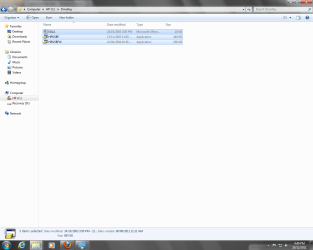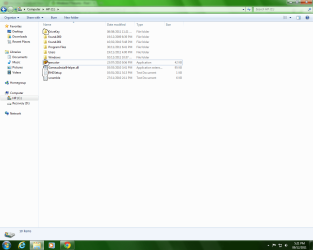
What are these files?

IngestedFool

New member
Member
Local time
2:31 AM
Messages
27
Location
Toronto
what are they.png

What is executor.exe ,RHDSetup.log, scramble.log, GameuxInstallHelper.dll and DriveKey?
I am running Windows 7 Home Premium. I find these files suspicious.
Thanks for the help!

Should I delete these files?
 
Last edited:

My Computer

Computer Manufacturer/Model Number
HP
OS
Windows 7 Home Premium 32bit
CPU
AMD Athlon (tm) 64 x2 Dual Core Processor 4600+
Motherboard
ASUSTek Computer INC. NODUSM3 1.05
Memory
1024 MB
Graphics Card(s)
Standard VGA Graphics Adapter (B)
Sound Card
Realtek
Monitor(s) Displays
HP vs17c
Screen Resolution
800x600
Keyboard
HP Standard PS/2 Compatible Mouse
Mouse
Sony VAIO Compatible Mouse
Sorry guys, I found out what executor is, its this Habbo thing I downloaded a few years ago. Right now, RHDSetup,scramble,GameuxInstallHelper and DriveKey files I need to know about.
 

My Computer

Computer Manufacturer/Model Number
HP
OS
Windows 7 Home Premium 32bit
CPU
AMD Athlon (tm) 64 x2 Dual Core Processor 4600+
Motherboard
ASUSTek Computer INC. NODUSM3 1.05
Memory
1024 MB
Graphics Card(s)
Standard VGA Graphics Adapter (B)
Sound Card
Realtek
Monitor(s) Displays
HP vs17c
Screen Resolution
800x600
Keyboard
HP Standard PS/2 Compatible Mouse
Mouse
Sony VAIO Compatible Mouse
Welcome to Seven Forums IngestedFool. Likely RHDSetup.log is the setuplog for the Realtek High Definition Audio driver. You can click on it, and likely see some info about when Realtek was 1st installed (assuming you have Realtek High Definition). You can safely delete that file.

scramble.log is more worrisome, as I see in searches this may be trojan related. I would submit the actual log file to Virus Total. If the log is indeed just a log and clean, then open it to see what it contains, and it may give us some clues.

From Process Library:

gameuxinstallhelper.dll is used by 'Vista Games Explorer Integration Helper Library'.This is an application created by 'Turbine, Inc.'. To stop gameuxinstallhelper.dll permanently uninstall 'Vista Games Explorer Integration Helper Library' from your system

Vendor: Turbine, Inc.
Product Name: Vista Games Explorer Integration Helper Library
File Location: C:\Program Files\turbine\the lord of the rings online

Although I see references from Microsoft to this dll as well:

Windows Games Explorer for Game Developers

Error message when you try to install a Microsoft Games for Windows game: "Failed to load DLL: GameuxInstallHelper"

From ThreatExpert:

Across all ThreatExpert reports, the file "gameuxinstallhelper.dll" has never been identified as a threat.

gameuxinstallhelper.dll | ThreatExpert statistics

What is this exe file? Is this file safe? Check the directory


DriveKey brings up a few things involving Wii:

DriveKey - The world's first plug-and-play mod solution for Wii

I see you have HP, and I also found this:

HP Drive Key Boot Utility - HP Business Support Center

and also mention of:

Small Form Lexar DriveKey II Boot and Format Utility for HP DriveKey USB Devices

What is in the DriveKey folder?

Both logs can be safely removed, but I'd look into the scramble issue. I'd also upload the gameuxinstallhelper.dll to Virus Total, but chances are it is legit, and should be left alone. DriveKey may also be legit, depending on what it contains . A Guy
 

My Computer

Computer type
PC/Desktop
OS
Windows 10 Home x64
CPU
INTEL Core i5-750 Quad-Core 3.37GHz
Motherboard
ASUS P7P55D
Memory
HyperX Fury Black Series 8GB (2 x 4GB) 1866Mhz
Graphics Card(s)
EVGA GeForce GTX 750 Superclocked 1GB 128-Bit GDDR5
Monitor(s) Displays
LG 32MA68HY 32" IPS
Screen Resolution
1920 x 1080
Hard Drives
Samsung 840 Evo 120GB, SEAGATE 500GB Barracuda® 7200.12, SATA 3 Gb/s, 7200 RPM, 16MB cache
PSU
ANTEC TruePower New TP-550, 80 PLUS, 550W
Case
ANTEC Three Hundred Illusion
Cooling
COOLER MASTER Hyper 212 Plus, 4 x 120mm 1 x 140mm Noctua's
Internet Speed
85 + Mbps
Antivirus
Avast
Browser
Vivaldi
Hello A Guy,
Thanks for the info.
I have deleted the scramble.log file and recently deleted GameuxInstallHelper.dll.
In the folder of DriveKey, it shows this:
Drivekey.png

I'm pretty sure its some backup from previous downloads, maybe Microsoft Word. I need to scan my PC..
 

My Computer

Computer Manufacturer/Model Number
HP
OS
Windows 7 Home Premium 32bit
CPU
AMD Athlon (tm) 64 x2 Dual Core Processor 4600+
Motherboard
ASUSTek Computer INC. NODUSM3 1.05
Memory
1024 MB
Graphics Card(s)
Standard VGA Graphics Adapter (B)
Sound Card
Realtek
Monitor(s) Displays
HP vs17c
Screen Resolution
800x600
Keyboard
HP Standard PS/2 Compatible Mouse
Mouse
Sony VAIO Compatible Mouse
Back
Top