
What ate all my memory?!?

Merlin2000

New member
Member
Local time
12:26 AM
Messages
91
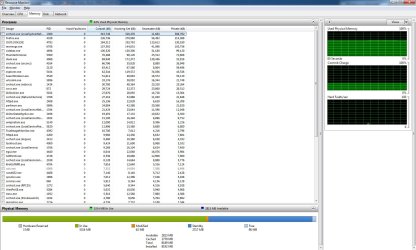
These numbers are not making sense to me.. All of my processes total <2GB ram being used (if you add up the #s in the list), yet my system shows over 5GB being used.

I also see like 3GB being cached.. not sure what that is... Where is it all going? :sarc:
 

Attachments
  • Process1.jpg
    Process1.jpg
    170.5 KB · Views: 130
  • Process2.jpg
    Process2.jpg
    159.5 KB · Views: 38

My Computer

OS
Windows 7
As I under stand it.

Some processes may still show under Taskmanager that may not be in use, but held for when they are needed
The memory is freed and called on when needed.

Win 7 handles memory much better and differently than XP.
 

My Computer

Computer Manufacturer/Model Number
Self Built
OS
Win 7 Ultimate 32bit
CPU
C2D E6600 2.4Ghz
Motherboard
Intel D965WH
Memory
4G Kingston KHX5400D2
Graphics Card(s)
EVGA GTX 570 HD SC (012-P3-1573-KR)
Sound Card
On-Board
Monitor(s) Displays
Samsung 226BW
Screen Resolution
1680 x 1050
Hard Drives
2 x 250 Seagate Barracuda
2 x 500 Seagate Barracuda (Raid1)
PSU
Corsair TX750W
Case
In-Win C589
Cooling
Stock Intel Cooling
The 3gb of ram being cached is perfectly fine. It's just windows assigning ram to services on your machine. Just think of it as ram on demand.

There's a few services you can stop from automatically starting that should improve some of your ram usage issues. Type "msconfig" into search and select the "startup" tab and uncheck some of the processes you don't need to automatically start.
 

My Computer

Computer Manufacturer/Model Number
Toshiba P300
OS
Windows 8 Pro
CPU
Intel Centrino Dual Core P7450 2.13GHz
Memory
4gb
Graphics Card(s)
ATI Mobility Raedon HD3650
Hard Drives
Toshiba MK3252GSX ATA
Internet Speed
Wish it were faster
Also keep in mind that some of that is counted includes the pagefile.
 

My Computer

Computer Manufacturer/Model Number
Self Built
OS
Win 7 Ultimate 32bit
CPU
C2D E6600 2.4Ghz
Motherboard
Intel D965WH
Memory
4G Kingston KHX5400D2
Graphics Card(s)
EVGA GTX 570 HD SC (012-P3-1573-KR)
Sound Card
On-Board
Monitor(s) Displays
Samsung 226BW
Screen Resolution
1680 x 1050
Hard Drives
2 x 250 Seagate Barracuda
2 x 500 Seagate Barracuda (Raid1)
PSU
Corsair TX750W
Case
In-Win C589
Cooling
Stock Intel Cooling
It caches programs(and stuff) you use frequently so they open up faster. Its doesn't slow down your ram at all really to operate it like that. If you really don't like it, I think you can disable it. I think its called superfetch in vista, not sure about Win 7.
 

My Computer

OS
Windows 7

My Computer

Computer type
PC/Desktop
Computer Manufacturer/Model Number
Dell XPS 420
OS
Windows 10, Home Clean Install
CPU
Intel Core2 processsor Q8200(2.33Ghz 1333FSB) Quad Core Tech
Motherboard
Dell
Memory
6 gb
Graphics Card(s)
ATI Radeon 256MB HD3650
Sound Card
Intergrated 7.1 Channel Audio
Monitor(s) Displays
Dell SP2009W 20"
Hard Drives
640 GB Serial ATA Hard drive
Cooling
Fan
Keyboard
Dell USB Keyboard
Mouse
Dell Premium Optical USB
Internet Speed
DSL 2.85
Well, I have 8gb of ram, so I'm not too worried about the numbers above, I just didn't quite understand how so much ram could be gone.

From what it sounds like, is that there are a couple different ways ram is utilized.

The first batch of ram is used for all the processes.

Then Win 7 magically comes up with a # of ram it wants to hold (called cache), that is used to just speed things up.

Whenever the processes use more ram, or more processes appear, that magic # earlier, will decrease as needed.

If that's correct, then that's a good thing, the fact it uses ram that would just normally be wasted, instead, it uses as much as possible to speed things up when it can.

So the memory used from processes + cache = real # of ram used
 

My Computer

OS
Windows 7
Well, I have 8gb of ram, so I'm not too worried about the numbers above, I just didn't quite understand how so much ram could be gone.

From what it sounds like, is that there are a couple different ways ram is utilized.

The first batch of ram is used for all the processes.

Then Win 7 magically comes up with a # of ram it wants to hold (called cache), that is used to just speed things up.

Whenever the processes use more ram, or more processes appear, that magic # earlier, will decrease as needed.

If that's correct, then that's a good thing, the fact it uses ram that would just normally be wasted, instead, it uses as much as possible to speed things up when it can.

So the memory used from processes + cache = real # of ram used


Exactly. Its been doing this since Vista. What is cached are programs you use frequently, like if you use Firefox, its always gonna be loaded into the ram so it starts up faster.


Hopefully its not caching games into the ram like vista did. lol.
 

My Computer

OS
Windows 7
For the record OS'es have been cache'ing for a long time.

The only difference is now windows (with superfetch enabled) will try and predict what should be in the cache at certain times and load it into cache before it is needed.
 

My Computer

Computer Manufacturer/Model Number
Custom
OS
Windows 7 Ultimate x64
CPU
QX6700 @ 3.2Ghz (temporarily till I get the drive to tweak)
Motherboard
Asus Maximus Formula
Memory
8gb (4x2gb) OCZ PC2-8500
Graphics Card(s)
GTX280
Sound Card
Auzentech Prelude
Monitor(s) Displays
Samsung 244T & 940BF
Screen Resolution
1920x1200 & 1280x1024
Hard Drives
2 x Hitatchi 7K500 500GB in raid 0
PSU
Seasonic M-12 700w
Case
Lian Li PC-6077B
Cooling
Liquid (D-tek Fuzion 2/DDC+/240GTX)
Keyboard
Saitech Eclipse II
Mouse
Logitech G9
Internet Speed
22Mbit burst - 15 Mbit typical down / 500Kbit up
Other Info
http://pics.livejournal.com/bun_bun/pic/001c64ww
That's awesome.. I'm glad my ram isn't just sitting around waiting to be used. I never saw this on XP, definitely an improvement!
 

My Computer

OS
Windows 7
That's awesome.. I'm glad my ram isn't just sitting around waiting to be used. I never saw this on XP, definitely an improvement!

XP had cacheing but it only cached programs you had already opened. So when you restarted your machine it would clear that cache.

I personally don't like superfetch and disable it as I find it to cause too much disk thrashing and slow things down.
 

My Computer

Computer Manufacturer/Model Number
Custom
OS
Windows 7 Ultimate x64
CPU
QX6700 @ 3.2Ghz (temporarily till I get the drive to tweak)
Motherboard
Asus Maximus Formula
Memory
8gb (4x2gb) OCZ PC2-8500
Graphics Card(s)
GTX280
Sound Card
Auzentech Prelude
Monitor(s) Displays
Samsung 244T & 940BF
Screen Resolution
1920x1200 & 1280x1024
Hard Drives
2 x Hitatchi 7K500 500GB in raid 0
PSU
Seasonic M-12 700w
Case
Lian Li PC-6077B
Cooling
Liquid (D-tek Fuzion 2/DDC+/240GTX)
Keyboard
Saitech Eclipse II
Mouse
Logitech G9
Internet Speed
22Mbit burst - 15 Mbit typical down / 500Kbit up
Other Info
http://pics.livejournal.com/bun_bun/pic/001c64ww
Cacheing in windows doesn't load up apps - superfetch does that in startup. It holds apps you use and close in the current session so they can start faster. If something else needs RAM the cache is given over to that app.
 

My Computer

Computer Manufacturer/Model Number
Sony Vaio Z46GDU
OS
Windows 7 Ultimate x86-64
CPU
[email protected] 1066MHz FSB
Motherboard
Sony branded
Memory
6GB DDR3 1066MHz
Graphics Card(s)
9300M GS 256MB Dedicated (Speed) + Intel4500MHD (Stamina)
Sound Card
Realtek HD Audio
Monitor(s) Displays
13.1' WXGA
Screen Resolution
1600x900
Hard Drives
320GB 7200RPM w/ 16MB cache
Internet Speed
1MB/s
Back
Top