What Can I Do To Save Memory?

2010MegaScooter

Like To Talk And Help
Member
VIP
Local time
8:25 AM
Messages
171
Location
USA Minnesota
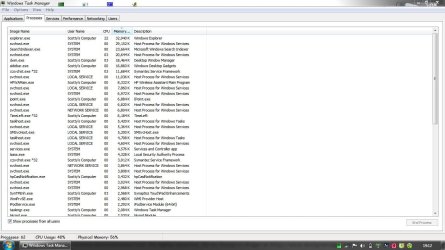
Here Is A Picture Of My Task Manager.
What Could I Eliminate?
What Could I Take Off Of My Services?

:) Thanks
 

Attachments

  • Capture.JPG
    Capture.JPG
    127 KB · Views: 257

My Computer

Computer Manufacturer/Model Number
Compaq Presario CQ60
OS
Windows 7 Home Premium 64 bit SP1
CPU
[01]: Intel64 GenuineIntel 2.20 GHz
Motherboard
Hewlett-Packard 3612 (CPU)
Memory
2.0GB Dual-Channel DDR2 @ 332MHz (5-5-5-14)
Graphics Card(s)
Mobile Intel(R) GMA 4500M (797MB Memory)(64 Dedicated)
Sound Card
Conexant Pebble High Definition SmartAudio
Screen Resolution
1366x768 HD Intel 4 Series Express
Hard Drives
245GB High Speed TOSHIBA Disk Drive ATA Device (SATA) (Primary)
Cooling
Stock, w/ High Quality Cooling Pad.
Mouse
Synaptics Touchpad V 7.0
Internet Speed
Around 10 to 20 MB Per Sec. Comcast Internet.
What specifically would you be attempting to acheive by doing this? It would make sense to know what the end goal is before giving advice, although the best advice to start is don't remove anything unless there's a problem (and even then, only remove things that you can prove are a part, or the cause, of a problem).
 

My Computer

Computer type
PC/Desktop
Computer Manufacturer/Model Number
Custom
OS
Windows 10 Pro x64
CPU
Intel Core i7 4790K @ 4.5GHz
Motherboard
Asus Maximus Hero VII
Memory
32GB DDR3
Graphics Card(s)
Nvidia GeForce GTX970
Sound Card
Realtek HD Audio
Screen Resolution
1920x1200
Hard Drives
1x Samsung 250GB SSD
4x WD RE 2TB (RAIDZ)
PSU
Corsair AX760i
Case
Fractal Design Define R4
Cooling
Noctua NH-D15
I think the best site for Windows Services advice is Black Viper's site: Black Viper's Web Site

Don't let the name throw you :)
 

My Computer

Computer Manufacturer/Model Number
OEM - Me
OS
Windows 7 Home Premium x64
CPU
AMD Phenom II X6 1600T
Motherboard
GigaByte GZ-990FXA-UD3
Memory
16GB PC3-10700 (1342MHz)
Graphics Card(s)
ATI Radeon 5770 HD (x2) CrossFire
Sound Card
On-board RealTek chipset
Monitor(s) Displays
3x Hanns-G 1920x1080 Monitors
Screen Resolution
3x Hanns-G 1920x1080 Monitors
Hard Drives
Intel 25-V SSD 40GB: 218 MB/s AT: 0.1ms
Intel X-25M SSD 80GB: 230MB/s AT: 0.1ms
Seagate 750GB: 133 MB/s AT: 13ms (perpendicular storage)
Buffalo HD-PCTU3 1TB External drive
PSU
OCZ Stealth X Stream 750W
Case
Cheap (unknown)
Cooling
Stock
Keyboard
HP USB
Mouse
LogiTech USB
Internet Speed
1.5 Mbps - Slow - At the tail-end of a rural network
Other Info
Printer: Epson Stylus C-84
Scanner: HP 3500C Flatbed
DVD-RW: Plextor
DVD-ROM: Unknown
WEI: 7.4

My Computer

Computer Manufacturer/Model Number
Alienware AREA-51 M17x
OS
windows 7 ultimate 64bit
CPU
Intel Core2 Extreme x9000 2.8GHZ
Motherboard
Asus P965 Intel chipset
Memory
4Gig
Graphics Card(s)
2 NVidia GeForce 8800M GTX (SLi)
Sound Card
onboard
Monitor(s) Displays
17in. built-in, 47in JVC LCD
Screen Resolution
1080p
Hard Drives
2 250Gig Hitachi (RAID 0) @ 7200RPM
Case
17in. laptop
Mouse
touchpad, Logitech Anywhere Mouse cordless laser
Internet Speed
cable
What do you want to do with the RAM - save it for a rainy day? LOL. Unless you are a super geek and really know all the odds and ends of these processes, I recommend to leave them alone. A lot of pocesses do things that are ot obvious.
 

My Computer

Computer Manufacturer/Model Number
HP, Dell, Gateway, Toshiba - 4 laptops and 2 desktops
OS
Vista, Windows7, Mint Mate, Zorin, Windows 8
CPU
from 1.6GHz Duo to i7
Monitor(s) Displays
2x HP w2207
Hard Drives
5x HDD, 7x SSD, 12x Externals
Keyboard
with trackball - no mices
Mouse
Trackball mice
Internet Speed
DSL 6000
What do you want to do with the RAM - save it for a rainy day? LOL. Unless you are a super geek and really know all the odds and ends of these processes, I recommend to leave them alone. A lot of pocesses do things that are ot obvious.

Well Its Snows In Minnesota.... xD And I Run A lot Of Heavy Programs... So I need To Squeeze Lots Of Ram As Possible. I Multi-Task In Other words
 

My Computer

Computer Manufacturer/Model Number
Compaq Presario CQ60
OS
Windows 7 Home Premium 64 bit SP1
CPU
[01]: Intel64 GenuineIntel 2.20 GHz
Motherboard
Hewlett-Packard 3612 (CPU)
Memory
2.0GB Dual-Channel DDR2 @ 332MHz (5-5-5-14)
Graphics Card(s)
Mobile Intel(R) GMA 4500M (797MB Memory)(64 Dedicated)
Sound Card
Conexant Pebble High Definition SmartAudio
Screen Resolution
1366x768 HD Intel 4 Series Express
Hard Drives
245GB High Speed TOSHIBA Disk Drive ATA Device (SATA) (Primary)
Cooling
Stock, w/ High Quality Cooling Pad.
Mouse
Synaptics Touchpad V 7.0
Internet Speed
Around 10 to 20 MB Per Sec. Comcast Internet.
I would add another 2GBs. Mucking around wih the processes is no good way to save RAM. Just make sure that you do not have too many startups running - in fact, you really only need the AV program there.
 

My Computer

Computer Manufacturer/Model Number
HP, Dell, Gateway, Toshiba - 4 laptops and 2 desktops
OS
Vista, Windows7, Mint Mate, Zorin, Windows 8
CPU
from 1.6GHz Duo to i7
Monitor(s) Displays
2x HP w2207
Hard Drives
5x HDD, 7x SSD, 12x Externals
Keyboard
with trackball - no mices
Mouse
Trackball mice
Internet Speed
DSL 6000
Well... to be honest, you can get rid of some stuff... I'll start with the sidebar... unless you badly need it, you can disable it... next, see if you use an ipod on that computer, if not, that ipod service is unnecesary... that timeleft process makes me wonder about what is it... if it is loaded via msconfig... you can get rid of it...

Basically, check typing msconfig and post the pic here... maybe you can disable some stuff from there.

See ya!!! :D
 

My Computer

Computer type
PC/Desktop
Computer Manufacturer/Model Number
Assembled Desktop PC
OS
Microsoft Windows 7 Home Premium SP1 64-bit Build 7600
CPU
AMD Athlon 64 X2 5200+ Dual Core CPU @ 2.7 Ghz (Brisbane)
Motherboard
PCChips A13G+ v3.0
Memory
2x2 GB DDR2 PC-5300 (667 Mhz) Kingston ValueRAM
Graphics Card(s)
XFX ATI Radeon HD 4350 GPU (512 MB + 512 MB HM)
Sound Card
Realtek High Definition Audio Driver ALC660 @ MCP61S
Monitor(s) Displays
HP S2031 20" LED HD Widescreen Display Monitor
Screen Resolution
1600 x 900 px
Hard Drives
Maxtor Diamond Max 10 (160 GB, 7200 RPM, SATA-II Hard Disk)
Western Digital Scorpion Blue (250 GB, 5400 RPM, SATA-II External Hard Disk - Personal Data)
Toshiba MQ01ABD050 (500 GB, 5400 RPM, SATA-II External Hard Disk - Software & ISOs)
PSU
Pixxo Transformer 850W 80+ Certification PSU
Case
Compaq 5BW353 Case
Cooling
Many solutions, see other info...
Keyboard
Green Leaf (Mitzu) Standard Keyboard
Mouse
Microsoft USB Lasser Pointing Device
Internet Speed
10 MB
Antivirus
Avast Antivirus Free
Browser
Firefox, Chrome, Internet Explorer
Other Info
Windows Experience Index Result: 3.8 of 7.9.

Cooling solutions:
- AVC @ 2000/5000 RPM Copper Heatpipes (For Athlon 64 X2 6000+ CPU used in an Athlon 64 X2 5200+)
- Rear Fan 80 mm @ 2700 RPM for heat extraction
- Manhatan Chipset Cooler @ 4700/7200 RPM (For nVidia Chipset in MoBo)
- Foxconn @ 2500 RPM (Old Pentium III heatsink fan) in XFX ATI Radeon HD 4350
I would add another 2GBs. Mucking around wih the processes is no good way to save RAM. Just make sure that you do not have too many startups running - in fact, you really only need the AV program there.

Totally agree - RAM's pretty cheap these days :)
 

My Computer

Computer Manufacturer/Model Number
Custom
OS
Win7 HP (x64)/Win7 Ultimate (x64)
CPU
Core i7 920
Motherboard
Intel X58
Memory
6 x 2GB Corsair XMS3
Graphics Card(s)
CF HD4890
Sound Card
Asus Xonar
Monitor(s) Displays
Dell 2408WFP
Screen Resolution
1920 x 1200
Hard Drives
2 x 150GB WDC Velociraptors (Raid 0)
1 x 1TB Seagate
1 x 1.5TB Seagate
PSU
Corsair HX1000W
Case
Antec 1200
Keyboard
Razer Lycosa/N52te
Mouse
Razer Lachesis
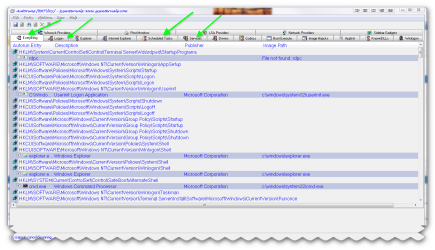
go for more ram at least 2GB you will see a great improvement in your system also if you want to check your start up programs etc use Autoruns for Windows v10.06
By Mark Russinovich and Bryce Cogswell

LINK :ar: Autoruns for Windows

This utility, which has the most comprehensive knowledge of auto-starting locations of any startup monitor, shows you what programs are configured to run during system bootup or login, and shows you the entries in the order Windows processes them. These programs include ones in your startup folder, Run, RunOnce, and other Registry keys. You can configure Autoruns to show other locations, including Explorer shell extensions, toolbars, browser helper objects, Winlogon notifications, auto-start services, and much more. Autoruns goes way beyond the MSConfig utility bundled with Windows Me and XP.

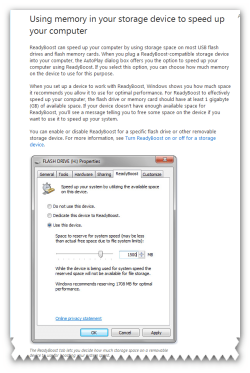
also readyboost is a good option if you have a spare thumb drive :ar: http://windows.microsoft.com/en-US/...your-storage-device-to-speed-up-your-computer

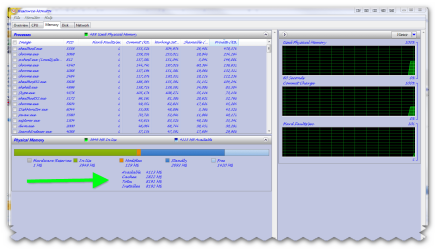
if you type resmon in the start menu search box and click on the result a window will open showing what has been allocated with your ram.(Resource Monitor)
 

Attachments

  • brys snap ?14 ?January ?2011 07h34m08s.png
    brys snap ?14 ?January ?2011 07h34m08s.png
    51.5 KB · Views: 76
  • brys snap ?14 ?January ?2011 07h39m21s.png
    brys snap ?14 ?January ?2011 07h39m21s.png
    59.4 KB · Views: 69
  • brys snap ?14 ?January ?2011 07h45m07s.png
    brys snap ?14 ?January ?2011 07h45m07s.png
    56 KB · Views: 65
Last edited:

My Computer

Computer Manufacturer/Model Number
packard bell IXTREME M5722
OS
Operating System : Windows 7 Home Premium Edition 6.01.7600 SP1 (x64)
CPU
Processor : Intel Core 2 Quad Q8300 @ 2500 MHz
Motherboard
Mainboard : Packard Bell (Acer EG43M )
Memory
Physical Memory :8GB Corsair4x 2GB 800MHz C5 DDR2
Graphics Card(s)
Video Card : XFX 6700 AMD
Monitor(s) Displays
Maestro 234DL - BenQ V2220 - BenQ VW2420H
Screen Resolution
Current Display :1920x1080p pixels at 60 Hz in HD LED
Hard Drives
Hard Disks : WDC (1000 GB)
Drive C: (Hard Disk) : 428 GB available on 491 GB
Drive D: (Hard Disk) : 426 GB available on 492 GB
SAMSUNG spinpoint HD103SJ 1000.2 GB
(X 2) KINGSTON SSD NOW V 30GB
PSU
XFX ProSeries 550W PSU
Case
PACKARD BELL IXTREME
Cooling
System Blower Current: 150mA Air Flow16CFM ;Akasa 90mm rear
Keyboard
Gigabyte Aivia K8100
Mouse
TRUST-Wireless Laser Mouse - Carbon edition MI-7770C
Internet Speed
TP-LINK > TL-WN951N / AV500 Gigabit Powerline Adapters
Browser
chrome dev
Other Info
EXTRA COOLING>(FAN CONTROLLER) PC Bay Cooler 3 x 40mm fans; Akasa AK-HD-BL Blue hard drive cooler 2 x 40 mm fan 4500 rpm 29.7 dBA
Bios> American Megatrends Inc.
Version : P01-A1
Date : 08/31/2009
I would add another 2GBs. Mucking around wih the processes is no good way to save RAM. Just make sure that you do not have too many startups running - in fact, you really only need the AV program there.

Totally agree - RAM's pretty cheap these days :)

I also agree. And might wonder why your running x64 on 2gb.
 

My Computer

Computer type
PC/Desktop
Computer Manufacturer/Model Number
Self - Build | Asus K53e Laptop
OS
10 x64 | 7 x64
CPU
AMD FX-9590 Vishera 4.7 | i5 Sandy Bridge
Motherboard
MSI 990 FXA | K53e
Memory
16 gigs Crucial Ballistix | 8 gigs Adata ddr3 1600
Graphics Card(s)
RX-570 4gd5 | Intel HD 3000
Sound Card
Realtek HD OnBoard Audio
Monitor(s) Displays
Samsung 22" & 37" Toshiba | 15.6
Hard Drives
ADATA 240 ssd & 750 Caviar Black 7200 sata | 250 840 EVO ssd & samsung ssd
PSU
Thermaltake 700 | 65w
Case
CoolMaster Centurion 534+
Cooling
Corsair H60
Keyboard
Rosewill RK-800G PS/2 Gaming Keyboard | Asus Chiclet
Mouse
Ventus | MS w/side buttons
Internet Speed
RoadRunner
Other Info
I hate the smell of friggin corn chip butt breath snacks.
I have one machine that runs w7 professional 64bit version on 2GB with no problems whatsoever. It's not the fastest machine on the planet, but it's a lot faster than most new machines that are full of factory installed bloat.
 

My Computer

Computer Manufacturer/Model Number
HP z800
OS
Windows 7 Professional 64 bit
CPU
xeon x5680 x2
Motherboard
hp
Memory
96 GB
Graphics Card(s)
nVidia quadro FX 5800 x2
Monitor(s) Displays
HP zr30w x4
Hard Drives
4 HP SAS 600GB HDDs RAID 0
PSU
1100w
Case
ATX
Cooling
factory installed liquid cooling
I have one machine that runs w7 professional 64bit version on 2GB with no problems whatsoever. It's not the fastest machine on the planet, but it's a lot faster than most new machines that are full of factory installed bloat.
If the "bloat" does not show up in the Startups, it should have no bearing on the performance. Processes that are not running cannot impact the performance. Those programs may only take a tiny bit of disk space, but who cares.
 

My Computer

Computer Manufacturer/Model Number
HP, Dell, Gateway, Toshiba - 4 laptops and 2 desktops
OS
Vista, Windows7, Mint Mate, Zorin, Windows 8
CPU
from 1.6GHz Duo to i7
Monitor(s) Displays
2x HP w2207
Hard Drives
5x HDD, 7x SSD, 12x Externals
Keyboard
with trackball - no mices
Mouse
Trackball mice
Internet Speed
DSL 6000
I have one machine that runs w7 professional 64bit version on 2GB with no problems whatsoever. It's not the fastest machine on the planet, but it's a lot faster than most new machines that are full of factory installed bloat.
If the "bloat" does not show up in the Startups, it should have no bearing on the performance. Processes that are not running cannot impact the performance. Those programs may only take a tiny bit of disk space, but who cares.
That's the deal. It seems like every program wants to run the second windows starts. So I unchecked almost everything in MSCONFIG and ended up with a total of 38 running processes at startup.
 

My Computer

Computer Manufacturer/Model Number
HP z800
OS
Windows 7 Professional 64 bit
CPU
xeon x5680 x2
Motherboard
hp
Memory
96 GB
Graphics Card(s)
nVidia quadro FX 5800 x2
Monitor(s) Displays
HP zr30w x4
Hard Drives
4 HP SAS 600GB HDDs RAID 0
PSU
1100w
Case
ATX
Cooling
factory installed liquid cooling
Very good. 38 running processes is fine - I have 65
 

My Computer

Computer Manufacturer/Model Number
HP, Dell, Gateway, Toshiba - 4 laptops and 2 desktops
OS
Vista, Windows7, Mint Mate, Zorin, Windows 8
CPU
from 1.6GHz Duo to i7
Monitor(s) Displays
2x HP w2207
Hard Drives
5x HDD, 7x SSD, 12x Externals
Keyboard
with trackball - no mices
Mouse
Trackball mice
Internet Speed
DSL 6000
38 processes seems about right when running a 2.4Ghz core 2 & 2GB RAM. My z800 is just about as responsive with over 100 running processes. I think the idea is to find a good balance for the hardware you're running. Manufacturers ought to be shot for some of the factory setups I've seen.
 

My Computer

Computer Manufacturer/Model Number
HP z800
OS
Windows 7 Professional 64 bit
CPU
xeon x5680 x2
Motherboard
hp
Memory
96 GB
Graphics Card(s)
nVidia quadro FX 5800 x2
Monitor(s) Displays
HP zr30w x4
Hard Drives
4 HP SAS 600GB HDDs RAID 0
PSU
1100w
Case
ATX
Cooling
factory installed liquid cooling
On this desktop system, I have a 2.5GHz duo core with 3GBs of RAM and absolutely no performance problems since I use an 80GB Intel SSD for the OS. That is always the first thing I do with a new system, install a SSD (even on my laptops). That makes a world of difference for performance. Only things like video editing where you depend a lot on the CPU and GPU are not as swift than on a system with more muscle. I can notice the difference when I use my quad cores with 1GB GPUs.
 

My Computer

Computer Manufacturer/Model Number
HP, Dell, Gateway, Toshiba - 4 laptops and 2 desktops
OS
Vista, Windows7, Mint Mate, Zorin, Windows 8
CPU
from 1.6GHz Duo to i7
Monitor(s) Displays
2x HP w2207
Hard Drives
5x HDD, 7x SSD, 12x Externals
Keyboard
with trackball - no mices
Mouse
Trackball mice
Internet Speed
DSL 6000
If you're into video editing you'd love the machine I'm using right now. I can convert 1 1/2 hours of raw video to DVD format in about 6 minutes.
To the OP: try doing what I did. go into the startup tab of MSCONFIG and uncheck everything there except for drivers and your AV software. Nothing else needs to run when windows starts in order to work when you need it.
 

My Computer

Computer Manufacturer/Model Number
HP z800
OS
Windows 7 Professional 64 bit
CPU
xeon x5680 x2
Motherboard
hp
Memory
96 GB
Graphics Card(s)
nVidia quadro FX 5800 x2
Monitor(s) Displays
HP zr30w x4
Hard Drives
4 HP SAS 600GB HDDs RAID 0
PSU
1100w
Case
ATX
Cooling
factory installed liquid cooling
you'd love the machine I'm using right now
You made me curious. What machine is that. I use Microsoft Expression Encoder 4 to convert captured screen videos from .xesc format to .wmv format. And that takes quite some time (2 passes) even with my i7, 1GB GPU, 4GB RAM and the OCZ Vertex2 SSD.
 

My Computer

Computer Manufacturer/Model Number
HP, Dell, Gateway, Toshiba - 4 laptops and 2 desktops
OS
Vista, Windows7, Mint Mate, Zorin, Windows 8
CPU
from 1.6GHz Duo to i7
Monitor(s) Displays
2x HP w2207
Hard Drives
5x HDD, 7x SSD, 12x Externals
Keyboard
with trackball - no mices
Mouse
Trackball mice
Internet Speed
DSL 6000
As others have said, with a 64-bit operating system, getting to at least 4GB of ram seems very worthwhile..especially considering how cheap RAM is these days. With Windows 7, it's not that advantageous to have gobs of ram just sitting idle. Might as well use everything you can. As long as it shows as "available", means that Windows will clear it and use it for other things when it's needed.
 

My Computer

Computer Manufacturer/Model Number
Self-Built in July 2009
OS
Windows 7 Ultimate x64
CPU
Intel Q9550 2.83Ghz OC'd to 3.40Ghz
Motherboard
Gigabyte GA-EP45-UD3R rev. 1.1, F12 BIOS
Memory
8GB G.Skill PI DDR2-800, 4-4-4-12 timings
Graphics Card(s)
EVGA 1280MB Nvidia GeForce GTX570
Sound Card
Realtek ALC899A 8 channel onboard audio
Monitor(s) Displays
23" Acer x233H
Screen Resolution
1920x1080
Hard Drives
Intel X25-M 80GB Gen 2 SSD
Western Digital 1TB Caviar Black, 32MB cache. WD1001FALS
PSU
Corsair 620HX modular
Case
Antec P182
Cooling
stock
Keyboard
ABS M1 Mechanical
Mouse
Logitech G9 Laser Mouse
Internet Speed
15/2 cable modem
Other Info
Windows and Linux enthusiast. Logitech G35 Headset.
Back
Top