What could suddenly cause these 3 similar programs from loading?

I guess I haven't tried manual TCP/IP settings, because I don't know what you're even talking about. But, I did what you said with the netsh int ip reset. Then I restarted the computer, ran sfc/scannow again. Still found corrupted files that it couldn't fix. I took a look at the log file and it looks the same with those two previous issues there that it couldn't repair.

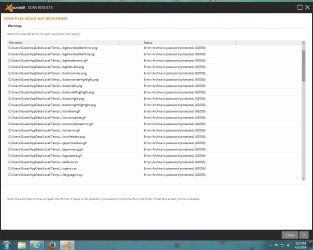
Yeah, I did have a virus right before all this happened. Might have been caused from the virus. I quarantined the virus, but avast antivirus still shows some warnings that it couldn't do nothing about. Anything else I can do?
 

My Computer My Computer

At a glance

Windows 7 64 bitAMD Athlon (tm) 64x2 dual core processor 2400+4 gigsNVIDIA GeForce GT 610
Computer type
PC/Desktop
Computer Manufacturer/Model Number
No idea, some website built it. Not a name brand.
OS
Windows 7 64 bit
CPU
AMD Athlon (tm) 64x2 dual core processor 2400+
Motherboard
ASUS
Memory
4 gigs
Graphics Card(s)
NVIDIA GeForce GT 610
Sound Card
C-Media PCI Audio Device
Monitor(s) Displays
HP vs17x
Screen Resolution
1280x1024
Hard Drives
IDE ATA
PSU
What's that stand for?
Case
I don't know.
Cooling
Dont' know
Keyboard
logitech k120
Mouse
HP
Internet Speed
around 70 megabite download speed
Antivirus
MSE + Malewarebites
Browser
Firefox, Chrome, EI
What security programs have you scanned with? Even if the infection is gone, the damage done can remain. But until you are sure you are clean, any repair except a clean install will be useless.

If you haven't, suggest you scan with Malwarebytes free, Superantispyware free, and I would run ESET from the web. Follow Jacees instructions on the bottom of this post (ignore the rest, and the title, just follow the ESET instructions)

http://www.sevenforums.com/system-security/214357-aggravating-window-passive-virus.html#post1797825

Report back with results, if any. If you come up clean, a Repair Install may be in order if Noel doesn't have the fix for your SFC issues. A Guy
 

My Computer My Computer

At a glance

Windows 10 Home x64INTEL Core i5-750 Quad-Core 3.37GHzHyperX Fury Black Series 8GB (2 x 4GB) 1866MhzEVGA GeForce GTX 750 Superclocked 1GB 128-Bit...
Computer type
PC/Desktop
OS
Windows 10 Home x64
CPU
INTEL Core i5-750 Quad-Core 3.37GHz
Motherboard
ASUS P7P55D
Memory
HyperX Fury Black Series 8GB (2 x 4GB) 1866Mhz
Graphics Card(s)
EVGA GeForce GTX 750 Superclocked 1GB 128-Bit GDDR5
Monitor(s) Displays
LG 32MA68HY 32" IPS
Screen Resolution
1920 x 1080
Hard Drives
Samsung 840 Evo 120GB, SEAGATE 500GB Barracuda® 7200.12, SATA 3 Gb/s, 7200 RPM, 16MB cache
PSU
ANTEC TruePower New TP-550, 80 PLUS, 550W
Case
ANTEC Three Hundred Illusion
Cooling
COOLER MASTER Hyper 212 Plus, 4 x 120mm 1 x 140mm Noctua's
Internet Speed
85 + Mbps
Antivirus
Avast
Browser
Vivaldi
I'm confused. Where did that come from? Are you getting me mixed up with someone else, I didn't upload that?

I did the chkdsk thing. I don't know if it found or fixed anything because after it scanned I found it on the log in screen. It never told me the results of the scan. After logging back on I did the sfc/scannow again. It found a problem, something was corrupted, and it said it could not fix all of the problems. But, I restarted the computer so that what it did fix would take effect.

I have no idea what any of this means, do you? Like what exactly is my problem here?

Sorry about that - my fault!.
Things must have started getting even worse that usual last night! :(

Ignore that.

Wee really do need some real information, though - PLEASE do the CHKDSK, and post the full CBS.log afterwards
Then we'll see what the situation is, and be able to do something about it.
 

My Computer My Computer

At a glance

Win 7 x64 Home Premium (and x86 VirtualBox VM...i3 370M/i7 6500U8GB - finally :)/8GBit's an i3, dude!/dual Intel&nVidia
Computer type
Laptop
Computer Manufacturer/Model Number
Asus K52F or Lenovo B51-80
OS
Win 7 x64 Home Premium (and x86 VirtualBox VM)/Win10
CPU
i3 370M/i7 6500U
Motherboard
Asus/Lenovo
Memory
8GB - finally :)/8GB
Graphics Card(s)
it's an i3, dude!/dual Intel&nVidia
Sound Card
onboard
Monitor(s) Displays
15.6" built-in
Screen Resolution
1366x768/1920x1080
Hard Drives
750GB Seagate internal
Sundry external drives attached to other computers on the local network
1TB SSD on the Lenovo
PSU
n/a
Internet Speed
as much as I can get - usually on a dongle/phone, so <1MB/s
Antivirus
MSE/Defender
Browser
IE11/12/Edge/Chrome/FF(if I must)
Ok, that took forever. I scanned my computer with Avast antivirus, malewarebites, superantispyware, and I ran that ESET you gave me. None of them found any threats, although Avast finds some warnings that it can't do nothing about. So I guess I already took care of the virus if all of this was indeed caused by a virus.

I did the chkdsk yesterday, but I can not figure out how to get to the log file. I have tried following the instructions I get from the internet, even those for Windows 7 and they do not lead me to the log file. I've read several instruction on how to do that, but my computer is different from all of them apparently.

I do have the sfc/scannow log file from yesterday. I will upload that. I will also upload the warnings from Avast Antivirus.
 

Attachments

  • sfcdetails.txt
    sfcdetails.txt
    124.4 KB · Views: 3
  • Avast Warnings.jpg
    Avast Warnings.jpg
    135.7 KB · Views: 5

My Computer My Computer

At a glance

Windows 7 64 bitAMD Athlon (tm) 64x2 dual core processor 2400+4 gigsNVIDIA GeForce GT 610
Computer type
PC/Desktop
Computer Manufacturer/Model Number
No idea, some website built it. Not a name brand.
OS
Windows 7 64 bit
CPU
AMD Athlon (tm) 64x2 dual core processor 2400+
Motherboard
ASUS
Memory
4 gigs
Graphics Card(s)
NVIDIA GeForce GT 610
Sound Card
C-Media PCI Audio Device
Monitor(s) Displays
HP vs17x
Screen Resolution
1280x1024
Hard Drives
IDE ATA
PSU
What's that stand for?
Case
I don't know.
Cooling
Dont' know
Keyboard
logitech k120
Mouse
HP
Internet Speed
around 70 megabite download speed
Antivirus
MSE + Malewarebites
Browser
Firefox, Chrome, EI
Ok, I figured out how to get the chkdsk log. Please read my previous reply in addition to this one. Now I have the chkdsk log.

Btw, in addition to these 3 programs not loading, the last couple times I tried to start malewarebites I get a message that says the files are missing or are corrupt. And I have to download the program again.
 

Attachments

Last edited:

My Computer My Computer

At a glance

Windows 7 64 bitAMD Athlon (tm) 64x2 dual core processor 2400+4 gigsNVIDIA GeForce GT 610
Computer type
PC/Desktop
Computer Manufacturer/Model Number
No idea, some website built it. Not a name brand.
OS
Windows 7 64 bit
CPU
AMD Athlon (tm) 64x2 dual core processor 2400+
Motherboard
ASUS
Memory
4 gigs
Graphics Card(s)
NVIDIA GeForce GT 610
Sound Card
C-Media PCI Audio Device
Monitor(s) Displays
HP vs17x
Screen Resolution
1280x1024
Hard Drives
IDE ATA
PSU
What's that stand for?
Case
I don't know.
Cooling
Dont' know
Keyboard
logitech k120
Mouse
HP
Internet Speed
around 70 megabite download speed
Antivirus
MSE + Malewarebites
Browser
Firefox, Chrome, EI
The Avast warnings are normal, just about not being able to scan within a password protected archive. There is apparently corruption from the infection, even if the infection itself is now truly gone. I bow to Noels greater knowledge. A Guy
 

My Computer My Computer

At a glance

Windows 10 Home x64INTEL Core i5-750 Quad-Core 3.37GHzHyperX Fury Black Series 8GB (2 x 4GB) 1866MhzEVGA GeForce GTX 750 Superclocked 1GB 128-Bit...
Computer type
PC/Desktop
OS
Windows 10 Home x64
CPU
INTEL Core i5-750 Quad-Core 3.37GHz
Motherboard
ASUS P7P55D
Memory
HyperX Fury Black Series 8GB (2 x 4GB) 1866Mhz
Graphics Card(s)
EVGA GeForce GTX 750 Superclocked 1GB 128-Bit GDDR5
Monitor(s) Displays
LG 32MA68HY 32" IPS
Screen Resolution
1920 x 1080
Hard Drives
Samsung 840 Evo 120GB, SEAGATE 500GB Barracuda® 7200.12, SATA 3 Gb/s, 7200 RPM, 16MB cache
PSU
ANTEC TruePower New TP-550, 80 PLUS, 550W
Case
ANTEC Three Hundred Illusion
Cooling
COOLER MASTER Hyper 212 Plus, 4 x 120mm 1 x 140mm Noctua's
Internet Speed
85 + Mbps
Antivirus
Avast
Browser
Vivaldi
The CHKDSK results are encouraging - it managed to fix all the problems it found, and didn't find any bad sectors.

The SFC results aren't too bad, and centre on a single Windows Component
Code:
2014-04-06 22:40:26, Info                  CSI    000002fc [SR] Repairing 1 components
2014-04-06 22:40:26, Info                  CSI    000002fd [SR] Beginning Verify and Repair transaction
2014-04-06 22:40:26, Info                  CSI    000002fe [SR] Cannot repair member file [l:18{9}]"tcpip.sys" of Microsoft-Windows-TCPIP-Binaries, Version = 6.1.7601.18254, pA = PROCESSOR_ARCHITECTURE_AMD64 (9), Culture neutral, VersionScope = 1 nonSxS, PublicKeyToken = {l:8 b:31bf3856ad364e35}, Type neutral, TypeName neutral, PublicKey neutral in the store, file is missing
2014-04-06 22:40:26, Info                  CSI    000002ff [SR] Cannot repair member file [l:24{12}]"FWPKCLNT.SYS" of Microsoft-Windows-TCPIP-Binaries, Version = 6.1.7601.18254, pA = PROCESSOR_ARCHITECTURE_AMD64 (9), Culture neutral, VersionScope = 1 nonSxS, PublicKeyToken = {l:8 b:31bf3856ad364e35}, Type neutral, TypeName neutral, PublicKey neutral in the store, file is missing
2014-04-06 22:40:26, Info                  CSI    00000300 [SR] Cannot repair member file [l:18{9}]"tcpip.sys" of Microsoft-Windows-TCPIP-Binaries, Version = 6.1.7601.18254, pA = PROCESSOR_ARCHITECTURE_AMD64 (9), Culture neutral, VersionScope = 1 nonSxS, PublicKeyToken = {l:8 b:31bf3856ad364e35}, Type neutral, TypeName neutral, PublicKey neutral in the store, file is missing
2014-04-06 22:40:26, Info                  CSI    00000301 [SR] Cannot repair member file [l:24{12}]"FWPKCLNT.SYS" of Microsoft-Windows-TCPIP-Binaries, Version = 6.1.7601.18254, pA = PROCESSOR_ARCHITECTURE_AMD64 (9), Culture neutral, VersionScope = 1 nonSxS, PublicKeyToken = {l:8 b:31bf3856ad364e35}, Type neutral, TypeName neutral, PublicKey neutral in the store, file is missing

I'll post a fix protocol for these later.
 

My Computer My Computer

At a glance

Win 7 x64 Home Premium (and x86 VirtualBox VM...i3 370M/i7 6500U8GB - finally :)/8GBit's an i3, dude!/dual Intel&nVidia
Computer type
Laptop
Computer Manufacturer/Model Number
Asus K52F or Lenovo B51-80
OS
Win 7 x64 Home Premium (and x86 VirtualBox VM)/Win10
CPU
i3 370M/i7 6500U
Motherboard
Asus/Lenovo
Memory
8GB - finally :)/8GB
Graphics Card(s)
it's an i3, dude!/dual Intel&nVidia
Sound Card
onboard
Monitor(s) Displays
15.6" built-in
Screen Resolution
1366x768/1920x1080
Hard Drives
750GB Seagate internal
Sundry external drives attached to other computers on the local network
1TB SSD on the Lenovo
PSU
n/a
Internet Speed
as much as I can get - usually on a dongle/phone, so <1MB/s
Antivirus
MSE/Defender
Browser
IE11/12/Edge/Chrome/FF(if I must)
Still waiting for that fix. Thought maybe you forgot about me. My computer didn't want to load up today at first. I got a message that said disk boot failure. I'm assuming that it's probably related to those 2 system files that need repaired. Could those cause that?

I just hit "ctrl + alt + del" and my computer restarted itself and loaded up fine after that.
 

My Computer My Computer

At a glance

Windows 7 64 bitAMD Athlon (tm) 64x2 dual core processor 2400+4 gigsNVIDIA GeForce GT 610
Computer type
PC/Desktop
Computer Manufacturer/Model Number
No idea, some website built it. Not a name brand.
OS
Windows 7 64 bit
CPU
AMD Athlon (tm) 64x2 dual core processor 2400+
Motherboard
ASUS
Memory
4 gigs
Graphics Card(s)
NVIDIA GeForce GT 610
Sound Card
C-Media PCI Audio Device
Monitor(s) Displays
HP vs17x
Screen Resolution
1280x1024
Hard Drives
IDE ATA
PSU
What's that stand for?
Case
I don't know.
Cooling
Dont' know
Keyboard
logitech k120
Mouse
HP
Internet Speed
around 70 megabite download speed
Antivirus
MSE + Malewarebites
Browser
Firefox, Chrome, EI
Ooops - sorry!.... back soon.
 

My Computer My Computer

At a glance

Win 7 x64 Home Premium (and x86 VirtualBox VM...i3 370M/i7 6500U8GB - finally :)/8GBit's an i3, dude!/dual Intel&nVidia
Computer type
Laptop
Computer Manufacturer/Model Number
Asus K52F or Lenovo B51-80
OS
Win 7 x64 Home Premium (and x86 VirtualBox VM)/Win10
CPU
i3 370M/i7 6500U
Motherboard
Asus/Lenovo
Memory
8GB - finally :)/8GB
Graphics Card(s)
it's an i3, dude!/dual Intel&nVidia
Sound Card
onboard
Monitor(s) Displays
15.6" built-in
Screen Resolution
1366x768/1920x1080
Hard Drives
750GB Seagate internal
Sundry external drives attached to other computers on the local network
1TB SSD on the Lenovo
PSU
n/a
Internet Speed
as much as I can get - usually on a dongle/phone, so <1MB/s
Antivirus
MSE/Defender
Browser
IE11/12/Edge/Chrome/FF(if I must)
The Files involved are related to TCIP and networking - although they should have been superceded by now, it's possible that they are blocking things.


I've uploaded a file - kutaa.zip - to my OneDrive at Noel's OneDrive
Please download and save it.

Right-click on the saved file and select Extract all...
Change the target to C:\ and click on Extract
Close all windows (it would be a good idea to print these instructions!)

Now reboot to the Repair Environment - as soon as the machine restarts, start tapping F8 - this should bring up the Advanced Boot Menu, at the top of which should be the option 'Repair my Computer'
Pick that
You'll have to log in with your username and password.

Pick the option to use a Command Prompt
At the prompt type
DIR C:\kutaa
hit the enter key - if you get a 'Not Found' error try
DIR D:\kutaa
or
DIR E:\kutaa


The drive letter in use when you find the folder will need to be substituted (for<drive>) into the following command...


XCOPY <drive>:\kutaa <drive>:\windows\winsxs /y /i /s /v /h


(e.g. XCOPY P:\wfire P:\windows\winsxs /y /i /s /v /h )


run the command (it should take almost no time) and when the prompt returns, type
EXIT
and hit the Enter key to exit Command Prompt - reboot to Normal Mode Windows.

Now run SFC /SCANNOW in an Elevated Command Prompt
then reboot and upload the new CBS.log file to your reply
 

My Computer My Computer

At a glance

Win 7 x64 Home Premium (and x86 VirtualBox VM...i3 370M/i7 6500U8GB - finally :)/8GBit's an i3, dude!/dual Intel&nVidia
Computer type
Laptop
Computer Manufacturer/Model Number
Asus K52F or Lenovo B51-80
OS
Win 7 x64 Home Premium (and x86 VirtualBox VM)/Win10
CPU
i3 370M/i7 6500U
Motherboard
Asus/Lenovo
Memory
8GB - finally :)/8GB
Graphics Card(s)
it's an i3, dude!/dual Intel&nVidia
Sound Card
onboard
Monitor(s) Displays
15.6" built-in
Screen Resolution
1366x768/1920x1080
Hard Drives
750GB Seagate internal
Sundry external drives attached to other computers on the local network
1TB SSD on the Lenovo
PSU
n/a
Internet Speed
as much as I can get - usually on a dongle/phone, so <1MB/s
Antivirus
MSE/Defender
Browser
IE11/12/Edge/Chrome/FF(if I must)
Ok, I followed instructions exactly, but now when I'm at the command prompt and I do the sfc/scannow command, I get this message:

Windows Resource Protection could not start the repair service.

Although, there is one thing I don't understand. You told me to unzip the kutaa file to the C drive, and after restarting and going to the advanced boot menu and checking for it in the C drive it didn't find it. It end up finding it in the D drive. But, why on earth would it be on the D drive? That would be my DVD RW drive, not the hard drive, so that doesn't even make sense. But, since it didn't work unzipping it to the C drive, do I need to unzip it to the D drive?

Here's the latest CBS.log file for that.
 

Attachments

Last edited:

My Computer My Computer

At a glance

Windows 7 64 bitAMD Athlon (tm) 64x2 dual core processor 2400+4 gigsNVIDIA GeForce GT 610
Computer type
PC/Desktop
Computer Manufacturer/Model Number
No idea, some website built it. Not a name brand.
OS
Windows 7 64 bit
CPU
AMD Athlon (tm) 64x2 dual core processor 2400+
Motherboard
ASUS
Memory
4 gigs
Graphics Card(s)
NVIDIA GeForce GT 610
Sound Card
C-Media PCI Audio Device
Monitor(s) Displays
HP vs17x
Screen Resolution
1280x1024
Hard Drives
IDE ATA
PSU
What's that stand for?
Case
I don't know.
Cooling
Dont' know
Keyboard
logitech k120
Mouse
HP
Internet Speed
around 70 megabite download speed
Antivirus
MSE + Malewarebites
Browser
Firefox, Chrome, EI
I don't like using the sfcdetails file - it misses a lot of the important details.
Haveing said that...
Here's the critical bit...
Code:
2014-04-06 22:40:26, Info                  CSI    000002f2 [SR] Repairing 1 components
2014-04-06 22:40:26, Info                  CSI    000002f3 [SR] Beginning Verify and Repair transaction
2014-04-06 22:40:26, Info                  CSI    000002f4 [SR] Cannot repair member file [l:18{9}]"tcpip.sys" of Microsoft-Windows-TCPIP-Binaries, Version = 6.1.7601.18254, pA = PROCESSOR_ARCHITECTURE_AMD64 (9), Culture neutral, VersionScope = 1 nonSxS, PublicKeyToken = {l:8 b:31bf3856ad364e35}, Type neutral, TypeName neutral, PublicKey neutral in the store, file is missing
2014-04-06 22:40:26, Info                  CSI    000002f5 [SR] Cannot repair member file [l:24{12}]"FWPKCLNT.SYS" of Microsoft-Windows-TCPIP-Binaries, Version = 6.1.7601.18254, pA = PROCESSOR_ARCHITECTURE_AMD64 (9), Culture neutral, VersionScope = 1 nonSxS, PublicKeyToken = {l:8 b:31bf3856ad364e35}, Type neutral, TypeName neutral, PublicKey neutral in the store, file is missing

Notice the date!!
this is still the same file which you uploaded earlier - please get the new one from the C:\Windows\Logs\CBS folder, copy it to the desktop, then compress it, and upload the compressed file.
 

My Computer My Computer

At a glance

Win 7 x64 Home Premium (and x86 VirtualBox VM...i3 370M/i7 6500U8GB - finally :)/8GBit's an i3, dude!/dual Intel&nVidia
Computer type
Laptop
Computer Manufacturer/Model Number
Asus K52F or Lenovo B51-80
OS
Win 7 x64 Home Premium (and x86 VirtualBox VM)/Win10
CPU
i3 370M/i7 6500U
Motherboard
Asus/Lenovo
Memory
8GB - finally :)/8GB
Graphics Card(s)
it's an i3, dude!/dual Intel&nVidia
Sound Card
onboard
Monitor(s) Displays
15.6" built-in
Screen Resolution
1366x768/1920x1080
Hard Drives
750GB Seagate internal
Sundry external drives attached to other computers on the local network
1TB SSD on the Lenovo
PSU
n/a
Internet Speed
as much as I can get - usually on a dongle/phone, so <1MB/s
Antivirus
MSE/Defender
Browser
IE11/12/Edge/Chrome/FF(if I must)
ok, lets try that again.
 

My Computer My Computer

At a glance

Windows 7 64 bitAMD Athlon (tm) 64x2 dual core processor 2400+4 gigsNVIDIA GeForce GT 610
Computer type
PC/Desktop
Computer Manufacturer/Model Number
No idea, some website built it. Not a name brand.
OS
Windows 7 64 bit
CPU
AMD Athlon (tm) 64x2 dual core processor 2400+
Motherboard
ASUS
Memory
4 gigs
Graphics Card(s)
NVIDIA GeForce GT 610
Sound Card
C-Media PCI Audio Device
Monitor(s) Displays
HP vs17x
Screen Resolution
1280x1024
Hard Drives
IDE ATA
PSU
What's that stand for?
Case
I don't know.
Cooling
Dont' know
Keyboard
logitech k120
Mouse
HP
Internet Speed
around 70 megabite download speed
Antivirus
MSE + Malewarebites
Browser
Firefox, Chrome, EI
I can see no sign that you've run another SFC in the past 48 hours?
There aren't even any related errors within that time...

However, there are some rather nasty error from before then...
Code:
 Line 16803: 2014-04-07 01:52:47, Error                 CSI    [EMAIL="00000109@2014/4/7:05:52:47.116"]00000109@2014/4/7:05:52:47.116[/EMAIL] (F) d:\win7sp1_gdr\base\wcp\componentstore\storelayout.cpp(11690): Store corruption detected in function ComponentStore::CRawStoreLayout::CheckFamilyIndexForDeadWinnerComponent expression: (null)
 Line 16805: 2014-04-07 01:52:51, Error                 CSI    0000010a (F) STATUS_SXS_COMPONENT_STORE_CORRUPT #416469# from CCSDirectTransaction::OperateEnding at index 0 of 88 (0x0000000000000058) operations, disposition 0[gle=0xd015001a]
 Line 16806: 2014-04-07 01:52:51, Error                 CSI    0000010b (F) HRESULT_FROM_WIN32(14098) #414066# from Windows::ServicingAPI::CCSITransaction::ICSITransaction2_AddComponents(Flags = 4, a = @0x35c98c0, mp = @0x35ca0c0, disp = 0)[gle=0x80073712]
 Line 16808: 2014-04-07 01:52:52, Error                 CBS    Failed to complete component closure [HRESULT = 0x80073712 - ERROR_SXS_COMPONENT_STORE_CORRUPT]
 Line 16812: 2014-04-07 01:52:52, Error                 CBS    Failed to process single phase execution. [HRESULT = 0x80073712 - ERROR_SXS_COMPONENT_STORE_CORRUPT]
 Line 17834: 2014-04-07 01:53:06, Error                 CSI    [EMAIL="00000164@2014/4/7:05:53:06.221"]00000164@2014/4/7:05:53:06.221[/EMAIL] (F) d:\win7sp1_gdr\base\wcp\componentstore\csd_locking.cpp(324): Error STATUS_SXS_ASSEMBLY_MISSING originated in function CCSDirectTransaction::LockComponent expression: (null)
 Line 17836: 2014-04-07 01:53:06, Error                 CSI    00000165 (F) STATUS_SXS_ASSEMBLY_MISSING #589605# from CCSDirectTransaction::OperateEnding at index 0 of 1 operations, disposition 2[gle=0xd015000c]
 Line 17837: 2014-04-07 01:53:06, Error                 CSI    00000166 (F) HRESULT_FROM_WIN32(ERROR_SXS_ASSEMBLY_MISSING) #589490# from Windows::ServicingAPI::CCSITransaction::ICSITransaction_PinDeployment(Flags = 0, a = usb.inf, Version = 6.1.7601.18251, pA = PROCESSOR_ARCHITECTURE_AMD64 (9), Culture neutral, VersionScope = 1 nonSxS, PublicKeyToken = {l:8 b:31bf3856ad364e35}, Type = [l:24{12}]"driverUpdate", TypeName neutral, PublicKey neutral, cb = (null), s = (null), rid = [77]"Package_1_for_KB2862330~31bf3856ad364e35~amd64~~6.1.1.2.2862330-2_neutral_GDR", rah = [1]"3", manpath = (null), catpath = (null), ed = 0, disp = 0)[gle=0x80073701]
 Line 17841: 2014-04-07 01:53:06, Error                 CBS    Failed to resolve execution package: Package_1_for_KB2862330~31bf3856ad364e35~amd64~~6.1.1.2 [HRESULT = 0x80073701 - ERROR_SXS_ASSEMBLY_MISSING]
 Line 17845: 2014-04-07 01:53:06, Error                 CBS    Failed to process single phase execution. [HRESULT = 0x80073701 - ERROR_SXS_ASSEMBLY_MISSING]
 Line 89443: 2014-04-07 01:55:45, Error                 CSI    [EMAIL="000002bc@2014/4/7:05:55:45.456"]000002bc@2014/4/7:05:55:45.456[/EMAIL] (F) d:\win7sp1_gdr\base\wcp\componentstore\csd_locking.cpp(324): Error STATUS_SXS_ASSEMBLY_MISSING originated in function CCSDirectTransaction::LockComponent expression: (null)
 Line 89445: 2014-04-07 01:55:48, Error                 CSI    000002bd (F) STATUS_SXS_ASSEMBLY_MISSING #3348230# from CCSDirectTransaction::OperateEnding at index 0 of 1 operations, disposition 2[gle=0xd015000c]
 Line 89446: 2014-04-07 01:55:48, Error                 CSI    000002be (F) HRESULT_FROM_WIN32(ERROR_SXS_ASSEMBLY_MISSING) #3348115# from Windows::ServicingAPI::CCSITransaction::ICSITransaction_PinDeployment(Flags = 0, a = d7cdc2faf6c33f97141d157fa3d61b7a, Version = 10.2.9200.20831, pA = PROCESSOR_ARCHITECTURE_AMD64 (9), Culture neutral, VersionScope = 1 nonSxS, PublicKeyToken = {l:8 b:31bf3856ad364e35}, Type neutral, TypeName neutral, PublicKey neutral, cb = (null), s = (null), rid = [78]"Package_1_for_KB2879017~31bf3856ad364e35~amd64~~10.2.1.0.2879017-1_neutral_LDR", rah = [1]"3", manpath = (null), catpath = (null), ed = 0, disp = 0)[gle=0x80073701]
 Line 89450: 2014-04-07 01:55:48, Error                 CBS    Failed to resolve execution package: Package_1_for_KB2879017~31bf3856ad364e35~amd64~~10.2.1.0 [HRESULT = 0x80073701 - ERROR_SXS_ASSEMBLY_MISSING]
 Line 89454: 2014-04-07 01:55:48, Error                 CBS    Failed to process single phase execution. [HRESULT = 0x80073701 - ERROR_SXS_ASSEMBLY_MISSING]
 Line 89469: 2014-04-07 01:55:52, Error                 CBS    Failed to perform operation.  [HRESULT = 0x80073701 - ERROR_SXS_ASSEMBLY_MISSING]

Please run a CheckSUR scan and post the log.


Please download and save the CheckSUR tool from http://support.microsoft.com/kb/947821
(you'll need to look in the details for Windows 7, downloading from the Microsoft Download Center)

Run it - The tool can take anywhere from 5 mins to a couple of hours to run (or 'Install') depending on how much it has to do, and may exit silently - it may appear to freeze for most of that time, but be patient.
The result is logged in the C:\Windows\Logs\CBS\CheckSUR.log file - and an archive …\checksur.persist.log file

Then zip the CheckSUR.log and upload it to your reply.
 

My Computer My Computer

At a glance

Win 7 x64 Home Premium (and x86 VirtualBox VM...i3 370M/i7 6500U8GB - finally :)/8GBit's an i3, dude!/dual Intel&nVidia
Computer type
Laptop
Computer Manufacturer/Model Number
Asus K52F or Lenovo B51-80
OS
Win 7 x64 Home Premium (and x86 VirtualBox VM)/Win10
CPU
i3 370M/i7 6500U
Motherboard
Asus/Lenovo
Memory
8GB - finally :)/8GB
Graphics Card(s)
it's an i3, dude!/dual Intel&nVidia
Sound Card
onboard
Monitor(s) Displays
15.6" built-in
Screen Resolution
1366x768/1920x1080
Hard Drives
750GB Seagate internal
Sundry external drives attached to other computers on the local network
1TB SSD on the Lenovo
PSU
n/a
Internet Speed
as much as I can get - usually on a dongle/phone, so <1MB/s
Antivirus
MSE/Defender
Browser
IE11/12/Edge/Chrome/FF(if I must)
I guess the reason you didn't see any sign of a sfc scan was because it wouldn't scan. I tried several times, but it kept giving me this same message: Windows Resource Protection could not start the repair service.

The CheckSUR tool believe it or not ran for several hours last night. Finally said complete at like 1:30 AM - about the time I was going to bed. Here is the CheckSUR.log:
 

Attachments

My Computer My Computer

At a glance

Windows 7 64 bitAMD Athlon (tm) 64x2 dual core processor 2400+4 gigsNVIDIA GeForce GT 610
Computer type
PC/Desktop
Computer Manufacturer/Model Number
No idea, some website built it. Not a name brand.
OS
Windows 7 64 bit
CPU
AMD Athlon (tm) 64x2 dual core processor 2400+
Motherboard
ASUS
Memory
4 gigs
Graphics Card(s)
NVIDIA GeForce GT 610
Sound Card
C-Media PCI Audio Device
Monitor(s) Displays
HP vs17x
Screen Resolution
1280x1024
Hard Drives
IDE ATA
PSU
What's that stand for?
Case
I don't know.
Cooling
Dont' know
Keyboard
logitech k120
Mouse
HP
Internet Speed
around 70 megabite download speed
Antivirus
MSE + Malewarebites
Browser
Firefox, Chrome, EI
Here's the critical bits from the CheckSUR report...
Code:
Checking Component Store
(f) CSI Catalog Missing 0x00000002 d37fbeb123b3aacbaba25cd06de2bde836387e184ff29df01edf7856cf11ad75.cat 2b80bf8b514..959709dfc9a_31bf3856ad364e35_6.1.7600.21402_39b96daee82ceb53 Missing catalog or invalid CatalogThumprint
(fix) CSI Catalog Missing CSI File Replaced File: d37fbeb123b3aacbaba25cd06de2bde836387e184ff29df01edf7856cf11ad75.cat From: C:\Windows\servicing\Packages\Package_6_for_KB2753842~31bf3856ad364e35~amd64~~6.1.2.0.cat
(f) CSI Missing Identity 0x00000000 appid 249513d8219..d09b5fe78b5_31bf3856ad364e35_6.1.7600.20792_018105df21b67ac9 
(f) CSI Missing Winning Component Key 0x00000000 amd64_microsoft-windows-tcpip-binaries_31bf3856ad364e35_6.1.7601.18254_none_1118bb977d265d27
As you can see, it managed to fix one of the problems, but there are two registry errors that need to be addressed.

I'll see what I can come up with for them :)

Back later/tomorrow.
 

My Computer My Computer

At a glance

Win 7 x64 Home Premium (and x86 VirtualBox VM...i3 370M/i7 6500U8GB - finally :)/8GBit's an i3, dude!/dual Intel&nVidia
Computer type
Laptop
Computer Manufacturer/Model Number
Asus K52F or Lenovo B51-80
OS
Win 7 x64 Home Premium (and x86 VirtualBox VM)/Win10
CPU
i3 370M/i7 6500U
Motherboard
Asus/Lenovo
Memory
8GB - finally :)/8GB
Graphics Card(s)
it's an i3, dude!/dual Intel&nVidia
Sound Card
onboard
Monitor(s) Displays
15.6" built-in
Screen Resolution
1366x768/1920x1080
Hard Drives
750GB Seagate internal
Sundry external drives attached to other computers on the local network
1TB SSD on the Lenovo
PSU
n/a
Internet Speed
as much as I can get - usually on a dongle/phone, so <1MB/s
Antivirus
MSE/Defender
Browser
IE11/12/Edge/Chrome/FF(if I must)
Hmmm...
Please open an Elevated Command Prompt, and run the following commands...
Code:
REG LOAD HKLM\COMPONENTS C:\Windows\System32\config\COMPONENTS
REG QUERY HKLM\COMPONENTS\DerivedData\Components\amd64_microsoft-windows-tcpip-binaries_31bf3856ad364e35_6.1.7601.18254_none_1118bb977d265d27
REG QUERY HKLM\COMPONENTS\CanonicalData\Deployments\249513d8219..d09b5fe78b5_31bf3856ad364e35_6.1.7600.20792_018105df21b67ac9
 
.

Post the results.

Here are some instructions to make life easier :)
1) To open an Elevated Command Prompt Window (the ECP window), click on Start, All Programs, Accessories – then right-click on Command Prompt, and select Run as Administrator. Accept the UAC prompt.
2) To run the commands easier, highlight the block of commands, and right-click on the highlight – select Copy. In the CP Window, click on the black/white icon at top left – select Paste. The commands will run but may not complete the last command, so hit the Enter Key once.
3) To copy the results... click on the Black/White icon in the top left, and select Edit... 'Select All', and hit the Enter key - then use Ctrl+V or r-click+Paste to paste it into your response.
 

My Computer My Computer

At a glance

Win 7 x64 Home Premium (and x86 VirtualBox VM...i3 370M/i7 6500U8GB - finally :)/8GBit's an i3, dude!/dual Intel&nVidia
Computer type
Laptop
Computer Manufacturer/Model Number
Asus K52F or Lenovo B51-80
OS
Win 7 x64 Home Premium (and x86 VirtualBox VM)/Win10
CPU
i3 370M/i7 6500U
Motherboard
Asus/Lenovo
Memory
8GB - finally :)/8GB
Graphics Card(s)
it's an i3, dude!/dual Intel&nVidia
Sound Card
onboard
Monitor(s) Displays
15.6" built-in
Screen Resolution
1366x768/1920x1080
Hard Drives
750GB Seagate internal
Sundry external drives attached to other computers on the local network
1TB SSD on the Lenovo
PSU
n/a
Internet Speed
as much as I can get - usually on a dongle/phone, so <1MB/s
Antivirus
MSE/Defender
Browser
IE11/12/Edge/Chrome/FF(if I must)
Microsoft Windows [Version 6.1.7601]
Copyright (c) 2009 Microsoft Corporation. All rights reserved.
C:\Windows\system32>REG LOAD HKLM\COMPONENTS C:\Windows\System32\config\COMPONEN
TS
The operation completed successfully.
C:\Windows\system32>REG QUERY HKLM\COMPONENTS\DerivedData\Components\amd64_micro
soft-windows-tcpip-binaries_31bf3856ad364e35_6.1.7601.18254_none_1118bb977d265d2
7
HKEY_LOCAL_MACHINE\COMPONENTS\DerivedData\Components\amd64_microsoft-windows-tcp
ip-binaries_31bf3856ad364e35_6.1.7601.18254_none_1118bb977d265d27
identity REG_BINARY 4D6963726F736F66742D57696E646F77732D54435049502D42
696E61726965732C2043756C747572653D6E65757472616C2C2056657273696F6E3D362E312E3736
30312E31383235342C205075626C69634B6579546F6B656E3D333162663338353661643336346533
352C2050726F636573736F724172636869746563747572653D616D6436342C2076657273696F6E53
636F70653D4E6F6E537853

C:\Windows\system32>REG QUERY HKLM\COMPONENTS\CanonicalData\Deployments\249513d8
219..d09b5fe78b5_31bf3856ad364e35_6.1.7600.20792_018105df21b67ac9
HKEY_LOCAL_MACHINE\COMPONENTS\CanonicalData\Deployments\249513d8219..d09b5fe78b5
_31bf3856ad364e35_6.1.7600.20792_018105df21b67ac9
CatalogThumbprint REG_SZ f5d28802b11b7ee18eba3e04d9eab89bc75fb235fa11e
fdac3602e9bc35a7720
p!CBS_package_1_for_kb2378111~31bf3856ad364e35~amd64~~6.1.1.1.2378_0b7007091
5be8909 REG_BINARY 4D000000010000005061636B6167655F315F666F725F4B423233373
83131317E333162663338353661643336346533357E616D6436347E7E362E312E312E312E3233373
83131312D315F6E65757472616C5F4C445233

C:\Windows\system32>
 

My Computer My Computer

At a glance

Windows 7 64 bitAMD Athlon (tm) 64x2 dual core processor 2400+4 gigsNVIDIA GeForce GT 610
Computer type
PC/Desktop
Computer Manufacturer/Model Number
No idea, some website built it. Not a name brand.
OS
Windows 7 64 bit
CPU
AMD Athlon (tm) 64x2 dual core processor 2400+
Motherboard
ASUS
Memory
4 gigs
Graphics Card(s)
NVIDIA GeForce GT 610
Sound Card
C-Media PCI Audio Device
Monitor(s) Displays
HP vs17x
Screen Resolution
1280x1024
Hard Drives
IDE ATA
PSU
What's that stand for?
Case
I don't know.
Cooling
Dont' know
Keyboard
logitech k120
Mouse
HP
Internet Speed
around 70 megabite download speed
Antivirus
MSE + Malewarebites
Browser
Firefox, Chrome, EI
with a bit of luck this will do the trick :)


I've uploaded a file - kutab.zip - to my OneDrive at Noel's OneDrive
Please download and save it to your desktop.
Right-click on the saved file and select Extract all...
Save it to the default location
This should create a file kutab.reg

right-click on the file, and select Merge
Accept the warnings, - you should then get a 'Success' message.
Close all windows, and reboot.

Run another CheckSUR report, and post the results.
 
Last edited:

My Computer My Computer

At a glance

Win 7 x64 Home Premium (and x86 VirtualBox VM...i3 370M/i7 6500U8GB - finally :)/8GBit's an i3, dude!/dual Intel&nVidia
Computer type
Laptop
Computer Manufacturer/Model Number
Asus K52F or Lenovo B51-80
OS
Win 7 x64 Home Premium (and x86 VirtualBox VM)/Win10
CPU
i3 370M/i7 6500U
Motherboard
Asus/Lenovo
Memory
8GB - finally :)/8GB
Graphics Card(s)
it's an i3, dude!/dual Intel&nVidia
Sound Card
onboard
Monitor(s) Displays
15.6" built-in
Screen Resolution
1366x768/1920x1080
Hard Drives
750GB Seagate internal
Sundry external drives attached to other computers on the local network
1TB SSD on the Lenovo
PSU
n/a
Internet Speed
as much as I can get - usually on a dongle/phone, so <1MB/s
Antivirus
MSE/Defender
Browser
IE11/12/Edge/Chrome/FF(if I must)
Looks like it fixed 1 out of 3 errors.
 

Attachments

My Computer My Computer

At a glance

Windows 7 64 bitAMD Athlon (tm) 64x2 dual core processor 2400+4 gigsNVIDIA GeForce GT 610
Computer type
PC/Desktop
Computer Manufacturer/Model Number
No idea, some website built it. Not a name brand.
OS
Windows 7 64 bit
CPU
AMD Athlon (tm) 64x2 dual core processor 2400+
Motherboard
ASUS
Memory
4 gigs
Graphics Card(s)
NVIDIA GeForce GT 610
Sound Card
C-Media PCI Audio Device
Monitor(s) Displays
HP vs17x
Screen Resolution
1280x1024
Hard Drives
IDE ATA
PSU
What's that stand for?
Case
I don't know.
Cooling
Dont' know
Keyboard
logitech k120
Mouse
HP
Internet Speed
around 70 megabite download speed
Antivirus
MSE + Malewarebites
Browser
Firefox, Chrome, EI
Back
Top