Solved What does bitlocker do for me?

Correct.. Once I reboot after enabling the system check, that pops up.
If I start the encryption and reboot, I need to input the key or the usb with the key on it
 

My Computer

Computer Manufacturer/Model Number
Myself
OS
XP, 7 32/64bit
CPU
i5 2500k, various
Motherboard
Gigabyte ga z68xp-ud3
Memory
Enough
Graphics Card(s)
560
Hard Drives
Far too many to keep track of
Internet Speed
Faster than yours, maybe.
The flash drive is fat32
 

My Computer

Computer Manufacturer/Model Number
Myself
OS
XP, 7 32/64bit
CPU
i5 2500k, various
Motherboard
Gigabyte ga z68xp-ud3
Memory
Enough
Graphics Card(s)
560
Hard Drives
Far too many to keep track of
Internet Speed
Faster than yours, maybe.
Is the flash part of the encryption?

I'm not sure if it need to be ntfs to. Since i believe its just what's holding the key but lets chance it to ntfs.

Open a command prompt
Type below
Convert F: /FS:NTFS
Replace F with the drive letter of the flash.

Try to do it again and report back

Here is some addition information for you

The hard disk must be partitioned with at least two drives:
The operating system drive (or boot drive) contains the operating system and its support files; it must be formatted with the NTFS file system.
The system drive contains the files that are needed to load Windows after the BIOS has prepared the system hardware. BitLocker is not enabled on this drive. For BitLocker to work, the system drive must not be encrypted, must differ from the operating system drive, and must be formatted with the NTFS file system. The system drive should be at least 1.5 gigabytes (GBs).
 

My Computer

OS
Windows 7 Ultimate x64
The disk has the 100mb system partition, and then a 300gb ntfs C.
The flash drive is formatted as ntfs

Upon rebooting doing the system check, same error. System asks for the key to boot, same error.

I'm going to try to uninstall the fingerprint software I have.. That allows me to power on, input a power on pass, hard disk pass, and windows password..

Did not work.
 

My Computer

Computer Manufacturer/Model Number
Myself
OS
XP, 7 32/64bit
CPU
i5 2500k, various
Motherboard
Gigabyte ga z68xp-ud3
Memory
Enough
Graphics Card(s)
560
Hard Drives
Far too many to keep track of
Internet Speed
Faster than yours, maybe.
After reading what I posted below. Im wondering if your TPM is not compatible with bitlocker.

Try going into group policy posted it the text below and disable if its enabled. You can also try to enable it if its disabled.

If your computer does not have a TPM, you can still use BitLocker, but you will be using the Startup key only authentication method. All of the required encryption key information is stored on a USB flash drive, which the user must insert into the computer during startup. The key stored on the USB flash drive unlocks the computer. Using a TPM is recommended because it helps protect against attacks made against the computer's critical startup process. Using the Startup key only method only encrypts the drive; it does not provide any validation of the early boot components or hardware tampering. To use this method, your computer must support the reading of USB devices in the preboot environment and you must enable this authentication method by selecting the check box Allow BitLocker without a compatible TPM in the Group Policy setting Require additional authentication at startup, which is located in the following location in the Local Group Policy Editor: Computer Configuration\Administrative Templates\Windows Components\BitLocker Drive Encryption\Operating System Drives.
 

My Computer

OS
Windows 7 Ultimate x64
Also verify that your tpm is at least version 1.2

Also look at your manufacturers website for a bios update.
 

My Computer

OS
Windows 7 Ultimate x64
The laptop is a Thinkpad T530. It does have TPM v1.2.. That is what it shows up as in device manager (tried uninstalling it too fyi)

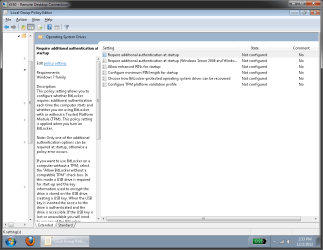
Screens showing gpedit and device manager..
I don't see an option to enable bitlocker with the usb key.. In fact, I don't want to do that. I'd much rather have to punch in a password, in which case, I'd rather use truecrypt.
 

Attachments

  • gpedit.png
    gpedit.png
    79.6 KB · Views: 5
  • devicemanager.png
    devicemanager.png
    97.4 KB · Views: 4

My Computer

Computer Manufacturer/Model Number
Myself
OS
XP, 7 32/64bit
CPU
i5 2500k, various
Motherboard
Gigabyte ga z68xp-ud3
Memory
Enough
Graphics Card(s)
560
Hard Drives
Far too many to keep track of
Internet Speed
Faster than yours, maybe.
Ran a bios update, but it seemed I was already at the latest version
 

My Computer

Computer Manufacturer/Model Number
Myself
OS
XP, 7 32/64bit
CPU
i5 2500k, various
Motherboard
Gigabyte ga z68xp-ud3
Memory
Enough
Graphics Card(s)
560
Hard Drives
Far too many to keep track of
Internet Speed
Faster than yours, maybe.
Hm.. I seem to have figured it out.

under "configure TPM platform validation" in gpedit, I turned off everything except #11.. Similar to the vista fix I found, but things were named slightly different.


Turned everything off, except #11, bitlocker worked.
Now I turned all the defaults back on, still works. I'm marking this as solved now, thanks
 

My Computer

Computer Manufacturer/Model Number
Myself
OS
XP, 7 32/64bit
CPU
i5 2500k, various
Motherboard
Gigabyte ga z68xp-ud3
Memory
Enough
Graphics Card(s)
560
Hard Drives
Far too many to keep track of
Internet Speed
Faster than yours, maybe.
Back
Top