What don't you like about Windows 7?

Status
Not open for further replies.
What annoys the heck out of me...Windows 7 inability to remember its windows size!!! This was a huge problem in Vista but seemed to be fixed...now we have Windows 7 displaying to same behavior. Right now when I click a link inside a webpage the window opens in a small box!!! What a pain in the @$$ :mad:

Other than that I really like Windows 7 above XP and Vista.

I don't have that problem at all, in fact Windows 7 seems better than Vista about it.


I don't have a lot of problems others have with Windows 7, does that mean they doesn't exist?

LOL. Oh my gosh I always love that one from software support companies. "It works on our computer equipped with that operating system so, everyone who it doesn't work for must have a problem with their system".

What a classic.

In fairness to landozelig's post.... We've all said what he said while replyig to a post, including me :o So...

But yeah, sometimes people do try to act like a problem is your imagination.
 

My Computer My Computer

At a glance

Windows 10 ProIntel Core i7-4770K (3.5Ghz)32 gig Corsair Dominator Platinum (4x8Gig)Sapphire Tri-X R9 Fury
Computer type
PC/Desktop
Computer Manufacturer/Model Number
Custom built by me.
OS
Windows 10 Pro
CPU
Intel Core i7-4770K (3.5Ghz)
Motherboard
Gigabyte G1 Sniper 5 (F10 Bios)
Memory
32 gig Corsair Dominator Platinum (4x8Gig)
Graphics Card(s)
Sapphire Tri-X R9 Fury
Sound Card
Soundblaster ZXR
Monitor(s) Displays
NEC PA242W 24" LCD Monitor
Screen Resolution
1920 x 1200
Hard Drives
Primary - Samsung 850 Pro (512gig), Samsung 840 Pro (256gig), 2TB WD Caviar Black.
PSU
EVGA Supernova 1000 G2
Case
Cooler Master HAF X
Cooling
Corsair H100i with Corsair Air Series SP120 Quiet Fans
Keyboard
Logitech Wireless Wave
Mouse
Logitech Performance MX
Internet Speed
High Speed Cable
Antivirus
Norton Security
Browser
IE11
Other Info
Memory Timings - 1866MHz @ 9-9-9-27-1T @ 1.5 volts
I absolutely cant stand that there isn't anything negative to say yet!! :roflmao:

Windows Live movie maker - Slow as hell, and you have to copy files from network to local drive first.... Real downer. Can also download and install Windows Movie Maker 2.6, but it's even slower. Time to get a real movie making program I guess... Windows 7 versions are crap :-(
 
Some of these have probably been mentioned already but I'm not reading through 90+ pages! :sleepy:
Here's my top 5:

1. Accidental folder deletion - granted this is technically user error but Windows has a bad habit of keeping items in the main explorer window highlighted in solid blue even when the focus is on the parent folder in the treeview. I've hit shift+delete a few times thinking the selected folder would be deleted but instead lost the entire parent folder! I never had this happen in XP.

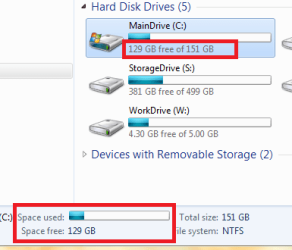
2. Explorer Status Bar! Sure, it looks nice and all and is about 5 times as large as XP's but it can't even display the remaining disk space! I realize MS did this because of the new Libraries concept but they still could have found a way to include this information in the status bar. The status bar is pretty much useless without it.

3. UAC - I never bothered to install Vista for obvious reasons, so this has become a 7 problem for me.

4. WMP12 Playlist won't stay open! I have to manually select "show list" every single time a movie file is opened. If anyone knows how to change this default behaviour please do tell. Thanks.

5. Multi-monitor support... or lack of it. Multi-monitor support was better in XP! You can't even extend a taskbar to other monitors in 7 without using 3rd party apps. Remote Desktop is also still unable to handle multiple monitors running different resolutions (how retarded is that!) and thus forces me to unnecessarily install VNC instead.
 
Last edited:

My Computer My Computer

At a glance

Win7 Ultimate x64Q6600 (G0) @ 3GHzMushkin 2x2GBNvidia 9800GTX+ Superclock by evga
OS
Win7 Ultimate x64
CPU
Q6600 (G0) @ 3GHz
Motherboard
evga nforce 680i SLI SE
Memory
Mushkin 2x2GB
Graphics Card(s)
Nvidia 9800GTX+ Superclock by evga
Monitor(s) Displays
DELL 23" 1920x1080, Samsung 19" 1440x900
Screen Resolution
3360 x 1080/900
Hard Drives
Seagate 250GB
Seagate 1.5TB
Maxtor 500GB (ext)
PSU
OCZ Fatal1ty 550W
Case
Antec P192 (gun metal)
Cooling
Zalman, 120mm
Keyboard
Logitech MX3200
Mouse
Logitech Laser
Internet Speed
5 - 6mbps / 700kbps
.. but it can't even display the remaining disk space!

See attached image...

5. Multi-monitor support... or lack of it. Multi-monitor support was better in XP! You can't even extend a taskbar to other monitors in 7 without using 3rd party apps. Remote Desktop is also still unable to handle multiple monitors running different resolutions (how retarded is that!) and thus forces me to unnecessarily install VNC instead.

You cannot even extend a taskbar to another monitor in Windows XP without using a 3rd party app. Remote Desktop is also still unable...in Windows XP...So...how is Windows XP better with multi-monitor support?
 

Attachments

  • Untitled.png
    Untitled.png
    8.7 KB · Views: 8

My Computer My Computer

At a glance

Windows 10 Pro (x64)Intel Core i7-3930K (3.2GHz - 4.5GHz)4x Samsung 4GB PC3-12800 DDR3 (16GB 1600MHz)Nvidia Geforce GTX 690
Computer type
PC/Desktop
Computer Manufacturer/Model Number
Alienware Aurora ALX R4
OS
Windows 10 Pro (x64)
CPU
Intel Core i7-3930K (3.2GHz - 4.5GHz)
Motherboard
Alienware Aurora-R4 x79
Memory
4x Samsung 4GB PC3-12800 DDR3 (16GB 1600MHz)
Graphics Card(s)
Nvidia Geforce GTX 690
Sound Card
SteelSeries Siberia Elite
Monitor(s) Displays
Dell UltraSharp U3011
Screen Resolution
2560x1600
Hard Drives
Samsung 850 Pro 256 GB, Seagate 1TB Desktop Hybrid HDD, 2x Western Digital 4TB Green HDD
PSU
875W Some Dell PSU <.<
Case
Alienware Aurora ALX
Cooling
Custom Liquid Cooling (EK CPU & GPU blocks) dual EK 480RAD
Keyboard
Logitech G710+ Mechanical
Mouse
Logitech G700s
Internet Speed
Verizon Fios (50 mbps average)
Other Info
Server: Intel NUC D54250WYK: i5-4250U, 16GB, 256 GB mSATA, Windows Server 2012 R2
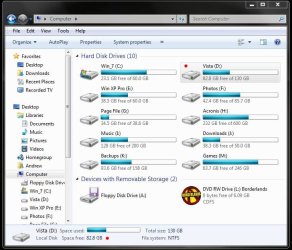
2. Explorer Status Bar! Sure, it looks nice and all and is about 5 times as large as XP's but it can't even display the remaining disk space! I realize MS did this because of the new Libraries concept but they still could have found a way to include this information in the status bar. The status bar is pretty much useless without it.

Perhaps i'm misunderstanding what you're saying...but Windows does display remaining disk space, it also does it on the bottom of Windows Explorer.

IE VIEW OF HD FREESPACE.JPG

What am I missing?

P.S. I see logicearth beat me to the punch, so... :)
 

My Computer My Computer

At a glance

Windows 10 ProIntel Core i7-4770K (3.5Ghz)32 gig Corsair Dominator Platinum (4x8Gig)Sapphire Tri-X R9 Fury
Computer type
PC/Desktop
Computer Manufacturer/Model Number
Custom built by me.
OS
Windows 10 Pro
CPU
Intel Core i7-4770K (3.5Ghz)
Motherboard
Gigabyte G1 Sniper 5 (F10 Bios)
Memory
32 gig Corsair Dominator Platinum (4x8Gig)
Graphics Card(s)
Sapphire Tri-X R9 Fury
Sound Card
Soundblaster ZXR
Monitor(s) Displays
NEC PA242W 24" LCD Monitor
Screen Resolution
1920 x 1200
Hard Drives
Primary - Samsung 850 Pro (512gig), Samsung 840 Pro (256gig), 2TB WD Caviar Black.
PSU
EVGA Supernova 1000 G2
Case
Cooler Master HAF X
Cooling
Corsair H100i with Corsair Air Series SP120 Quiet Fans
Keyboard
Logitech Wireless Wave
Mouse
Logitech Performance MX
Internet Speed
High Speed Cable
Antivirus
Norton Security
Browser
IE11
Other Info
Memory Timings - 1866MHz @ 9-9-9-27-1T @ 1.5 volts
1. Accidental folder deletion - granted this is technically user error but Windows has a bad habit of keeping items in the main explorer window highlighted in solid blue even when the focus is on the parent folder in the treeview. I've hit shift+delete a few times thinking the selected folder would be deleted but instead lost the entire parent folder! I never had this happen in XP.


I'm glad to see it's not just me. I've been copy/paste/cut/move/etc folders since the earliest windows version and never had this happen until win 7.

I used an UNdelete program and it recovered about 350 files, named, "file1.doc, file2.doc, file3.doc, etc. Okay, not happy about that but it worked.

In Explorer, I then highlighted 10 at a time to open in Word 2007. It was fairly quick to see if I wanted it or not, save it or not, and close out. Those ten files were still highlighted in Explorer, so I just clicked DEL and tried the next ten.

This went on for about 140 files when suddenly the entire folder was deleted! I have no idea why. Must have something I did, but it was the same process over and over.

Now, I have to re-scan for those same 350 and start over. Not too happy.
 

My Computer My Computer

At a glance

Win 7 - 64 Pro2.284 gb? laptop
Computer Manufacturer/Model Number
Asus G50 and Toshiba L505
OS
Win 7 - 64 Pro
CPU
2.28
Motherboard
?- asus laptop
Memory
4 gb
Graphics Card(s)
? laptop
Sound Card
? laptop
Monitor(s) Displays
dual display, laptop and 24" Samsung
Hard Drives
two 250gb drives in laptop and one 250 Esata
PSU
laptop
Case
laptop
Cooling
laptop
See attached image...
sygnus21 said:
Perhaps i'm misunderstanding what you're saying...but Windows does display remaining disk space, it also does it on the bottom of Windows Explorer.

That's the "Computer" screen which shows a summary of all devices, not a typical explorer folder view. In other words, if I'm working several levels deep in the bowels of windows explorer, I have to go all the way up and click on "Computer" to look at my free space because it isn't actually displayed in the status bar. Sounds small I know, but it is actually a big inconvenience for a lot of people.

You cannot even extend a taskbar to another monitor in Windows XP without using a 3rd party app. Remote Desktop is also still unable...in Windows XP...So...how is Windows XP better with multi-monitor support?
You are right about the taskbar in XP. I was thinking about the option "Extend windows desktop..." (see image link) which doesn't actually extend the taskbar. I f'd up here, my bad.
As for RDP, I was commenting that it STILL doesn't properly support multi-monitor setups despite high expectations that Win 7 would handle it much better overall. I'd much rather stick with built-in functionality than resort to VNC if it weren't for this tiny but important detail.

robertpri said:
I'm glad to see it's not just me. I've been copy/paste/cut/move/etc folders since the earliest windows version and never had this happen until win 7.

I used an UNdelete program and it recovered about 350 files, named, "file1.doc, file2.doc, file3.doc, etc. Okay, not happy about that but it worked.

In Explorer, I then highlighted 10 at a time to open in Word 2007. It was fairly quick to see if I wanted it or not, save it or not, and close out. Those ten files were still highlighted in Explorer, so I just clicked DEL and tried the next ten.

This went on for about 140 files when suddenly the entire folder was deleted! I have no idea why. Must have something I did, but it was the same process over and over.

Now, I have to re-scan for those same 350 and start over. Not too happy.

Damn that sucks dude. Luckily I didn't lose anything terribly important but I'm trying to change my habits. Good to know I'm not the only one too.

For the record, overall I love Windows 7! :D
 
Last edited:

My Computer My Computer

At a glance

Win7 Ultimate x64Q6600 (G0) @ 3GHzMushkin 2x2GBNvidia 9800GTX+ Superclock by evga
OS
Win7 Ultimate x64
CPU
Q6600 (G0) @ 3GHz
Motherboard
evga nforce 680i SLI SE
Memory
Mushkin 2x2GB
Graphics Card(s)
Nvidia 9800GTX+ Superclock by evga
Monitor(s) Displays
DELL 23" 1920x1080, Samsung 19" 1440x900
Screen Resolution
3360 x 1080/900
Hard Drives
Seagate 250GB
Seagate 1.5TB
Maxtor 500GB (ext)
PSU
OCZ Fatal1ty 550W
Case
Antec P192 (gun metal)
Cooling
Zalman, 120mm
Keyboard
Logitech MX3200
Mouse
Logitech Laser
Internet Speed
5 - 6mbps / 700kbps
Choppy performance..
Every 5-30 minutes the computer seems to freeze (winamp stops playing too) for 2-10 seconds.
On these occations even Ctrl-alt-del wont work, and cpu usage is 0-2% at the time according to Everest Ultimate LCD information.
Before someone mentiones it, Audio Effects is disabled (I tried that suggestion just in case).
Defrag is also disabled (I use manual mode with OO Defrag 12).
 

My Computer My Computer

At a glance

Windows 7 Professional x64 RetailIntel i7 3770K16GB Corsair Vengeance DDR3-1600 CL9XFX Radeon HD7950 DD 3GB
Computer type
PC/Desktop
Computer Manufacturer/Model Number
Selfbuilt
OS
Windows 7 Professional x64 Retail
CPU
Intel i7 3770K
Motherboard
ASUS P8Z77-V Deluxe
Memory
16GB Corsair Vengeance DDR3-1600 CL9
Graphics Card(s)
XFX Radeon HD7950 DD 3GB
Sound Card
Integrated
Monitor(s) Displays
BENQ G2400WD
Screen Resolution
1920x1200
Hard Drives
WDC WD10EZEX
SEAGATE ST2000DM001 x2
WDC WD2500BEV
PSU
Corsair AX760
Case
Cooler Master Storm Trooper
Cooling
Stock
Keyboard
Logitech G510
Mouse
Logitech G9x
Internet Speed
12Mbs
Antivirus
NOD32 Antivirus
Browser
Firefox

My Computer My Computer

At a glance

XP Media Edition / Vista /Win 7 Home PremiumWin 7 Machine: Intel Core 2 Duo T5850 @ 2.16G...4GB Dual Channel DDR2 @ 333MHz 5-5-5-15Nvidia Defaul 1920X1200 256MB GeForce 9300M
Computer Manufacturer/Model Number
HP Touchsmart
OS
XP Media Edition / Vista /Win 7 Home Premium
CPU
Win 7 Machine: Intel Core 2 Duo T5850 @ 2.16GHz Merom 65nm
Motherboard
Pegatron Corp. EVE Model
Memory
4GB Dual Channel DDR2 @ 333MHz 5-5-5-15
Graphics Card(s)
Nvidia Defaul 1920X1200 256MB GeForce 9300M
Sound Card
SoundMAX Integrated Digital HD Audio
Monitor(s) Displays
HP 25" Flat Panel Touch Screen
Screen Resolution
1900X1200
Hard Drives
500 GB Seagate ST3500620as (Sata) 1.5 TB Seagate External
Keyboard
HP Model RK713A
Internet Speed
3.0Gb
I dont even use explorer any more! Just press the Windows key and type in whatever you want!!! Including control panel stuff etc...everything is there...I guess this is the primary reason why working on 7 has become much faster for me that xp...

The only major thing i hate about windows 7 is its name...its actually very stupid but its damn hard to search for anything related to windows 7 because well, both windows and 7 are very commonly used individually...or maybe i should just start using +?
 

My Computer My Computer

At a glance

Windows 7 RC1 64bitIntel Core2Duo [email protected]3GBATI Radeon 3670 512MB
Computer Manufacturer/Model Number
Dell XPS Studio 16
OS
Windows 7 RC1 64bit
CPU
Intel Core2Duo [email protected]
Memory
3GB
Graphics Card(s)
ATI Radeon 3670 512MB
Screen Resolution
720p
Hard Drives
320GB 7200rpm
Internet Speed
2mbps
Other Info
Backlit Keyboard FTW!
Most search engines will perform a better search for "windows 7" than windows 7. Treating the name as an expression rather than two words
 

My Computers My Computers

  • At a glance

    Windows 11 Pro x64 [Latest Release and Releas...Ryzen 9 5950X, 3.8 - 5.2 MHz64GB [2 x 32GB] DDR4 3200MHz4GB NVIDIA GEFORCE GTX 1650 Ti
    Computer type
    PC/Desktop
    Computer Manufacturer/Model Number
    ChillBlast - Custom to my design
    OS
    Windows 11 Pro x64 [Latest Release and Release Preview]
    CPU
    Ryzen 9 5950X, 3.8 - 5.2 MHz
    Motherboard
    Asus Prime X570-Pro
    Memory
    64GB [2 x 32GB] DDR4 3200MHz
    Graphics Card(s)
    4GB NVIDIA GEFORCE GTX 1650 Ti
    Sound Card
    On-board SPDIF to 5.1 System + HDMI [5.1 system]
    Monitor(s) Displays
    32" UHD 32 Bit HDR Monitor + 43" UHD 4K 32Bit HDR TV
    Screen Resolution
    2 x 3840 x 2160 @60Hz
    Hard Drives
    1TB M2 SSD OS, 500GB Fast Access SSD, 2 x 8TB Data + Various Externals from 1TB to 4TB, 10TB NAS
    PSU
    NZXT C750 80 PLUS Gold 750W Modular PSU
    Case
    Workstation Case [Matt Black]
    Cooling
    NZXT Kraken X63 280mm CPU Cooler +2x Quiet Case fans
    Keyboard
    Logitech Wireless MX Keys & K400 + others
    Mouse
    Logitech Wireless MX Master 3S
    Internet Speed
    920 MB Down 50 MB Up
    Antivirus
    BitDefender Total Security Pro
    Browser
    Chrome (always run latest Non-Beta)
    Other Info
    Also run ...
    Laptop - Quad 8GB - Windows 10 Pro x64
    Nexus 7 Android tablet x2
    Samsung 10.2" tablet
    Blackview TAB 8 4G Android Tablet c/w Keyboard
    Wacom Intuos Pro Medium Pen Pad
    Wacom Intuos Pro Small Pen Pad
    Wacom Expresskeys Remote
    Loopdeck+ Graphics Controller
    Shuttle Pro v2 Control
  • At a glance

    Windows 11 Pro x64 Latest RPIntel I7 10750H 5.0GHz32GB [2x16GB] DDR4 2933 MHznVidia GTX1650Ti 4 GB GDDR6
    Computer type
    Laptop
    System Manufacturer/Model Number
    Dell XPS 17 10750H
    OS
    Windows 11 Pro x64 Latest RP
    CPU
    Intel I7 10750H 5.0GHz
    Motherboard
    Dell XPS
    Memory
    32GB [2x16GB] DDR4 2933 MHz
    Graphics Card(s)
    nVidia GTX1650Ti 4 GB GDDR6
    Sound Card
    Stock [Realtek] 4 Speaker
    Monitor(s) Displays
    17" IPS UHD+ Infinity Edge Touchscreen
    Screen Resolution
    3840 x 2400
    Hard Drives
    2TB M2 NVMe, 4TB External + various 500GB & 1TB External NVMe (also have access to spinner HDD from
    PSU
    Stock
    Case
    Stock XPS Aluminium & Carbon Fibre
    Cooling
    Stock - Active Fan Control
    Keyboard
    Backlit + Various Logitech
    Mouse
    Stock Track Pad + Logitech MX Trackball
    Internet Speed
    72 MB Down 18MB Up
    Browser
    Chrome
    Other Info
    Also run ...
    Laptop - Quad 8GB - Windows 10 Pro x64
    Nexus 7 Android tablet x2
    10.2" tablet
    Sony Z3 Android Smartphone
    Wacom Intuos Pro Medium Pen Pad
    Wacom Intuos Pro Small Pen Pad
    Wacom Expresskeys Remote
    Loopdeck+ Graphics Controller
    Shuttle Pro v2 Control Pad
    10TB NAS
Explorer Nav Pane - Takes up real estate on the screen when you are not using it.
You can go into Organize-Layout and turn it off to recover needed screen real estate; then back on to get the utilities back, but this is a bit cumbersome. Is there a way to auto hide the Nav Pane? If not, it would be an asset in future revisions. Ditto The Edit Bar at the bottom of the screen (Pictures/Music). This would be a little harder, as I autohide the Task Bar.
I use both of these utilities, but don't always want them taking up valuable real estate on the screen.

F11 is a much used key for me. Can we make the Organize bar hide with the rest of the chaff at the top of the screen?

Just the files mam... Nothing but the files.
 
Last edited:

My Computer My Computer

At a glance

XP Media Edition / Vista /Win 7 Home PremiumWin 7 Machine: Intel Core 2 Duo T5850 @ 2.16G...4GB Dual Channel DDR2 @ 333MHz 5-5-5-15Nvidia Defaul 1920X1200 256MB GeForce 9300M
Computer Manufacturer/Model Number
HP Touchsmart
OS
XP Media Edition / Vista /Win 7 Home Premium
CPU
Win 7 Machine: Intel Core 2 Duo T5850 @ 2.16GHz Merom 65nm
Motherboard
Pegatron Corp. EVE Model
Memory
4GB Dual Channel DDR2 @ 333MHz 5-5-5-15
Graphics Card(s)
Nvidia Defaul 1920X1200 256MB GeForce 9300M
Sound Card
SoundMAX Integrated Digital HD Audio
Monitor(s) Displays
HP 25" Flat Panel Touch Screen
Screen Resolution
1900X1200
Hard Drives
500 GB Seagate ST3500620as (Sata) 1.5 TB Seagate External
Keyboard
HP Model RK713A
Internet Speed
3.0Gb
Themes

I hate that I can't delete the unwanted MS supplied themes.
 

My Computer My Computer

At a glance

Windows 7
OS
Windows 7
updates don't work
 

My Computer My Computer

At a glance

Windows 7Inter Celeron2GBIntel 4
Computer Manufacturer/Model Number
Toshiba L455 S5975
OS
Windows 7
CPU
Inter Celeron
Motherboard
Toshiba
Memory
2GB
Graphics Card(s)
Intel 4
Sound Card
RealTek HD
Monitor(s) Displays
Toshiba laptop 15.6 inches 16:9 aspect ratio
Hard Drives
Hitachi 220 GB

My Computer My Computer

At a glance

Windows 10 Pro (x64)Intel Core i7-3930K (3.2GHz - 4.5GHz)4x Samsung 4GB PC3-12800 DDR3 (16GB 1600MHz)Nvidia Geforce GTX 690
Computer type
PC/Desktop
Computer Manufacturer/Model Number
Alienware Aurora ALX R4
OS
Windows 10 Pro (x64)
CPU
Intel Core i7-3930K (3.2GHz - 4.5GHz)
Motherboard
Alienware Aurora-R4 x79
Memory
4x Samsung 4GB PC3-12800 DDR3 (16GB 1600MHz)
Graphics Card(s)
Nvidia Geforce GTX 690
Sound Card
SteelSeries Siberia Elite
Monitor(s) Displays
Dell UltraSharp U3011
Screen Resolution
2560x1600
Hard Drives
Samsung 850 Pro 256 GB, Seagate 1TB Desktop Hybrid HDD, 2x Western Digital 4TB Green HDD
PSU
875W Some Dell PSU <.<
Case
Alienware Aurora ALX
Cooling
Custom Liquid Cooling (EK CPU & GPU blocks) dual EK 480RAD
Keyboard
Logitech G710+ Mechanical
Mouse
Logitech G700s
Internet Speed
Verizon Fios (50 mbps average)
Other Info
Server: Intel NUC D54250WYK: i5-4250U, 16GB, 256 GB mSATA, Windows Server 2012 R2

My Computer My Computer

At a glance

Windows 7 Home Premium 64-BitIntel Core i7 2600K 3.4GHz Sandy Bridge8Gb Corsair Vengeance 1600MHz DDR3 CL8Gigabyte GTX460 1Gb OC
Computer Manufacturer/Model Number
Home Build
OS
Windows 7 Home Premium 64-Bit
CPU
Intel Core i7 2600K 3.4GHz Sandy Bridge
Motherboard
ASUS P8Z68-V Pro
Memory
8Gb Corsair Vengeance 1600MHz DDR3 CL8
Graphics Card(s)
Gigabyte GTX460 1Gb OC
Sound Card
Realtek HD, Logitech G35 7.1 USB Headset
Monitor(s) Displays
BenQ 24" Full HD 16:9 DVI
Screen Resolution
1920x1080
Hard Drives
Western Digital 640Gb 64Mb Cache SATA III
Maxtor 250Gb SATA
PSU
XFX 650W XXX Edition Modular
Case
CoolerMaster Elite 335
Cooling
Xilence Red Wing
Keyboard
Microsoft Sidewinder X4
Mouse
Logitech G500 Gaming Mouse
Internet Speed
20Mb Cable
I am only in my first week of using windows 7 ultimate and so far i cant come up with anything bad apart from the fact that when i leave my computer alone for about a hour when i come back i find its turned itself off...strange
 

My Computer My Computer

At a glance

Windows 7 Ultimate
OS
Windows 7 Ultimate
Screen Resolution
1920x1200
I am only in my first week of using windows 7 ultimate and so far i cant come up with anything bad apart from the fact that when i leave my computer alone for about a hour when i come back i find its turned itself off...strange
Have you adjust power settings like, sleep and hibernation?
 

My Computer My Computer

At a glance

Windows 10 Pro (x64)Intel Core i7-3930K (3.2GHz - 4.5GHz)4x Samsung 4GB PC3-12800 DDR3 (16GB 1600MHz)Nvidia Geforce GTX 690
Computer type
PC/Desktop
Computer Manufacturer/Model Number
Alienware Aurora ALX R4
OS
Windows 10 Pro (x64)
CPU
Intel Core i7-3930K (3.2GHz - 4.5GHz)
Motherboard
Alienware Aurora-R4 x79
Memory
4x Samsung 4GB PC3-12800 DDR3 (16GB 1600MHz)
Graphics Card(s)
Nvidia Geforce GTX 690
Sound Card
SteelSeries Siberia Elite
Monitor(s) Displays
Dell UltraSharp U3011
Screen Resolution
2560x1600
Hard Drives
Samsung 850 Pro 256 GB, Seagate 1TB Desktop Hybrid HDD, 2x Western Digital 4TB Green HDD
PSU
875W Some Dell PSU <.<
Case
Alienware Aurora ALX
Cooling
Custom Liquid Cooling (EK CPU & GPU blocks) dual EK 480RAD
Keyboard
Logitech G710+ Mechanical
Mouse
Logitech G700s
Internet Speed
Verizon Fios (50 mbps average)
Other Info
Server: Intel NUC D54250WYK: i5-4250U, 16GB, 256 GB mSATA, Windows Server 2012 R2
I hate that I can't delete the unwanted MS supplied themes.

You should be able to delete them if you take ownership of the folder/files.
 

My Computer My Computer

At a glance

Win7 Ultimate x64Q6600 (G0) @ 3GHzMushkin 2x2GBNvidia 9800GTX+ Superclock by evga
OS
Win7 Ultimate x64
CPU
Q6600 (G0) @ 3GHz
Motherboard
evga nforce 680i SLI SE
Memory
Mushkin 2x2GB
Graphics Card(s)
Nvidia 9800GTX+ Superclock by evga
Monitor(s) Displays
DELL 23" 1920x1080, Samsung 19" 1440x900
Screen Resolution
3360 x 1080/900
Hard Drives
Seagate 250GB
Seagate 1.5TB
Maxtor 500GB (ext)
PSU
OCZ Fatal1ty 550W
Case
Antec P192 (gun metal)
Cooling
Zalman, 120mm
Keyboard
Logitech MX3200
Mouse
Logitech Laser
Internet Speed
5 - 6mbps / 700kbps
Status
Not open for further replies.
Back
Top