What don't you like about Windows 7?

Status
Not open for further replies.
For those that feel access to files should be restricted, I'll just have to agree to disagree. It shouldn't be up to someone else to decide which files I "Need" access to.

Another thing. Being an administrator is all about responsibility. Not being all knowing. If you claim to be an administrator and crash a system, it's your own stupid fault and nobody else’s. Yes, it is true, that Joe average user doesn’t need access to some files. The truth is Joe (or Joan) will probably not even look for these files because either they don't care, or it's beyond the scope of their knowledge. Protection for these people is nice. Anybody that looks for a file however, and wants to take responsibility for modifying it, should be able to. ANY file. No explination needed. No jumping through hoops. I personally haven’t run across one yet, (I either don't care or it's beyond the scope of my knowledge. :)) but I hear even in the secret Admin mode, there are still files that cannot be modified. Anyone know the truth of that last statement?
 

My Computer My Computer

At a glance

XP Media Edition / Vista /Win 7 Home PremiumWin 7 Machine: Intel Core 2 Duo T5850 @ 2.16G...4GB Dual Channel DDR2 @ 333MHz 5-5-5-15Nvidia Defaul 1920X1200 256MB GeForce 9300M
Computer Manufacturer/Model Number
HP Touchsmart
OS
XP Media Edition / Vista /Win 7 Home Premium
CPU
Win 7 Machine: Intel Core 2 Duo T5850 @ 2.16GHz Merom 65nm
Motherboard
Pegatron Corp. EVE Model
Memory
4GB Dual Channel DDR2 @ 333MHz 5-5-5-15
Graphics Card(s)
Nvidia Defaul 1920X1200 256MB GeForce 9300M
Sound Card
SoundMAX Integrated Digital HD Audio
Monitor(s) Displays
HP 25" Flat Panel Touch Screen
Screen Resolution
1900X1200
Hard Drives
500 GB Seagate ST3500620as (Sata) 1.5 TB Seagate External
Keyboard
HP Model RK713A
Internet Speed
3.0Gb
For those that feel access to files should be restricted, I'll just have to agree to disagree. It shouldn't be up to someone else to decide which files I "Need" access to.

And no one is, you CAN change it. But WHY should it be open by default? Hell Microsoft should forget about security all together and put you bare face on the internet with no means to protect yourself. That is what everyone wants! So lets do that!

but I hear even in the secret Admin mode, there are still files that cannot be modified. Anyone know the truth of that last statement?

No truth. Everything can be accessed with the right knowledge.
 

My Computer My Computer

At a glance

Windows 10 Pro (x64)Intel Core i7-3930K (3.2GHz - 4.5GHz)4x Samsung 4GB PC3-12800 DDR3 (16GB 1600MHz)Nvidia Geforce GTX 690
Computer type
PC/Desktop
Computer Manufacturer/Model Number
Alienware Aurora ALX R4
OS
Windows 10 Pro (x64)
CPU
Intel Core i7-3930K (3.2GHz - 4.5GHz)
Motherboard
Alienware Aurora-R4 x79
Memory
4x Samsung 4GB PC3-12800 DDR3 (16GB 1600MHz)
Graphics Card(s)
Nvidia Geforce GTX 690
Sound Card
SteelSeries Siberia Elite
Monitor(s) Displays
Dell UltraSharp U3011
Screen Resolution
2560x1600
Hard Drives
Samsung 850 Pro 256 GB, Seagate 1TB Desktop Hybrid HDD, 2x Western Digital 4TB Green HDD
PSU
875W Some Dell PSU <.<
Case
Alienware Aurora ALX
Cooling
Custom Liquid Cooling (EK CPU & GPU blocks) dual EK 480RAD
Keyboard
Logitech G710+ Mechanical
Mouse
Logitech G700s
Internet Speed
Verizon Fios (50 mbps average)
Other Info
Server: Intel NUC D54250WYK: i5-4250U, 16GB, 256 GB mSATA, Windows Server 2012 R2
but I hear even in the secret Admin mode, there are still files that cannot be modified. Anyone know the truth of that last statement?

You hear correctly. There are still files/folders with which you have to change permissions or take ownership. In reality, the "secret" administrator is in reality an advanced user account. But as the previous poster said, you can access anything if you know how.
 

My Computer My Computer

At a glance

Windows 7 Ultimate 32 bitIntel(R) Pentium(R) 4 CPU 3.00GHz2.50 GB RAMNVIDIA GeForce 7600 GS
Computer Manufacturer/Model Number
Home built
OS
Windows 7 Ultimate 32 bit
CPU
Intel(R) Pentium(R) 4 CPU 3.00GHz
Motherboard
ASUS P4P800-VM Motherboard Chipset: Intel 865G + ICH5
Memory
2.50 GB RAM
Graphics Card(s)
NVIDIA GeForce 7600 GS
Sound Card
SoundMax Integrated Digital Audio (Chip)
Monitor(s) Displays
ViewSonic VX 1962 wm
Screen Resolution
1680 X 1050
Hard Drives
Seagate Barracuda 7200.10 80 GB
ST380215A ATA Device 18.6 GB
Western Digital "My Book" external hard drive 750 GB
Cooling
Fan based
Keyboard
Microsoft Comfort Curve Keyboard 2000 v10 USB
Mouse
Logitec optic USB
Internet Speed
3.01 Mb/s download 0.64 Mb/s upload
The Horrible harsh white explorer backgrounds in Aero still are blinding me. Been struggling to modify aero.msstyles , but run into obstacle after obstacle. Why MS made this so horribly hard to change is beyond me. It was trivial in WinNT, Win2k, and WinXP. If I ever manage to fix it I promise I will write a noob-friendly, step-by-step tutorial. I've been in this thread, it seems to be the best one but I am still stuck:

http://www.sevenforums.com/customization/38975-win-explorer-background-change-3.html#post491306

Also still frustrated by Win7's refusing to always default to "detailed" view in all folder windows, despite trying everything I can think of to make it listen - it maddeningly insists that it knows best, showing thumbnails, or icons, when I only want DETAILS, always, without exception.

In general, Win7 tries to decide for me what is best. I desperately want to turn all of that decision process off, and make it stay off! I and only I, know what is best to maximize my productivity. Win7 is not HAL 9000; it always gets it wrong when it tries to "help".

But the colors are pretty and it seems sort of more stable than XP. A little more. Runs faster - but I'm comparing Win7x64 with XPx32 on the same dual-boot box.

$teve
 

My Computer My Computer

At a glance

Windows 7 Pro x64 (dual-booting XPSP3 and Win7)Intel Core-2 Quad4GB 800 Mhz PC2 unbuffered ECCNVIDIA Quadro FX 570
Computer Manufacturer/Model Number
Dell T3400
OS
Windows 7 Pro x64 (dual-booting XPSP3 and Win7)
CPU
Intel Core-2 Quad
Memory
4GB 800 Mhz PC2 unbuffered ECC
Graphics Card(s)
NVIDIA Quadro FX 570
Sound Card
Creative SB X-Fi model SB0770
Monitor(s) Displays
Dell 19" FP
Screen Resolution
1680x1050
Hard Drives
SATA disk0 250GB disk1 500GB
Internet Speed
TW RR
Other Info
Just a baby compared to my work box!
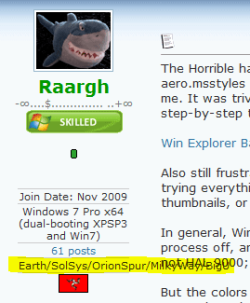
Steve, it's OK to be funny but honestly, this disturbs me every time I see your posts:
Raargh.PNG

Not the text itself but that it is too long.

Don't misunderstand me, it's up to you what you write here to present you. I'm just telling my opinion.

Kari
 

My Computer My Computer

At a glance

Windows 10 Pro x64 EN-GB1.6 GHz Intel Core i7-720QM Processor6 GBATI Mobility Radeon HD 5850 Graphics
Computer type
Laptop
Computer Manufacturer/Model Number
HP ENVY 17-1150eg
OS
Windows 10 Pro x64 EN-GB
CPU
1.6 GHz Intel Core i7-720QM Processor
Memory
6 GB
Graphics Card(s)
ATI Mobility Radeon HD 5850 Graphics
Sound Card
Beats sound system with integrated subwoofer
Monitor(s) Displays
17" laptop display, 22" LED and 32" Full HD TV through HDMI
Screen Resolution
1600*900 (1), 1920*1080 (2&3)
Hard Drives
Internal: 2 x 500 GB SATA Hard Disk Drive 7200 rpm
External: 2TB for backups, 3TB USB3 network drive for media
Cooling
As Envy runs a bit warm, I have it on a Cooler Master pad
Keyboard
Logitech diNovo Media Desktop Laser (bluetooth)
Mouse
Logitech Performance Mouse MX
Internet Speed
50/10 Mbps VDSL
Antivirus
Windows Defender 4.3.9431.0
Browser
Maxthon 3.5.2., IE11
Also still frustrated by Win7's refusing to always default to "detailed" view in all folder windows, despite trying everything I can think of to make it listen - it maddeningly insists that it knows best, showing thumbnails, or icons, when I only want DETAILS, always, without exception.

$teve

This is insanely maddening. I've "Fixed:" it on mine by hand setting all of the built-in "modes" (Pictures, Documents, Music, Videos) to all have the exact same layout and options as "General Items". Then when it tries to autopick something, it always looks the same (the way I set it up) and I don't even know it's done it.

Now if I can only remember how I did that...

[Edit] THe second half of this vista tutorial may have done the trick for me... http://www.vistax64.com/tutorials/77444-windows-explorer-folder-type-templates.html

Basically you set a folder to each template type, then set all the settings exactly as you want them the same for each one. Then when it auto selects a template it's always the same layout.

You have to do each one seperately. Find a folder. Assign it a template (Documents for example). Set all the layoutsettings, columns sorting, icon size etc. Then tools, view Apply to all folders. It will apply it to all folders with that template.

I am not sure that if you create a new fiolder and it assigns the pictures template to it if it sticks though. 've not seen theproblem crop up in memory since I did thias, but I don;t create root level folders all that often after initial setup.
[/edit]
 

My Computer My Computer

At a glance

Windows 7 x64 Ultimatei7 96012 Gig Corsair DominatorNvidia 480
Computer Manufacturer/Model Number
Scratch built
OS
Windows 7 x64 Ultimate
CPU
i7 960
Motherboard
Asus P6X58D
Memory
12 Gig Corsair Dominator
Graphics Card(s)
Nvidia 480
Sound Card
Maudio Delta 44 + breakout box
Monitor(s) Displays
Dell UltraSharp U2410 24in and Samsung 21 dual monitors
Screen Resolution
1920x1200 and 1280x1024
Hard Drives
Primary: Intel X-25M G2 160G SSD
Secondary: Segate baracuda 1.0 TB
HDs in AHCI mode.
PSU
Corasair TX850
Case
Cooler Master HAF
Cooling
Corsair H50
Keyboard
Logitech G15 + N52 game pad
Mouse
Logitech MX518
Internet Speed
15kbs down 4.5kbps up
Other Info
WEI 7.6
CPU & RAM 7.6
Graphics 7.9
Hard disk 7.7
I hate how it thinks its all that..... and it is
 

My Computer My Computer

At a glance

Windows 7 Pro 64bitAmd 550BE unlocked to Quadcore 3.1GHZ4GB OCZ platinum 1333ATI 3850 512MB Asus
Computer Manufacturer/Model Number
The Cloud Windfoot Omega Build. Codename: Outpost
OS
Windows 7 Pro 64bit
CPU
Amd 550BE unlocked to Quadcore 3.1GHZ
Motherboard
GA-770TA-UD3 Rev 1.0
Memory
4GB OCZ platinum 1333
Graphics Card(s)
ATI 3850 512MB Asus
Sound Card
creative Xfi music
Monitor(s) Displays
samsung syncmaster T220+ Dell P780
Screen Resolution
1680x1050, 1280x960
Hard Drives
WD 250GB
segate 500GB
PSU
Ultra 500 watt
Case
some random case
Cooling
Coolmaster TX3
Keyboard
Microsoft natural ergonomic 4000
Mouse
Logitech G9
Internet Speed
Teksavvy 5Mbps down 700Kbps up
Other Info
there is a 80mm(8cm) intake fan on the side of the case and a 120mm(12cm) fan as exaust
And no one is, you CAN change it. But WHY should it be open by default? Hell Microsoft should forget about security all together and put you bare face on the internet with no means to protect yourself. That is what everyone wants! So lets do that!

So I guess what you're trying to say is, if some breaks into my computer through the internet, it makes it easier to get into my files. Otherwise, what does one thing have to do with the other?

I know when people disagree, sometimes it's frustrating. Please don't take this personally. I respect you, and what you are saying. If we met IRL you could even be a friend. I just (Personally) feel MS went overboard with security. It detracts from my computing experience. The security they did come up with, is overt and intrusive. I feel no effort was made to make the security transparent.

(Point) A door lock can be picked, so spme people put a dead bolt on to help secure the door. Since the dead bolt can be picked, you can also put 2 more locks on, and have different keys for them all. The security is great! but it makes it a pain to open the door.

Open by default? Maybe not. Easy access to turn it off or reconfigure it? Yeah that's the ticket. If someone wants to turn off UAC, why not make it easy to do it, and easy to find. Some will say it is easy already. Easy for whom. Do you really have to be an advanced user, or go through a ton of research to get rid of something you consider to be a pain? The ability to choose NOT to jump through hoops to access files, or renew an IP address would be nice too.

To some there cannot be to much security, and no sacrifice is to great in the name of security. I'm not one of those people. As much as I hate to compare apples and oranges, XP has no where near the security, and I NEVER had a problem.

Just a point of view. Thanks for listening.
Scott
 
Last edited:

My Computer My Computer

At a glance

XP Media Edition / Vista /Win 7 Home PremiumWin 7 Machine: Intel Core 2 Duo T5850 @ 2.16G...4GB Dual Channel DDR2 @ 333MHz 5-5-5-15Nvidia Defaul 1920X1200 256MB GeForce 9300M
Computer Manufacturer/Model Number
HP Touchsmart
OS
XP Media Edition / Vista /Win 7 Home Premium
CPU
Win 7 Machine: Intel Core 2 Duo T5850 @ 2.16GHz Merom 65nm
Motherboard
Pegatron Corp. EVE Model
Memory
4GB Dual Channel DDR2 @ 333MHz 5-5-5-15
Graphics Card(s)
Nvidia Defaul 1920X1200 256MB GeForce 9300M
Sound Card
SoundMAX Integrated Digital HD Audio
Monitor(s) Displays
HP 25" Flat Panel Touch Screen
Screen Resolution
1900X1200
Hard Drives
500 GB Seagate ST3500620as (Sata) 1.5 TB Seagate External
Keyboard
HP Model RK713A
Internet Speed
3.0Gb
@cbleman, then why don't you just remove the security? Right-click on the "C" drive > Properties > Security tab > Advance > Owner > Edit > Other user > type in "Everyone" OK > Select the checkbox > OK (wait) > Permissions > Edit > Add > type in "Everyone" OK > Full Control > OK > Last checkbox > OK. No more security.

But in no way should Microsoft make this default, that would be just stupid. The way things are now is the way it has to be. In my own opinion it should be even more restricted. The things you want access to you do not need access to them, wanting to have permission just for the sack of it, is a ridiculous notion.

Whether you had problems or not is irrelevant, you are the only user out there.
 

My Computer My Computer

At a glance

Windows 10 Pro (x64)Intel Core i7-3930K (3.2GHz - 4.5GHz)4x Samsung 4GB PC3-12800 DDR3 (16GB 1600MHz)Nvidia Geforce GTX 690
Computer type
PC/Desktop
Computer Manufacturer/Model Number
Alienware Aurora ALX R4
OS
Windows 10 Pro (x64)
CPU
Intel Core i7-3930K (3.2GHz - 4.5GHz)
Motherboard
Alienware Aurora-R4 x79
Memory
4x Samsung 4GB PC3-12800 DDR3 (16GB 1600MHz)
Graphics Card(s)
Nvidia Geforce GTX 690
Sound Card
SteelSeries Siberia Elite
Monitor(s) Displays
Dell UltraSharp U3011
Screen Resolution
2560x1600
Hard Drives
Samsung 850 Pro 256 GB, Seagate 1TB Desktop Hybrid HDD, 2x Western Digital 4TB Green HDD
PSU
875W Some Dell PSU <.<
Case
Alienware Aurora ALX
Cooling
Custom Liquid Cooling (EK CPU & GPU blocks) dual EK 480RAD
Keyboard
Logitech G710+ Mechanical
Mouse
Logitech G700s
Internet Speed
Verizon Fios (50 mbps average)
Other Info
Server: Intel NUC D54250WYK: i5-4250U, 16GB, 256 GB mSATA, Windows Server 2012 R2
@cbleman, then why don't you just remove the security? Right-click on the "C" drive > Properties > Security tab > Advance > Owner > Edit > Other user > type in "Everyone" OK > Select the checkbox > OK (wait) > Permissions > Edit > Add > type in "Everyone" OK > Full Control > OK > Last checkbox > OK. No more security.

But in no way should Microsoft make this default, that would be just stupid. The way things are now is the way it has to be. In my own opinion it should be even more restricted. The things you want access to you do not need access to them, wanting to have permission just for the sack of it, is a ridiculous notion.

Whether you had problems or not is irrelevant, you are the only user out there.

Open by default? Maybe not. Easy access to turn it off or reconfigure it? Yeah that's the ticket. If someone wants to turn off UAC, why not make it easy to do it, and easy to find. Some will say it is easy already. Easy for whom. Do you really have to be an advanced user, or go through a ton of research to get rid of something you consider to be a pain? The ability to choose NOT to jump through hoops to access files, or renew an IP address would be nice too.

I agree with LogicEarth. If you really don't want the advanced security, then Windows does provide the means with which to turn it off.

And the fact that you need to be a relatively advanced user to disable the security or other components is right on the ticket. In my experience, most of the problems I've encountered with Windows (any version) are from the novice users who change something for the sake of doing so, and screw things up in the process with no idea how to set it back.

Quite frankly, I personally believe that the ability to disable that which is designed to protect the stability of the system could use a bit more of a lockdown, and have it made even harder to turn off.
 

My Computer My Computer

At a glance

Windows 7 Professional 32-bit SP1AMD A4/A63.00GB EDOVMware SVGA 3D
Computer type
PC/Desktop
Computer Manufacturer/Model Number
Virtual Machine
OS
Windows 7 Professional 32-bit SP1
CPU
AMD A4/A6
Motherboard
Intel Corporation 440BX Desktop Reference Platform
Memory
3.00GB EDO
Graphics Card(s)
VMware SVGA 3D
Sound Card
High Definition Audio Device
Monitor(s) Displays
Generic Non-PnP Monitor on VMware SVGA 3D
Screen Resolution
1440x900
Hard Drives
1 x 60GB VMware Virtual SATA Hard Drive ATA Device
Antivirus
Kaspersky Total Security
Let's get negative.

All windows explorer windows open at the same size and auto cascade. I'm constantly moving windows around ...

Very annoying.
 

My Computer My Computer

At a glance

XP Pro SP3 X86 / Win7 Pro X86Amd 64 x2 4200 (2.4ghz)Kingston DDR2 800 2gbNvidia GF-8400
Computer Manufacturer/Model Number
Homebrew
OS
XP Pro SP3 X86 / Win7 Pro X86
CPU
Amd 64 x2 4200 (2.4ghz)
Motherboard
Asus M2N-MX SE Plus
Memory
Kingston DDR2 800 2gb
Graphics Card(s)
Nvidia GF-8400
Sound Card
Realtek on Motherboard
Monitor(s) Displays
Acer x-193bw
Screen Resolution
1440 x 900
Hard Drives
Western Digital 500g
PSU
350watt In-Win
Case
In-Win
Cooling
Air
Keyboard
yes
Mouse
yes
Internet Speed
5mpbs
Other Info
Also ASRock ION 330 as HTPC (on XP).
Acer Aspire as GP netbook (on XP).
@logicearth
I edited my last post about open as a default. Your post beat my edit. I agree. Don't leave everything open as a default. Thank you for that last piece of info! It's terrific! As always you are very helpful.

No... I'm NOT the only user out there. I'm advocating making it easy for others to remove or modify security if they wish, and making the security more transparent. I'm in other peoples houses on their computers almost every day. Complaints about the "Nags and restricted file/function access is something I commonly hear. I do NOT remove their security, nor do I advocate it while wearing my work hat. I DO tell them it's risky, and refer them to this forum. Weather they go or not, and what they do after they go to the forum, is up to them. My security has been opened up for a long time. I will take responsibility for myself. I will NOT advise them to remove their security, nor open their systems at MY discression. They need to make a decision for themselves, and accept responsibility for their own actions, just as I do mine.

What I don't like, (The theme of this thread.) is that it's not easier to take full control, and the security is not more transparent. There doesn’t seem to be many options in the GUI, and not everyone is a command prompt junkie. as I said in my modified post. some people will say it IS easy. I would disagree with that also. Others will say "It's for their own good." Dictators in the past have expoused the same Idea. Not only let the people decide, make these options easy to find, and easy to execute.

On a more personal note, I would like to thank you again. As I said, my security options have been modified for a long time. The answer in your last post was FAR more elegant. You have helped me, and expanded my knowledge once more. The system will not let me REP you again. You (again) have my personal thanks.

@dzomlija I understand and respect your point of view also. I don't believe treating everyone like an idiot is the answer. Giving others credit for a little sense is a big part of my outlook. Will some just cruise through the controls and change them just because they can? Yup. These people need to take responsibility for their actions also. Idiot proofing the entire system is impossible. :)
 
Last edited:

My Computer My Computer

At a glance

XP Media Edition / Vista /Win 7 Home PremiumWin 7 Machine: Intel Core 2 Duo T5850 @ 2.16G...4GB Dual Channel DDR2 @ 333MHz 5-5-5-15Nvidia Defaul 1920X1200 256MB GeForce 9300M
Computer Manufacturer/Model Number
HP Touchsmart
OS
XP Media Edition / Vista /Win 7 Home Premium
CPU
Win 7 Machine: Intel Core 2 Duo T5850 @ 2.16GHz Merom 65nm
Motherboard
Pegatron Corp. EVE Model
Memory
4GB Dual Channel DDR2 @ 333MHz 5-5-5-15
Graphics Card(s)
Nvidia Defaul 1920X1200 256MB GeForce 9300M
Sound Card
SoundMAX Integrated Digital HD Audio
Monitor(s) Displays
HP 25" Flat Panel Touch Screen
Screen Resolution
1900X1200
Hard Drives
500 GB Seagate ST3500620as (Sata) 1.5 TB Seagate External
Keyboard
HP Model RK713A
Internet Speed
3.0Gb
I understand and respect your point of view also. I don't believe treating everyone like an idiot is the answer. Giving others credit for a little sense is a big part of my outlook. Will some just cruise through the controls and change them just because they can? Yup. These people need to take responsibility for their actions also. Idiot proofing the entire system is impossible. :)

I agree completely.

"No matter how smart you are, there is always someone smarter"

In a similar vein with computer security:

"No matter how secure your system, someone will find a way around it".

So why make it easier for them?
 

My Computer My Computer

At a glance

Windows 7 Professional 32-bit SP1AMD A4/A63.00GB EDOVMware SVGA 3D
Computer type
PC/Desktop
Computer Manufacturer/Model Number
Virtual Machine
OS
Windows 7 Professional 32-bit SP1
CPU
AMD A4/A6
Motherboard
Intel Corporation 440BX Desktop Reference Platform
Memory
3.00GB EDO
Graphics Card(s)
VMware SVGA 3D
Sound Card
High Definition Audio Device
Monitor(s) Displays
Generic Non-PnP Monitor on VMware SVGA 3D
Screen Resolution
1440x900
Hard Drives
1 x 60GB VMware Virtual SATA Hard Drive ATA Device
Antivirus
Kaspersky Total Security
That's a good point too. How much ease of use do we sacrifice in the name of security. Leaving my front door unlocked would defiantly make the door easier for me to use, but I wouldn't do that. It would make it to easy for someone to break in. On the other hand, I wouldn't resort to the extreme measures I mentioned earlier. There are however, others that would. I also agree that even fatalists who say anyone with enough knowledge to get through one lock can get through ten, will generaly put at least one good lock on a door. (Therefore no open default) Shouldn't it be left up to the individual? Shouldn't the locks be easy to operate?
 

My Computer My Computer

At a glance

XP Media Edition / Vista /Win 7 Home PremiumWin 7 Machine: Intel Core 2 Duo T5850 @ 2.16G...4GB Dual Channel DDR2 @ 333MHz 5-5-5-15Nvidia Defaul 1920X1200 256MB GeForce 9300M
Computer Manufacturer/Model Number
HP Touchsmart
OS
XP Media Edition / Vista /Win 7 Home Premium
CPU
Win 7 Machine: Intel Core 2 Duo T5850 @ 2.16GHz Merom 65nm
Motherboard
Pegatron Corp. EVE Model
Memory
4GB Dual Channel DDR2 @ 333MHz 5-5-5-15
Graphics Card(s)
Nvidia Defaul 1920X1200 256MB GeForce 9300M
Sound Card
SoundMAX Integrated Digital HD Audio
Monitor(s) Displays
HP 25" Flat Panel Touch Screen
Screen Resolution
1900X1200
Hard Drives
500 GB Seagate ST3500620as (Sata) 1.5 TB Seagate External
Keyboard
HP Model RK713A
Internet Speed
3.0Gb
Drivers.

It took my long time to get my Internet working on Window 7. I used to have Window XP and there was only window xp drivers but i manged to get them working by going in safe mode lots of time
 

My Computer My Computer

At a glance

Window XP SP3 and Window Vista SP2
OS
Window XP SP3 and Window Vista SP2
Drivers.

It took my long time to get my Internet working on Window 7. I used to have Window XP and there was only window xp drivers but i manged to get them working by going in safe mode lots of time
Drivers? Specificly What are you trying to run? Drivers are one of the things I couldn't find anything to complain about.

The only times I couldn't get drivers, the fault usually was with the hardware manufacturer; not with Windows 7. There are a lot of extremely knowledgable people on this thread. If you mention the specific hardware, and manufacturer, perhaps we can help.
 
Last edited:

My Computer My Computer

At a glance

XP Media Edition / Vista /Win 7 Home PremiumWin 7 Machine: Intel Core 2 Duo T5850 @ 2.16G...4GB Dual Channel DDR2 @ 333MHz 5-5-5-15Nvidia Defaul 1920X1200 256MB GeForce 9300M
Computer Manufacturer/Model Number
HP Touchsmart
OS
XP Media Edition / Vista /Win 7 Home Premium
CPU
Win 7 Machine: Intel Core 2 Duo T5850 @ 2.16GHz Merom 65nm
Motherboard
Pegatron Corp. EVE Model
Memory
4GB Dual Channel DDR2 @ 333MHz 5-5-5-15
Graphics Card(s)
Nvidia Defaul 1920X1200 256MB GeForce 9300M
Sound Card
SoundMAX Integrated Digital HD Audio
Monitor(s) Displays
HP 25" Flat Panel Touch Screen
Screen Resolution
1900X1200
Hard Drives
500 GB Seagate ST3500620as (Sata) 1.5 TB Seagate External
Keyboard
HP Model RK713A
Internet Speed
3.0Gb
Help

I tried to post a message earlier re the lack of support for event log messages (what don't you like about Windows 7).
I cannot find my post and I did not want to post the same message again in case I violated forum protocols.
Can any one advise me re this?
 

My Computer My Computer

At a glance

Windows 7 Ultimate 64 BitIntel Core 2 Quad Q9300 2.5GhzCrucial Ballistix DDR2 800 PC6400-BL25664AA80...INNO3D Geforce 9400GT 512 MB with CUDA
Computer Manufacturer/Model Number
Custom Build
OS
Windows 7 Ultimate 64 Bit
CPU
Intel Core 2 Quad Q9300 2.5Ghz
Motherboard
ASUS P5KPL-CM
Memory
Crucial Ballistix DDR2 800 PC6400-BL25664AA80A 2GB x 2
Graphics Card(s)
INNO3D Geforce 9400GT 512 MB with CUDA
Sound Card
Built in
Monitor(s) Displays
AMW X2210WDS
Hard Drives
500GB Samsung (SATA II) HD501LJ (Internal)
500GB My Book WD 5000AAV (External) USB
500GB My Book WD 5000AAJ (External) USB
PSU
Aopen Z450-12APNF
Case
Aopen H500E
Cooling
Akasa AK-956SF
I tried to post a message earlier re the lack of support for event log messages (what don't you like about Windows 7).
I cannot find my post and I did not want to post the same message again in case I violated forum protocols.
Can any one advise me re this?
Chris - You only show 1 post on this forum. I don't know what happened to your original post. I'm not a moderator, but I recommend you post your original again.
 
Last edited:

My Computer My Computer

At a glance

XP Media Edition / Vista /Win 7 Home PremiumWin 7 Machine: Intel Core 2 Duo T5850 @ 2.16G...4GB Dual Channel DDR2 @ 333MHz 5-5-5-15Nvidia Defaul 1920X1200 256MB GeForce 9300M
Computer Manufacturer/Model Number
HP Touchsmart
OS
XP Media Edition / Vista /Win 7 Home Premium
CPU
Win 7 Machine: Intel Core 2 Duo T5850 @ 2.16GHz Merom 65nm
Motherboard
Pegatron Corp. EVE Model
Memory
4GB Dual Channel DDR2 @ 333MHz 5-5-5-15
Graphics Card(s)
Nvidia Defaul 1920X1200 256MB GeForce 9300M
Sound Card
SoundMAX Integrated Digital HD Audio
Monitor(s) Displays
HP 25" Flat Panel Touch Screen
Screen Resolution
1900X1200
Hard Drives
500 GB Seagate ST3500620as (Sata) 1.5 TB Seagate External
Keyboard
HP Model RK713A
Internet Speed
3.0Gb
@Kari
Steve, it's OK to be funny but honestly, this disturbs me every time I see your posts:
View attachment 61949

Not the text itself but that it is too long.

Don't misunderstand me, it's up to you what you write here to present you. I'm just telling my opinion.

Kari

LOL! Thanks.

Actually that is the shortened version of my "standard" location string that I use in all forums to which I belong. SevenForums is the only one that limits it to the length you see. The full string is this:
"Earth/Sol System/Sagittarius Arm/Milky Way Galaxy/Local Group/Fornax-Virgo Filament/Virgo Supercluster/Hubble Bubble/Infinity

I will concede that it is a long string. But, I compensate by not having an image in my signature. So there! 8^]

$teve
 

My Computer My Computer

At a glance

Windows 7 Pro x64 (dual-booting XPSP3 and Win7)Intel Core-2 Quad4GB 800 Mhz PC2 unbuffered ECCNVIDIA Quadro FX 570
Computer Manufacturer/Model Number
Dell T3400
OS
Windows 7 Pro x64 (dual-booting XPSP3 and Win7)
CPU
Intel Core-2 Quad
Memory
4GB 800 Mhz PC2 unbuffered ECC
Graphics Card(s)
NVIDIA Quadro FX 570
Sound Card
Creative SB X-Fi model SB0770
Monitor(s) Displays
Dell 19" FP
Screen Resolution
1680x1050
Hard Drives
SATA disk0 250GB disk1 500GB
Internet Speed
TW RR
Other Info
Just a baby compared to my work box!
Thanks Cbleman
Will try that.
 

My Computer My Computer

At a glance

Windows 7 Ultimate 64 BitIntel Core 2 Quad Q9300 2.5GhzCrucial Ballistix DDR2 800 PC6400-BL25664AA80...INNO3D Geforce 9400GT 512 MB with CUDA
Computer Manufacturer/Model Number
Custom Build
OS
Windows 7 Ultimate 64 Bit
CPU
Intel Core 2 Quad Q9300 2.5Ghz
Motherboard
ASUS P5KPL-CM
Memory
Crucial Ballistix DDR2 800 PC6400-BL25664AA80A 2GB x 2
Graphics Card(s)
INNO3D Geforce 9400GT 512 MB with CUDA
Sound Card
Built in
Monitor(s) Displays
AMW X2210WDS
Hard Drives
500GB Samsung (SATA II) HD501LJ (Internal)
500GB My Book WD 5000AAV (External) USB
500GB My Book WD 5000AAJ (External) USB
PSU
Aopen Z450-12APNF
Case
Aopen H500E
Cooling
Akasa AK-956SF
Status
Not open for further replies.
Back
Top