What don't you like about Windows 7?

Status
Not open for further replies.
Hey guys I've just tried installing forceware 72.14 and somehow it works for my GF 4mx (pci):D.
 

My Computer My Computer

At a glance

Windows XP SP3C2D E73002x 1 gb OCZ ddr2800 CL4radeon x1900xt
OS
Windows XP SP3
CPU
C2D E7300
Motherboard
Asus p5b-e plus
Memory
2x 1 gb OCZ ddr2800 CL4
Graphics Card(s)
radeon x1900xt
Sound Card
integrated
Monitor(s) Displays
15" tft
Hard Drives
Samsung Spinpoint F1 1TB
PSU
450W Arctic cooling
Case
Arctic cooling silentium eco 80
Cooling
Arctic freeze xtreme
Mouse
Logitech mx510
Internet Speed
8/1 Mbit
Howdy All.

I mostly like Win 7 and have already decided that I'm only leaving my XP partition alive just in case I need it. I imagine that virutalization in Win7 will eventually provide me with a work around for most situations.

I recently discovered I could pin a document or folder to an application by dragging with right mouse to the app in the taskbar. A very nice feature.

I don't like being too positive as it goes against my nature :-) So my favorite little gripes so far are:

I really miss the classic start menu. I just like having a browse of my available programs and this is a little more work with Win7. At work I don't mind using the search function of the start menu but at home I usually have a coffee or a beer in one of my hands.

For the same reason I miss the "cut, copy, delete" buttons I could put on explorer's toolbar. It isn't THAT much more work but laziness is something of an art form to me.

I haven't found a way to decrease the spacing between desktop icons yet. I'm sure it can be done but it isn't that big a deal to me.

Using a tip on this site i managed to bring my quicklaunch toolbar to life. I'll use it in combination with the new taskbar/startmenu features and see if quicklaunch eventually becomes redundant.

Apart from all that, I think Win7 is just bloody amazing.

Thanks for all the great information on this site.
 
Last edited:

My Computer My Computer

At a glance

xp
OS
xp
...I haven't found a way to decrease the spacing between desktop icons yet. I'm sure it can be done but it isn't that big a deal to me...
Right click desktop
Personalization
Window Color
You should recognize the screen
Icon Spacing
 
I don`t like RAM consumption, 30% at startup (no programs loaded)
600Mb of 2000mb.
 

My Computer My Computer

At a glance

Windows 7 Ultimatei5 2500kCorsair Vengeance LP 1600Mhz 4GBx4Nvidia 970 Gtx Gigabyte
OS
Windows 7 Ultimate
CPU
i5 2500k
Motherboard
Asrock Pro3 Gen3
Memory
Corsair Vengeance LP 1600Mhz 4GBx4
Graphics Card(s)
Nvidia 970 Gtx Gigabyte
Sound Card
Onboard
Monitor(s) Displays
Samsung T260HD
Screen Resolution
1920x1200
Hard Drives
Samsung SSD 850 EVO 250GB
Seagate Barracuda 7200.12 (x2)
PSU
Corsair TX850
Case
Cooler Master K380
Cooling
Cooler Master Hyper 212 EVO/Corsair AF120 Quiet Edition(x2)
Keyboard
Microsoft Sidewinder X6
Mouse
Logitech G502 Proteus Core
Antman bites tongue. Film at 11.
 

Attachments

  • Stick%20Out%20Tongue%20Pierced.gif
    Stick%20Out%20Tongue%20Pierced.gif
    44.8 KB · Views: 258
I don`t like RAM consumption, 30% at startup (no programs loaded)
600Mb of 2000mb.

Oh jeez...not this again. If you look at task manager, and you look at cached ram and available RAM...what do you see. If these make up a majority of your RAM....you are good.

Newer versions of Windows cache frequently used applications into RAM so that they start faster when you click on them. It does this behind the scenes without impacting performance. In the event that you launch a program which needs some of this RAM, it will just write over the the top of that cached RAM making it immediately available.

Windows isn't the only OS doing this...Unix/Linux have been doing it for many years.

Personally, if you have 2GB of RAM...why would you want most of it free? Would you buy a 2TB hard drive and then only use 100MB of it and revell in the fact that you had 1.9TB free???
 

My Computer My Computer

At a glance

Windows 7 Ultimate x64Intel Q9550 2.83Ghz OC'd to 3.40Ghz8GB G.Skill PI DDR2-800, 4-4-4-12 timingsEVGA 1280MB Nvidia GeForce GTX570
Computer Manufacturer/Model Number
Self-Built in July 2009
OS
Windows 7 Ultimate x64
CPU
Intel Q9550 2.83Ghz OC'd to 3.40Ghz
Motherboard
Gigabyte GA-EP45-UD3R rev. 1.1, F12 BIOS
Memory
8GB G.Skill PI DDR2-800, 4-4-4-12 timings
Graphics Card(s)
EVGA 1280MB Nvidia GeForce GTX570
Sound Card
Realtek ALC899A 8 channel onboard audio
Monitor(s) Displays
23" Acer x233H
Screen Resolution
1920x1080
Hard Drives
Intel X25-M 80GB Gen 2 SSD
Western Digital 1TB Caviar Black, 32MB cache. WD1001FALS
PSU
Corsair 620HX modular
Case
Antec P182
Cooling
stock
Keyboard
ABS M1 Mechanical
Mouse
Logitech G9 Laser Mouse
Internet Speed
15/2 cable modem
Other Info
Windows and Linux enthusiast. Logitech G35 Headset.
Oh jeez...not this again. If you look at task manager, and you look at cached ram and available RAM...what do you see. If these make up a majority of your RAM....you are good.
Right. +1
 

My Computer My Computer

At a glance

Windows 10 Pro x64 EN-GB1.6 GHz Intel Core i7-720QM Processor6 GBATI Mobility Radeon HD 5850 Graphics
Computer type
Laptop
Computer Manufacturer/Model Number
HP ENVY 17-1150eg
OS
Windows 10 Pro x64 EN-GB
CPU
1.6 GHz Intel Core i7-720QM Processor
Memory
6 GB
Graphics Card(s)
ATI Mobility Radeon HD 5850 Graphics
Sound Card
Beats sound system with integrated subwoofer
Monitor(s) Displays
17" laptop display, 22" LED and 32" Full HD TV through HDMI
Screen Resolution
1600*900 (1), 1920*1080 (2&3)
Hard Drives
Internal: 2 x 500 GB SATA Hard Disk Drive 7200 rpm
External: 2TB for backups, 3TB USB3 network drive for media
Cooling
As Envy runs a bit warm, I have it on a Cooler Master pad
Keyboard
Logitech diNovo Media Desktop Laser (bluetooth)
Mouse
Logitech Performance Mouse MX
Internet Speed
50/10 Mbps VDSL
Antivirus
Windows Defender 4.3.9431.0
Browser
Maxthon 3.5.2., IE11
the 59 hz issues.
i just cant stand not having 1 working refreshrate when games still stuborn try change refresh rate.
it takes 1 to long.
and 2 crashes my media player each time going ingame destroy's whole purpose off having dual screen setup for me.
 

My Computer My Computer

At a glance

windows 7 sp1 x64i7 920 @ 3.8 ghz 1.30 vcore 1.35 qpi3x 2 gb ddr3 @ 1604 9-9-9-24-1t 1.64vgtx 480sc @ 800/1600/1900 h2o
OS
windows 7 sp1 x64
CPU
i7 920 @ 3.8 ghz 1.30 vcore 1.35 qpi
Motherboard
p6x58d premium asus
Memory
3x 2 gb ddr3 @ 1604 9-9-9-24-1t 1.64v
Graphics Card(s)
gtx 480sc @ 800/1600/1900 h2o
Sound Card
creative sb x-fi titanium
Monitor(s) Displays
samsung t260 + samsung le46c750 3D :D
Screen Resolution
1920x1200 and 1920x1080
Hard Drives
1x samsung 1 tb
1x 2 tb hitachi
PSU
Antec TPQ-850
Case
Coolermaster haf932
Cooling
mcp 655 pa120.3 radiator 1/2 tubing 4 lpm
Keyboard
logitech g15
Mouse
logitech g9
Internet Speed
120/10
Right. +1

Dead Wrong, buddy. Windows 7 was caching a wasteful 2Gb of precious RAM and as a consequence ALT-TAB between my foreground applications was sluggish. Not to mention operation of my foreground applications such as Opera, Explorer, Notepad and Outlook. Free physical RAM hovered at around 154Mb ;-(

I noted nvscpapisvr.exe was consuming 300Mb+ of RAM and thanks to Rafael from WithinWindows I've disabled yet another service (this time NVIDIA's stereoscopic 3D service) which has a massive memory leak and according to NVIDIA this will be fixed in the next driver release.

I rebooted Windows 7 and now have a continual 2Gb of free RAM at *my* NOT *microsoft's* disposal and my foreground application and PC responsiveness in general is equal to that of XP.

Here's the new memory mantra for smart PC users:

RAM filled with rarely used Cached programs is wasted RAM.

2Gb of free RAM available for foreground and OS processes is BEST USE of RAM.

Adhere to the above and you will note a vastly more responsive OS to the *user* as a consequence.

I always wondered why Vista / Windows 7 continually felt like it was being "weighed down" and all the caching is the reason.
 

My Computer My Computer

At a glance

Windows XP Professional3.4Ghz HT3.3GBATI X800 XT 256Mb
Computer Manufacturer/Model Number
Dell 8400
OS
Windows XP Professional
CPU
3.4Ghz HT
Motherboard
Dell
Memory
3.3GB
Graphics Card(s)
ATI X800 XT 256Mb
Sound Card
Sound Blaster
Monitor(s) Displays
Samsung
So you are saying....

Bad Driver w/ Memory leak = Windows 7 caching is bad.....

Great logic there.
 

My Computer My Computer

At a glance

Windows 7 Ultimate x64 (RTM)Phenom II 955 @ 3.93ghz8gb Corsair XMS DDR3 @ 1750mhz NorthBridge@30...NVIDIA GeForce GTX 295
Computer Manufacturer/Model Number
Home Grown
OS
Windows 7 Ultimate x64 (RTM)
CPU
Phenom II 955 @ 3.93ghz
Motherboard
GA-MA790XT-UD4P
Memory
8gb Corsair XMS DDR3 @ 1750mhz NorthBridge@3023mhz
Graphics Card(s)
NVIDIA GeForce GTX 295
PSU
Antec 750w
Cooling
Zalman 9900
Keyboard
Logitech G15
Mouse
Microsoft Sidewinder
Internet Speed
16/down 8/up
Dead Wrong, buddy. Windows 7 was caching a wasteful 2Gb of precious RAM and as a consequence ALT-TAB between my foreground applications was sluggish.

Im wondering why does this happen to some select users, Win7 has filled all of my 8GB and its showing about 50mb free, i can alt tab super fast, and cached memory is also as good as free memory, but if super fetch is hurting the performance on your PC then just turn it off.


---

The only thing I really dislike with win7 so far is the nasty bug about the thumbnail caching, the one that causes folder access errors, I cant believe its taking MS so long to fix that.
 

My Computer My Computer

At a glance

Windows 7 Ultimate X64 RTMQ6600 @ 3.4Ghz8GB DDR2-800GTX285 1GB
OS
Windows 7 Ultimate X64 RTM
CPU
Q6600 @ 3.4Ghz
Motherboard
Abit IP35-E
Memory
8GB DDR2-800
Graphics Card(s)
GTX285 1GB
Sound Card
Creative X-Fi Extreme Music
Monitor(s) Displays
Samsung T220
Hard Drives
Samsung F1 Spinpoint 1TB
PSU
Silverstone Zues 750ZF
Case
Lian Li PC-P80
Cooling
Thermalright Ultra 120-Extreme
so your blaming windows for having troubles juggling memory when a buggy video (hint: alt-tab uses aero) driver with a memory leak was the culprit?

so the process you followed was: claim caching is problem > find buggy driver > disable service related to driver > reboot, with caching still enabled > claim that caching was the problem.

i think there is something wrong with that argument.
 

My Computer My Computer

At a glance

Windows 7 build 7100 x86Intel Core 2 Duo 2.1GHz3GBIntel(TM) Graphics Media Accelerator X4500HD
Computer Manufacturer/Model Number
Dell Inspiron 1545
OS
Windows 7 build 7100 x86
CPU
Intel Core 2 Duo 2.1GHz
Motherboard
GM45 chipset
Memory
3GB
Graphics Card(s)
Intel(TM) Graphics Media Accelerator X4500HD
Sound Card
Realtek HD
Monitor(s) Displays
15.6" WLED 720p
Screen Resolution
1366x768
Hard Drives
320GB 5400rpm hard drive
Btw, the slow alt tabing was a known issue with nvidia drivers from 182.xx to 190.38, they fixed it at 190.53 though
 

My Computer My Computer

At a glance

Windows 7 Ultimate X64 RTMQ6600 @ 3.4Ghz8GB DDR2-800GTX285 1GB
OS
Windows 7 Ultimate X64 RTM
CPU
Q6600 @ 3.4Ghz
Motherboard
Abit IP35-E
Memory
8GB DDR2-800
Graphics Card(s)
GTX285 1GB
Sound Card
Creative X-Fi Extreme Music
Monitor(s) Displays
Samsung T220
Hard Drives
Samsung F1 Spinpoint 1TB
PSU
Silverstone Zues 750ZF
Case
Lian Li PC-P80
Cooling
Thermalright Ultra 120-Extreme
Dead Wrong, buddy. Windows 7 was caching a wasteful 2Gb of precious RAM and as a consequence ALT-TAB between my foreground applications was sluggish. Not to mention operation of my foreground applications such as Opera, Explorer, Notepad and Outlook. Free physical RAM hovered at around 154Mb ;-(

I noted nvscpapisvr.exe was consuming 300Mb+ of RAM and thanks to Rafael from WithinWindows I've disabled yet another service (this time NVIDIA's stereoscopic 3D service) which has a massive memory leak and according to NVIDIA this will be fixed in the next driver release.

I rebooted Windows 7 and now have a continual 2Gb of free RAM at *my* NOT *microsoft's* disposal and my foreground application and PC responsiveness in general is equal to that of XP.

And? You blame Windows because some bad drivers and running applications are using some of your RAM. Nice.

Let's hope Windows 8 fixes this bug.


Here's the new memory mantra for smart PC users:

RAM filled with rarely used Cached programs is wasted RAM.

2Gb of free RAM available for foreground and OS processes is BEST USE of RAM.

Adhere to the above and you will note a vastly more responsive OS to the *user* as a consequence.

I always wondered why Vista / Windows 7 continually felt like it was being "weighed down" and all the caching is the reason.

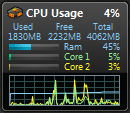
If we compare our RAM usage graphs, we'll see they are like fingerprints. No two are the same, every rig has it's own unique "DNA". Every decision you make when assembling your computer and installing software and applications changes it a little bit. Every running gadget needs a little of resources, every running application as well.

RAM is there to be used. IMHO opinion you should enjoy computing more and not all the time check how much RAM is currently being used. It's going to be used anyway.

Here's an example from my rig, just now. Outlook, Photoshop and Firefox running foreground; Skype, VoIP, MSN, security software and all the other stuff background. That my rig is currently using 45% of its RAM is not a problem for me; like I said RAM is there to be used. But check the CPU usage. It's impressing. Together these two factors, available RAM and CPU usage tell me I can do wonders with Windows 7.

CPU_RAM_usage.PNG

Kari
 
Last edited:

My Computer My Computer

At a glance

Windows 10 Pro x64 EN-GB1.6 GHz Intel Core i7-720QM Processor6 GBATI Mobility Radeon HD 5850 Graphics
Computer type
Laptop
Computer Manufacturer/Model Number
HP ENVY 17-1150eg
OS
Windows 10 Pro x64 EN-GB
CPU
1.6 GHz Intel Core i7-720QM Processor
Memory
6 GB
Graphics Card(s)
ATI Mobility Radeon HD 5850 Graphics
Sound Card
Beats sound system with integrated subwoofer
Monitor(s) Displays
17" laptop display, 22" LED and 32" Full HD TV through HDMI
Screen Resolution
1600*900 (1), 1920*1080 (2&3)
Hard Drives
Internal: 2 x 500 GB SATA Hard Disk Drive 7200 rpm
External: 2TB for backups, 3TB USB3 network drive for media
Cooling
As Envy runs a bit warm, I have it on a Cooler Master pad
Keyboard
Logitech diNovo Media Desktop Laser (bluetooth)
Mouse
Logitech Performance Mouse MX
Internet Speed
50/10 Mbps VDSL
Antivirus
Windows Defender 4.3.9431.0
Browser
Maxthon 3.5.2., IE11
Everyone

Feeding the trolls gives them a voice. ignore them and they have no choice but to go away. there is a reason why the OP has MINUS 90 points of rep power.

While everyone has the right to voice their opinions, we not they determine how much creedence we give them

Ken
 

My Computer My Computer

At a glance

Win 8 Release candidate 8400[email protected]4 gigsNvidia 9600M
Computer Manufacturer/Model Number
HP Pavillion dv-7 1005 Tx
OS
Win 8 Release candidate 8400
CPU
[email protected]
Memory
4 gigs
Graphics Card(s)
Nvidia 9600M
Sound Card
HD built-in
Monitor(s) Displays
17" Wxga
Screen Resolution
1440x900
Cooling
none
Internet Speed
45Mb down 5Mb up
4) The file system should have been started over, eliminate need for anti virus, malware, spyware protection etc.
I have to ask...what does the file system have to do with malware? The file system only stores files. Second malware is an application no different from paint or notepad. So yeah how is redoing the file system going to help?
 

My Computer My Computer

At a glance

Windows 10 Pro (x64)Intel Core i7-3930K (3.2GHz - 4.5GHz)4x Samsung 4GB PC3-12800 DDR3 (16GB 1600MHz)Nvidia Geforce GTX 690
Computer type
PC/Desktop
Computer Manufacturer/Model Number
Alienware Aurora ALX R4
OS
Windows 10 Pro (x64)
CPU
Intel Core i7-3930K (3.2GHz - 4.5GHz)
Motherboard
Alienware Aurora-R4 x79
Memory
4x Samsung 4GB PC3-12800 DDR3 (16GB 1600MHz)
Graphics Card(s)
Nvidia Geforce GTX 690
Sound Card
SteelSeries Siberia Elite
Monitor(s) Displays
Dell UltraSharp U3011
Screen Resolution
2560x1600
Hard Drives
Samsung 850 Pro 256 GB, Seagate 1TB Desktop Hybrid HDD, 2x Western Digital 4TB Green HDD
PSU
875W Some Dell PSU <.<
Case
Alienware Aurora ALX
Cooling
Custom Liquid Cooling (EK CPU & GPU blocks) dual EK 480RAD
Keyboard
Logitech G710+ Mechanical
Mouse
Logitech G700s
Internet Speed
Verizon Fios (50 mbps average)
Other Info
Server: Intel NUC D54250WYK: i5-4250U, 16GB, 256 GB mSATA, Windows Server 2012 R2
I actually do have something I do not like about 7. I sent feedback but evidently it is not important enough.

The way 'focus' works in the 'file manager' (windows explorer of old). Open my C drive and choose a folder. That folder is blue indicating 'focus', OK so far. When I select a sub-folder the blue, indicating 'focus', goes to the bottom of the page. Now I selected the sub-folder so I could view its contents but all the contents of the folder are now below the visible part of my screen. I have to click on the sub-folder, again, and drag it up to the middle of the screen in order to view its contents. Now if I select one of these folders the blue (focus) again returns to the bottom of the page so if I need a file that is 4 or 5 levels deep, each time I have to drag the selected folder from the bottom of the screen to where its contents are visible. It is like a yo-yo. Click, click again and drag up; click, click again and drag up; click, click again and drag up; click, click again and drag up. Does anyone else find this behavior aggravating?
This damn well aggravates me as well! They should move the folder you just clicked on to the TOP of the pane, not the bottom! Very poor design.
 

My Computer My Computer

At a glance

xp/Windows 7
OS
xp/Windows 7
The only thing I really dislike with win7 so far is the nasty bug about the thumbnail caching, the one that causes folder access errors, I cant believe its taking MS so long to fix that.
Do you have thumbs.db from Windows XP in those folders? Simply delete that file. Microsoft solved that problem long ago in Vista by making the cache in a central location. But you have to manually delete thumbs.db
 

My Computer My Computer

At a glance

Windows 10 Pro (x64)Intel Core i7-3930K (3.2GHz - 4.5GHz)4x Samsung 4GB PC3-12800 DDR3 (16GB 1600MHz)Nvidia Geforce GTX 690
Computer type
PC/Desktop
Computer Manufacturer/Model Number
Alienware Aurora ALX R4
OS
Windows 10 Pro (x64)
CPU
Intel Core i7-3930K (3.2GHz - 4.5GHz)
Motherboard
Alienware Aurora-R4 x79
Memory
4x Samsung 4GB PC3-12800 DDR3 (16GB 1600MHz)
Graphics Card(s)
Nvidia Geforce GTX 690
Sound Card
SteelSeries Siberia Elite
Monitor(s) Displays
Dell UltraSharp U3011
Screen Resolution
2560x1600
Hard Drives
Samsung 850 Pro 256 GB, Seagate 1TB Desktop Hybrid HDD, 2x Western Digital 4TB Green HDD
PSU
875W Some Dell PSU <.<
Case
Alienware Aurora ALX
Cooling
Custom Liquid Cooling (EK CPU & GPU blocks) dual EK 480RAD
Keyboard
Logitech G710+ Mechanical
Mouse
Logitech G700s
Internet Speed
Verizon Fios (50 mbps average)
Other Info
Server: Intel NUC D54250WYK: i5-4250U, 16GB, 256 GB mSATA, Windows Server 2012 R2
Why are you still using the RC.... :sarc:


Sorry to intrude.... I am still using RC too. Where can I get whatever is better? And what is it?
What shoud I get?
Thanks
KH
 

My Computer My Computer

At a glance

Window 7 Ultimate 64 bitCore i7 920 @ 3.6DDR3 6Gb @1550GeForce 275 GTX
Computer Manufacturer/Model Number
home made
OS
Window 7 Ultimate 64 bit
CPU
Core i7 920 @ 3.6
Motherboard
ASUS P6T
Memory
DDR3 6Gb @1550
Graphics Card(s)
GeForce 275 GTX
Sound Card
don't care
Monitor(s) Displays
24" Viewsonic
Screen Resolution
1900x1080
Hard Drives
WDC Black 1TB
WDC 500 GB
Seagate 500GB
PSU
Corsair TX750W
Case
CoCM690 modified
Cooling
CoolerMaster V8
Status
Not open for further replies.
Back
Top