What don't you like about Windows 7?

Status
Not open for further replies.
The way Seven caches it's icons is starting to get a little annoying.

I'm noticing icons and some customised folder icons sporadicaly disappearing and re-appearing everywhere :rolleyes:
 

My Computer My Computer

At a glance

8 Pro x64i7 3770K 4.6GHz16GB G.Skill Trident X 2666mhzx2 EVGA 780 Ti Superclocked SLI
Computer type
PC/Desktop
Computer Manufacturer/Model Number
Systems by SmartEyeball
OS
8 Pro x64
CPU
i7 3770K 4.6GHz
Motherboard
ASUS P8Z77 WS
Memory
16GB G.Skill Trident X 2666mhz
Graphics Card(s)
x2 EVGA 780 Ti Superclocked SLI
Sound Card
SB X-FI Surround 5.1 PRO USB / ATH-AD900 Headphones
Monitor(s) Displays
x3 Dell U2410 / 58" Samsung
Screen Resolution
5760*1200/ 1920*1200
Hard Drives
2x Intel 520 240GB (RAID 0) * 2x WD Caviar Blacks 2TB (RAID 0) * 2TB WD Caviar Black * Sony Optirac DVD
PSU
Silverstone Strider Evolution 1200W
Case
Thermaltake Level 10 GT Snow Edition
Cooling
Noctua NH-D14
Keyboard
Topre Realforce // Ducky Shine MX Black // Filco Ninja TKL
Mouse
Thermaltake Theron (Highly Recommended) + Razer Imperator
Antivirus
MSE
Browser
IE, FF, WaterFox
Other Info
GT Extreme V2 Sim Racing Cockpit + 40" LCD and K/B Mouse stand ▼
Fanatec CSR Elite Wheel + Clubsport V1 Pedals + CSR shifter/7G-H ▼Saitek X52 Pro ▼ TrackIR 5 Pro
Buttkicker v2 Seat Rumbler with Dedicated 5.1 and Sub Woofer attached to frame ▼
=
Bloody Big Grin
..... @cbleman, Just stick with Windows XP then for the rest of your computing life if you are unable to adapt to change. Nothing is going to go backwards for you. Things are the way they are and they are no going to go back. So either just stick with XP or move on and re-learn.

I think.... I second that....
 

My Computer My Computer

At a glance

Windows 7 Ultimate x64, 7600.20647 RTMIntel Core2Quad Q9505 @ 4.0Ghz6GB Transcend DDR3-1333 Dual ChannelASUS GTX285 1GB GDDR3
Computer Manufacturer/Model Number
It's a Custom Build.....
OS
Windows 7 Ultimate x64, 7600.20647 RTM
CPU
Intel Core2Quad Q9505 @ 4.0Ghz
Motherboard
Intel Skyburg DP45SG
Memory
6GB Transcend DDR3-1333 Dual Channel
Graphics Card(s)
ASUS GTX285 1GB GDDR3
Sound Card
OnBoard Intel IDT HD Audio
Monitor(s) Displays
HP w2207h 22" WideScreen LCD, VGA & HDMI
Screen Resolution
1680x1050, 60Hz
Hard Drives
1TB WD Caviar Black, Green Power...
1TB Dell, 32Mb/s, Internal SATA
320GB Seagate Internal SATA (3 Partitions)
PSU
Omega 600W ATX2.0 Dual Rail, 2x Fans
Case
Cooler Master HAF 922
Cooling
Corsair Hydro H50 in Push-Pull mode, 4 Case Fans with LED
Keyboard
White aigo keyboard with blue LED on the keys....
Mouse
Genius Mini Tracer
Internet Speed
I'm ashamed to say...
Other Info
Aigo wireless keyboard(black) and a 2.1 Speaker System(white)
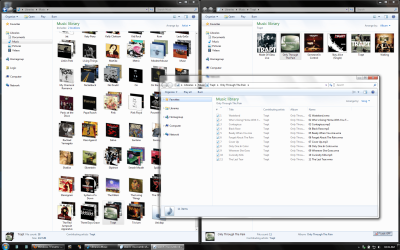
Change the Arrangement to "Album" or "Artist" or how ever it is said in your language. You'll just get pretty pictures.

How do I do that? Just write the solution in English please, as I change the written language to English while following your guide :D.
I have tried looking in folder options, but no luck here.
 

My Computer My Computer

At a glance

Windows 7 Ultimate x64Intel E6850 3,0 running 3,6 Ghz2x2 and Gb Corsair PC6400 CAS5 - 4GB totalNvidia Geforce 260GTX
OS
Windows 7 Ultimate x64
CPU
Intel E6850 3,0 running 3,6 Ghz
Motherboard
Gigabyte DS4 P35
Memory
2x2 and Gb Corsair PC6400 CAS5 - 4GB total
Graphics Card(s)
Nvidia Geforce 260GTX
Sound Card
Creative X-Fi Fata1ty Gamer Extreme
Monitor(s) Displays
Samsung 2493hm
Screen Resolution
1920*1200
Hard Drives
Intel X25-M SSD for system
2x 1Tb Samsung F1 as seperate discs
PSU
Zahlman 850HP
Case
Shg
Cooling
Evo 120
Keyboard
Logitech G15 (blue backlight)
Mouse
Logitech G5 laser
Internet Speed
25/25 mbit
Other Info
1 Samsung SATA dvd-burner
1 LiteOn SATA dvd-burner
How do I do that? Just write the solution in English please, as I change the written language to English while following your guide :D.
I have tried looking in folder options, but no luck here.

In the same bar above the files, where it says "Music Library" There is a control on the far right where you can pick different views.
 

My Computer My Computer

At a glance

Windows 10 Pro (x64)Intel Core i7-3930K (3.2GHz - 4.5GHz)4x Samsung 4GB PC3-12800 DDR3 (16GB 1600MHz)Nvidia Geforce GTX 690
Computer type
PC/Desktop
Computer Manufacturer/Model Number
Alienware Aurora ALX R4
OS
Windows 10 Pro (x64)
CPU
Intel Core i7-3930K (3.2GHz - 4.5GHz)
Motherboard
Alienware Aurora-R4 x79
Memory
4x Samsung 4GB PC3-12800 DDR3 (16GB 1600MHz)
Graphics Card(s)
Nvidia Geforce GTX 690
Sound Card
SteelSeries Siberia Elite
Monitor(s) Displays
Dell UltraSharp U3011
Screen Resolution
2560x1600
Hard Drives
Samsung 850 Pro 256 GB, Seagate 1TB Desktop Hybrid HDD, 2x Western Digital 4TB Green HDD
PSU
875W Some Dell PSU <.<
Case
Alienware Aurora ALX
Cooling
Custom Liquid Cooling (EK CPU & GPU blocks) dual EK 480RAD
Keyboard
Logitech G710+ Mechanical
Mouse
Logitech G700s
Internet Speed
Verizon Fios (50 mbps average)
Other Info
Server: Intel NUC D54250WYK: i5-4250U, 16GB, 256 GB mSATA, Windows Server 2012 R2
Networking works great if you set it up as as work network, NOT HomeNetwork ;)

" Doc "
Tried that and nothign change FTL >.<
 

My Computer My Computer

At a glance

windows 7T94004gbintel GMAX4500HD
Computer Manufacturer/Model Number
Laptop Asus X51a
OS
windows 7
CPU
T9400
Motherboard
M51A
Memory
4gb
Graphics Card(s)
intel GMAX4500HD

My Computers My Computers

  • At a glance

    Windows 11 Pro x64 [Latest Release and Releas...Ryzen 9 5950X, 3.8 - 5.2 MHz64GB [2 x 32GB] DDR4 3200MHz4GB NVIDIA GEFORCE GTX 1650 Ti
    Computer type
    PC/Desktop
    Computer Manufacturer/Model Number
    ChillBlast - Custom to my design
    OS
    Windows 11 Pro x64 [Latest Release and Release Preview]
    CPU
    Ryzen 9 5950X, 3.8 - 5.2 MHz
    Motherboard
    Asus Prime X570-Pro
    Memory
    64GB [2 x 32GB] DDR4 3200MHz
    Graphics Card(s)
    4GB NVIDIA GEFORCE GTX 1650 Ti
    Sound Card
    On-board SPDIF to 5.1 System + HDMI [5.1 system]
    Monitor(s) Displays
    32" UHD 32 Bit HDR Monitor + 43" UHD 4K 32Bit HDR TV
    Screen Resolution
    2 x 3840 x 2160 @60Hz
    Hard Drives
    1TB M2 SSD OS, 500GB Fast Access SSD, 2 x 8TB Data + Various Externals from 1TB to 4TB, 10TB NAS
    PSU
    NZXT C750 80 PLUS Gold 750W Modular PSU
    Case
    Workstation Case [Matt Black]
    Cooling
    NZXT Kraken X63 280mm CPU Cooler +2x Quiet Case fans
    Keyboard
    Logitech Wireless MX Keys & K400 + others
    Mouse
    Logitech Wireless MX Master 3S
    Internet Speed
    920 MB Down 50 MB Up
    Antivirus
    BitDefender Total Security Pro
    Browser
    Chrome (always run latest Non-Beta)
    Other Info
    Also run ...
    Laptop - Quad 8GB - Windows 10 Pro x64
    Nexus 7 Android tablet x2
    Samsung 10.2" tablet
    Blackview TAB 8 4G Android Tablet c/w Keyboard
    Wacom Intuos Pro Medium Pen Pad
    Wacom Intuos Pro Small Pen Pad
    Wacom Expresskeys Remote
    Loopdeck+ Graphics Controller
    Shuttle Pro v2 Control
  • At a glance

    Windows 11 Pro x64 Latest RPIntel I7 10750H 5.0GHz32GB [2x16GB] DDR4 2933 MHznVidia GTX1650Ti 4 GB GDDR6
    Computer type
    Laptop
    System Manufacturer/Model Number
    Dell XPS 17 10750H
    OS
    Windows 11 Pro x64 Latest RP
    CPU
    Intel I7 10750H 5.0GHz
    Motherboard
    Dell XPS
    Memory
    32GB [2x16GB] DDR4 2933 MHz
    Graphics Card(s)
    nVidia GTX1650Ti 4 GB GDDR6
    Sound Card
    Stock [Realtek] 4 Speaker
    Monitor(s) Displays
    17" IPS UHD+ Infinity Edge Touchscreen
    Screen Resolution
    3840 x 2400
    Hard Drives
    2TB M2 NVMe, 4TB External + various 500GB & 1TB External NVMe (also have access to spinner HDD from
    PSU
    Stock
    Case
    Stock XPS Aluminium & Carbon Fibre
    Cooling
    Stock - Active Fan Control
    Keyboard
    Backlit + Various Logitech
    Mouse
    Stock Track Pad + Logitech MX Trackball
    Internet Speed
    72 MB Down 18MB Up
    Browser
    Chrome
    Other Info
    Also run ...
    Laptop - Quad 8GB - Windows 10 Pro x64
    Nexus 7 Android tablet x2
    10.2" tablet
    Sony Z3 Android Smartphone
    Wacom Intuos Pro Medium Pen Pad
    Wacom Intuos Pro Small Pen Pad
    Wacom Expresskeys Remote
    Loopdeck+ Graphics Controller
    Shuttle Pro v2 Control Pad
    10TB NAS
I have backed up my CDs into folders along with the cover art. In XP, the cover art displayed flat and clear by making a folder.jpg file. I cannot seem to find a way to do that in Win7 or Vista. It's also one of the things I dont like. Thanks for the reminder sven.

The previous post wasn't about change. It was about change for no reason. I know I'm not alone in that line of thought. My friends and I don't sit around all day, and be bitter about it; It's just to trivial. This forum asked for dislikes, and that's one of mine.

antt. Great response! That was very clear, and relevant. It makes sense, and answers a question. Thanks

If you don't want to hear about it. Dont ask.
 
Last edited:

My Computer My Computer

At a glance

XP Media Edition / Vista /Win 7 Home PremiumWin 7 Machine: Intel Core 2 Duo T5850 @ 2.16G...4GB Dual Channel DDR2 @ 333MHz 5-5-5-15Nvidia Defaul 1920X1200 256MB GeForce 9300M
Computer Manufacturer/Model Number
HP Touchsmart
OS
XP Media Edition / Vista /Win 7 Home Premium
CPU
Win 7 Machine: Intel Core 2 Duo T5850 @ 2.16GHz Merom 65nm
Motherboard
Pegatron Corp. EVE Model
Memory
4GB Dual Channel DDR2 @ 333MHz 5-5-5-15
Graphics Card(s)
Nvidia Defaul 1920X1200 256MB GeForce 9300M
Sound Card
SoundMAX Integrated Digital HD Audio
Monitor(s) Displays
HP 25" Flat Panel Touch Screen
Screen Resolution
1900X1200
Hard Drives
500 GB Seagate ST3500620as (Sata) 1.5 TB Seagate External
Keyboard
HP Model RK713A
Internet Speed
3.0Gb
Change the Arrangement to "Album" or "Artist" or how ever it is said in your language. You'll just get pretty pictures.

Tried that. I changed the folder to Music, and sorted by Album. It didn't seem to work for me. The folder view didn't change. Each file in the folder however does display the cover art. What I would like to do is post the album art clearly on the (Closed) folder, or just the cover art by itself. I don't see a way to do this without creating a .ICO file for each folder, and changing the icon. I DID make folder.jpg files for each one; but I did it as I ripped each of my disks. I don't feel like making .ICO files, and changing each folder for over a thousand albums.
 
Last edited:

My Computer My Computer

At a glance

XP Media Edition / Vista /Win 7 Home PremiumWin 7 Machine: Intel Core 2 Duo T5850 @ 2.16G...4GB Dual Channel DDR2 @ 333MHz 5-5-5-15Nvidia Defaul 1920X1200 256MB GeForce 9300M
Computer Manufacturer/Model Number
HP Touchsmart
OS
XP Media Edition / Vista /Win 7 Home Premium
CPU
Win 7 Machine: Intel Core 2 Duo T5850 @ 2.16GHz Merom 65nm
Motherboard
Pegatron Corp. EVE Model
Memory
4GB Dual Channel DDR2 @ 333MHz 5-5-5-15
Graphics Card(s)
Nvidia Defaul 1920X1200 256MB GeForce 9300M
Sound Card
SoundMAX Integrated Digital HD Audio
Monitor(s) Displays
HP 25" Flat Panel Touch Screen
Screen Resolution
1900X1200
Hard Drives
500 GB Seagate ST3500620as (Sata) 1.5 TB Seagate External
Keyboard
HP Model RK713A
Internet Speed
3.0Gb
I have backed up my CDs into folders along with the cover art. In XP, the cover art displayed flat and clear by making a folder.jpg file. I cannot seem to find a way to do that in Win7 or Vista. It's also one of the things I dont like. Thanks for the reminder sven.
Change the Arrangement to "Album" or "Artist" or how ever it is said in your language. You'll just get pretty pictures.
Tried that. I changed the folder to Music, and sorted by Album. It didn't seem to work for me. The folder view didn't change. Each file in the folder however does display the cover art. What I would like to do is post the album art clearly on the (Closed) folder, or just the cover art by itself. I don't see a way to do this without creating a .ICO file for each folder, and changing the icon. I DID make folder.jpg files for each one; but I did it as I ripped each of my disks. I don't feel like making .ICO files, and changing each folder for over a thousand albums.

The instructions were for the Music Library, not for just any folder. [See attachement below.]

The previous post wasn't about change. It was about change for no reason. I know I'm not alone in that line of thought. My friends and I don't sit around all day, and be bitter about it; It's just to trivial. This forum asked for dislikes, and that's one of mine.

There was a lot of good reasons for the change, nothing was done just for the sake of change. Microsoft goes though a lot of testing, usability testing, research, etc. Something as big and as used as Windows doesn't get a change out of the blue without a reason.
 

Attachments

  • music_library.png
    music_library.png
    279.4 KB · Views: 42

My Computer My Computer

At a glance

Windows 10 Pro (x64)Intel Core i7-3930K (3.2GHz - 4.5GHz)4x Samsung 4GB PC3-12800 DDR3 (16GB 1600MHz)Nvidia Geforce GTX 690
Computer type
PC/Desktop
Computer Manufacturer/Model Number
Alienware Aurora ALX R4
OS
Windows 10 Pro (x64)
CPU
Intel Core i7-3930K (3.2GHz - 4.5GHz)
Motherboard
Alienware Aurora-R4 x79
Memory
4x Samsung 4GB PC3-12800 DDR3 (16GB 1600MHz)
Graphics Card(s)
Nvidia Geforce GTX 690
Sound Card
SteelSeries Siberia Elite
Monitor(s) Displays
Dell UltraSharp U3011
Screen Resolution
2560x1600
Hard Drives
Samsung 850 Pro 256 GB, Seagate 1TB Desktop Hybrid HDD, 2x Western Digital 4TB Green HDD
PSU
875W Some Dell PSU <.<
Case
Alienware Aurora ALX
Cooling
Custom Liquid Cooling (EK CPU & GPU blocks) dual EK 480RAD
Keyboard
Logitech G710+ Mechanical
Mouse
Logitech G700s
Internet Speed
Verizon Fios (50 mbps average)
Other Info
Server: Intel NUC D54250WYK: i5-4250U, 16GB, 256 GB mSATA, Windows Server 2012 R2
Sigh.... It sometimes seems that way.Without reason that is. I've often had a picture in my head of a person behind desk rolling up a fatty with a smirk. saying "Wait till they see this one!" I've often wondered how much actual research actualy goes into something like this; and how much is just a unilateral decision made by one or two people on a whim.
 
Last edited:

My Computer My Computer

At a glance

XP Media Edition / Vista /Win 7 Home PremiumWin 7 Machine: Intel Core 2 Duo T5850 @ 2.16G...4GB Dual Channel DDR2 @ 333MHz 5-5-5-15Nvidia Defaul 1920X1200 256MB GeForce 9300M
Computer Manufacturer/Model Number
HP Touchsmart
OS
XP Media Edition / Vista /Win 7 Home Premium
CPU
Win 7 Machine: Intel Core 2 Duo T5850 @ 2.16GHz Merom 65nm
Motherboard
Pegatron Corp. EVE Model
Memory
4GB Dual Channel DDR2 @ 333MHz 5-5-5-15
Graphics Card(s)
Nvidia Defaul 1920X1200 256MB GeForce 9300M
Sound Card
SoundMAX Integrated Digital HD Audio
Monitor(s) Displays
HP 25" Flat Panel Touch Screen
Screen Resolution
1900X1200
Hard Drives
500 GB Seagate ST3500620as (Sata) 1.5 TB Seagate External
Keyboard
HP Model RK713A
Internet Speed
3.0Gb
Win XP supported a folder view that showed covers. any chance of a workaround to see my folders like I did in XP? there are sometimes instances where I would like to explore and listen to music without pulling it into my library.

I like the music lbrary. It takes a long time to populate the screen in the artist view mode. Minutes under each directory (A-Z) in fact. Is this a one time thing? I keep my music on a seperate drive, that I sometimes disconnect to move to the laptop.
Love the graphics, Love the IDEA. Since I use a third party player, I was more interested in running Media monkey through the wringer to see if it worked OK in win7 than exploring this feature (Silly me!). The more I play with it, the more I find out; the more I like it. It even opens up my default player.

Something else that has bothered me for a while, is setting a global view. I don't like going folder to folder to set the view. Can someone educate me?
 

My Computer My Computer

At a glance

XP Media Edition / Vista /Win 7 Home PremiumWin 7 Machine: Intel Core 2 Duo T5850 @ 2.16G...4GB Dual Channel DDR2 @ 333MHz 5-5-5-15Nvidia Defaul 1920X1200 256MB GeForce 9300M
Computer Manufacturer/Model Number
HP Touchsmart
OS
XP Media Edition / Vista /Win 7 Home Premium
CPU
Win 7 Machine: Intel Core 2 Duo T5850 @ 2.16GHz Merom 65nm
Motherboard
Pegatron Corp. EVE Model
Memory
4GB Dual Channel DDR2 @ 333MHz 5-5-5-15
Graphics Card(s)
Nvidia Defaul 1920X1200 256MB GeForce 9300M
Sound Card
SoundMAX Integrated Digital HD Audio
Monitor(s) Displays
HP 25" Flat Panel Touch Screen
Screen Resolution
1900X1200
Hard Drives
500 GB Seagate ST3500620as (Sata) 1.5 TB Seagate External
Keyboard
HP Model RK713A
Internet Speed
3.0Gb
NOT happy about this taskbar having to pin items its really stupid a real step backwards whatever were they thinking? . Why no Dreamscenes ?

Its ok but not the best they could have done.
 

My Computer My Computer

At a glance

Windows 7 Ultimate
OS
Windows 7 Ultimate
If you would prefer your icons on the taskbar to behave more like vista or XP simply set the taskbar to "never combine" and unpin any items pinned by default - looks similar.

The dreamscenes I think can be classed as a failed experiment - it could be made to operate with the Beta versions of Windows 7 but I believe additional changes in the RTM has now prevented this - to be honest I think that the lack of users running this in Vista made it not viable to continue development.
 

My Computers My Computers

  • At a glance

    Windows 11 Pro x64 [Latest Release and Releas...Ryzen 9 5950X, 3.8 - 5.2 MHz64GB [2 x 32GB] DDR4 3200MHz4GB NVIDIA GEFORCE GTX 1650 Ti
    Computer type
    PC/Desktop
    Computer Manufacturer/Model Number
    ChillBlast - Custom to my design
    OS
    Windows 11 Pro x64 [Latest Release and Release Preview]
    CPU
    Ryzen 9 5950X, 3.8 - 5.2 MHz
    Motherboard
    Asus Prime X570-Pro
    Memory
    64GB [2 x 32GB] DDR4 3200MHz
    Graphics Card(s)
    4GB NVIDIA GEFORCE GTX 1650 Ti
    Sound Card
    On-board SPDIF to 5.1 System + HDMI [5.1 system]
    Monitor(s) Displays
    32" UHD 32 Bit HDR Monitor + 43" UHD 4K 32Bit HDR TV
    Screen Resolution
    2 x 3840 x 2160 @60Hz
    Hard Drives
    1TB M2 SSD OS, 500GB Fast Access SSD, 2 x 8TB Data + Various Externals from 1TB to 4TB, 10TB NAS
    PSU
    NZXT C750 80 PLUS Gold 750W Modular PSU
    Case
    Workstation Case [Matt Black]
    Cooling
    NZXT Kraken X63 280mm CPU Cooler +2x Quiet Case fans
    Keyboard
    Logitech Wireless MX Keys & K400 + others
    Mouse
    Logitech Wireless MX Master 3S
    Internet Speed
    920 MB Down 50 MB Up
    Antivirus
    BitDefender Total Security Pro
    Browser
    Chrome (always run latest Non-Beta)
    Other Info
    Also run ...
    Laptop - Quad 8GB - Windows 10 Pro x64
    Nexus 7 Android tablet x2
    Samsung 10.2" tablet
    Blackview TAB 8 4G Android Tablet c/w Keyboard
    Wacom Intuos Pro Medium Pen Pad
    Wacom Intuos Pro Small Pen Pad
    Wacom Expresskeys Remote
    Loopdeck+ Graphics Controller
    Shuttle Pro v2 Control
  • At a glance

    Windows 11 Pro x64 Latest RPIntel I7 10750H 5.0GHz32GB [2x16GB] DDR4 2933 MHznVidia GTX1650Ti 4 GB GDDR6
    Computer type
    Laptop
    System Manufacturer/Model Number
    Dell XPS 17 10750H
    OS
    Windows 11 Pro x64 Latest RP
    CPU
    Intel I7 10750H 5.0GHz
    Motherboard
    Dell XPS
    Memory
    32GB [2x16GB] DDR4 2933 MHz
    Graphics Card(s)
    nVidia GTX1650Ti 4 GB GDDR6
    Sound Card
    Stock [Realtek] 4 Speaker
    Monitor(s) Displays
    17" IPS UHD+ Infinity Edge Touchscreen
    Screen Resolution
    3840 x 2400
    Hard Drives
    2TB M2 NVMe, 4TB External + various 500GB & 1TB External NVMe (also have access to spinner HDD from
    PSU
    Stock
    Case
    Stock XPS Aluminium & Carbon Fibre
    Cooling
    Stock - Active Fan Control
    Keyboard
    Backlit + Various Logitech
    Mouse
    Stock Track Pad + Logitech MX Trackball
    Internet Speed
    72 MB Down 18MB Up
    Browser
    Chrome
    Other Info
    Also run ...
    Laptop - Quad 8GB - Windows 10 Pro x64
    Nexus 7 Android tablet x2
    10.2" tablet
    Sony Z3 Android Smartphone
    Wacom Intuos Pro Medium Pen Pad
    Wacom Intuos Pro Small Pen Pad
    Wacom Expresskeys Remote
    Loopdeck+ Graphics Controller
    Shuttle Pro v2 Control Pad
    10TB NAS
   Note

In order to keep this thread as a location for odd issues that may not warrant a full thread, I will if a topic expands to more that a post or two create a new thread where the subject can be given individual attention.


I hope this will meet with everyone's approval - as I think it will also allow other members to find the subjects more easily in future
 

My Computers My Computers

  • At a glance

    Windows 11 Pro x64 [Latest Release and Releas...Ryzen 9 5950X, 3.8 - 5.2 MHz64GB [2 x 32GB] DDR4 3200MHz4GB NVIDIA GEFORCE GTX 1650 Ti
    Computer type
    PC/Desktop
    Computer Manufacturer/Model Number
    ChillBlast - Custom to my design
    OS
    Windows 11 Pro x64 [Latest Release and Release Preview]
    CPU
    Ryzen 9 5950X, 3.8 - 5.2 MHz
    Motherboard
    Asus Prime X570-Pro
    Memory
    64GB [2 x 32GB] DDR4 3200MHz
    Graphics Card(s)
    4GB NVIDIA GEFORCE GTX 1650 Ti
    Sound Card
    On-board SPDIF to 5.1 System + HDMI [5.1 system]
    Monitor(s) Displays
    32" UHD 32 Bit HDR Monitor + 43" UHD 4K 32Bit HDR TV
    Screen Resolution
    2 x 3840 x 2160 @60Hz
    Hard Drives
    1TB M2 SSD OS, 500GB Fast Access SSD, 2 x 8TB Data + Various Externals from 1TB to 4TB, 10TB NAS
    PSU
    NZXT C750 80 PLUS Gold 750W Modular PSU
    Case
    Workstation Case [Matt Black]
    Cooling
    NZXT Kraken X63 280mm CPU Cooler +2x Quiet Case fans
    Keyboard
    Logitech Wireless MX Keys & K400 + others
    Mouse
    Logitech Wireless MX Master 3S
    Internet Speed
    920 MB Down 50 MB Up
    Antivirus
    BitDefender Total Security Pro
    Browser
    Chrome (always run latest Non-Beta)
    Other Info
    Also run ...
    Laptop - Quad 8GB - Windows 10 Pro x64
    Nexus 7 Android tablet x2
    Samsung 10.2" tablet
    Blackview TAB 8 4G Android Tablet c/w Keyboard
    Wacom Intuos Pro Medium Pen Pad
    Wacom Intuos Pro Small Pen Pad
    Wacom Expresskeys Remote
    Loopdeck+ Graphics Controller
    Shuttle Pro v2 Control
  • At a glance

    Windows 11 Pro x64 Latest RPIntel I7 10750H 5.0GHz32GB [2x16GB] DDR4 2933 MHznVidia GTX1650Ti 4 GB GDDR6
    Computer type
    Laptop
    System Manufacturer/Model Number
    Dell XPS 17 10750H
    OS
    Windows 11 Pro x64 Latest RP
    CPU
    Intel I7 10750H 5.0GHz
    Motherboard
    Dell XPS
    Memory
    32GB [2x16GB] DDR4 2933 MHz
    Graphics Card(s)
    nVidia GTX1650Ti 4 GB GDDR6
    Sound Card
    Stock [Realtek] 4 Speaker
    Monitor(s) Displays
    17" IPS UHD+ Infinity Edge Touchscreen
    Screen Resolution
    3840 x 2400
    Hard Drives
    2TB M2 NVMe, 4TB External + various 500GB & 1TB External NVMe (also have access to spinner HDD from
    PSU
    Stock
    Case
    Stock XPS Aluminium & Carbon Fibre
    Cooling
    Stock - Active Fan Control
    Keyboard
    Backlit + Various Logitech
    Mouse
    Stock Track Pad + Logitech MX Trackball
    Internet Speed
    72 MB Down 18MB Up
    Browser
    Chrome
    Other Info
    Also run ...
    Laptop - Quad 8GB - Windows 10 Pro x64
    Nexus 7 Android tablet x2
    10.2" tablet
    Sony Z3 Android Smartphone
    Wacom Intuos Pro Medium Pen Pad
    Wacom Intuos Pro Small Pen Pad
    Wacom Expresskeys Remote
    Loopdeck+ Graphics Controller
    Shuttle Pro v2 Control Pad
    10TB NAS
   Note

In order to keep this thread as a location for odd issues that may not warrant a full thread, I will if a topic expands to more that a post or two create a new thread where the subject can be given individual attention.


I hope this will meet with everyone's approval - as I think it will also allow other members to find the subjects more easily in future

Good idea :)
 

My Computer My Computer

At a glance

Windows 7 Ultimate
OS
Windows 7 Ultimate
If you would prefer your icons on the taskbar to behave more like vista or XP simply set the taskbar to "never combine" and unpin any items pinned by default - looks similar.

The dreamscenes I think can be classed as a failed experiment - it could be made to operate with the Beta versions of Windows 7 but I believe additional changes in the RTM has now prevented this - to be honest I think that the lack of users running this in Vista made it not viable to continue development.

Hi Barman

Thanks for the reply and the tip I did try your suggestion but the issue for me is why if I want a shortcut to a word doc on the taskbar I have to pin it to it (ok fine) BUT if I click it I get a blank doc WTF ? I have to right click it and scroll to the top to get the actual item (pinned). This right click scroll is ridiculous and as such drives me mad, If I am missing something here please enlighten me. :)

As for the dreamscenes I do not think it was a failed anything It worked very well on my laptop and to puting an "upgraded" product out there (some may say) and then removing bits off it is not on, I doubt many will miss it LOL - but thats not the point.

Whilst I'm having a major moan where has the classic start menu gone the programs menu on the Vista style one is awful.

I use Stardock desktop x to create a second start menu similar to classic and beta deskscapes for moving wallpaper both run well in 7 so all is not lost LOL.

There are many many good points on 7 its as some may agree the Vista we never had I for one never had many issues after SP1 and never supported the long running hate campaign.

Great site keep up the good works :)
 
Last edited:

My Computer My Computer

At a glance

Windows 7 Ultimate
OS
Windows 7 Ultimate
I don't like control panel it is messy ... :confused:
 

My Computer My Computer

At a glance

Windows 7 RTMAMD Athlon X2 4000+2gb ddr2 800mhzSapphire Ati Radeon 4850
OS
Windows 7 RTM
CPU
AMD Athlon X2 4000+
Motherboard
elitegroup nforce6m-a v2.0
Memory
2gb ddr2 800mhz
Graphics Card(s)
Sapphire Ati Radeon 4850
Monitor(s) Displays
Viewsonic VA2216w
Internet Speed
WDSL
Thanks for the reply and the tip I did try your suggestion but the issue for me is why if I want a shortcut to a word doc on the taskbar I have to pin it to it (ok fine) BUT if I click it I get a blank doc WTF ? I have to right click it and scroll to the top to get the actual item (pinned). This right click scroll is ridiculous and as such drives me mad, If I am missing something here please enlighten me. :)

can someone who uses windows 7 answer if there is a way around the above situation? i haven't used windows 7 yet, but i have a excel document that i like to keep in vista's quicklaunch. if i install windows 7, i don't want to have to click on the document and then scroll up to something else to open it. reading things like this make me question if i should stick with vista.
 

My Computer My Computer

At a glance

Windows 7 Home Premium x64
OS
Windows 7 Home Premium x64
Thanks for the reply and the tip I did try your suggestion but the issue for me is why if I want a shortcut to a word doc on the taskbar I have to pin it to it (ok fine) BUT if I click it I get a blank doc WTF ? I have to right click it and scroll to the top to get the actual item (pinned). This right click scroll is ridiculous and as such drives me mad, If I am missing something here please enlighten me. :)

can someone who uses windows 7 answer if there is a way around this? i haven't used windows 7 yet, but i have a excel document that i like to keep in vista's quicklaunch. if i install windows 7, i don't want to have to click on it and then scroll up to something else. i'm trying to decide if i should stick with vista or not.
Quick Lanuch is not enabled in Windows 7 but there are some things you can do...

1) Pin the Excel icon to the Superbar and pin the workbook on the excel icon. YOu can right click the excel icon and choose the workbook that way
2) You can make a dummy look-alike Quick Lanuch: http://www.sevenforums.com/tutorials/888-quick-launch-enable-disable.html...that might be more to your fancy

If this is all that holds you back from 7...than welcome to Windows 7 sense their is no reason to stick with Vista now
 

My Computer My Computer

At a glance

Windows 7 Home Premium x64 - Mac OS X 10.6.4 x64Intel Core 2 Duo T9300 2.5 GHz4GB Kingston DDR2-800NVIDIA Geforce 8600M GT (512MB Model)
Computer Manufacturer/Model Number
Compal JFT02 (Custom Build Laptop)
OS
Windows 7 Home Premium x64 - Mac OS X 10.6.4 x64
CPU
Intel Core 2 Duo T9300 2.5 GHz
Motherboard
JFT02
Memory
4GB Kingston DDR2-800
Graphics Card(s)
NVIDIA Geforce 8600M GT (512MB Model)
Sound Card
Realtek HD Audio
Monitor(s) Displays
WUXGA Standard Laptop Display
Screen Resolution
1680*1050
Hard Drives
Toshiba 320GB 5400RPM Laptop HD
PSU
Standard Laptop Power Supply
Case
Standard Laptop Case
Cooling
Standard Laptop Cooling
Keyboard
Standard Laptop 105 Key-Keyboard
Mouse
Synaptics Touchpad
Internet Speed
Verizion Online DSL 3360/864 kbs (dl/up)
Thanks for the reply and the tip I did try your suggestion but the issue for me is why if I want a shortcut to a word doc on the taskbar I have to pin it to it (ok fine) BUT if I click it I get a blank doc WTF ? I have to right click it and scroll to the top to get the actual item (pinned). This right click scroll is ridiculous and as such drives me mad, If I am missing something here please enlighten me. :)

can someone who uses windows 7 answer if there is a way around this? i haven't used windows 7 yet, but i have a excel document that i like to keep in vista's quicklaunch. if i install windows 7, i don't want to have to click on it and then scroll up to something else. i'm trying to decide if i should stick with vista or not.
Quick Lanuch is not enabled in Windows 7 but there are some things you can do...

1) Pin the Excel icon to the Superbar and pin the workbook on the excel icon. YOu can right click the excel icon and choose the workbook that way
2) You can make a dummy look-alike Quick Lanuch: http://www.sevenforums.com/tutorials/888-quick-launch-enable-disable.html...that might be more to your fancy

If this is all that holds you back from 7...than welcome to Windows 7 sense their is no reason to stick with Vista now

what about this? would this work?

http://**************.com/tutorials/how-to-pin-any-item-to-the-taskbar-in-windows-7/

edit: windows 7 center dot com is being filtered out for some reason.
 

My Computer My Computer

At a glance

Windows 7 Home Premium x64
OS
Windows 7 Home Premium x64
Status
Not open for further replies.
Back
Top