
Solved What is Meant by 'Max Usage' when configuring System Protection?

wingclip

New member
Local time
3:35 PM
Messages
24
I have a question regarding restore points; when I go into the system protection configuration settings one of the options is the setting for maximum disk space usage.

I had the slider set to 4% of my total disk memory which is about 27.45 GB, (I have a 750GB Hard drive). Is that where I should be? The amount of used disk space on that hard drive is about 380 GB. Of the three options given for restore settings I have ticked the "Restore System Settings and Previous Versions of Files".

I'm assuming that the 4% I have set in "Maximum Usage" is enough because it only needs to hold some system information reference links, (I think). What I mean is I don't think that the slider should be set to the same amount of gigabytes as the amount of used space on my hard disk, right?

I would appreciate an answer as soon as possible. Without going into too much detail the need for me to know this has a lot hinged on it.
Thank you, Rich
 

My Computer My Computer

At a glance

Microsoft Windows 7 Home Premium 64-bit 7601 ...Intel(R) Core(TM) i7-4790K CPU @ 4.00GHzG-Skill 24ooMhz (2x8GB)16.00 GBNVIDIA GeForce GTX 1070
Computer type
PC/Desktop
Computer Manufacturer/Model Number
Custom Built
OS
Microsoft Windows 7 Home Premium 64-bit 7601 Multiprocessor Free Service Pack 1
CPU
Intel(R) Core(TM) i7-4790K CPU @ 4.00GHz
Motherboard
MSI Z97 MPOWER MAX AC (MS-7888)
Memory
G-Skill 24ooMhz (2x8GB)16.00 GB
Graphics Card(s)
NVIDIA GeForce GTX 1070
Sound Card
(1) USB Audio Class 1.0 and 2.0 Device Driver (2) NVIDIA H
Monitor(s) Displays
Acer 28" 4K Monitor
Screen Resolution
2560 x 1440 x 32 bits (4294967296 colors) @ 59 Hz
Hard Drives
(1) Crucial_CT500MX200SSD1 ATA Device (2) Crucial_CT500MX200SSD1 ATA Device (3) Crucial_CT512MX100SSD1 ATA Device (4) PLEXTOR PX-256M5Pro ATA Device (5) Samsung SSD 840 EVO 500GB ATA Device (6) Generic- USB3.0 CRW-CF/MD USB Device (7) Gen
PSU
Corsair RM1000i 1000w PSU
Case
Corsair Graphite Series 780T
Cooling
Swiftech H220 and additional Swiftech 120mm radiator
Keyboard
Logitech G910
Mouse
G602
Internet Speed
150 Mb/ps
Antivirus
Malwarebytes & MSE
Browser
Google Chrome
Other Info
All Liquid cooling radiators are stradled by 120mm fans in a Push/Pull config.
Hello wingclip and welcome to Seven Forums.

That slider lets you set aside a percentage of your total hard drive for restore points and other system info. Using just approximate figures, if you set aside 10% of your hard drive, you'd be left with about 675GB of usable hard drive space. (750GB - 75GB = 675GB.)

http://www.sevenforums.com/tutorials/335-system-protection-change-disk-space-usage.html

NOTE: A hard drive rated as 750GB by the manufacturer really has only 698GB of usable space because the manufacturer says 1GB = 1000MB but the computer says 1GB = 1024MB. Not trying to make it confusing but the larger the hard drive the greater the difference in usable space.

I think you should be fine with 4%. If the 4% doesn't provide enough space for the next newest restore point, the oldest restore points(s) will automatically be deleted to make enough room.

Hope this helps.
 

My Computer My Computer

At a glance

Win 7 Pro 64-bitIntel i5 2.4 Ghz8GB DDR3Intel HD 3000
Computer type
Laptop
Computer Manufacturer/Model Number
Sony Vaio VPCEB47GM Laptop
OS
Win 7 Pro 64-bit
CPU
Intel i5 2.4 Ghz
Memory
8GB DDR3
Graphics Card(s)
Intel HD 3000
Sound Card
IDT High Definition
Monitor(s) Displays
15.6 WGXA Anti-Glare LED
Screen Resolution
1280x800
Hard Drives
640Gb 7200rpm
Antivirus
MSE
Browser
Opera (primary) with IE9 backup
Thank you marsmimar! Yes that much I know and I certainly don't want to overwrite the previous 4 or 5 restore points. I want to keep at least 4 or 5 at any one time. So what I'm trying to figure out is how much room does a "Restore Point" need in order to give me that ability?

So if I have about 380GB's of space used up by files and programs that I want to keep, (that's how I have the system protection set), I don't think I would need the Restore point configuration to have at least 380GB's, or about 50% of the Hard drive, right? I mean, a "Restore Point" is actually just a string of info or a link, isn't it?

If that's true, then I should be ok with 4 or 5 percent set aside in order to hold 4 or 5 restore points at any one time. Do you see what I'm getting at? I'm not sure how to put the question much differently than that.
Thanks again!
 

My Computer My Computer

At a glance

Microsoft Windows 7 Home Premium 64-bit 7601 ...Intel(R) Core(TM) i7-4790K CPU @ 4.00GHzG-Skill 24ooMhz (2x8GB)16.00 GBNVIDIA GeForce GTX 1070
Computer type
PC/Desktop
Computer Manufacturer/Model Number
Custom Built
OS
Microsoft Windows 7 Home Premium 64-bit 7601 Multiprocessor Free Service Pack 1
CPU
Intel(R) Core(TM) i7-4790K CPU @ 4.00GHz
Motherboard
MSI Z97 MPOWER MAX AC (MS-7888)
Memory
G-Skill 24ooMhz (2x8GB)16.00 GB
Graphics Card(s)
NVIDIA GeForce GTX 1070
Sound Card
(1) USB Audio Class 1.0 and 2.0 Device Driver (2) NVIDIA H
Monitor(s) Displays
Acer 28" 4K Monitor
Screen Resolution
2560 x 1440 x 32 bits (4294967296 colors) @ 59 Hz
Hard Drives
(1) Crucial_CT500MX200SSD1 ATA Device (2) Crucial_CT500MX200SSD1 ATA Device (3) Crucial_CT512MX100SSD1 ATA Device (4) PLEXTOR PX-256M5Pro ATA Device (5) Samsung SSD 840 EVO 500GB ATA Device (6) Generic- USB3.0 CRW-CF/MD USB Device (7) Gen
PSU
Corsair RM1000i 1000w PSU
Case
Corsair Graphite Series 780T
Cooling
Swiftech H220 and additional Swiftech 120mm radiator
Keyboard
Logitech G910
Mouse
G602
Internet Speed
150 Mb/ps
Antivirus
Malwarebytes & MSE
Browser
Google Chrome
Other Info
All Liquid cooling radiators are stradled by 120mm fans in a Push/Pull config.
I guess what you're trying to find out is how much disk space a single restore point uses. I'm not knowledgeable enough to answer that. A restore point doesn't do a 1:1 copy of what's on the hard drive. Generally speaking, it backs up the registry; on Windows Vista and later versions, all system file types are monitored on all paths on a volume; local user profile; COM+ and WMI Databases; IIS Metabase. Additionally, the following file name extensions are monitored and presumably backed up:

Monitored File Name Extensions (Windows)

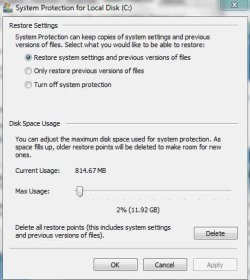
Right now my laptop has about 60GB of hard drive space being used on the C: drive and I have two current restore points set. The total space used for both restore points is about 815MB.

restore.JPG

I'm not sure if it's possible to calculate how much hard drive space a single restore point will use because there are too many variables. My best suggestion is to set aside 10% and create your 5 or 6 restore points. See how much space they use and adjust the 10% accordingly.
 

My Computer My Computer

At a glance

Win 7 Pro 64-bitIntel i5 2.4 Ghz8GB DDR3Intel HD 3000
Computer type
Laptop
Computer Manufacturer/Model Number
Sony Vaio VPCEB47GM Laptop
OS
Win 7 Pro 64-bit
CPU
Intel i5 2.4 Ghz
Memory
8GB DDR3
Graphics Card(s)
Intel HD 3000
Sound Card
IDT High Definition
Monitor(s) Displays
15.6 WGXA Anti-Glare LED
Screen Resolution
1280x800
Hard Drives
640Gb 7200rpm
Antivirus
MSE
Browser
Opera (primary) with IE9 backup
Outstanding! That's exactly what I needed to hear. I saw that my restore point didn't take up much room and wasn't sure if something was going wrong. I had something like 6 or 7 of them about 2 weeks ago and then lost them all when I inadvertently turned off the System Protection.

I found that out yesterday when I needed to go back to a point just before June 25th. It was like my only hope in a situation that I've been fighting with, (long story involving Dragon Nat Speaking). So I Googled the web for possibilities of recovering those lost points but the chances are so remote as to make trying it pointless.

One more thing, If I change some Services status from say, "Automatic" to "Disable" as well as turn on and off a number of programs that come up at the System Boot up, can I use the restore points to put them back as they were if I didn't like what I changed?
Thanks for your help! That allows me to stop worrying about the size of the Disc Usage for restore points.
Rich
 

My Computer My Computer

At a glance

Microsoft Windows 7 Home Premium 64-bit 7601 ...Intel(R) Core(TM) i7-4790K CPU @ 4.00GHzG-Skill 24ooMhz (2x8GB)16.00 GBNVIDIA GeForce GTX 1070
Computer type
PC/Desktop
Computer Manufacturer/Model Number
Custom Built
OS
Microsoft Windows 7 Home Premium 64-bit 7601 Multiprocessor Free Service Pack 1
CPU
Intel(R) Core(TM) i7-4790K CPU @ 4.00GHz
Motherboard
MSI Z97 MPOWER MAX AC (MS-7888)
Memory
G-Skill 24ooMhz (2x8GB)16.00 GB
Graphics Card(s)
NVIDIA GeForce GTX 1070
Sound Card
(1) USB Audio Class 1.0 and 2.0 Device Driver (2) NVIDIA H
Monitor(s) Displays
Acer 28" 4K Monitor
Screen Resolution
2560 x 1440 x 32 bits (4294967296 colors) @ 59 Hz
Hard Drives
(1) Crucial_CT500MX200SSD1 ATA Device (2) Crucial_CT500MX200SSD1 ATA Device (3) Crucial_CT512MX100SSD1 ATA Device (4) PLEXTOR PX-256M5Pro ATA Device (5) Samsung SSD 840 EVO 500GB ATA Device (6) Generic- USB3.0 CRW-CF/MD USB Device (7) Gen
PSU
Corsair RM1000i 1000w PSU
Case
Corsair Graphite Series 780T
Cooling
Swiftech H220 and additional Swiftech 120mm radiator
Keyboard
Logitech G910
Mouse
G602
Internet Speed
150 Mb/ps
Antivirus
Malwarebytes & MSE
Browser
Google Chrome
Other Info
All Liquid cooling radiators are stradled by 120mm fans in a Push/Pull config.
Glad I could be of some limited help. As far as your services, personally I'd leave them alone. Windows 7 is doing a much, much better job handling them than Vista or XP ever did. A lot of the Forum experts (people who carry the Microsoft MVP tags because of their expertise) all recommend leaving services alone.

Having said that, if you like to experiment and test things . . . ;)

I would definitely, positively, absolutely NOT rely on restore points when it comes to service tweaks. I would go with a full blown system image. That's the only way you can be sure that your computer will be restored to it's pre-tweaking condition.
 

My Computer My Computer

At a glance

Win 7 Pro 64-bitIntel i5 2.4 Ghz8GB DDR3Intel HD 3000
Computer type
Laptop
Computer Manufacturer/Model Number
Sony Vaio VPCEB47GM Laptop
OS
Win 7 Pro 64-bit
CPU
Intel i5 2.4 Ghz
Memory
8GB DDR3
Graphics Card(s)
Intel HD 3000
Sound Card
IDT High Definition
Monitor(s) Displays
15.6 WGXA Anti-Glare LED
Screen Resolution
1280x800
Hard Drives
640Gb 7200rpm
Antivirus
MSE
Browser
Opera (primary) with IE9 backup
I completely agree with you regarding the restore points. But I was desperate at the time and wanted to find a way to recover them. Apparently, when you turn off your System Protection, you immediately delete all the previously saved restore points, (true bummer).

The System Image suggestion is very helpful as well! I know I can run a complete backup but with 380+GB to back up, I really don't want to wait that long. However, a System Image is more or less a 'snapshot' of the hard drive, right? If I remember correctly, it can be done pretty quickly.

I'll need to 'hit the books' on that option again. I read a good amount of info in regards to System Images but it's been a while.
Thanks again, Rich
 

My Computer My Computer

At a glance

Microsoft Windows 7 Home Premium 64-bit 7601 ...Intel(R) Core(TM) i7-4790K CPU @ 4.00GHzG-Skill 24ooMhz (2x8GB)16.00 GBNVIDIA GeForce GTX 1070
Computer type
PC/Desktop
Computer Manufacturer/Model Number
Custom Built
OS
Microsoft Windows 7 Home Premium 64-bit 7601 Multiprocessor Free Service Pack 1
CPU
Intel(R) Core(TM) i7-4790K CPU @ 4.00GHz
Motherboard
MSI Z97 MPOWER MAX AC (MS-7888)
Memory
G-Skill 24ooMhz (2x8GB)16.00 GB
Graphics Card(s)
NVIDIA GeForce GTX 1070
Sound Card
(1) USB Audio Class 1.0 and 2.0 Device Driver (2) NVIDIA H
Monitor(s) Displays
Acer 28" 4K Monitor
Screen Resolution
2560 x 1440 x 32 bits (4294967296 colors) @ 59 Hz
Hard Drives
(1) Crucial_CT500MX200SSD1 ATA Device (2) Crucial_CT500MX200SSD1 ATA Device (3) Crucial_CT512MX100SSD1 ATA Device (4) PLEXTOR PX-256M5Pro ATA Device (5) Samsung SSD 840 EVO 500GB ATA Device (6) Generic- USB3.0 CRW-CF/MD USB Device (7) Gen
PSU
Corsair RM1000i 1000w PSU
Case
Corsair Graphite Series 780T
Cooling
Swiftech H220 and additional Swiftech 120mm radiator
Keyboard
Logitech G910
Mouse
G602
Internet Speed
150 Mb/ps
Antivirus
Malwarebytes & MSE
Browser
Google Chrome
Other Info
All Liquid cooling radiators are stradled by 120mm fans in a Push/Pull config.
Back
Top