Solved What is privacy protection? Fake virus program?

From the webpage you posted Golden when I try (on either computer) to download the free version of malwarebytes I am linked to CNET, from where I downloaded ARO2011.

For now I may leave it and just keep an open eye for abnormalities, I don't use it to go online often and do not want to purchase malwarebytes online from this unit, as I would need to enter important information to pay. For now it is working and I can complete my schoolwork for this final week, thank you all very much. I did restore it to a date in November prior to the issue, hopefully that helped.
 

My Computer My Computer

At a glance

Windows 7
OS
Windows 7
The Kaspersky scan didn't come up with anything, on the malwarebytes it said 2700 or so threats found, I didn't purchase it to clean the unit, though.

You do NOT need to purchase Malwarebytes in order for it to remove what is found. Did you download something other than Malwarebytes?

Since you accomplished restoring your computer to an older point, I suggest you uninstall whatever you downloaded and do the following, downloading MBAM only from the link I posted which will redirect you to malwarebytes.org/products/malwarebytes_free:

Please download Malwarebytes' Anti-Malware to your desktop.


  • Double-click mbam-setup.exe and follow the prompts to install the program.
  • At the end, be sure a checkmark is placed next to Update Malwarebytes' Anti-Malware and Launch Malwarebytes' Anti-Malware, then click Finish.
  • If an update is found, it will download and install the latest version.
  • Once the program has loaded, be sure Quick scan is selected, then click Scan.
  • When the scan is complete, click OK, then Show Results to view the results.
  • Be sure that everything is checked, EXCEPT items in System Restore as shown in this sample:
    MBAM_SR.png
  • Click Remove Selected.
  • When disinfection is completed, a log will open in Notepad and you may be prompted to Restart. (See the Note below)
  • The log is automatically saved by MBAM and can be viewed by clicking the Logs tab in MBAM.
  • Please post contents of that file in your next reply.


** Note **

If MBAM encounters a file that is difficult to remove, you will be presented with 1 of 2 prompts. Click OK to either and let MBAM proceed with the disinfection process. If asked to restart the computer, please do so immediately.
 

My Computer My Computer

At a glance

Windows 7 & Windows Vista Ultimate
OS
Windows 7 & Windows Vista Ultimate
I previously downloaded ARO2011, TDSSkiller and something from Kaspersky

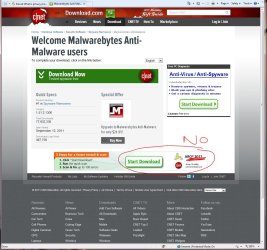
Every time I click any of the malwarebytes links posted I am directed to the CNET site and the only two options (both say "start download") lead to either RegClean or ARO2011. This is true for both my laptops, can I access it another way? Searched google and did not find anything I feel I can trust.
 

My Computer My Computer

At a glance

Windows 7
OS
Windows 7
Hi,

I think you are clicking the wrong link - please see below.

Regards,
Golden
 

Attachments

  • Capture.JPG
    Capture.JPG
    173.9 KB · Views: 7
Last edited:

My Computer My Computer

At a glance

Windows 10 Pro x64 ; Xubuntu x64Intel i7 860 @ 2.80 GHz O/C'ed to 4.0GHz16GB Corsair Vengance DDR3 @ 661 MHz Dual Cha...EVGA NVidia GTX 560 1024MB
Computer type
PC/Desktop
Computer Manufacturer/Model Number
Golden Mk. I.4
OS
Windows 10 Pro x64 ; Xubuntu x64
CPU
Intel i7 860 @ 2.80 GHz O/C'ed to 4.0GHz
Motherboard
Gigabyte P55A-UD3R Rev.1. Award BIOS F13
Memory
16GB Corsair Vengance DDR3 @ 661 MHz Dual Channel (9-9-9-24)
Graphics Card(s)
EVGA NVidia GTX 560 1024MB
Sound Card
Realtek Integrated
Monitor(s) Displays
Dual Samsung SyncMaster 2494HS
Screen Resolution
1920*1080 and 1920*1080
Hard Drives
1*Samsung 840 EVO 120GB SSD;
1*OCZ Vertex 2 60GB SSD;
2*Samsung F3 SpinPoint 1TB in RAID0;
1*Samsung F1 SpinPoint 1TB;
2*Western Digital 1TB External USB 3.0
1*Western Digital 500GB External USB 3.0
1*Seagate 500GB External USB 2.0
PSU
Thermaltake ToughPower QFan 750W
Case
Thermaltake Element S VK60001W2Z
Cooling
Corsair H60 Water Cooling, 2*230mm and 2*80mm case fans
Keyboard
Logitech G110
Mouse
Logitech MX518
On the good computer I get a link to download RegClean Pro, is that the one I want?

The one with the issue has a link there for ARO2011, I mean above where 'NO' is written.
 

My Computer My Computer

At a glance

Windows 7
OS
Windows 7

My Computer My Computer

At a glance

Windows 10 Pro x64 ; Xubuntu x64Intel i7 860 @ 2.80 GHz O/C'ed to 4.0GHz16GB Corsair Vengance DDR3 @ 661 MHz Dual Cha...EVGA NVidia GTX 560 1024MB
Computer type
PC/Desktop
Computer Manufacturer/Model Number
Golden Mk. I.4
OS
Windows 10 Pro x64 ; Xubuntu x64
CPU
Intel i7 860 @ 2.80 GHz O/C'ed to 4.0GHz
Motherboard
Gigabyte P55A-UD3R Rev.1. Award BIOS F13
Memory
16GB Corsair Vengance DDR3 @ 661 MHz Dual Channel (9-9-9-24)
Graphics Card(s)
EVGA NVidia GTX 560 1024MB
Sound Card
Realtek Integrated
Monitor(s) Displays
Dual Samsung SyncMaster 2494HS
Screen Resolution
1920*1080 and 1920*1080
Hard Drives
1*Samsung 840 EVO 120GB SSD;
1*OCZ Vertex 2 60GB SSD;
2*Samsung F3 SpinPoint 1TB in RAID0;
1*Samsung F1 SpinPoint 1TB;
2*Western Digital 1TB External USB 3.0
1*Western Digital 500GB External USB 3.0
1*Seagate 500GB External USB 2.0
PSU
Thermaltake ToughPower QFan 750W
Case
Thermaltake Element S VK60001W2Z
Cooling
Corsair H60 Water Cooling, 2*230mm and 2*80mm case fans
Keyboard
Logitech G110
Mouse
Logitech MX518
I attached the log following the scan, one infection was found: Rogue Privacy

The results say it was quarantined and deleted successfully. Now what is in my best interest? Run any other clean-ups, or leave it as is? Also is there I way I can double check to ensure all is well? Should I scan once more?
 

Attachments

My Computer My Computer

At a glance

Windows 7
OS
Windows 7
Well done! :cool:

Reboot your PC, log back in as normal, then re-run a FULL scan with Malwarebytes again.

Regards,
Golden
 

My Computer My Computer

At a glance

Windows 10 Pro x64 ; Xubuntu x64Intel i7 860 @ 2.80 GHz O/C'ed to 4.0GHz16GB Corsair Vengance DDR3 @ 661 MHz Dual Cha...EVGA NVidia GTX 560 1024MB
Computer type
PC/Desktop
Computer Manufacturer/Model Number
Golden Mk. I.4
OS
Windows 10 Pro x64 ; Xubuntu x64
CPU
Intel i7 860 @ 2.80 GHz O/C'ed to 4.0GHz
Motherboard
Gigabyte P55A-UD3R Rev.1. Award BIOS F13
Memory
16GB Corsair Vengance DDR3 @ 661 MHz Dual Channel (9-9-9-24)
Graphics Card(s)
EVGA NVidia GTX 560 1024MB
Sound Card
Realtek Integrated
Monitor(s) Displays
Dual Samsung SyncMaster 2494HS
Screen Resolution
1920*1080 and 1920*1080
Hard Drives
1*Samsung 840 EVO 120GB SSD;
1*OCZ Vertex 2 60GB SSD;
2*Samsung F3 SpinPoint 1TB in RAID0;
1*Samsung F1 SpinPoint 1TB;
2*Western Digital 1TB External USB 3.0
1*Western Digital 500GB External USB 3.0
1*Seagate 500GB External USB 2.0
PSU
Thermaltake ToughPower QFan 750W
Case
Thermaltake Element S VK60001W2Z
Cooling
Corsair H60 Water Cooling, 2*230mm and 2*80mm case fans
Keyboard
Logitech G110
Mouse
Logitech MX518
I made a mistake, I just noticed above it states run a quick scan, the one I last did was a full scan. Might this present a problem?

Also, I did not remove items in System Restore when I scanned previously, need I do the quick scan over?

EDIT: I just did the quick scan anyway, it only took two minutes and found no threats. I'm now doing the full scan once again.
 

My Computer My Computer

At a glance

Windows 7
OS
Windows 7
Hi, executiV. How is your computer now?

By the way, the quick scan with Malwarebytes was all you needed to do. See these quotes by nosirrah/Bruce Harrison, Vice President of Research, and RubbeR DuckY/Marcin Kleczynski, President and CEO:

nosirrah said:
The MBAM quick scan option will catch every bit of live malware that the full scan will detect and 99% of the traces .

I develop the definitions for MBAM and have never needed to use the full scan to test them out .

RubbeR DuckY said:
{SNIP}

Anyway, the quick scan catches 99.9% of malware the full scan catches. The only reason are anomalies such as malware archives and new malware hiding in new locations (which we detect a few hours after it is detected). So basically, it is like Lysol. Lysol is a germ killing spray, but in the commercials they say they kill 99.9% of germs. Reason -- some mutant strains and they get sued. I know, I know, bad analogy, but you get the point :).

Note also regarding System Restore that in a full scan, MBAM (and A/V programs) scans System Restore. If it does not completely clean the file, the computer may not have a good restore point. At a minimum, it will be returned to the state prior to the restore, which could be defective due to a f/p or incorrect user action.

It is better to have an infected restore point than none at all. It is safer to create a fresh restore point after the system is clean and then use the Disk Cleanup "More Options" to delete all but the most recent restore point.
 

My Computer My Computer

At a glance

Windows 7 & Windows Vista Ultimate
OS
Windows 7 & Windows Vista Ultimate
please help!

hmmm...well I managed to scan and delete the spyware with malwarebytes and have also recently scanned my comp with Ccleaner. No more of privacy protection it seems....

BUT: I have this problem now (which I guess is something to do with the registry being corrupted) when every time I try to download/install something, instead of words being displayed it's either blank boxes or weird symbols. Very infuriating trying to navigate your way through the install/download setup, probably marking the wrong boxes. I-tunes doesn't work as well, and I've been trying to install hitman blood money but xbmc won't install either. Surely it's related to privacy protection?

And the divx webplayer is not recognised (always being prompted to install it whenever I try to watch stuff on a divx supported vid player) - even though its installed (I've downloaded it dozens of times) and enabled in my addons for firefox. This is also extremely annoying!

Any advice and help would be much appreciated...
 

My Computer My Computer

At a glance

7
OS
7
To determine whether the issue that you are experiencing is caused by one or more system files that are used by Windows, run the System File Checker tool. The System File Checker tool scans system files and replaces incorrect versions of the system files by using the correct versions.

To run the System File Checker tool, follow these steps:

  • Click Start, and then type cmd in the Start Search box.
  • Right-click cmd in the Programs list, and then click Run as administrator.
  • If you are prompted for an administrator password or confirmation, type your password or click Continue
  • At the command prompt, type the following line, and then press ENTER:
    sfc /scannow (note the space before the forward slash)
  • When the scan is complete, test to see whether the issue that you are experiencing is resolved.


Note: If errors are found, run the tool again.
 

My Computer My Computer

At a glance

Windows 7 & Windows Vista Ultimate
OS
Windows 7 & Windows Vista Ultimate
thanks for the assistance, but it hasn't solved it.

shall I just reinstall windows? I don't have an installation disc though. I know there's ways around that, but not too confident about the whole procedure.

lemme know what you think.
 

My Computer My Computer

At a glance

7
OS
7
Let's see what an online scan shows. Please go here to run an on-line scan from ESET.

  • Note: It is easiest if you use Internet explorer for this scan. (If you use an alternate browser, it will be necessary to download the ESET Smart Installer)
  • Turn off the real time scanner of any existing antivirus program while performing the online scan
  • Tick the box next to YES, I accept the Terms of Use.
  • Click Start
  • When asked, allow the ActiveX control to install
  • Click Start
  • Make sure that the option Remove found threats is unticked and the Scan Archives option is ticked.
  • Click on Advanced Settings, ensure the options Scan for potentially unwanted applications, Scan for potentially unsafe applications, and Enable Anti-Stealth Technology are ticked.
  • Click Scan
  • Wait for the scan to finish
  • Use notepad to open the logfile located at C:\Program Files\Eset\Eset Online Scanner\log.txt
  • Copy and paste that log as a reply to this topic.
 

My Computer My Computer

At a glance

Windows 7 & Windows Vista Ultimate
OS
Windows 7 & Windows Vista Ultimate
annoyingly enough, one of the problems or symptoms of this irritating issue is that internet explorer doesn't work. Well it loads, but then this box with no words keeps on popping up - and it has that sign which is like the one that is displayed when a program is not responding and you're asked to close it immediately or wait until it's started responding again. The box will continue to pop up as long as IE is open and I've tried typing stuff into the search and address bars, but no words appear.

so will it be sufficient enough to do the scan on firefox or chrome?

eurgh, ESET wouldn't install properly anyway!

reinstall windows???
 
Last edited:

My Computer My Computer

At a glance

7
OS
7
Back
Top