What is that?Is that a hard disk?

panais. I suggest you go the easy way as I have done with 3 SSD installations.

1. drop the SSD in and install Windows7 as you would on any other Sata disk. Just make sure all other HDDs are physically disconnected. Else you may get some unwanted effects with the MBR.
2. When w7 runs, check to make sure that Defrag is disabled (it should be from the installer) and Superfetch is set to automatic (better for performance)
3. Optionally you can delete the hiberfile if you do not use hibernation. Saves you some SSD space. The command is powercfg -h off

That is all I ever did. More elaborate tweaks might give you a 1 or 2% better performance, but you will not notice the difference. Chances are only that you muck it up. That's why I always refrain from those tweaks.
 

My Computer My Computer

At a glance

Vista, Windows7, Mint Mate, Zorin, Windows 8from 1.6GHz Duo to i7
Computer Manufacturer/Model Number
HP, Dell, Gateway, Toshiba - 4 laptops and 2 desktops
OS
Vista, Windows7, Mint Mate, Zorin, Windows 8
CPU
from 1.6GHz Duo to i7
Monitor(s) Displays
2x HP w2207
Hard Drives
5x HDD, 7x SSD, 12x Externals
Keyboard
with trackball - no mices
Mouse
Trackball mice
Internet Speed
DSL 6000
panais. I suggest you go the easy way as I have done with 3 SSD installations.

1. drop the SSD in and install Windows7 as you would on any other Sata disk. Just make sure all other HDDs are physically disconnected. Else you may get some unwanted effects with the MBR.
2. When w7 runs, check to make sure that Defrag is disabled (it should be from the installer) and Superfetch is set to automatic (better for performance)
3. Optionally you can delete the hiberfile if you do not use hibernation. Saves you some SSD space. The command is powercfg -h off

That is all I ever did. More elaborate tweaks might give you a 1 or 2% better performance, but you will not notice the difference. Chances are only that you muck it up. That's why I always refrain from those tweaks.

OK i will buy Corsair Force Series F120 - Solid state drive - 120 GB,maybe tomorow.
http://www.corsair.com/products/ssd_force/default.aspx
I hope I'm making a good choice.
And i hope my pc hardwares,cpu,ram etc are capable to handle and use all the speed of it.
PLEASE Tell me ur opinion about this (read my specs) i hope my hardwares are not a bottleneck!
-------------------------
And i have some more answers.
I worry about my ga-x38-ds4,i dont trust this motherboard because i had some compatibility issues(my ga-x38-ds4 cannot accept ram more than 800mhz speed and when i install 1066mhz ram i get an endless reboot)This is the only thing i really worried,the motherboard is crazy,anyway this is not a ram is just a hard disk and i never had any problems with that.So i hope everything will go fine.
Second i always use 3 hard disks C:\ D:\ E:\ and cdrom F:\
And i like my hard disks in that order C:\ D:\ E:\ and cdrom F:\
If i have only the ssd and the cdrom the cdrom will named as D:\
Is there any trick when i finish insatlling win7 to set my hard disks in that order?
C:\ D:\ E:\ and cdrom F:\
 
Last edited:

My Computer My Computer

At a glance

Windows 7 Ultimate 64bit SP1Intel Core 2 Quad Q66002X2GB DDR2 PC6400 800MHZ DUAL CHANNELXFX RADEON HD 6850 1GB GDDR5
Computer Manufacturer/Model Number
Custom Built by me.
OS
Windows 7 Ultimate 64bit SP1
CPU
Intel Core 2 Quad Q6600
Motherboard
Gigabyte GA-X38-DS4
Memory
2X2GB DDR2 PC6400 800MHZ DUAL CHANNEL
Graphics Card(s)
XFX RADEON HD 6850 1GB GDDR5
Sound Card
2/4/5.1/7.1-channel Realtek High Definition
Monitor(s) Displays
Samsung LE40A656F1 1080p 100Hz LCD HD TV 50,000:1
Screen Resolution
1366x768 in Desktop,1920x1080p in gaming and video
Hard Drives
C:\WD VelociRaptor 150 GB,10,000 RPM
E:\WESTERN DIGITAL WD15EADS 1.5TB CAVIAR GREEN SATA2 F:\WESTERN DIGITAL WD15EADS 1.5TB CAVIAR GREEN SATA2
PSU
THERMALTAKE W0229 TOUGHPOWER XT 750W
Case
A-Case Twin Engine BB
Cooling
3 x thermaltake smart case fan II + 1 arctic cooling fan
Keyboard
Wireless Logitech LX710
Mouse
Logitech Wireless Gaming Mouse G700
Internet Speed
ADSL 12000 plus
Other Info
Mouse Logitech G700,with 13 buttons who needs keyboard in RPG?

D:\Sony high speed sata Dvd Rewriter
Logitech Cordless Rumblepad 2
Your hardware is perfect. In fact have an OCZ Vertex on nearly the same system (Q6600, 4GBs RAM) and it works perfectly. I would not think that your mobo will have a problem with the SSD. The SSD esentially behaves like any old Sata disk.
As far as the numbering of your partitions goes, you can chose the letters in Disk Management. I would not predefine those partitions because then you also have to worry about the alignment of the SSD - the Win7 installer will take care of that automatically. You may, however, end up with an additional 100MB active boot partition. That is no problem and the normal win7 procedure. You should only watch that your additional partitions are logical partitions (not primary partitions) because of the NTFS limit of 4 primaries. If you need further help on that, let us know.
Also, Disk Management may not let you shrink C as much as you want (because of the MFT in the midle of C that DM cannot move). In that case you should use Partition Wizard which can move the MFT.
 

My Computer My Computer

At a glance

Vista, Windows7, Mint Mate, Zorin, Windows 8from 1.6GHz Duo to i7
Computer Manufacturer/Model Number
HP, Dell, Gateway, Toshiba - 4 laptops and 2 desktops
OS
Vista, Windows7, Mint Mate, Zorin, Windows 8
CPU
from 1.6GHz Duo to i7
Monitor(s) Displays
2x HP w2207
Hard Drives
5x HDD, 7x SSD, 12x Externals
Keyboard
with trackball - no mices
Mouse
Trackball mice
Internet Speed
DSL 6000
I have no practical knowledge of Corsairs SSD's, so no opinion. Corsair is a quality company, I'm sure its a good SSD.

I do not know the technical reason for choosing port 5 over 4 for rom. Its considered the way to do installs of OS to SSD. About keeping hardware config simple. After install is up and running you could replug it to a different port. Plug in your other drives in the sequence you want recognized, plug rom last. Or manually change them in disk managment.

More than likely, you will not have any issues. But when there are issues, these things are what people are saying to do. I read up before my attempt. Did what the OCZ forum suggested for my Vertex. I have used my hardware config for W7 RC1 and now W 7 retail.
0% issues in 2 years thru 2 OS installs.
 

My Computer My Computer

At a glance

W7 Ulti/64, XP Pro/32INTEL i7 920 DO, Core2 Duo 6400KINGSTON DDR3 1333MHz, CORSAIR DDR2 800MHzEVGA GTX 260 x2, 8800 GTX
Computer Manufacturer/Model Number
DIY #3, #2
OS
W7 Ulti/64, XP Pro/32
CPU
INTEL i7 920 DO, Core2 Duo 6400
Motherboard
GIGABYTE EX58 UD3R-SLI, EP45-UD3R
Memory
KINGSTON DDR3 1333MHz, CORSAIR DDR2 800MHz
Graphics Card(s)
EVGA GTX 260 x2, 8800 GTX
Sound Card
REALTEK HD onboard, ditto
Monitor(s) Displays
SONY 40" BRAVIA LCD
Screen Resolution
1360 X 768
Hard Drives
OCZ VERTEX/RAID0 -3, Vertex 30GB
PSU
COOLERMASTER 900W, ENERMAX 850W
Case
COOLERMASTER HAF 932 x2
Cooling
stock
Keyboard
MS
Mouse
MS
Internet Speed
ADSL 3MB/768KBs
Other Info
amateur enthusiast
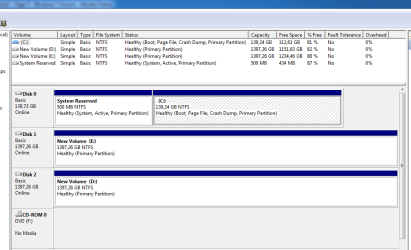
Ok thats how my hard disks looks now in Disk Management.
Are connected in motherboard in that order:
C:\ is on port 0
D:\ is on port 1
E:\ is on port 2
F:\cdrom is on port 3
I dont know why D:\ shows as Disk 2 and why E:\ shows as Disk 1.
Any ideas?
 

Attachments

  • Capture.PNG
    Capture.PNG
    18.6 KB · Views: 8

My Computer My Computer

At a glance

Windows 7 Ultimate 64bit SP1Intel Core 2 Quad Q66002X2GB DDR2 PC6400 800MHZ DUAL CHANNELXFX RADEON HD 6850 1GB GDDR5
Computer Manufacturer/Model Number
Custom Built by me.
OS
Windows 7 Ultimate 64bit SP1
CPU
Intel Core 2 Quad Q6600
Motherboard
Gigabyte GA-X38-DS4
Memory
2X2GB DDR2 PC6400 800MHZ DUAL CHANNEL
Graphics Card(s)
XFX RADEON HD 6850 1GB GDDR5
Sound Card
2/4/5.1/7.1-channel Realtek High Definition
Monitor(s) Displays
Samsung LE40A656F1 1080p 100Hz LCD HD TV 50,000:1
Screen Resolution
1366x768 in Desktop,1920x1080p in gaming and video
Hard Drives
C:\WD VelociRaptor 150 GB,10,000 RPM
E:\WESTERN DIGITAL WD15EADS 1.5TB CAVIAR GREEN SATA2 F:\WESTERN DIGITAL WD15EADS 1.5TB CAVIAR GREEN SATA2
PSU
THERMALTAKE W0229 TOUGHPOWER XT 750W
Case
A-Case Twin Engine BB
Cooling
3 x thermaltake smart case fan II + 1 arctic cooling fan
Keyboard
Wireless Logitech LX710
Mouse
Logitech Wireless Gaming Mouse G700
Internet Speed
ADSL 12000 plus
Other Info
Mouse Logitech G700,with 13 buttons who needs keyboard in RPG?

D:\Sony high speed sata Dvd Rewriter
Logitech Cordless Rumblepad 2
Hmm, maybe they are not on the ports you think they are. And sorry I gave you all that sermon about partitions. I did not know those were actual different disks (often people call partition=disks, but you knew better).
What's funny is that it reserved 500MBs for the active partition. Normally that is 100MBs. But given the space you have, that should be no problem. Just make sure not to play with that partition, else you may not able to boot.
 

My Computer My Computer

At a glance

Vista, Windows7, Mint Mate, Zorin, Windows 8from 1.6GHz Duo to i7
Computer Manufacturer/Model Number
HP, Dell, Gateway, Toshiba - 4 laptops and 2 desktops
OS
Vista, Windows7, Mint Mate, Zorin, Windows 8
CPU
from 1.6GHz Duo to i7
Monitor(s) Displays
2x HP w2207
Hard Drives
5x HDD, 7x SSD, 12x Externals
Keyboard
with trackball - no mices
Mouse
Trackball mice
Internet Speed
DSL 6000
Hmm, maybe they are not on the ports you think they are. And sorry I gave you all that sermon about partitions. I did not know those were actual different disks (often people call partition=disks, but you knew better).
What's funny is that it reserved 500MBs for the active partition. Normally that is 100MBs. But given the space you have, that should be no problem. Just make sure not to play with that partition, else you may not able to boot.
My box is always open and i just check they are in the correct port.
I dont know,i dont find any logical reason.(as i said my mobo is CRAZY)
whs think maybe you find something.
(The System Reserved is big 500mb because i increase the size with the partition magic for an old backup issue,the story...with bitdefender installed when i was trying to create a system image (Control Panel\All Control Panel Items\Backup and Restore) i had the error <<not enouph size for backup,something like that, so i increase it)and yes was bitdefender conflict,
Nevermind now i use norton ghost an im happy with it.
And in 2 days i will change the hard disk and i will format without the other disks to see what will happen.
 

My Computer My Computer

At a glance

Windows 7 Ultimate 64bit SP1Intel Core 2 Quad Q66002X2GB DDR2 PC6400 800MHZ DUAL CHANNELXFX RADEON HD 6850 1GB GDDR5
Computer Manufacturer/Model Number
Custom Built by me.
OS
Windows 7 Ultimate 64bit SP1
CPU
Intel Core 2 Quad Q6600
Motherboard
Gigabyte GA-X38-DS4
Memory
2X2GB DDR2 PC6400 800MHZ DUAL CHANNEL
Graphics Card(s)
XFX RADEON HD 6850 1GB GDDR5
Sound Card
2/4/5.1/7.1-channel Realtek High Definition
Monitor(s) Displays
Samsung LE40A656F1 1080p 100Hz LCD HD TV 50,000:1
Screen Resolution
1366x768 in Desktop,1920x1080p in gaming and video
Hard Drives
C:\WD VelociRaptor 150 GB,10,000 RPM
E:\WESTERN DIGITAL WD15EADS 1.5TB CAVIAR GREEN SATA2 F:\WESTERN DIGITAL WD15EADS 1.5TB CAVIAR GREEN SATA2
PSU
THERMALTAKE W0229 TOUGHPOWER XT 750W
Case
A-Case Twin Engine BB
Cooling
3 x thermaltake smart case fan II + 1 arctic cooling fan
Keyboard
Wireless Logitech LX710
Mouse
Logitech Wireless Gaming Mouse G700
Internet Speed
ADSL 12000 plus
Other Info
Mouse Logitech G700,with 13 buttons who needs keyboard in RPG?

D:\Sony high speed sata Dvd Rewriter
Logitech Cordless Rumblepad 2
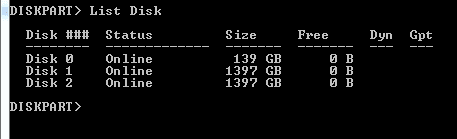
Type msinfo32 into the Start/search field and hit Enter. Then open (the little + fields in front) Components > Storage and double click on Disks. Then look in the right pane which SCSI bus is given for your disks.

You can also open an elevated Command Prompt and type Diskpart > hit Enter, then List Disk > hit Enter. What does this say?
 

My Computer My Computer

At a glance

Vista, Windows7, Mint Mate, Zorin, Windows 8from 1.6GHz Duo to i7
Computer Manufacturer/Model Number
HP, Dell, Gateway, Toshiba - 4 laptops and 2 desktops
OS
Vista, Windows7, Mint Mate, Zorin, Windows 8
CPU
from 1.6GHz Duo to i7
Monitor(s) Displays
2x HP w2207
Hard Drives
5x HDD, 7x SSD, 12x Externals
Keyboard
with trackball - no mices
Mouse
Trackball mice
Internet Speed
DSL 6000
Type msinfo32 into the Start/search field and hit Enter. Then open (the little + fields in front) Components > Storage and double click on Disks. Then look in the right pane which SCSI bus is given for your disks.

You can also open an elevated Command Prompt and type Diskpart > hit Enter, then List Disk > hit Enter. What does this say?
Here they are...
 

Attachments

Last edited:

My Computer My Computer

At a glance

Windows 7 Ultimate 64bit SP1Intel Core 2 Quad Q66002X2GB DDR2 PC6400 800MHZ DUAL CHANNELXFX RADEON HD 6850 1GB GDDR5
Computer Manufacturer/Model Number
Custom Built by me.
OS
Windows 7 Ultimate 64bit SP1
CPU
Intel Core 2 Quad Q6600
Motherboard
Gigabyte GA-X38-DS4
Memory
2X2GB DDR2 PC6400 800MHZ DUAL CHANNEL
Graphics Card(s)
XFX RADEON HD 6850 1GB GDDR5
Sound Card
2/4/5.1/7.1-channel Realtek High Definition
Monitor(s) Displays
Samsung LE40A656F1 1080p 100Hz LCD HD TV 50,000:1
Screen Resolution
1366x768 in Desktop,1920x1080p in gaming and video
Hard Drives
C:\WD VelociRaptor 150 GB,10,000 RPM
E:\WESTERN DIGITAL WD15EADS 1.5TB CAVIAR GREEN SATA2 F:\WESTERN DIGITAL WD15EADS 1.5TB CAVIAR GREEN SATA2
PSU
THERMALTAKE W0229 TOUGHPOWER XT 750W
Case
A-Case Twin Engine BB
Cooling
3 x thermaltake smart case fan II + 1 arctic cooling fan
Keyboard
Wireless Logitech LX710
Mouse
Logitech Wireless Gaming Mouse G700
Internet Speed
ADSL 12000 plus
Other Info
Mouse Logitech G700,with 13 buttons who needs keyboard in RPG?

D:\Sony high speed sata Dvd Rewriter
Logitech Cordless Rumblepad 2
Too bad, you cannot tell D and E apart because they are the same size.
 

My Computer My Computer

At a glance

Vista, Windows7, Mint Mate, Zorin, Windows 8from 1.6GHz Duo to i7
Computer Manufacturer/Model Number
HP, Dell, Gateway, Toshiba - 4 laptops and 2 desktops
OS
Vista, Windows7, Mint Mate, Zorin, Windows 8
CPU
from 1.6GHz Duo to i7
Monitor(s) Displays
2x HP w2207
Hard Drives
5x HDD, 7x SSD, 12x Externals
Keyboard
with trackball - no mices
Mouse
Trackball mice
Internet Speed
DSL 6000
Too bad, you cannot tell D and E apart because they are the same size.
We will see how they look after the new ssd/format etc.
If you have any idea for BIOS adjustment please write.
 

My Computer My Computer

At a glance

Windows 7 Ultimate 64bit SP1Intel Core 2 Quad Q66002X2GB DDR2 PC6400 800MHZ DUAL CHANNELXFX RADEON HD 6850 1GB GDDR5
Computer Manufacturer/Model Number
Custom Built by me.
OS
Windows 7 Ultimate 64bit SP1
CPU
Intel Core 2 Quad Q6600
Motherboard
Gigabyte GA-X38-DS4
Memory
2X2GB DDR2 PC6400 800MHZ DUAL CHANNEL
Graphics Card(s)
XFX RADEON HD 6850 1GB GDDR5
Sound Card
2/4/5.1/7.1-channel Realtek High Definition
Monitor(s) Displays
Samsung LE40A656F1 1080p 100Hz LCD HD TV 50,000:1
Screen Resolution
1366x768 in Desktop,1920x1080p in gaming and video
Hard Drives
C:\WD VelociRaptor 150 GB,10,000 RPM
E:\WESTERN DIGITAL WD15EADS 1.5TB CAVIAR GREEN SATA2 F:\WESTERN DIGITAL WD15EADS 1.5TB CAVIAR GREEN SATA2
PSU
THERMALTAKE W0229 TOUGHPOWER XT 750W
Case
A-Case Twin Engine BB
Cooling
3 x thermaltake smart case fan II + 1 arctic cooling fan
Keyboard
Wireless Logitech LX710
Mouse
Logitech Wireless Gaming Mouse G700
Internet Speed
ADSL 12000 plus
Other Info
Mouse Logitech G700,with 13 buttons who needs keyboard in RPG?

D:\Sony high speed sata Dvd Rewriter
Logitech Cordless Rumblepad 2
Ok the plan is...
In 2 days i will have the Corsair Force Series F120 (btw that thing is 285 MBps (read) / 275 MBps (write) with 50.000 IOPS)
Connect ssd port 0,cdrom port 4
Format,installing win7 ultimate 64bit (in that time i will like to know ,if its possible to remove the system reserved if is NOT a bad thing to remove system reserved and how to do that)if is a BAD thing to remove it ok forget it.
Then connect the rest of my hard disks and find the solution to arrange them in the correct name order C:\ D:\ E:\ and F:\ for cdrom
Then installs all my programs and adjust them the way i like
Then create system image with norton ghost.
For now i created a new folder with the name SSD SETUPS and i start to download all the updated programs,the newest versions of 7zip,firefox,sound driver,ati radeon... EVERYTHING!!
-----------------------------------------------------------------------
So until then any ideas and advices are very welcome!!
Thanks EVERYBODY for helping me!!
 

My Computer My Computer

At a glance

Windows 7 Ultimate 64bit SP1Intel Core 2 Quad Q66002X2GB DDR2 PC6400 800MHZ DUAL CHANNELXFX RADEON HD 6850 1GB GDDR5
Computer Manufacturer/Model Number
Custom Built by me.
OS
Windows 7 Ultimate 64bit SP1
CPU
Intel Core 2 Quad Q6600
Motherboard
Gigabyte GA-X38-DS4
Memory
2X2GB DDR2 PC6400 800MHZ DUAL CHANNEL
Graphics Card(s)
XFX RADEON HD 6850 1GB GDDR5
Sound Card
2/4/5.1/7.1-channel Realtek High Definition
Monitor(s) Displays
Samsung LE40A656F1 1080p 100Hz LCD HD TV 50,000:1
Screen Resolution
1366x768 in Desktop,1920x1080p in gaming and video
Hard Drives
C:\WD VelociRaptor 150 GB,10,000 RPM
E:\WESTERN DIGITAL WD15EADS 1.5TB CAVIAR GREEN SATA2 F:\WESTERN DIGITAL WD15EADS 1.5TB CAVIAR GREEN SATA2
PSU
THERMALTAKE W0229 TOUGHPOWER XT 750W
Case
A-Case Twin Engine BB
Cooling
3 x thermaltake smart case fan II + 1 arctic cooling fan
Keyboard
Wireless Logitech LX710
Mouse
Logitech Wireless Gaming Mouse G700
Internet Speed
ADSL 12000 plus
Other Info
Mouse Logitech G700,with 13 buttons who needs keyboard in RPG?

D:\Sony high speed sata Dvd Rewriter
Logitech Cordless Rumblepad 2
Ok the plan is...
In 2 days i will have the Corsair Force Series F120 (btw that thing is 285 MBps (read) / 275 MBps (write) with 50.000 IOPS)
Connect ssd port 0,cdrom port 4
Format,installing win7 ultimate 64bit (in that time i will like to know ,if its possible to remove the system reserved if is NOT a bad thing to remove system reserved and how to do that)if is a BAD thing to remove it ok forget it.
Then connect the rest of my hard disks and find the solution to arrange them in the correct name order C:\ D:\ E:\ and F:\ for cdrom
Then installs all my programs and adjust them the way i like
Then create system image with norton ghost.
For now i created a new folder with the name SSD SETUPS and i start to download all the updated programs,the newest versions of 7zip,firefox,sound driver,ati radeon... EVERYTHING!!
-----------------------------------------------------------------------
So until then any ideas and advices are very welcome!!
If you mean by "Format" to format the SSD, don't do it. Leave all that to the installer. Just delete the partitions and the volumes so that you have all unallocated space with the bootable CD of Partition Wizard. But if the SSD is brand new, you need not do that.

To get rid of the 100MB partition, you would have to predefine a partition (e.g. with Partition Wizard) on the SSD to where to install w7. But then you need to align the SSD yourself. It is possible, but I am not sure you want to go thru the trouble.

But you can try. Define the partition (must be primary, active) and see whether the alignment is OK. If you can attach it to another PC via USB, you can check it with Command Prompt:

Diskpart (hit Enter after each line)
List disk
Select disk n (where n is the number of the SSD from List Disk)
List partition

Now you should see a result like this.

Partition ### Type Size Offset
------------- ---------------- ------- -------
Partition 1 Primary 59 GB 1024 KB

The offset has to be divisible by 4.
 
Last edited:

My Computer My Computer

At a glance

Vista, Windows7, Mint Mate, Zorin, Windows 8from 1.6GHz Duo to i7
Computer Manufacturer/Model Number
HP, Dell, Gateway, Toshiba - 4 laptops and 2 desktops
OS
Vista, Windows7, Mint Mate, Zorin, Windows 8
CPU
from 1.6GHz Duo to i7
Monitor(s) Displays
2x HP w2207
Hard Drives
5x HDD, 7x SSD, 12x Externals
Keyboard
with trackball - no mices
Mouse
Trackball mice
Internet Speed
DSL 6000
Yes, no format required on brand new factory SSD. Do not worry about the system reserved partition. Let the install create it an move on.

While you wait for SSD to arrive,
IDE or AHCI mode in bios?
Is mobo latest bios flash?
Are you going to overprovision the drive?

Get Intels Latest chipset version for X 38 with W 7 64 bit. Other 64 bit drivers as well.
Go to Corsair and see what latest firmware version for your SSD is available. When SSD arrives check its fw version. More than likely its the latest version.

IDE or ACHI, preferably you want ACHI mode selected at OS install. But older chipsets seem to lose an ACHI mode SSD?????? I have a EP45 chipset that would only work with its SSD boot drive in IDE mode. The SSD was uptodate, mobo had latest bios flash, would lose an ACHI selected SSD??????

Hey your gonna luv this thing when your all up and running!

Oh,
and do not add other hardware untill OS boot is in, updated, with all periphial and mobo hardware drivers installed. Make system stable with just OS before adding rest of hardware.
 

My Computer My Computer

At a glance

W7 Ulti/64, XP Pro/32INTEL i7 920 DO, Core2 Duo 6400KINGSTON DDR3 1333MHz, CORSAIR DDR2 800MHzEVGA GTX 260 x2, 8800 GTX
Computer Manufacturer/Model Number
DIY #3, #2
OS
W7 Ulti/64, XP Pro/32
CPU
INTEL i7 920 DO, Core2 Duo 6400
Motherboard
GIGABYTE EX58 UD3R-SLI, EP45-UD3R
Memory
KINGSTON DDR3 1333MHz, CORSAIR DDR2 800MHz
Graphics Card(s)
EVGA GTX 260 x2, 8800 GTX
Sound Card
REALTEK HD onboard, ditto
Monitor(s) Displays
SONY 40" BRAVIA LCD
Screen Resolution
1360 X 768
Hard Drives
OCZ VERTEX/RAID0 -3, Vertex 30GB
PSU
COOLERMASTER 900W, ENERMAX 850W
Case
COOLERMASTER HAF 932 x2
Cooling
stock
Keyboard
MS
Mouse
MS
Internet Speed
ADSL 3MB/768KBs
Other Info
amateur enthusiast

My Computer My Computer

At a glance

W7 Ulti/64, XP Pro/32INTEL i7 920 DO, Core2 Duo 6400KINGSTON DDR3 1333MHz, CORSAIR DDR2 800MHzEVGA GTX 260 x2, 8800 GTX
Computer Manufacturer/Model Number
DIY #3, #2
OS
W7 Ulti/64, XP Pro/32
CPU
INTEL i7 920 DO, Core2 Duo 6400
Motherboard
GIGABYTE EX58 UD3R-SLI, EP45-UD3R
Memory
KINGSTON DDR3 1333MHz, CORSAIR DDR2 800MHz
Graphics Card(s)
EVGA GTX 260 x2, 8800 GTX
Sound Card
REALTEK HD onboard, ditto
Monitor(s) Displays
SONY 40" BRAVIA LCD
Screen Resolution
1360 X 768
Hard Drives
OCZ VERTEX/RAID0 -3, Vertex 30GB
PSU
COOLERMASTER 900W, ENERMAX 850W
Case
COOLERMASTER HAF 932 x2
Cooling
stock
Keyboard
MS
Mouse
MS
Internet Speed
ADSL 3MB/768KBs
Other Info
amateur enthusiast
In my motherboard SATA\RAID ANSI is disabled.
Is that ok?
 

My Computer My Computer

At a glance

Windows 7 Ultimate 64bit SP1Intel Core 2 Quad Q66002X2GB DDR2 PC6400 800MHZ DUAL CHANNELXFX RADEON HD 6850 1GB GDDR5
Computer Manufacturer/Model Number
Custom Built by me.
OS
Windows 7 Ultimate 64bit SP1
CPU
Intel Core 2 Quad Q6600
Motherboard
Gigabyte GA-X38-DS4
Memory
2X2GB DDR2 PC6400 800MHZ DUAL CHANNEL
Graphics Card(s)
XFX RADEON HD 6850 1GB GDDR5
Sound Card
2/4/5.1/7.1-channel Realtek High Definition
Monitor(s) Displays
Samsung LE40A656F1 1080p 100Hz LCD HD TV 50,000:1
Screen Resolution
1366x768 in Desktop,1920x1080p in gaming and video
Hard Drives
C:\WD VelociRaptor 150 GB,10,000 RPM
E:\WESTERN DIGITAL WD15EADS 1.5TB CAVIAR GREEN SATA2 F:\WESTERN DIGITAL WD15EADS 1.5TB CAVIAR GREEN SATA2
PSU
THERMALTAKE W0229 TOUGHPOWER XT 750W
Case
A-Case Twin Engine BB
Cooling
3 x thermaltake smart case fan II + 1 arctic cooling fan
Keyboard
Wireless Logitech LX710
Mouse
Logitech Wireless Gaming Mouse G700
Internet Speed
ADSL 12000 plus
Other Info
Mouse Logitech G700,with 13 buttons who needs keyboard in RPG?

D:\Sony high speed sata Dvd Rewriter
Logitech Cordless Rumblepad 2

My Computer My Computer

At a glance

W7 Ulti/64, XP Pro/32INTEL i7 920 DO, Core2 Duo 6400KINGSTON DDR3 1333MHz, CORSAIR DDR2 800MHzEVGA GTX 260 x2, 8800 GTX
Computer Manufacturer/Model Number
DIY #3, #2
OS
W7 Ulti/64, XP Pro/32
CPU
INTEL i7 920 DO, Core2 Duo 6400
Motherboard
GIGABYTE EX58 UD3R-SLI, EP45-UD3R
Memory
KINGSTON DDR3 1333MHz, CORSAIR DDR2 800MHz
Graphics Card(s)
EVGA GTX 260 x2, 8800 GTX
Sound Card
REALTEK HD onboard, ditto
Monitor(s) Displays
SONY 40" BRAVIA LCD
Screen Resolution
1360 X 768
Hard Drives
OCZ VERTEX/RAID0 -3, Vertex 30GB
PSU
COOLERMASTER 900W, ENERMAX 850W
Case
COOLERMASTER HAF 932 x2
Cooling
stock
Keyboard
MS
Mouse
MS
Internet Speed
ADSL 3MB/768KBs
Other Info
amateur enthusiast
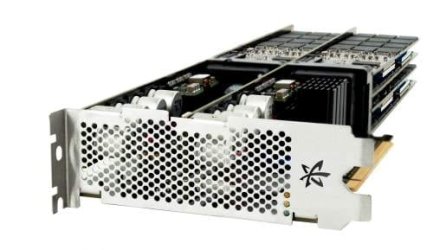
And then there's this puppy...

ioDrive Octal
thumb.500x500.iodrive-octal-angle.jpg

oDrive Octal Capacity: 5.12TB
NAND Type: Multi Level Cell (MLC)
Read IOPS: 1,190,000
Write IOPS: 1,180,000
75/25 Mix IOPS: 729,000
Read Bandwidth: 6.0 GB/s
Write Bandwidth: 4.4 GB/s
Access Latency: 30µs
Bus Interface: PCI-Express x16 Gen2.0

And guess what we're getting two of to play with :zip:
I've been told it retails at around US$180,000
 

My Computer My Computer

At a glance

Windows 7 EnterpriseIntel Pentium Dual E2200 @2.2GHz4GBPalit GForce 9500GT 1GB
OS
Windows 7 Enterprise
CPU
Intel Pentium Dual E2200 @2.2GHz
Motherboard
Gigabyte II-G31
Memory
4GB
Graphics Card(s)
Palit GForce 9500GT 1GB
Sound Card
onBoard
Hard Drives
WesternDigital: 250GB + 1TB + 1TB + 2TB
PSU
450W
Case
CoolerMaster CM690
Cooling
Corsair H50
Mouse
Logitech MX518
House fo sale

And then there's this puppy...

ioDrive Octal
View attachment 134432

oDrive Octal Capacity: 5.12TB
NAND Type: Multi Level Cell (MLC)
Read IOPS: 1,190,000
Write IOPS: 1,180,000
75/25 Mix IOPS: 729,000
Read Bandwidth: 6.0 GB/s
Write Bandwidth: 4.4 GB/s
Access Latency: 30µs
Bus Interface: PCI-Express x16 Gen2.0

And guess what we're getting two of to play with :zip:
I've been told it retails at around US$180,000
Ok i decided i will buy one!!
I must sell the house first of course but who cares?
That thing is fast!!!
 

My Computer My Computer

At a glance

Windows 7 Ultimate 64bit SP1Intel Core 2 Quad Q66002X2GB DDR2 PC6400 800MHZ DUAL CHANNELXFX RADEON HD 6850 1GB GDDR5
Computer Manufacturer/Model Number
Custom Built by me.
OS
Windows 7 Ultimate 64bit SP1
CPU
Intel Core 2 Quad Q6600
Motherboard
Gigabyte GA-X38-DS4
Memory
2X2GB DDR2 PC6400 800MHZ DUAL CHANNEL
Graphics Card(s)
XFX RADEON HD 6850 1GB GDDR5
Sound Card
2/4/5.1/7.1-channel Realtek High Definition
Monitor(s) Displays
Samsung LE40A656F1 1080p 100Hz LCD HD TV 50,000:1
Screen Resolution
1366x768 in Desktop,1920x1080p in gaming and video
Hard Drives
C:\WD VelociRaptor 150 GB,10,000 RPM
E:\WESTERN DIGITAL WD15EADS 1.5TB CAVIAR GREEN SATA2 F:\WESTERN DIGITAL WD15EADS 1.5TB CAVIAR GREEN SATA2
PSU
THERMALTAKE W0229 TOUGHPOWER XT 750W
Case
A-Case Twin Engine BB
Cooling
3 x thermaltake smart case fan II + 1 arctic cooling fan
Keyboard
Wireless Logitech LX710
Mouse
Logitech Wireless Gaming Mouse G700
Internet Speed
ADSL 12000 plus
Other Info
Mouse Logitech G700,with 13 buttons who needs keyboard in RPG?

D:\Sony high speed sata Dvd Rewriter
Logitech Cordless Rumblepad 2
Panais,
You can’t go wrong with the Corsair f120. It’s actually based on the same controller (or similar) as the Revo PCI drive you first posted about. And it’s a fraction of the price!! Although because it will use a SATA port instead of the PCIe slot like the Revo it will not be as fast. However you will defiantly be impressed by its performance compared to your Raptor mechanical hard drive.

Follow the easy tutorial on installation and optimizing your SSD and you will be as good as gold.
http://www.sevenforums.com/tutorials/91339-ssd-hdd-optimize-windows-reinstallation.html?filter
 

My Computer My Computer

At a glance

Windows 7 ProfessionalIntel i7 4790K32 GB G.SKILL TridentX F3-2400C10D-GTXEVGA GeForce GTX 980 Superclocked X2 SLI
Computer type
PC/Desktop
Computer Manufacturer/Model Number
Misfits Machine!
OS
Windows 7 Professional
CPU
Intel i7 4790K
Motherboard
ASUS Maximus VII Hero
Memory
32 GB G.SKILL TridentX F3-2400C10D-GTX
Graphics Card(s)
EVGA GeForce GTX 980 Superclocked X2 SLI
Sound Card
Teac UD-501 External USB DAC/Bryston BHA-1 Headphone Amp
Monitor(s) Displays
BenQ BL3200PT
Screen Resolution
2560x1440
Hard Drives
Samsung 850 Pro Series 256GB SSD
Western Digital Red 3TB
PSU
Corsair RM Series Gold 1000W
Case
Corsair Carbide Series Air 540
Cooling
Corsair Hydro Series H110
Keyboard
Corsair Vengeance K70 - Cherry MX Red/Razer Orbweaver Elite
Mouse
Razer DeathAdder Chroma
Back
Top