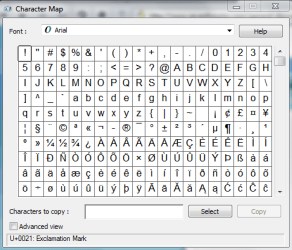
What is the default style in Character Map?

Local time
6:19 AM
Messages
49
null

null
 
Last edited:

My Computer My Computer

Computer type
PC/Desktop
OS
Windows 7 Home Premium 64-bit
Do you mean this:

Map.PNG
 

My Computer My Computer

Computer Manufacturer/Model Number
Sony Vaio Z46GDU
OS
Windows 7 Ultimate x86-64
CPU
[email protected] 1066MHz FSB
Motherboard
Sony branded
Memory
6GB DDR3 1066MHz
Graphics Card(s)
9300M GS 256MB Dedicated (Speed) + Intel4500MHD (Stamina)
Sound Card
Realtek HD Audio
Monitor(s) Displays
13.1' WXGA
Screen Resolution
1600x900
Hard Drives
320GB 7200RPM w/ 16MB cache
Internet Speed
1MB/s
Since I';ve never used it before i just fired it up and Arial was the font displayed
 

My Computer My Computer

Computer Manufacturer/Model Number
Cheap $399.00 E-Machine
OS
Windows 7 Pro & Vista Home Premium
CPU
Athlon 64 3800+ (Orleans) 2.40GHz
Motherboard
Winfast
Memory
2GB DDR2 RAM DIMM
Graphics Card(s)
NVIDIA GeForce 8500 GT 512 MB memory HDMI out
Sound Card
creative X-Fi Exteme 7..1 channel
Monitor(s) Displays
Acer V223W 22" widescreen DVI
Screen Resolution
1680x1050
Hard Drives
WDC WD5 500GB
WDC WD25 250GB
PSU
OCZ 550 watt
Case
Gateway
Cooling
2 fans
Keyboard
Dell
Mouse
Sony Vaio
Internet Speed
18MB/s down - .72MB /s up
Thanks you guys. I'm actually having a problem doing special characters on a game I play. I play a game called Habbo and on their website, I can do alt codes correctly, but when I log onto their game client and try to do alt codes, it doesn't work the way it should. Like on their website, a dark heart is Alt+159 and it would come out correctly. On their game client, I try to do it and it comes out as an apostrophe. I didn't have this problem on Windows XP so I could really use an answer. It's not their end, it's something with my computer since all my friends on there can do alt codes correctly on the game client.

 

My Computer My Computer

Computer type
PC/Desktop
OS
Windows 7 Home Premium 64-bit
Can you copy and paste the right character?
 

My Computer My Computer

Computer Manufacturer/Model Number
Sony Vaio Z46GDU
OS
Windows 7 Ultimate x86-64
CPU
[email protected] 1066MHz FSB
Motherboard
Sony branded
Memory
6GB DDR3 1066MHz
Graphics Card(s)
9300M GS 256MB Dedicated (Speed) + Intel4500MHD (Stamina)
Sound Card
Realtek HD Audio
Monitor(s) Displays
13.1' WXGA
Screen Resolution
1600x900
Hard Drives
320GB 7200RPM w/ 16MB cache
Internet Speed
1MB/s
Alt+159 would look like this on their game client and website: ♥
When I do it on their website, it works correctly. When I do it on their game client, it looks like this: '

I didn't have this problem when I was using Windows XP Service Pack 3, so I don't know if this has something to do with Windows 7 Home Premium x64? If it matters, their site requires Java and Flash Player. Their game client requires Flash Player to play. Oh and you can't copy and paste in their game client - it's not allowed. I'm so confused. :(
 

My Computer My Computer

Computer type
PC/Desktop
OS
Windows 7 Home Premium 64-bit

My Computer My Computer

Computer Manufacturer/Model Number
Sony Vaio Z46GDU
OS
Windows 7 Ultimate x86-64
CPU
[email protected] 1066MHz FSB
Motherboard
Sony branded
Memory
6GB DDR3 1066MHz
Graphics Card(s)
9300M GS 256MB Dedicated (Speed) + Intel4500MHD (Stamina)
Sound Card
Realtek HD Audio
Monitor(s) Displays
13.1' WXGA
Screen Resolution
1600x900
Hard Drives
320GB 7200RPM w/ 16MB cache
Internet Speed
1MB/s

My Computer My Computer

Computer Manufacturer/Model Number
Cheap $399.00 E-Machine
OS
Windows 7 Pro & Vista Home Premium
CPU
Athlon 64 3800+ (Orleans) 2.40GHz
Motherboard
Winfast
Memory
2GB DDR2 RAM DIMM
Graphics Card(s)
NVIDIA GeForce 8500 GT 512 MB memory HDMI out
Sound Card
creative X-Fi Exteme 7..1 channel
Monitor(s) Displays
Acer V223W 22" widescreen DVI
Screen Resolution
1680x1050
Hard Drives
WDC WD5 500GB
WDC WD25 250GB
PSU
OCZ 550 watt
Case
Gateway
Cooling
2 fans
Keyboard
Dell
Mouse
Sony Vaio
Internet Speed
18MB/s down - .72MB /s up
Back
Top