
Hi. Ok, so this is a kind of ridiculous request by one of my users. It should not matter, but of course, it matters to her.
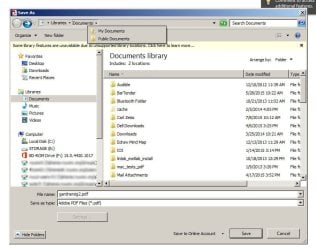
See the screenshot of the Save As dialog box. Along the top, where the drop-down is for the location to save it to, her drop-down shows two different locations which must be cached somewhere. The folders do not actually exist. One is her F drive, which was a thumbdrive. So, how / where is this info stored and how can I delete it?
Thanks in advance.
Matt
See the screenshot of the Save As dialog box. Along the top, where the drop-down is for the location to save it to, her drop-down shows two different locations which must be cached somewhere. The folders do not actually exist. One is her F drive, which was a thumbdrive. So, how / where is this info stored and how can I delete it?
Thanks in advance.
Matt
Attachments
My Computer
At a glance
Win 7 Pro 64bit, v.6.1 build 7601, sp1
- Computer type
- PC/Desktop
- OS
- Win 7 Pro 64bit, v.6.1 build 7601, sp1


