
What is this folder - "Apps" in appdata/local/

Nothing found

Well I've checked for anything that was modified/ created/ installed anywhere near that time/ date and have come up with nothing. It's possible that those folders were created by a program that I installed but have since removed. I have a habit of clearing out logs and junk on a fairly regular basis so possibly that's why I can't find anything else.

I've got an idea that it could be something to do with VMWare Player which I did install around that time but have since removed. I can't say for sure though.

A suggestion:

Perhaps try running Nirsoft's LastActivityView v1.06

It might show what was installed at that time even if it's since been removed.
 

My Computer

Computer type
Laptop
Computer Manufacturer/Model Number
ASUS
OS
Microsoft Windows 7 Home Premium 64-bit 7601 Multiprocessor Free Service Pack 1
CPU
AMD C-60 APU with Radeon(tm) HD Graphics
Motherboard
ASUSTeK COMPUTER INC. X501U
Memory
4.00 GB
Graphics Card(s)
AMD Radeon HD 6290 Graphics
Sound Card
(1) AMD High Definition Audio Device (2) Realtek High Defi
Screen Resolution
1366 x 768 x 32 bits (4294967296 colors) @ 60 Hz
Hard Drives
Hitachi HTS545050A7E380 SATA Disk Device
Antivirus
Comodo CIS & FW, SecureAplus App Whitelisting, Threatfire
Browser
Cyberfox 64bit, Opera 64bit, Airfox
Other Info
Spy-The-Spy, HitmanPro.Alert, Norton Connect Safe, MJRegWatcher, BitDefender TrafficLight, Voodoo Shield, Zemana AntiMalware
Well I've checked for anything that was modified/ created/ installed anywhere near that time/ date and have come up with nothing. It's possible that those folders were created by a program that I installed but have since removed. I have a habit of clearing out logs and junk on a fairly regular basis so possibly that's why I can't find anything else.

I've got an idea that it could be something to do with VMWare Player which I did install around that time but have since removed. I can't say for sure though.

A suggestion:

Perhaps try running Nirsoft's LastActivityView v1.06

It might show what was installed at that time even if it's since been removed.

Out of all this is there any indication of anything malicious?
 

My Computer

Computer type
PC/Desktop
OS
Windows 7 Home Premium 64 bit
Anything malicious

Out of all this is there any indication of anything malicious?

No. Nothing to indicate that at all.
 

My Computer

Computer type
Laptop
Computer Manufacturer/Model Number
ASUS
OS
Microsoft Windows 7 Home Premium 64-bit 7601 Multiprocessor Free Service Pack 1
CPU
AMD C-60 APU with Radeon(tm) HD Graphics
Motherboard
ASUSTeK COMPUTER INC. X501U
Memory
4.00 GB
Graphics Card(s)
AMD Radeon HD 6290 Graphics
Sound Card
(1) AMD High Definition Audio Device (2) Realtek High Defi
Screen Resolution
1366 x 768 x 32 bits (4294967296 colors) @ 60 Hz
Hard Drives
Hitachi HTS545050A7E380 SATA Disk Device
Antivirus
Comodo CIS & FW, SecureAplus App Whitelisting, Threatfire
Browser
Cyberfox 64bit, Opera 64bit, Airfox
Other Info
Spy-The-Spy, HitmanPro.Alert, Norton Connect Safe, MJRegWatcher, BitDefender TrafficLight, Voodoo Shield, Zemana AntiMalware

My Computer

Computer type
Laptop
Computer Manufacturer/Model Number
ASUS
OS
Microsoft Windows 7 Home Premium 64-bit 7601 Multiprocessor Free Service Pack 1
CPU
AMD C-60 APU with Radeon(tm) HD Graphics
Motherboard
ASUSTeK COMPUTER INC. X501U
Memory
4.00 GB
Graphics Card(s)
AMD Radeon HD 6290 Graphics
Sound Card
(1) AMD High Definition Audio Device (2) Realtek High Defi
Screen Resolution
1366 x 768 x 32 bits (4294967296 colors) @ 60 Hz
Hard Drives
Hitachi HTS545050A7E380 SATA Disk Device
Antivirus
Comodo CIS & FW, SecureAplus App Whitelisting, Threatfire
Browser
Cyberfox 64bit, Opera 64bit, Airfox
Other Info
Spy-The-Spy, HitmanPro.Alert, Norton Connect Safe, MJRegWatcher, BitDefender TrafficLight, Voodoo Shield, Zemana AntiMalware
Here's what I found:

ClickOnce applications are installed under the profile of the user who installed them.

On windows Vista and Windows 7, you will find the ClickOnce cache here: c:\users\username\AppData\Local\Apps\2.0\obfuscatedfoldername\obfuscatedfoldername


.net - How to get folder path for ClickOnce application - Stack Overflow

Also see: Uninstall ClickOnce clients - Stack Overflow
Does windows ever use click once for anything? I dont download clickonce my self.
I have deleted the folder and it hasn't come back. Im still quite confused of its origin. The only clickonce files (.application extension) I have are from steam games, howver they are quite old. Unless maybe a steam downloaded an update for them, imdont know, or if running the games somehow activates it.
 

My Computer

Computer type
PC/Desktop
OS
Windows 7 Home Premium 64 bit
Click Once apps

As far as I can work out it's used when a user clicks a hyperlink in a web browser to install an application and the app then installs.

See: ClickOnce manifest build automation tool for Microsoft.Net ClickOnce - clickoncemore.net

I'm struggling to find actual examples of applications that use it but it seems that Google Chome is or was one such application.

See post 5 here: c# - How does Google Chrome manage to execute installation automatically after download? - Stack Overflow
 

My Computer

Computer type
Laptop
Computer Manufacturer/Model Number
ASUS
OS
Microsoft Windows 7 Home Premium 64-bit 7601 Multiprocessor Free Service Pack 1
CPU
AMD C-60 APU with Radeon(tm) HD Graphics
Motherboard
ASUSTeK COMPUTER INC. X501U
Memory
4.00 GB
Graphics Card(s)
AMD Radeon HD 6290 Graphics
Sound Card
(1) AMD High Definition Audio Device (2) Realtek High Defi
Screen Resolution
1366 x 768 x 32 bits (4294967296 colors) @ 60 Hz
Hard Drives
Hitachi HTS545050A7E380 SATA Disk Device
Antivirus
Comodo CIS & FW, SecureAplus App Whitelisting, Threatfire
Browser
Cyberfox 64bit, Opera 64bit, Airfox
Other Info
Spy-The-Spy, HitmanPro.Alert, Norton Connect Safe, MJRegWatcher, BitDefender TrafficLight, Voodoo Shield, Zemana AntiMalware
As far as I can work out it's used when a user clicks a hyperlink in a web browser to install an application and the app then installs.

See: ClickOnce manifest build automation tool for Microsoft.Net ClickOnce - clickoncemore.net

I'm struggling to find actual examples of applications that use it but it seems that Google Chome is or was one such application.

See post 5 here: c# - How does Google Chrome manage to execute installation automatically after download? - Stack Overflow
Would .application files create any folders there? I have 4 .application files related to games, and the only thing I think of if it was a setup file when installing or something.
 

My Computer

Computer type
PC/Desktop
OS
Windows 7 Home Premium 64 bit
As far as I can work out it's used when a user clicks a hyperlink in a web browser to install an application and the app then installs.

See: ClickOnce manifest build automation tool for Microsoft.Net ClickOnce - clickoncemore.net

I'm struggling to find actual examples of applications that use it but it seems that Google Chome is or was one such application.

See post 5 here: c# - How does Google Chrome manage to execute installation automatically after download? - Stack Overflow

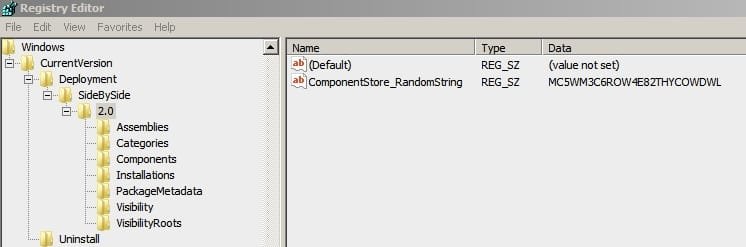
I have found a registry key related to the temp folder name. In

Hkey_classes_root/software/microsoft/windows/currentversion/deployment/sidebyside/2.0


Inside the 2.0 key are 7 other keys.

Assemblies
Categories
Components
Installations
Packagemetadata
Visibility
Visibilityroots

There is a key named clickonce35sp1update, witha a value that shows a directory to the apps folder, however its date indicates it was created when the os was installed. Are we getting closer to finding out?
 

My Computer

Computer type
PC/Desktop
OS
Windows 7 Home Premium 64 bit
Registry Entries

Hkey_classes_root/software/microsoft/windows/currentversion/deployment/sidebyside/2.0

Well done for spotting that! I have exactly the same entries.

deployment.jpg

The data value in ComponentStore_RandomString matches the folder names.

A quick search reveals that Google Updater stores entries here so in answer to your earlier question then yes, I'd guess that some games might use "one click" for downloading/ installing updates.

As far as I can work out those folders are actually where a click once application installs.

Where does click once deploy?
 

My Computer

Computer type
Laptop
Computer Manufacturer/Model Number
ASUS
OS
Microsoft Windows 7 Home Premium 64-bit 7601 Multiprocessor Free Service Pack 1
CPU
AMD C-60 APU with Radeon(tm) HD Graphics
Motherboard
ASUSTeK COMPUTER INC. X501U
Memory
4.00 GB
Graphics Card(s)
AMD Radeon HD 6290 Graphics
Sound Card
(1) AMD High Definition Audio Device (2) Realtek High Defi
Screen Resolution
1366 x 768 x 32 bits (4294967296 colors) @ 60 Hz
Hard Drives
Hitachi HTS545050A7E380 SATA Disk Device
Antivirus
Comodo CIS & FW, SecureAplus App Whitelisting, Threatfire
Browser
Cyberfox 64bit, Opera 64bit, Airfox
Other Info
Spy-The-Spy, HitmanPro.Alert, Norton Connect Safe, MJRegWatcher, BitDefender TrafficLight, Voodoo Shield, Zemana AntiMalware
Hkey_classes_root/software/microsoft/windows/currentversion/deployment/sidebyside/2.0

Well done for spotting that! I have exactly the same entries.

View attachment 333958

The data value in ComponentStore_RandomString matches the folder names.

A quick search reveals that Google Updater stores entries here so in answer to your earlier question then yes, I'd guess that some games might use "one click" for downloading/ installing updates.

As far as I can work out those folders are actually where a click once application installs.

Where does click once deploy?
The games in question are quite old, they were installed months ago. Ive had various google chromemupdates in the past week, so does the google chrome updater use clickonce technology or .net?

Also, I have another question, can I ask here or start a new thread?
 

My Computer

Computer type
PC/Desktop
OS
Windows 7 Home Premium 64 bit
Google Chrome

Well I don't use Google Chrome but I do have a Chromium based browser installed. The only way that I could be sure would be to install Chrome. Based on a little research I do believe that installing Chrome also results in Google Updater getting installed. The same applies for other Google products like Google Toolbar.

Example for Google Updater:

LOCAL\APPS\2.0\XC567B5E.TQ5\WV36B27P.9KP

As for other questions - unless it's directly related it's probably better to start a new thread!
 

My Computer

Computer type
Laptop
Computer Manufacturer/Model Number
ASUS
OS
Microsoft Windows 7 Home Premium 64-bit 7601 Multiprocessor Free Service Pack 1
CPU
AMD C-60 APU with Radeon(tm) HD Graphics
Motherboard
ASUSTeK COMPUTER INC. X501U
Memory
4.00 GB
Graphics Card(s)
AMD Radeon HD 6290 Graphics
Sound Card
(1) AMD High Definition Audio Device (2) Realtek High Defi
Screen Resolution
1366 x 768 x 32 bits (4294967296 colors) @ 60 Hz
Hard Drives
Hitachi HTS545050A7E380 SATA Disk Device
Antivirus
Comodo CIS & FW, SecureAplus App Whitelisting, Threatfire
Browser
Cyberfox 64bit, Opera 64bit, Airfox
Other Info
Spy-The-Spy, HitmanPro.Alert, Norton Connect Safe, MJRegWatcher, BitDefender TrafficLight, Voodoo Shield, Zemana AntiMalware
Back
Top