what partition is the vista on?

sablegsd

New member
Member
Local time
4:18 AM
Messages
63
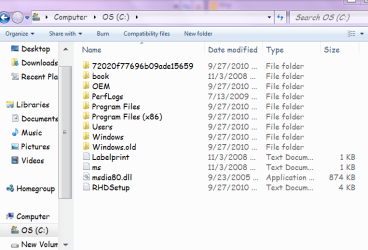
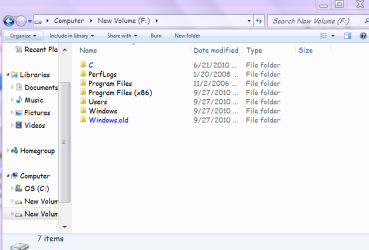
Hi, I have been fighting with my computer for days and it's wearing me down. I have clawed my back from everything being gone, even the o/s. I don't know what caused it. Anyway I ended up with a vista on here too that I don't want. It's weird too, all big and fuzzy. Anyhow, I think it's in the o/s partition but I can't really tell. The 7 is on top of the boot menu. So if it's in the o/s part, am I stuck with it?
 

Attachments
  • help.PNG
    help.PNG
    37.5 KB · Views: 11
  • help 2.PNG
    help 2.PNG
    26.7 KB · Views: 9
  • help 3.PNG
    help 3.PNG
    28.5 KB · Views: 8

My Computer My Computer

At a glance

7 64 bit Home Premium
Computer Manufacturer/Model Number
HP p7-1254
OS
7 64 bit Home Premium
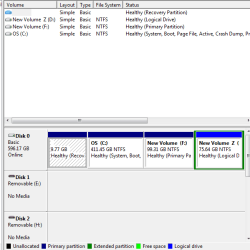
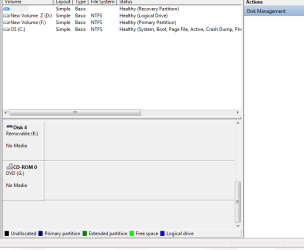
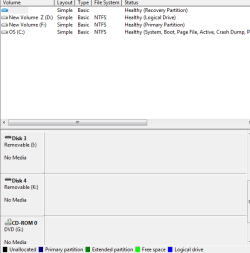
Can you post a image of your disk management window?

I'm assuming you did an upgrade from Vista to Windows 7?

What OS are you in where you took those screen shots?
 

My Computers My Computers

  • At a glance

    WIN10AMD Ryzen 5 3600 6-Core Processor 3.59 GHz16.0 GB
    Computer type
    PC/Desktop
    Computer Manufacturer/Model Number
    PowerSpec G164
    OS
    WIN10
    CPU
    AMD Ryzen 5 3600 6-Core Processor 3.59 GHz
    Memory
    16.0 GB
    Internet Speed
    VERY FAST>>>!!!
  • Antivirus
    ESET Security Premium
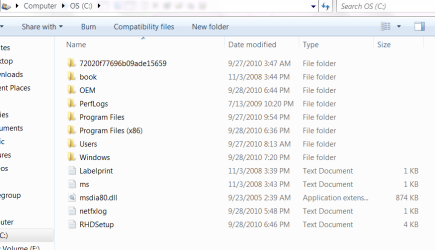
The "OS C" drive shows the Windows.old folder from Vista being replaced with the 7 custom install option used if you didn't perfrom an inplace upgrade but simply elected not to reformat the drive first before 7 went on. That preserves all the user files from the former Vista installation there and should be seen as Disk 0 in the DM.
 

My Computers My Computers

  • At a glance

    W7 Ultimate x64/W10 Pro x64/W11 Pro Triple Bo...AMD Phenom II X4 975 Deneb 3.6ghz - 965 2nd r...Kingston Hyper X DDR3 1600 1.5v 16gb - Hyper ...MSI HD Radeon 5750 1gb - MSI HD Radeon 6450 o...
    Computer type
    PC/Desktop
    Computer Manufacturer/Model Number
    Custom builds = 2
    OS
    W7 Ultimate x64/W10 Pro x64/W11 Pro Triple Boot - Main PC W7 Remote PC Micro ATX W7 Pro x64/W11 Pro
    CPU
    AMD Phenom II X4 975 Deneb 3.6ghz - 965 2nd remote pc
    Motherboard
    Gigabyte GA-790XTA-UD4-Gigabyte GA-880GM-D2H remote pc
    Memory
    Kingston Hyper X DDR3 1600 1.5v 16gb - Hyper X Fury 8gb 2nd
    Graphics Card(s)
    MSI HD Radeon 5750 1gb - MSI HD Radeon 6450 on mini tower
    Sound Card
    Creative Labs X-Fi Xtreme Audio P - Realtek onooard 2nd case
    Monitor(s) Displays
    ASUS VW199T-P 19" HP 2082a Main-HP 2082a 20" remote pc
    Screen Resolution
    Asus 1440x900 - HP 1600x900
    Hard Drives
    WD Black 1TB HD per OS W7, W10, and pending W11 presently on 500gb OS Drive - Pending Triple 1TB HDs for Spanned Storage/backup volume
    Single 2TB external USB enclosure, single 1TB System 7 Host/Boot drive, Pending 8TB external HD for system image b
    PSU
    Corsair 750TX - primary / Corsair CX600 - second
    Case
    Antec 900-2 - SSD compatible / NZXT Vulcan mini tower
    Cooling
    Zalman CNPS9900A
    Keyboard
    AZIO L70 Backlit Letters Gaming - ONN Cordless/USB
    Mouse
    MSI DS200 Programmable, Logitech Cordless
    Internet Speed
    30mbps upgrade - primary hard wired - mini tower usb WiFi
    Antivirus
    GFI VIPRE Internet Security 2014 on W7 2016 beta on W10,
    Browser
    Cyberfox, WaterFox 64bit FF variants, FireFox x64, Pale Moon
    Other Info
    Accomdata fan cooled usb 2.0 PIDE/Sata II, III external enclosure.
    Sambient usb/eSata PATA/Sata II, III external enclosure.
  • At a glance

    W7 Pro x64/W11 ProAMD Deneb 3.6ghz - 965Kingston Hyper X Fury 8gbMSI HD Radeon 6450 DVI Output
    Computer type
    PC/Desktop
    System Manufacturer/Model Number
    CUSTOM ASSEMBLY
    OS
    W7 Pro x64/W11 Pro
    CPU
    AMD Deneb 3.6ghz - 965
    Motherboard
    Gigabyte GA-880GM-D2H remote pc
    Memory
    Kingston Hyper X Fury 8gb
    Graphics Card(s)
    MSI HD Radeon 6450 DVI Output
    Sound Card
    Realtek onooard Creative or Other separate PENDING
    Monitor(s) Displays
    VIZIO 32" LCD TV Separate LCD Pending
    Screen Resolution
    1600x1080
    Hard Drives
    WD 500GB OS Host/Boot WD Green 1TB Storage/Backup
    PSU
    Corsair 600W - THERMALTAKE 600W spare case
    Case
    NZXT Vulcan mini tower
    Cooling
    Twin 120mm Top Fans - 240mm Side Cover
    Keyboard
    ONN Cordless/USB Logitech Cordless
    Mouse
    ONN USB/Cordless - Logitech Cordless
    Internet Speed
    DSL 5G
    Browser
    MS Edge, FireFox, WaterFox x64, FireFox Nightly
    Other Info
    OS Testing-Remote Access to Main TeamViewer
That's how it started out. :p
 

Attachments

  • disk.PNG
    disk.PNG
    10.9 KB · Views: 11
  • disk 2.PNG
    disk 2.PNG
    9.8 KB · Views: 4
  • disk 3.PNG
    disk 3.PNG
    8.4 KB · Views: 4

My Computer My Computer

At a glance

7 64 bit Home Premium
Computer Manufacturer/Model Number
HP p7-1254
OS
7 64 bit Home Premium
What a mess, what do you want to do, which OS do you want to keep.

May I suggest you backup everything important to an external hard drive, and perform a new "Clean Install".

Prepare a Drive for- Clean Install
Clean Install Windows 7

I assume your recovery partition is no longer good, since it will be to recovery back to Vista?
 

My Computers My Computers

  • At a glance

    WIN10AMD Ryzen 5 3600 6-Core Processor 3.59 GHz16.0 GB
    Computer type
    PC/Desktop
    Computer Manufacturer/Model Number
    PowerSpec G164
    OS
    WIN10
    CPU
    AMD Ryzen 5 3600 6-Core Processor 3.59 GHz
    Memory
    16.0 GB
    Internet Speed
    VERY FAST>>>!!!
  • Antivirus
    ESET Security Premium
I just want the 7. The recovery partition thing is greek to me. It used to have something like pqservices but that seems to be gone with the wind.

Every thing I do makes it worse. :confused:

So if it start the 7 upgrade thing all over again, will it ask me which partition I want it and should I do the O/S one?
 

My Computer My Computer

At a glance

7 64 bit Home Premium
Computer Manufacturer/Model Number
HP p7-1254
OS
7 64 bit Home Premium
I just want the 7. The recovery partition thing is greek to me. It used to have something like pqservices but that seems to be gone with the wind.

Every thing I do makes it worse. :confused:

So if it start the 7 upgrade thing all over again, will it ask me which partition I want it and should I do the O/S one?


If thats what you decide follow the tutorials..:)

If will completely erase all partitions, don't do an upgrade do a clean install. Follow the first link to prepare the drives and then the clean install.

You should have something like one partition for the OS and one DATA partition.

Data Partition
User Folders - Change Default Location
 

My Computers My Computers

  • At a glance

    WIN10AMD Ryzen 5 3600 6-Core Processor 3.59 GHz16.0 GB
    Computer type
    PC/Desktop
    Computer Manufacturer/Model Number
    PowerSpec G164
    OS
    WIN10
    CPU
    AMD Ryzen 5 3600 6-Core Processor 3.59 GHz
    Memory
    16.0 GB
    Internet Speed
    VERY FAST>>>!!!
  • Antivirus
    ESET Security Premium
What about the driver thing? Where and how do I save them? Hey, I can hear you guys snickering! :D
 

My Computer My Computer

At a glance

7 64 bit Home Premium
Computer Manufacturer/Model Number
HP p7-1254
OS
7 64 bit Home Premium
You won't hear anyone snickering here.
We ALL have been there done that and learned from our mistakes and moved on to help other from doing the same thing.
Don't worry about drivers as Windows 7 should supply all of them.
 

My Computer My Computer

At a glance

Windows 10 Pro x64i7-4770K16Gig DDR3-2400Gigabyte GT740
Computer type
PC/Desktop
Computer Manufacturer/Model Number
Self Built Custom Computer.
OS
Windows 10 Pro x64
CPU
i7-4770K
Motherboard
Asus Z87 Sabertooth
Memory
16Gig DDR3-2400
Graphics Card(s)
Gigabyte GT740
Sound Card
Onboard
Monitor(s) Displays
Benq 27" - Dell 23' - Benq 22"
Screen Resolution
1680x1050
Hard Drives
Samsung 840 Pro 128g SSD
1xWestern Digital Caviar Green 1tb
2xWestern Digital Caviar Green 2 tb
PSU
Seasonic 760 watt Platinum
Case
Coolermaster Haf - X
Cooling
Noctua NH-C12P CPU Cooler
Keyboard
Logitech illuminated keyboard
Mouse
Logitech Perfomance MX
Internet Speed
Cable = speeds to 20Mbps downsteam and 512kbps upsteam
Antivirus
Avast Internet Security
Browser
Firefox
For one the last of the four partitions is an extended not primary partition there. The first thing to consider would be nuking that off of the drive and expanding the now 3rd primary used for storage into that space. Note that any partition changes could result in a mishap where you would lose everything if not first backed up elsewhere as suggested to another drive or removable media!

With the D or E volume expanded if all went well you would simply nuke the small recovery and present C to see a brand new C primary larger in size for a nice clean install of 7 there. Since you are working with upgrade media you would need to follow the guide for this. http://www.sevenforums.com/tutorials/31402-clean-install-upgrade-windows-7-version.html
 

My Computers My Computers

  • At a glance

    W7 Ultimate x64/W10 Pro x64/W11 Pro Triple Bo...AMD Phenom II X4 975 Deneb 3.6ghz - 965 2nd r...Kingston Hyper X DDR3 1600 1.5v 16gb - Hyper ...MSI HD Radeon 5750 1gb - MSI HD Radeon 6450 o...
    Computer type
    PC/Desktop
    Computer Manufacturer/Model Number
    Custom builds = 2
    OS
    W7 Ultimate x64/W10 Pro x64/W11 Pro Triple Boot - Main PC W7 Remote PC Micro ATX W7 Pro x64/W11 Pro
    CPU
    AMD Phenom II X4 975 Deneb 3.6ghz - 965 2nd remote pc
    Motherboard
    Gigabyte GA-790XTA-UD4-Gigabyte GA-880GM-D2H remote pc
    Memory
    Kingston Hyper X DDR3 1600 1.5v 16gb - Hyper X Fury 8gb 2nd
    Graphics Card(s)
    MSI HD Radeon 5750 1gb - MSI HD Radeon 6450 on mini tower
    Sound Card
    Creative Labs X-Fi Xtreme Audio P - Realtek onooard 2nd case
    Monitor(s) Displays
    ASUS VW199T-P 19" HP 2082a Main-HP 2082a 20" remote pc
    Screen Resolution
    Asus 1440x900 - HP 1600x900
    Hard Drives
    WD Black 1TB HD per OS W7, W10, and pending W11 presently on 500gb OS Drive - Pending Triple 1TB HDs for Spanned Storage/backup volume
    Single 2TB external USB enclosure, single 1TB System 7 Host/Boot drive, Pending 8TB external HD for system image b
    PSU
    Corsair 750TX - primary / Corsair CX600 - second
    Case
    Antec 900-2 - SSD compatible / NZXT Vulcan mini tower
    Cooling
    Zalman CNPS9900A
    Keyboard
    AZIO L70 Backlit Letters Gaming - ONN Cordless/USB
    Mouse
    MSI DS200 Programmable, Logitech Cordless
    Internet Speed
    30mbps upgrade - primary hard wired - mini tower usb WiFi
    Antivirus
    GFI VIPRE Internet Security 2014 on W7 2016 beta on W10,
    Browser
    Cyberfox, WaterFox 64bit FF variants, FireFox x64, Pale Moon
    Other Info
    Accomdata fan cooled usb 2.0 PIDE/Sata II, III external enclosure.
    Sambient usb/eSata PATA/Sata II, III external enclosure.
  • At a glance

    W7 Pro x64/W11 ProAMD Deneb 3.6ghz - 965Kingston Hyper X Fury 8gbMSI HD Radeon 6450 DVI Output
    Computer type
    PC/Desktop
    System Manufacturer/Model Number
    CUSTOM ASSEMBLY
    OS
    W7 Pro x64/W11 Pro
    CPU
    AMD Deneb 3.6ghz - 965
    Motherboard
    Gigabyte GA-880GM-D2H remote pc
    Memory
    Kingston Hyper X Fury 8gb
    Graphics Card(s)
    MSI HD Radeon 6450 DVI Output
    Sound Card
    Realtek onooard Creative or Other separate PENDING
    Monitor(s) Displays
    VIZIO 32" LCD TV Separate LCD Pending
    Screen Resolution
    1600x1080
    Hard Drives
    WD 500GB OS Host/Boot WD Green 1TB Storage/Backup
    PSU
    Corsair 600W - THERMALTAKE 600W spare case
    Case
    NZXT Vulcan mini tower
    Cooling
    Twin 120mm Top Fans - 240mm Side Cover
    Keyboard
    ONN Cordless/USB Logitech Cordless
    Mouse
    ONN USB/Cordless - Logitech Cordless
    Internet Speed
    DSL 5G
    Browser
    MS Edge, FireFox, WaterFox x64, FireFox Nightly
    Other Info
    OS Testing-Remote Access to Main TeamViewer
Hello sablegsd, welcome to Seven Forums!


If there's nothing at all left on the PC Hard Disk Drive (HDD) or after you have made backups of anything you may want to save, have a look at the info below, this would be your best bet to get back to 1 partition with Windows 7 on it.
Be sure to post back with any questions you may have and to keep us informed.

   Information

After you have made backups of everything you care to save and you want to do a real wipe "secure erase" to the Hard Disk Drive (HDD) have a look at this tutorial at the link below, it over-writes everything, all the old Windows code including the old Windows drivers, everything all data, giving you the best possible space to install Windows 7 to; it goes hand-in-hand with a clean install.

SSD / HDD : Optimize for Windows Reinstallation

How to Do a Clean Installation with Windows 7

Do a Clean Install with a Upgrade Windows 7 Version


My Computer My Computer

At a glance

W 7 64-bit UltimateIntel Q9550 Yorkfield8GB Dominator 8500C5DATI : XFX 5870
Computer Manufacturer/Model Number
* BFK Customs *
OS
W 7 64-bit Ultimate
CPU
Intel Q9550 Yorkfield
Motherboard
ASUS P5Q Pro
Memory
8GB Dominator 8500C5D
Graphics Card(s)
ATI : XFX 5870
Sound Card
Realtek HD Audio 7-1
Monitor(s) Displays
1x 47" LCD HDMI & 3x 26" LCD HDMI
Screen Resolution
1920x1080P & 1920x1200
Hard Drives
1x 80GB Intel X25-M G2 SSD : 1x 500GB & 1x 640GB WD Caviar Black(s)
PSU
Corsair 620HX
Case
Cooler Master RC-690
Cooling
Tuniq Tower 120, 2x 140mm and 3x 120mm case fans
Keyboard
Microsoft 500
Mouse
Razer Diamondback 3G
Internet Speed
14 Mb/s
Other Info
1x Koutech 3Gb/s SATA HDD Hot Swap Rack
So if I wipe the whole hard drive, I can use just the upgrade disks to start over? There does't need to be an underlying system? I want to say thanks for all the help and encouragement. Obviously I don't know what I am
doing. :o

I saw a reference somewhere to the mini tool partition wizard and looked at it, would that work to wipe everything and then put the 7 back in? I'm old and not computer savvy and I read all these ways to do stuff and promptly forget half and remember the other half wrong. :confused:
 

My Computer My Computer

At a glance

7 64 bit Home Premium
Computer Manufacturer/Model Number
HP p7-1254
OS
7 64 bit Home Premium
If C is Windows 7 then you can delete the other partitions in Disk Management and try to make Win7 work for you if you want. Make sure you have all of your files - they are backed up in the windows.old folder if not.

How is the performance with just C: Win7?
 
I don't know. That was my first question I think, the 7 is on top of the vista when it starts up and
asks you which you want. The vista is all freaky looking and wont hook up to the internet. But I don't know
where they are. :confused:
 

My Computer My Computer

At a glance

7 64 bit Home Premium
Computer Manufacturer/Model Number
HP p7-1254
OS
7 64 bit Home Premium
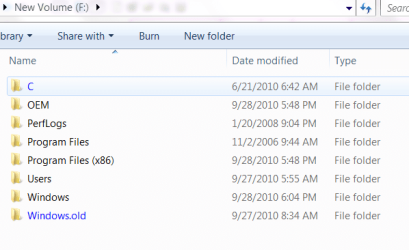
I believe Win7 is F: if it was installed after Vista.


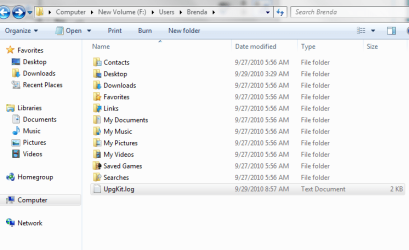
Browse in F:User folder to Desktop to check for sure that what you are seeing on your desktop now is there.

I will then give you the steps to remove the other partitions if you want to keep Win7 you have now. Do you want to keep only Win7? Is it working ok?
 
If the C volume had 7 there you would only have to move it forward some 9.7gb and later expand it out towards the back once you decided whether or not to keep a second storage partition available with the reformat of F and removal of the last extended volume and successful expansion of F into that space.

Even that is risky and could end up resulting in problems with the Master File Table(MFT) making it unusable. With everything backed up from the drive you want to keep the best move would be a total wipe and see one fresh primary for 7 or two new one for storage with the first for 7. On a single drive system many opt to split the main drive up to see a second storage/backup partition available often larger then the C OS primary.
 

My Computers My Computers

  • At a glance

    W7 Ultimate x64/W10 Pro x64/W11 Pro Triple Bo...AMD Phenom II X4 975 Deneb 3.6ghz - 965 2nd r...Kingston Hyper X DDR3 1600 1.5v 16gb - Hyper ...MSI HD Radeon 5750 1gb - MSI HD Radeon 6450 o...
    Computer type
    PC/Desktop
    Computer Manufacturer/Model Number
    Custom builds = 2
    OS
    W7 Ultimate x64/W10 Pro x64/W11 Pro Triple Boot - Main PC W7 Remote PC Micro ATX W7 Pro x64/W11 Pro
    CPU
    AMD Phenom II X4 975 Deneb 3.6ghz - 965 2nd remote pc
    Motherboard
    Gigabyte GA-790XTA-UD4-Gigabyte GA-880GM-D2H remote pc
    Memory
    Kingston Hyper X DDR3 1600 1.5v 16gb - Hyper X Fury 8gb 2nd
    Graphics Card(s)
    MSI HD Radeon 5750 1gb - MSI HD Radeon 6450 on mini tower
    Sound Card
    Creative Labs X-Fi Xtreme Audio P - Realtek onooard 2nd case
    Monitor(s) Displays
    ASUS VW199T-P 19" HP 2082a Main-HP 2082a 20" remote pc
    Screen Resolution
    Asus 1440x900 - HP 1600x900
    Hard Drives
    WD Black 1TB HD per OS W7, W10, and pending W11 presently on 500gb OS Drive - Pending Triple 1TB HDs for Spanned Storage/backup volume
    Single 2TB external USB enclosure, single 1TB System 7 Host/Boot drive, Pending 8TB external HD for system image b
    PSU
    Corsair 750TX - primary / Corsair CX600 - second
    Case
    Antec 900-2 - SSD compatible / NZXT Vulcan mini tower
    Cooling
    Zalman CNPS9900A
    Keyboard
    AZIO L70 Backlit Letters Gaming - ONN Cordless/USB
    Mouse
    MSI DS200 Programmable, Logitech Cordless
    Internet Speed
    30mbps upgrade - primary hard wired - mini tower usb WiFi
    Antivirus
    GFI VIPRE Internet Security 2014 on W7 2016 beta on W10,
    Browser
    Cyberfox, WaterFox 64bit FF variants, FireFox x64, Pale Moon
    Other Info
    Accomdata fan cooled usb 2.0 PIDE/Sata II, III external enclosure.
    Sambient usb/eSata PATA/Sata II, III external enclosure.
  • At a glance

    W7 Pro x64/W11 ProAMD Deneb 3.6ghz - 965Kingston Hyper X Fury 8gbMSI HD Radeon 6450 DVI Output
    Computer type
    PC/Desktop
    System Manufacturer/Model Number
    CUSTOM ASSEMBLY
    OS
    W7 Pro x64/W11 Pro
    CPU
    AMD Deneb 3.6ghz - 965
    Motherboard
    Gigabyte GA-880GM-D2H remote pc
    Memory
    Kingston Hyper X Fury 8gb
    Graphics Card(s)
    MSI HD Radeon 6450 DVI Output
    Sound Card
    Realtek onooard Creative or Other separate PENDING
    Monitor(s) Displays
    VIZIO 32" LCD TV Separate LCD Pending
    Screen Resolution
    1600x1080
    Hard Drives
    WD 500GB OS Host/Boot WD Green 1TB Storage/Backup
    PSU
    Corsair 600W - THERMALTAKE 600W spare case
    Case
    NZXT Vulcan mini tower
    Cooling
    Twin 120mm Top Fans - 240mm Side Cover
    Keyboard
    ONN Cordless/USB Logitech Cordless
    Mouse
    ONN USB/Cordless - Logitech Cordless
    Internet Speed
    DSL 5G
    Browser
    MS Edge, FireFox, WaterFox x64, FireFox Nightly
    Other Info
    OS Testing-Remote Access to Main TeamViewer
7 is working fine, so far. :p

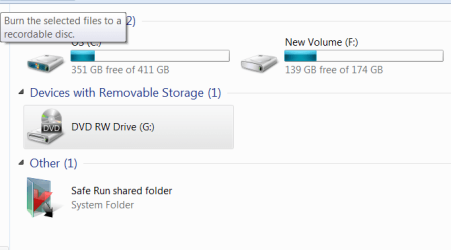
Here is where I stand today.
 

Attachments

  • OS.PNG
    OS.PNG
    22.8 KB · Views: 2
  • F.PNG
    F.PNG
    34 KB · Views: 2
  • today.PNG
    today.PNG
    12.3 KB · Views: 2

My Computer My Computer

At a glance

7 64 bit Home Premium
Computer Manufacturer/Model Number
HP p7-1254
OS
7 64 bit Home Premium
F is almost def your Win7 installation, however did you browse for files on your Win7 desktop in the Users folder as I suggested, to make sure you are using the same OS/desktop? Just do that to confirm F is Win7.

Are you getting a Dual Boot Menu for Vista or Win7 when you start your Computer?

Do you want to delete Vista and recover its HD space into the Win7 installation? Answer these questions back and I will give you the steps.
 
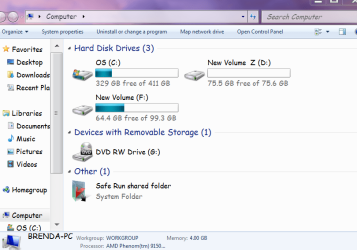
One way to know for sure which primary is 7's is to simply label the volume. You can do that by simply right clicking on the C drive icon while booted in 7 since both Vista and 7 are seeing their own Windows.old folder.

Backing any files up from that and removing will also distinguish the two. You may want to back up anything left from the Vista primary you want before tossing that or opt to stay with a working dual boot with 7 set as the default OS. Less risk of losing anything through any repartitioning mishap.

It seems you already were able to remove the small recovery at front and extended volume at the back of the drive. For removing the Vista primary, moving the 7 primary forward and expanding that there is risk of some partition table corruption resulting in the loss of that. This is why the recommendation for backing everything to another drive or removable media is emphasized before proceeding.
 

My Computers My Computers

  • At a glance

    W7 Ultimate x64/W10 Pro x64/W11 Pro Triple Bo...AMD Phenom II X4 975 Deneb 3.6ghz - 965 2nd r...Kingston Hyper X DDR3 1600 1.5v 16gb - Hyper ...MSI HD Radeon 5750 1gb - MSI HD Radeon 6450 o...
    Computer type
    PC/Desktop
    Computer Manufacturer/Model Number
    Custom builds = 2
    OS
    W7 Ultimate x64/W10 Pro x64/W11 Pro Triple Boot - Main PC W7 Remote PC Micro ATX W7 Pro x64/W11 Pro
    CPU
    AMD Phenom II X4 975 Deneb 3.6ghz - 965 2nd remote pc
    Motherboard
    Gigabyte GA-790XTA-UD4-Gigabyte GA-880GM-D2H remote pc
    Memory
    Kingston Hyper X DDR3 1600 1.5v 16gb - Hyper X Fury 8gb 2nd
    Graphics Card(s)
    MSI HD Radeon 5750 1gb - MSI HD Radeon 6450 on mini tower
    Sound Card
    Creative Labs X-Fi Xtreme Audio P - Realtek onooard 2nd case
    Monitor(s) Displays
    ASUS VW199T-P 19" HP 2082a Main-HP 2082a 20" remote pc
    Screen Resolution
    Asus 1440x900 - HP 1600x900
    Hard Drives
    WD Black 1TB HD per OS W7, W10, and pending W11 presently on 500gb OS Drive - Pending Triple 1TB HDs for Spanned Storage/backup volume
    Single 2TB external USB enclosure, single 1TB System 7 Host/Boot drive, Pending 8TB external HD for system image b
    PSU
    Corsair 750TX - primary / Corsair CX600 - second
    Case
    Antec 900-2 - SSD compatible / NZXT Vulcan mini tower
    Cooling
    Zalman CNPS9900A
    Keyboard
    AZIO L70 Backlit Letters Gaming - ONN Cordless/USB
    Mouse
    MSI DS200 Programmable, Logitech Cordless
    Internet Speed
    30mbps upgrade - primary hard wired - mini tower usb WiFi
    Antivirus
    GFI VIPRE Internet Security 2014 on W7 2016 beta on W10,
    Browser
    Cyberfox, WaterFox 64bit FF variants, FireFox x64, Pale Moon
    Other Info
    Accomdata fan cooled usb 2.0 PIDE/Sata II, III external enclosure.
    Sambient usb/eSata PATA/Sata II, III external enclosure.
  • At a glance

    W7 Pro x64/W11 ProAMD Deneb 3.6ghz - 965Kingston Hyper X Fury 8gbMSI HD Radeon 6450 DVI Output
    Computer type
    PC/Desktop
    System Manufacturer/Model Number
    CUSTOM ASSEMBLY
    OS
    W7 Pro x64/W11 Pro
    CPU
    AMD Deneb 3.6ghz - 965
    Motherboard
    Gigabyte GA-880GM-D2H remote pc
    Memory
    Kingston Hyper X Fury 8gb
    Graphics Card(s)
    MSI HD Radeon 6450 DVI Output
    Sound Card
    Realtek onooard Creative or Other separate PENDING
    Monitor(s) Displays
    VIZIO 32" LCD TV Separate LCD Pending
    Screen Resolution
    1600x1080
    Hard Drives
    WD 500GB OS Host/Boot WD Green 1TB Storage/Backup
    PSU
    Corsair 600W - THERMALTAKE 600W spare case
    Case
    NZXT Vulcan mini tower
    Cooling
    Twin 120mm Top Fans - 240mm Side Cover
    Keyboard
    ONN Cordless/USB Logitech Cordless
    Mouse
    ONN USB/Cordless - Logitech Cordless
    Internet Speed
    DSL 5G
    Browser
    MS Edge, FireFox, WaterFox x64, FireFox Nightly
    Other Info
    OS Testing-Remote Access to Main TeamViewer
F is almost def your Win7 installation, however did you browse for files on your Win7 desktop in the Users folder as I suggested, to make sure you are using the same OS/desktop? Just do that to confirm F is Win7.

Are you getting a Dual Boot Menu for Vista or Win7 when you start your Computer?

Do you want to delete Vista and recover its HD space into the Win7 installation? Answer these questions back and I will give you the steps.

Yes, there is a dual boot, the 7 on top, but the vista looks really strange and won't connect to the internet.

Yes, I want to delete vista.

here are the user things. I had a cd with some of my favorites, pictures, etc that I loaded on when I got on. they look alike to me except for that upgrade thing on the bottom. so if I delete the o/s partition, the computer will still run on the 7? or vice versa as well?
 

Attachments

  • user.PNG
    user.PNG
    19.9 KB · Views: 3
  • user2.PNG
    user2.PNG
    5.6 KB · Views: 3

My Computer My Computer

At a glance

7 64 bit Home Premium
Computer Manufacturer/Model Number
HP p7-1254
OS
7 64 bit Home Premium
Back
Top