What security setup do you have?

Hardware firewall, Router, Windows Firewall, WOT, safe browsing habits (not) and enough experience to know how to kill malware before it gets embedded. That is it on my machine. Oh, and the most effective weapon in my modest arsenal; old and current system/disk images.;)
No AV/AM.

Edit: Forgot to mention my virtual machine(s).
 

My Computer

Computer Manufacturer/Model Number
Old (2004) Gateway laptop
OS
Windows 7 Pro x86; Pro x64; Home Prem x64; and others....
CPU
Pentium 4 @ 3.4
Motherboard
Gateway
Memory
2GB
Graphics Card(s)
ATI Mobility Radeon 9700
Sound Card
SigmaTel C-Major Audio
Monitor(s) Displays
Element 19 in. LCD HD TV
Screen Resolution
1360x768
Hard Drives
Intel SSD 3200 80GB; Seagate Momentus XT (Hybrid) 500GB
PSU
HP monitor PSU - Spliced;lol
Cooling
Coolingpad
Mouse
MS TouchMouse Arc & Mouse
UAC disabled, Windows Firewall and Nod32 x64 antivirus, nothing else needed really.

Im wondering if i should switch to Nod32 security suit or just stay with the free windows firewall.

Hey i am new to the forums, what is nod32? & what is UAC and should i turn it off?

I use windows firewall and spy bot verizon security suite which kinda idk sucks. It keeps giving me a pop-up about something being wrong.. its. 5 bucks a month on my Fios bill.
 

My Computer

OS
windows 7 no idea of 64 or 32 bit
Hi guys,

After reading this thread I'm a little confused if I have enough security protection.

Currently I have a router firewall and Windows Firewall turned on.

I also have Microsoft Security Essentials installed and running.

Do I need to do anything else?

Hi BingFeller,

You already have a good setup. The general recommendation is to have a layered approach to security, so you might consider also using the FREE version of Malwarebytes to do the odd occasional scan (since its the free version, you will have to update it manually prior to every scan so it picks up the latest malware definitions).

Apart from that, be careful what you download, and make sure Adobe Reader and FlashPlayer, and Java, are updated regularly. Use this tutorial to help you identify if they require updating.

http://www.sevenforums.com/tutorials/181981-secunia-online-software-inspector.html

Regards,
Golden

Hi Golden,

Thanks for the reply. I downloaded the free version of Malwarebytes, although I didn't install it yet. I'm a little confused how this program works, does this program run at start or can I run it manually? If I choose to run it manually should I also have Microsoft Security Essentials running too?
 

My Computer

Computer Manufacturer/Model Number
Sony Vaio VPCEJ2B1E
OS
Windows 7 Home Premium SP1 64bit
CPU
Intel Core i5-2430M CPU @2.40GHz
Motherboard
Sony VPCEJ2B1E
Memory
6 GBytes
Graphics Card(s)
NVIDIA GeForce 410M
Sound Card
Conexant SmartAudio HD
Monitor(s) Displays
Laptop Display
Screen Resolution
1600x900 (32bit) (60Hz)
Hi,

Since its the free version, you can only run it manually - remember to update it before you start the scan. MSE will already be resident on your PC, so you only need to ensure that MSE is physically not in the process of scanning before you run a Malwarebytes scan. Note : just because MSE is installed and resident on your system, it doesn't mean you cannot run another anti-virus program - its just recommended that both do not scan at the same time.

Regards,
Golden
 

My Computer

Computer type
PC/Desktop
Computer Manufacturer/Model Number
Golden Mk. I.4
OS
Windows 10 Pro x64 ; Xubuntu x64
CPU
Intel i7 860 @ 2.80 GHz O/C'ed to 4.0GHz
Motherboard
Gigabyte P55A-UD3R Rev.1. Award BIOS F13
Memory
16GB Corsair Vengance DDR3 @ 661 MHz Dual Channel (9-9-9-24)
Graphics Card(s)
EVGA NVidia GTX 560 1024MB
Sound Card
Realtek Integrated
Monitor(s) Displays
Dual Samsung SyncMaster 2494HS
Screen Resolution
1920*1080 and 1920*1080
Hard Drives
1*Samsung 840 EVO 120GB SSD;
1*OCZ Vertex 2 60GB SSD;
2*Samsung F3 SpinPoint 1TB in RAID0;
1*Samsung F1 SpinPoint 1TB;
2*Western Digital 1TB External USB 3.0
1*Western Digital 500GB External USB 3.0
1*Seagate 500GB External USB 2.0
PSU
Thermaltake ToughPower QFan 750W
Case
Thermaltake Element S VK60001W2Z
Cooling
Corsair H60 Water Cooling, 2*230mm and 2*80mm case fans
Keyboard
Logitech G110
Mouse
Logitech MX518
current: MSE, Malwarebytes Pro W/ Realtime Protection and windows firewall behind router/modem i have norton 360 that i could put on if i really want to instead of MSE.
 

My Computer

Computer Manufacturer/Model Number
HP Pavilion p6795a
OS
windows 7 64 bit
CPU
intel core i5 3.30GHz Quad Core
Motherboard
HP
Memory
6gb
Graphics Card(s)
AMD RADEON HD 6450 1GB Dedicated
Sound Card
ATI HIGH DEFINITION SOUND
Monitor(s) Displays
LG
Screen Resolution
16:9 Hd
Hard Drives
1TB
Cooling
Fan
Keyboard
Wireless
Mouse
HP wireless keyboard and mouse
Internet Speed
fast enough
Other Info
Beast Of A Machine!
Hi,

Since its the free version, you can only run it manually - remember to update it before you start the scan. MSE will already be resident on your PC, so you only need to ensure that MSE is physically not in the process of scanning before you run a Malwarebytes scan. Note : just because MSE is installed and resident on your system, it doesn't mean you cannot run another anti-virus program - its just recommended that both do not scan at the same time.

Regards,
Golden

Thanks, I will get the Malwarebytes installed now :)
 

My Computer

Computer Manufacturer/Model Number
Sony Vaio VPCEJ2B1E
OS
Windows 7 Home Premium SP1 64bit
CPU
Intel Core i5-2430M CPU @2.40GHz
Motherboard
Sony VPCEJ2B1E
Memory
6 GBytes
Graphics Card(s)
NVIDIA GeForce 410M
Sound Card
Conexant SmartAudio HD
Monitor(s) Displays
Laptop Display
Screen Resolution
1600x900 (32bit) (60Hz)
My main antivirus is Trend Micro Titanium AV+
Pro: It's really cheap, has a scanner, and a great firewall. Really does block a lot.
Con: The scanner is lame.

As a backup scanner, I have HitmanPro 3.5
Pro: Is a cloud scanner, will boot before windows, to clean especially pesky malware that likes to hide, and uses GData, Emisisoft, Prevx, Dr.Web, and Ikarus. It does all this without causing issues with other security programs. Comes in portable edition. Saved my system when I had a massive breach.
Con: Doesn't seem to find the same things consistently, even if they are still there. False positives a lot (XChat, etc)

To scan for kits, I've got Kaspersky's TDSSKiller.
Pro: Works great! Insanely fast, and portable.
Con: ....yet to find one

I'm putting the big guns together: Superantispyware and Spybot
Pro: Both have the best definitions, and Spybot comes in portable form. Scans are very thurough.
Con: SASpyware tends to use 500MB of RAM on my system, but no prob b/c I've got 8. May be an issue with those with older computers.

Unless mentioned, none are resource hogs. I use to use Trend Micro's Rubotted for bot protection, but it's incompatible with the most recent version of Winpcap, which you need for wireshark, nmap, etc. I'm using Trend Micro's Browser Guard. Name is self explanatory.

Malwarebytes didnt work for me. Always conflicted with my other programs, and Hitman has better definitions anyhow! :D
 

My Computer

OS
Windows 7 Home Premium 64bit
Windows 7 Ultimate with UAC.
Malwarebytes Anti Malware set to run scans every day.
NOD 32 active all the time.
Adblock Plus on Firefox.
LastPass for Firefox.
Sandboxie.

:)

Hiyya and welcome jloc You don't mention what version of MBAM you are using as I said to Paranoid the full version can conflict with your man suite mate:)

It's the Malwarebytes Anti Malware FREE version, don't see a point in buying the full version if I already have NOD32. Thanks for the tip though :D
 

My Computer

Computer type
PC/Desktop
Computer Manufacturer/Model Number
HP
OS
Windows 7 Ultimate
CPU
DualCore Intel Pentium D 930, 3000 MHz (15 x 200)
Motherboard
Asus P5LP-LE (Emery)
Memory
3x512mb 1x1GB
Graphics Card(s)
NVIDIA GeForce 7800 GTX
Sound Card
Realtek ALC882/D/M @ Intel 82801GB ICH7
Monitor(s) Displays
Iiyama ProLite E2407HDS
Screen Resolution
1920 x 1080 70 Hz
Hard Drives
1TB WD10EARS-00Y5B1 ATA Device
Keyboard
Hewlett Packard Wireless Ergo
Mouse
Logitech USB Wheel Mouse
Internet Speed
20mbps Download - 2mbps Upload
Antivirus
Windows Defender - Malwarebytes Anti Malware
Browser
Google Chrome
Well, after reading this thread I now have the following programs installed:

Microsoft Security Essentials running all the time.
Malware Bytes to do occasional scans.
Superantispyware to do occasional scans.
Windows Firewall

Hopefully I'm well protected with all of these things :3
 

My Computer

Computer Manufacturer/Model Number
Sony Vaio VPCEJ2B1E
OS
Windows 7 Home Premium SP1 64bit
CPU
Intel Core i5-2430M CPU @2.40GHz
Motherboard
Sony VPCEJ2B1E
Memory
6 GBytes
Graphics Card(s)
NVIDIA GeForce 410M
Sound Card
Conexant SmartAudio HD
Monitor(s) Displays
Laptop Display
Screen Resolution
1600x900 (32bit) (60Hz)
Well, after reading this thread I now have the following programs installed:

Microsoft Security Essentials running all the time.
Malware Bytes to do occasional scans.
Superantispyware to do occasional scans.
Windows Firewall

Hopefully I'm well protected with all of these things :3

Sounds like a good solid setup :)

A Guy
 

My Computer

Computer type
PC/Desktop
OS
Windows 10 Home x64
CPU
INTEL Core i5-750 Quad-Core 3.37GHz
Motherboard
ASUS P7P55D
Memory
HyperX Fury Black Series 8GB (2 x 4GB) 1866Mhz
Graphics Card(s)
EVGA GeForce GTX 750 Superclocked 1GB 128-Bit GDDR5
Monitor(s) Displays
LG 32MA68HY 32" IPS
Screen Resolution
1920 x 1080
Hard Drives
Samsung 840 Evo 120GB, SEAGATE 500GB Barracuda® 7200.12, SATA 3 Gb/s, 7200 RPM, 16MB cache
PSU
ANTEC TruePower New TP-550, 80 PLUS, 550W
Case
ANTEC Three Hundred Illusion
Cooling
COOLER MASTER Hyper 212 Plus, 4 x 120mm 1 x 140mm Noctua's
Internet Speed
85 + Mbps
Antivirus
Avast
Browser
Vivaldi
Well, after reading this thread I now have the following programs installed:

Microsoft Security Essentials running all the time.
Malware Bytes to do occasional scans.
Superantispyware to do occasional scans.
Windows Firewall

Hopefully I'm well protected with all of these things :3

Sounds like a good solid setup :)

A Guy

I'll second that.
;)
 

My Computer

Computer Manufacturer/Model Number
Old (2004) Gateway laptop
OS
Windows 7 Pro x86; Pro x64; Home Prem x64; and others....
CPU
Pentium 4 @ 3.4
Motherboard
Gateway
Memory
2GB
Graphics Card(s)
ATI Mobility Radeon 9700
Sound Card
SigmaTel C-Major Audio
Monitor(s) Displays
Element 19 in. LCD HD TV
Screen Resolution
1360x768
Hard Drives
Intel SSD 3200 80GB; Seagate Momentus XT (Hybrid) 500GB
PSU
HP monitor PSU - Spliced;lol
Cooling
Coolingpad
Mouse
MS TouchMouse Arc & Mouse
Well, after reading this thread I now have the following programs installed:

Microsoft Security Essentials running all the time.
Malware Bytes to do occasional scans.
Superantispyware to do occasional scans.
Windows Firewall

Hopefully I'm well protected with all of these things :3
I hope so too since I run the same with the addition of SpywareBlaster.

So that would be:

MSE
MBAM
SpywareBlaster
SUPERAntiSpyware

SAS has been a bit problematic as it never finds any tracking cookies like it used to. I know about tracking cookies and their role in security but my concern is why the program stopped finding them. I had conversations with people at SAS but they did not have an answer. It makes me a bit unsure of it's total effectiveness.
 

My Computer

Computer Manufacturer/Model Number
HP p6608f
OS
Win 7 Home Premium x64
CPU
Intel Core i3-540 3.07 GHz
Motherboard
MS-7613 (Iona-GL8E)
Memory
4 GB (2 X 2) Dual-Channel PC-10600 DDR3 @ 665MHz (9-9-9-24)
Graphics Card(s)
Integrated Intel H57
Sound Card
Integrated Realtek ALC888S Audio
Monitor(s) Displays
17" SDM-HS73 (a vestige from my old computer)
Screen Resolution
1280 X 1024
Hard Drives
750GB SATA 7200 RPM
PSU
250W
Keyboard
HP USB keyboard
Mouse
HP USB optical mouse
Internet Speed
15Mbps/1Mbps

My Computer

Computer Manufacturer/Model Number
ASUS Notebook K53E Series
OS
Windows 7 Home Premium x64 SP1
CPU
Intel Core i5-2430M
Screen Resolution
1366x768
MSE and Windows firewall - UAC off
That's my same configuration. Should I add anything else?

I have UAC on and would recommend it be on for most.

Regarding adding anything else, as has been mentioned having an on demand scanner program is certainly a good idea. Several good ones have been mentioned including Malwarebytes and SUPERAntiSpyware. There are others but those two are pretty darn popular and good.
 

My Computer

Computer Manufacturer/Model Number
HP p6608f
OS
Win 7 Home Premium x64
CPU
Intel Core i3-540 3.07 GHz
Motherboard
MS-7613 (Iona-GL8E)
Memory
4 GB (2 X 2) Dual-Channel PC-10600 DDR3 @ 665MHz (9-9-9-24)
Graphics Card(s)
Integrated Intel H57
Sound Card
Integrated Realtek ALC888S Audio
Monitor(s) Displays
17" SDM-HS73 (a vestige from my old computer)
Screen Resolution
1280 X 1024
Hard Drives
750GB SATA 7200 RPM
PSU
250W
Keyboard
HP USB keyboard
Mouse
HP USB optical mouse
Internet Speed
15Mbps/1Mbps
Why do you recommend to turn on UAC?
 

My Computer

Computer Manufacturer/Model Number
ASUS Notebook K53E Series
OS
Windows 7 Home Premium x64 SP1
CPU
Intel Core i5-2430M
Screen Resolution
1366x768
Real-Time Protection - Microsoft Security Essentials, Windows Firewall, Windows Defender & Comodo Firewall.
Should I disable Windows Firewall/Defender?

Run Every Week - MalwareBytes Free, SuperAntiSpyware Free & Threatfire Free.

File/Drive Protection - Unlocker, Recuva and TrueCrypt

Cleanup (not Registry) - CCleaner with CCEnhancer.

General Protection - UAC Maxed, All Windows Updates installed, Java, Flash, Net Framework, and DirectX fully updated. Sandboxie, Secunia PSI, and EMET, and thinking if whether or not I should use a Virtual Machine. Secure Passwords (mixed and lengthy)

I have added exclusions for each program and vise virsa.

Browser Protection - Mozilla Firefox with AdBlock Plus and AdBlock Plus Popup Addon (excluded SevenForums). BetterPrivacy, BitDefender Quick Scan, BrowserProtect, Click&Clean, CookieKiller, FlashBlock, FlashGot, NoRedirect, NoScript, Optimize Google, Procon Latte Content Filter, QuickJava, RedirectRemover, RequestPolicy, WOT, and Ghostery.

Backup - None (except Windows Backup) tiny backups and some Dll backups for modified ones. If anyone can suggest me a good solid Free Backup Solution, please let me know.

I have been running this setup for over 2 weeks, with no problems.
 

My Computer

Computer type
PC/Desktop
Computer Manufacturer/Model Number
Novatech iRush Pro
OS
Windows 7 Ultimate SP1 - 64 Bit
CPU
Intel Core i5 2500k
Motherboard
Foxconn H67M-S/H67M-V/H67
Memory
2x4GB DDR3 1333Hz
Graphics Card(s)
Ati Radeon 6770
Sound Card
None
Monitor(s) Displays
Samsung S22B150
Screen Resolution
1920x1080
Hard Drives
2x500GB
PSU
500W
Cooling
Fan
Keyboard
HP KU0316
Mouse
Wireless Logitech M185
Internet Speed
20MB/s
Antivirus
Avast Free
Browser
Google Chrome
Other Info
Logitech M185 Mouse
KU-M316 Keyboard
Why do you recommend to turn on UAC?

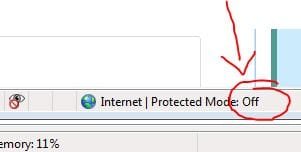
UAC is the final line of defense between any malware in traditional installtions, or not.

Also, if UAC is turned OFF, then Internet Protected Mode using IE is also turned OFF (see image below).

Regards,
Golden
 

Attachments

  • Capture.JPG
    Capture.JPG
    15.3 KB · Views: 119

My Computer

Computer type
PC/Desktop
Computer Manufacturer/Model Number
Golden Mk. I.4
OS
Windows 10 Pro x64 ; Xubuntu x64
CPU
Intel i7 860 @ 2.80 GHz O/C'ed to 4.0GHz
Motherboard
Gigabyte P55A-UD3R Rev.1. Award BIOS F13
Memory
16GB Corsair Vengance DDR3 @ 661 MHz Dual Channel (9-9-9-24)
Graphics Card(s)
EVGA NVidia GTX 560 1024MB
Sound Card
Realtek Integrated
Monitor(s) Displays
Dual Samsung SyncMaster 2494HS
Screen Resolution
1920*1080 and 1920*1080
Hard Drives
1*Samsung 840 EVO 120GB SSD;
1*OCZ Vertex 2 60GB SSD;
2*Samsung F3 SpinPoint 1TB in RAID0;
1*Samsung F1 SpinPoint 1TB;
2*Western Digital 1TB External USB 3.0
1*Western Digital 500GB External USB 3.0
1*Seagate 500GB External USB 2.0
PSU
Thermaltake ToughPower QFan 750W
Case
Thermaltake Element S VK60001W2Z
Cooling
Corsair H60 Water Cooling, 2*230mm and 2*80mm case fans
Keyboard
Logitech G110
Mouse
Logitech MX518
Real-Time Protection - Microsoft Security Essentials, Windows Firewall, Windows Defender & Comodo Firewall.
Should I disable Windows Firewall/Defender?

I'm not sure whether the firewalls will clash but having two running is more likely to cause system confusion, than help. Also, Windows Defender is already incorporated into MSE, so you do not need that to run seperately - turn it off.

Regards,
Golden
 

My Computer

Computer type
PC/Desktop
Computer Manufacturer/Model Number
Golden Mk. I.4
OS
Windows 10 Pro x64 ; Xubuntu x64
CPU
Intel i7 860 @ 2.80 GHz O/C'ed to 4.0GHz
Motherboard
Gigabyte P55A-UD3R Rev.1. Award BIOS F13
Memory
16GB Corsair Vengance DDR3 @ 661 MHz Dual Channel (9-9-9-24)
Graphics Card(s)
EVGA NVidia GTX 560 1024MB
Sound Card
Realtek Integrated
Monitor(s) Displays
Dual Samsung SyncMaster 2494HS
Screen Resolution
1920*1080 and 1920*1080
Hard Drives
1*Samsung 840 EVO 120GB SSD;
1*OCZ Vertex 2 60GB SSD;
2*Samsung F3 SpinPoint 1TB in RAID0;
1*Samsung F1 SpinPoint 1TB;
2*Western Digital 1TB External USB 3.0
1*Western Digital 500GB External USB 3.0
1*Seagate 500GB External USB 2.0
PSU
Thermaltake ToughPower QFan 750W
Case
Thermaltake Element S VK60001W2Z
Cooling
Corsair H60 Water Cooling, 2*230mm and 2*80mm case fans
Keyboard
Logitech G110
Mouse
Logitech MX518
When you install MSE it should of turned off Defender.
 

My Computer

Computer type
PC/Desktop
Computer Manufacturer/Model Number
Home made Desktop
OS
Windows 10 Pro. 64/ version 1709 Windows 7 Pro/64
CPU
Intel i7-6800K @ 4.3
Motherboard
ASUS X-99 Deluxe II
Memory
Corsair Platinum 16 gig @2400
Graphics Card(s)
EVGA GTX 1070 OC
Monitor(s) Displays
Asus 27" LED LCD/VE278Q
Screen Resolution
1920-1080 or 1280-720 HDMI
Hard Drives
INTEL SSD 730-240 Gb Sata 3.0/
PSU
EVGA Platium 1200W
Case
Phanteks Luxe Tempered Glass 8 fans/ one radiator
Cooling
XSPC/ Water Cooled CPU
Keyboard
Das 4 Professional
Mouse
Logitech M705/MX Anywhere 2-S
Internet Speed
100 mbits
Antivirus
Microsoft Security Essentials/ Malwarebytes Premium 3.0/ SAS
Browser
I.E. 11 default/Firefox/ ISP Time Warner Cable/Spectrum
Other Info
LG BluRay Burner/
Sound system-KLipsch-THX/
Icy Dock ssd Hot Swap bays.
Just dropped a check in the mail to get Malwarebytes Anti Malware. I hope the bought one works as good and better than the free one.
 

My Computer

Computer type
PC/Desktop
Computer Manufacturer/Model Number
Home made Desktop
OS
Windows 10 Pro. 64/ version 1709 Windows 7 Pro/64
CPU
Intel i7-6800K @ 4.3
Motherboard
ASUS X-99 Deluxe II
Memory
Corsair Platinum 16 gig @2400
Graphics Card(s)
EVGA GTX 1070 OC
Monitor(s) Displays
Asus 27" LED LCD/VE278Q
Screen Resolution
1920-1080 or 1280-720 HDMI
Hard Drives
INTEL SSD 730-240 Gb Sata 3.0/
PSU
EVGA Platium 1200W
Case
Phanteks Luxe Tempered Glass 8 fans/ one radiator
Cooling
XSPC/ Water Cooled CPU
Keyboard
Das 4 Professional
Mouse
Logitech M705/MX Anywhere 2-S
Internet Speed
100 mbits
Antivirus
Microsoft Security Essentials/ Malwarebytes Premium 3.0/ SAS
Browser
I.E. 11 default/Firefox/ ISP Time Warner Cable/Spectrum
Other Info
LG BluRay Burner/
Sound system-KLipsch-THX/
Icy Dock ssd Hot Swap bays.
Back
Top