What to do after installing a ssd in a laptop?

paulobao

New member
Member
VIP
Local time
4:32 AM
Messages
197
Hi,

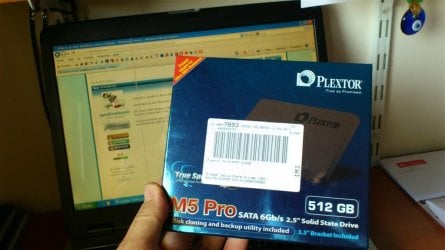
I'm less that 24 hours of receiving my M5P 523GB ssd!

I saw many tweaks around but could anyone, please, tell me exactly what are the really necessary tweaks (and things that i must do before installing the ssd) ?
For example, I will not deactivate hibernate since I've 512GB! Of course I will deactivate defrag (if not automatically disabled by Win7 Pro).

I will not clone my actual hdd but instead I will restore my laptop to the factory state! (of course with the ssd installed!).

SSD like the sleep function? (I mean if I press F3 my lap go to sleep! Is this possible with the SSD?)

Thanks a lot,

paulo
 

My Computer My Computer

At a glance

Windows 7 Professional 64 bitI7 2640M8 GBAMD Radeo HD 6450M
Computer Manufacturer/Model Number
Toshiba Tecra R840
OS
Windows 7 Professional 64 bit
CPU
I7 2640M
Memory
8 GB
Graphics Card(s)
AMD Radeo HD 6450M
Monitor(s) Displays
HD+ 14 inch
Hard Drives
HDD 500GB 7200 rpm

My Computer My Computer

At a glance

Windows 7 Professional SP1 - x64 [Non-UEFI Boot]Ivy Bridge Core i5 3570K (Delidded)G.Skill "Ares" DDR3 PC3-12800 - 1600MHz (16Gb)Asus Dual-RX480-O4G
Computer type
PC/Desktop
Computer Manufacturer/Model Number
Custom Build
OS
Windows 7 Professional SP1 - x64 [Non-UEFI Boot]
CPU
Ivy Bridge Core i5 3570K (Delidded)
Motherboard
Asus P8Z77-V LE PLUS
Memory
G.Skill "Ares" DDR3 PC3-12800 - 1600MHz (16Gb)
Graphics Card(s)
Asus Dual-RX480-O4G
Sound Card
Creative Sound Blaster Z w/5.1 sound system
Monitor(s) Displays
Asus IPS 23"
Screen Resolution
16/9
Hard Drives
Internal:
500Go Sata 6Gb/s (x2)
500Go Sata 3Gb/s (x2)
SSD 60Go Sata 6Gb/s
PSU
In Win C 900W Series 80+ Platinum
Case
Thermaltake Chaser A71
Cooling
Custom Water Cooling Loop
Keyboard
Cooler Master QuickFire XTi
Mouse
Razer Imperator 2012 (4G)
Antivirus
MSE
Browser
IE 11.0.xxx Rtm
Other Info
"Raid0" with Intel Smart Response Technology (HDD/SSD)
tell me exactly what are the really necessary tweaks (and things that i must do before installing the ssd) ?
For example, I will not deactivate hibernate since I've 512GB! Of course I will deactivate defrag (if not automatically disabled by Win7 Pro).

I will not clone my actual hdd but instead I will restore my laptop to the factory state! (of course with the ssd installed!).

SSD like the sleep function? (I mean if I press F3 my lap go to sleep! Is this possible with the SSD?)

Off the top of my head, I can't think of anything you need to do differently than an HDD.

Is your hard drive alignment OK on your current drive?

There are a few things to check after you restore such as defrag, page file, System Restore, and alignment.

A factory restore will create the same partition structure on the SSD that your laptop had from the factory. Are you sure that is what you want?

I'd normally do a clean install, but you may have some reason you don't want to do that.
 

My Computer My Computer

At a glance

Windows 7 Home Premium SP1, 64-bitIntel Skylake i5-6600K, not overclocked8 GB HyperX DDR4-2666 (2 x 4 GB)none; graphics are integrated on CPU
Computer type
PC/Desktop
Computer Manufacturer/Model Number
Ignatz Special; 4 speed manual gearbox; factory air conditioning; one of one
OS
Windows 7 Home Premium SP1, 64-bit
CPU
Intel Skylake i5-6600K, not overclocked
Motherboard
AsRock Z170M Extreme 4, micro ATX
Memory
8 GB HyperX DDR4-2666 (2 x 4 GB)
Graphics Card(s)
none; graphics are integrated on CPU
Sound Card
onboard: Realtek ALC1150; external: USB Behringer UF0-202
Monitor(s) Displays
Dell S2340M 23 inch IPS
Screen Resolution
1600 x 900
Hard Drives
System: Crucial MX100 series SSD, 128 GB;
Data: Samsung Spinpoint 103SJ, 1 TB;
Backup: WD Caviar Green WD30EZRX-00D8PB0, 3 TB
PSU
Rosewill SilentNight 500 watt fanless, semi-modular
Case
Antec Solo II
Cooling
Noctua NH-U12S; Noctua F12 intake, Noctua S12A exhaust
Keyboard
Microsoft 200 6JH-00001 USB
Mouse
Dell or Microsoft optical wired; USB
Antivirus
Microsoft Security Essentials and Malwarebytes Premium
Browser
Pale Moon
Other Info
All fans PWM; speeds at idle: CPU circa 500 rpm; intake circa 600 rpm; exhaust circa 600 rpm; CPU temps 27 idle and 47 C load in a warm room (27 C/81 F) when running Intel Extreme Tuning Utility stress test.
Thanks a lot for the tips :-)
Yes my hdd is aligned and working great now!
I removed most of the bloatware (just kept some Toshiba apps that I found nice and not intrusive!). My system is booting really fast now and everything are function great!

I kow that the system restore will create the same partition structure but, could I change it after the restore?
If so, I will remove the sytem restore partition (since I created the recovery media just in case: DVDs and a USB flash!)

I like the restore to a virgin ssd/hdd because it is simpler: windows 7 Pro SP1 and all the drivers will be installed automatically from the restore media! After this, I only need to remove the "bloatware" that I do not want and remove the items I want at the startup (and I tested these stuff in the hdd to see if everything was ok and there was no issues!).

These are only my thoughts since I do not know much about it and all that I want is a reliable and robust system! A little speed boost will ok too :D.

paulo
 

My Computer My Computer

At a glance

Windows 7 Professional 64 bitI7 2640M8 GBAMD Radeo HD 6450M
Computer Manufacturer/Model Number
Toshiba Tecra R840
OS
Windows 7 Professional 64 bit
CPU
I7 2640M
Memory
8 GB
Graphics Card(s)
AMD Radeo HD 6450M
Monitor(s) Displays
HD+ 14 inch
Hard Drives
HDD 500GB 7200 rpm
I kow that the system restore will create the same partition structure but, could I change it after the restore?
If so, I will remove the sytem restore partition (since I created the recovery media just in case: DVDs and a USB flash!)

I like the restore to a virgin ssd/hdd because it is simpler: windows 7 Pro SP1 and all the drivers will be installed automatically from the restore media! After this, I only need to remove the "bloatware" that I do not want and remove the items I want at the startup (and I tested these stuff in the hdd to see if everything was ok and there was no issues!).

Yes, you can change the partition structure after the restore, however.......

I wouldn't remove the factory restore partition. Why? Because the recovery partition is the most reliable method of restoring to factory specifications.

Your plan on restoring to the new SSD will likely work, but you should be aware that restorations can fail or require troubleshooting.

I can understand an aversion to a clean install if that would require a lot of program re-installation and configuration. It's worth a try.

But know exactly what your plan will be if it fails.
 

My Computer My Computer

At a glance

Windows 7 Home Premium SP1, 64-bitIntel Skylake i5-6600K, not overclocked8 GB HyperX DDR4-2666 (2 x 4 GB)none; graphics are integrated on CPU
Computer type
PC/Desktop
Computer Manufacturer/Model Number
Ignatz Special; 4 speed manual gearbox; factory air conditioning; one of one
OS
Windows 7 Home Premium SP1, 64-bit
CPU
Intel Skylake i5-6600K, not overclocked
Motherboard
AsRock Z170M Extreme 4, micro ATX
Memory
8 GB HyperX DDR4-2666 (2 x 4 GB)
Graphics Card(s)
none; graphics are integrated on CPU
Sound Card
onboard: Realtek ALC1150; external: USB Behringer UF0-202
Monitor(s) Displays
Dell S2340M 23 inch IPS
Screen Resolution
1600 x 900
Hard Drives
System: Crucial MX100 series SSD, 128 GB;
Data: Samsung Spinpoint 103SJ, 1 TB;
Backup: WD Caviar Green WD30EZRX-00D8PB0, 3 TB
PSU
Rosewill SilentNight 500 watt fanless, semi-modular
Case
Antec Solo II
Cooling
Noctua NH-U12S; Noctua F12 intake, Noctua S12A exhaust
Keyboard
Microsoft 200 6JH-00001 USB
Mouse
Dell or Microsoft optical wired; USB
Antivirus
Microsoft Security Essentials and Malwarebytes Premium
Browser
Pale Moon
Other Info
All fans PWM; speeds at idle: CPU circa 500 rpm; intake circa 600 rpm; exhaust circa 600 rpm; CPU temps 27 idle and 47 C load in a warm room (27 C/81 F) when running Intel Extreme Tuning Utility stress test.
Thanks again ignatz :-)
Hope everything works as planned!

I restore it to the factory fresh state 2 times (to test)! One from the partitition,and one using the 5 DVDs created by the Toshiba Recovery Media creator! Both worked 100% and with the same results :-)

The ssd will be delivered by ups portugal between 11:35 and 12:00 :-) (it is 10:24 now!)

paulo
 

My Computer My Computer

At a glance

Windows 7 Professional 64 bitI7 2640M8 GBAMD Radeo HD 6450M
Computer Manufacturer/Model Number
Toshiba Tecra R840
OS
Windows 7 Professional 64 bit
CPU
I7 2640M
Memory
8 GB
Graphics Card(s)
AMD Radeo HD 6450M
Monitor(s) Displays
HD+ 14 inch
Hard Drives
HDD 500GB 7200 rpm
You will be king of the hill with a 512 GB SSD. I can't recall anyone else buying one that large.

What brand did you get?

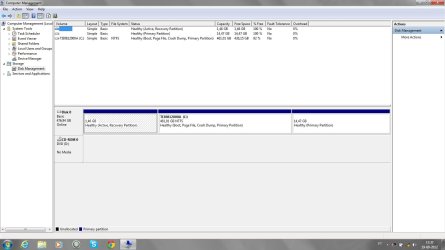
First thing I would do after the install is confirm the SSD will boot and then look at Windows Disk Management.

Then get your Internet working and post a screen shot of Disk Management if possible.

Then update Windows and get anti-virus going.

Then take a look in Device Manager, looking for errors.

Do you have your laptop's Ethernet driver downloaded and saved already? That's a good idea. The last thing you want to have happen is to not have a connection. You shouldn't need it since you are doing a factory restore, but I'd ALWAYS have that driver stored away somewhere safe.
 

My Computer My Computer

At a glance

Windows 7 Home Premium SP1, 64-bitIntel Skylake i5-6600K, not overclocked8 GB HyperX DDR4-2666 (2 x 4 GB)none; graphics are integrated on CPU
Computer type
PC/Desktop
Computer Manufacturer/Model Number
Ignatz Special; 4 speed manual gearbox; factory air conditioning; one of one
OS
Windows 7 Home Premium SP1, 64-bit
CPU
Intel Skylake i5-6600K, not overclocked
Motherboard
AsRock Z170M Extreme 4, micro ATX
Memory
8 GB HyperX DDR4-2666 (2 x 4 GB)
Graphics Card(s)
none; graphics are integrated on CPU
Sound Card
onboard: Realtek ALC1150; external: USB Behringer UF0-202
Monitor(s) Displays
Dell S2340M 23 inch IPS
Screen Resolution
1600 x 900
Hard Drives
System: Crucial MX100 series SSD, 128 GB;
Data: Samsung Spinpoint 103SJ, 1 TB;
Backup: WD Caviar Green WD30EZRX-00D8PB0, 3 TB
PSU
Rosewill SilentNight 500 watt fanless, semi-modular
Case
Antec Solo II
Cooling
Noctua NH-U12S; Noctua F12 intake, Noctua S12A exhaust
Keyboard
Microsoft 200 6JH-00001 USB
Mouse
Dell or Microsoft optical wired; USB
Antivirus
Microsoft Security Essentials and Malwarebytes Premium
Browser
Pale Moon
Other Info
All fans PWM; speeds at idle: CPU circa 500 rpm; intake circa 600 rpm; exhaust circa 600 rpm; CPU temps 27 idle and 47 C load in a warm room (27 C/81 F) when running Intel Extreme Tuning Utility stress test.
It is a Plextor M5Pro.
I will do that, thanks!

When you say "after install" do you mean after the hardware install or after the sw install?

There is a new firmware available for this model! I will check for the fw of my ssd and if it is not the updated version, I will try to make the update as the first step (after installing the ssd in the hdd bay). I have already the FW ISO file in a DVD and the boot order starting at the Optical device!
 

My Computer My Computer

At a glance

Windows 7 Professional 64 bitI7 2640M8 GBAMD Radeo HD 6450M
Computer Manufacturer/Model Number
Toshiba Tecra R840
OS
Windows 7 Professional 64 bit
CPU
I7 2640M
Memory
8 GB
Graphics Card(s)
AMD Radeo HD 6450M
Monitor(s) Displays
HD+ 14 inch
Hard Drives
HDD 500GB 7200 rpm
I meant I would do those things immediately after I had done the system restore to the SSD.

Good idea on the firmware. It might not matter, but you may as well get it.

Be aware that firmware flashing is a delicate procedure. If it goes bad, you would be in a major problem. Be sure you are connected to AC power, not battery, when you make the change.

You never know what you might see in Windows Disk Management. You could have some unallocated space, but you should be able to add it to some existing partition.
 

My Computer My Computer

At a glance

Windows 7 Home Premium SP1, 64-bitIntel Skylake i5-6600K, not overclocked8 GB HyperX DDR4-2666 (2 x 4 GB)none; graphics are integrated on CPU
Computer type
PC/Desktop
Computer Manufacturer/Model Number
Ignatz Special; 4 speed manual gearbox; factory air conditioning; one of one
OS
Windows 7 Home Premium SP1, 64-bit
CPU
Intel Skylake i5-6600K, not overclocked
Motherboard
AsRock Z170M Extreme 4, micro ATX
Memory
8 GB HyperX DDR4-2666 (2 x 4 GB)
Graphics Card(s)
none; graphics are integrated on CPU
Sound Card
onboard: Realtek ALC1150; external: USB Behringer UF0-202
Monitor(s) Displays
Dell S2340M 23 inch IPS
Screen Resolution
1600 x 900
Hard Drives
System: Crucial MX100 series SSD, 128 GB;
Data: Samsung Spinpoint 103SJ, 1 TB;
Backup: WD Caviar Green WD30EZRX-00D8PB0, 3 TB
PSU
Rosewill SilentNight 500 watt fanless, semi-modular
Case
Antec Solo II
Cooling
Noctua NH-U12S; Noctua F12 intake, Noctua S12A exhaust
Keyboard
Microsoft 200 6JH-00001 USB
Mouse
Dell or Microsoft optical wired; USB
Antivirus
Microsoft Security Essentials and Malwarebytes Premium
Browser
Pale Moon
Other Info
All fans PWM; speeds at idle: CPU circa 500 rpm; intake circa 600 rpm; exhaust circa 600 rpm; CPU temps 27 idle and 47 C load in a warm room (27 C/81 F) when running Intel Extreme Tuning Utility stress test.
:-)...my ssd has arrived! No need for firmware update....
Manufact. Aug 2012; FW: 1.01.

I'm glad to receive a still hot one, and already with the new firmware :-).

Now I'm going to read the manual! First thing (and I like to read manuals, realy!).

Thanks for all :-) I will be post my "findings" here when I start the "activity"! But I need to calm down and only then I will start!

Cheers,
paulo
 

Attachments

  • DSC_0078 (Large).JPG
    DSC_0078 (Large).JPG
    68.5 KB · Views: 9

My Computer My Computer

At a glance

Windows 7 Professional 64 bitI7 2640M8 GBAMD Radeo HD 6450M
Computer Manufacturer/Model Number
Toshiba Tecra R840
OS
Windows 7 Professional 64 bit
CPU
I7 2640M
Memory
8 GB
Graphics Card(s)
AMD Radeo HD 6450M
Monitor(s) Displays
HD+ 14 inch
Hard Drives
HDD 500GB 7200 rpm
First look at the manual and sw:
- Quick guide it's very simple!
- SW: Acronis True Image OEM HD
User Manual

Do I need to format the ssd?
 

My Computer My Computer

At a glance

Windows 7 Professional 64 bitI7 2640M8 GBAMD Radeo HD 6450M
Computer Manufacturer/Model Number
Toshiba Tecra R840
OS
Windows 7 Professional 64 bit
CPU
I7 2640M
Memory
8 GB
Graphics Card(s)
AMD Radeo HD 6450M
Monitor(s) Displays
HD+ 14 inch
Hard Drives
HDD 500GB 7200 rpm
First look at the manual and sw:
- Quick guide it's very simple!
- SW: Acronis True Image OEM HD
User Manual

Do I need to format the ssd?

I'd seriously doubt it since you are doing a factory restore. Try it without and see if it fails.

But formatting is easily done if needed.


You don't even have to specifically do it on a clean install.

I'd immediately check alignment after the first boot to confirm that is OK.
 

My Computer My Computer

At a glance

Windows 7 Home Premium SP1, 64-bitIntel Skylake i5-6600K, not overclocked8 GB HyperX DDR4-2666 (2 x 4 GB)none; graphics are integrated on CPU
Computer type
PC/Desktop
Computer Manufacturer/Model Number
Ignatz Special; 4 speed manual gearbox; factory air conditioning; one of one
OS
Windows 7 Home Premium SP1, 64-bit
CPU
Intel Skylake i5-6600K, not overclocked
Motherboard
AsRock Z170M Extreme 4, micro ATX
Memory
8 GB HyperX DDR4-2666 (2 x 4 GB)
Graphics Card(s)
none; graphics are integrated on CPU
Sound Card
onboard: Realtek ALC1150; external: USB Behringer UF0-202
Monitor(s) Displays
Dell S2340M 23 inch IPS
Screen Resolution
1600 x 900
Hard Drives
System: Crucial MX100 series SSD, 128 GB;
Data: Samsung Spinpoint 103SJ, 1 TB;
Backup: WD Caviar Green WD30EZRX-00D8PB0, 3 TB
PSU
Rosewill SilentNight 500 watt fanless, semi-modular
Case
Antec Solo II
Cooling
Noctua NH-U12S; Noctua F12 intake, Noctua S12A exhaust
Keyboard
Microsoft 200 6JH-00001 USB
Mouse
Dell or Microsoft optical wired; USB
Antivirus
Microsoft Security Essentials and Malwarebytes Premium
Browser
Pale Moon
Other Info
All fans PWM; speeds at idle: CPU circa 500 rpm; intake circa 600 rpm; exhaust circa 600 rpm; CPU temps 27 idle and 47 C load in a warm room (27 C/81 F) when running Intel Extreme Tuning Utility stress test.
Thanks again! I will check alignment at the first boot!
 

My Computer My Computer

At a glance

Windows 7 Professional 64 bitI7 2640M8 GBAMD Radeo HD 6450M
Computer Manufacturer/Model Number
Toshiba Tecra R840
OS
Windows 7 Professional 64 bit
CPU
I7 2640M
Memory
8 GB
Graphics Card(s)
AMD Radeo HD 6450M
Monitor(s) Displays
HD+ 14 inch
Hard Drives
HDD 500GB 7200 rpm
Hi,

I could not resist and worked on it! Installed everything...what a difference in performace!
Everything untill now occured as planned! No issue at all! Zero untill now (hope it remains like this for long time!)
Ignatz, here the screen you asked for!

Defrag is off (I think because is schedulled for "never") but what about pagefile and system restore? Should I turn anything off/on?

And should I disable Write-caching to the ssd?

And should I disable "allow files in this drive to have contents indexed in adition to file properties" ?

Cheers,
paulo
 

Attachments

  • Disk management.jpg
    Disk management.jpg
    88.7 KB · Views: 18

My Computer My Computer

At a glance

Windows 7 Professional 64 bitI7 2640M8 GBAMD Radeo HD 6450M
Computer Manufacturer/Model Number
Toshiba Tecra R840
OS
Windows 7 Professional 64 bit
CPU
I7 2640M
Memory
8 GB
Graphics Card(s)
AMD Radeo HD 6450M
Monitor(s) Displays
HD+ 14 inch
Hard Drives
HDD 500GB 7200 rpm
And should I disable Write-caching to the ssd?

I would not do that on SSD either on HDD. Just let it on!
 

My Computer My Computer

At a glance

Windows 7 Professional SP1 - x64 [Non-UEFI Boot]Ivy Bridge Core i5 3570K (Delidded)G.Skill "Ares" DDR3 PC3-12800 - 1600MHz (16Gb)Asus Dual-RX480-O4G
Computer type
PC/Desktop
Computer Manufacturer/Model Number
Custom Build
OS
Windows 7 Professional SP1 - x64 [Non-UEFI Boot]
CPU
Ivy Bridge Core i5 3570K (Delidded)
Motherboard
Asus P8Z77-V LE PLUS
Memory
G.Skill "Ares" DDR3 PC3-12800 - 1600MHz (16Gb)
Graphics Card(s)
Asus Dual-RX480-O4G
Sound Card
Creative Sound Blaster Z w/5.1 sound system
Monitor(s) Displays
Asus IPS 23"
Screen Resolution
16/9
Hard Drives
Internal:
500Go Sata 6Gb/s (x2)
500Go Sata 3Gb/s (x2)
SSD 60Go Sata 6Gb/s
PSU
In Win C 900W Series 80+ Platinum
Case
Thermaltake Chaser A71
Cooling
Custom Water Cooling Loop
Keyboard
Cooler Master QuickFire XTi
Mouse
Razer Imperator 2012 (4G)
Antivirus
MSE
Browser
IE 11.0.xxx Rtm
Other Info
"Raid0" with Intel Smart Response Technology (HDD/SSD)
Hi,

I could not resist and worked on it! Installed everything...what a difference in performace!
Everything untill now occured as planned! No issue at all! Zero untill now (hope it remains like this for long time!)
Ignatz, here the screen you asked for!

Defrag is off (I think because is schedulled for "never") but what about pagefile and system restore? Should I turn anything off/on?

And should I disable Write-caching to the ssd?

And should I disable "allow files in this drive to have contents indexed in adition to file properties" ?

I would not disable write-caching.

I turn off indexing on all drives. As far as I know, it's only purpose is to allow you to search the contents of files with the Windows search tool. I search only for file names rather than file contents and even then I do not use the Windows tool.

You need to keep a page file, but you can reduce its size to save some space. I use 1024 MB as a minimum and 2048 MB as a maximum.

I like System Restore and use it probably once a month. You can certainly adjust how much disk space is devoted to it. Mine is set to use a maximum of 8 GB and that allows me to have a dozen or so restore points dating back several weeks.

What is the purpose of that 14.47 GB partition?

Have you confirmed proper alignment?

If it seems to be working well, I'd run a benchmark using a couple of the best known tools, such as AS SSD and ATTO. Post screenshots of the results here or in this thread:

http://www.sevenforums.com/hardware-devices/213193-show-us-your-ssd-performance-2-a.html

I'd keep the screen shots for later reference if the drive starts acting poorly.

You could also test your boot time by downloading the measurement tool in this thread:

http://www.sevenforums.com/performance-maintenance/592-reboot-time.html

and then making a post about the results. A typical good score is around 30 seconds.

Looks like you are doing fine. Enjoy the drive.
 

My Computer My Computer

At a glance

Windows 7 Home Premium SP1, 64-bitIntel Skylake i5-6600K, not overclocked8 GB HyperX DDR4-2666 (2 x 4 GB)none; graphics are integrated on CPU
Computer type
PC/Desktop
Computer Manufacturer/Model Number
Ignatz Special; 4 speed manual gearbox; factory air conditioning; one of one
OS
Windows 7 Home Premium SP1, 64-bit
CPU
Intel Skylake i5-6600K, not overclocked
Motherboard
AsRock Z170M Extreme 4, micro ATX
Memory
8 GB HyperX DDR4-2666 (2 x 4 GB)
Graphics Card(s)
none; graphics are integrated on CPU
Sound Card
onboard: Realtek ALC1150; external: USB Behringer UF0-202
Monitor(s) Displays
Dell S2340M 23 inch IPS
Screen Resolution
1600 x 900
Hard Drives
System: Crucial MX100 series SSD, 128 GB;
Data: Samsung Spinpoint 103SJ, 1 TB;
Backup: WD Caviar Green WD30EZRX-00D8PB0, 3 TB
PSU
Rosewill SilentNight 500 watt fanless, semi-modular
Case
Antec Solo II
Cooling
Noctua NH-U12S; Noctua F12 intake, Noctua S12A exhaust
Keyboard
Microsoft 200 6JH-00001 USB
Mouse
Dell or Microsoft optical wired; USB
Antivirus
Microsoft Security Essentials and Malwarebytes Premium
Browser
Pale Moon
Other Info
All fans PWM; speeds at idle: CPU circa 500 rpm; intake circa 600 rpm; exhaust circa 600 rpm; CPU temps 27 idle and 47 C load in a warm room (27 C/81 F) when running Intel Extreme Tuning Utility stress test.
Back
Top