
What's a Good Bench Mark Program

BruhthaKuga

New member
Local time
8:05 PM
Messages
71
Location
Gamma Quadrant
What is a good Bench mark program to bench mark my PCs overall performance?

I think my Pooter runs slow? I say "think" because I am not really sure. I see some web pages load slow but when I do a speed test it say I have good download speed, I know that it could be the PC on the other end as some web pages zip but how do I know for sure? I see some apps. work slow or stutter at certain points but perhaps it is a in it's a part of it's operation where it works the hardest.

I am talking about performance after a clean install, I think I have a good entry level enthusiast component (Check my System Spec) so either I need to do a bench mark to get a reference or I have faulty stuff in my case that I need to replace.
 

My Computer

Computer Manufacturer/Model Number
z#k&x%
OS
64 bit Windows 7 Ultimate (Free from Windows 7 Launch Event)
CPU
I7 920 (stinking CO)
Motherboard
Gigabyte GA-EX58-UD4P
Memory
6GB Patriot Viper DDR3 (3 x 2GB) 1333 (PC3 10666) 7-7-7-20
Graphics Card(s)
MSI 4670 1GB
Sound Card
Realtek ALC889A (onboard)
Monitor(s) Displays
Samsung LN52A650
Screen Resolution
1920 X1080
Hard Drives
32GB OCZ Vertex 1VTX30G SSD (OS Boot Drive)

80GB WD Caviar Blue WD800JD (Auxilery Drive for SSD off loading)

500GB Seagate Momentus ST9500325AS (Personal Storage)
PSU
Antec EA750
Case
Antec 180 I got from Craigslist free? Or was it Freecycle
Cooling
Intel OEM, Case side off, PC Duct Taped to Window A/C unit
Keyboard
Piece of Crap I Found Dumpster Diving
Mouse
Logitech Optical Trackman (Tracking Ball)
Internet Speed
Varies, Downloads from 121MB to 12MB Upload from 3MB to 25MB
Other Info
Uber Chronometric Particle Emitter with the Verteron Exovector extrapolated to the sub neutrino level and Hyper Calibrated with a zero gravity tritonium / unobtainium alloy infused Collaborating Meter

My Computer

Computer type
PC/Desktop
Computer Manufacturer/Model Number
76~2.0
OS
Windows 7 Ult x64 - SP1/ Windows 8 Pro x64
CPU
Intel Core i5-3570K 4.6GHz
Motherboard
Gigabyte GA-Z77X UD3H, f18
Memory
8GB (2X4GB) DDR3 1600 Corsair Vengeance CL8 1.5v
Graphics Card(s)
Sapphire HD 7770 Vapor-X OC 1GB DDR5
Sound Card
Onboard VIA VT2021
Monitor(s) Displays
22" LCD Dell
Screen Resolution
1680x1050
Hard Drives
Samsung 840Pro 128GB SSD,
Seagate Barracuda 500GB SATA2 7200rpm 32MB cache, Seagate Barracuda 1TB SATA2 7200rpm 32MB cache,
PSU
Corsair HX650W
Case
Cooler Master Storm Scout
Cooling
Corsair H80 2x12cm Noctua NF P12 , 2x14cm case fans
Keyboard
Logitech Wave
Mouse
CM Sentinel
Internet Speed
Dismal
Antivirus
Avast
Browser
Opera Next
Other Info
Haswell laptop: HP Envy 17t-j, i7-4700MQ, GeForce 740M 2GB DDR3, 17.3" Full HD 1920x1080, 16GB RAM, Samsung 840 Pro 128GB, 1TB Hitachi 7200 HDD,
Desktop: eSATA ports,
External eSATA Seagate 500GB SATA2 7200rpm,
External WD USB 500GB
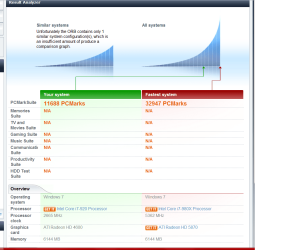
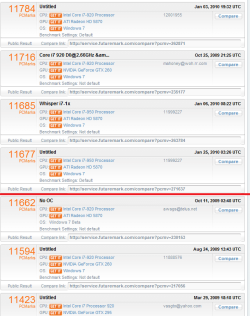
I ran PC Vantage free and got a score of 11668, find below some screen shots of the results, the first seem to have me pitted against Corsair Labs with a Gulftown 980X, the next pic is the highest scores when I search the ORB and the last pic is a few pages down with a red line where I would place if I was included in this list with a paid version of PC Vantage. I am going to read up on those Bench Mark programs you sugested, thank you.
 

Attachments

  • 1 PC Vantage Bench Mark 4-2-10.png
    1 PC Vantage Bench Mark 4-2-10.png
    83.7 KB · Views: 52
  • 1 Others PC Vantage Bench Mark 4-2-10.png
    1 Others PC Vantage Bench Mark 4-2-10.png
    60 KB · Views: 28
  • 2 Others PC Vantage Bench Mark 4-2-10.png
    2 Others PC Vantage Bench Mark 4-2-10.png
    45.3 KB · Views: 30

My Computer

Computer Manufacturer/Model Number
z#k&x%
OS
64 bit Windows 7 Ultimate (Free from Windows 7 Launch Event)
CPU
I7 920 (stinking CO)
Motherboard
Gigabyte GA-EX58-UD4P
Memory
6GB Patriot Viper DDR3 (3 x 2GB) 1333 (PC3 10666) 7-7-7-20
Graphics Card(s)
MSI 4670 1GB
Sound Card
Realtek ALC889A (onboard)
Monitor(s) Displays
Samsung LN52A650
Screen Resolution
1920 X1080
Hard Drives
32GB OCZ Vertex 1VTX30G SSD (OS Boot Drive)

80GB WD Caviar Blue WD800JD (Auxilery Drive for SSD off loading)

500GB Seagate Momentus ST9500325AS (Personal Storage)
PSU
Antec EA750
Case
Antec 180 I got from Craigslist free? Or was it Freecycle
Cooling
Intel OEM, Case side off, PC Duct Taped to Window A/C unit
Keyboard
Piece of Crap I Found Dumpster Diving
Mouse
Logitech Optical Trackman (Tracking Ball)
Internet Speed
Varies, Downloads from 121MB to 12MB Upload from 3MB to 25MB
Other Info
Uber Chronometric Particle Emitter with the Verteron Exovector extrapolated to the sub neutrino level and Hyper Calibrated with a zero gravity tritonium / unobtainium alloy infused Collaborating Meter
What is a good Bench mark program to bench mark my PCs overall performance?

Everest:

Lavalys - Comprehensive IT Security and Management

Sisoft Sandra:

SiSoftware Sandra - Free software downloads and software reviews - CNET Download.com


I think my Pooter runs slow? I say "think" because I am not really sure. I see some web pages load slow but when I do a speed test it say I have good download speed, I know that it could be the PC on the other end as some web pages zip but how do I know for sure?

If some crawl while others load fine, then it's the site itself. Sites with a lot of embedded Flash and those that connect to a million other sites at the same time will run slowly, no matter what.

Browser benchmark:
Peacekeeper - The Browser Benchmark from Futuremark Corporation

I see some apps. work slow or stutter at certain points but perhaps it is a in it's a part of it's operation where it works the hardest.

That depends on the app - which ones tend to stutter at times?

I am talking about performance after a clean install, I think I have a good entry level enthusiast component (Check my System Spec) so either I need to do a bench mark to get a reference or I have faulty stuff in my case that I need to replace.

How close after a clean install are these stutters etc occurring? Windows still needs a little time to 'settle down' after a clean install while services / background tasks do their thing.
 

My Computer

Computer type
PC/Desktop
Computer Manufacturer/Model Number
Systems by SmartEyeball
OS
8 Pro x64
CPU
i7 3770K 4.6GHz
Motherboard
ASUS P8Z77 WS
Memory
16GB G.Skill Trident X 2666mhz
Graphics Card(s)
x2 EVGA 780 Ti Superclocked SLI
Sound Card
SB X-FI Surround 5.1 PRO USB / ATH-AD900 Headphones
Monitor(s) Displays
x3 Dell U2410 / 58" Samsung
Screen Resolution
5760*1200/ 1920*1200
Hard Drives
2x Intel 520 240GB (RAID 0) * 2x WD Caviar Blacks 2TB (RAID 0) * 2TB WD Caviar Black * Sony Optirac DVD
PSU
Silverstone Strider Evolution 1200W
Case
Thermaltake Level 10 GT Snow Edition
Cooling
Noctua NH-D14
Keyboard
Topre Realforce // Ducky Shine MX Black // Filco Ninja TKL
Mouse
Thermaltake Theron (Highly Recommended) + Razer Imperator
Antivirus
MSE
Browser
IE, FF, WaterFox
Other Info
GT Extreme V2 Sim Racing Cockpit + 40" LCD and K/B Mouse stand ▼
Fanatec CSR Elite Wheel + Clubsport V1 Pedals + CSR shifter/7G-H ▼Saitek X52 Pro ▼ TrackIR 5 Pro
Buttkicker v2 Seat Rumbler with Dedicated 5.1 and Sub Woofer attached to frame ▼
=
Bloody Big Grin
Smart Guy, that was one of the best replies that I have ever gotten, your answer were well thought out and informative. I did not detect the slightest since of smugness, thank you very much.

I will take note of those things you mentioned and get back with you, is it OK to PM you occasionally?

I am going to have to repay you? .. .. .. I got it, you know the story of Rumpelstiltskin? Well I am going to give you my first born male child. . . only this is not a fairytale and my first born, Well she gets out of the prison of criminally insane next year and her parole officer will have an armored truck deliver her sedated and strapped like Hannible Lector in Silence Of The Lambs.

Good Luck With That and no you cannot back out cause a deal is a deal:)
 

My Computer

Computer Manufacturer/Model Number
z#k&x%
OS
64 bit Windows 7 Ultimate (Free from Windows 7 Launch Event)
CPU
I7 920 (stinking CO)
Motherboard
Gigabyte GA-EX58-UD4P
Memory
6GB Patriot Viper DDR3 (3 x 2GB) 1333 (PC3 10666) 7-7-7-20
Graphics Card(s)
MSI 4670 1GB
Sound Card
Realtek ALC889A (onboard)
Monitor(s) Displays
Samsung LN52A650
Screen Resolution
1920 X1080
Hard Drives
32GB OCZ Vertex 1VTX30G SSD (OS Boot Drive)

80GB WD Caviar Blue WD800JD (Auxilery Drive for SSD off loading)

500GB Seagate Momentus ST9500325AS (Personal Storage)
PSU
Antec EA750
Case
Antec 180 I got from Craigslist free? Or was it Freecycle
Cooling
Intel OEM, Case side off, PC Duct Taped to Window A/C unit
Keyboard
Piece of Crap I Found Dumpster Diving
Mouse
Logitech Optical Trackman (Tracking Ball)
Internet Speed
Varies, Downloads from 121MB to 12MB Upload from 3MB to 25MB
Other Info
Uber Chronometric Particle Emitter with the Verteron Exovector extrapolated to the sub neutrino level and Hyper Calibrated with a zero gravity tritonium / unobtainium alloy infused Collaborating Meter
I second the recommendation for Everest. It's a comprehensive program. You can monitor temperatures, benchmark your computer, view and edit settings for all aspects of your configuration. If you're looking to improve the performance of your computer, there's a couple of quick things you can do to reduce memory usage and speed up your computer.

1) Turn off Aero & related effects (Right Click Computer > Advanced System Settings > Performance > Adjust for Best Performance
2) Run a system cleaner/defrag (CCleaner & Defraggler are good examples... See Piriform - Download CCleaner, Defraggler, Recuva, Speccy - Millions of users worldwide! )
3) Turn off as many unnecessary start-up programs as you can, the least program you have starting up with your computer the faster you'll reboot.

If you're looking for more comprehensive performance increases, I recommend new hardware over software modifications.
 

My Computer

Computer Manufacturer/Model Number
Apple Macbook Pro (April 2009)
OS
W7 Ult. x64 | OS X
CPU
Intel Mobile Core 2 Duo 2.93Ghz [T9800 Penryn]
Motherboard
NVIDIA nForce 730i Rev. B1 [Mac-F2268EC8 (U2E1)]
Memory
4096MB Samsung DDR3 Dual Channel [PC3-8500F 1066Mhz]
Graphics Card(s)
NVIDIA GeForce 9600M GT 512MB [G96M Rev. C1]
Sound Card
SB X-Fi Surround 5.1 USB | Onboard Realtek (Disabled)
Monitor(s) Displays
Acer x223wbd 22" | Apple Anti-Glare 17" (Disabled)
Screen Resolution
{Current} 1440x900 {Acer} 1680x1050 {Apple} 1920x1200
Hard Drives
{Internal}
Seagate Momentus 320GB 2.5" 7200RPM [ST9320421AS]

{Externals}
LaCie 320GB USB 2.0 HDD [301284UR]
LaCie 750GB USB 2.0 FW400 eSATA HDD [301314U]
LaCie 1TB USB 2.0 HDD [301304UR]
PSU
Magsafe
Case
Aluminum/Unibody (MBP52)
Cooling
2 x 6000 RPM Fans
Keyboard
Logitech G-15v2 [PN 920-000379]
Mouse
Logitech G-9 [PN 910-000338]
Internet Speed
12Mbps/2.5Mbps w/ 24Mbps Speed Boost [Comcast]
Other Info
Logitech X-540 Speakers [PN 970223-0122]
Sennheiser PC-151 Headset
I am going to read up on those Bench Mark programs you sugested, thank you.

Hope they helped, I have just been looking for some myself.

SEB has a wealth of knowledge and both feet planted firmly on terafirma.

I'm going to use his suggestions as well.
 

My Computer

Computer type
PC/Desktop
Computer Manufacturer/Model Number
76~2.0
OS
Windows 7 Ult x64 - SP1/ Windows 8 Pro x64
CPU
Intel Core i5-3570K 4.6GHz
Motherboard
Gigabyte GA-Z77X UD3H, f18
Memory
8GB (2X4GB) DDR3 1600 Corsair Vengeance CL8 1.5v
Graphics Card(s)
Sapphire HD 7770 Vapor-X OC 1GB DDR5
Sound Card
Onboard VIA VT2021
Monitor(s) Displays
22" LCD Dell
Screen Resolution
1680x1050
Hard Drives
Samsung 840Pro 128GB SSD,
Seagate Barracuda 500GB SATA2 7200rpm 32MB cache, Seagate Barracuda 1TB SATA2 7200rpm 32MB cache,
PSU
Corsair HX650W
Case
Cooler Master Storm Scout
Cooling
Corsair H80 2x12cm Noctua NF P12 , 2x14cm case fans
Keyboard
Logitech Wave
Mouse
CM Sentinel
Internet Speed
Dismal
Antivirus
Avast
Browser
Opera Next
Other Info
Haswell laptop: HP Envy 17t-j, i7-4700MQ, GeForce 740M 2GB DDR3, 17.3" Full HD 1920x1080, 16GB RAM, Samsung 840 Pro 128GB, 1TB Hitachi 7200 HDD,
Desktop: eSATA ports,
External eSATA Seagate 500GB SATA2 7200rpm,
External WD USB 500GB
Smart Guy, that was one of the best replies that I have ever gotten, your answer were well thought out and informative. I did not detect the slightest since of smugness, thank you very much.

I will take note of those things you mentioned and get back with you, is it OK to PM you occasionally?

You're welcome mate and sure you can :)

I am going to have to repay you? .. .. .. I got it, you know the story of Rumpelstiltskin? Well I am going to give you my first born male child. . . only this is not a fairytale and my first born, Well she gets out of the prison of criminally insane next year and her parole officer will have an armored truck deliver her sedated and strapped like Hannible Lector in Silence Of The Lambs.

Good Luck With That and no you cannot back out cause a deal is a deal:)

lol, I look forward to it. I shall name her trouble :p
 

My Computer

Computer type
PC/Desktop
Computer Manufacturer/Model Number
Systems by SmartEyeball
OS
8 Pro x64
CPU
i7 3770K 4.6GHz
Motherboard
ASUS P8Z77 WS
Memory
16GB G.Skill Trident X 2666mhz
Graphics Card(s)
x2 EVGA 780 Ti Superclocked SLI
Sound Card
SB X-FI Surround 5.1 PRO USB / ATH-AD900 Headphones
Monitor(s) Displays
x3 Dell U2410 / 58" Samsung
Screen Resolution
5760*1200/ 1920*1200
Hard Drives
2x Intel 520 240GB (RAID 0) * 2x WD Caviar Blacks 2TB (RAID 0) * 2TB WD Caviar Black * Sony Optirac DVD
PSU
Silverstone Strider Evolution 1200W
Case
Thermaltake Level 10 GT Snow Edition
Cooling
Noctua NH-D14
Keyboard
Topre Realforce // Ducky Shine MX Black // Filco Ninja TKL
Mouse
Thermaltake Theron (Highly Recommended) + Razer Imperator
Antivirus
MSE
Browser
IE, FF, WaterFox
Other Info
GT Extreme V2 Sim Racing Cockpit + 40" LCD and K/B Mouse stand ▼
Fanatec CSR Elite Wheel + Clubsport V1 Pedals + CSR shifter/7G-H ▼Saitek X52 Pro ▼ TrackIR 5 Pro
Buttkicker v2 Seat Rumbler with Dedicated 5.1 and Sub Woofer attached to frame ▼
=
Bloody Big Grin
Back
Top