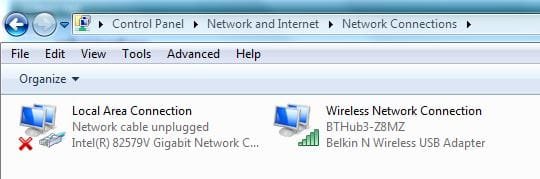
Hi and thanks for your very helpful replies

Phew, I am pleased I did not manage to install the stated driver!
I will try to reply to Bill's post as best I can, but please bear in mind your dealing with a pensioner and not someone educated at school in these matters.
I have a windows image backup taken on Monday evening so that should be okay but I will take another after this post just to be bang up to date.
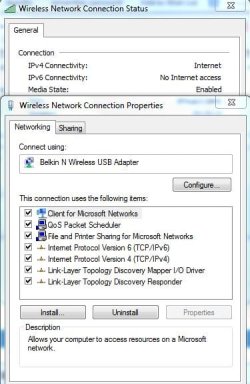
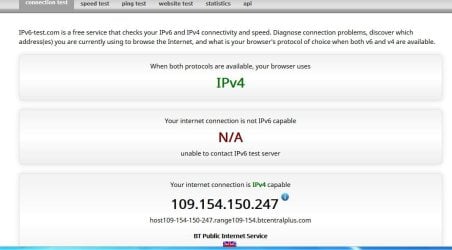
The Ipv screenshot as below.
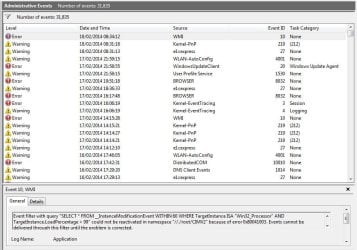
To help diagnose the slow startup look at the perforance disgnostic events
Control Panel\All Control Panel Items\Performance Information and Tools\Advanced Tools
Select "View performance details in Event log"
Sort by the Level column
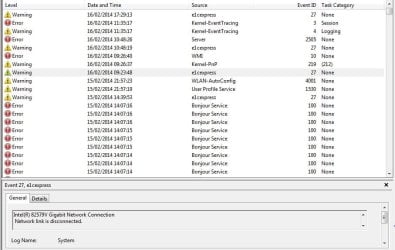
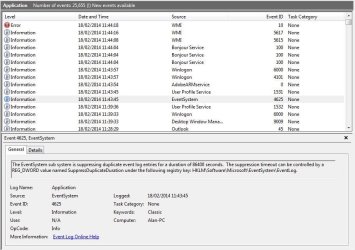
Post the error and warning level entries.
I have copied the log sorted by Level, this ends up as 17 A4 Pages, is there a better way!
NIC controller: I'd like to know the MAC address of the 82759V. There are some reports that say the prefix is wrong. In an elevated command prompt, type:
ipconfig /all
and post the output.
ipconfig /all:
Microsoft Windows [Version 6.1.7601]
Copyright (c) 2009 Microsoft Corporation. All rights reserved.
C:\Windows\system32>ipconfig /all
Windows IP Configuration
Host Name . . . . . . . . . . . . : Alan-PC
Primary Dns Suffix . . . . . . . :
Node Type . . . . . . . . . . . . : Hybrid
IP Routing Enabled. . . . . . . . : No
WINS Proxy Enabled. . . . . . . . : No
DNS Suffix Search List. . . . . . : home
Ethernet adapter Local Area Connection:
Media State . . . . . . . . . . . : Media disconnected
Connection-specific DNS Suffix . :
Description . . . . . . . . . . . : Intel(R) 82579V Gigabit Network Connection
Physical Address. . . . . . . . . : 14-DA-E9-D5-A5-16
DHCP Enabled. . . . . . . . . . . : Yes
Autoconfiguration Enabled . . . . : Yes
Wireless LAN adapter Wireless Network Connection:
Connection-specific DNS Suffix . : home
Description . . . . . . . . . . . : Belkin N Wireless USB Adapter
Physical Address. . . . . . . . . : 94-44-52-D3-DF-FC
DHCP Enabled. . . . . . . . . . . : Yes
Autoconfiguration Enabled . . . . : Yes
Link-local IPv6 Address . . . . . : fe80::ca6:9e08:3d58:c287%11(Preferred)
IPv4 Address. . . . . . . . . . . : 192.168.1.72(Preferred)
Subnet Mask . . . . . . . . . . . : 255.255.255.0
Lease Obtained. . . . . . . . . . : 19 February 2014 09:06:21
Lease Expires . . . . . . . . . . : 20 February 2014 10:07:43
Default Gateway . . . . . . . . . : 192.168.1.254
DHCP Server . . . . . . . . . . . : 192.168.1.254
DHCPv6 IAID . . . . . . . . . . . : 244597842
DHCPv6 Client DUID. . . . . . . . : 00-01-00-01-19-45-48-AD-94-44-52-D3-DF-FC
DNS Servers . . . . . . . . . . . : 192.168.1.254
NetBIOS over Tcpip. . . . . . . . : Enabled
Tunnel adapter isatap.home:
Media State . . . . . . . . . . . : Media disconnected
Connection-specific DNS Suffix . : home
Description . . . . . . . . . . . : Microsoft ISATAP Adapter
Physical Address. . . . . . . . . : 00-00-00-00-00-00-00-E0
DHCP Enabled. . . . . . . . . . . : No
Autoconfiguration Enabled . . . . : Yes
Tunnel adapter Local Area Connection* 11:
Media State . . . . . . . . . . . : Media disconnected
Connection-specific DNS Suffix . :
Description . . . . . . . . . . . : Teredo Tunneling Pseudo-Interface
Physical Address. . . . . . . . . : 00-00-00-00-00-00-00-E0
DHCP Enabled. . . . . . . . . . . : No
Autoconfiguration Enabled . . . . : Yes
C:\Windows\system32>
END
Please post the version of the controller currently installed on your machine.(Dev Mgr properties, driver).
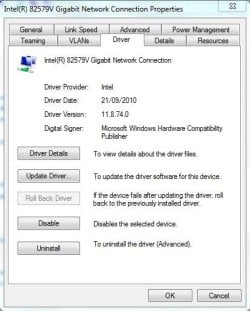
While looking at Control Panel\All Control Panel Items\Performance Information and Tools\Advanced Tools
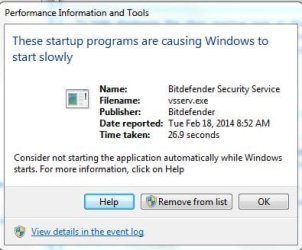
I noted a report about programs slowing up the startup, the offender was reported as Bitdefender as in the screenshot below, I installed this (a newer 2014 version of my existing, 2013 version) a few weeks ago and did not notice any slowdown after installing the newer program.
I will run the MS Fixit link later and also download the tutorial which will give me something to do while the backup runs!
Before I do anything with the ASUS links and risk making matters worse, I will await your thoughts on the above. I hope I have got the right info but if not let me know.
Thanks for your help.
Alan.
I remembered that last time I looked my internet connection had both IPv4 and IPv6 shown, now there is only IPv4. Not knowing what is what I am attaching a screen shot below that may? give some clue as to what may be wrong.