Whats slowing up my startup? Event Viewer shows lots of problems!

Trapper

New member
Power User
Local time
11:36 PM
Messages
207
Location
Hertfordshire UK.
Hi Guys.
The last week or so my Win 7 Pro 64bit has been very slow to boot into windows, once there it is business as usual but I would like to get an idea of what the problem may be.

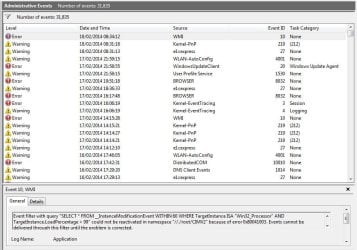
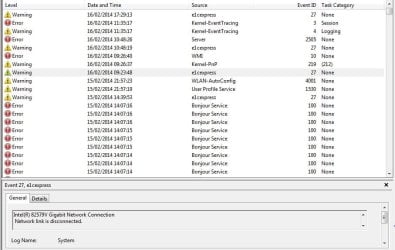
I am attaching a couple of screenshots from Event Viewer, showing my startup this morning.

As you will see the first entry was 08.31.13 e1 cexpress then at 08.31.18 kernel-PnP then a 3 minute delay until 08.34.12 WMI is loaded.

This is repeated on earlier startups. There are also many other 'Errors' shown so I am hoping someone can advise what may be wrong.

Many thanks

Alan.
 

Attachments

  • Win 7 Errors.JPG
    Win 7 Errors.JPG
    87.3 KB · Views: 2
  • Win7 Error 1.JPG
    Win7 Error 1.JPG
    68.7 KB · Views: 1
Last edited:

My Computer My Computer

At a glance

Windows 7 Professional 64biti5-2500K 3.30Hz 6MB Cache16GB DDR3ASUSGeforce GTX1050Ti 4GB
Computer type
PC/Desktop
Computer Manufacturer/Model Number
Home Build
OS
Windows 7 Professional 64bit
CPU
i5-2500K 3.30Hz 6MB Cache
Motherboard
ASUS P8P67 Pro B3 Revision
Memory
16GB DDR3
Graphics Card(s)
ASUSGeforce GTX1050Ti 4GB
Sound Card
On-Board
Monitor(s) Displays
LG23MP65HQ-P
Hard Drives
WD Caviar Green 500gb
Maxtor 300gb
WD External USB 120gb
WD My Passport USB 2TB
LUX3 External USB 1TB
PSU
Corsair 800W
Case
Antec
Cooling
Arctic 13 Cooler
Antivirus
Bitdefender Total Security 2017
Browser
FireFox
Hi there .. As you can see for yourself a lot of your problems Gigabit Network Connection .. Not sure if it is a Driver problem or some thing else .. The other thing is Bonjour Service and Apple Product updater .. You could Uninstall that ..
 

My Computer My Computer

At a glance

windows 7 home 64bitINTEL-CORE I716GB
Computer Manufacturer/Model Number
W530-3630QM1
OS
windows 7 home 64bit
CPU
INTEL-CORE I7
Memory
16GB
Hard Drives
750GB
Browser
Chrome
Thanks for the advice.
I disabled Bonjour Service in case removing it caused more grief, but it made no difference to the problem so I re activated it.

Reading some the error messages I found one that "The Computer Browser service depends on the Server Service which failed to start because of the following error.
The dependency service or group failed to start"

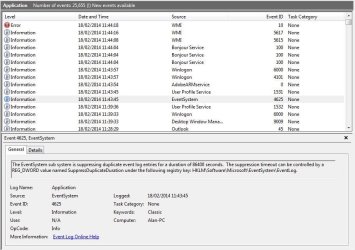
I did a google search and found most hits had to do with internet connections but just in case I changed it from Manual to Automatic in Services. I then rebooted and there were a lot less errors shown on the event log (See below) but the delay in starting (During the Starting Windows screen) is still there as shown below.

There is a reference to 'suppressing duplicate event' but have no idea if this is relevant.

Thanks
Alan.
 

Attachments

  • win 7 error 2.JPG
    win 7 error 2.JPG
    80.3 KB · Views: 0

My Computer My Computer

At a glance

Windows 7 Professional 64biti5-2500K 3.30Hz 6MB Cache16GB DDR3ASUSGeforce GTX1050Ti 4GB
Computer type
PC/Desktop
Computer Manufacturer/Model Number
Home Build
OS
Windows 7 Professional 64bit
CPU
i5-2500K 3.30Hz 6MB Cache
Motherboard
ASUS P8P67 Pro B3 Revision
Memory
16GB DDR3
Graphics Card(s)
ASUSGeforce GTX1050Ti 4GB
Sound Card
On-Board
Monitor(s) Displays
LG23MP65HQ-P
Hard Drives
WD Caviar Green 500gb
Maxtor 300gb
WD External USB 120gb
WD My Passport USB 2TB
LUX3 External USB 1TB
PSU
Corsair 800W
Case
Antec
Cooling
Arctic 13 Cooler
Antivirus
Bitdefender Total Security 2017
Browser
FireFox
Hi there Alan ... The WIMI error Microsoft have a fix for that .. But your real problem is the Network Adapter its a Hardware Error .. This might not be effecting your connection .. Just the problem you are having during start up being that bit slower ... Adobe Arm you can disable that .. From start search box type >> msconfig in the Tab start ... or Services ...
 

My Computer My Computer

At a glance

windows 7 home 64bitINTEL-CORE I716GB
Computer Manufacturer/Model Number
W530-3630QM1
OS
windows 7 home 64bit
CPU
INTEL-CORE I7
Memory
16GB
Hard Drives
750GB
Browser
Chrome
Hi Maxie.

Maybe I'm being over cautious but it's all too easy to screw things up. (I've got the T shirt!)

The WIMI error Microsoft have a fix for that
A search got me to the Windows download site, the best option I could see was to download:
WMIDiag.exe Was this the 'fix' you mention above?

But your real problem is the Network Adapter its a Hardware Error .. This might not be effecting your connection ..
I did a search on the 82579v and used the free Driver Genius program to come up with a suggestion, GD listed my driver as 09/21/2010 Version 8.74.0 and the latest driver as 01/13/2014 Version 18.8.1. I then checked with the Intel website and I have downloaded the suggested driver from the Intel website. This was driver download shown as 'PROWinx64.exe' However when I attempted to install this I saw the pop-up below.

This makes me wonder if I have the right driver after all, I do not wish to uninstall what I have in case it all goes pear shaped, and I am left with no internet or worse! Any words of wisdom relating to this? Is this a normal procedure and can I save the existing driver in case it goes wrong so I can re-install it? If uninstalled would using Windows Roll Back still work?

For cautious read paranoid ;)

Your help is really appreciated.

Many thanks

Alan.
 

Attachments

  • 825479v.JPG
    825479v.JPG
    32.6 KB · Views: 72

My Computer My Computer

At a glance

Windows 7 Professional 64biti5-2500K 3.30Hz 6MB Cache16GB DDR3ASUSGeforce GTX1050Ti 4GB
Computer type
PC/Desktop
Computer Manufacturer/Model Number
Home Build
OS
Windows 7 Professional 64bit
CPU
i5-2500K 3.30Hz 6MB Cache
Motherboard
ASUS P8P67 Pro B3 Revision
Memory
16GB DDR3
Graphics Card(s)
ASUSGeforce GTX1050Ti 4GB
Sound Card
On-Board
Monitor(s) Displays
LG23MP65HQ-P
Hard Drives
WD Caviar Green 500gb
Maxtor 300gb
WD External USB 120gb
WD My Passport USB 2TB
LUX3 External USB 1TB
PSU
Corsair 800W
Case
Antec
Cooling
Arctic 13 Cooler
Antivirus
Bitdefender Total Security 2017
Browser
FireFox
Hi Alan .. You have done the right thing DO NOT INSTALL that DRIVER Version ... Apparently it can cause problems on some Motherboards .. If you look on the Motherboards Website .. There is a Driver Version which is newer than your present one .. But as i have stated this might not be a Driver problem ... As for running the fix leave that for the time being .. I have asked a friend who has Network experience to look at your Post .. Could be a router problem any how time shall tell ...
 

My Computer My Computer

At a glance

windows 7 home 64bitINTEL-CORE I716GB
Computer Manufacturer/Model Number
W530-3630QM1
OS
windows 7 home 64bit
CPU
INTEL-CORE I7
Memory
16GB
Hard Drives
750GB
Browser
Chrome
Hi Alan,

Just jumping in with a few offerings

Create a system image. See: http://www.sevenforums.com/tutorials/663-backup-complete-computer-create-image-backup.html

So that you can in short time get the machine back to the same state as now.


Then, visit ipv6 test to determine your IP status. I'm curious whether IPv6 or IPv4 takes precedence on your machine.

305839d1392129291-ipv6-you-your-isp-ready-ipv6-test_1.png


To help diagnose the slow startup look at the perforance disgnostic events
Control Panel\All Control Panel Items\Performance Information and Tools\Advanced Tools
Select "View performance details in Event log"
Sort by the Level column

Post the error and warning level entries.

Then follow this tutorial: http://www.sevenforums.com/tutorial...ation-conflicts-performing-clean-startup.html


WMI error 10 is erroneously logged in the application log after every reboot.
This is easy to fix with MS Fixit 50688 - scroll down on the MS Fixit page and click the Microsoft Fix it button.


NIC controller: I'd like to know the MAC address of the 82759V. There are some reports that say the prefix is wrong. In an elevated command prompt, type:
ipconfig /all
and post the output.

Please post the version of the controller currently installed on your machine.(Dev Mgr properties, driver).

Asus download: Intel LAN Driver V17.3.0.0 for Windows XP / Win7 / Win8 (WHQL) x86 & x64
:note: Install NVM Update Utility for Intel 82579V Gigabit Ethernet PHY Network Connection
:note: BEFORE you update the driver.
:note: Click here for the detailed description

If the driver from Asus says you have to uninstall, then go ahead and uninstall.... but
do NOT remove the software if prompted.

Thanks,

Bill
.
 

My Computer My Computer

At a glance

x64 (6.3.9600) Win8.1 Pro & soon dual boot x6...AMD A6-3420M APU with Radeon(tm) HD Graphics6.00 GBAMD Radeon(TM) HD 6520G
Computer type
Laptop
Computer Manufacturer/Model Number
HP Pavilion dv6-6c10us
OS
x64 (6.3.9600) Win8.1 Pro & soon dual boot x64 (6.1.7601) Win7_SP1 HomePrem
CPU
AMD A6-3420M APU with Radeon(tm) HD Graphics
Motherboard
Hewlett-Packard 1805
Memory
6.00 GB
Graphics Card(s)
AMD Radeon(TM) HD 6520G
Sound Card
(1) AMD High Definition Audio Device (2) IDT High Definiti
Monitor(s) Displays
HP W2072a 20" LCD (1600 x 900) @ 60 Hz
Screen Resolution
1366 x 768 x 32 bits (4294967296 colors) @ 60 Hz
Hard Drives
ST640LM0 00 HM641JI SATA Disk Device
Keyboard
Logitech k520 wireless KB
Mouse
Logitech m320 wireless mouse (bundled with KB)
Internet Speed
15/5 | 54 MB Wireless 'n'
Antivirus
Realtime: Defender or Avast | On-demand: Malwarebytes, ESET
Browser
IE 11 on Win8, IE 10 on win 7
Other Info
Media: [Gimp, Audacity, VLC] || Comm: [WEmail 2012, Skype] || Productivity: [OpenOffice,| Textpad] || Utils: [Sysinternals, cCleaner, Speccy, Defraggler]
Hi and thanks for your very helpful replies:D

Phew, I am pleased I did not manage to install the stated driver!

I will try to reply to Bill's post as best I can, but please bear in mind your dealing with a pensioner and not someone educated at school in these matters.

I have a windows image backup taken on Monday evening so that should be okay but I will take another after this post just to be bang up to date.

The Ipv screenshot as below.
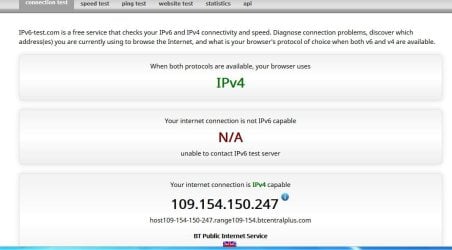
IPv6 info.JPG

To help diagnose the slow startup look at the perforance disgnostic events
Control Panel\All Control Panel Items\Performance Information and Tools\Advanced Tools
Select "View performance details in Event log"
Sort by the Level column

Post the error and warning level entries.
I have copied the log sorted by Level, this ends up as 17 A4 Pages, is there a better way!

NIC controller: I'd like to know the MAC address of the 82759V. There are some reports that say the prefix is wrong. In an elevated command prompt, type:
ipconfig /all
and post the output.
ipconfig /all:
Microsoft Windows [Version 6.1.7601]
Copyright (c) 2009 Microsoft Corporation. All rights reserved.

C:\Windows\system32>ipconfig /all

Windows IP Configuration

Host Name . . . . . . . . . . . . : Alan-PC
Primary Dns Suffix . . . . . . . :
Node Type . . . . . . . . . . . . : Hybrid
IP Routing Enabled. . . . . . . . : No
WINS Proxy Enabled. . . . . . . . : No
DNS Suffix Search List. . . . . . : home

Ethernet adapter Local Area Connection:

Media State . . . . . . . . . . . : Media disconnected
Connection-specific DNS Suffix . :
Description . . . . . . . . . . . : Intel(R) 82579V Gigabit Network Connection
Physical Address. . . . . . . . . : 14-DA-E9-D5-A5-16
DHCP Enabled. . . . . . . . . . . : Yes
Autoconfiguration Enabled . . . . : Yes

Wireless LAN adapter Wireless Network Connection:

Connection-specific DNS Suffix . : home
Description . . . . . . . . . . . : Belkin N Wireless USB Adapter
Physical Address. . . . . . . . . : 94-44-52-D3-DF-FC
DHCP Enabled. . . . . . . . . . . : Yes
Autoconfiguration Enabled . . . . : Yes
Link-local IPv6 Address . . . . . : fe80::ca6:9e08:3d58:c287%11(Preferred)
IPv4 Address. . . . . . . . . . . : 192.168.1.72(Preferred)
Subnet Mask . . . . . . . . . . . : 255.255.255.0
Lease Obtained. . . . . . . . . . : 19 February 2014 09:06:21
Lease Expires . . . . . . . . . . : 20 February 2014 10:07:43
Default Gateway . . . . . . . . . : 192.168.1.254
DHCP Server . . . . . . . . . . . : 192.168.1.254
DHCPv6 IAID . . . . . . . . . . . : 244597842
DHCPv6 Client DUID. . . . . . . . : 00-01-00-01-19-45-48-AD-94-44-52-D3-DF-FC

DNS Servers . . . . . . . . . . . : 192.168.1.254
NetBIOS over Tcpip. . . . . . . . : Enabled

Tunnel adapter isatap.home:

Media State . . . . . . . . . . . : Media disconnected
Connection-specific DNS Suffix . : home
Description . . . . . . . . . . . : Microsoft ISATAP Adapter
Physical Address. . . . . . . . . : 00-00-00-00-00-00-00-E0
DHCP Enabled. . . . . . . . . . . : No
Autoconfiguration Enabled . . . . : Yes

Tunnel adapter Local Area Connection* 11:

Media State . . . . . . . . . . . : Media disconnected
Connection-specific DNS Suffix . :
Description . . . . . . . . . . . : Teredo Tunneling Pseudo-Interface
Physical Address. . . . . . . . . : 00-00-00-00-00-00-00-E0
DHCP Enabled. . . . . . . . . . . : No
Autoconfiguration Enabled . . . . : Yes

C:\Windows\system32> END


Please post the version of the controller currently installed on your machine.(Dev Mgr properties, driver).
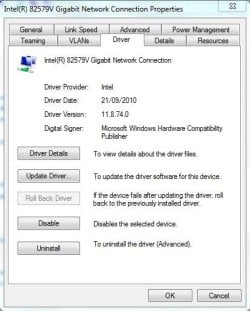
8759v Properties.JPG

While looking at Control Panel\All Control Panel Items\Performance Information and Tools\Advanced Tools
I noted a report about programs slowing up the startup, the offender was reported as Bitdefender as in the screenshot below, I installed this (a newer 2014 version of my existing, 2013 version) a few weeks ago and did not notice any slowdown after installing the newer program.
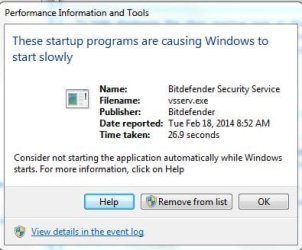
BD Slow start up.JPG


I will run the MS Fixit link later and also download the tutorial which will give me something to do while the backup runs!
Before I do anything with the ASUS links and risk making matters worse, I will await your thoughts on the above. I hope I have got the right info but if not let me know.

Thanks for your help.

Alan.

I remembered that last time I looked my internet connection had both IPv4 and IPv6 shown, now there is only IPv4. Not knowing what is what I am attaching a screen shot below that may? give some clue as to what may be wrong.
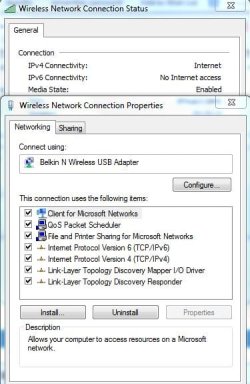
IP Internet connection.JPG
 

My Computer My Computer

At a glance

Windows 7 Professional 64biti5-2500K 3.30Hz 6MB Cache16GB DDR3ASUSGeforce GTX1050Ti 4GB
Computer type
PC/Desktop
Computer Manufacturer/Model Number
Home Build
OS
Windows 7 Professional 64bit
CPU
i5-2500K 3.30Hz 6MB Cache
Motherboard
ASUS P8P67 Pro B3 Revision
Memory
16GB DDR3
Graphics Card(s)
ASUSGeforce GTX1050Ti 4GB
Sound Card
On-Board
Monitor(s) Displays
LG23MP65HQ-P
Hard Drives
WD Caviar Green 500gb
Maxtor 300gb
WD External USB 120gb
WD My Passport USB 2TB
LUX3 External USB 1TB
PSU
Corsair 800W
Case
Antec
Cooling
Arctic 13 Cooler
Antivirus
Bitdefender Total Security 2017
Browser
FireFox
Hi Alan ... The Driver from the Motherboards Website should not give you any problems ... The reason i did not suggest you using the fix is because its more than likely for the errors to return after a reboot .. You could try stopping Bitdefender from your startup to see if it makes any difference ...
 

My Computer My Computer

At a glance

windows 7 home 64bitINTEL-CORE I716GB
Computer Manufacturer/Model Number
W530-3630QM1
OS
windows 7 home 64bit
CPU
INTEL-CORE I7
Memory
16GB
Hard Drives
750GB
Browser
Chrome
Your feedback is great Trapper, now let me sort through it all.

re: the performance logs. You said you copied the log and there are 17 pages. Are these all error and warning entries?
I have copied the log sorted by Level, this ends up as 17 A4 Pages, is there a better way!

You can attach the file you created to a post using the paperclip icon on the post menu. Note the file types allowed, you can always zip the file and attach the zip if necessary.


re: MAC address. I believe that this is the issue with the controller and might contribute to the slow startup. The prefix should be 0x00 or 0x01, not 0x14. The updated driver should resolve that.

The other 'related' issues were Computer Browser not being started because a Server dependency wasn't started.... and it snowballed. This might only be a timing issue. You were able to start Server and Computer Browser manually (and set them to automatic). Most likely due to srvnet miniport failing to start.

More for me to read.

Please follow this tutorial: http://www.sevenforums.com/tutorials/92394-sf-diagnostic-tool-using-troubleshooting.html
it will collect a lot of information I might need to review. Output = SF_DD_MM_YYYY.zip

One more tutorial: http://www.sevenforums.com/tutorials/1538-sfc-scannow-command-system-file-checker.html
Follow OPTION TWO - To Run the SFC /SCANNOW Command in Windows 7; steps 1, 2, 4, & 5.
Then follow OPTION THREE- How to See and Read Only the "SFC" Scan Results from the CBS.LOG; steps 1, 2, 3, 4. Output = sfcdetails.txt

Attach both output results to a new post.
SF_DD_MM_YYYY.zip
sfcdetails.txt

Thanks,

Bill
.
 

My Computer My Computer

At a glance

x64 (6.3.9600) Win8.1 Pro & soon dual boot x6...AMD A6-3420M APU with Radeon(tm) HD Graphics6.00 GBAMD Radeon(TM) HD 6520G
Computer type
Laptop
Computer Manufacturer/Model Number
HP Pavilion dv6-6c10us
OS
x64 (6.3.9600) Win8.1 Pro & soon dual boot x64 (6.1.7601) Win7_SP1 HomePrem
CPU
AMD A6-3420M APU with Radeon(tm) HD Graphics
Motherboard
Hewlett-Packard 1805
Memory
6.00 GB
Graphics Card(s)
AMD Radeon(TM) HD 6520G
Sound Card
(1) AMD High Definition Audio Device (2) IDT High Definiti
Monitor(s) Displays
HP W2072a 20" LCD (1600 x 900) @ 60 Hz
Screen Resolution
1366 x 768 x 32 bits (4294967296 colors) @ 60 Hz
Hard Drives
ST640LM0 00 HM641JI SATA Disk Device
Keyboard
Logitech k520 wireless KB
Mouse
Logitech m320 wireless mouse (bundled with KB)
Internet Speed
15/5 | 54 MB Wireless 'n'
Antivirus
Realtime: Defender or Avast | On-demand: Malwarebytes, ESET
Browser
IE 11 on Win8, IE 10 on win 7
Other Info
Media: [Gimp, Audacity, VLC] || Comm: [WEmail 2012, Skype] || Productivity: [OpenOffice,| Textpad] || Utils: [Sysinternals, cCleaner, Speccy, Defraggler]
The e1cexpress error is just a timing error when the Intel driver looks for the Network adapter.

This started with some of the last Intel driver updates. It is not a real problem with the Network adapter though.

Go to the Network and Sharing center

Select Change adapter settings

Right click on your Intel 82579V Network adapter

Then Adapter properties

Then configure

On the Advanced tab

at the bottom of the list

Change wait for link to on instead of auto detect

Reboot.
 
Last edited:

My Computer My Computer

At a glance

Windows 10 Pro x64, Windows 8.1 Pro x64, Wind...INTEL i9-7920X LGA 206664 GB (4 X 16 GB) G-Skill V Series DDR4 3200 ...EVGA GTX 1060 SC 3 GB
Computer type
PC/Desktop
Computer Manufacturer/Model Number
Custom Built
OS
Windows 10 Pro x64, Windows 8.1 Pro x64, Windows 7 Ultimate x64 SP1,
CPU
INTEL i9-7920X LGA 2066
Motherboard
Gigabyte X299-WU8 F3
Memory
64 GB (4 X 16 GB) G-Skill V Series DDR4 3200 Quad Channel
Graphics Card(s)
EVGA GTX 1060 SC 3 GB
Sound Card
Realtek Onboard ALC1220
Monitor(s) Displays
2 x Samsung S27E310
Screen Resolution
1920x1080
Hard Drives
Samsung 2 x 970 EVO Plus 500 GB NVMe
1 x 6TB WD 6003FZBX SATA
1 x 6TB WD 60EFRX SATA
12 x 3TB WD 30EFRX SATA
PSU
Seasonic X-1050
Case
Thermaltake Armor+
Cooling
Corsair H80i V2 Liquid AOI Cooler
Keyboard
Logitech G510s
Mouse
Logitech MX Master 2S
Internet Speed
200 Mb/s
Antivirus
ESET NOD32 13.1
Browser
EDGE (Dev, Canary, Beta), Chrome
Other Info
ASUS RT-AC68U router
Malwarebytes 4.0.4
Hi Bill.

The log showed all Critical, Error and Warnings, I have attached the log file so you can have a look while I continue with the requests in your post.

Thanks for your help with this.

Alan.
View attachment Critical16.docx
 

My Computer My Computer

At a glance

Windows 7 Professional 64biti5-2500K 3.30Hz 6MB Cache16GB DDR3ASUSGeforce GTX1050Ti 4GB
Computer type
PC/Desktop
Computer Manufacturer/Model Number
Home Build
OS
Windows 7 Professional 64bit
CPU
i5-2500K 3.30Hz 6MB Cache
Motherboard
ASUS P8P67 Pro B3 Revision
Memory
16GB DDR3
Graphics Card(s)
ASUSGeforce GTX1050Ti 4GB
Sound Card
On-Board
Monitor(s) Displays
LG23MP65HQ-P
Hard Drives
WD Caviar Green 500gb
Maxtor 300gb
WD External USB 120gb
WD My Passport USB 2TB
LUX3 External USB 1TB
PSU
Corsair 800W
Case
Antec
Cooling
Arctic 13 Cooler
Antivirus
Bitdefender Total Security 2017
Browser
FireFox
Hi Bill.

Hmm, not much luck with the DOS Command Prompt, I've spent nearly an hour trying to figure out DOS commands!

I have downloaded the ASUSinstaller.exe file through 'Akamai Netsession Interface' and the 82579VSKU.zip file which are on my drive I: \free program files\asusinstaller.exe and I: \free program files\82579vsku.zip

I have extracted the 82579vsku.zip files into folder I: \free program files\82579VSKU this folder contains the 3 files including the 82579vskuw64e.exe.

Trying to run the 82579vskuw64e.exe file in DOS has proved impossible as I do not know how to get to it!
I can copy it to my C:\ drive but where to copy it to so I can easily find it in DOS? Suggestions?

Regards

Alan.
 

My Computer My Computer

At a glance

Windows 7 Professional 64biti5-2500K 3.30Hz 6MB Cache16GB DDR3ASUSGeforce GTX1050Ti 4GB
Computer type
PC/Desktop
Computer Manufacturer/Model Number
Home Build
OS
Windows 7 Professional 64bit
CPU
i5-2500K 3.30Hz 6MB Cache
Motherboard
ASUS P8P67 Pro B3 Revision
Memory
16GB DDR3
Graphics Card(s)
ASUSGeforce GTX1050Ti 4GB
Sound Card
On-Board
Monitor(s) Displays
LG23MP65HQ-P
Hard Drives
WD Caviar Green 500gb
Maxtor 300gb
WD External USB 120gb
WD My Passport USB 2TB
LUX3 External USB 1TB
PSU
Corsair 800W
Case
Antec
Cooling
Arctic 13 Cooler
Antivirus
Bitdefender Total Security 2017
Browser
FireFox
One step forward and one back, such is life with computers.

I copied the file 82579vskuw64e.exe to my C:\ users folder and ran it in DOS as below, well I think it ran as the screen flashed for a few seconds when I hit enter but when I checked the driver it was still the old one.:(

DOS box.JPG

Hi Maxie.

I have the SFC tutorial, do you suggest a verify or scan and repair? Also will a scan and repair replace the files that are causing the issues I am facing?

Thanks again

Alan.

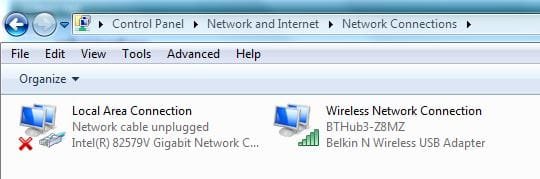
I just checked my Networking and Sharing Centre, (Thanks pbcopter) see the screen shot below. It is stating a cable is unplugged but I do not have anything to plug in, printer and laptop are connected to this PC through our BT hub so there is no cable to plug in??

Network cable unplugged.JPG
 

My Computer My Computer

At a glance

Windows 7 Professional 64biti5-2500K 3.30Hz 6MB Cache16GB DDR3ASUSGeforce GTX1050Ti 4GB
Computer type
PC/Desktop
Computer Manufacturer/Model Number
Home Build
OS
Windows 7 Professional 64bit
CPU
i5-2500K 3.30Hz 6MB Cache
Motherboard
ASUS P8P67 Pro B3 Revision
Memory
16GB DDR3
Graphics Card(s)
ASUSGeforce GTX1050Ti 4GB
Sound Card
On-Board
Monitor(s) Displays
LG23MP65HQ-P
Hard Drives
WD Caviar Green 500gb
Maxtor 300gb
WD External USB 120gb
WD My Passport USB 2TB
LUX3 External USB 1TB
PSU
Corsair 800W
Case
Antec
Cooling
Arctic 13 Cooler
Antivirus
Bitdefender Total Security 2017
Browser
FireFox
Place the file on your Desktop ..>>>> C:\ 82579vskuw64e.exe C:\ desktop
 

My Computer My Computer

At a glance

windows 7 home 64bitINTEL-CORE I716GB
Computer Manufacturer/Model Number
W530-3630QM1
OS
windows 7 home 64bit
CPU
INTEL-CORE I7
Memory
16GB
Hard Drives
750GB
Browser
Chrome
Yes Alan do the scan and see what it finds ... I doubt if it will find any thing ..
 

My Computer My Computer

At a glance

windows 7 home 64bitINTEL-CORE I716GB
Computer Manufacturer/Model Number
W530-3630QM1
OS
windows 7 home 64bit
CPU
INTEL-CORE I7
Memory
16GB
Hard Drives
750GB
Browser
Chrome
Hi Maxie.

No problems shown in SFC as below:

Microsoft Windows [Version 6.1.7601]
Copyright (c) 2009 Microsoft Corporation. All rights reserved.

C:\Windows\system32>sfc /verifyonly

Beginning system scan. This process will take some time.

Beginning verification phase of system scan.
Verification 100% complete.

Windows Resource Protection did not find any integrity violations.

C:\Windows\system32>

Okay,

Place the file on your Desktop ..>>>> C:\ 82579vskuw64e.exe C:\ desktop

I can copy it there but do you suggest running it directly from the desktop and not using DOS prompt?

How can I verify the file actually ran as it seemed to do so when I used DOS but it obviously didn't!

Sorry to be such an idiot.

Regards
Alan.
 

My Computer My Computer

At a glance

Windows 7 Professional 64biti5-2500K 3.30Hz 6MB Cache16GB DDR3ASUSGeforce GTX1050Ti 4GB
Computer type
PC/Desktop
Computer Manufacturer/Model Number
Home Build
OS
Windows 7 Professional 64bit
CPU
i5-2500K 3.30Hz 6MB Cache
Motherboard
ASUS P8P67 Pro B3 Revision
Memory
16GB DDR3
Graphics Card(s)
ASUSGeforce GTX1050Ti 4GB
Sound Card
On-Board
Monitor(s) Displays
LG23MP65HQ-P
Hard Drives
WD Caviar Green 500gb
Maxtor 300gb
WD External USB 120gb
WD My Passport USB 2TB
LUX3 External USB 1TB
PSU
Corsair 800W
Case
Antec
Cooling
Arctic 13 Cooler
Antivirus
Bitdefender Total Security 2017
Browser
FireFox
Alan the arrow points to what to write in CMD >>> C:\ 82579vskuw64e.exe C:\ desktop ... In the Notification area on the task bar if you click on it and then your Internet Connection and scroll your mouse to the green bars what does it say ? Secured or Not ...
 

My Computer My Computer

At a glance

windows 7 home 64bitINTEL-CORE I716GB
Computer Manufacturer/Model Number
W530-3630QM1
OS
windows 7 home 64bit
CPU
INTEL-CORE I7
Memory
16GB
Hard Drives
750GB
Browser
Chrome
I think if you got an Earthnet Cable and plugged it in .. It might resolve this issue .. You can get them in them in the Pound Shop ... It is a Desktop not as if you would be moving it around ..
 

My Computer My Computer

At a glance

windows 7 home 64bitINTEL-CORE I716GB
Computer Manufacturer/Model Number
W530-3630QM1
OS
windows 7 home 64bit
CPU
INTEL-CORE I7
Memory
16GB
Hard Drives
750GB
Browser
Chrome
Back
Top