Whats the difference in ISO version numbers?

spacednow

New member
Local time
3:58 AM
Messages
6
Location
Central US
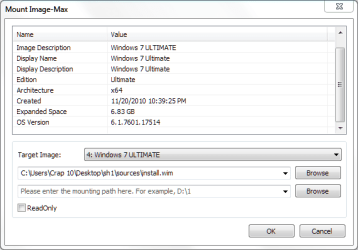
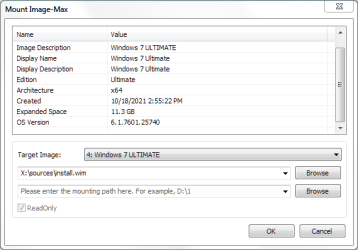
I can't find anything on this. I have 2 win 7 ISO's. One is 6.1.7601.17514 and other is 6.1.7601.25740. Anyone know?
 

My Computer

Computer type
PC/Desktop
Computer Manufacturer/Model Number
AsRock
OS
Windows 7 x64
CPU
Ryzen 1600AF
Motherboard
Fatal1ty B450 Gaming K4
Memory
GSkill Flare X 2x8 3200
Graphics Card(s)
RX550
Hard Drives
Samsung Evo 970plus nvme (& 3 other SSD/HDD)
PSU
Rosewill
Case
Rosewill
Cooling
CM Hyper 212
Not sure what you mean. Is that the name somebody has given to the .iso file, or is it what you get from querying the install.wim?

- - - Updated - - -

For example, this is the wim info for image 4 ( ultimate) in the last official iso from ms which is called en_windows_7_ultimate_with_sp1_x64_dvd_u_677332.iso
SHA1: 36AE90DEFBAD9D9539E649B193AE573B77A71C83

wim-query.jpg


and here is wim info for image 3 ( professional) after I added some updates to it - you can see the changes to the service pack build with added updates
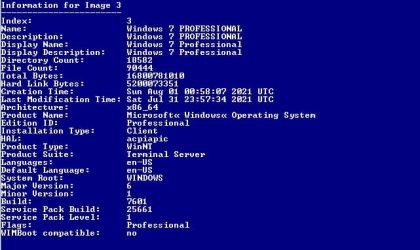
wim-query-pro.jpg

If I were to bother creating an iso , I could give it any name at all, e.g knootyplum.iso

Though it would make more sense if I named it 7601.25661x64_en-US.iso to reflect the updates included.

I would guess that is what somebody has done to the iso you have

- - - Updated - - -

The official iso files contain an install.wim which has all the images for the consumer editions, as you can see the install.wim of the x64 official iso has these 4 images
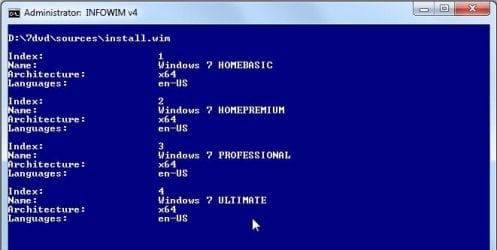
wim images.jpg

- - - Updated - - -

You could check the sha1 hash of the iso named 17514, because that might be an official iso which somebody has renamed.

Then search for the hash number on tinternet.

The iso you have with the higher number has likely been updated by somebody and is therefore not "official"

 

My Computers

System One System Two

  • Computer type
    PC/Desktop
    OS
    7 X64
    CPU
    i5 8400
    Motherboard
    gigabyte b365m ds3h
    Memory
    2x8gb 3200mhz
    Hard Drives
    various
    PSU
    pure power 11 400w cm
    Case
    Coolermaster
    Cooling
    cryorig m9i
  • Computer type
    PC/Desktop
    OS
    7x64
    CPU
    g5400
    Motherboard
    ga b365m ds3h
    Memory
    8gb ddr4 2400
    PSU
    xfx pro 450w
It was a purchased download...both were. That was the build number that Disn++ listed when I loaded ultimate.
1.PNG2.PNG Never mind...Duh. I deleted the other pics I had. I was looking at different ISO's I had made. Apparently the last numbers change when you modify it.
 

My Computer

Computer type
PC/Desktop
Computer Manufacturer/Model Number
AsRock
OS
Windows 7 x64
CPU
Ryzen 1600AF
Motherboard
Fatal1ty B450 Gaming K4
Memory
GSkill Flare X 2x8 3200
Graphics Card(s)
RX550
Hard Drives
Samsung Evo 970plus nvme (& 3 other SSD/HDD)
PSU
Rosewill
Case
Rosewill
Cooling
CM Hyper 212
25740 is presumably updated by somebody.
.
You can easily make your own updated versions.
 

My Computers

System One System Two

  • Computer type
    PC/Desktop
    OS
    7 X64
    CPU
    i5 8400
    Motherboard
    gigabyte b365m ds3h
    Memory
    2x8gb 3200mhz
    Hard Drives
    various
    PSU
    pure power 11 400w cm
    Case
    Coolermaster
    Cooling
    cryorig m9i
  • Computer type
    PC/Desktop
    OS
    7x64
    CPU
    g5400
    Motherboard
    ga b365m ds3h
    Memory
    8gb ddr4 2400
    PSU
    xfx pro 450w
Yeh ...duh. I had mounted both earlier and the numbers had changed. I thought maybe one was a later release and it freaked me out. Thought it might have telemetry in it. I remounted my saved original ISO's quickly and the # is the same.
Capture.PNG
 

My Computer

Computer type
PC/Desktop
Computer Manufacturer/Model Number
AsRock
OS
Windows 7 x64
CPU
Ryzen 1600AF
Motherboard
Fatal1ty B450 Gaming K4
Memory
GSkill Flare X 2x8 3200
Graphics Card(s)
RX550
Hard Drives
Samsung Evo 970plus nvme (& 3 other SSD/HDD)
PSU
Rosewill
Case
Rosewill
Cooling
CM Hyper 212
I'm sorry! But I have to ask.....with an OS that's so "Yesterday" (outdated and abandoned by MS) why are we even worrying about any version of Windows 7.
I've migrated all my 10 systems to Windows 8.1, that had all the drivers and many of the attributes of Win-10, without being so user UN-Friendly.

Besides, Win-7 was always such a bi7sh to install, because it never had the drivers I wanted/needed.
Why waste your time, when 8.1 is so available and installs so nicely with all the common drivers you'd ever need.

Just a thought......

:cool:
 

My Computer

Computer type
PC/Desktop
Computer Manufacturer/Model Number
Various
OS
Win 7 Pro, SP1, x86, Win-11/Pro/64
CPU
AMD
Motherboard
Various
Memory
8GB Crucial
Graphics Card(s)
Various
Sound Card
OnBoard
Monitor(s) Displays
Acer 21.5"
Hard Drives
Crucial SSD, 500 GB
PSU
OEM
Case
SFF Slim Line Case
Cooling
OEM
Keyboard
eMachines
Mouse
Logitech Wireless
Internet Speed
varies
Antivirus
Windows Defender/Super Anti-Spyware
Browser
Firefox
hi
those are the build numbers, the lower the number the older the "version".

Dont know why you paid for it, its available free, have to assume that was for the Ultimate licence --- be carefull dont know how long it will remain activated.

I would run the MGAdiag tool available at MajorGeeks, and copy/paste the results and i'll look it over
 

My Computer

Computer type
PC/Desktop
Computer Manufacturer/Model Number
medionl/Aspire 6930G/acer x55a
OS
W7 home premium 32bit/W7HP 64bit/w10 tp insider ring
CPU
E5300 dual core
Motherboard
medion MS7366
Memory
3gb
Graphics Card(s)
Nvidia Geforce 7100 Nforce 630i
Monitor(s) Displays
avixc
Internet Speed
n (isp resticted to 72)
Antivirus
mse/pands
Browser
palemoon
Other Info
Belkin Fd7050 n USB using Railink RT2870 drivers, more upto date
Back
Top