
Whats your SSD image creation time

IownAmoneyPit

Canadian Loonie X 2
Guru
Gold Member
VIP
Local time
9:11 AM
Messages
2,498
Location
Canada
Whats your SSD image creation time in GB/min - GB/sec

Whats your SSD image creation time in GB/min or GB/sec

Note: This thread is only intended to measure the "Performance" of how fast your SSD can create an image and nothing more, Any other questions should be posted in the Backup and Restore forum where they can be properly answered.

With the advent of SSD technology and blazing fast speeds images are now created in mere minutes.

To see the image creation time the relevant information should be available at the completion of a newly created Image or from the log files of a previous Image created. If not than you can still use information in the log files to calculate this.

For my particular calculation I opened the log file noting the difference between the start and finish time of a selected image. Also noted the amount of data on the drive (before compression) in GB that was backed up.

I mounted a previous image to determine this, also it may be listed in the log.

In my example below I have used the free Acronis True Image WD Edition. Any free software that lists a Completion time or start time and finish time + amount of data will suffice.

2011-04-11_082916.png2011-04-11_085032.png

So 3:34:46 (Finish time) - 3:27:35 (Start time) = 7:11 min (overall creation time)
and uncompressed Image size of 65.6 GB

Finally we must calculate the image creation time of the image in GB/min by dividing Image size by overall creation time
65.6
----- = 9.23 GB/min
7.11
 
Last edited:

My Computer My Computer

Computer type
PC/Desktop
Computer Manufacturer/Model Number
My own abomination, I call it the Money Pit
OS
Windows 10 Pro x 2/Windows 11 Home
CPU
Intel i7 2600K @ 3.40 GHz
Motherboard
ASUS Sabertooth P67
Memory
Corsair Vengeance 16GB DDR3 1600MHz CL8 Dual Channel Kit
Graphics Card(s)
EVGA GeForce RTX 3080 XC3 ULTRA GAMING 10GB GDDR6X
Sound Card
Onboard Realtek or Nvidia High Definition Audio (HDMI)
Monitor(s) Displays
Samsung JS7000 50" SUHD TV or Samsung 27" FHD 60Hz 8ms GTG V
Screen Resolution
1920 x 1080
Hard Drives
1 x Samsung 870 EVO 250 GB SSD (Windows 10 Pro), 1 x Samsung 850 EVO 250 GB SSD (Windows 10 Pro)
PSU
Corsair AX860 - 860W Modular Power Supply
Case
Phanteks Enthoo Luxe Full Tower Case - Black
Cooling
CORSAIR Hydro Series H150i PRO RGB 360mm Liquid CPU Cooler
Keyboard
Logitech K830 Illuminated Living-Room Keyboard
Mouse
Logitech MX Anywhere 2S Wireless Mouse
Internet Speed
100 Mbps
Antivirus
ESET Internet Security
Browser
Latest Version Of Firefox & Microsoft Edge Chromium Stable
Other Info
LG Super Multi Blue Internal Blu-ray Disk Rewriter - BH10LS30
6x2 HDMI Switcher (6 inputs, 2 outputs) so I can send the output of my Cable Box, Roku, or any my 4 computers to either my TV or Monitor separately or simultaneously.
I use the paid version of Macrium and like the free version it
states the image ceation time at completion. Anyhoo, here are
my times etc:

Macrium Reflect (Complete Edition)

Source: C: (OS and Programs only)

"Image Completed Successfully in 00:01:23"

+image verification @ 49sec

10.3Gb of data @ 1.2 Gb/s

Image size 3.31Gb

Cheers!
 

My Computer My Computer

Computer Manufacturer/Model Number
built by me
OS
Windows 7 Pro 64bit
CPU
i7 970 (stock 3.2Ghz for now)
Motherboard
ASUS P6X58D-E
Memory
G-Skills Ripjaws 12Gb (3X4 GB) 1600 (XMP)
Graphics Card(s)
EVGA GeForce GTX 460SE
Sound Card
HT Omega Claro Plus +
Monitor(s) Displays
I-Inc iH-282HPB 28"
Screen Resolution
1920x1200
Hard Drives
2x Crucial C300 - 64GB (Raid0)
WD Caviar Black 1TB
WD Caviar Black 1TB
External Drives:
WD Caviar Black 1TB
Seagate Barracuda 1TB
Seagate Barracuda 500Gb
PSU
Corsair HX750 Modular
Case
CoolerMaster HAF-X 942
Cooling
Noctua NH-D14
Keyboard
Logitech Illuminated USB Keyboard (Unidriver)
Mouse
Logitech LX8 Cordless Laser
Internet Speed
3mbps
Other Info
Asus DRW 24B1ST
Cyberpower CPS1500AVR
Corsair SP2500 Gaming Audio / Klipsch ProMedia Ultra 5.1 w/Klipsch RB-61 Fronts
3x CoolerMaster MegaFlow 200 Case Fans (snazzy blue!)
I apologize for the momentary hijack, but I have a question about imaging programs and SSD drives.

When making the image, do you image the entire drive including the System Reserved area, or just the regular partition.

Thanks in advance....

T
 

My Computer My Computer

OS
Win 7 SP1
CPU
Intel i7 920
Motherboard
Asus P6T
Memory
6g OCZ Triple Channel
Graphics Card(s)
nVidia GTX 275 868mg
Sound Card
Asus Xonar D2X PCI-e
Monitor(s) Displays
ASUS VE228H
Screen Resolution
1920 x 1080 (1080p - HD)
Hard Drives
Intel X-25M 80g SSD and 4x SATA II (2 WD, 2 Seagate)
Keyboard
Logitech G19
Internet Speed
Cable
I use the paid version of Macrium and like the free version it
states the image ceation time at completion. Anyhoo, here are
my times etc:

Macrium Reflect (Complete Edition)

Source: C: (OS and Programs only)

"Image Completed Successfully in 00:01:23"

+image verification @ 49sec

10.3Gb of data @ 1.2 Gb/s

Image size 3.31Gb

Cheers!

Thats fast = 8.4 Gb/min

Most do give the time at Image completion or even in the log files if your lucky, but if not that would mean creating a new image to see the completion time which would be impractical for this thread so the log files + basic arithmetic were used as I missed snipping the initial completion screen when Image was created or I want to reference another previously created Image.
 

My Computer My Computer

Computer type
PC/Desktop
Computer Manufacturer/Model Number
My own abomination, I call it the Money Pit
OS
Windows 10 Pro x 2/Windows 11 Home
CPU
Intel i7 2600K @ 3.40 GHz
Motherboard
ASUS Sabertooth P67
Memory
Corsair Vengeance 16GB DDR3 1600MHz CL8 Dual Channel Kit
Graphics Card(s)
EVGA GeForce RTX 3080 XC3 ULTRA GAMING 10GB GDDR6X
Sound Card
Onboard Realtek or Nvidia High Definition Audio (HDMI)
Monitor(s) Displays
Samsung JS7000 50" SUHD TV or Samsung 27" FHD 60Hz 8ms GTG V
Screen Resolution
1920 x 1080
Hard Drives
1 x Samsung 870 EVO 250 GB SSD (Windows 10 Pro), 1 x Samsung 850 EVO 250 GB SSD (Windows 10 Pro)
PSU
Corsair AX860 - 860W Modular Power Supply
Case
Phanteks Enthoo Luxe Full Tower Case - Black
Cooling
CORSAIR Hydro Series H150i PRO RGB 360mm Liquid CPU Cooler
Keyboard
Logitech K830 Illuminated Living-Room Keyboard
Mouse
Logitech MX Anywhere 2S Wireless Mouse
Internet Speed
100 Mbps
Antivirus
ESET Internet Security
Browser
Latest Version Of Firefox & Microsoft Edge Chromium Stable
Other Info
LG Super Multi Blue Internal Blu-ray Disk Rewriter - BH10LS30
6x2 HDMI Switcher (6 inputs, 2 outputs) so I can send the output of my Cable Box, Roku, or any my 4 computers to either my TV or Monitor separately or simultaneously.
I apologize for the momentary hijack, but I have a question about imaging programs and SSD drives.

When making the image, do you image the entire drive including the System Reserved area, or just the regular partition.

Thanks in advance....

T

The tutorials and 2 top Stickies of the Backup and Restore forum should answer all of your questions.

The purpose of this thread was only to measure how fast can your SSD make an Image and nothing more.
 

My Computer My Computer

Computer type
PC/Desktop
Computer Manufacturer/Model Number
My own abomination, I call it the Money Pit
OS
Windows 10 Pro x 2/Windows 11 Home
CPU
Intel i7 2600K @ 3.40 GHz
Motherboard
ASUS Sabertooth P67
Memory
Corsair Vengeance 16GB DDR3 1600MHz CL8 Dual Channel Kit
Graphics Card(s)
EVGA GeForce RTX 3080 XC3 ULTRA GAMING 10GB GDDR6X
Sound Card
Onboard Realtek or Nvidia High Definition Audio (HDMI)
Monitor(s) Displays
Samsung JS7000 50" SUHD TV or Samsung 27" FHD 60Hz 8ms GTG V
Screen Resolution
1920 x 1080
Hard Drives
1 x Samsung 870 EVO 250 GB SSD (Windows 10 Pro), 1 x Samsung 850 EVO 250 GB SSD (Windows 10 Pro)
PSU
Corsair AX860 - 860W Modular Power Supply
Case
Phanteks Enthoo Luxe Full Tower Case - Black
Cooling
CORSAIR Hydro Series H150i PRO RGB 360mm Liquid CPU Cooler
Keyboard
Logitech K830 Illuminated Living-Room Keyboard
Mouse
Logitech MX Anywhere 2S Wireless Mouse
Internet Speed
100 Mbps
Antivirus
ESET Internet Security
Browser
Latest Version Of Firefox & Microsoft Edge Chromium Stable
Other Info
LG Super Multi Blue Internal Blu-ray Disk Rewriter - BH10LS30
6x2 HDMI Switcher (6 inputs, 2 outputs) so I can send the output of my Cable Box, Roku, or any my 4 computers to either my TV or Monitor separately or simultaneously.

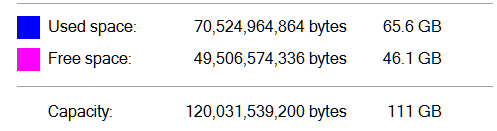
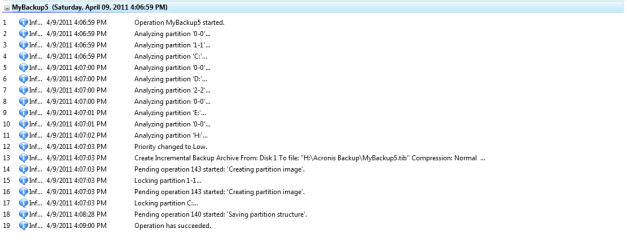
I'm using Acronis True Image Home 2010
(Couldn't find the data transfer rate)
Backup performed 4/9/11 & 2 minutes, 1 second total time

A full sector-by-sector image on 4/1/11:
Start time: 10:12:14
End time: 10:26:44
 

Attachments

  • log time.PNG
    log time.PNG
    9.8 KB · Views: 4
  • used space.PNG
    used space.PNG
    1.4 KB · Views: 1

My Computer My Computer

Computer Manufacturer/Model Number
Rig 1
OS
Windows 7 Ultimate x64
CPU
AMD Phenom II X4 940 Black Edition @ 3.4GHz (AM2+)
Motherboard
Gigabyte GA-MA790X-UD4P (AM2+)
Memory
Corsair CM2X4096-8500C5 (4 X 2GB)
Graphics Card(s)
XFX Radeon HD 5770 / Diamond Radeon HD 5770 CrossFireX
Sound Card
Asus Xonar DS (PCI)
Monitor(s) Displays
Samsung SyncMaster 932bw+ (3)
Screen Resolution
4320x900
Hard Drives
OCZ Vertex 2 80 GB - Windows 7 System --
WD Caviar Black 1TB - Music, Movies, Vids, Pics --
WD Caviar Black 640GB - User Profiles & Games --
WD My Book 320GB external
PSU
Corsair CMPSU-750TX
Case
Cooler Master HAF 932
Cooling
Corsair Hydro Series H50
Keyboard
Logitech Desktop Wave
Mouse
Logitech LX8 Laser
Internet Speed
20 down / 2 up
Other Info
LG GGC-H20L Blu-Ray / HDDVD combo --
Hauppauge HVR-1250 --
Silverstone MFP-51 --
Logitech Webcam C600
I'm using Acronis True Image Home 2010
(Couldn't find the data transfer rate)
Backup performed 4/9/11 & 2 minutes, 1 second total time

A full sector-by-sector image on 4/1/11:
Start time: 10:12:14
End time: 10:26:44

mpcrsc562 Your Data transfer rate/Image Creation rate in GB/min would be:

Total data/Used space divided by total time

IE: 23GB divided by 2 minutes = 12.5 GB/min.
 

My Computer My Computer

Computer type
PC/Desktop
Computer Manufacturer/Model Number
My own abomination, I call it the Money Pit
OS
Windows 10 Pro x 2/Windows 11 Home
CPU
Intel i7 2600K @ 3.40 GHz
Motherboard
ASUS Sabertooth P67
Memory
Corsair Vengeance 16GB DDR3 1600MHz CL8 Dual Channel Kit
Graphics Card(s)
EVGA GeForce RTX 3080 XC3 ULTRA GAMING 10GB GDDR6X
Sound Card
Onboard Realtek or Nvidia High Definition Audio (HDMI)
Monitor(s) Displays
Samsung JS7000 50" SUHD TV or Samsung 27" FHD 60Hz 8ms GTG V
Screen Resolution
1920 x 1080
Hard Drives
1 x Samsung 870 EVO 250 GB SSD (Windows 10 Pro), 1 x Samsung 850 EVO 250 GB SSD (Windows 10 Pro)
PSU
Corsair AX860 - 860W Modular Power Supply
Case
Phanteks Enthoo Luxe Full Tower Case - Black
Cooling
CORSAIR Hydro Series H150i PRO RGB 360mm Liquid CPU Cooler
Keyboard
Logitech K830 Illuminated Living-Room Keyboard
Mouse
Logitech MX Anywhere 2S Wireless Mouse
Internet Speed
100 Mbps
Antivirus
ESET Internet Security
Browser
Latest Version Of Firefox & Microsoft Edge Chromium Stable
Other Info
LG Super Multi Blue Internal Blu-ray Disk Rewriter - BH10LS30
6x2 HDMI Switcher (6 inputs, 2 outputs) so I can send the output of my Cable Box, Roku, or any my 4 computers to either my TV or Monitor separately or simultaneously.
Back
Top