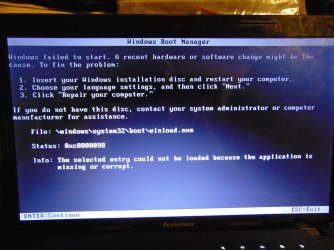
Solved When I opened my computer after shutting down it won't boot

I put it on my flash stick with rufus. I checked in BIOS and the USB was enabled. Unfortunately I don't have a dvd writer in another computer, so I can't burn it on a DVD, so I can't try disks, however, I have a Windows Ultimate 7 64bit dvd. Can I work with that?
 

My Computer My Computer

At a glance

Windows 7 Home Premium 64-bitIntel I5-2430M 2.4 GHz4 GB DDR3Nvidia 520M GT, Intel HD 3000
Computer type
Laptop
Computer Manufacturer/Model Number
Lenovo Z570
OS
Windows 7 Home Premium 64-bit
CPU
Intel I5-2430M 2.4 GHz
Motherboard
Lenovo 10245XG
Memory
4 GB DDR3
Graphics Card(s)
Nvidia 520M GT, Intel HD 3000
Sound Card
Realtek HD audio
Screen Resolution
1366 x 768
Hard Drives
698 GB SATA
I attached a picture, what I got from the startup repair
P.S. It is made with a mobile phone, so sorry for the bad quality.
 

Attachments

  • CAM00066.jpg
    CAM00066.jpg
    332.8 KB · Views: 0

My Computer My Computer

At a glance

Windows 7 Home Premium 64-bitIntel I5-2430M 2.4 GHz4 GB DDR3Nvidia 520M GT, Intel HD 3000
Computer type
Laptop
Computer Manufacturer/Model Number
Lenovo Z570
OS
Windows 7 Home Premium 64-bit
CPU
Intel I5-2430M 2.4 GHz
Motherboard
Lenovo 10245XG
Memory
4 GB DDR3
Graphics Card(s)
Nvidia 520M GT, Intel HD 3000
Sound Card
Realtek HD audio
Screen Resolution
1366 x 768
Hard Drives
698 GB SATA
Yes, I did all that
 

My Computer My Computer

At a glance

Windows 7 Home Premium 64-bitIntel I5-2430M 2.4 GHz4 GB DDR3Nvidia 520M GT, Intel HD 3000
Computer type
Laptop
Computer Manufacturer/Model Number
Lenovo Z570
OS
Windows 7 Home Premium 64-bit
CPU
Intel I5-2430M 2.4 GHz
Motherboard
Lenovo 10245XG
Memory
4 GB DDR3
Graphics Card(s)
Nvidia 520M GT, Intel HD 3000
Sound Card
Realtek HD audio
Screen Resolution
1366 x 768
Hard Drives
698 GB SATA
If so then please download and burn to CD with Windows Image Burner Partition Wizard,
boot the disk to take another picture of the full drive map and all listings so we can see every label on partitions. You may need to burn the disk on a borrowed PC.

You can also reinstall the OS you uninstalled without giving any thought to whether it held the boot files, or another preferred Dual Boot OS even as a rescue install. Make sure you select the correct partition so it doesn't overwrite the OS you want to save. It should configure a Dual Boot but if not install EasyBCD to add the other to a Dual Boot menu. Then we can give you the steps to properly remove the unwanted OS.

You can rescue your files at any time using http://www.sevenforums.com/tutorials/93347-copy-paste-windows-recovery-console.html. But I would do it now in case you somehow overwrite the old OS.
 
When I use bootrec.exe /ScanOs command in cmd, it says Total identified Windows installations: 0, is this a problem? Can I try using commands like bootrec.exe /fixmbr or fixboot? And maybe it is too drastical, but if I delete the boot information, wouldn't Windows generate new information needed?
 

My Computer My Computer

At a glance

Windows 7 Home Premium 64-bitIntel I5-2430M 2.4 GHz4 GB DDR3Nvidia 520M GT, Intel HD 3000
Computer type
Laptop
Computer Manufacturer/Model Number
Lenovo Z570
OS
Windows 7 Home Premium 64-bit
CPU
Intel I5-2430M 2.4 GHz
Motherboard
Lenovo 10245XG
Memory
4 GB DDR3
Graphics Card(s)
Nvidia 520M GT, Intel HD 3000
Sound Card
Realtek HD audio
Screen Resolution
1366 x 768
Hard Drives
698 GB SATA
I somehow managed to get the boot manager screen on for a few seconds, there was only Microsoft windows setup (EMS) written in the list.
 

My Computer My Computer

At a glance

Windows 7 Home Premium 64-bitIntel I5-2430M 2.4 GHz4 GB DDR3Nvidia 520M GT, Intel HD 3000
Computer type
Laptop
Computer Manufacturer/Model Number
Lenovo Z570
OS
Windows 7 Home Premium 64-bit
CPU
Intel I5-2430M 2.4 GHz
Motherboard
Lenovo 10245XG
Memory
4 GB DDR3
Graphics Card(s)
Nvidia 520M GT, Intel HD 3000
Sound Card
Realtek HD audio
Screen Resolution
1366 x 768
Hard Drives
698 GB SATA
That's the installation media you booted.

Problem is Repair for some reason won't write boot files into the partition which were never there. So unless you can copy them in to Repair then bootsect has nothing to work with.

If you don't want to do a rescue install or show PW map so we see what other complications might exist then rescue your files to delete all partitions during reinstall.
 
Will it help when I find a tutorial that I did this thing in the first place?
 

My Computer My Computer

At a glance

Windows 7 Home Premium 64-bitIntel I5-2430M 2.4 GHz4 GB DDR3Nvidia 520M GT, Intel HD 3000
Computer type
Laptop
Computer Manufacturer/Model Number
Lenovo Z570
OS
Windows 7 Home Premium 64-bit
CPU
Intel I5-2430M 2.4 GHz
Motherboard
Lenovo 10245XG
Memory
4 GB DDR3
Graphics Card(s)
Nvidia 520M GT, Intel HD 3000
Sound Card
Realtek HD audio
Screen Resolution
1366 x 768
Hard Drives
698 GB SATA
I uploaded the pictures:
1. the picture of an error when I opened my computer
2. picture taken from partition wizard
 

Attachments

  • DSC00616.JPG
    DSC00616.JPG
    104.9 KB · Views: 0
  • DSC00617.JPG
    DSC00617.JPG
    106.3 KB · Views: 0

My Computer My Computer

At a glance

Windows 7 Home Premium 64-bitIntel I5-2430M 2.4 GHz4 GB DDR3Nvidia 520M GT, Intel HD 3000
Computer type
Laptop
Computer Manufacturer/Model Number
Lenovo Z570
OS
Windows 7 Home Premium 64-bit
CPU
Intel I5-2430M 2.4 GHz
Motherboard
Lenovo 10245XG
Memory
4 GB DDR3
Graphics Card(s)
Nvidia 520M GT, Intel HD 3000
Sound Card
Realtek HD audio
Screen Resolution
1366 x 768
Hard Drives
698 GB SATA
It looks like it was once a UEFI install with the several boot partitions, which then had BIOS changed to Legacy or CSM. But if that was the case then the GPT formatting of the drive would have had to be changed to MBR since it's accepting the Active flag on 100mb.

Boot into BIOS setup to look for UEFI, CSM, Legacy BIOS settings now, and their choices available, report back with pictures if possible. There is no need to change these settings now, just check to see if this is possibly what happened at some point to explain the multiple boot partitions normally only seen in a UEFI install.

If no settings for UEFI and it will not start after running Startup Repair - Run 3 Separate Times, then try deleting the first four partitions in Partition Wizard, create a new Primary NTFS partition in that space labeled System Reserved, mark it Active: Partition Wizard Create Partition - Video Help
How to Set Active/Inactive partition -Partition Wizard Video Help.

Then again run Startup Repair - Run 3 Separate Times to try to get it to write the System boot files to the new boot partition you created and marked Active. If that fails try moving the Partition Marked Active to C to run the Repairs again. You've then done everything you can do.

Since you have Partition Wizard, you could then as a last resort delete the System Reserved partition to Resize Partition C as much as possible to make space on the left to Clean Reinstall - Factory OEM Windows 7. This should configure a Dual Boot so that you can boot into the old OS if needed to do any necessary backups, or just copy any needed files over from the new install via Explorer. Once you're sure you have everything we can help you delete the old Win7 to Recover its space.

Everything needed to get and keep a perfect Clean Reinstall - Factory OEM Windows 7 is in the blue link. If you stick with those steps you will get and keep a vastly better install than the Lenovo factory install, better than most anyone else has. Pay careful attention to how drivers are handled in Win7 which is important enough those steps are printed in red.

 
Now it says NTLDR is missing please press ctrl+alt+delete to restart
 

My Computer My Computer

At a glance

Windows 7 Home Premium 64-bitIntel I5-2430M 2.4 GHz4 GB DDR3Nvidia 520M GT, Intel HD 3000
Computer type
Laptop
Computer Manufacturer/Model Number
Lenovo Z570
OS
Windows 7 Home Premium 64-bit
CPU
Intel I5-2430M 2.4 GHz
Motherboard
Lenovo 10245XG
Memory
4 GB DDR3
Graphics Card(s)
Nvidia 520M GT, Intel HD 3000
Sound Card
Realtek HD audio
Screen Resolution
1366 x 768
Hard Drives
698 GB SATA
It is fixed now, I did system repair two times. Thank you so much for your help, I really appreciate it. :)
 

My Computer My Computer

At a glance

Windows 7 Home Premium 64-bitIntel I5-2430M 2.4 GHz4 GB DDR3Nvidia 520M GT, Intel HD 3000
Computer type
Laptop
Computer Manufacturer/Model Number
Lenovo Z570
OS
Windows 7 Home Premium 64-bit
CPU
Intel I5-2430M 2.4 GHz
Motherboard
Lenovo 10245XG
Memory
4 GB DDR3
Graphics Card(s)
Nvidia 520M GT, Intel HD 3000
Sound Card
Realtek HD audio
Screen Resolution
1366 x 768
Hard Drives
698 GB SATA
If you got an NTLDR error it can only mean that old XP boot code is still on the drive and reasserting itself. A subsequent repair may have remedied that, but keep in mind if you every reinstall you'll want to wipe the HD with at least Clean command to get it cleanest first: Diskpart Clean Command
 
Good deal. I was about to suggest reluctantly to install GAG Boot Loader (for future reference or folks landing here from google search). It would probably have allowed you to select the old windows partition with the deleted boot files and boot it for you. I am guessing what happened is you installed Windows 10 or whatever and Windows LOVES to take over existing boot sectors, so then when you remove/delete that windows install, the old one is left broken and orphaned without boot files! I've stopped trying to dual boot windows on a single drive because of that. I would just install them on separate drives (not an option for everyone of course) and change the boot priority in the BIOS or by hitting F12 at boot time to select the one I wanted.
 

My Computer My Computer

At a glance

Windows 7 Pro x64 x32AMD Phenom II X4 9554 GB A-DATA DDR3 1600MSI Cyclone GTX460
Computer type
PC/Desktop
Computer Manufacturer/Model Number
Custom Build
OS
Windows 7 Pro x64 x32
CPU
AMD Phenom II X4 955
Motherboard
Gigabyte MA785GT-UD3H
Memory
4 GB A-DATA DDR3 1600
Graphics Card(s)
MSI Cyclone GTX460
Sound Card
Realtek ALC889A / Focusrite Scarlett 2i4
Monitor(s) Displays
AOC 2436Vw
Screen Resolution
1920x1080
Hard Drives
2x300 GB SATA
PSU
Antec TP-750 750W
Case
Big old tower
Cooling
Plenty of air
Internet Speed
25/5 Cable
Antivirus
None
Browser
Firefox
Back
Top