BSOD after shutting down PC

chriscars18

New member
Local time
9:30 PM
Messages
23
Yesterday, I shut down my computer and went to bed and woke up to BSOD unmountable blah,blah,blah. I get two options "Launch system repair" and "Start windows normally." None of those options work, neither does hitting f8 and trying to boot any of the safe modes or last known config. I tried to access System Recovery Options and enter CHKDSK in command prompt, but that hangs on CHKDSK is verifying for usn journal... for hours.

If there's no repairable option, I want to back up data if I can. I already have a new hard drive. I do have recovery disks that I made years ago but I haven't tired them just yet.
 

My Computer

Computer type
Laptop
Computer Manufacturer/Model Number
HP Dv6000
OS
Windows 7 Home Premium x64
CPU
Don't know
Motherboard
Don't Know
Memory
4
Graphics Card(s)
Intel graphics
Hard Drives
Seagate
Antivirus
AVG
Browser
Chrome
how to get rid with Bsod

When you get BSOD please follow the steps:

Firstly check whether your hard disk is inserted properly to your laptop or pc
if it is inserted properly then start your pc/laptop and press F8 function key and select Last known Good configuration.

Still your error not rectified,Again press f8 and select Safe mode.

Now your system will start,so the problem is with your Devices.

So if you want to copy the files form your hard-disk just follow the steps:

Just Insert your OS cd or mounted Os usb
Press F12(mostly works) command for loading into boot device
Then select your Boot option either by DVD ROM or USB stick
Now just proceed the steps that appear on the screen
finally when you select the option custom(advanced) you can see list of drives
Now insert your USB stick or external hard disk into USB port
Now select any drive you want to copy the data
After selecting the drive just observe there will be option called Load driver below
Now select the drive where your data is and then copy it and paste in the USB stick you inserted

Thats IT!!!!!!!!!!!!:):):)
 

My Computer

Computer type
PC/Desktop
OS
Andhra Pradesh
Hi, thank you for taking the time to respond to me.

Can I use blank Dvds instead? I don't have a usb stick. I have one, but it only has like 5 gb of storage and is totally untraceable right now.
 

My Computer

Computer type
Laptop
Computer Manufacturer/Model Number
HP Dv6000
OS
Windows 7 Home Premium x64
CPU
Don't know
Motherboard
Don't Know
Memory
4
Graphics Card(s)
Intel graphics
Hard Drives
Seagate
Antivirus
AVG
Browser
Chrome
When you get BSOD please follow the steps:

Firstly check whether your hard disk is inserted properly to your laptop or pc
if it is inserted properly then start your pc/laptop and press F8 function key and select Last known Good configuration.

Still your error not rectified,Again press f8 and select Safe mode.

Now your system will start,so the problem is with your Devices.

So if you want to copy the files form your hard-disk just follow the steps:

Just Insert your OS cd or mounted Os usb
Press F12(mostly works) command for loading into boot device
Then select your Boot option either by DVD ROM or USB stick
Now just proceed the steps that appear on the screen
finally when you select the option custom(advanced) you can see list of drives
Now insert your USB stick or external hard disk into USB port
Now select any drive you want to copy the data
After selecting the drive just observe there will be option called Load driver below
Now select the drive where your data is and then copy it and paste in the USB stick you inserted

Thats IT!!!!!!!!!!!!:):):)

I'm getting a media tst failure error when I select f12.
 

My Computer

Computer type
Laptop
Computer Manufacturer/Model Number
HP Dv6000
OS
Windows 7 Home Premium x64
CPU
Don't know
Motherboard
Don't Know
Memory
4
Graphics Card(s)
Intel graphics
Hard Drives
Seagate
Antivirus
AVG
Browser
Chrome
Hi chris,

Sorry that no one has replied to you sooner I bet most BSOD wizards have been busy with other stuff.

To access BIOS you will need to press F10 upon booting so that you can change the Boot Order.

And I take it that you have your Windows 7 installation disk? If you have it you can try to fix Windows from there.

Did you happen to see what your BSOD error was, usually there is a line with all caps near the top of the screen, this would help us really much in solving your issue!

Cheers!
Boris :)
 

My Computer

Computer type
PC/Desktop
Computer Manufacturer/Model Number
Custom build
OS
Windows 7 Home Premium
CPU
i5-3570k
Motherboard
ASUS Sabertooth z77
Memory
16 GB DDR3 G Skill Sniper
Graphics Card(s)
GIGABYTE GeForce GTX 970 GV-N970WF3OC-4GD
Monitor(s) Displays
ASUS ROG PG278Q
Screen Resolution
2560x1440@60Hz/120Hz/144Hz
Hard Drives
56GB KINGSTON SVP200S37A60G
512GB Crucial MX100
1863GB Seagate ST2000DM001-1CH164
2795GB Seagate ST3000DM001-9YN166
PSU
Corsair GS800
Case
Storm Trooper Stryker White
Keyboard
Logitech G910 Orion Spark
Mouse
Logitech G502
Antivirus
MSE
Browser
Firefox/Chrome
Other Info
Logitech G633
Logitech Mouse Matt
Hi chris,

Sorry that no one has replied to you sooner I bet most BSOD wizards have been busy with other stuff.

To access BIOS you will need to press F10 upon booting so that you can change the Boot Order.

And I take it that you have your Windows 7 installation disk? If you have it you can try to fix Windows from there.

Did you happen to see what your BSOD error was, usually there is a line with all caps near the top of the screen, this would help us really much in solving your issue!

Cheers!
Boris :)

Hi Boris,

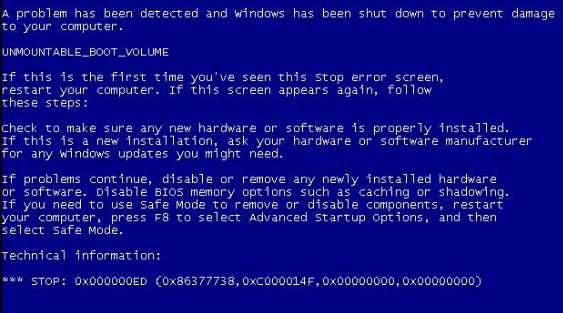
I played around with the boot order selecting boot for CD drive and HD drive, and I even disabled LAN, but still got BSOD. The error was unmountable boot volume:
blue-screen-of-death-0x000000ed-11.jpg


I tried putting the disk in and repairing my computer but it was just scan for hours and hours. Thank you.
 

My Computer

Computer type
Laptop
Computer Manufacturer/Model Number
HP Dv6000
OS
Windows 7 Home Premium x64
CPU
Don't know
Motherboard
Don't Know
Memory
4
Graphics Card(s)
Intel graphics
Hard Drives
Seagate
Antivirus
AVG
Browser
Chrome
Hi chris,

Sorry that no one has replied to you sooner I bet most BSOD wizards have been busy with other stuff.

To access BIOS you will need to press F10 upon booting so that you can change the Boot Order.

And I take it that you have your Windows 7 installation disk? If you have it you can try to fix Windows from there.

Did you happen to see what your BSOD error was, usually there is a line with all caps near the top of the screen, this would help us really much in solving your issue!

Cheers!
Boris :)

Hi Boris,

I played around with the boot order selecting boot for CD drive and HD drive, and I even disabled LAN, but still got BSOD. The error was unmountable boot volume:
blue-screen-of-death-0x000000ed-11.jpg


I tried putting the disk in and repairing my computer but it was just scan for hours and hours. Thank you.
Okay well there are three reasons why you are getting this problem whatever your condition it is and those reasons are:
  1. Boot volume corrupted
  2. Corrupted files of your windows
  3. Hdd got faulty
Boot into System Recovery Options and enter these in command prompt, click enter after each command:


  1. Bootrec /fixmbr
  2. Bootrec /fixboot
  3. Bootrec /rebuildbcd


And do a restart after they all have finished, it might take a while!

Cheers and I hope this will solve your issue!
Boris :)
 

My Computer

Computer type
PC/Desktop
Computer Manufacturer/Model Number
Custom build
OS
Windows 7 Home Premium
CPU
i5-3570k
Motherboard
ASUS Sabertooth z77
Memory
16 GB DDR3 G Skill Sniper
Graphics Card(s)
GIGABYTE GeForce GTX 970 GV-N970WF3OC-4GD
Monitor(s) Displays
ASUS ROG PG278Q
Screen Resolution
2560x1440@60Hz/120Hz/144Hz
Hard Drives
56GB KINGSTON SVP200S37A60G
512GB Crucial MX100
1863GB Seagate ST2000DM001-1CH164
2795GB Seagate ST3000DM001-9YN166
PSU
Corsair GS800
Case
Storm Trooper Stryker White
Keyboard
Logitech G910 Orion Spark
Mouse
Logitech G502
Antivirus
MSE
Browser
Firefox/Chrome
Other Info
Logitech G633
Logitech Mouse Matt

My Computer

Computer type
PC/Desktop
Computer Manufacturer/Model Number
Custom build
OS
Windows 10 Pro
CPU
i5-6500
Motherboard
Gigabyte B150-HD3P-CF
Memory
16GB DDR4 2133 Crucial Ballistix Sport LT
Graphics Card(s)
MSI GeForce GTX 1060 GAMING X 6G
Sound Card
Intel Display Audio
Monitor(s) Displays
Liyama ProLite XB2483HSU-B2
Screen Resolution
1920 x 1080
Hard Drives
Crucial MX200 500GB & Toshiba DT01ACA300 3TB
PSU
Corsair RM550x
Case
Fractal Design Define S
Cooling
Cooler Master TX3 i
Keyboard
Func KB-460 (MX Red)
Mouse
Corsair Gaming M65 RGB
Antivirus
Bitdefender Total Security 2016 + MBAM Pro + MBAE Pro
Browser
Google Chrome
Other Info
Creative Sound Blaster Tactic3D Rage V2 headset
Hi chris,

Sorry that no one has replied to you sooner I bet most BSOD wizards have been busy with other stuff.

To access BIOS you will need to press F10 upon booting so that you can change the Boot Order.

And I take it that you have your Windows 7 installation disk? If you have it you can try to fix Windows from there.

Did you happen to see what your BSOD error was, usually there is a line with all caps near the top of the screen, this would help us really much in solving your issue!

Cheers!
Boris :)

Hi Boris,

I played around with the boot order selecting boot for CD drive and HD drive, and I even disabled LAN, but still got BSOD. The error was unmountable boot volume:
blue-screen-of-death-0x000000ed-11.jpg


I tried putting the disk in and repairing my computer but it was just scan for hours and hours. Thank you.
Okay well there are three reasons why you are getting this problem whatever your condition it is and those reasons are:
  1. Boot volume corrupted
  2. Corrupted files of your windows
  3. Hdd got faulty
Boot into System Recovery Options and enter these in command prompt, click enter after each command:


  1. Bootrec /fixmbr
  2. Bootrec /fixboot
  3. Bootrec /rebuildbcd


And do a restart after they all have finished, it might take a while!

Cheers and I hope this will solve your issue!
Boris :)

That didn't work. Thanks though.
 

My Computer

Computer type
Laptop
Computer Manufacturer/Model Number
HP Dv6000
OS
Windows 7 Home Premium x64
CPU
Don't know
Motherboard
Don't Know
Memory
4
Graphics Card(s)
Intel graphics
Hard Drives
Seagate
Antivirus
AVG
Browser
Chrome

My Computer

Computer type
PC/Desktop
Computer Manufacturer/Model Number
Custom build
OS
Windows 7 Home Premium
CPU
i5-3570k
Motherboard
ASUS Sabertooth z77
Memory
16 GB DDR3 G Skill Sniper
Graphics Card(s)
GIGABYTE GeForce GTX 970 GV-N970WF3OC-4GD
Monitor(s) Displays
ASUS ROG PG278Q
Screen Resolution
2560x1440@60Hz/120Hz/144Hz
Hard Drives
56GB KINGSTON SVP200S37A60G
512GB Crucial MX100
1863GB Seagate ST2000DM001-1CH164
2795GB Seagate ST3000DM001-9YN166
PSU
Corsair GS800
Case
Storm Trooper Stryker White
Keyboard
Logitech G910 Orion Spark
Mouse
Logitech G502
Antivirus
MSE
Browser
Firefox/Chrome
Other Info
Logitech G633
Logitech Mouse Matt
You might want to read http://www.sevenforums.com/crash-lockup-debug-how/374763-troubleshooting-stop-0x7b-stop-0xed.html
A troubleshooting process written by Arc special for this error :)

I don't know where to begin. I don't see SATA in BIOS.

What should the sequence order be? HD then CD drive, or vise versa?

Tried Chkdsk /f/ r d: I got the usn journal...error

I can't access safe boot with or without cmp at all.

I don't have any blanks to create bootables at the moment... I don't have a 4gb usb stick
 

My Computer

Computer type
Laptop
Computer Manufacturer/Model Number
HP Dv6000
OS
Windows 7 Home Premium x64
CPU
Don't know
Motherboard
Don't Know
Memory
4
Graphics Card(s)
Intel graphics
Hard Drives
Seagate
Antivirus
AVG
Browser
Chrome

My Computer

Computer type
Laptop
Computer Manufacturer/Model Number
HP Dv6000
OS
Windows 7 Home Premium x64
CPU
Don't know
Motherboard
Don't Know
Memory
4
Graphics Card(s)
Intel graphics
Hard Drives
Seagate
Antivirus
AVG
Browser
Chrome
With a laptop you have the very minimum possibilities in the BIOS.
Most of the BIOS possibilities should be fine for you.

What kind of a cd is the one you mentioned in post 3?
 

My Computer

Computer type
PC/Desktop
Computer Manufacturer/Model Number
Custom build
OS
Windows 10 Pro
CPU
i5-6500
Motherboard
Gigabyte B150-HD3P-CF
Memory
16GB DDR4 2133 Crucial Ballistix Sport LT
Graphics Card(s)
MSI GeForce GTX 1060 GAMING X 6G
Sound Card
Intel Display Audio
Monitor(s) Displays
Liyama ProLite XB2483HSU-B2
Screen Resolution
1920 x 1080
Hard Drives
Crucial MX200 500GB & Toshiba DT01ACA300 3TB
PSU
Corsair RM550x
Case
Fractal Design Define S
Cooling
Cooler Master TX3 i
Keyboard
Func KB-460 (MX Red)
Mouse
Corsair Gaming M65 RGB
Antivirus
Bitdefender Total Security 2016 + MBAM Pro + MBAE Pro
Browser
Google Chrome
Other Info
Creative Sound Blaster Tactic3D Rage V2 headset

My Computer

Computer type
PC/Desktop
Computer Manufacturer/Model Number
Custom build
OS
Windows 7 Home Premium
CPU
i5-3570k
Motherboard
ASUS Sabertooth z77
Memory
16 GB DDR3 G Skill Sniper
Graphics Card(s)
GIGABYTE GeForce GTX 970 GV-N970WF3OC-4GD
Monitor(s) Displays
ASUS ROG PG278Q
Screen Resolution
2560x1440@60Hz/120Hz/144Hz
Hard Drives
56GB KINGSTON SVP200S37A60G
512GB Crucial MX100
1863GB Seagate ST2000DM001-1CH164
2795GB Seagate ST3000DM001-9YN166
PSU
Corsair GS800
Case
Storm Trooper Stryker White
Keyboard
Logitech G910 Orion Spark
Mouse
Logitech G502
Antivirus
MSE
Browser
Firefox/Chrome
Other Info
Logitech G633
Logitech Mouse Matt
With a laptop you have the very minimum possibilities in the BIOS.
Most of the BIOS possibilities should be fine for you.

What kind of a cd is the one you mentioned in post 3?

A blank disk. I just want my files from the HD. I have a new one already set up.
 

My Computer

Computer type
Laptop
Computer Manufacturer/Model Number
HP Dv6000
OS
Windows 7 Home Premium x64
CPU
Don't know
Motherboard
Don't Know
Memory
4
Graphics Card(s)
Intel graphics
Hard Drives
Seagate
Antivirus
AVG
Browser
Chrome


No, I haven't. That's a lot of reading. Can you tell me the basis of it?
It's a system file checker tool that will search for and try to repair errors found on a system..

OK. When I go to System Recovery Options, it says the partition size is 0 MB. Does that mean there's nothing on the drive or no more space on the drive?
 

My Computer

Computer type
Laptop
Computer Manufacturer/Model Number
HP Dv6000
OS
Windows 7 Home Premium x64
CPU
Don't know
Motherboard
Don't Know
Memory
4
Graphics Card(s)
Intel graphics
Hard Drives
Seagate
Antivirus
AVG
Browser
Chrome
nvm.
 

My Computer

Computer type
Laptop
Computer Manufacturer/Model Number
HP Dv6000
OS
Windows 7 Home Premium x64
CPU
Don't know
Motherboard
Don't Know
Memory
4
Graphics Card(s)
Intel graphics
Hard Drives
Seagate
Antivirus
AVG
Browser
Chrome
No, I haven't. That's a lot of reading. Can you tell me the basis of it?
It's a system file checker tool that will search for and try to repair errors found on a system..

OK. When I go to System Recovery Options, it says the partition size is 0 MB. Does that mean there's nothing on the drive or no more space on the drive?
Well that would point to a faulty disk.

If you have another disk that you could install Windows on, I would do it. After that you have installed a new Windows you can then tap the Windows button -> click My Computer -> and manually access the drive there!

/Boris
 

My Computer

Computer type
PC/Desktop
Computer Manufacturer/Model Number
Custom build
OS
Windows 7 Home Premium
CPU
i5-3570k
Motherboard
ASUS Sabertooth z77
Memory
16 GB DDR3 G Skill Sniper
Graphics Card(s)
GIGABYTE GeForce GTX 970 GV-N970WF3OC-4GD
Monitor(s) Displays
ASUS ROG PG278Q
Screen Resolution
2560x1440@60Hz/120Hz/144Hz
Hard Drives
56GB KINGSTON SVP200S37A60G
512GB Crucial MX100
1863GB Seagate ST2000DM001-1CH164
2795GB Seagate ST3000DM001-9YN166
PSU
Corsair GS800
Case
Storm Trooper Stryker White
Keyboard
Logitech G910 Orion Spark
Mouse
Logitech G502
Antivirus
MSE
Browser
Firefox/Chrome
Other Info
Logitech G633
Logitech Mouse Matt
Is the cd a cd-rom, cd-r or cd-rw?

cd-rom = only reading
cd-r = recordable, write once only
cd-rw = rewritable, write erase and re-write again endless times
 

My Computer

Computer type
PC/Desktop
Computer Manufacturer/Model Number
Custom build
OS
Windows 10 Pro
CPU
i5-6500
Motherboard
Gigabyte B150-HD3P-CF
Memory
16GB DDR4 2133 Crucial Ballistix Sport LT
Graphics Card(s)
MSI GeForce GTX 1060 GAMING X 6G
Sound Card
Intel Display Audio
Monitor(s) Displays
Liyama ProLite XB2483HSU-B2
Screen Resolution
1920 x 1080
Hard Drives
Crucial MX200 500GB & Toshiba DT01ACA300 3TB
PSU
Corsair RM550x
Case
Fractal Design Define S
Cooling
Cooler Master TX3 i
Keyboard
Func KB-460 (MX Red)
Mouse
Corsair Gaming M65 RGB
Antivirus
Bitdefender Total Security 2016 + MBAM Pro + MBAE Pro
Browser
Google Chrome
Other Info
Creative Sound Blaster Tactic3D Rage V2 headset
is the cd a cd-rom, cd-r or cd-rw?

Cd-rom = only reading
cd-r = recordable, write once only
cd-rw = rewritable, write erase and re-write again endless times


dvd + r.
 

My Computer

Computer type
Laptop
Computer Manufacturer/Model Number
HP Dv6000
OS
Windows 7 Home Premium x64
CPU
Don't know
Motherboard
Don't Know
Memory
4
Graphics Card(s)
Intel graphics
Hard Drives
Seagate
Antivirus
AVG
Browser
Chrome
Back
Top