Where is IE sending my downloads to???

Exotic

New member
Local time
6:37 PM
Messages
37
Good evening Most Talented Ones :)
I would like to know exactly where IE Explorer is sending my downloads to. I look in my download folder, and it is not there.
But let me explain something a bit tricky first, it may have relevance.
I use Google Chrome as a standard browser. But when I have to upload files to my website, I have to use IE, as Chrome does not support Java needed to upload. So now, I need to download some files from my ftp space. But because the browser I'm in is IE, I am lost as to their location. I looked in all the normal spots, but am not familiar enough with the IE browser as to know how to tweak. TY in advance Oh Great Ones :)
 

My Computer My Computer

At a glance

windows 7 home premium, 64 bit2 gig
Computer Manufacturer/Model Number
e-machine
OS
windows 7 home premium, 64 bit
Memory
2 gig
Monitor(s) Displays
HNC 25 inch
Hard Drives
400 gig
DID you tell them to open or to save?
 

My Computer My Computer

At a glance

Windows 7 x86/x64, Server 2008r2, Web Server ...i7 v2 3930K Steping stone 2G.SKILL Ripjaws Z Series 32GBAMD HD 5770
Computer Manufacturer/Model Number
SMN-Productions
OS
Windows 7 x86/x64, Server 2008r2, Web Server 2008
CPU
i7 v2 3930K Steping stone 2
Motherboard
ASUS Rampage IV Extreme
Memory
G.SKILL Ripjaws Z Series 32GB
Graphics Card(s)
AMD HD 5770
Monitor(s) Displays
Acer 21" and Samsung 20"
Hard Drives
Patriot Pyro 80GB
PSU
1000 Watt
Case
HAF-X
Cooling
4 Fans
Keyboard
Black Widow Ultimate
Mostly in download folder ..... did you check .....?
 

My Computer My Computer

At a glance

WDS 7 Home Pre.x64Intel Core i5 2450M @ 2.50GHz8GB Kingston[2x4] Dual-Channel DDR3 @ 1333MHzAMD Radeon(TM) HD 6470M + Intel(R) HD Graph 3000
Computer type
Laptop
Computer Manufacturer/Model Number
Sony Vaio VPC-SE23FXS
OS
WDS 7 Home Pre.x64
CPU
Intel Core i5 2450M @ 2.50GHz
Memory
8GB Kingston[2x4] Dual-Channel DDR3 @ 1333MHz
Graphics Card(s)
AMD Radeon(TM) HD 6470M + Intel(R) HD Graph 3000
Hard Drives
TOSHIBA MK6459GSXP 600GB x 5400RPM (SATA)
Go to Start > Run > type regedit and enter

Go to HKEY_CURRENT_USER\ Software\ Microsoft\ Internet Explorer

Create a new String value with key "Download Directory" and set the value to a valid directory C:\Download for example. If this key already exists, just modify the value to point to the location you want.
 

My Computer My Computer

At a glance

Windows 7 Professional x64 Backtrack 4 R2Intel Core i5-6504 GB Geil PC3 12800HIS HD 4870 X2
OS
Windows 7 Professional x64 Backtrack 4 R2
CPU
Intel Core i5-650
Motherboard
Gigabyte P55-UD3
Memory
4 GB Geil PC3 12800
Graphics Card(s)
HIS HD 4870 X2
Sound Card
Sound Blaster X-Fi Titanium Fatal1ty Champion
Monitor(s) Displays
BenQ 22" G2220HD
Hard Drives
Seagate Barracuda 7200.12 500GB
PSU
Antec High Current Gamer 620W Power Supply
Case
Thermaltake Armor+ MX
Keyboard
Microsoft SideWinder X6
Mouse
Razer Abyssus
Perhaps I'm not completely understanding your question, but my downloads go to different locations, depending on what they are. For example, my default location for most files is my documents folder; downloaded videos go to either my videos folder or my public videos folder; downloaded music either goes to my music folder or to my shared folder; downloaded apps go to either my programs folder or my programs x86 folder, and so on. (And, of course, with many downloaded files, apps, etc. you can change the default and have them download wherever you wish.)
 

My Computer My Computer

At a glance

Vista 64 bit and 32 bit (SP2)Intel(R) Core(TM)2 Duo Processor T9400 (2.53 GHz4GB DDR2 System Memory (2 Dimm)512 MB NVIDIA GeForce 9600M GT
Computer Manufacturer/Model Number
HP Pavillion dv5t (generation 1)
OS
Vista 64 bit and 32 bit (SP2)
CPU
Intel(R) Core(TM)2 Duo Processor T9400 (2.53 GHz
Memory
4GB DDR2 System Memory (2 Dimm)
Graphics Card(s)
512 MB NVIDIA GeForce 9600M GT
Monitor(s) Displays
15.4" diagonal WSXGA+ High-Definition HP BrightView Widescre
Screen Resolution
1680 x 1050
Hard Drives
320GB 5400RPM SATA Hard Drive with HP ProtectSmart Hard Drive Protection
Keyboard
Built-in HP
Mouse
Built in - Synaptics TouchPad V6.5 on PS/2 Port
Internet Speed
Max
Other Info
~ Intel Next-Gen Wireless-N Mini-card w/Bluetooth ~ Blu-Ray ROM DVD+/-R/RW ~ Integ. HDTV Hybrid Tuner ~ 12 Cell Battery ~ MS Office (Home Premium) 2007 ~
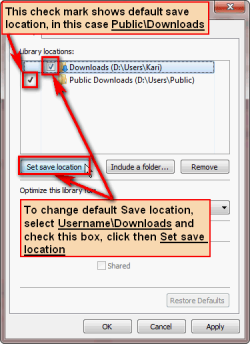
By default, IE saves using Libraries feature. It might be that the default save location in various libraries is set to a public folder rather than your own user folder. In this case you might find downloaded files from respective folders in Public i.e. Public\Downloads, Public\Videos, Public\Pictures and so on.

To change the default save location in a library, right click the library in question, select Properties and change the set another save location.

Libraries_default_save_location.png

Kari
 

My Computer My Computer

At a glance

Windows 10 Pro x64 EN-GB1.6 GHz Intel Core i7-720QM Processor6 GBATI Mobility Radeon HD 5850 Graphics
Computer type
Laptop
Computer Manufacturer/Model Number
HP ENVY 17-1150eg
OS
Windows 10 Pro x64 EN-GB
CPU
1.6 GHz Intel Core i7-720QM Processor
Memory
6 GB
Graphics Card(s)
ATI Mobility Radeon HD 5850 Graphics
Sound Card
Beats sound system with integrated subwoofer
Monitor(s) Displays
17" laptop display, 22" LED and 32" Full HD TV through HDMI
Screen Resolution
1600*900 (1), 1920*1080 (2&3)
Hard Drives
Internal: 2 x 500 GB SATA Hard Disk Drive 7200 rpm
External: 2TB for backups, 3TB USB3 network drive for media
Cooling
As Envy runs a bit warm, I have it on a Cooler Master pad
Keyboard
Logitech diNovo Media Desktop Laser (bluetooth)
Mouse
Logitech Performance Mouse MX
Internet Speed
50/10 Mbps VDSL
Antivirus
Windows Defender 4.3.9431.0
Browser
Maxthon 3.5.2., IE11
Thank you each and everyone. I did some digging per all of your instructions, and did locate them. This forum is the best! Thanks again guys :D
 

My Computer My Computer

At a glance

windows 7 home premium, 64 bit2 gig
Computer Manufacturer/Model Number
e-machine
OS
windows 7 home premium, 64 bit
Memory
2 gig
Monitor(s) Displays
HNC 25 inch
Hard Drives
400 gig
You're welcome Exotic. By the way, in addition to Kari's method of changing the default save location, you can also Hit Ctrl + J to bring up the Download Manager and click "Options" near the top. You can change the default download location there.
 

My Computer My Computer

At a glance

Vista 64 bit and 32 bit (SP2)Intel(R) Core(TM)2 Duo Processor T9400 (2.53 GHz4GB DDR2 System Memory (2 Dimm)512 MB NVIDIA GeForce 9600M GT
Computer Manufacturer/Model Number
HP Pavillion dv5t (generation 1)
OS
Vista 64 bit and 32 bit (SP2)
CPU
Intel(R) Core(TM)2 Duo Processor T9400 (2.53 GHz
Memory
4GB DDR2 System Memory (2 Dimm)
Graphics Card(s)
512 MB NVIDIA GeForce 9600M GT
Monitor(s) Displays
15.4" diagonal WSXGA+ High-Definition HP BrightView Widescre
Screen Resolution
1680 x 1050
Hard Drives
320GB 5400RPM SATA Hard Drive with HP ProtectSmart Hard Drive Protection
Keyboard
Built-in HP
Mouse
Built in - Synaptics TouchPad V6.5 on PS/2 Port
Internet Speed
Max
Other Info
~ Intel Next-Gen Wireless-N Mini-card w/Bluetooth ~ Blu-Ray ROM DVD+/-R/RW ~ Integ. HDTV Hybrid Tuner ~ 12 Cell Battery ~ MS Office (Home Premium) 2007 ~
I love that keyboard trick! Thank you 'Im'perfect :)
 

My Computer My Computer

At a glance

windows 7 home premium, 64 bit2 gig
Computer Manufacturer/Model Number
e-machine
OS
windows 7 home premium, 64 bit
Memory
2 gig
Monitor(s) Displays
HNC 25 inch
Hard Drives
400 gig
When I hit Ctrl + J I get nothing unles IE is visible...then I get the IE Feeds menu. My download directory (shown in the registry) is simply the last directory I used for the purpose.
 

My Computer My Computer

At a glance

Windows 8 Pro w/MC 32-bitIntel Atom 1.86 GHz2 GBIntel GMA 500
Computer type
PC/Desktop
Computer Manufacturer/Model Number
OQO 2+
OS
Windows 8 Pro w/MC 32-bit
CPU
Intel Atom 1.86 GHz
Motherboard
OQO 2+
Memory
2 GB
Graphics Card(s)
Intel GMA 500
Sound Card
IDT
Monitor(s) Displays
LCD
Screen Resolution
800 x 480 (portable) 1280 x 1024 (docked)
Hard Drives
64 GB SSD
PSU
9 Ah Battery (portable) or OQO Brick (docked)
Case
Shirt Pocket Sized
Cooling
Tiny Fan
Keyboard
Slide out (portable) DiNovo Edge (docked)
Mouse
Eraser head (portable) Logitech Bluetooth (docked)
Internet Speed
WWAN or 802.11G (portable) T1 (docked)
Browser
IE 10
Other Info
DVD-RW OQO Docking Station
Some further information which might help in future:
Not Prompted to Specify Download Folder for File


If you want to be prompted for a download location for the file type, follow these steps:
  1. Double-click My Computer.
  2. On the View menu, click Folder Options.
  3. On the File Types tab, click the appropriate file type in the Registered File Types box.
  4. Click Edit.
  5. Click to select the Confirm Open After Download check box.
  6. Click OK, and then click OK.
 

My Computer My Computer

At a glance

Windows 7 Home Premium 64bitIntel(R) Core(TM) i3-2120 CPU @ 3.30GHz3.00 GB(1) Intel(R) HD Graphics (2) VNC Mirror Driver
Computer type
PC/Desktop
Computer Manufacturer/Model Number
Packard Bell
OS
Windows 7 Home Premium 64bit
CPU
Intel(R) Core(TM) i3-2120 CPU @ 3.30GHz
Motherboard
Packard Bell IPISB-AG
Memory
3.00 GB
Graphics Card(s)
(1) Intel(R) HD Graphics (2) VNC Mirror Driver
Sound Card
Realtek High Definition Audio
Monitor(s) Displays
AIO LCD
Screen Resolution
1920 x 1080
Hard Drives
WDC WD10EADX-22TDHB0 ATA Device
Fixed hard disk media
4 partitions
931.51 GB
Keyboard
Wireless
Mouse
Wireless
Antivirus
Microsoft Security Essentials
Browser
IE; Firefox
Other Info
Also:
Samsung N220 Plus Netbook - Windows 7 Home
HP laptop
iPad 5
TY Irene, that is information I will promptly put to good use :)
 

My Computer My Computer

At a glance

windows 7 home premium, 64 bit2 gig
Computer Manufacturer/Model Number
e-machine
OS
windows 7 home premium, 64 bit
Memory
2 gig
Monitor(s) Displays
HNC 25 inch
Hard Drives
400 gig

My Computer My Computer

At a glance

Windows 7 Home Premium 64bitIntel(R) Core(TM) i3-2120 CPU @ 3.30GHz3.00 GB(1) Intel(R) HD Graphics (2) VNC Mirror Driver
Computer type
PC/Desktop
Computer Manufacturer/Model Number
Packard Bell
OS
Windows 7 Home Premium 64bit
CPU
Intel(R) Core(TM) i3-2120 CPU @ 3.30GHz
Motherboard
Packard Bell IPISB-AG
Memory
3.00 GB
Graphics Card(s)
(1) Intel(R) HD Graphics (2) VNC Mirror Driver
Sound Card
Realtek High Definition Audio
Monitor(s) Displays
AIO LCD
Screen Resolution
1920 x 1080
Hard Drives
WDC WD10EADX-22TDHB0 ATA Device
Fixed hard disk media
4 partitions
931.51 GB
Keyboard
Wireless
Mouse
Wireless
Antivirus
Microsoft Security Essentials
Browser
IE; Firefox
Other Info
Also:
Samsung N220 Plus Netbook - Windows 7 Home
HP laptop
iPad 5
Some further information which might help in future:
Not Prompted to Specify Download Folder for File
I was wondering why I had no File Types tab on my Folder options but the above link also says: "This article was written about products for which Microsoft no longer offers support." Perhaps that was the way it was in Win98 or XP but it's been changed for Win Vista/7. In order to be prompted, I found this registry fix:

Windows Registry Editor Version 5.00
[HKEY_CURRENT_USER\Software\Policies\Microsoft\Internet Explorer\Restrictions]
"AlwaysPromptWhenDownload"=dword:00000001
 

My Computer My Computer

At a glance

Windows 8 Pro w/MC 32-bitIntel Atom 1.86 GHz2 GBIntel GMA 500
Computer type
PC/Desktop
Computer Manufacturer/Model Number
OQO 2+
OS
Windows 8 Pro w/MC 32-bit
CPU
Intel Atom 1.86 GHz
Motherboard
OQO 2+
Memory
2 GB
Graphics Card(s)
Intel GMA 500
Sound Card
IDT
Monitor(s) Displays
LCD
Screen Resolution
800 x 480 (portable) 1280 x 1024 (docked)
Hard Drives
64 GB SSD
PSU
9 Ah Battery (portable) or OQO Brick (docked)
Case
Shirt Pocket Sized
Cooling
Tiny Fan
Keyboard
Slide out (portable) DiNovo Edge (docked)
Mouse
Eraser head (portable) Logitech Bluetooth (docked)
Internet Speed
WWAN or 802.11G (portable) T1 (docked)
Browser
IE 10
Other Info
DVD-RW OQO Docking Station
Some further information which might help in future:
Not Prompted to Specify Download Folder for File
I was wondering why I had no File Types tab on my Folder options but the above link also says: "This article was written about products for which Microsoft no longer offers support." Perhaps that was the way it was in Win98 or XP but it's been changed for Win Vista/7

Thanks for spotting that, roncerr, I stand corrected. ;)

Further information on editing the registry for this issue here:
Not prompted to specify download folder for file Windows 7 - Microsoft Answers

Important:
This section, method, or task contains steps that tell you how to modify the registry. However, serious problems might occur if you modify the registry incorrectly. Therefore, make sure that you follow these steps carefully. For added protection, back up the registry before you modify it. Then, you can restore the registry if a problem occurs.

For more information about how to back up and restore the registry, click the following article number to view the article in the Microsoft Knowledge Base:

http://www.sevenforums.com/tutorials/4230-registry-backup-restore.html
 

My Computer My Computer

At a glance

Windows 7 Home Premium 64bitIntel(R) Core(TM) i3-2120 CPU @ 3.30GHz3.00 GB(1) Intel(R) HD Graphics (2) VNC Mirror Driver
Computer type
PC/Desktop
Computer Manufacturer/Model Number
Packard Bell
OS
Windows 7 Home Premium 64bit
CPU
Intel(R) Core(TM) i3-2120 CPU @ 3.30GHz
Motherboard
Packard Bell IPISB-AG
Memory
3.00 GB
Graphics Card(s)
(1) Intel(R) HD Graphics (2) VNC Mirror Driver
Sound Card
Realtek High Definition Audio
Monitor(s) Displays
AIO LCD
Screen Resolution
1920 x 1080
Hard Drives
WDC WD10EADX-22TDHB0 ATA Device
Fixed hard disk media
4 partitions
931.51 GB
Keyboard
Wireless
Mouse
Wireless
Antivirus
Microsoft Security Essentials
Browser
IE; Firefox
Other Info
Also:
Samsung N220 Plus Netbook - Windows 7 Home
HP laptop
iPad 5
Back
Top