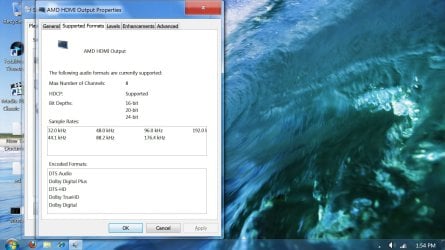
Where is the DTS sound option?

premier69

New member
Member
VIP
Local time
4:30 AM
Messages
139
I recently upgraded from motherboard Gigabyte ga-x48-ds5 where i had DTS in the drop-down list of the realtek hd manager in windows 7 x64 sp1.

I have an optical cable connected from the computer to the Logitech z-5500 sound system.

now i upgraded to a asus p8p67 deluxe and by upgrade i mean i just moved over my win hdd to the new motherboard without any reinstallation or pre-preperations and it all works perfectly! except for the sound thing.

this is copied from asus website:

Realtek® ALC889 8-Channel High Definition Audio CODEC
- Absolute Pitch 192khz/24bit True BD Lossless Sound
- BD Audio Layer Content Protection
- DTS Surround Sensation UltraPC
- Supports Jack-Detection, Multi-streaming and Front Panel Jack-Retasking
- Coaxial / Optical S/PDIF out ports at back I/O

this is copied from gigabytes website:

  1. Realtek ALC889A codec
  2. High Definition Audio
  3. 2/4/5.1/7.1-channel
  4. Support for DTS (dts NEO:PC)
  5. Support for S/PDIF In/Out
  6. Support for CD In


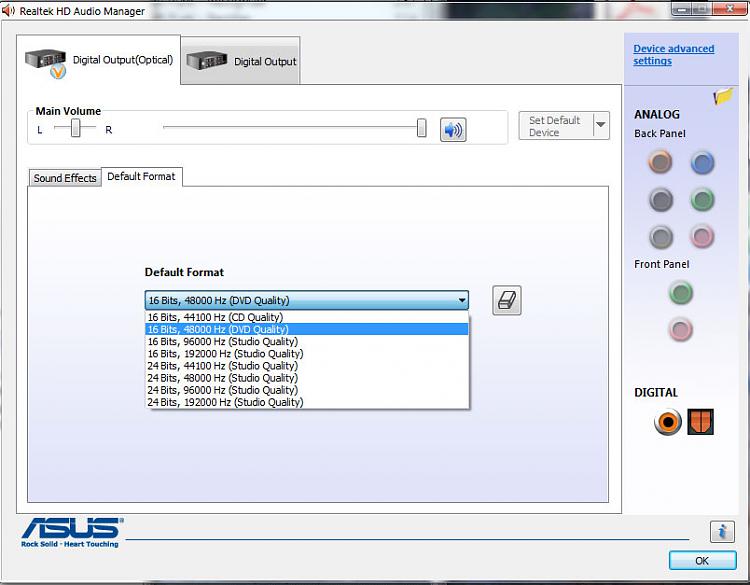
added screenshot is from the new computer where the DTS option is gone.
I have installed the latest realtek driver: Vista_Win7_R260_x64.exe which i downloaded from realtek's website.
 

Attachments
  • no-dts.jpg
    no-dts.jpg
    51 KB · Views: 469

My Computer My Computer

Computer Manufacturer/Model Number
White Box
OS
Windows 7 RTM x64
CPU
Core 2 Quad 2.6GHz
Motherboard
Gigabyte Ga-x48-ds5
Memory
4GB Ram
Graphics Card(s)
Asus nvidia 260
Sound Card
Built in, Using Optical Out with Logitech Z-5500 5.1
Monitor(s) Displays
Acer T230H & Samsung LCD TV FULL HD "LE46B530"
Screen Resolution
1920x1080 + 1920x1080
Hard Drives
8 of them, about 6.5TB
PSU
750 watt
Case
Antec P180
Cooling
Default Intel stock
Keyboard
Logitech Dinovo edge
Mouse
wireless laser mouse
Internet Speed
15mbit Cable
Other Info
Primary monitor is multitouch (yay)
You don't mention installing the board's sound drivers?
 

My Computer My Computer

OS
7 Ultimate x64
CPU
i5-2500k
Motherboard
Asus P8P67 Pro
Memory
8GB G.Skill Ripjaws X F3-12800CL7D-8GBXH 1866MHz 8-9-8-24
Graphics Card(s)
EVGA GTX 570 SC
Sound Card
X-Fi Titanium Fatality
Monitor(s) Displays
Samsung S27A550H 27" LED
Screen Resolution
1920x1080
Hard Drives
OCZ Vertex 3 120GB.
1TB Samsung F3.
2TB Samsung F4.
PSU
PC Power & Cooling Silencer 760
Case
Lian Li Lancool K62
Cooling
Thermalright Venomous X Black/Scythe S-Flex/Shin-Etsu X23
Keyboard
MS Natural Elite 4000 Ergonomic
Mouse
Logitech G500
Internet Speed
6MB/768
Other Info
Logitech Z-5500 505 watts.
D-Link DGL-4500.
Tripp-Lite Smart Pro 1500.
yes i did =)

I have installed the latest realtek driver: Vista_Win7_R260_x64.exe which i downloaded from realtek's website.
 

My Computer My Computer

Computer Manufacturer/Model Number
White Box
OS
Windows 7 RTM x64
CPU
Core 2 Quad 2.6GHz
Motherboard
Gigabyte Ga-x48-ds5
Memory
4GB Ram
Graphics Card(s)
Asus nvidia 260
Sound Card
Built in, Using Optical Out with Logitech Z-5500 5.1
Monitor(s) Displays
Acer T230H & Samsung LCD TV FULL HD "LE46B530"
Screen Resolution
1920x1080 + 1920x1080
Hard Drives
8 of them, about 6.5TB
PSU
750 watt
Case
Antec P180
Cooling
Default Intel stock
Keyboard
Logitech Dinovo edge
Mouse
wireless laser mouse
Internet Speed
15mbit Cable
Other Info
Primary monitor is multitouch (yay)
Maybe that's the problem? Asus has these, which are different than what you installed: Realtek Audio Driver V6.0.1.6235 for Windows Vista/7 32bit & 64bit.(WHQL)
 

My Computer My Computer

OS
7 Ultimate x64
CPU
i5-2500k
Motherboard
Asus P8P67 Pro
Memory
8GB G.Skill Ripjaws X F3-12800CL7D-8GBXH 1866MHz 8-9-8-24
Graphics Card(s)
EVGA GTX 570 SC
Sound Card
X-Fi Titanium Fatality
Monitor(s) Displays
Samsung S27A550H 27" LED
Screen Resolution
1920x1080
Hard Drives
OCZ Vertex 3 120GB.
1TB Samsung F3.
2TB Samsung F4.
PSU
PC Power & Cooling Silencer 760
Case
Lian Li Lancool K62
Cooling
Thermalright Venomous X Black/Scythe S-Flex/Shin-Etsu X23
Keyboard
MS Natural Elite 4000 Ergonomic
Mouse
Logitech G500
Internet Speed
6MB/768
Other Info
Logitech Z-5500 505 watts.
D-Link DGL-4500.
Tripp-Lite Smart Pro 1500.
i like the way you think. yeah i thought the same thing. first asus, then realtek, then asus again. zip zilch.
 

My Computer My Computer

Computer Manufacturer/Model Number
White Box
OS
Windows 7 RTM x64
CPU
Core 2 Quad 2.6GHz
Motherboard
Gigabyte Ga-x48-ds5
Memory
4GB Ram
Graphics Card(s)
Asus nvidia 260
Sound Card
Built in, Using Optical Out with Logitech Z-5500 5.1
Monitor(s) Displays
Acer T230H & Samsung LCD TV FULL HD "LE46B530"
Screen Resolution
1920x1080 + 1920x1080
Hard Drives
8 of them, about 6.5TB
PSU
750 watt
Case
Antec P180
Cooling
Default Intel stock
Keyboard
Logitech Dinovo edge
Mouse
wireless laser mouse
Internet Speed
15mbit Cable
Other Info
Primary monitor is multitouch (yay)
If you play a DTS movie does the Logitech desktop box light up with DTS?

**edit** just fired up the gaming rig (in specs) to test out the z-5500's and dts. I don't have this machine set up for media at all, so without additional software there's only so much I can test out for you... but, when playing a DTS movie, is DTS an option under the "effects" settings on the z5500 desktop box?
 

My Computer My Computer

OS
7 Ultimate x64
CPU
i5-2500k
Motherboard
Asus P8P67 Pro
Memory
8GB G.Skill Ripjaws X F3-12800CL7D-8GBXH 1866MHz 8-9-8-24
Graphics Card(s)
EVGA GTX 570 SC
Sound Card
X-Fi Titanium Fatality
Monitor(s) Displays
Samsung S27A550H 27" LED
Screen Resolution
1920x1080
Hard Drives
OCZ Vertex 3 120GB.
1TB Samsung F3.
2TB Samsung F4.
PSU
PC Power & Cooling Silencer 760
Case
Lian Li Lancool K62
Cooling
Thermalright Venomous X Black/Scythe S-Flex/Shin-Etsu X23
Keyboard
MS Natural Elite 4000 Ergonomic
Mouse
Logitech G500
Internet Speed
6MB/768
Other Info
Logitech Z-5500 505 watts.
D-Link DGL-4500.
Tripp-Lite Smart Pro 1500.
http://www.sevenforums.com/attachme...1306740420t-where-dts-sound-option-no-dts.jpg

Can you check the advanced options... I'm not sure you're in the right place? I've been scratching my head all morning wondering why you would be looking for DTS in the sampling rate section instead of the supported format section? It just didn't make sense that you would want to "set" DTS as the surround decoder as opposed to just letting the source determine what to run... dts, dolby, pcm or stereo... then, if you wanted a different decoder, just switch it through the Z-5500's effects button?

My X-Fi supports DTS and Dolby, but looking exactly where you are, I don't have that option there either... but that doesn't mean I can't play DTS natively. I'll install some players this evening to support my claims.

In the meantime, I bitstream upstairs and I'm positive I can do DTS-HD MA and True HD.. my options don't show DTS in the sample rate section either.

I'm not sure how bitstreaming would effect this since I pass through all audio to my receiver... so while the settings shown here aren't being applied, this is where they'd be if they were... does that make any sense?
 

Attachments

  • dts.jpg
    dts.jpg
    205 KB · Views: 241
  • sample rate.jpg
    sample rate.jpg
    90.1 KB · Views: 258

My Computer My Computer

OS
7 Ultimate x64
CPU
i5-2500k
Motherboard
Asus P8P67 Pro
Memory
8GB G.Skill Ripjaws X F3-12800CL7D-8GBXH 1866MHz 8-9-8-24
Graphics Card(s)
EVGA GTX 570 SC
Sound Card
X-Fi Titanium Fatality
Monitor(s) Displays
Samsung S27A550H 27" LED
Screen Resolution
1920x1080
Hard Drives
OCZ Vertex 3 120GB.
1TB Samsung F3.
2TB Samsung F4.
PSU
PC Power & Cooling Silencer 760
Case
Lian Li Lancool K62
Cooling
Thermalright Venomous X Black/Scythe S-Flex/Shin-Etsu X23
Keyboard
MS Natural Elite 4000 Ergonomic
Mouse
Logitech G500
Internet Speed
6MB/768
Other Info
Logitech Z-5500 505 watts.
D-Link DGL-4500.
Tripp-Lite Smart Pro 1500.
Ok... so I installed Kantaris (vcl player on steroids) and played several types of movies. HD DVD's, DTS movies and Dolby movies. I don't have any issues playing dts movies using the movie's native format, be it dts or dolby.

First off, using the Z-5500's 6 channel direct setting uses the source's native surround decoder... so if it's a move encoded with DTS, that's what it's going to play. You can augment that with the effects setting button, but, there's a limit to your options as the 5500's desktop box just doesn't have all the surround decoders that a decent newer model receiver has... but it does output correctly... even though, like you, there are no surround decoders listed in the sample rate section.


Since there's no hdmi input, nor are there enough plugs to enable 6 channel analog on the back of the desktop box, Bitstreaming is impossible... so I won't even attempt it.

How's it going for you?
 

Attachments

  • game room sound.jpg
    game room sound.jpg
    32.5 KB · Views: 205

My Computer My Computer

OS
7 Ultimate x64
CPU
i5-2500k
Motherboard
Asus P8P67 Pro
Memory
8GB G.Skill Ripjaws X F3-12800CL7D-8GBXH 1866MHz 8-9-8-24
Graphics Card(s)
EVGA GTX 570 SC
Sound Card
X-Fi Titanium Fatality
Monitor(s) Displays
Samsung S27A550H 27" LED
Screen Resolution
1920x1080
Hard Drives
OCZ Vertex 3 120GB.
1TB Samsung F3.
2TB Samsung F4.
PSU
PC Power & Cooling Silencer 760
Case
Lian Li Lancool K62
Cooling
Thermalright Venomous X Black/Scythe S-Flex/Shin-Etsu X23
Keyboard
MS Natural Elite 4000 Ergonomic
Mouse
Logitech G500
Internet Speed
6MB/768
Other Info
Logitech Z-5500 505 watts.
D-Link DGL-4500.
Tripp-Lite Smart Pro 1500.
Let me butt in if I may...

In Vista I could tell the audio driver to allways output as Dolby digital and even make it emulate 7.1 wich made the Z 5500 play much better. Better on the rear channels and more clear on front channels. In games, or media players, where it wasn't the native format it still sounded better.

I would love if you two find a way to force W7 onto Dolby digital

Sorry for butting in :)
 

My Computer My Computer

OS
Windows 7 Ultimate x64
Did you ever find a solution to this issue?

Did you ever find a solution to this issue? Im having the same problem now on my new build. I only have 2channel options to set the system to. Movies and such play with whatever audio its encoded with, so I can hear DTS or Dolby audio in 5.1 when watching them but since games default to the sound the desktop is using, I can only play in 2channel audio, not 5.1. I found some unlocked Realtek drivers that give me the ability to set the desktop to DTS or Dolby 5.1 sound which almost works. My receiver says its playing DTS5.1 when on the desktop but the center channel does not work. Im still looking for another solution but Im about to give up and just get a discrete audio card.
 

My Computer My Computer

Computer type
PC/Desktop
Computer Manufacturer/Model Number
Custom Build
OS
Windows 7 Ultimate 64bit
CPU
i7 - 3570k
Motherboard
MSI Z77A-G45
Memory
16GB Team Vulcan 4x4GB DDR3-2400
Graphics Card(s)
MSI GTX660
Hard Drives
1x120GB Kinston SSD
3x750GB WesternDigital - RAID0
Back
Top