Solved Where to go from here

80yearold

New member
Local time
7:05 PM
Messages
13
Did not choose user name for sympathy, merely to tap into a patient soul. New unit, new OS and been totally Linux for several years. Attempted to partition with gparted with less then favorable results. Downloaded partition wizard and DO NOT want to be forced into recovery again,
Is it as simple as resizing that 286 plus GB,is there anything else I need to know? And like gparted I assume I will be given opportunity to choose ext3 as file system for Linux? While I have your attention can I also partition for another Win OS namely XP. If so can I use the disk from my old laptop (yes I understand no support) I appreciate your attention in this matter as this is one extremely challenged old man (but not in Linux)
Thanks
Allen
 

My Computer

Computer Manufacturer/Model Number
PSK3JV-01D001
OS
Win 7 64 bit
CPU
P520 2.30 GHz
Motherboard
?
Memory
4 MB RAM
Monitor(s) Displays
17.3
Hard Drives
320 GB
Hi 80yearold and a warm welcome to the forum:D

So. Have you bought a new PC and it has got Windows 7 on it and you want to make a dual boot with a linux distro?
 

My Computer

Computer Manufacturer/Model Number
The Monolith. 3.1
OS
Windows 7 Home Premium 64 bit
CPU
i7 [email protected]
Motherboard
Gigabyte Z77-D3H
Memory
2x4GB Corsair Vegeance DDR3
Graphics Card(s)
XFX GTX 260 Black Edition
Sound Card
none-through large stereo hi fi
Monitor(s) Displays
Croosover 27MDP LED IPS Dell 2408 WFP
Screen Resolution
2560x1440 1920x1200
Hard Drives
1x Samsung 840Pro 128GB SSD
1x Samsung Spinpoint F1 1TB
PSU
Corsair AX 850 Watt
Case
Cooler Master ACTS 840
Cooling
Be Quiet! Dark Rock Pro
Keyboard
Enermax Aurora
Mouse
Logitech Ballmouse
Internet Speed
20MBPS
partitioning in win 7

Did not choose user name for sympathy, merely to tap into a patient soul. New unit, new OS and been totally Linux for several years. Attempted to partition with gparted with less then favorable results. Downloaded partition wizard and DO NOT want to be forced into recovery again,
Is it as simple as resizing that 286 plus GB,is there anything else I need to know? And like gparted I assume I will be given opportunity to choose ext3 as file system for Linux? While I have your attention can I also partition for another Win OS namely XP. If so can I use the disk from my old laptop (yes I understand no support) I appreciate your attention in this matter as this is one extremely challenged old man (but not in Linux)
Thanks
Allen
As I indicated I was comfortable with Linux, in fact had ubuntu, Lenny, and mint with an extended partition from XP which I used seldom. With help I know I can get back to Ubuntu at least. As an aside I even tried wubi and username came up Allen and tried every PW I ever used but to no avail. Is there a way in wubi to recover PW. At any rate any help in any direction appreciated

Allen:cry:
 

My Computer

Computer Manufacturer/Model Number
PSK3JV-01D001
OS
Win 7 64 bit
CPU
P520 2.30 GHz
Motherboard
?
Memory
4 MB RAM
Monitor(s) Displays
17.3
Hard Drives
320 GB
Hello 80yearold, welcome to Seven Forums!


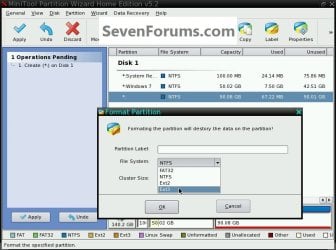
I know next to nothing about Linux but if you're asking if Partition Wizard will format to the Ext3 file system, yes it will.


click to enlarge
Ext3.jpg
 

My Computer

Computer Manufacturer/Model Number
* BFK Customs *
OS
W 7 64-bit Ultimate
CPU
Intel Q9550 Yorkfield
Motherboard
ASUS P5Q Pro
Memory
8GB Dominator 8500C5D
Graphics Card(s)
ATI : XFX 5870
Sound Card
Realtek HD Audio 7-1
Monitor(s) Displays
1x 47" LCD HDMI & 3x 26" LCD HDMI
Screen Resolution
1920x1080P & 1920x1200
Hard Drives
1x 80GB Intel X25-M G2 SSD : 1x 500GB & 1x 640GB WD Caviar Black(s)
PSU
Corsair 620HX
Case
Cooler Master RC-690
Cooling
Tuniq Tower 120, 2x 140mm and 3x 120mm case fans
Keyboard
Microsoft 500
Mouse
Razer Diamondback 3G
Internet Speed
14 Mb/s
Other Info
1x Koutech 3Gb/s SATA HDD Hot Swap Rack
Hello 80 year old. Welcome to the forum. I'm a lot younger than you. I won't be 80 years old until March.
 

My Computer

Computer type
Laptop
Computer Manufacturer/Model Number
HP Pavilion g7-1260us Notebook
OS
Desk Top with Win 7 Home Premium 64 bit and Lap Top with Windows 8.1 Pro 64 bit
Memory
8Gig
Screen Resolution
1600x900
Frank:
Glad to know others my age or near are out and about
 

My Computer

Computer Manufacturer/Model Number
PSK3JV-01D001
OS
Win 7 64 bit
CPU
P520 2.30 GHz
Motherboard
?
Memory
4 MB RAM
Monitor(s) Displays
17.3
Hard Drives
320 GB
I'm still not clear what position you are in now. Have you got a new machine with Windows 7 on it?
If so. are you now wanting to create an ext3 partition and put Ubuntu on it in a dual boot?

Assuming the above, as you can see from BFKs post it's perfectly possible to create an ext3 partition.
Also you can shrink your Windows partition via Disk Management in Windows. Then install Ubuntu from disk and allocate it to the space you have created.
I haven't used Ubuntu for a while but Linux Mint will do this for you.
You will then have Linux as your first boot choice-in GRUB. You drop down to Windows and choose that and Windows boot loader appears.

Hope this helps, John

PS. I gather you've been a Linux man for a while and as you can see I walk on both sides of the road but I think you will find Windows 7 absolutely amazing:D
 

My Computer

Computer Manufacturer/Model Number
The Monolith. 3.1
OS
Windows 7 Home Premium 64 bit
CPU
i7 [email protected]
Motherboard
Gigabyte Z77-D3H
Memory
2x4GB Corsair Vegeance DDR3
Graphics Card(s)
XFX GTX 260 Black Edition
Sound Card
none-through large stereo hi fi
Monitor(s) Displays
Croosover 27MDP LED IPS Dell 2408 WFP
Screen Resolution
2560x1440 1920x1200
Hard Drives
1x Samsung 840Pro 128GB SSD
1x Samsung Spinpoint F1 1TB
PSU
Corsair AX 850 Watt
Case
Cooler Master ACTS 840
Cooling
Be Quiet! Dark Rock Pro
Keyboard
Enermax Aurora
Mouse
Logitech Ballmouse
Internet Speed
20MBPS
If you plan to run Ubuntu, you may want to consider running it in Virtual Box. Then you do not have the complcations with double booting, the Grub taking control and all the other unneccessary headaches. I run it that way and it performs like a charm. Only Firefox was a bit slow, but I fixed that with Chromium. In addition you have access to Ubuntu and Windows7 in parallel which is very handy.

There are a few experts on this forum which can help you with an optimal Virtual Box installation. And I am an oldtimer too (73) - probably sounds like a youngster to you, LOL.
 

My Computer

Computer Manufacturer/Model Number
HP, Dell, Gateway, Toshiba - 4 laptops and 2 desktops
OS
Vista, Windows7, Mint Mate, Zorin, Windows 8
CPU
from 1.6GHz Duo to i7
Monitor(s) Displays
2x HP w2207
Hard Drives
5x HDD, 7x SSD, 12x Externals
Keyboard
with trackball - no mices
Mouse
Trackball mice
Internet Speed
DSL 6000

My Computer

Computer Manufacturer/Model Number
The Monolith. 3.1
OS
Windows 7 Home Premium 64 bit
CPU
i7 [email protected]
Motherboard
Gigabyte Z77-D3H
Memory
2x4GB Corsair Vegeance DDR3
Graphics Card(s)
XFX GTX 260 Black Edition
Sound Card
none-through large stereo hi fi
Monitor(s) Displays
Croosover 27MDP LED IPS Dell 2408 WFP
Screen Resolution
2560x1440 1920x1200
Hard Drives
1x Samsung 840Pro 128GB SSD
1x Samsung Spinpoint F1 1TB
PSU
Corsair AX 850 Watt
Case
Cooler Master ACTS 840
Cooling
Be Quiet! Dark Rock Pro
Keyboard
Enermax Aurora
Mouse
Logitech Ballmouse
Internet Speed
20MBPS
a bit more detail on partitioning

A expense of being redundant user name while true was chosen to elicit patience not as a sympathy ploy.
I have tried to understand what I have read and sadly my comprehension is not what it once was.
I am looking to get back to what I had in my prior unit but with more HD.
I had an extended with 3 logical drives and had Ubuntu , Lenny, and would get curious with 3rd and try different distros.
Frankly out of my comfort zone and need someone willing to walk me through. Present HD came with 3 primary, a boot, recovery, and 286+ GB that for my purpose needs to be extended to:
3 logical of about 30 GB each and remainder unallocated. If this is not acceptable please advise as this is my one and only hobby and I miss Linux.
Hope to find someone with patience and time to help me.
As an aside I am a retired chef and there I have not lost my comprehension:D
I want to thank all who replied and apologize for what appears an old mans folly. And John I envy you ability walk both sides. Ubuntu and any distro in Linux is my comfort zone. Yep that being said been around since 3.1 Cheere
 
Last edited:

My Computer

Computer Manufacturer/Model Number
PSK3JV-01D001
OS
Win 7 64 bit
CPU
P520 2.30 GHz
Motherboard
?
Memory
4 MB RAM
Monitor(s) Displays
17.3
Hard Drives
320 GB
Your request shouldn't be too difficult but likely will require additional hardware (not very expensive).

How about a little background information?

Is the "current" system an entirely "new" (physical) computer or did you "upgrade" your existing computer? It sounds like this is a new unit that came pre-installed with Windows 7.

Is this new system a desktop or a laptop?

What is the make and model of the system? If built from scratch, what is the motherboard make and model?

Where is your "old" system? Do you still have the "old" hard drive?

I can present ideas once I know this information.

Regards,
GEWB
 

My Computer

Computer type
PC/Desktop
Computer Manufacturer/Model Number
(7 different computers booting up to 10 systems)
OS
Linux Mint / XP / Win7 Home, Pro, Ultimate / Win8.1 / Win10
Other Info
Four desktops, two laptops, one notebook and one tablet
Yes Allen. We need more info from you.
Have you now got W7 on a partition and wish to create 3x30GB partitions for Linux distros?
Sp you would end up with a quadruple boot?
By the way, we could do with a favourite recipe thread in chillout:D
 

My Computer

Computer Manufacturer/Model Number
The Monolith. 3.1
OS
Windows 7 Home Premium 64 bit
CPU
i7 [email protected]
Motherboard
Gigabyte Z77-D3H
Memory
2x4GB Corsair Vegeance DDR3
Graphics Card(s)
XFX GTX 260 Black Edition
Sound Card
none-through large stereo hi fi
Monitor(s) Displays
Croosover 27MDP LED IPS Dell 2408 WFP
Screen Resolution
2560x1440 1920x1200
Hard Drives
1x Samsung 840Pro 128GB SSD
1x Samsung Spinpoint F1 1TB
PSU
Corsair AX 850 Watt
Case
Cooler Master ACTS 840
Cooling
Be Quiet! Dark Rock Pro
Keyboard
Enermax Aurora
Mouse
Logitech Ballmouse
Internet Speed
20MBPS
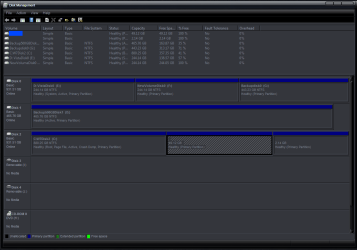
If you go to the start menu and open it then click control panel/administrative services/computer management you will open the Computer Management box.
Then click Disk Management in the left hand column and you should get something like this.
Use the snipping tool (start menu/accessories) to take a picture of it and post it for us.
 

Attachments

  • Disk Management1.PNG
    Disk Management1.PNG
    34.4 KB · Views: 8

My Computer

Computer Manufacturer/Model Number
The Monolith. 3.1
OS
Windows 7 Home Premium 64 bit
CPU
i7 [email protected]
Motherboard
Gigabyte Z77-D3H
Memory
2x4GB Corsair Vegeance DDR3
Graphics Card(s)
XFX GTX 260 Black Edition
Sound Card
none-through large stereo hi fi
Monitor(s) Displays
Croosover 27MDP LED IPS Dell 2408 WFP
Screen Resolution
2560x1440 1920x1200
Hard Drives
1x Samsung 840Pro 128GB SSD
1x Samsung Spinpoint F1 1TB
PSU
Corsair AX 850 Watt
Case
Cooler Master ACTS 840
Cooling
Be Quiet! Dark Rock Pro
Keyboard
Enermax Aurora
Mouse
Logitech Ballmouse
Internet Speed
20MBPS
You apparently were double/triple booting before and are familiar with that kind of setup. (I prefer not to do that because I do not like to wrestle with the Grub - LOL). But if you want your original setup back, I suggest you shrink the 286GB partition (which I assume is your C partition) to gain the necessary free space for your additional partitions (sounds like you ned 90GBs for those). That can be done with Disk Management.

I do not understand why you want "freespace". With Disk Management, you can probably only shrink about 140GBs or less off C. If you want to shrink C more, then you need different tools. Let us know if that is what you want.

In the freespace you gained, you can allocate the 3 new partitions. Just make sure you make those extended/logical partitions and NOT primaries. Since you already have 3 primaries, you would get stuck if you allocated a 4th primary because 4 primaries is the maximum allowed.

Please call back if you have further questions.
 

My Computer

Computer Manufacturer/Model Number
HP, Dell, Gateway, Toshiba - 4 laptops and 2 desktops
OS
Vista, Windows7, Mint Mate, Zorin, Windows 8
CPU
from 1.6GHz Duo to i7
Monitor(s) Displays
2x HP w2207
Hard Drives
5x HDD, 7x SSD, 12x Externals
Keyboard
with trackball - no mices
Mouse
Trackball mice
Internet Speed
DSL 6000
Hello again mate.


If the 'boot' partition is Windows, have a look at this info so you can post a snip of disk management for us to look at before you go too far with anything.


   Note

In the Windows start menu right click computer and click manage, in the left pane of the "Computer Management" window that opens click disk management and post a snip of that.

click this link below
How to Upload and Post a Screenshot and File in Seven Forums


My Computer

Computer Manufacturer/Model Number
* BFK Customs *
OS
W 7 64-bit Ultimate
CPU
Intel Q9550 Yorkfield
Motherboard
ASUS P5Q Pro
Memory
8GB Dominator 8500C5D
Graphics Card(s)
ATI : XFX 5870
Sound Card
Realtek HD Audio 7-1
Monitor(s) Displays
1x 47" LCD HDMI & 3x 26" LCD HDMI
Screen Resolution
1920x1080P & 1920x1200
Hard Drives
1x 80GB Intel X25-M G2 SSD : 1x 500GB & 1x 640GB WD Caviar Black(s)
PSU
Corsair 620HX
Case
Cooler Master RC-690
Cooling
Tuniq Tower 120, 2x 140mm and 3x 120mm case fans
Keyboard
Microsoft 500
Mouse
Razer Diamondback 3G
Internet Speed
14 Mb/s
Other Info
1x Koutech 3Gb/s SATA HDD Hot Swap Rack
OK, been here and done this too many times over the past decade. After trying numerous methods, I found that adhernig to MISS and KISS really is the best:

Make It Stupid Simple and Keep It Stupid Simple

Sure, using a VM is the sexy way but the simple, foolproof way is:

> Add a second physical drive JUST FOR YOUR LINUX distributions, then
> Use your computer BIOS / startup menu to boot to the Linux drive when desired.

> Latest option I use: burn my Linux to a 16GB flash drive and boot to the flash drive

No potential problems with Windows or Linux re: boot sectors, etc.

Set up the free space on the Windows "drive" as an NTSF partition just for storage and make accessable to Windows and Linux.

These are the reasons I requested more info - to help formulate an appropriate approach.

(One of my rigs uses four hard drives and boots to eight operating systems, sometimes more!)

Regards,
GEWB
 

My Computer

Computer type
PC/Desktop
Computer Manufacturer/Model Number
(7 different computers booting up to 10 systems)
OS
Linux Mint / XP / Win7 Home, Pro, Ultimate / Win8.1 / Win10
Other Info
Four desktops, two laptops, one notebook and one tablet
Talk about an active forum!! well let me see if I can answer the questions:It is a new unit Toshiba L670, 320 GB HD, 4.00 GB, 64 bit P 520 2.30GHz
Yes I still have my old HP on line infact.
Out box this has 3 primary Capacity Used Unused
System NTFS 1.46 GB 190.96MB 1.28.GB
CT1105838 NTFS 286.59 38.05 GB 248.54
Recovery NTFS 10.03GB 9.44GB 610.95MB
Above taken after clicking Partition Wizard
I am still on line with old because I have 2 active web sites I created. and transfering them is another chore I do not look forward to. Talk about being behind the time I did them in front page
New Page 1
Home Page
In case anyone is interested
To restate my needs, I want an extended with 3 logical for 3 different linux OS
Anyone and everyone help appreciated.:cry:
 

My Computer

Computer Manufacturer/Model Number
PSK3JV-01D001
OS
Win 7 64 bit
CPU
P520 2.30 GHz
Motherboard
?
Memory
4 MB RAM
Monitor(s) Displays
17.3
Hard Drives
320 GB
I love you donuts - LOL. And to solve your problem, did you read my post #14? Also, as BFK said, it would help to have a snip of your Disk Management.
 

My Computer

Computer Manufacturer/Model Number
HP, Dell, Gateway, Toshiba - 4 laptops and 2 desktops
OS
Vista, Windows7, Mint Mate, Zorin, Windows 8
CPU
from 1.6GHz Duo to i7
Monitor(s) Displays
2x HP w2207
Hard Drives
5x HDD, 7x SSD, 12x Externals
Keyboard
with trackball - no mices
Mouse
Trackball mice
Internet Speed
DSL 6000
Where to from here

I thought I gave you that in my text format because that generated snip is beyon this old head. Sorry about that I even lostability to PRTSC in 7 or at least I cannot find it. Not giving up but seems as if I was better of without this new machine with all bells and whistles. But I will attempt to comply.
 

My Computer

Computer Manufacturer/Model Number
PSK3JV-01D001
OS
Win 7 64 bit
CPU
P520 2.30 GHz
Motherboard
?
Memory
4 MB RAM
Monitor(s) Displays
17.3
Hard Drives
320 GB
The snipping tool is in All Programs > Accessories - just pin it to the taskbar. Then it is handy. There are fancier tools like Jing that you can program to e.g. F9 or any other available function keys.

And for posting the resulting picture, just click on the paper clip on the top right of the reply field. Make sure your cursor is sitting below your text before you hit the paper clip. Then Browse followed by Upload. When the upload completed, just close the paper clip window. You will only see your picture once you posted.
 

My Computer

Computer Manufacturer/Model Number
HP, Dell, Gateway, Toshiba - 4 laptops and 2 desktops
OS
Vista, Windows7, Mint Mate, Zorin, Windows 8
CPU
from 1.6GHz Duo to i7
Monitor(s) Displays
2x HP w2207
Hard Drives
5x HDD, 7x SSD, 12x Externals
Keyboard
with trackball - no mices
Mouse
Trackball mice
Internet Speed
DSL 6000
Back
Top