Solved Which backup & restore to use

bbrose2

New member
Local time
12:02 AM
Messages
19
New system using W7 Pro & IE11 with 1TB SATA hard drive (c drive) & an external drive (e) 250 GB Seagate One Touch Mini 4. Need help in deciding which backup & restore to use, Windows 7 Backup & Restore or Seagate 2 step programs or any suggestions. Want to be able to create whole system image & also backup of all users data files & programs. A couple of questions are: do I have to completely wipe my external drive clean before starting any new backup procedure, can I store both system image & data files on the external drive without creating paritions, is my external drive big enough to hold everything (I currently have space (approx 50 GB left on external drive when using XP). Thank you for any help you can provide.
 

My Computer

Computer type
PC/Desktop
Computer Manufacturer/Model Number
Dell
OS
Windows 7 Professional 64 bit
CPU
Intel 4th Generation Core i5
Memory
RAM 8GB
Graphics Card(s)
Intel HD
Hard Drives
1TB - SATA
External Maxtor One Touch Mini 4 - 250GB
Antivirus
Norton & Advanced System Care Pro
Browser
IE 11
do I have to completely wipe my external drive clean before starting any new backup procedure

No, backup image is stored as a file.

can I store both system image & data files on the external drive without creating paritions

I think you mean extra partitions - you must already have at least one.

Yes, just store it like any other file.

is my external drive big enough to hold everything

Depends how much used space you have on the source partition. Also depends on what type of files you have on the used space, some will compress a lot, some file types compress very little.

Images will typically be 50-60% of the size of the original used space.


Aomei ( owmay ) Backupper is the best free imaging program, Standard version is free:

Windows 8.1, Windows 8, Windows 7 Free Backup and Restore Software
 

My Computers

System One System Two

  • Computer type
    PC/Desktop
    OS
    7 X64
    CPU
    i5 8400
    Motherboard
    gigabyte b365m ds3h
    Memory
    2x8gb 3200mhz
    Hard Drives
    various
    PSU
    pure power 11 400w cm
    Case
    Coolermaster
    Cooling
    cryorig m9i
  • Computer type
    PC/Desktop
    OS
    7x64
    CPU
    g5400
    Motherboard
    ga b365m ds3h
    Memory
    8gb ddr4 2400
    PSU
    xfx pro 450w
Many people here prefer Macrium Reflect Free (here is a good tutorial on how to use Macrium Reflect). I use a paid version of Macrium Reflect to back up my C: drive (or partition, depending on the machine) but the free version will meet most peoples needs. I also use FreeFileSync to back up my data drives (or partition, depending on the machine). A folder/file syncing program, such as FreeFileSync is much faster for backing up data than imaging. The OS and programs, however, have to be backed up by imaging or cloning, imaging generally being the most practical.
 

My Computer

Computer type
PC/Desktop
Computer Manufacturer/Model Number
Custom Build
OS
Win 7 Ultimate 64 bit
CPU
Intel i7-3930K
Motherboard
ASUS P9X79 WS
Memory
Kingston HyperX Genesis 32GB Kit (8x4GB Modules) 1600MHz DDR
Graphics Card(s)
MSI R7850 Twin Frozr 2GD5/OC Radeon HD 7850 2GB 256-bit GDDR
Sound Card
Asus Xonar Essence STX
Monitor(s) Displays
3x Asus VG248QE 24", Vizio 32" TV
Screen Resolution
1920 x 1080, ?
Hard Drives
Samsung 128GB 840 Pro SSD (1),
Samsung 4TB 850 EVO SSDs (4)
Samsung 4TB 850 EVO SSDs (16) external backup drives used in 2.5" hot swap bays in the computer.
PSU
Corsair HX750w
Case
Antec Two Hundred v2 (modified)
Cooling
Cooler Master GeminII S524 120mm (fan replaced with a 140mm)
Keyboard
Logitech G510s
Mouse
Logitech M525 (two in use)
Internet Speed
=< 32Mbps down, 8Mbps up
Antivirus
AVAST!, MBAM, SAS, Spybot S&D (all but MBAM free) Glary Util
Browser
IE11
Other Info
LSI 9211-8i HBA card (8 SATA III ports), 2.5" & 3.5" Hot Swap Bays, HooToo HT-CR001 PCI-E to USB 3.0 Internal Hub + 6 Slot Card Reader, and LG Model CH12LS28 BD-ROM Optical Drive. Also, ScanSnap S1500 ADF duplexing scanner, Canon 9000F flat bed scanner, Corsair SP2500 2.1 speakers, Samsung CLP 415nw laser color printer, Cyberpower PP2200SW UPS
For some redundancy, I use 2 system imaging programs; Windows inbuilt and (free) Macrium Reflect. Neither has let me down so far but Macrium has the edge. Macrium is more flexible and does provide compression of your image files. For hardware redundancy I keep current images on 2 separate external HDDs.
 

My Computer

Computer type
PC/Desktop
Computer Manufacturer/Model Number
Own build
OS
Windows 7x64 Home Premium SP1
CPU
Intel i7 2600k
Motherboard
ASUS P8Z68 Deluxe
Memory
G.Skill Ripjaws (DDR3-1600) 2x4GB
Graphics Card(s)
Nvidia GeForce GTS 450; Intel HD Graphics 3000(GT2+)
Monitor(s) Displays
Dell Ultrasharp IPS panel U2311H, Samsung SyncMaster P2350
Screen Resolution
1920x1080
Hard Drives
Samsung 850 Pro SSD 256GB, Samsung SSD 840 120GB, Seagates 1TB Barracuda ST31000528AS x2
PSU
Seasonic M12II 520W
Case
Lian Li Lancool PC-K60
Cooling
Case: 1x120mm, 3x140mm CPU: Hyper 212+
Keyboard
Logitech MK520 (wireless)
Mouse
Logitech MK520
Internet Speed
6-7 Mbps
Antivirus
Norton Security Premium, Malwarebytes on 2 (MSE on 3rd PC)
Browser
FireFox
Other Info
Audio: Logitech Z523 2.1
SIW2,

Would it benefit me more to start with a clean disc rather than all of the old stuff that I probably can not access anyway?
 

My Computer

Computer type
PC/Desktop
Computer Manufacturer/Model Number
Dell
OS
Windows 7 Professional 64 bit
CPU
Intel 4th Generation Core i5
Memory
RAM 8GB
Graphics Card(s)
Intel HD
Hard Drives
1TB - SATA
External Maxtor One Touch Mini 4 - 250GB
Antivirus
Norton & Advanced System Care Pro
Browser
IE 11
Which disk do you mean - the one you intend to store your images on?

Up to you. If what you have on there is not accessible or not wanted, then you can do a quick format if you like. Or you could just delete anything you are certain you don't want. 50gb isn't a lot of space, so if you can clear some more, it is a good idea.

If you want to do regular file backups as well as an image, then aomei does that also. Schedule it if you like.
 

My Computers

System One System Two

  • Computer type
    PC/Desktop
    OS
    7 X64
    CPU
    i5 8400
    Motherboard
    gigabyte b365m ds3h
    Memory
    2x8gb 3200mhz
    Hard Drives
    various
    PSU
    pure power 11 400w cm
    Case
    Coolermaster
    Cooling
    cryorig m9i
  • Computer type
    PC/Desktop
    OS
    7x64
    CPU
    g5400
    Motherboard
    ga b365m ds3h
    Memory
    8gb ddr4 2400
    PSU
    xfx pro 450w
SIW2,

Yes, I am speaking of the drive I want to use as my external backup. I figured it would be best to start with a full 250GB rather than what is left on that drive from previous backups.
 

My Computer

Computer type
PC/Desktop
Computer Manufacturer/Model Number
Dell
OS
Windows 7 Professional 64 bit
CPU
Intel 4th Generation Core i5
Memory
RAM 8GB
Graphics Card(s)
Intel HD
Hard Drives
1TB - SATA
External Maxtor One Touch Mini 4 - 250GB
Antivirus
Norton & Advanced System Care Pro
Browser
IE 11
Yes. good idea. Quick format will be fine to clear that if you don't need/want anything currently on there.
 

My Computers

System One System Two

  • Computer type
    PC/Desktop
    OS
    7 X64
    CPU
    i5 8400
    Motherboard
    gigabyte b365m ds3h
    Memory
    2x8gb 3200mhz
    Hard Drives
    various
    PSU
    pure power 11 400w cm
    Case
    Coolermaster
    Cooling
    cryorig m9i
  • Computer type
    PC/Desktop
    OS
    7x64
    CPU
    g5400
    Motherboard
    ga b365m ds3h
    Memory
    8gb ddr4 2400
    PSU
    xfx pro 450w
Macrium and Windows built in imaging.
 

My Computer

Computer type
PC/Desktop
Computer Manufacturer/Model Number
Skylake Special #666
OS
Windows 10 Pro x64
CPU
Intel Core i7 6700K
Motherboard
Asus Sabertooth Z170 Mark 1
Memory
GSkill TridentZ RGB 16GB 3600 16-16-16-36
Graphics Card(s)
EVGA GTX 980 Ti SC x2
Sound Card
Realtek High Definition
Monitor(s) Displays
AOC G2460PG
Screen Resolution
1920 x 1080 144Hz
Hard Drives
Samsung 860 Pro 256GB, Seagate Barracuda 4TB x2
PSU
EVGA 1000 P2, EVGA White Custom Braided Cables
Case
Corsair Vengeance C70 Gunmetal Black
Cooling
Corsair H100i v2, Corsair ML120 x2, Thermal Grizzly Kryonaut
Keyboard
Logitech G910 Orion Spectrum
Mouse
Logitech G700s
Internet Speed
Verizon Fios Quantum Gateway 75/75
Antivirus
Windows Defender, Malwarebytes Free 3.8.3
Browser
Chrome
Other Info
Corsair SP120 x4, LG Blu-ray Drive, Durabrand HT-395 100 Watt Dolby Digital Amp, Corsair H2100 Wireless 7.1 Headset
Even though I haven't used it myself (I found it too confusing when I first tried to) after seeing all the posts from people having problems with Windows Imaging, there is no way I would ever recommend it, especially since Macrium Reflect is so easy to use and is so reliable.
 

My Computer

Computer type
PC/Desktop
Computer Manufacturer/Model Number
Custom Build
OS
Win 7 Ultimate 64 bit
CPU
Intel i7-3930K
Motherboard
ASUS P9X79 WS
Memory
Kingston HyperX Genesis 32GB Kit (8x4GB Modules) 1600MHz DDR
Graphics Card(s)
MSI R7850 Twin Frozr 2GD5/OC Radeon HD 7850 2GB 256-bit GDDR
Sound Card
Asus Xonar Essence STX
Monitor(s) Displays
3x Asus VG248QE 24", Vizio 32" TV
Screen Resolution
1920 x 1080, ?
Hard Drives
Samsung 128GB 840 Pro SSD (1),
Samsung 4TB 850 EVO SSDs (4)
Samsung 4TB 850 EVO SSDs (16) external backup drives used in 2.5" hot swap bays in the computer.
PSU
Corsair HX750w
Case
Antec Two Hundred v2 (modified)
Cooling
Cooler Master GeminII S524 120mm (fan replaced with a 140mm)
Keyboard
Logitech G510s
Mouse
Logitech M525 (two in use)
Internet Speed
=< 32Mbps down, 8Mbps up
Antivirus
AVAST!, MBAM, SAS, Spybot S&D (all but MBAM free) Glary Util
Browser
IE11
Other Info
LSI 9211-8i HBA card (8 SATA III ports), 2.5" & 3.5" Hot Swap Bays, HooToo HT-CR001 PCI-E to USB 3.0 Internal Hub + 6 Slot Card Reader, and LG Model CH12LS28 BD-ROM Optical Drive. Also, ScanSnap S1500 ADF duplexing scanner, Canon 9000F flat bed scanner, Corsair SP2500 2.1 speakers, Samsung CLP 415nw laser color printer, Cyberpower PP2200SW UPS
Lady Fitzgerald

Thank you for your info. It was very helpful. It seems most people prefer using Macrium Free version. A question I could not determine from going to Macrium web site is: If I download & use the free version can I do both an image backup & also backup my data files to the same external drive or do I have to purchase the paid version to do this?? Thanks again.
 

My Computer

Computer type
PC/Desktop
Computer Manufacturer/Model Number
Dell
OS
Windows 7 Professional 64 bit
CPU
Intel 4th Generation Core i5
Memory
RAM 8GB
Graphics Card(s)
Intel HD
Hard Drives
1TB - SATA
External Maxtor One Touch Mini 4 - 250GB
Antivirus
Norton & Advanced System Care Pro
Browser
IE 11
Thank you for your info. It was very helpful. It seems most people prefer using Macrium Free version. A question I could not determine from going to Macrium web site is: If I download & use the free version can I do both an image backup & also backup my data files to the same external drive or do I have to purchase the paid version to do this?? Thanks again.

If your OS and programs are on their own drive or partition, you can make images of that drive or partition and save them to an external drive (you aren't limited to one image as long as you have room to store them). Images are a type of file and can be stored just like other files. Imaging is the best way to backup the OS and programs since merely copying the OS and programs will render them nonfunctional.

Data can also be backed up by imaging (and saved on the same drive as the OS/program images) but, for backing up data, imaging takes too long. An image of the entire volume has to made every time a backup can be made. A folder/file syncing program, such as FreeFileSync, is much faster. A folder/file syncing program copies data files from a designated folder on the source drive to an identical folder on the destination drive. When set for backing up data, once the initial backup has been done, the only files that get transferred from the source drive to data drive are the ones that have changed since the previous backup. Any files that have been deleted from the source drive will also be deleted from the destination drive. Since only new, changed, and deleted files are involved, backups are much faster once the initial backup has been done.
 

My Computer

Computer type
PC/Desktop
Computer Manufacturer/Model Number
Custom Build
OS
Win 7 Ultimate 64 bit
CPU
Intel i7-3930K
Motherboard
ASUS P9X79 WS
Memory
Kingston HyperX Genesis 32GB Kit (8x4GB Modules) 1600MHz DDR
Graphics Card(s)
MSI R7850 Twin Frozr 2GD5/OC Radeon HD 7850 2GB 256-bit GDDR
Sound Card
Asus Xonar Essence STX
Monitor(s) Displays
3x Asus VG248QE 24", Vizio 32" TV
Screen Resolution
1920 x 1080, ?
Hard Drives
Samsung 128GB 840 Pro SSD (1),
Samsung 4TB 850 EVO SSDs (4)
Samsung 4TB 850 EVO SSDs (16) external backup drives used in 2.5" hot swap bays in the computer.
PSU
Corsair HX750w
Case
Antec Two Hundred v2 (modified)
Cooling
Cooler Master GeminII S524 120mm (fan replaced with a 140mm)
Keyboard
Logitech G510s
Mouse
Logitech M525 (two in use)
Internet Speed
=< 32Mbps down, 8Mbps up
Antivirus
AVAST!, MBAM, SAS, Spybot S&D (all but MBAM free) Glary Util
Browser
IE11
Other Info
LSI 9211-8i HBA card (8 SATA III ports), 2.5" & 3.5" Hot Swap Bays, HooToo HT-CR001 PCI-E to USB 3.0 Internal Hub + 6 Slot Card Reader, and LG Model CH12LS28 BD-ROM Optical Drive. Also, ScanSnap S1500 ADF duplexing scanner, Canon 9000F flat bed scanner, Corsair SP2500 2.1 speakers, Samsung CLP 415nw laser color printer, Cyberpower PP2200SW UPS
Even though I haven't used it myself (I found it too confusing when I first tried to) after seeing all the posts from people having problems with Windows Imaging, there is no way I would ever recommend it, especially since Macrium Reflect is so easy to use and is so reliable.
If you haven't used it how could recommend it or not. :confused:

I've used it for years (5+) on 3 very different PCs without a single problem. I'm talking many images and system restores including to new drives. In terms of use it couldn't be simpler - click on "Create a system image".
As I have said I also use Macrium when added flexibility is required and just in case.
If further guidance is needed Brink has 2 tutorials on making and restoring system images using Windows inbuilt system imaging.
 

My Computer

Computer type
PC/Desktop
Computer Manufacturer/Model Number
Own build
OS
Windows 7x64 Home Premium SP1
CPU
Intel i7 2600k
Motherboard
ASUS P8Z68 Deluxe
Memory
G.Skill Ripjaws (DDR3-1600) 2x4GB
Graphics Card(s)
Nvidia GeForce GTS 450; Intel HD Graphics 3000(GT2+)
Monitor(s) Displays
Dell Ultrasharp IPS panel U2311H, Samsung SyncMaster P2350
Screen Resolution
1920x1080
Hard Drives
Samsung 850 Pro SSD 256GB, Samsung SSD 840 120GB, Seagates 1TB Barracuda ST31000528AS x2
PSU
Seasonic M12II 520W
Case
Lian Li Lancool PC-K60
Cooling
Case: 1x120mm, 3x140mm CPU: Hyper 212+
Keyboard
Logitech MK520 (wireless)
Mouse
Logitech MK520
Internet Speed
6-7 Mbps
Antivirus
Norton Security Premium, Malwarebytes on 2 (MSE on 3rd PC)
Browser
FireFox
Other Info
Audio: Logitech Z523 2.1
Even though I haven't used it myself (I found it too confusing when I first tried to) after seeing all the posts from people having problems with Windows Imaging, there is no way I would ever recommend it, especially since Macrium Reflect is so easy to use and is so reliable.
If you haven't used it how could recommend it or not. :confused:...

Reread what I wrote, especially what I just bolded. The fact I found it too confusing to use yet had no trouble using Macrium Reflect is another. Another reason is, if one move the Users folders from the C: drive or partition to another drive or partition, Windows Imaging will image both.
 

My Computer

Computer type
PC/Desktop
Computer Manufacturer/Model Number
Custom Build
OS
Win 7 Ultimate 64 bit
CPU
Intel i7-3930K
Motherboard
ASUS P9X79 WS
Memory
Kingston HyperX Genesis 32GB Kit (8x4GB Modules) 1600MHz DDR
Graphics Card(s)
MSI R7850 Twin Frozr 2GD5/OC Radeon HD 7850 2GB 256-bit GDDR
Sound Card
Asus Xonar Essence STX
Monitor(s) Displays
3x Asus VG248QE 24", Vizio 32" TV
Screen Resolution
1920 x 1080, ?
Hard Drives
Samsung 128GB 840 Pro SSD (1),
Samsung 4TB 850 EVO SSDs (4)
Samsung 4TB 850 EVO SSDs (16) external backup drives used in 2.5" hot swap bays in the computer.
PSU
Corsair HX750w
Case
Antec Two Hundred v2 (modified)
Cooling
Cooler Master GeminII S524 120mm (fan replaced with a 140mm)
Keyboard
Logitech G510s
Mouse
Logitech M525 (two in use)
Internet Speed
=< 32Mbps down, 8Mbps up
Antivirus
AVAST!, MBAM, SAS, Spybot S&D (all but MBAM free) Glary Util
Browser
IE11
Other Info
LSI 9211-8i HBA card (8 SATA III ports), 2.5" & 3.5" Hot Swap Bays, HooToo HT-CR001 PCI-E to USB 3.0 Internal Hub + 6 Slot Card Reader, and LG Model CH12LS28 BD-ROM Optical Drive. Also, ScanSnap S1500 ADF duplexing scanner, Canon 9000F flat bed scanner, Corsair SP2500 2.1 speakers, Samsung CLP 415nw laser color printer, Cyberpower PP2200SW UPS
Even though I haven't used it myself (I found it too confusing when I first tried to) after seeing all the posts from people having problems with Windows Imaging, there is no way I would ever recommend it, especially since Macrium Reflect is so easy to use and is so reliable.
If you haven't used it how could recommend it or not. :confused:...

Reread what I wrote, especially what I just bolded. The fact I found it too confusing to use yet had no trouble using Macrium Reflect is another. Another reason is, if one move the Users folders from the C: drive or partition to another drive or partition, Windows Imaging will image both.
I can read. You are going on hearsay. I'm going on extensive first hand experience.
It may be ok to suggest some others appear to have had problems but that's all.
 

My Computer

Computer type
PC/Desktop
Computer Manufacturer/Model Number
Own build
OS
Windows 7x64 Home Premium SP1
CPU
Intel i7 2600k
Motherboard
ASUS P8Z68 Deluxe
Memory
G.Skill Ripjaws (DDR3-1600) 2x4GB
Graphics Card(s)
Nvidia GeForce GTS 450; Intel HD Graphics 3000(GT2+)
Monitor(s) Displays
Dell Ultrasharp IPS panel U2311H, Samsung SyncMaster P2350
Screen Resolution
1920x1080
Hard Drives
Samsung 850 Pro SSD 256GB, Samsung SSD 840 120GB, Seagates 1TB Barracuda ST31000528AS x2
PSU
Seasonic M12II 520W
Case
Lian Li Lancool PC-K60
Cooling
Case: 1x120mm, 3x140mm CPU: Hyper 212+
Keyboard
Logitech MK520 (wireless)
Mouse
Logitech MK520
Internet Speed
6-7 Mbps
Antivirus
Norton Security Premium, Malwarebytes on 2 (MSE on 3rd PC)
Browser
FireFox
Other Info
Audio: Logitech Z523 2.1
Lady Fitzgerald

I guess I did not make my question clear enough. My question was "If I download & use the free version, can I do both a image backup & also backup data files to the same external drive or do I have to purchase the paid version to do this?" To clarify, does the free version allow you to do an image of the complete system for a compete restore of the disk if needed & but also provide a way to backup data files (not an image of data files) but a copy of the new, changed, deleted file, etc.
 

My Computer

Computer type
PC/Desktop
Computer Manufacturer/Model Number
Dell
OS
Windows 7 Professional 64 bit
CPU
Intel 4th Generation Core i5
Memory
RAM 8GB
Graphics Card(s)
Intel HD
Hard Drives
1TB - SATA
External Maxtor One Touch Mini 4 - 250GB
Antivirus
Norton & Advanced System Care Pro
Browser
IE 11
If you haven't used it how could recommend it or not. :confused:...

Reread what I wrote, especially what I just bolded. The fact I found it too confusing to use yet had no trouble using Macrium Reflect is another. Another reason is, if one move the Users folders from the C: drive or partition to another drive or partition, Windows Imaging will image both.
I can read. You are going on hearsay. I'm going on extensive first hand experience.
It may be ok to suggest some others appear to have had problems but that's all.

That "hearsay" far outnumbers your own experience. Also, I did say from the word go that my opinion was based the problems others have said.
 

My Computer

Computer type
PC/Desktop
Computer Manufacturer/Model Number
Custom Build
OS
Win 7 Ultimate 64 bit
CPU
Intel i7-3930K
Motherboard
ASUS P9X79 WS
Memory
Kingston HyperX Genesis 32GB Kit (8x4GB Modules) 1600MHz DDR
Graphics Card(s)
MSI R7850 Twin Frozr 2GD5/OC Radeon HD 7850 2GB 256-bit GDDR
Sound Card
Asus Xonar Essence STX
Monitor(s) Displays
3x Asus VG248QE 24", Vizio 32" TV
Screen Resolution
1920 x 1080, ?
Hard Drives
Samsung 128GB 840 Pro SSD (1),
Samsung 4TB 850 EVO SSDs (4)
Samsung 4TB 850 EVO SSDs (16) external backup drives used in 2.5" hot swap bays in the computer.
PSU
Corsair HX750w
Case
Antec Two Hundred v2 (modified)
Cooling
Cooler Master GeminII S524 120mm (fan replaced with a 140mm)
Keyboard
Logitech G510s
Mouse
Logitech M525 (two in use)
Internet Speed
=< 32Mbps down, 8Mbps up
Antivirus
AVAST!, MBAM, SAS, Spybot S&D (all but MBAM free) Glary Util
Browser
IE11
Other Info
LSI 9211-8i HBA card (8 SATA III ports), 2.5" & 3.5" Hot Swap Bays, HooToo HT-CR001 PCI-E to USB 3.0 Internal Hub + 6 Slot Card Reader, and LG Model CH12LS28 BD-ROM Optical Drive. Also, ScanSnap S1500 ADF duplexing scanner, Canon 9000F flat bed scanner, Corsair SP2500 2.1 speakers, Samsung CLP 415nw laser color printer, Cyberpower PP2200SW UPS

My Computer

Computer type
PC/Desktop
Computer Manufacturer/Model Number
Golden Mk. I.4
OS
Windows 10 Pro x64 ; Xubuntu x64
CPU
Intel i7 860 @ 2.80 GHz O/C'ed to 4.0GHz
Motherboard
Gigabyte P55A-UD3R Rev.1. Award BIOS F13
Memory
16GB Corsair Vengance DDR3 @ 661 MHz Dual Channel (9-9-9-24)
Graphics Card(s)
EVGA NVidia GTX 560 1024MB
Sound Card
Realtek Integrated
Monitor(s) Displays
Dual Samsung SyncMaster 2494HS
Screen Resolution
1920*1080 and 1920*1080
Hard Drives
1*Samsung 840 EVO 120GB SSD;
1*OCZ Vertex 2 60GB SSD;
2*Samsung F3 SpinPoint 1TB in RAID0;
1*Samsung F1 SpinPoint 1TB;
2*Western Digital 1TB External USB 3.0
1*Western Digital 500GB External USB 3.0
1*Seagate 500GB External USB 2.0
PSU
Thermaltake ToughPower QFan 750W
Case
Thermaltake Element S VK60001W2Z
Cooling
Corsair H60 Water Cooling, 2*230mm and 2*80mm case fans
Keyboard
Logitech G110
Mouse
Logitech MX518
Golden,

Thank you. I certainly did not want to get into the middle of that discussion! Do you happen to know if the paid version will allow you to incrementally backup data files in addition to doing a image backup only of the OS drive? I do not want to have to run 2 different program just to do backups. Is Aomei any better than Macrium.

Bud Rose
 

My Computer

Computer type
PC/Desktop
Computer Manufacturer/Model Number
Dell
OS
Windows 7 Professional 64 bit
CPU
Intel 4th Generation Core i5
Memory
RAM 8GB
Graphics Card(s)
Intel HD
Hard Drives
1TB - SATA
External Maxtor One Touch Mini 4 - 250GB
Antivirus
Norton & Advanced System Care Pro
Browser
IE 11
The paid verison of Macrium allows incremental imaging, but not backups as far as I know. I could be wrong there though. I use the the 2 x software approach myself.

AOEMI has a very good name, and is becoming very popular, but I don't know much about it. It has imaging as well as backup capability. I've asked SiW2 to drop by here....knows the software intimately and will offer his experience of it.

***Edit***
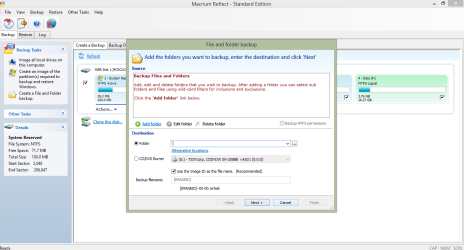
I've just looked at my paid version of Macrium Reflect, and it DOES indeed have a folder backup option.

1.png

2.PNG

3.PNG

It would be worth waiting for SiW2 to post about AOEMI first, then you can decide between Macrium or AOEMI (I suspect AOEMI might offer all this functionality in their free version)
 
Last edited:

My Computer

Computer type
PC/Desktop
Computer Manufacturer/Model Number
Golden Mk. I.4
OS
Windows 10 Pro x64 ; Xubuntu x64
CPU
Intel i7 860 @ 2.80 GHz O/C'ed to 4.0GHz
Motherboard
Gigabyte P55A-UD3R Rev.1. Award BIOS F13
Memory
16GB Corsair Vengance DDR3 @ 661 MHz Dual Channel (9-9-9-24)
Graphics Card(s)
EVGA NVidia GTX 560 1024MB
Sound Card
Realtek Integrated
Monitor(s) Displays
Dual Samsung SyncMaster 2494HS
Screen Resolution
1920*1080 and 1920*1080
Hard Drives
1*Samsung 840 EVO 120GB SSD;
1*OCZ Vertex 2 60GB SSD;
2*Samsung F3 SpinPoint 1TB in RAID0;
1*Samsung F1 SpinPoint 1TB;
2*Western Digital 1TB External USB 3.0
1*Western Digital 500GB External USB 3.0
1*Seagate 500GB External USB 2.0
PSU
Thermaltake ToughPower QFan 750W
Case
Thermaltake Element S VK60001W2Z
Cooling
Corsair H60 Water Cooling, 2*230mm and 2*80mm case fans
Keyboard
Logitech G110
Mouse
Logitech MX518
Back
Top