I guess I did not make my question clear enough. My question was "If I download & use the free version, can I do both a image backup & also backup data files to the same external drive or do I have to purchase the paid version to do this?" To clarify, does the free version allow you to do an image of the complete system for a compete restore of the disk if needed & but also provide a way to backup data files (not an image of data files) but a copy of the new, changed, deleted file, etc.
The free version of Macrium Reflect supports "system image" backups only. It does NOT provide selective folder/file "data backup" functionality. The
feature comparison chart shows that. The free version also does NOT get vendor support (by email or forum).
To get true selective folder/file "data backup" (allowing you to selectively backup only what folders/files you want from assorted drives, as well as to selectively recover folder(s)/file(s) if you need to without having to restore the entire drive from a "system image"), you need the paid non-free Standard version.
Furthermore, the paid version also includes "space management" functionality. This is "automatic pruning" of older generations, so that you can retain only as many versions of both "system image" and "data backups" that you want, and the next time you run the backup job to create a new version the oldest one will be automatically deleted. If you use the free version of the program this auto-pruning does not occur, so you'll have to manually do it yourself. This is a real convenience to have it done automatically, once you're in steady state with a regular backup regimen.
As far as the target output media for either "system image" or "data backup", most commonly you'd use an external USB 3.0 drive. You can obviously configure the output of your your backups to go wherever you want, but having two primary target folders (for the two types of backups) on the external drive makes common intuitive sense.
You should consider a backup regimen that provides adequate and sufficient protection and recovery capability to satisfy your own paranoia, or personal/professional requirements. We know we will cry if we lose priceless or irreplaceable personal or professional data, so anything that can be done that can pretty much guarantee that will not happen is what you should do. This can go to extremes of course, such as running TWO backups every time... to two separate output backup media, and then disconnecting the second external drive and bringing it to an external storage facility that is not in your home, etc. Up to you.
I, myself, run "system images" of the C-partition weekly on one desktop machine, and twice-weekly on my HTPC machine. I retain 5 generations of the once-weekly backups, and 10 generations of the twice-weekly backups.
Also, I honestly prefer the look and feel and overall feature list of another program named
NovaBACKUP (from NovaStor) for "data backup" of folders/files, as compared to the comparable folder/file capabilities of Macrium Reflect. So although I could have saved money by not buying NovaBACKUP, I've been using it ever since upgrading to Win7 back in 2009. I love it.
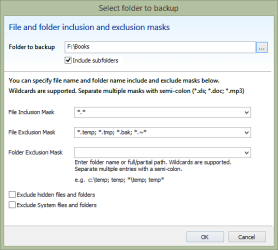
So, using NovaBACKUP (to write its "data backups" to the same external USB 3.0 drive I use for my "system image" backups out of Macrium Reflect Standard) I take monthly FULL backups of all my "data" (on C, as well as on all of my other multiple drives/partitions). I also take daily INCREMENTAL backups of the same "data". I retain 4 complete "monthly sets" (i.e. monthly FULL plus each of the daily INCREMENTAL backups for the rest of that month) of these "data backups".
NovaBACKUP has a wonderful "time-based restore" capability that allows you to pick the as-of date for recovery of folder/file data, which might exist on multiple backup datasets. You simply specify (through a time slider GUI) a particular as-of date (sliding backwards from "as of TODAY"), thus requesting the restore of "the most recent version on whatever backup dataset it resides on, that satisfies the as-of data specified". Newer versions on later backups are ignored, and older backups on earlier backups are not used. Whichever is the RIGHT backup dataset to satisfy your specified "most current version as-of this date" is selected by the program, automatically. You don't have to know or search for yourself... the program simply does it for you.
You get what you pay for, is my feeling. I will absolutely support "live" software products that have active support from the vendor, including fixes and enhancements. And for that, they must have money. And I will pay that money to them (including annual maintenance if they ask) to get the best product for my needs.
And in my opinion, Macrium Reflect Standard (which also includes vendor support, that the "free" version does not) is worth the $45 for a single license or $90 for four licenses. Its "system image" backups of my C-drive guarantee quick and easy recovery from a system disaster, or migration to new hardware (like SSD).
Also, in my opinion NovaBACKUP is absolutely worth the $50 for its "professional" license. Don't know how many times I've had to recover some lost or corrupted or unwittingly deleted folder/file over the years... probably very few. But just having it run automatically every night to do INCREMENTAL backups of any data I've created or updated that day, and also run automatically every month to do FULL backups of all of my data (just for having convenient recovery access to everything I have, even if it hasn't been updated or created recently so as to appear on some INCREMENTAL backup), again... I feel secure.
I also take DAT (tape) backups to my HP DAT160 drive every few months or so (again, using NovaBACKUP which supports DAT as a storage medium) just to have a secondary backup that sits in my drawer (or could be taken offsite conveniently) where it's not subject to electrical disturbances.
Again, Macrium Reflect Standard provides both "system image" and "data backup" capability, but I use only its "system image" functionality. Similarly, NovaBACKUP provides both "data backup" as well as "system image" capability, but I use only its "data backup" functionality. This is no problem or inconvenience, as both products provide automatic scheduling of jobs (to run weekly, monthly, daily, etc.) so once you set up the schedule for each backup stream for the two products, you really never have to think about it. They just automatically run overnight when they should, and I'm secure. There's no reason not to use two different but similar products if there's a difference between them, and some reason to justify it. The small additional dollar cost is irrelevant.
That's my story.



 Thanks Si!