which hard drive is windows booting from?

comfused

New member
Local time
9:11 PM
Messages
5
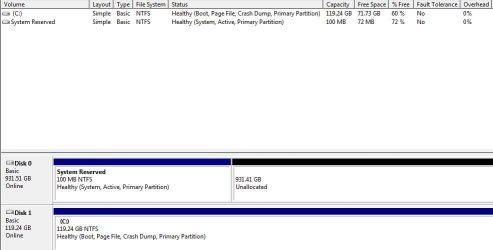
I just got done building my first computer! (12 gb ddr3 ram, i7 950, WD 1T HDD, 128gb SSD sata 3, radeon HD 6950) and I'm trying to figure out which drive windows 7 is booting from?
 

Attachments

  • Capture.JPG
    Capture.JPG
    40.8 KB · Views: 102

My Computer My Computer

OS
Windows 7 ultimate 64x
disk 1, however the boot partition is on disk 0, this is done for hardware reasons, as some systems will not see the bootmgr unless it's located on disk 0. This is a physical identification based on where the disk is plugged into the motherboard.
 

My Computer My Computer

Computer Manufacturer/Model Number
Insane hobo technologies. ;-)
OS
Windows 7 x64
CPU
Intel i7 2600k
Motherboard
Asrock z68 extreme 4 gen 3
Memory
G.skill Ripjaw 16gigs @ 1866
Graphics Card(s)
Nvidia gtx580 (evga)
Sound Card
Integrated HD audio + hdmi
Monitor(s) Displays
24" ASUS widescreen + 42" insignia
Screen Resolution
1080p (1920x1080)
Hard Drives
128 Samsung 830
256 Samsung 840
3 x 1tb storage drive (various)
1 western digital 1tb (eSATA)
1 Seagate 1tb (eSATA)
PSU
1 kilowatt SLI/Crossfire rated Silverstone modular
Case
NZXT Phantom + additional 220 fan
Cooling
Zalmann
Keyboard
Microsoft wireless 3000 (v2)
Mouse
MS - wireless 5000 (bluetrack)
Internet Speed
depends on if you ask me or my provider.
Other Info
The above information is provided as is, and the author assumes no responsibility for issues it may cause with your sanity or fanboyism.
Not really.

It is booting from Disk0 - you can change it if you like.

Just mark your C partition Active - use disk Management or a 3rd party partition app. = PW free is pretty good.

http://www.partitionwizard.com/

Then mark the 100mb system reserved partition Inactive - you will need to use Diskpart ( command line ) or a 3rd party partitioner - PW again.

Boot the 7 installation/recovery disc and run startup repair - probably need 3 runs.

If you can't be bothered with startup repair - it is quicker to open a command prompt and type:

bcdboot c:\windows /s c:

then press enter.

Reboot - you're done.
 

My Computers My Computers

System One System Two

  • Computer type
    PC/Desktop
    OS
    7 X64
    CPU
    i5 8400
    Motherboard
    gigabyte b365m ds3h
    Memory
    2x8gb 3200mhz
    Hard Drives
    various
    PSU
    pure power 11 400w cm
    Case
    Coolermaster
    Cooling
    cryorig m9i
  • Computer type
    PC/Desktop
    OS
    7x64
    CPU
    g5400
    Motherboard
    ga b365m ds3h
    Memory
    8gb ddr4 2400
    PSU
    xfx pro 450w
so to make it iniactive....
command prompt
diskpart
list disk
select 0?
inactive
exit

will this not make my second hdd inactive aswell?
 

My Computer My Computer

OS
Windows 7 ultimate 64x
Give the 100mb a drive letter in Disk Management e.g. S

Then from cmd prmpt

diskpart
sel vol S
inact
exi
 

My Computers My Computers

System One System Two

  • Computer type
    PC/Desktop
    OS
    7 X64
    CPU
    i5 8400
    Motherboard
    gigabyte b365m ds3h
    Memory
    2x8gb 3200mhz
    Hard Drives
    various
    PSU
    pure power 11 400w cm
    Case
    Coolermaster
    Cooling
    cryorig m9i
  • Computer type
    PC/Desktop
    OS
    7x64
    CPU
    g5400
    Motherboard
    ga b365m ds3h
    Memory
    8gb ddr4 2400
    PSU
    xfx pro 450w
once i do this, will i be reinstalling windows 7?
how do i make sure it goes on the ssd this time?
why under disk 1 (in comp mgmt) does it say Healthy (Boot, Page File, Active, Crash Dump, Primary partion) but the sys reserve is disk 0?

thanks
 

My Computer My Computer

OS
Windows 7 ultimate 64x
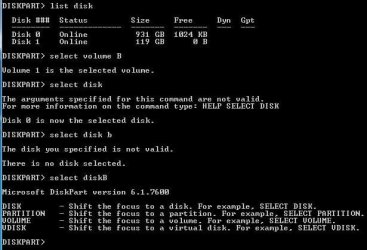
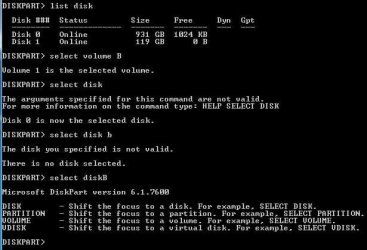
i tried diskpart....but
 

Attachments

  • Capture1.JPG
    Capture1.JPG
    8.4 KB · Views: 386
  • Capture2.JPG
    Capture2.JPG
    43.9 KB · Views: 29

My Computer My Computer

OS
Windows 7 ultimate 64x
You don't need to reinstall 7.

Do the commands in the earlier post.

Restart.

That's all.

There is no select disk in my earlier post - just do it exactly as written. Press Enter after each one.

diskpart ( you know how to do that )

sel vol S ( assuming you assigned S to the 100mb in Disk Management, or B if that is the letter you gave it.)

act

exi.

It's not hard.

BTW - looks like a great rig you built.:)
 

My Computers My Computers

System One System Two

  • Computer type
    PC/Desktop
    OS
    7 X64
    CPU
    i5 8400
    Motherboard
    gigabyte b365m ds3h
    Memory
    2x8gb 3200mhz
    Hard Drives
    various
    PSU
    pure power 11 400w cm
    Case
    Coolermaster
    Cooling
    cryorig m9i
  • Computer type
    PC/Desktop
    OS
    7x64
    CPU
    g5400
    Motherboard
    ga b365m ds3h
    Memory
    8gb ddr4 2400
    PSU
    xfx pro 450w
this is what i got
 

Attachments

  • Capture1.JPG
    Capture1.JPG
    8.4 KB · Views: 386
  • Capture2.JPG
    Capture2.JPG
    43.9 KB · Views: 28

My Computer My Computer

OS
Windows 7 ultimate 64x
I don't know why you are typing select disk.
 

My Computers My Computers

System One System Two

  • Computer type
    PC/Desktop
    OS
    7 X64
    CPU
    i5 8400
    Motherboard
    gigabyte b365m ds3h
    Memory
    2x8gb 3200mhz
    Hard Drives
    various
    PSU
    pure power 11 400w cm
    Case
    Coolermaster
    Cooling
    cryorig m9i
  • Computer type
    PC/Desktop
    OS
    7x64
    CPU
    g5400
    Motherboard
    ga b365m ds3h
    Memory
    8gb ddr4 2400
    PSU
    xfx pro 450w
Back
Top