
Which key is genuine and useful!

rraod

Dreamer!
Guru
Local time
11:45 PM
Messages
738
Location
Somewhere in the middle of Desert :-)
When I purchased Toshiba Laptop with windows 7 Home Premium, It came to me preactivated with SLP key.

There was also a key with COA sticker.

Now I have converted Home Premium to Ultimate with windows Anytime Upgrade key.

That means I have three keys. In case of reinstall which one to use? I am in a dillema!!! :sarc:

Can someone please clarify?
 

My Computer My Computer

Computer Manufacturer/Model Number
Toshiba Satellite P775-S7232
OS
MS Windows 7 Ultimate 64-bit SP1
CPU
i5-2410M 2.3GHz (2.9GHz Turbo-Boost) Sandy Bridge 32nm
Motherboard
Toshiba PHRAA ver. PSBY1U-00F003
Memory
4GB+4GB Samsung DDR3 PC3-10700 (1333 MHz)
Graphics Card(s)
Video Intel(R) HD Graphics Family, 1696MB available memory
Sound Card
Realtek High Definition Audio version=6.0.1.6323
Monitor(s) Displays
17.3 " Trubrite TFT LCD, LED Backlit
Screen Resolution
1600x900 32 bit, Native support for 720P content
Hard Drives
TOSHIBA MK6476GSXN
580.614 [GB] partitioned C: 80GB and D: 500GB with hidden recovery partitons.

Spare bay for 2nd HDD but no SATA connector :-(
PSU
Toshiba AC/DC Adapter
Case
Notebook
Cooling
Built-in Fan
Keyboard
Premium Raised Tile keyboard
Mouse
Logitech M215 wireless mouse
Internet Speed
Not fast enough
Other Info
Built-in Harman Kardon speakers with Dolby Advanced Audio, Waves MaxxAudio® 3. HDMI, 1xUSB3+3xUSB2 ports, WebCam, Battery life 4hrs 11mins, 4GB Readyboost SDHC card, WD My Book Essential Ext HDDs 2 TB, 2x1TB, My Passport SE 1TB and WDTV 1st Gen for Multimedia playing on a Sony Wega 32" LCD.
Recent addition to my toys are Asus Transformer Pad TF300T with 32GB onboard sd card + 32GB microsd card.
   Information
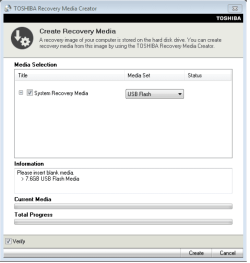
We always assume you have made your Recovery Disks using the OEM manufacturer's Recovery Media Creator app the first day you had your new PC.
& made the Startup Repair CD.
startup repair disc-create


Did you make the OEM manufacturer's Recovery Disks?

Toshiba USB.PNG

How to use Toshiba Recovery.
How to use the Toshiba HDD Recovery Utility

Reinstall with Toshiba Recovery Disks, than use Anytime Upgrade.
 

My Computer My Computer

OS
ME/XP/Vista/Win7
It depends on what you are using for install media when you reinstall Windows. If you use the recovery media it will use the SLP key and you won't be asked for a product key during installation. Once its restored to Home Premium you would use any time upgrade and enter your Ultimate key. If you have a universal install disk I would think you could just install Ultimate and enter your Ultimate product key when asked. The product code on the COA sticker has never been used and I believe by default will not activate on line. You would have to activate by phone if you use it. I would only use that as a last resort.
 

My Computer My Computer

Computer type
PC/Desktop
Computer Manufacturer/Model Number
Home Built
OS
Windows 10 Education 64 bit
CPU
AMD Phenom II X4 980 Black Edition Deneb 3.7GHz
Motherboard
Asus M4N68T-M V2 µATX Motherboard
Memory
8GB 4GBx2 Kingston PC10600 DDR3 1333 Memory
Graphics Card(s)
Zotac NVIDIA Geforce GT640 2 Gig DDR3 PCIe
Sound Card
VIA VT1708s High Definition Audio 8-channel Onboard
Monitor(s) Displays
22" LG E2242 1080p and 2 19" I-INC AG191D
Screen Resolution
1280x1024 - 1920x1080 - 1280x1024
Hard Drives
Crucial M100 256 GB SSD and 500 GB WD Blue SATA
PSU
Thermaltake TR 620
Case
Power Up Black ATX Mid-Tower Case
Cooling
Stock heatsink and fan
Keyboard
Logitech Wireless K350 Wave
Mouse
Logitech Wireless M570 Trackman Wheel
Internet Speed
80 Mbps Down 30 Mbps Up
Antivirus
Windows Defender
Browser
Internet Explorer 11
Other Info
HP DVD1040e Lightscribe - External USB2
If you have a universal install disk I would think you could just install Ultimate and enter your Ultimate product key when asked. The product code on the COA sticker has never been used and I believe by default will not activate on line. You would have to activate by phone if you use it. I would only use that as a last resort.

You cannot (as far as I know) use an Anytime Upgrade Key for a disk install :(
Even if you did, it would have to be by the double-install method, as there is nothing to upgrade from.
 

My Computer My Computer

Computer type
Laptop
Computer Manufacturer/Model Number
Asus K52F or Lenovo B51-80
OS
Win 7 x64 Home Premium (and x86 VirtualBox VM)/Win10
CPU
i3 370M/i7 6500U
Motherboard
Asus/Lenovo
Memory
8GB - finally :)/8GB
Graphics Card(s)
it's an i3, dude!/dual Intel&nVidia
Sound Card
onboard
Monitor(s) Displays
15.6" built-in
Screen Resolution
1366x768/1920x1080
Hard Drives
750GB Seagate internal
Sundry external drives attached to other computers on the local network
1TB SSD on the Lenovo
PSU
n/a
Internet Speed
as much as I can get - usually on a dongle/phone, so <1MB/s
Antivirus
MSE/Defender
Browser
IE11/12/Edge/Chrome/FF(if I must)
Image your system disc, then you wont need to worry about re-activation! ;)
 

My Computer My Computer

Computer type
PC/Desktop
Computer Manufacturer/Model Number
LENOVO K450 @3.0GHZ
OS
64-bit Windows 8.1 Pro
CPU
Core(TM) i5 CPU 4330 Haswell @ 3.20GHz
Motherboard
LENOVO
Memory
12.00 GB
Graphics Card(s)
Intel(R) HD Graphics
Sound Card
Intel HD integtrated
Monitor(s) Displays
HP 25' ISP Monitor
Screen Resolution
1900/1020
Hard Drives
(1) ST1000DM003-1CH162 (2) Generic STORAGE DEVICE USB Device (3) Generic STORAGE DEVICE USB Device
Internet Speed
100mb down/10mb up
If you have a universal install disk I would think you could just install Ultimate and enter your Ultimate product key when asked. The product code on the COA sticker has never been used and I believe by default will not activate on line. You would have to activate by phone if you use it. I would only use that as a last resort.

You cannot (as far as I know) use an Anytime Upgrade Key for a disk install :(
Even if you did, it would have to be by the double-install method, as there is nothing to upgrade from.

I was thinking If I originally have say Home Premium and latter on buy an off the shelf version of Ultimate. I can use anytime upgrade option and just enter the product code instead of installing Ultimate off of the DVD? Then latter on I can skip Home Premium and go right to Ultimate on a clean install. I didn't know there was a difference/restriction on the anytime upgrade key versus a normal product code. Other than not getting any install media with it that is.
 

My Computer My Computer

Computer type
PC/Desktop
Computer Manufacturer/Model Number
Home Built
OS
Windows 10 Education 64 bit
CPU
AMD Phenom II X4 980 Black Edition Deneb 3.7GHz
Motherboard
Asus M4N68T-M V2 µATX Motherboard
Memory
8GB 4GBx2 Kingston PC10600 DDR3 1333 Memory
Graphics Card(s)
Zotac NVIDIA Geforce GT640 2 Gig DDR3 PCIe
Sound Card
VIA VT1708s High Definition Audio 8-channel Onboard
Monitor(s) Displays
22" LG E2242 1080p and 2 19" I-INC AG191D
Screen Resolution
1280x1024 - 1920x1080 - 1280x1024
Hard Drives
Crucial M100 256 GB SSD and 500 GB WD Blue SATA
PSU
Thermaltake TR 620
Case
Power Up Black ATX Mid-Tower Case
Cooling
Stock heatsink and fan
Keyboard
Logitech Wireless K350 Wave
Mouse
Logitech Wireless M570 Trackman Wheel
Internet Speed
80 Mbps Down 30 Mbps Up
Antivirus
Windows Defender
Browser
Internet Explorer 11
Other Info
HP DVD1040e Lightscribe - External USB2
If you have a universal install disk I would think you could just install Ultimate and enter your Ultimate product key when asked. The product code on the COA sticker has never been used and I believe by default will not activate on line. You would have to activate by phone if you use it. I would only use that as a last resort.

You cannot (as far as I know) use an Anytime Upgrade Key for a disk install :(
Even if you did, it would have to be by the double-install method, as there is nothing to upgrade from.

I was thinking If I originally have say Home Premium and latter on buy an off the shelf version of Ultimate. I can use anytime upgrade option and just enter the product code instead of installing Ultimate off of the DVD? Then latter on I can skip Home Premium and go right to Ultimate on a clean install. I didn't know there was a difference/restriction on the anytime upgrade key versus a normal product code. Other than not getting any install media with it that is.

If you buy an Upgrade or Full Retail version of Ultimate, you can use the Anytime Upgrade route to upgrade an existing installation.
You can obviously clean install the Full retail version if necessary.
You can also clean install the Upgrade, using the double-install method - PROVIDING you have a valid license for a full version of Windows XP/Vista/7 on that machine.

If you buy an Anytime Upgrade, it can ONLY upgrade an existing valid installation of Windows 7. You would therefore have to reinstall the original OS and ensure it's activated, and then do the upgrade (actually less hassle for most people than an clean install using an Upgrade disk).
 

My Computer My Computer

Computer type
Laptop
Computer Manufacturer/Model Number
Asus K52F or Lenovo B51-80
OS
Win 7 x64 Home Premium (and x86 VirtualBox VM)/Win10
CPU
i3 370M/i7 6500U
Motherboard
Asus/Lenovo
Memory
8GB - finally :)/8GB
Graphics Card(s)
it's an i3, dude!/dual Intel&nVidia
Sound Card
onboard
Monitor(s) Displays
15.6" built-in
Screen Resolution
1366x768/1920x1080
Hard Drives
750GB Seagate internal
Sundry external drives attached to other computers on the local network
1TB SSD on the Lenovo
PSU
n/a
Internet Speed
as much as I can get - usually on a dongle/phone, so <1MB/s
Antivirus
MSE/Defender
Browser
IE11/12/Edge/Chrome/FF(if I must)
With Anytime upgrade product code, you can only upgrade from Windows 7 desktop.

But you can use Retail full/upgrade product code, in the Anytime upgrade App.
 

My Computer My Computer

OS
ME/XP/Vista/Win7
Thanks everyone for the response. I have created the OEM recovery media disks as soon as I got the laptop.

But I am hesitant to use this media, as these recovery disks contain lot of bloatware from Toshiba. I am not sure whether I can do a clean install of Home Premium with these disks? I wanted to do a clean install of Windows 7 and then selectively install the needed software.

The two possibilities I am exploring are

1. Clean install Windows 7 home premium without bloatware and install all the necessary software. As I am in Saudi Arabia, I prefer to activate it online and not to call Microsoft ( a hassle here).

I have a universal windows 7 ISO burned on a DVD. I also have the SLP key of Home Premium for Toshiba. My question is whether I can clean install Home Premium with this DVD and use the SLP key, which will activate the windows automatically (will it do offline or do I have to get online and activate it?).

I do not want to use the COA serial no. which requires me to call Microsoft on phone (:rolleyes:).

Once windows is installed, use the Windows 7 Anytime Upgrade key to convert Home Premium to Ultimate like I did before.

2. Directly install windows 7 Ultimate through clean install using the Anytime Upgrade key. Is double install method means initially Home Premium and then Ultimate?
 

My Computer My Computer

Computer Manufacturer/Model Number
Toshiba Satellite P775-S7232
OS
MS Windows 7 Ultimate 64-bit SP1
CPU
i5-2410M 2.3GHz (2.9GHz Turbo-Boost) Sandy Bridge 32nm
Motherboard
Toshiba PHRAA ver. PSBY1U-00F003
Memory
4GB+4GB Samsung DDR3 PC3-10700 (1333 MHz)
Graphics Card(s)
Video Intel(R) HD Graphics Family, 1696MB available memory
Sound Card
Realtek High Definition Audio version=6.0.1.6323
Monitor(s) Displays
17.3 " Trubrite TFT LCD, LED Backlit
Screen Resolution
1600x900 32 bit, Native support for 720P content
Hard Drives
TOSHIBA MK6476GSXN
580.614 [GB] partitioned C: 80GB and D: 500GB with hidden recovery partitons.

Spare bay for 2nd HDD but no SATA connector :-(
PSU
Toshiba AC/DC Adapter
Case
Notebook
Cooling
Built-in Fan
Keyboard
Premium Raised Tile keyboard
Mouse
Logitech M215 wireless mouse
Internet Speed
Not fast enough
Other Info
Built-in Harman Kardon speakers with Dolby Advanced Audio, Waves MaxxAudio® 3. HDMI, 1xUSB3+3xUSB2 ports, WebCam, Battery life 4hrs 11mins, 4GB Readyboost SDHC card, WD My Book Essential Ext HDDs 2 TB, 2x1TB, My Passport SE 1TB and WDTV 1st Gen for Multimedia playing on a Sony Wega 32" LCD.
Recent addition to my toys are Asus Transformer Pad TF300T with 32GB onboard sd card + 32GB microsd card.
I have a universal windows 7 ISO burned on a DVD. I also have the SLP key of Home Premium for Toshiba. My question is whether I can clean install Home Premium with this DVD and use the SLP key, which will activate the windows automatically (will it do offline or do I have to get online and activate it?).

ONLY with the Toshiba Recovery Disk/s.
 

My Computer My Computer

OS
ME/XP/Vista/Win7
I have a universal windows 7 ISO burned on a DVD. I also have the SLP key of Home Premium for Toshiba. My question is whether I can clean install Home Premium with this DVD and use the SLP key, which will activate the windows automatically (will it do offline or do I have to get online and activate it?).

ONLY with the Toshiba Recovery Disk/s.


....and on the Toshiba machine
 

My Computer My Computer

Computer type
Laptop
Computer Manufacturer/Model Number
Asus K52F or Lenovo B51-80
OS
Win 7 x64 Home Premium (and x86 VirtualBox VM)/Win10
CPU
i3 370M/i7 6500U
Motherboard
Asus/Lenovo
Memory
8GB - finally :)/8GB
Graphics Card(s)
it's an i3, dude!/dual Intel&nVidia
Sound Card
onboard
Monitor(s) Displays
15.6" built-in
Screen Resolution
1366x768/1920x1080
Hard Drives
750GB Seagate internal
Sundry external drives attached to other computers on the local network
1TB SSD on the Lenovo
PSU
n/a
Internet Speed
as much as I can get - usually on a dongle/phone, so <1MB/s
Antivirus
MSE/Defender
Browser
IE11/12/Edge/Chrome/FF(if I must)
I do believe the SLP key by itself is useless. There is more to SLP activation than just having the key. There are some extra added bits on OEM branded install media. SLP installs don't activate online and authenticate more than just the product code used. Otherwise millions of people could use that key and get a free upgrade to Ultimate.
 

My Computer My Computer

Computer type
PC/Desktop
Computer Manufacturer/Model Number
Home Built
OS
Windows 10 Education 64 bit
CPU
AMD Phenom II X4 980 Black Edition Deneb 3.7GHz
Motherboard
Asus M4N68T-M V2 µATX Motherboard
Memory
8GB 4GBx2 Kingston PC10600 DDR3 1333 Memory
Graphics Card(s)
Zotac NVIDIA Geforce GT640 2 Gig DDR3 PCIe
Sound Card
VIA VT1708s High Definition Audio 8-channel Onboard
Monitor(s) Displays
22" LG E2242 1080p and 2 19" I-INC AG191D
Screen Resolution
1280x1024 - 1920x1080 - 1280x1024
Hard Drives
Crucial M100 256 GB SSD and 500 GB WD Blue SATA
PSU
Thermaltake TR 620
Case
Power Up Black ATX Mid-Tower Case
Cooling
Stock heatsink and fan
Keyboard
Logitech Wireless K350 Wave
Mouse
Logitech Wireless M570 Trackman Wheel
Internet Speed
80 Mbps Down 30 Mbps Up
Antivirus
Windows Defender
Browser
Internet Explorer 11
Other Info
HP DVD1040e Lightscribe - External USB2
Jumanji, if you copy the $OEM$ folder and ei.cfg file from the sources folder on the Dell disk to the new sp1 disk, the sp1 disk should now do the OEM SLP activation like the original Dell disk did. ;) Any custom Dell wallpapers, screen savers, etc, that were on the original Dell disk should transfer too. :)
 

My Computer My Computer

Computer type
PC/Desktop
Computer Manufacturer/Model Number
Home Built
OS
Windows 10 Education 64 bit
CPU
AMD Phenom II X4 980 Black Edition Deneb 3.7GHz
Motherboard
Asus M4N68T-M V2 µATX Motherboard
Memory
8GB 4GBx2 Kingston PC10600 DDR3 1333 Memory
Graphics Card(s)
Zotac NVIDIA Geforce GT640 2 Gig DDR3 PCIe
Sound Card
VIA VT1708s High Definition Audio 8-channel Onboard
Monitor(s) Displays
22" LG E2242 1080p and 2 19" I-INC AG191D
Screen Resolution
1280x1024 - 1920x1080 - 1280x1024
Hard Drives
Crucial M100 256 GB SSD and 500 GB WD Blue SATA
PSU
Thermaltake TR 620
Case
Power Up Black ATX Mid-Tower Case
Cooling
Stock heatsink and fan
Keyboard
Logitech Wireless K350 Wave
Mouse
Logitech Wireless M570 Trackman Wheel
Internet Speed
80 Mbps Down 30 Mbps Up
Antivirus
Windows Defender
Browser
Internet Explorer 11
Other Info
HP DVD1040e Lightscribe - External USB2
Thanks for the info, alphanumeric. Good to know that. (The Dell disk does not have any other customisation other than a) built-in OEM-SLP activation and b) Multilanguage. It is some 5.2GB)

I presume that most OEMs will only send the Recovery Disks and not the OEM Reinstall Disk like Dell.


It is as good as having an OEM Reinstall Disk.
 
Last edited by a moderator:

My Computer My Computer

OS
Windows 7 Home Premium 32 bit
Thanks for the info, alphanumeric. Good to know that. (The Dell disk does not have any other customisation other than a) built-in OEM-SLP activation and b) Multilanguage. It is some 5.2GB)

I presume that most OEMs will only send the Recovery Disks and not the OEM Reinstall Disk like Dell.

It would seem that that is the way things are going. My theory is its to reduce pirating windows. You are pretty limited to what you can do with a recovery set but not so much with actual OEM branded install media. I won't say anymore because I don't want to give people any ideas, but thats my theory as to why.
 

My Computer My Computer

Computer type
PC/Desktop
Computer Manufacturer/Model Number
Home Built
OS
Windows 10 Education 64 bit
CPU
AMD Phenom II X4 980 Black Edition Deneb 3.7GHz
Motherboard
Asus M4N68T-M V2 µATX Motherboard
Memory
8GB 4GBx2 Kingston PC10600 DDR3 1333 Memory
Graphics Card(s)
Zotac NVIDIA Geforce GT640 2 Gig DDR3 PCIe
Sound Card
VIA VT1708s High Definition Audio 8-channel Onboard
Monitor(s) Displays
22" LG E2242 1080p and 2 19" I-INC AG191D
Screen Resolution
1280x1024 - 1920x1080 - 1280x1024
Hard Drives
Crucial M100 256 GB SSD and 500 GB WD Blue SATA
PSU
Thermaltake TR 620
Case
Power Up Black ATX Mid-Tower Case
Cooling
Stock heatsink and fan
Keyboard
Logitech Wireless K350 Wave
Mouse
Logitech Wireless M570 Trackman Wheel
Internet Speed
80 Mbps Down 30 Mbps Up
Antivirus
Windows Defender
Browser
Internet Explorer 11
Other Info
HP DVD1040e Lightscribe - External USB2
Back
Top