Which OS should I get?

paradox13

New member
Local time
12:43 PM
Messages
12
Location
Lubbock Tx
I am going to be building a gaming computer in the near future and I was wondering which OS I should get. Someone suggested that I use Microsoft Windows 7 Professional SP1 64-bit - OEM. I was wondering if this was the way to go? I understand that this OS is good for only 1 system and if the need arises to change the Mobo that I will have to purchase a new OS for it. Any help would be great:)
 

My Computer

Computer Manufacturer/Model Number
Toshiba L655-S5154 Laptop
OS
Windows 7 Home Premium 64bit SP1
CPU
Stock
Motherboard
Stock
Memory
Stock
Graphics Card(s)
Stock
Sound Card
Stock
Monitor(s) Displays
Stock
Hard Drives
Stock
PSU
Stock
Case
Stock
Cooling
Stock
Keyboard
Logitech K260 wireless
Mouse
Logitech K260 wireless
Most people who choose the OEM version do so because it can be had for a lower price. It is really meant for system builders, and has it's drawbacks, as you mentioned. I think most will recommend getting a full retail version.

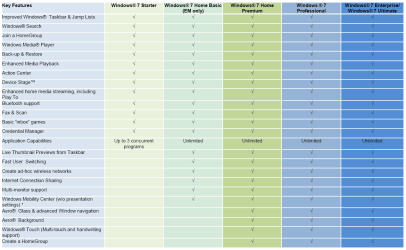
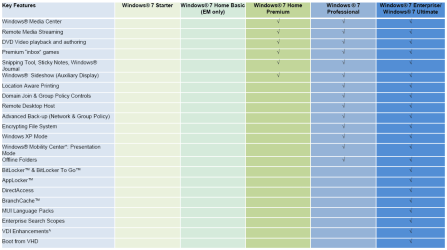
I think you need to decide which features are important to you as far as selection a version

Compare Windows - Microsoft Windows

win71.PNG

win72.PNG

I would recommend the x64 version of whichever flavor you do choose.

A Guy
 

My Computer

Computer type
PC/Desktop
OS
Windows 10 Home x64
CPU
INTEL Core i5-750 Quad-Core 3.37GHz
Motherboard
ASUS P7P55D
Memory
HyperX Fury Black Series 8GB (2 x 4GB) 1866Mhz
Graphics Card(s)
EVGA GeForce GTX 750 Superclocked 1GB 128-Bit GDDR5
Monitor(s) Displays
LG 32MA68HY 32" IPS
Screen Resolution
1920 x 1080
Hard Drives
Samsung 840 Evo 120GB, SEAGATE 500GB Barracuda® 7200.12, SATA 3 Gb/s, 7200 RPM, 16MB cache
PSU
ANTEC TruePower New TP-550, 80 PLUS, 550W
Case
ANTEC Three Hundred Illusion
Cooling
COOLER MASTER Hyper 212 Plus, 4 x 120mm 1 x 140mm Noctua's
Internet Speed
85 + Mbps
Antivirus
Avast
Browser
Vivaldi
I would recommend the x64

Yes a 64 bit is better as it can handle larger amount of RAM which is needed for gaming....
 

My Computer

Computer Manufacturer/Model Number
Lenovo Ideapad Y550 (4186)
OS
Windows 7 Ultimate x64 SP1 / Ubuntu 12.04.3 x64
CPU
Intel Core 2 Duo 2.20 Ghz
Motherboard
LENOVO KIWB1 (U2E1)
Memory
4.0GB Dual-Channel DDR3 @ 398MHz
Graphics Card(s)
NVIDIA GeForce GT 240M 1GB
Sound Card
Realtek High Definition Audio
Monitor(s) Displays
15 inch (1366x768@60Hz)
Screen Resolution
1366*768
Hard Drives
320GB Hitachi HITACHI HTS545032B9A300 (SATA)
Keyboard
Build In
Mouse
Touchpad
Internet Speed
30 KBps (Dial up)
Buying a retail version has benefits in that it can be transferred to a different computer without a problem providing you have uninstalled it from the old one first.

Of the different versions I think Professional is the best choice unless you want things like Bitlocker drive encryption and the multi-language GUI, which will mean buying Ultimate if you do.

As already mentioned, 64-bit is the way to go if your computer's CPU supports it so on balance it would appear that Windows 7 Professional 64-bit is probably your best bet.

However, if you don't need to be joining a Domain or don't want to use XP Mode you will save money by buying Windows 7 Home Premium 64-bit.

Whatever you do, don't go for the Starter or Basic versions.
 

My Computer

Computer Manufacturer/Model Number
HP Pavilion Elite 495UK
OS
Windows 7 Ultimate SP1 64-Bit
CPU
Intel Core i7 870 @ 2.93GHz
Motherboard
MSI 2A9C (CPU1)
Memory
8Gb Dual-Channel DDR3 @ 664MHz
Graphics Card(s)
nVidia GeForce GTX 460 1024MB dedicated RAM
Sound Card
Realtek HD Audio
Monitor(s) Displays
HP2310i
Screen Resolution
1920 x 1080
Hard Drives
1x1954GB Hitachi HDS22020ALA 330 (RAID), 1x1954GB Hitachi External for backup and storage
PSU
460W
Case
HP Elite
Cooling
Air cooled
Keyboard
Logitech K750 solar-powered keyboard
Mouse
Logitech Wireless M180 mouse
Internet Speed
2Mb
Other Info
Pure Avanti Flow Internet Radio with iPod Dock, 64Gb iPod, HP USB Speakers, Sony MDR-V500 Headphones, Sony Vaio F-Series Laptop
Just to muddy the waters:

Is it OK to use OEM Windows on your own PC? Don't ask Microsoft | ZDNet

Apparently, the "system builder" OEM license is intended only for use on systems for resale. You aren't supposed to use it on a system that you'll keep. I am unaware of any enforcement of this, though.

That said, online retailers like Newegg will cheerfully sell you a system builder copy by itself, not bundled with any hardware.

The Home Premium version is adequate for most people. Professional or above is needed if you need to join a domain (whatever that means), more than 16GB of RAM, or two physical CPU sockets.
 

My Computer

Computer Manufacturer/Model Number
homegrown
OS
Windows 7 Pro X64 SP1
CPU
Intel Core I7-3930k
Motherboard
Asus P9X79 Pro
Memory
16 GB Gskill DDR3-2133
Graphics Card(s)
eVGA GTX680
Sound Card
Creative X-Fi Titanium
Monitor(s) Displays
As PA246Q
Screen Resolution
1920 X 1200
Hard Drives
Corsair Force GT, 120 GB
WDC 1.5TB Caviar Black
PSU
PCP&C Silencer 750 Crossfire
Case
Silverstone FT02
Cooling
Noctua NH-D14
Keyboard
cheap Logitech USB
Mouse
Microsoft Intellimouse Explorer (old optical) USB
Internet Speed
6Mb cable
Other Info
Pioneer BDR-205
Samsung SH-203B
Monsoon 5.1 speakers
I was under the impression that a retail boxed copy includes both bit versions.

Oem copy might only have one bit version dvd to save a few cents.

However the product key is valid for either 32 or 64 bit o/s.


Yes a 64 bit is better as it can handle larger amount of RAM which is needed for gaming....

Is it, where did you hear that?
 

My Computers

System One System Two

  • Computer type
    PC/Desktop
    OS
    7 X64
    CPU
    i5 8400
    Motherboard
    gigabyte b365m ds3h
    Memory
    2x8gb 3200mhz
    Hard Drives
    various
    PSU
    pure power 11 400w cm
    Case
    Coolermaster
    Cooling
    cryorig m9i
  • Computer type
    PC/Desktop
    OS
    7x64
    CPU
    g5400
    Motherboard
    ga b365m ds3h
    Memory
    8gb ddr4 2400
    PSU
    xfx pro 450w
This is the build that I'm going with:

Mobo: Gigabyte GA-Z68XP-UD3P
CPU: Intel Core i5-2500K Sandy Bridge 3.3GHz (3.7GHz Turbo Boost) LGA 1155 95W Quad-Core
GPU: Sapphire Radeon 7850 2GB
RAM: G.Skill Ripjaws X Series 8GB
PSU: Corsair Enthusiast Series TX750 V2 750W
Optical: LG BluRay burner
Hard Drives:
OCZ Agility 3 AGT3-25SAT3-120G SSD for OS and apps
Samsung EcoGreen F4 HD204UI 2TB for Storage
Case: Antec Twelve Hundred V3
Monitor: ASUS VH232H

Would Home Premium be good enough for this, and how do you get SP1?
 

My Computer

Computer Manufacturer/Model Number
Toshiba L655-S5154 Laptop
OS
Windows 7 Home Premium 64bit SP1
CPU
Stock
Motherboard
Stock
Memory
Stock
Graphics Card(s)
Stock
Sound Card
Stock
Monitor(s) Displays
Stock
Hard Drives
Stock
PSU
Stock
Case
Stock
Cooling
Stock
Keyboard
Logitech K260 wireless
Mouse
Logitech K260 wireless

My Computer

Computer Manufacturer/Model Number
HP Pavilion Elite 495UK
OS
Windows 7 Ultimate SP1 64-Bit
CPU
Intel Core i7 870 @ 2.93GHz
Motherboard
MSI 2A9C (CPU1)
Memory
8Gb Dual-Channel DDR3 @ 664MHz
Graphics Card(s)
nVidia GeForce GTX 460 1024MB dedicated RAM
Sound Card
Realtek HD Audio
Monitor(s) Displays
HP2310i
Screen Resolution
1920 x 1080
Hard Drives
1x1954GB Hitachi HDS22020ALA 330 (RAID), 1x1954GB Hitachi External for backup and storage
PSU
460W
Case
HP Elite
Cooling
Air cooled
Keyboard
Logitech K750 solar-powered keyboard
Mouse
Logitech Wireless M180 mouse
Internet Speed
2Mb
Other Info
Pure Avanti Flow Internet Radio with iPod Dock, 64Gb iPod, HP USB Speakers, Sony MDR-V500 Headphones, Sony Vaio F-Series Laptop
From looking at the comparison chart at the link A Guy gave you, Windows Home Premium would meet your needs, IMO. However, I think a lot of gamers use Win7 Professional (or Ultimate).
You forum members who are gamers please correct me if I am wrong. I myself am not a gamer.

As for service packs you receive them via Windows updates.

If you have any old programs or hardware that can only be operated using WinXP I suggest you consider nothing less than Windows Professional.

Here is a link with info concerning Windows XP Mode

http://www.microsoft.com/windows/virtual-pc/default.aspx
 

My Computer

Computer Manufacturer/Model Number
Deviantsystems
OS
Win7 Ultimate x64
CPU
Intel Core i7 950 (4x 3066 MHz with HT) Quad Core
Motherboard
Asus P6X58D-E
Memory
6GB DDR3 1333Mhz
Graphics Card(s)
Nvidia GTS 450 (1024MB GDDR5 | DX 11)
Sound Card
Intel HD Audio via Realtek ALC889 with 8-channel support
Monitor(s) Displays
Sony Bravia 32"
Screen Resolution
1080i, x1768x992
Hard Drives
2x WD 1TB 7200 RPM Sata
PSU
OCZ ModXStream Pro 600W 80+
Case
Lian Li PC-7FN
Cooling
Processor cooling: Scythe Big Shuriken SCBSK-1000
Keyboard
Microsoft Ergonomic
Mouse
Logitec Trackball
This is the build that I'm going with:

Mobo: Gigabyte GA-Z68XP-UD3P
CPU: Intel Core i5-2500K Sandy Bridge 3.3GHz (3.7GHz Turbo Boost) LGA 1155 95W Quad-Core
GPU: Sapphire Radeon 7850 2GB
RAM: G.Skill Ripjaws X Series 8GB
PSU: Corsair Enthusiast Series TX750 V2 750W
Optical: LG BluRay burner
Hard Drives:
OCZ Agility 3 AGT3-25SAT3-120G SSD for OS and apps
Samsung EcoGreen F4 HD204UI 2TB for Storage
Case: Antec Twelve Hundred V3
Monitor: ASUS VH232H

Would Home Premium be good enough fo

this, and how do you get SP1?

Very nice.

I think that Home Premium would be fine. As you've specified 8GB of RAM, you need the X64 version.

I neglected to mention XP Mode (a copy of XP running in a virtual machine), and that it's only free with Pro an Ultimate. Thanks to C32C3 for that. I can't answer as to whether you'd want that.

The best way to get SP1 is to obtain a copy of Windows that includes it. Windows 7 appears to not permit a real "slipstream" like XP did: you can integrate SP1 into the installer, but the result can't be used to repair Win7 with SP1.

If you buy a system builder (OEM) copy, you'll only receive the bit depth that you order (32 or 64 bit). Retail copies include both. I have read that the OEM key will activate both bit depth versions, regardless of which one you've purchased. There are non-pirated versions of the .iso files for the DVD online (see mydigitallife for links to Digital River, for example), but you'll want to be careful about that sort of thing.

My original copies of Win7 were upgrades purchased from the Microsoft Store back in the summer of 09 (prerelease deal). MS allows me to download fresh copies, and they include SP1. That's one advantage to dealing with the MS Store.
 

My Computer

Computer Manufacturer/Model Number
homegrown
OS
Windows 7 Pro X64 SP1
CPU
Intel Core I7-3930k
Motherboard
Asus P9X79 Pro
Memory
16 GB Gskill DDR3-2133
Graphics Card(s)
eVGA GTX680
Sound Card
Creative X-Fi Titanium
Monitor(s) Displays
As PA246Q
Screen Resolution
1920 X 1200
Hard Drives
Corsair Force GT, 120 GB
WDC 1.5TB Caviar Black
PSU
PCP&C Silencer 750 Crossfire
Case
Silverstone FT02
Cooling
Noctua NH-D14
Keyboard
cheap Logitech USB
Mouse
Microsoft Intellimouse Explorer (old optical) USB
Internet Speed
6Mb cable
Other Info
Pioneer BDR-205
Samsung SH-203B
Monsoon 5.1 speakers
Thanks to evryone for the info. I really doubt that I'll be joining a network so it looks like I can save myself $100 and go with Home Premiun x64 :)
 

My Computer

Computer Manufacturer/Model Number
Toshiba L655-S5154 Laptop
OS
Windows 7 Home Premium 64bit SP1
CPU
Stock
Motherboard
Stock
Memory
Stock
Graphics Card(s)
Stock
Sound Card
Stock
Monitor(s) Displays
Stock
Hard Drives
Stock
PSU
Stock
Case
Stock
Cooling
Stock
Keyboard
Logitech K260 wireless
Mouse
Logitech K260 wireless
I would recommend the x64

Yes a 64 bit is better as it can handle larger amount of RAM which is needed for gaming....

Hi there : Larger amount of RAM needed for Gaming : Why please ?????

64 bit is the OS of choice I agree -- but GAMING per se doesn't actually require large amounts of RAM

For Gaming what IS mega important is a DECENT GPU where most of the video and rendering processes are off loaded from the main processor and system RAM anyway -- AND the fastest DISKS you can find as well -- not HUGE disks but FAST one's -- I'd recommend an SSD for the main OS.

Processor power IS important too --but if you have the top of the line GPU the processor plays less importance than you might think. Still get a QUAD anyway.

Obviously you must have some sort of sensible size RAM -- 8GB is cheap enough -- but don't go Bonkers with RAM while neglecting the other parts of the system.

Cheers
jimbo
 

My Computer

Computer type
PC/Desktop
Computer Manufacturer/Model Number
Custom built, several laptops HP/ASUS
OS
Linux CENTOS 7 / various Windows OS'es and servers
CPU
Intel i7 Intel i5
Memory
8GB, 16GB
Graphics Card(s)
On Motherboard
Sound Card
Realtek HD audio
Monitor(s) Displays
Apple Cinema display, Samsung LCD
Screen Resolution
1920 X 1080
Hard Drives
4 X 1TB SATA
Mouse
Toshiba wireless laser
Internet Speed
> 20MB up
Your build looks killer, your choices are good, and I'd agree, Windows Seven Home Premium x64 looks like the choice. be sure to share your build with us in the Show us your rig thread :thumbsup:

A Guy
 

My Computer

Computer type
PC/Desktop
OS
Windows 10 Home x64
CPU
INTEL Core i5-750 Quad-Core 3.37GHz
Motherboard
ASUS P7P55D
Memory
HyperX Fury Black Series 8GB (2 x 4GB) 1866Mhz
Graphics Card(s)
EVGA GeForce GTX 750 Superclocked 1GB 128-Bit GDDR5
Monitor(s) Displays
LG 32MA68HY 32" IPS
Screen Resolution
1920 x 1080
Hard Drives
Samsung 840 Evo 120GB, SEAGATE 500GB Barracuda® 7200.12, SATA 3 Gb/s, 7200 RPM, 16MB cache
PSU
ANTEC TruePower New TP-550, 80 PLUS, 550W
Case
ANTEC Three Hundred Illusion
Cooling
COOLER MASTER Hyper 212 Plus, 4 x 120mm 1 x 140mm Noctua's
Internet Speed
85 + Mbps
Antivirus
Avast
Browser
Vivaldi
Thanks to evryone for the info. I really doubt that I'll be joining a network so it looks like I can save myself $100 and go with Home Premiun x64 :)

You're very welcome and a wise choice if I may say so.

Just goes to prove that a bit if research is invaluable if you're looking to save some money.

The $100 you've saved on the operating system could always be put to anything else you need for your new build.

Anyway, do keep us posted as to how things go. :)
 

My Computer

Computer Manufacturer/Model Number
HP Pavilion Elite 495UK
OS
Windows 7 Ultimate SP1 64-Bit
CPU
Intel Core i7 870 @ 2.93GHz
Motherboard
MSI 2A9C (CPU1)
Memory
8Gb Dual-Channel DDR3 @ 664MHz
Graphics Card(s)
nVidia GeForce GTX 460 1024MB dedicated RAM
Sound Card
Realtek HD Audio
Monitor(s) Displays
HP2310i
Screen Resolution
1920 x 1080
Hard Drives
1x1954GB Hitachi HDS22020ALA 330 (RAID), 1x1954GB Hitachi External for backup and storage
PSU
460W
Case
HP Elite
Cooling
Air cooled
Keyboard
Logitech K750 solar-powered keyboard
Mouse
Logitech Wireless M180 mouse
Internet Speed
2Mb
Other Info
Pure Avanti Flow Internet Radio with iPod Dock, 64Gb iPod, HP USB Speakers, Sony MDR-V500 Headphones, Sony Vaio F-Series Laptop
Where do I find the Show Us Your Rig thread?
 

My Computer

Computer Manufacturer/Model Number
Toshiba L655-S5154 Laptop
OS
Windows 7 Home Premium 64bit SP1
CPU
Stock
Motherboard
Stock
Memory
Stock
Graphics Card(s)
Stock
Sound Card
Stock
Monitor(s) Displays
Stock
Hard Drives
Stock
PSU
Stock
Case
Stock
Cooling
Stock
Keyboard
Logitech K260 wireless
Mouse
Logitech K260 wireless

My Computer

Computer type
PC/Desktop
OS
Windows 10 Home x64
CPU
INTEL Core i5-750 Quad-Core 3.37GHz
Motherboard
ASUS P7P55D
Memory
HyperX Fury Black Series 8GB (2 x 4GB) 1866Mhz
Graphics Card(s)
EVGA GeForce GTX 750 Superclocked 1GB 128-Bit GDDR5
Monitor(s) Displays
LG 32MA68HY 32" IPS
Screen Resolution
1920 x 1080
Hard Drives
Samsung 840 Evo 120GB, SEAGATE 500GB Barracuda® 7200.12, SATA 3 Gb/s, 7200 RPM, 16MB cache
PSU
ANTEC TruePower New TP-550, 80 PLUS, 550W
Case
ANTEC Three Hundred Illusion
Cooling
COOLER MASTER Hyper 212 Plus, 4 x 120mm 1 x 140mm Noctua's
Internet Speed
85 + Mbps
Antivirus
Avast
Browser
Vivaldi
This is the build that I'm going with:

Mobo: Gigabyte GA-Z68XP-UD3P
CPU: Intel Core i5-2500K Sandy Bridge 3.3GHz (3.7GHz Turbo Boost) LGA 1155 95W Quad-Core
GPU: Sapphire Radeon 7850 2GB
RAM: G.Skill Ripjaws X Series 8GB
PSU: Corsair Enthusiast Series TX750 V2 750W
Optical: LG BluRay burner
Hard Drives:
OCZ Agility 3 AGT3-25SAT3-120G SSD for OS and apps
Samsung EcoGreen F4 HD204UI 2TB for Storage
Case: Antec Twelve Hundred V3
Monitor: ASUS VH232H

Would Home Premium be good enough for this, and how do you get SP1?
yes home premium is good enough
 

My Computer

Computer type
PC/Desktop
Computer Manufacturer/Model Number
custom build
OS
Windows 10 64bit
CPU
AMD Phenom II X4 925 (Deneb)(2.8GHz) OC 3.4GHz
Motherboard
M5A78L-MLX Plus
Memory
Corsair Vengeance DDR3 4GBX2 (8192MB)
Graphics Card(s)
XFX HD 6870 1GB (OC)- 940MHz core, mem 1150MHz
Monitor(s) Displays
Vizio 26' 1920x1080 / Acer 1336x768
Screen Resolution
1920x1080 60Hz /1336x768
Hard Drives
Kingston Digital 60GB SSDNow V300/500gb HDD Western Digital 7200rpm (/WD 160GB HDD 7200rpm
PSU
CORSAIR CX600 600w
Case
AZZA Orion 202 EVO
Cooling
cooler master hyper TX3 cpu cooler
Keyboard
Razer DeathStalker
Mouse
Logitech Optical Gaming Mouse G400
Antivirus
Defualt on win 10
Browser
Firefox
Other Info
cpu is overclocked in bios
Try to use 64 bit because i think its better as it can give extra speed to your System while you play game or something else....
 

My Computer

OS
Windows 7
Thank you, I will definitely be going with x64. I looked in to the retail version and it comes with both x32 and x64 to choose from:)
 

My Computer

Computer Manufacturer/Model Number
Toshiba L655-S5154 Laptop
OS
Windows 7 Home Premium 64bit SP1
CPU
Stock
Motherboard
Stock
Memory
Stock
Graphics Card(s)
Stock
Sound Card
Stock
Monitor(s) Displays
Stock
Hard Drives
Stock
PSU
Stock
Case
Stock
Cooling
Stock
Keyboard
Logitech K260 wireless
Mouse
Logitech K260 wireless
Let me clarify a few things. First, to the OP, you were told where yo get SP1 after you install the OS, but if you look around, you should be able to buy Home Premium with SP1 already incorporated. If not, you can download one from here: Download the media refresh version to match whatever you buy....if it doesn't already come with SP1.

Windows 7 Digital River direct links: Multiple Languages; X86 & X64 - Page 60

As for those questioning the memory usage for gaming, 4 GB should be the minimum considered. Many of the current games can use several GB of memory at once. In addition to this....why not? Memory is dirt cheap right now. As we've seen before with memory, and now hard drives....we're one natural disaster away from skyrocketing prices.
 

My Computer

OS
Windows 7 Ultimate x64 SP1
CPU
Intel Core i7-2600
Motherboard
Gigabyte GA-P67A-UD3P-B3
Memory
12 GB Patriot Extreme DDR3-1333
Graphics Card(s)
Nvidia GTX 470
Monitor(s) Displays
Dell UltraSharp 2209WA
Hard Drives
OCZ Agility3 240 GB, WD5001AALS, WD7501AALS
PSU
OCZ ModStream 700W
Case
CoolerMaster HAF 912 Advanced
Cooling
CoolerMaster Hyper 212 Plus
Back
Top