
Solved Which partitions do I actually need?

Tomtom:

To answer your original question "how many partitions do I need"?

As your PC sits now, you need 2: C and System

If you move your boot files from System to C, you will need only C.

As nice as that would be to do, I can't access 'system' partition or 'HP_tools' partition. I can delete or resize them in the partition manager but that's it. Unless you know how to access those files, that's not possible.
 

My Computer My Computer

Computer type
PC/Desktop
Computer Manufacturer/Model Number
Custom Build
OS
Windows 7 Professional SP1 x64
CPU
AMD FX6300 3.6GHz (4.1GHz Turbo) 6 core Black Edition
Motherboard
ASRock 960GM/U3S3 FX Socket AM3+
Memory
Crucial Ballistix Tactial 8GB (2x4GB) 1866MHz
Graphics Card(s)
ASUS Radeon HD6850 1GB
Monitor(s) Displays
HP 22xi 21.5" Monitor
Screen Resolution
1920x1080p
Hard Drives
Western Digital 1TB SATA6 64MB Cache WD10EZEX
PSU
Corsair CX500 500W (Non modular)
Case
Fractal Design Define Mini
Cooling
2x Fractal Design 120MM 1200RPM, GPU fan, CPU fan, PSU fan
Keyboard
Logitech EX100 Keyboard
Mouse
Logitech MX Revoloution
Internet Speed
~37Mbps down, ~15Mbps up
Antivirus
Avast Anti-virus
Browser
Google Chrome
Other Info
Wireless card: TP-Link TL-WN781ND 150Mbps PCI-E Card

It also has a nice blue power button (Yay)

My Computer My Computer

Computer type
PC/Desktop
Computer Manufacturer/Model Number
Ignatz Special; 4 speed manual gearbox; factory air conditioning; one of one
OS
Windows 7 Home Premium SP1, 64-bit
CPU
Intel Skylake i5-6600K, not overclocked
Motherboard
AsRock Z170M Extreme 4, micro ATX
Memory
8 GB HyperX DDR4-2666 (2 x 4 GB)
Graphics Card(s)
none; graphics are integrated on CPU
Sound Card
onboard: Realtek ALC1150; external: USB Behringer UF0-202
Monitor(s) Displays
Dell S2340M 23 inch IPS
Screen Resolution
1600 x 900
Hard Drives
System: Crucial MX100 series SSD, 128 GB;
Data: Samsung Spinpoint 103SJ, 1 TB;
Backup: WD Caviar Green WD30EZRX-00D8PB0, 3 TB
PSU
Rosewill SilentNight 500 watt fanless, semi-modular
Case
Antec Solo II
Cooling
Noctua NH-U12S; Noctua F12 intake, Noctua S12A exhaust
Keyboard
Microsoft 200 6JH-00001 USB
Mouse
Dell or Microsoft optical wired; USB
Antivirus
Microsoft Security Essentials and Malwarebytes Premium
Browser
Pale Moon
Other Info
All fans PWM; speeds at idle: CPU circa 500 rpm; intake circa 600 rpm; exhaust circa 600 rpm; CPU temps 27 idle and 47 C load in a warm room (27 C/81 F) when running Intel Extreme Tuning Utility stress test.
The one that comes with windows 7
 

My Computer My Computer

Computer type
PC/Desktop
Computer Manufacturer/Model Number
Custom Build
OS
Windows 7 Professional SP1 x64
CPU
AMD FX6300 3.6GHz (4.1GHz Turbo) 6 core Black Edition
Motherboard
ASRock 960GM/U3S3 FX Socket AM3+
Memory
Crucial Ballistix Tactial 8GB (2x4GB) 1866MHz
Graphics Card(s)
ASUS Radeon HD6850 1GB
Monitor(s) Displays
HP 22xi 21.5" Monitor
Screen Resolution
1920x1080p
Hard Drives
Western Digital 1TB SATA6 64MB Cache WD10EZEX
PSU
Corsair CX500 500W (Non modular)
Case
Fractal Design Define Mini
Cooling
2x Fractal Design 120MM 1200RPM, GPU fan, CPU fan, PSU fan
Keyboard
Logitech EX100 Keyboard
Mouse
Logitech MX Revoloution
Internet Speed
~37Mbps down, ~15Mbps up
Antivirus
Avast Anti-virus
Browser
Google Chrome
Other Info
Wireless card: TP-Link TL-WN781ND 150Mbps PCI-E Card

It also has a nice blue power button (Yay)
I assume you are referring to Disk Management?

It works for most operations but has it's limitations.
 

My Computer My Computer

Computer type
PC/Desktop
Computer Manufacturer/Model Number
Ignatz Special; 4 speed manual gearbox; factory air conditioning; one of one
OS
Windows 7 Home Premium SP1, 64-bit
CPU
Intel Skylake i5-6600K, not overclocked
Motherboard
AsRock Z170M Extreme 4, micro ATX
Memory
8 GB HyperX DDR4-2666 (2 x 4 GB)
Graphics Card(s)
none; graphics are integrated on CPU
Sound Card
onboard: Realtek ALC1150; external: USB Behringer UF0-202
Monitor(s) Displays
Dell S2340M 23 inch IPS
Screen Resolution
1600 x 900
Hard Drives
System: Crucial MX100 series SSD, 128 GB;
Data: Samsung Spinpoint 103SJ, 1 TB;
Backup: WD Caviar Green WD30EZRX-00D8PB0, 3 TB
PSU
Rosewill SilentNight 500 watt fanless, semi-modular
Case
Antec Solo II
Cooling
Noctua NH-U12S; Noctua F12 intake, Noctua S12A exhaust
Keyboard
Microsoft 200 6JH-00001 USB
Mouse
Dell or Microsoft optical wired; USB
Antivirus
Microsoft Security Essentials and Malwarebytes Premium
Browser
Pale Moon
Other Info
All fans PWM; speeds at idle: CPU circa 500 rpm; intake circa 600 rpm; exhaust circa 600 rpm; CPU temps 27 idle and 47 C load in a warm room (27 C/81 F) when running Intel Extreme Tuning Utility stress test.
Yeah that's the one! Would the system still boot ok if I move the system partition?
 

My Computer My Computer

Computer type
PC/Desktop
Computer Manufacturer/Model Number
Custom Build
OS
Windows 7 Professional SP1 x64
CPU
AMD FX6300 3.6GHz (4.1GHz Turbo) 6 core Black Edition
Motherboard
ASRock 960GM/U3S3 FX Socket AM3+
Memory
Crucial Ballistix Tactial 8GB (2x4GB) 1866MHz
Graphics Card(s)
ASUS Radeon HD6850 1GB
Monitor(s) Displays
HP 22xi 21.5" Monitor
Screen Resolution
1920x1080p
Hard Drives
Western Digital 1TB SATA6 64MB Cache WD10EZEX
PSU
Corsair CX500 500W (Non modular)
Case
Fractal Design Define Mini
Cooling
2x Fractal Design 120MM 1200RPM, GPU fan, CPU fan, PSU fan
Keyboard
Logitech EX100 Keyboard
Mouse
Logitech MX Revoloution
Internet Speed
~37Mbps down, ~15Mbps up
Antivirus
Avast Anti-virus
Browser
Google Chrome
Other Info
Wireless card: TP-Link TL-WN781ND 150Mbps PCI-E Card

It also has a nice blue power button (Yay)
You wouldn't move the system partition. You would move files from it to C.

Just like the tutorial says.
 

My Computer My Computer

Computer type
PC/Desktop
Computer Manufacturer/Model Number
Ignatz Special; 4 speed manual gearbox; factory air conditioning; one of one
OS
Windows 7 Home Premium SP1, 64-bit
CPU
Intel Skylake i5-6600K, not overclocked
Motherboard
AsRock Z170M Extreme 4, micro ATX
Memory
8 GB HyperX DDR4-2666 (2 x 4 GB)
Graphics Card(s)
none; graphics are integrated on CPU
Sound Card
onboard: Realtek ALC1150; external: USB Behringer UF0-202
Monitor(s) Displays
Dell S2340M 23 inch IPS
Screen Resolution
1600 x 900
Hard Drives
System: Crucial MX100 series SSD, 128 GB;
Data: Samsung Spinpoint 103SJ, 1 TB;
Backup: WD Caviar Green WD30EZRX-00D8PB0, 3 TB
PSU
Rosewill SilentNight 500 watt fanless, semi-modular
Case
Antec Solo II
Cooling
Noctua NH-U12S; Noctua F12 intake, Noctua S12A exhaust
Keyboard
Microsoft 200 6JH-00001 USB
Mouse
Dell or Microsoft optical wired; USB
Antivirus
Microsoft Security Essentials and Malwarebytes Premium
Browser
Pale Moon
Other Info
All fans PWM; speeds at idle: CPU circa 500 rpm; intake circa 600 rpm; exhaust circa 600 rpm; CPU temps 27 idle and 47 C load in a warm room (27 C/81 F) when running Intel Extreme Tuning Utility stress test.
Yeah that's what I meant, but would it just be safer to delete the HP tools partition and make a new partition in its place?
 

My Computer My Computer

Computer type
PC/Desktop
Computer Manufacturer/Model Number
Custom Build
OS
Windows 7 Professional SP1 x64
CPU
AMD FX6300 3.6GHz (4.1GHz Turbo) 6 core Black Edition
Motherboard
ASRock 960GM/U3S3 FX Socket AM3+
Memory
Crucial Ballistix Tactial 8GB (2x4GB) 1866MHz
Graphics Card(s)
ASUS Radeon HD6850 1GB
Monitor(s) Displays
HP 22xi 21.5" Monitor
Screen Resolution
1920x1080p
Hard Drives
Western Digital 1TB SATA6 64MB Cache WD10EZEX
PSU
Corsair CX500 500W (Non modular)
Case
Fractal Design Define Mini
Cooling
2x Fractal Design 120MM 1200RPM, GPU fan, CPU fan, PSU fan
Keyboard
Logitech EX100 Keyboard
Mouse
Logitech MX Revoloution
Internet Speed
~37Mbps down, ~15Mbps up
Antivirus
Avast Anti-virus
Browser
Google Chrome
Other Info
Wireless card: TP-Link TL-WN781ND 150Mbps PCI-E Card

It also has a nice blue power button (Yay)
I would leave the system reserved partition alone. Gregrocker was the first to point out to me that without the system reserve partition, you cannot use the Repair console with advanced boot options (F8 menu accessed at startup). It is actual recommended to extend the system reserve partition when dual booting.
 

My Computer My Computer

Computer type
Laptop
Computer Manufacturer/Model Number
Toshiba P775-S7100
OS
Windows 7 Professional SP1 64-bit
CPU
Intel Core i5-2450M @2.5 GHz
Memory
6 GB DDR3 1333MHz
Graphics Card(s)
Intel HD 3000
Monitor(s) Displays
Built-in 17.3" LED; 22" Insignia NS-L22Q-10A
Screen Resolution
1600x900; 1360x768
Hard Drives
750 GB Hitachi
1TB Seagate FreeAgent External
Internet Speed
Verizon DSL Speed(Down/Up): 3360 Kbps / 800 Kbps
Antivirus
MSE and MBAM Pro
Browser
IE10
I would leave the system reserved partition alone. Gregrocker was the first to point out to me that without the system reserve partition, you cannot use the Repair console with advanced boot options (F8 menu accessed at startup). It is actual recommended to extend the system reserve partition when dual booting.

Ok I'll bear that in mind when I install the other OS. Would it still be ok to remove the HP tools partition? Could I still restore windows 7 without it? And does it contain the quick dock install files? So they wont be installed during reinstalling win 7
 

My Computer My Computer

Computer type
PC/Desktop
Computer Manufacturer/Model Number
Custom Build
OS
Windows 7 Professional SP1 x64
CPU
AMD FX6300 3.6GHz (4.1GHz Turbo) 6 core Black Edition
Motherboard
ASRock 960GM/U3S3 FX Socket AM3+
Memory
Crucial Ballistix Tactial 8GB (2x4GB) 1866MHz
Graphics Card(s)
ASUS Radeon HD6850 1GB
Monitor(s) Displays
HP 22xi 21.5" Monitor
Screen Resolution
1920x1080p
Hard Drives
Western Digital 1TB SATA6 64MB Cache WD10EZEX
PSU
Corsair CX500 500W (Non modular)
Case
Fractal Design Define Mini
Cooling
2x Fractal Design 120MM 1200RPM, GPU fan, CPU fan, PSU fan
Keyboard
Logitech EX100 Keyboard
Mouse
Logitech MX Revoloution
Internet Speed
~37Mbps down, ~15Mbps up
Antivirus
Avast Anti-virus
Browser
Google Chrome
Other Info
Wireless card: TP-Link TL-WN781ND 150Mbps PCI-E Card

It also has a nice blue power button (Yay)
If I had no interest in the HP tools or recovery partitions, I'd get rid of them.

As far as I know, there is nothing in either of them that is needed for Windows to boot or run properly, but you might get a second opinion.

Your "system" partition is marked as both active and system.

You say you have already made recovery disks and that your PC is out of warranty.

I'd also download a Windows 7 ISO and burn it to a disk so I could do a clean install using the existing Product Key.
 

My Computer My Computer

Computer type
PC/Desktop
Computer Manufacturer/Model Number
Ignatz Special; 4 speed manual gearbox; factory air conditioning; one of one
OS
Windows 7 Home Premium SP1, 64-bit
CPU
Intel Skylake i5-6600K, not overclocked
Motherboard
AsRock Z170M Extreme 4, micro ATX
Memory
8 GB HyperX DDR4-2666 (2 x 4 GB)
Graphics Card(s)
none; graphics are integrated on CPU
Sound Card
onboard: Realtek ALC1150; external: USB Behringer UF0-202
Monitor(s) Displays
Dell S2340M 23 inch IPS
Screen Resolution
1600 x 900
Hard Drives
System: Crucial MX100 series SSD, 128 GB;
Data: Samsung Spinpoint 103SJ, 1 TB;
Backup: WD Caviar Green WD30EZRX-00D8PB0, 3 TB
PSU
Rosewill SilentNight 500 watt fanless, semi-modular
Case
Antec Solo II
Cooling
Noctua NH-U12S; Noctua F12 intake, Noctua S12A exhaust
Keyboard
Microsoft 200 6JH-00001 USB
Mouse
Dell or Microsoft optical wired; USB
Antivirus
Microsoft Security Essentials and Malwarebytes Premium
Browser
Pale Moon
Other Info
All fans PWM; speeds at idle: CPU circa 500 rpm; intake circa 600 rpm; exhaust circa 600 rpm; CPU temps 27 idle and 47 C load in a warm room (27 C/81 F) when running Intel Extreme Tuning Utility stress test.
If I had no interest in the HP tools or recovery partitions, I'd get rid of them.

As far as I know, there is nothing in either of them that is needed for Windows to boot or run properly, but you might get a second opinion.

Your "system" partition is marked as both active and system.

You say you have already made recovery disks and that your PC is out of warranty.

I'd also download a Windows 7 ISO and burn it to a disk so I could do a clean install using the existing Product Key.

I don't want to get rid of the recovery partition because it would make a restore more of a faf, with getting different discs and stuff.
 

My Computer My Computer

Computer type
PC/Desktop
Computer Manufacturer/Model Number
Custom Build
OS
Windows 7 Professional SP1 x64
CPU
AMD FX6300 3.6GHz (4.1GHz Turbo) 6 core Black Edition
Motherboard
ASRock 960GM/U3S3 FX Socket AM3+
Memory
Crucial Ballistix Tactial 8GB (2x4GB) 1866MHz
Graphics Card(s)
ASUS Radeon HD6850 1GB
Monitor(s) Displays
HP 22xi 21.5" Monitor
Screen Resolution
1920x1080p
Hard Drives
Western Digital 1TB SATA6 64MB Cache WD10EZEX
PSU
Corsair CX500 500W (Non modular)
Case
Fractal Design Define Mini
Cooling
2x Fractal Design 120MM 1200RPM, GPU fan, CPU fan, PSU fan
Keyboard
Logitech EX100 Keyboard
Mouse
Logitech MX Revoloution
Internet Speed
~37Mbps down, ~15Mbps up
Antivirus
Avast Anti-virus
Browser
Google Chrome
Other Info
Wireless card: TP-Link TL-WN781ND 150Mbps PCI-E Card

It also has a nice blue power button (Yay)
The HP_Tools and Recovery partitions can be removed since you have made your own backup anyways. Without the HP_tools partition the recovery partition would be unusabe anyways, at least as far as I can tell. You'd want to you a backup you made yourself to restore from anyways.
 

My Computer My Computer

Computer type
Laptop
Computer Manufacturer/Model Number
Toshiba P775-S7100
OS
Windows 7 Professional SP1 64-bit
CPU
Intel Core i5-2450M @2.5 GHz
Memory
6 GB DDR3 1333MHz
Graphics Card(s)
Intel HD 3000
Monitor(s) Displays
Built-in 17.3" LED; 22" Insignia NS-L22Q-10A
Screen Resolution
1600x900; 1360x768
Hard Drives
750 GB Hitachi
1TB Seagate FreeAgent External
Internet Speed
Verizon DSL Speed(Down/Up): 3360 Kbps / 800 Kbps
Antivirus
MSE and MBAM Pro
Browser
IE10
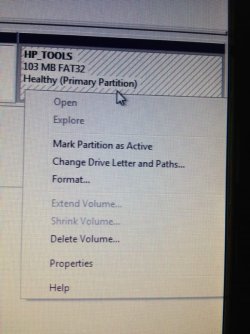
I've not got a copy of the HP tools one! I can't access the files on it. The picture shows the options I get for it.
 

Attachments

  • ImageUploadedBySevenForums1338989483.349895.jpg
    ImageUploadedBySevenForums1338989483.349895.jpg
    78.1 KB · Views: 4

My Computer My Computer

Computer type
PC/Desktop
Computer Manufacturer/Model Number
Custom Build
OS
Windows 7 Professional SP1 x64
CPU
AMD FX6300 3.6GHz (4.1GHz Turbo) 6 core Black Edition
Motherboard
ASRock 960GM/U3S3 FX Socket AM3+
Memory
Crucial Ballistix Tactial 8GB (2x4GB) 1866MHz
Graphics Card(s)
ASUS Radeon HD6850 1GB
Monitor(s) Displays
HP 22xi 21.5" Monitor
Screen Resolution
1920x1080p
Hard Drives
Western Digital 1TB SATA6 64MB Cache WD10EZEX
PSU
Corsair CX500 500W (Non modular)
Case
Fractal Design Define Mini
Cooling
2x Fractal Design 120MM 1200RPM, GPU fan, CPU fan, PSU fan
Keyboard
Logitech EX100 Keyboard
Mouse
Logitech MX Revoloution
Internet Speed
~37Mbps down, ~15Mbps up
Antivirus
Avast Anti-virus
Browser
Google Chrome
Other Info
Wireless card: TP-Link TL-WN781ND 150Mbps PCI-E Card

It also has a nice blue power button (Yay)
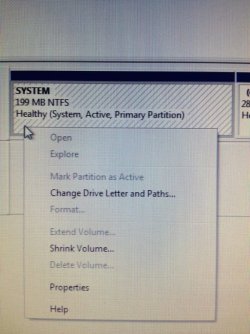
Also I can't delete the system partition, only shrink it. I can't even extend it.
 

Attachments

  • ImageUploadedBySevenForums1338989547.664842.jpg
    ImageUploadedBySevenForums1338989547.664842.jpg
    79.7 KB · Views: 3

My Computer My Computer

Computer type
PC/Desktop
Computer Manufacturer/Model Number
Custom Build
OS
Windows 7 Professional SP1 x64
CPU
AMD FX6300 3.6GHz (4.1GHz Turbo) 6 core Black Edition
Motherboard
ASRock 960GM/U3S3 FX Socket AM3+
Memory
Crucial Ballistix Tactial 8GB (2x4GB) 1866MHz
Graphics Card(s)
ASUS Radeon HD6850 1GB
Monitor(s) Displays
HP 22xi 21.5" Monitor
Screen Resolution
1920x1080p
Hard Drives
Western Digital 1TB SATA6 64MB Cache WD10EZEX
PSU
Corsair CX500 500W (Non modular)
Case
Fractal Design Define Mini
Cooling
2x Fractal Design 120MM 1200RPM, GPU fan, CPU fan, PSU fan
Keyboard
Logitech EX100 Keyboard
Mouse
Logitech MX Revoloution
Internet Speed
~37Mbps down, ~15Mbps up
Antivirus
Avast Anti-virus
Browser
Google Chrome
Other Info
Wireless card: TP-Link TL-WN781ND 150Mbps PCI-E Card

It also has a nice blue power button (Yay)
If it makes a difference all the partitions are formatted as ntfs other than the HP tools which is fat32
 

My Computer My Computer

Computer type
PC/Desktop
Computer Manufacturer/Model Number
Custom Build
OS
Windows 7 Professional SP1 x64
CPU
AMD FX6300 3.6GHz (4.1GHz Turbo) 6 core Black Edition
Motherboard
ASRock 960GM/U3S3 FX Socket AM3+
Memory
Crucial Ballistix Tactial 8GB (2x4GB) 1866MHz
Graphics Card(s)
ASUS Radeon HD6850 1GB
Monitor(s) Displays
HP 22xi 21.5" Monitor
Screen Resolution
1920x1080p
Hard Drives
Western Digital 1TB SATA6 64MB Cache WD10EZEX
PSU
Corsair CX500 500W (Non modular)
Case
Fractal Design Define Mini
Cooling
2x Fractal Design 120MM 1200RPM, GPU fan, CPU fan, PSU fan
Keyboard
Logitech EX100 Keyboard
Mouse
Logitech MX Revoloution
Internet Speed
~37Mbps down, ~15Mbps up
Antivirus
Avast Anti-virus
Browser
Google Chrome
Other Info
Wireless card: TP-Link TL-WN781ND 150Mbps PCI-E Card

It also has a nice blue power button (Yay)
What's wrong with the "delete volume" choice on the HP tools partition?
 

My Computer My Computer

Computer type
PC/Desktop
Computer Manufacturer/Model Number
Ignatz Special; 4 speed manual gearbox; factory air conditioning; one of one
OS
Windows 7 Home Premium SP1, 64-bit
CPU
Intel Skylake i5-6600K, not overclocked
Motherboard
AsRock Z170M Extreme 4, micro ATX
Memory
8 GB HyperX DDR4-2666 (2 x 4 GB)
Graphics Card(s)
none; graphics are integrated on CPU
Sound Card
onboard: Realtek ALC1150; external: USB Behringer UF0-202
Monitor(s) Displays
Dell S2340M 23 inch IPS
Screen Resolution
1600 x 900
Hard Drives
System: Crucial MX100 series SSD, 128 GB;
Data: Samsung Spinpoint 103SJ, 1 TB;
Backup: WD Caviar Green WD30EZRX-00D8PB0, 3 TB
PSU
Rosewill SilentNight 500 watt fanless, semi-modular
Case
Antec Solo II
Cooling
Noctua NH-U12S; Noctua F12 intake, Noctua S12A exhaust
Keyboard
Microsoft 200 6JH-00001 USB
Mouse
Dell or Microsoft optical wired; USB
Antivirus
Microsoft Security Essentials and Malwarebytes Premium
Browser
Pale Moon
Other Info
All fans PWM; speeds at idle: CPU circa 500 rpm; intake circa 600 rpm; exhaust circa 600 rpm; CPU temps 27 idle and 47 C load in a warm room (27 C/81 F) when running Intel Extreme Tuning Utility stress test.
You cannot delete the system partition as long as it contains your boot files.
 

My Computer My Computer

Computer type
PC/Desktop
Computer Manufacturer/Model Number
Ignatz Special; 4 speed manual gearbox; factory air conditioning; one of one
OS
Windows 7 Home Premium SP1, 64-bit
CPU
Intel Skylake i5-6600K, not overclocked
Motherboard
AsRock Z170M Extreme 4, micro ATX
Memory
8 GB HyperX DDR4-2666 (2 x 4 GB)
Graphics Card(s)
none; graphics are integrated on CPU
Sound Card
onboard: Realtek ALC1150; external: USB Behringer UF0-202
Monitor(s) Displays
Dell S2340M 23 inch IPS
Screen Resolution
1600 x 900
Hard Drives
System: Crucial MX100 series SSD, 128 GB;
Data: Samsung Spinpoint 103SJ, 1 TB;
Backup: WD Caviar Green WD30EZRX-00D8PB0, 3 TB
PSU
Rosewill SilentNight 500 watt fanless, semi-modular
Case
Antec Solo II
Cooling
Noctua NH-U12S; Noctua F12 intake, Noctua S12A exhaust
Keyboard
Microsoft 200 6JH-00001 USB
Mouse
Dell or Microsoft optical wired; USB
Antivirus
Microsoft Security Essentials and Malwarebytes Premium
Browser
Pale Moon
Other Info
All fans PWM; speeds at idle: CPU circa 500 rpm; intake circa 600 rpm; exhaust circa 600 rpm; CPU temps 27 idle and 47 C load in a warm room (27 C/81 F) when running Intel Extreme Tuning Utility stress test.
I'll go into more details about what is on the HP_Tools partition. It contains HPs hardware diagnostic software that must be run at startup. HPs diagnostic software, like most OEMs diagnostic software, is rather lacking. They aren't nearly as thorough as programs you can find for free online. OEMs just don't like to do warranty claims unless their software sees a problem. It is believed, although I did not see it confirmed, that HP_Tools is also used for do a factory reset using the recovery partition. As long as you have a backup from a time that the computer was working properly, the recovery partition is useless to you.

Leave the System Reserved partition alone. I see that it is at 199 MB, which is larger than the default 100MB. The size it is now is as perfect as it gets. Remember, without it you can not access the recovery console, which means that without a Windows 7 repair or install disc, if the computer became unbootable, you would be stuck.
 

My Computer My Computer

Computer type
Laptop
Computer Manufacturer/Model Number
Toshiba P775-S7100
OS
Windows 7 Professional SP1 64-bit
CPU
Intel Core i5-2450M @2.5 GHz
Memory
6 GB DDR3 1333MHz
Graphics Card(s)
Intel HD 3000
Monitor(s) Displays
Built-in 17.3" LED; 22" Insignia NS-L22Q-10A
Screen Resolution
1600x900; 1360x768
Hard Drives
750 GB Hitachi
1TB Seagate FreeAgent External
Internet Speed
Verizon DSL Speed(Down/Up): 3360 Kbps / 800 Kbps
Antivirus
MSE and MBAM Pro
Browser
IE10
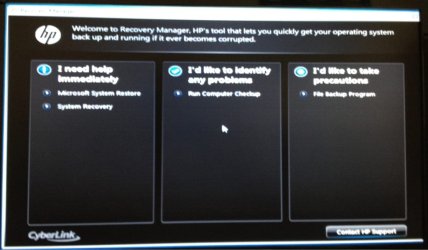
If this helps, I've taken a shot of what comes up when preparing for a restore. This may be what is on the HP tools partition.
 

Attachments

  • ImageUploadedBySevenForums1338990573.462892.jpg
    ImageUploadedBySevenForums1338990573.462892.jpg
    51 KB · Views: 8

My Computer My Computer

Computer type
PC/Desktop
Computer Manufacturer/Model Number
Custom Build
OS
Windows 7 Professional SP1 x64
CPU
AMD FX6300 3.6GHz (4.1GHz Turbo) 6 core Black Edition
Motherboard
ASRock 960GM/U3S3 FX Socket AM3+
Memory
Crucial Ballistix Tactial 8GB (2x4GB) 1866MHz
Graphics Card(s)
ASUS Radeon HD6850 1GB
Monitor(s) Displays
HP 22xi 21.5" Monitor
Screen Resolution
1920x1080p
Hard Drives
Western Digital 1TB SATA6 64MB Cache WD10EZEX
PSU
Corsair CX500 500W (Non modular)
Case
Fractal Design Define Mini
Cooling
2x Fractal Design 120MM 1200RPM, GPU fan, CPU fan, PSU fan
Keyboard
Logitech EX100 Keyboard
Mouse
Logitech MX Revoloution
Internet Speed
~37Mbps down, ~15Mbps up
Antivirus
Avast Anti-virus
Browser
Google Chrome
Other Info
Wireless card: TP-Link TL-WN781ND 150Mbps PCI-E Card

It also has a nice blue power button (Yay)
Leave the System Reserved partition alone. I see that it is at 199 MB, which is larger than the default 100MB. The size it is now is as perfect as it gets. Remember, without it you can not access the recovery console, which means that without a Windows 7 repair or install disc, if the computer became unbootable, you would be stuck.

As windows 7 came preinatalled on my PC, I have no install discs other than the recovery discs I made.
 

My Computer My Computer

Computer type
PC/Desktop
Computer Manufacturer/Model Number
Custom Build
OS
Windows 7 Professional SP1 x64
CPU
AMD FX6300 3.6GHz (4.1GHz Turbo) 6 core Black Edition
Motherboard
ASRock 960GM/U3S3 FX Socket AM3+
Memory
Crucial Ballistix Tactial 8GB (2x4GB) 1866MHz
Graphics Card(s)
ASUS Radeon HD6850 1GB
Monitor(s) Displays
HP 22xi 21.5" Monitor
Screen Resolution
1920x1080p
Hard Drives
Western Digital 1TB SATA6 64MB Cache WD10EZEX
PSU
Corsair CX500 500W (Non modular)
Case
Fractal Design Define Mini
Cooling
2x Fractal Design 120MM 1200RPM, GPU fan, CPU fan, PSU fan
Keyboard
Logitech EX100 Keyboard
Mouse
Logitech MX Revoloution
Internet Speed
~37Mbps down, ~15Mbps up
Antivirus
Avast Anti-virus
Browser
Google Chrome
Other Info
Wireless card: TP-Link TL-WN781ND 150Mbps PCI-E Card

It also has a nice blue power button (Yay)
Back
Top