Solved Which partitions do I actually need?

That may be the answer. So if I get rid of one of the partitions, HP_tools or recovery, the other of the two won't work?

What exactly is it that you would like to accomplish now?

What other OS would you like to Dual Boot? If it's Linux the best method is here to avoid GRUB corrupting Win7: Dual boot Ubuntu-Win7

I gave you the best way based on three years experience of adding another OS to Win7 HP's where the user wishes to keep Recovery and Diag. Tools intact.

However most tech enthusiasts do not run the grossly bloated HP preinstall however but instead Clean Reinstall - Factory OEM Windows 7. There are special notes at the end of the tutorial for HP owners.

I want to install another OS while keeping the option of restoring windows, be it by CDs or the recovery patition, preferably without reinstalling windows before hand
 

My Computer My Computer

Computer type
PC/Desktop
Computer Manufacturer/Model Number
Custom Build
OS
Windows 7 Professional SP1 x64
CPU
AMD FX6300 3.6GHz (4.1GHz Turbo) 6 core Black Edition
Motherboard
ASRock 960GM/U3S3 FX Socket AM3+
Memory
Crucial Ballistix Tactial 8GB (2x4GB) 1866MHz
Graphics Card(s)
ASUS Radeon HD6850 1GB
Monitor(s) Displays
HP 22xi 21.5" Monitor
Screen Resolution
1920x1080p
Hard Drives
Western Digital 1TB SATA6 64MB Cache WD10EZEX
PSU
Corsair CX500 500W (Non modular)
Case
Fractal Design Define Mini
Cooling
2x Fractal Design 120MM 1200RPM, GPU fan, CPU fan, PSU fan
Keyboard
Logitech EX100 Keyboard
Mouse
Logitech MX Revoloution
Internet Speed
~37Mbps down, ~15Mbps up
Antivirus
Avast Anti-virus
Browser
Google Chrome
Other Info
Wireless card: TP-Link TL-WN781ND 150Mbps PCI-E Card

It also has a nice blue power button (Yay)
Then follow the steps I gave earlier which you must have missed:

The best course with HP is to convert C to Logical, resize it to add as many Logical partitions as you wish. As long as Win7 is booted by System Reserved then Win7 and another OS can be on Logical partitions.

To do this use free Partition Wizard bootable CD, follow these video steps:
How to set partition as Primary or Logical.
How to Create Partition with partition manager? Partition Wizard Create Partition Video Help
 
OK, I'll try changing it to logical. A few questions though, can I install a new OS on a logical partition? next, I thought there were 2 types of disk, basic limited to 4 partitions, and dynamic on which you can have many more partitions, but not install OS's on them, so where does logical disk come in all of that?
 

My Computer My Computer

Computer type
PC/Desktop
Computer Manufacturer/Model Number
Custom Build
OS
Windows 7 Professional SP1 x64
CPU
AMD FX6300 3.6GHz (4.1GHz Turbo) 6 core Black Edition
Motherboard
ASRock 960GM/U3S3 FX Socket AM3+
Memory
Crucial Ballistix Tactial 8GB (2x4GB) 1866MHz
Graphics Card(s)
ASUS Radeon HD6850 1GB
Monitor(s) Displays
HP 22xi 21.5" Monitor
Screen Resolution
1920x1080p
Hard Drives
Western Digital 1TB SATA6 64MB Cache WD10EZEX
PSU
Corsair CX500 500W (Non modular)
Case
Fractal Design Define Mini
Cooling
2x Fractal Design 120MM 1200RPM, GPU fan, CPU fan, PSU fan
Keyboard
Logitech EX100 Keyboard
Mouse
Logitech MX Revoloution
Internet Speed
~37Mbps down, ~15Mbps up
Antivirus
Avast Anti-virus
Browser
Google Chrome
Other Info
Wireless card: TP-Link TL-WN781ND 150Mbps PCI-E Card

It also has a nice blue power button (Yay)
I specifically said in my first post which you ignored that you can install OS's on Logical as long as there is a Primary boot partition which there is.

You can have four Primary partitions, or three Primary and unlimited Logical. If you already have four you need to remove one to create a Logical using Partition Wizard CD or convert an Inactive Primary to Logical. Much experience has led us to recommend converting C in the case of HP's.
 
OK, I'm sorry if I ask for stuff that you have already posted. Would it be ok to convert one of the existing partitions to logical, and then create a new logical partition on which the new os will be installed. Because you said I can only convert an inactive partition, so I could only convert C drive, recovery or hp_tools, correct?
 

My Computer My Computer

Computer type
PC/Desktop
Computer Manufacturer/Model Number
Custom Build
OS
Windows 7 Professional SP1 x64
CPU
AMD FX6300 3.6GHz (4.1GHz Turbo) 6 core Black Edition
Motherboard
ASRock 960GM/U3S3 FX Socket AM3+
Memory
Crucial Ballistix Tactial 8GB (2x4GB) 1866MHz
Graphics Card(s)
ASUS Radeon HD6850 1GB
Monitor(s) Displays
HP 22xi 21.5" Monitor
Screen Resolution
1920x1080p
Hard Drives
Western Digital 1TB SATA6 64MB Cache WD10EZEX
PSU
Corsair CX500 500W (Non modular)
Case
Fractal Design Define Mini
Cooling
2x Fractal Design 120MM 1200RPM, GPU fan, CPU fan, PSU fan
Keyboard
Logitech EX100 Keyboard
Mouse
Logitech MX Revoloution
Internet Speed
~37Mbps down, ~15Mbps up
Antivirus
Avast Anti-virus
Browser
Google Chrome
Other Info
Wireless card: TP-Link TL-WN781ND 150Mbps PCI-E Card

It also has a nice blue power button (Yay)
Did you read the steps I've repeatedly posted? I couldnt' have been more clear that the best way to proceed is to convert C to Logical, shrink it and create another Logical partition to it's right to install the other OS.

I even provided you with video tutorials that show exactly how to do both things.

You're pulling my leg asking again, right? ;) I mean, I literally made you a movie.
 
Yeah, I am paying attention. I've now got 5 partitions. However I can't format it. It comes up with a message saying it needs to be converted to a dynamic disk, which I don't want to do as I can't install another OS
 

My Computer My Computer

Computer type
PC/Desktop
Computer Manufacturer/Model Number
Custom Build
OS
Windows 7 Professional SP1 x64
CPU
AMD FX6300 3.6GHz (4.1GHz Turbo) 6 core Black Edition
Motherboard
ASRock 960GM/U3S3 FX Socket AM3+
Memory
Crucial Ballistix Tactial 8GB (2x4GB) 1866MHz
Graphics Card(s)
ASUS Radeon HD6850 1GB
Monitor(s) Displays
HP 22xi 21.5" Monitor
Screen Resolution
1920x1080p
Hard Drives
Western Digital 1TB SATA6 64MB Cache WD10EZEX
PSU
Corsair CX500 500W (Non modular)
Case
Fractal Design Define Mini
Cooling
2x Fractal Design 120MM 1200RPM, GPU fan, CPU fan, PSU fan
Keyboard
Logitech EX100 Keyboard
Mouse
Logitech MX Revoloution
Internet Speed
~37Mbps down, ~15Mbps up
Antivirus
Avast Anti-virus
Browser
Google Chrome
Other Info
Wireless card: TP-Link TL-WN781ND 150Mbps PCI-E Card

It also has a nice blue power button (Yay)
Do not convert to Dynamic which is for use only to span a partition across multiple HD's. You should not get this warning if you have converted C to Logical and are creating another Logical partition to its right.

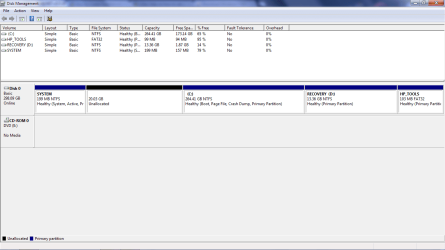
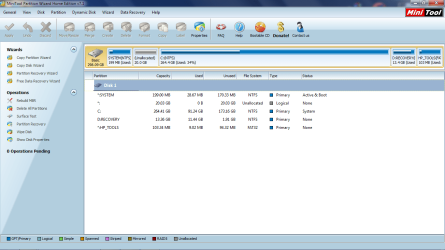
Please post back a screenshot of your maximized Disk mgmt drive map with listings so we can advise you better.
 
Don't worry i'm not going to convert it, I know I can't install OS's on it. If I understand you correctly, I've not converted any partition to logical. I've attached what Windows disk management said as well as the mini tool manager.
 

Attachments

  • dskmnmt.png
    dskmnmt.png
    22.4 KB · Views: 5
  • dskmnmt2.png
    dskmnmt2.png
    54.2 KB · Views: 5

My Computer My Computer

Computer type
PC/Desktop
Computer Manufacturer/Model Number
Custom Build
OS
Windows 7 Professional SP1 x64
CPU
AMD FX6300 3.6GHz (4.1GHz Turbo) 6 core Black Edition
Motherboard
ASRock 960GM/U3S3 FX Socket AM3+
Memory
Crucial Ballistix Tactial 8GB (2x4GB) 1866MHz
Graphics Card(s)
ASUS Radeon HD6850 1GB
Monitor(s) Displays
HP 22xi 21.5" Monitor
Screen Resolution
1920x1080p
Hard Drives
Western Digital 1TB SATA6 64MB Cache WD10EZEX
PSU
Corsair CX500 500W (Non modular)
Case
Fractal Design Define Mini
Cooling
2x Fractal Design 120MM 1200RPM, GPU fan, CPU fan, PSU fan
Keyboard
Logitech EX100 Keyboard
Mouse
Logitech MX Revoloution
Internet Speed
~37Mbps down, ~15Mbps up
Antivirus
Avast Anti-virus
Browser
Google Chrome
Other Info
Wireless card: TP-Link TL-WN781ND 150Mbps PCI-E Card

It also has a nice blue power button (Yay)
I wouldn't have resized C from the left since it moves Win7 to a lower address with slightly slower read times.

But since it's done, you must complete the steps to convert C to Logical, then create a Logical partition in the space. I linked you video tutorials on how to do this earlier.
 
Is there any way I can change the order of the partitions?
 

My Computer My Computer

Computer type
PC/Desktop
Computer Manufacturer/Model Number
Custom Build
OS
Windows 7 Professional SP1 x64
CPU
AMD FX6300 3.6GHz (4.1GHz Turbo) 6 core Black Edition
Motherboard
ASRock 960GM/U3S3 FX Socket AM3+
Memory
Crucial Ballistix Tactial 8GB (2x4GB) 1866MHz
Graphics Card(s)
ASUS Radeon HD6850 1GB
Monitor(s) Displays
HP 22xi 21.5" Monitor
Screen Resolution
1920x1080p
Hard Drives
Western Digital 1TB SATA6 64MB Cache WD10EZEX
PSU
Corsair CX500 500W (Non modular)
Case
Fractal Design Define Mini
Cooling
2x Fractal Design 120MM 1200RPM, GPU fan, CPU fan, PSU fan
Keyboard
Logitech EX100 Keyboard
Mouse
Logitech MX Revoloution
Internet Speed
~37Mbps down, ~15Mbps up
Antivirus
Avast Anti-virus
Browser
Google Chrome
Other Info
Wireless card: TP-Link TL-WN781ND 150Mbps PCI-E Card

It also has a nice blue power button (Yay)
Yes, you would boot PW CD, rightclick on C and slide it to the left intact, Click OK. Apply.

Then rightclick C to Modify>Set to Logical, OK, Apply.

Then rightclick the empty space you made earlier and now have on the right side of C, Create a Logical NTFS partition there, OK, Apply.
 
Ok, thanks, I'll try it later. I'm away from my PC now.
 

My Computer My Computer

Computer type
PC/Desktop
Computer Manufacturer/Model Number
Custom Build
OS
Windows 7 Professional SP1 x64
CPU
AMD FX6300 3.6GHz (4.1GHz Turbo) 6 core Black Edition
Motherboard
ASRock 960GM/U3S3 FX Socket AM3+
Memory
Crucial Ballistix Tactial 8GB (2x4GB) 1866MHz
Graphics Card(s)
ASUS Radeon HD6850 1GB
Monitor(s) Displays
HP 22xi 21.5" Monitor
Screen Resolution
1920x1080p
Hard Drives
Western Digital 1TB SATA6 64MB Cache WD10EZEX
PSU
Corsair CX500 500W (Non modular)
Case
Fractal Design Define Mini
Cooling
2x Fractal Design 120MM 1200RPM, GPU fan, CPU fan, PSU fan
Keyboard
Logitech EX100 Keyboard
Mouse
Logitech MX Revoloution
Internet Speed
~37Mbps down, ~15Mbps up
Antivirus
Avast Anti-virus
Browser
Google Chrome
Other Info
Wireless card: TP-Link TL-WN781ND 150Mbps PCI-E Card

It also has a nice blue power button (Yay)
Yeah, that went well. While formatting the partition for the new OS it corrupted windows, and I've been forced to reinstall it. Luckily I've got backups.
 

My Computer My Computer

Computer type
PC/Desktop
Computer Manufacturer/Model Number
Custom Build
OS
Windows 7 Professional SP1 x64
CPU
AMD FX6300 3.6GHz (4.1GHz Turbo) 6 core Black Edition
Motherboard
ASRock 960GM/U3S3 FX Socket AM3+
Memory
Crucial Ballistix Tactial 8GB (2x4GB) 1866MHz
Graphics Card(s)
ASUS Radeon HD6850 1GB
Monitor(s) Displays
HP 22xi 21.5" Monitor
Screen Resolution
1920x1080p
Hard Drives
Western Digital 1TB SATA6 64MB Cache WD10EZEX
PSU
Corsair CX500 500W (Non modular)
Case
Fractal Design Define Mini
Cooling
2x Fractal Design 120MM 1200RPM, GPU fan, CPU fan, PSU fan
Keyboard
Logitech EX100 Keyboard
Mouse
Logitech MX Revoloution
Internet Speed
~37Mbps down, ~15Mbps up
Antivirus
Avast Anti-virus
Browser
Google Chrome
Other Info
Wireless card: TP-Link TL-WN781ND 150Mbps PCI-E Card

It also has a nice blue power button (Yay)
Right, well since I'm now in the situation where nothing really matters if anything bad happens because all my data is safe and I've got a clean install of windows 7 with HP's rubbish. Could it be better to do a clean install of windows without HP's intervention, which would give me 3 free partitions to use, as there would be no recovery, no HP_tools and no system, because the last one would be combined with the main c drive.

Opinions please.
 

My Computer My Computer

Computer type
PC/Desktop
Computer Manufacturer/Model Number
Custom Build
OS
Windows 7 Professional SP1 x64
CPU
AMD FX6300 3.6GHz (4.1GHz Turbo) 6 core Black Edition
Motherboard
ASRock 960GM/U3S3 FX Socket AM3+
Memory
Crucial Ballistix Tactial 8GB (2x4GB) 1866MHz
Graphics Card(s)
ASUS Radeon HD6850 1GB
Monitor(s) Displays
HP 22xi 21.5" Monitor
Screen Resolution
1920x1080p
Hard Drives
Western Digital 1TB SATA6 64MB Cache WD10EZEX
PSU
Corsair CX500 500W (Non modular)
Case
Fractal Design Define Mini
Cooling
2x Fractal Design 120MM 1200RPM, GPU fan, CPU fan, PSU fan
Keyboard
Logitech EX100 Keyboard
Mouse
Logitech MX Revoloution
Internet Speed
~37Mbps down, ~15Mbps up
Antivirus
Avast Anti-virus
Browser
Google Chrome
Other Info
Wireless card: TP-Link TL-WN781ND 150Mbps PCI-E Card

It also has a nice blue power button (Yay)
what i did was, move the partition to the right of the c drive, as you said, then formatted it as NTFS, then went into the OS install disc and thgen formatted the disc for mac os. that somehow mucked everything up, so that i couldn't boot windows, one reinstall from recovery discs later, windows 7 is back with all the original partitions. Where'd I go wrong?

I'm now considering doing a cleam install of windows from a disc (not recovery discs) and then using the spare partitions, as there will be no HP_tools partition, or recovery partiton for the new os.
 

My Computer My Computer

Computer type
PC/Desktop
Computer Manufacturer/Model Number
Custom Build
OS
Windows 7 Professional SP1 x64
CPU
AMD FX6300 3.6GHz (4.1GHz Turbo) 6 core Black Edition
Motherboard
ASRock 960GM/U3S3 FX Socket AM3+
Memory
Crucial Ballistix Tactial 8GB (2x4GB) 1866MHz
Graphics Card(s)
ASUS Radeon HD6850 1GB
Monitor(s) Displays
HP 22xi 21.5" Monitor
Screen Resolution
1920x1080p
Hard Drives
Western Digital 1TB SATA6 64MB Cache WD10EZEX
PSU
Corsair CX500 500W (Non modular)
Case
Fractal Design Define Mini
Cooling
2x Fractal Design 120MM 1200RPM, GPU fan, CPU fan, PSU fan
Keyboard
Logitech EX100 Keyboard
Mouse
Logitech MX Revoloution
Internet Speed
~37Mbps down, ~15Mbps up
Antivirus
Avast Anti-virus
Browser
Google Chrome
Other Info
Wireless card: TP-Link TL-WN781ND 150Mbps PCI-E Card

It also has a nice blue power button (Yay)
Ah, ok. Does it always corrupt the drive when trying to install mac os? I might try linux, i presume I just follow the steps you've posted previously? Also, how do people make Hackintosh's?
 

My Computer My Computer

Computer type
PC/Desktop
Computer Manufacturer/Model Number
Custom Build
OS
Windows 7 Professional SP1 x64
CPU
AMD FX6300 3.6GHz (4.1GHz Turbo) 6 core Black Edition
Motherboard
ASRock 960GM/U3S3 FX Socket AM3+
Memory
Crucial Ballistix Tactial 8GB (2x4GB) 1866MHz
Graphics Card(s)
ASUS Radeon HD6850 1GB
Monitor(s) Displays
HP 22xi 21.5" Monitor
Screen Resolution
1920x1080p
Hard Drives
Western Digital 1TB SATA6 64MB Cache WD10EZEX
PSU
Corsair CX500 500W (Non modular)
Case
Fractal Design Define Mini
Cooling
2x Fractal Design 120MM 1200RPM, GPU fan, CPU fan, PSU fan
Keyboard
Logitech EX100 Keyboard
Mouse
Logitech MX Revoloution
Internet Speed
~37Mbps down, ~15Mbps up
Antivirus
Avast Anti-virus
Browser
Google Chrome
Other Info
Wireless card: TP-Link TL-WN781ND 150Mbps PCI-E Card

It also has a nice blue power button (Yay)
Back
Top