
Solved Which partitions do I actually need?

I've got a couple of touch sensitive buttons, which I can tap and the wifi turns off or mutes the PC, and I've just realised that when in windows, the volume buttons is red (indicating mute although it may not be) and when I'm on Ubuntu it's white (indicating unmuted, even though it is not). So I was wondering if any I you guy might know why it's happened, and perhaps how to fix it. It doesn't annoy me much, the button still works fine, the colour just doesn't change.
 

My Computer My Computer

Computer type
PC/Desktop
Computer Manufacturer/Model Number
Custom Build
OS
Windows 7 Professional SP1 x64
CPU
AMD FX6300 3.6GHz (4.1GHz Turbo) 6 core Black Edition
Motherboard
ASRock 960GM/U3S3 FX Socket AM3+
Memory
Crucial Ballistix Tactial 8GB (2x4GB) 1866MHz
Graphics Card(s)
ASUS Radeon HD6850 1GB
Monitor(s) Displays
HP 22xi 21.5" Monitor
Screen Resolution
1920x1080p
Hard Drives
Western Digital 1TB SATA6 64MB Cache WD10EZEX
PSU
Corsair CX500 500W (Non modular)
Case
Fractal Design Define Mini
Cooling
2x Fractal Design 120MM 1200RPM, GPU fan, CPU fan, PSU fan
Keyboard
Logitech EX100 Keyboard
Mouse
Logitech MX Revoloution
Internet Speed
~37Mbps down, ~15Mbps up
Antivirus
Avast Anti-virus
Browser
Google Chrome
Other Info
Wireless card: TP-Link TL-WN781ND 150Mbps PCI-E Card

It also has a nice blue power button (Yay)
I've got a couple of touch sensitive buttons, which I can tap and the wifi turns off or mutes the PC, and I've just realised that when in windows, the volume buttons is red (indicating mute although it may not be) and when I'm on Ubuntu it's white (indicating unmuted, even though it is not). So I was wondering if any I you guy might know why it's happened, and perhaps how to fix it. It doesn't annoy me much, the button still works fine, the colour just doesn't change.

I would guess that has something to do with the OEM software installed.
when you're running under Ubuntu that OEM software's not running.
 

My Computer My Computer

OS
Windows 7 Ultimate x64
So then in theory it should run a ok in windows, but it doesn't! I only get the one colour! Can it be fixed without reinstallation?
 

My Computer My Computer

Computer type
PC/Desktop
Computer Manufacturer/Model Number
Custom Build
OS
Windows 7 Professional SP1 x64
CPU
AMD FX6300 3.6GHz (4.1GHz Turbo) 6 core Black Edition
Motherboard
ASRock 960GM/U3S3 FX Socket AM3+
Memory
Crucial Ballistix Tactial 8GB (2x4GB) 1866MHz
Graphics Card(s)
ASUS Radeon HD6850 1GB
Monitor(s) Displays
HP 22xi 21.5" Monitor
Screen Resolution
1920x1080p
Hard Drives
Western Digital 1TB SATA6 64MB Cache WD10EZEX
PSU
Corsair CX500 500W (Non modular)
Case
Fractal Design Define Mini
Cooling
2x Fractal Design 120MM 1200RPM, GPU fan, CPU fan, PSU fan
Keyboard
Logitech EX100 Keyboard
Mouse
Logitech MX Revoloution
Internet Speed
~37Mbps down, ~15Mbps up
Antivirus
Avast Anti-virus
Browser
Google Chrome
Other Info
Wireless card: TP-Link TL-WN781ND 150Mbps PCI-E Card

It also has a nice blue power button (Yay)
Did you reinstall or are you still running the Win7 factory bloatware preinstall?

If you clean reinstalled did you look for the button software on HP Support Downloads webpage for your model?

In rare cases buttons will not light or function correctly with the software provided after a clean reinstall. If you google the issue you will often find others who have faced this and how they resolved it. If not, the only solution is to reinstall the software, ask HP and/or run Factory Recovery.
 
It's not a clean install, and I've not uninstalled any of HP programs. I'll google it, I don't suppose any of you guys have a solution without reinstalling?
 

My Computer My Computer

Computer type
PC/Desktop
Computer Manufacturer/Model Number
Custom Build
OS
Windows 7 Professional SP1 x64
CPU
AMD FX6300 3.6GHz (4.1GHz Turbo) 6 core Black Edition
Motherboard
ASRock 960GM/U3S3 FX Socket AM3+
Memory
Crucial Ballistix Tactial 8GB (2x4GB) 1866MHz
Graphics Card(s)
ASUS Radeon HD6850 1GB
Monitor(s) Displays
HP 22xi 21.5" Monitor
Screen Resolution
1920x1080p
Hard Drives
Western Digital 1TB SATA6 64MB Cache WD10EZEX
PSU
Corsair CX500 500W (Non modular)
Case
Fractal Design Define Mini
Cooling
2x Fractal Design 120MM 1200RPM, GPU fan, CPU fan, PSU fan
Keyboard
Logitech EX100 Keyboard
Mouse
Logitech MX Revoloution
Internet Speed
~37Mbps down, ~15Mbps up
Antivirus
Avast Anti-virus
Browser
Google Chrome
Other Info
Wireless card: TP-Link TL-WN781ND 150Mbps PCI-E Card

It also has a nice blue power button (Yay)
That's not the way I would ask that question expecting to get help here from our volunteers, especially after a marathon thread in which your every question was answered.

The plain fact is that no tech enthusiast would run a HP bloatware factory preinstall, so we would be remiss if we didn't press this point. While HP's are excellent machines, the preinstalled sponsors' crapware and useless utilities throttle Win7 and create endless niggling issues like you're experiencing. The solution is to Clean Reinstall - Factory OEM Windows 7.
 
I'm sorry if I seem ungrateful for the help everyone has given me, I don't mean to. I'll consider a clean install more seriously. To make sure- will I just use the product Key that's on the bottom of the PC? I read somewhere that if the key isn't in use it can be used on another windows installation.
 

My Computer My Computer

Computer type
PC/Desktop
Computer Manufacturer/Model Number
Custom Build
OS
Windows 7 Professional SP1 x64
CPU
AMD FX6300 3.6GHz (4.1GHz Turbo) 6 core Black Edition
Motherboard
ASRock 960GM/U3S3 FX Socket AM3+
Memory
Crucial Ballistix Tactial 8GB (2x4GB) 1866MHz
Graphics Card(s)
ASUS Radeon HD6850 1GB
Monitor(s) Displays
HP 22xi 21.5" Monitor
Screen Resolution
1920x1080p
Hard Drives
Western Digital 1TB SATA6 64MB Cache WD10EZEX
PSU
Corsair CX500 500W (Non modular)
Case
Fractal Design Define Mini
Cooling
2x Fractal Design 120MM 1200RPM, GPU fan, CPU fan, PSU fan
Keyboard
Logitech EX100 Keyboard
Mouse
Logitech MX Revoloution
Internet Speed
~37Mbps down, ~15Mbps up
Antivirus
Avast Anti-virus
Browser
Google Chrome
Other Info
Wireless card: TP-Link TL-WN781ND 150Mbps PCI-E Card

It also has a nice blue power button (Yay)
Read the tutorial I linked.

The Product Key on COA sticker is permanently tied to and can only be used on that machine to reinstall as often as you like. Back it up and keep it in a safe place.

However after getting a perfect Clean Reinstall you can save a Win7 backup image to use in place of reinstall or recovery.

Most everything is covered in the tutorial, but ask back if you have any other questions.
 
Ok, would it be better to do a clean install from an official disc, as I have another w7 PC which is bloatware free, or at least would the key still work with it? I have read the guide which says to download an iso from the site, but I'm out of discs that are big enough, so using the disc I've already got would save some money and time.
 
Last edited:

My Computer My Computer

Computer type
PC/Desktop
Computer Manufacturer/Model Number
Custom Build
OS
Windows 7 Professional SP1 x64
CPU
AMD FX6300 3.6GHz (4.1GHz Turbo) 6 core Black Edition
Motherboard
ASRock 960GM/U3S3 FX Socket AM3+
Memory
Crucial Ballistix Tactial 8GB (2x4GB) 1866MHz
Graphics Card(s)
ASUS Radeon HD6850 1GB
Monitor(s) Displays
HP 22xi 21.5" Monitor
Screen Resolution
1920x1080p
Hard Drives
Western Digital 1TB SATA6 64MB Cache WD10EZEX
PSU
Corsair CX500 500W (Non modular)
Case
Fractal Design Define Mini
Cooling
2x Fractal Design 120MM 1200RPM, GPU fan, CPU fan, PSU fan
Keyboard
Logitech EX100 Keyboard
Mouse
Logitech MX Revoloution
Internet Speed
~37Mbps down, ~15Mbps up
Antivirus
Avast Anti-virus
Browser
Google Chrome
Other Info
Wireless card: TP-Link TL-WN781ND 150Mbps PCI-E Card

It also has a nice blue power button (Yay)
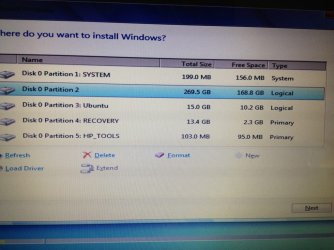
Should I delete the system partition? Like you said in the tutorial I should wait and see if the others work after the reinstall.
 

Attachments

  • ImageUploadedBySevenForums1339920334.407912.jpg
    ImageUploadedBySevenForums1339920334.407912.jpg
    89.1 KB · Views: 6

My Computer My Computer

Computer type
PC/Desktop
Computer Manufacturer/Model Number
Custom Build
OS
Windows 7 Professional SP1 x64
CPU
AMD FX6300 3.6GHz (4.1GHz Turbo) 6 core Black Edition
Motherboard
ASRock 960GM/U3S3 FX Socket AM3+
Memory
Crucial Ballistix Tactial 8GB (2x4GB) 1866MHz
Graphics Card(s)
ASUS Radeon HD6850 1GB
Monitor(s) Displays
HP 22xi 21.5" Monitor
Screen Resolution
1920x1080p
Hard Drives
Western Digital 1TB SATA6 64MB Cache WD10EZEX
PSU
Corsair CX500 500W (Non modular)
Case
Fractal Design Define Mini
Cooling
2x Fractal Design 120MM 1200RPM, GPU fan, CPU fan, PSU fan
Keyboard
Logitech EX100 Keyboard
Mouse
Logitech MX Revoloution
Internet Speed
~37Mbps down, ~15Mbps up
Antivirus
Avast Anti-virus
Browser
Google Chrome
Other Info
Wireless card: TP-Link TL-WN781ND 150Mbps PCI-E Card

It also has a nice blue power button (Yay)
It depends on whether you want to keep the Recovery and Tools partition, or wipe the slate clean to have the full disk for just Win7. If you choose the latter be sure to make your Recovery Disks and save a Win7 backup image so you have a path back to where you are now.

If you want to keep Recovery and Tools then I'd keep System, otherwise delete all partitions and create new ones as you wish, or just click Next to let the installer create one partition and format for you.
 
Should I use the downloaded iso on the website you linked burnt onto a disc, or should I use an official installation disc?
 

My Computer My Computer

Computer type
PC/Desktop
Computer Manufacturer/Model Number
Custom Build
OS
Windows 7 Professional SP1 x64
CPU
AMD FX6300 3.6GHz (4.1GHz Turbo) 6 core Black Edition
Motherboard
ASRock 960GM/U3S3 FX Socket AM3+
Memory
Crucial Ballistix Tactial 8GB (2x4GB) 1866MHz
Graphics Card(s)
ASUS Radeon HD6850 1GB
Monitor(s) Displays
HP 22xi 21.5" Monitor
Screen Resolution
1920x1080p
Hard Drives
Western Digital 1TB SATA6 64MB Cache WD10EZEX
PSU
Corsair CX500 500W (Non modular)
Case
Fractal Design Define Mini
Cooling
2x Fractal Design 120MM 1200RPM, GPU fan, CPU fan, PSU fan
Keyboard
Logitech EX100 Keyboard
Mouse
Logitech MX Revoloution
Internet Speed
~37Mbps down, ~15Mbps up
Antivirus
Avast Anti-virus
Browser
Google Chrome
Other Info
Wireless card: TP-Link TL-WN781ND 150Mbps PCI-E Card

It also has a nice blue power button (Yay)
Should I use the downloaded iso on the website you linked burnt onto a disc, or should I use an official installation disc?

Official, given the choice.

It shouldn't matter, but that avoids most of the chance of a defective disk or bad burn.
 

My Computer My Computer

Computer type
PC/Desktop
Computer Manufacturer/Model Number
Ignatz Special; 4 speed manual gearbox; factory air conditioning; one of one
OS
Windows 7 Home Premium SP1, 64-bit
CPU
Intel Skylake i5-6600K, not overclocked
Motherboard
AsRock Z170M Extreme 4, micro ATX
Memory
8 GB HyperX DDR4-2666 (2 x 4 GB)
Graphics Card(s)
none; graphics are integrated on CPU
Sound Card
onboard: Realtek ALC1150; external: USB Behringer UF0-202
Monitor(s) Displays
Dell S2340M 23 inch IPS
Screen Resolution
1600 x 900
Hard Drives
System: Crucial MX100 series SSD, 128 GB;
Data: Samsung Spinpoint 103SJ, 1 TB;
Backup: WD Caviar Green WD30EZRX-00D8PB0, 3 TB
PSU
Rosewill SilentNight 500 watt fanless, semi-modular
Case
Antec Solo II
Cooling
Noctua NH-U12S; Noctua F12 intake, Noctua S12A exhaust
Keyboard
Microsoft 200 6JH-00001 USB
Mouse
Dell or Microsoft optical wired; USB
Antivirus
Microsoft Security Essentials and Malwarebytes Premium
Browser
Pale Moon
Other Info
All fans PWM; speeds at idle: CPU circa 500 rpm; intake circa 600 rpm; exhaust circa 600 rpm; CPU temps 27 idle and 47 C load in a warm room (27 C/81 F) when running Intel Extreme Tuning Utility stress test.
OK, thanks. I'll try the official one then the download if it doesn't work. I presume I'll still have to enter the product ID?
 

My Computer My Computer

Computer type
PC/Desktop
Computer Manufacturer/Model Number
Custom Build
OS
Windows 7 Professional SP1 x64
CPU
AMD FX6300 3.6GHz (4.1GHz Turbo) 6 core Black Edition
Motherboard
ASRock 960GM/U3S3 FX Socket AM3+
Memory
Crucial Ballistix Tactial 8GB (2x4GB) 1866MHz
Graphics Card(s)
ASUS Radeon HD6850 1GB
Monitor(s) Displays
HP 22xi 21.5" Monitor
Screen Resolution
1920x1080p
Hard Drives
Western Digital 1TB SATA6 64MB Cache WD10EZEX
PSU
Corsair CX500 500W (Non modular)
Case
Fractal Design Define Mini
Cooling
2x Fractal Design 120MM 1200RPM, GPU fan, CPU fan, PSU fan
Keyboard
Logitech EX100 Keyboard
Mouse
Logitech MX Revoloution
Internet Speed
~37Mbps down, ~15Mbps up
Antivirus
Avast Anti-virus
Browser
Google Chrome
Other Info
Wireless card: TP-Link TL-WN781ND 150Mbps PCI-E Card

It also has a nice blue power button (Yay)
OK, thanks. I'll try the official one then the download if it doesn't work. I presume I'll still have to enter the product ID?

No.

You will need to enter the Product Key if you intend to activate. You can go 30 days without activation.
 

My Computer My Computer

Computer type
PC/Desktop
Computer Manufacturer/Model Number
Ignatz Special; 4 speed manual gearbox; factory air conditioning; one of one
OS
Windows 7 Home Premium SP1, 64-bit
CPU
Intel Skylake i5-6600K, not overclocked
Motherboard
AsRock Z170M Extreme 4, micro ATX
Memory
8 GB HyperX DDR4-2666 (2 x 4 GB)
Graphics Card(s)
none; graphics are integrated on CPU
Sound Card
onboard: Realtek ALC1150; external: USB Behringer UF0-202
Monitor(s) Displays
Dell S2340M 23 inch IPS
Screen Resolution
1600 x 900
Hard Drives
System: Crucial MX100 series SSD, 128 GB;
Data: Samsung Spinpoint 103SJ, 1 TB;
Backup: WD Caviar Green WD30EZRX-00D8PB0, 3 TB
PSU
Rosewill SilentNight 500 watt fanless, semi-modular
Case
Antec Solo II
Cooling
Noctua NH-U12S; Noctua F12 intake, Noctua S12A exhaust
Keyboard
Microsoft 200 6JH-00001 USB
Mouse
Dell or Microsoft optical wired; USB
Antivirus
Microsoft Security Essentials and Malwarebytes Premium
Browser
Pale Moon
Other Info
All fans PWM; speeds at idle: CPU circa 500 rpm; intake circa 600 rpm; exhaust circa 600 rpm; CPU temps 27 idle and 47 C load in a warm room (27 C/81 F) when running Intel Extreme Tuning Utility stress test.
Well, I do want to have the full thing on my PC for longer than 30 days. Should I use the code on the label, or the one that came with the disc, as the current install was pre-insatlled.
 

My Computer My Computer

Computer type
PC/Desktop
Computer Manufacturer/Model Number
Custom Build
OS
Windows 7 Professional SP1 x64
CPU
AMD FX6300 3.6GHz (4.1GHz Turbo) 6 core Black Edition
Motherboard
ASRock 960GM/U3S3 FX Socket AM3+
Memory
Crucial Ballistix Tactial 8GB (2x4GB) 1866MHz
Graphics Card(s)
ASUS Radeon HD6850 1GB
Monitor(s) Displays
HP 22xi 21.5" Monitor
Screen Resolution
1920x1080p
Hard Drives
Western Digital 1TB SATA6 64MB Cache WD10EZEX
PSU
Corsair CX500 500W (Non modular)
Case
Fractal Design Define Mini
Cooling
2x Fractal Design 120MM 1200RPM, GPU fan, CPU fan, PSU fan
Keyboard
Logitech EX100 Keyboard
Mouse
Logitech MX Revoloution
Internet Speed
~37Mbps down, ~15Mbps up
Antivirus
Avast Anti-virus
Browser
Google Chrome
Other Info
Wireless card: TP-Link TL-WN781ND 150Mbps PCI-E Card

It also has a nice blue power button (Yay)
If you are installing from a purchased official disk, use the Product Key that came with that disk.
 

My Computer My Computer

Computer type
PC/Desktop
Computer Manufacturer/Model Number
Ignatz Special; 4 speed manual gearbox; factory air conditioning; one of one
OS
Windows 7 Home Premium SP1, 64-bit
CPU
Intel Skylake i5-6600K, not overclocked
Motherboard
AsRock Z170M Extreme 4, micro ATX
Memory
8 GB HyperX DDR4-2666 (2 x 4 GB)
Graphics Card(s)
none; graphics are integrated on CPU
Sound Card
onboard: Realtek ALC1150; external: USB Behringer UF0-202
Monitor(s) Displays
Dell S2340M 23 inch IPS
Screen Resolution
1600 x 900
Hard Drives
System: Crucial MX100 series SSD, 128 GB;
Data: Samsung Spinpoint 103SJ, 1 TB;
Backup: WD Caviar Green WD30EZRX-00D8PB0, 3 TB
PSU
Rosewill SilentNight 500 watt fanless, semi-modular
Case
Antec Solo II
Cooling
Noctua NH-U12S; Noctua F12 intake, Noctua S12A exhaust
Keyboard
Microsoft 200 6JH-00001 USB
Mouse
Dell or Microsoft optical wired; USB
Antivirus
Microsoft Security Essentials and Malwarebytes Premium
Browser
Pale Moon
Other Info
All fans PWM; speeds at idle: CPU circa 500 rpm; intake circa 600 rpm; exhaust circa 600 rpm; CPU temps 27 idle and 47 C load in a warm room (27 C/81 F) when running Intel Extreme Tuning Utility stress test.
So I guess I'll use the code that came on the sticker if I use the downloaded iso. Thanks, I may be back with more questions if something goes wrong.
 

My Computer My Computer

Computer type
PC/Desktop
Computer Manufacturer/Model Number
Custom Build
OS
Windows 7 Professional SP1 x64
CPU
AMD FX6300 3.6GHz (4.1GHz Turbo) 6 core Black Edition
Motherboard
ASRock 960GM/U3S3 FX Socket AM3+
Memory
Crucial Ballistix Tactial 8GB (2x4GB) 1866MHz
Graphics Card(s)
ASUS Radeon HD6850 1GB
Monitor(s) Displays
HP 22xi 21.5" Monitor
Screen Resolution
1920x1080p
Hard Drives
Western Digital 1TB SATA6 64MB Cache WD10EZEX
PSU
Corsair CX500 500W (Non modular)
Case
Fractal Design Define Mini
Cooling
2x Fractal Design 120MM 1200RPM, GPU fan, CPU fan, PSU fan
Keyboard
Logitech EX100 Keyboard
Mouse
Logitech MX Revoloution
Internet Speed
~37Mbps down, ~15Mbps up
Antivirus
Avast Anti-virus
Browser
Google Chrome
Other Info
Wireless card: TP-Link TL-WN781ND 150Mbps PCI-E Card

It also has a nice blue power button (Yay)
I haven't read the full thread. However, you may want to image each partition of the HP configuration using free Macrium Reflect. Then you are safe to return to the original HP configuration if required.
 

My Computer My Computer

Computer type
PC/Desktop
Computer Manufacturer/Model Number
Own build
OS
Windows 7x64 Home Premium SP1
CPU
Intel i7 2600k
Motherboard
ASUS P8Z68 Deluxe
Memory
G.Skill Ripjaws (DDR3-1600) 2x4GB
Graphics Card(s)
Nvidia GeForce GTS 450; Intel HD Graphics 3000(GT2+)
Monitor(s) Displays
Dell Ultrasharp IPS panel U2311H, Samsung SyncMaster P2350
Screen Resolution
1920x1080
Hard Drives
Samsung 850 Pro SSD 256GB, Samsung SSD 840 120GB, Seagates 1TB Barracuda ST31000528AS x2
PSU
Seasonic M12II 520W
Case
Lian Li Lancool PC-K60
Cooling
Case: 1x120mm, 3x140mm CPU: Hyper 212+
Keyboard
Logitech MK520 (wireless)
Mouse
Logitech MK520
Internet Speed
6-7 Mbps
Antivirus
Norton Security Premium, Malwarebytes on 2 (MSE on 3rd PC)
Browser
FireFox
Other Info
Audio: Logitech Z523 2.1
I don't blame you for not reading it all. I've got recovery discs, which can restore all partitions but it will be like a new install, but I can just restore my files and I'll be fine. Thanks though.
 

My Computer My Computer

Computer type
PC/Desktop
Computer Manufacturer/Model Number
Custom Build
OS
Windows 7 Professional SP1 x64
CPU
AMD FX6300 3.6GHz (4.1GHz Turbo) 6 core Black Edition
Motherboard
ASRock 960GM/U3S3 FX Socket AM3+
Memory
Crucial Ballistix Tactial 8GB (2x4GB) 1866MHz
Graphics Card(s)
ASUS Radeon HD6850 1GB
Monitor(s) Displays
HP 22xi 21.5" Monitor
Screen Resolution
1920x1080p
Hard Drives
Western Digital 1TB SATA6 64MB Cache WD10EZEX
PSU
Corsair CX500 500W (Non modular)
Case
Fractal Design Define Mini
Cooling
2x Fractal Design 120MM 1200RPM, GPU fan, CPU fan, PSU fan
Keyboard
Logitech EX100 Keyboard
Mouse
Logitech MX Revoloution
Internet Speed
~37Mbps down, ~15Mbps up
Antivirus
Avast Anti-virus
Browser
Google Chrome
Other Info
Wireless card: TP-Link TL-WN781ND 150Mbps PCI-E Card

It also has a nice blue power button (Yay)
Back
Top