Which temp programs are believable

BigTabs

It's All About Money
Power User
VIP
Local time
5:41 PM
Messages
445
Location
Chester
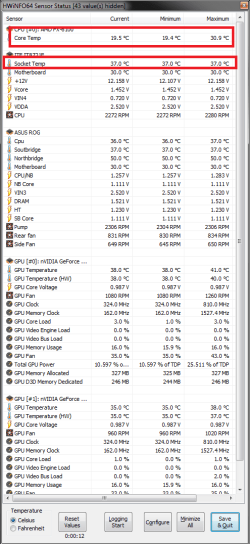
Here's some images of programs I use
 

Attachments

  • CPU tmps.png
    CPU tmps.png
    339.6 KB · Views: 34

My Computer

Computer type
PC/Desktop
Computer Manufacturer/Model Number
Custom Build
OS
Windows 7 64 (bit)
CPU
I7 4790K
Motherboard
Asus Maximus VII Hero
Memory
8GB
Graphics Card(s)
EVGA 770 SC ACX
Monitor(s) Displays
iiyama GB2488HSU
Screen Resolution
1920*1080
Hard Drives
1TB WESTERN DIGITAL BLACK
PSU
850 EVGA Supernova G2
Case
Carbide Series® Air 540 High Airflow ATX Cube Case
Cooling
The Black Ice® GT Stealth 240, Alphacool NexXxoS UT60 280
Keyboard
STEELSERIES APEX [RAW]
Mouse
Roccat XTD
Internet Speed
30Meg
Antivirus
Bitdefender
Browser
Google Chrome
Hi BigTabs
Welcome to Seven forums.
You should only use 1 software to monitor your cpu as using more will cause conflicts in and wrong reading's.
They all right but what you are seeing is the socket temp and the very low number is the core temp but not the true core temp. AMD temps are measured in a strange way and the core temp does not read true untill it reaches around 40/45c
This will explain it better than i can AMD Temp Information and Guide
I hope this helps.
 

Attachments

  • Temps.png
    Temps.png
    29.4 KB · Views: 15

My Computer

Computer type
PC/Desktop
Computer Manufacturer/Model Number
Custom build
OS
Win7 Home Premium x64 SP1
CPU
i7 4770k
Motherboard
Asus maximus VI Hero
Memory
8Gb Kingston HyperX Beast 2400MHz @2133MHz 11-12-11-30
Graphics Card(s)
MSI GTX 780ti Gaming Oc x2
Sound Card
Onboard ROG SupremeFX
Monitor(s) Displays
Asus VG248QE
Screen Resolution
3840X1080 144Hz
Hard Drives
Samung Evo 256Gb, OCZ Agility4 128Gb
1x1TB hitachi storage
PSU
EVGA Supernova 1000w Platinum
Case
Corsair Air 540
Cooling
Corsair H100i
Keyboard
Coolermaster Quickfire Pro
Mouse
Corsair M65 RGB
Internet Speed
74mb dwn/16up
Antivirus
MSE,Malwarebytes
Browser
Chrome
Thanks for the reply

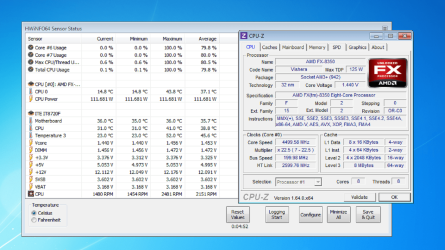
I have noted down the software prog in image hope you dont mind

and the results i get are in the image
 

Attachments

  • cpu temps.png
    cpu temps.png
    216.6 KB · Views: 17

My Computer

Computer type
PC/Desktop
Computer Manufacturer/Model Number
Custom Build
OS
Windows 7 64 (bit)
CPU
I7 4790K
Motherboard
Asus Maximus VII Hero
Memory
8GB
Graphics Card(s)
EVGA 770 SC ACX
Monitor(s) Displays
iiyama GB2488HSU
Screen Resolution
1920*1080
Hard Drives
1TB WESTERN DIGITAL BLACK
PSU
850 EVGA Supernova G2
Case
Carbide Series® Air 540 High Airflow ATX Cube Case
Cooling
The Black Ice® GT Stealth 240, Alphacool NexXxoS UT60 280
Keyboard
STEELSERIES APEX [RAW]
Mouse
Roccat XTD
Internet Speed
30Meg
Antivirus
Bitdefender
Browser
Google Chrome
They all show different temps, it`s amazing. I would trust your bios readings the most, probably, maybe.
 

My Computer

Computer type
PC/Desktop
Computer Manufacturer/Model Number
Skylake Special #666
OS
Windows 10 Pro x64
CPU
Intel Core i7 6700K
Motherboard
Asus Sabertooth Z170 Mark 1
Memory
GSkill TridentZ RGB 16GB 3600 16-16-16-36
Graphics Card(s)
EVGA GTX 980 Ti SC x2
Sound Card
Realtek High Definition
Monitor(s) Displays
AOC G2460PG
Screen Resolution
1920 x 1080 144Hz
Hard Drives
Samsung 860 Pro 256GB, Seagate Barracuda 4TB x2
PSU
EVGA 1000 P2, EVGA White Custom Braided Cables
Case
Corsair Vengeance C70 Gunmetal Black
Cooling
Corsair H100i v2, Corsair ML120 x2, Thermal Grizzly Kryonaut
Keyboard
Logitech G910 Orion Spectrum
Mouse
Logitech G700s
Internet Speed
Verizon Fios Quantum Gateway 75/75
Antivirus
Windows Defender, Malwarebytes Free 3.8.3
Browser
Chrome
Other Info
Corsair SP120 x4, LG Blu-ray Drive, Durabrand HT-395 100 Watt Dolby Digital Amp, Corsair H2100 Wireless 7.1 Headset
Thanks for the reply

I have noted down the software prog in image hope you dont mind

and the results i get are in the image

No worries! the Temp labelled cpu0 is the core temp but it won't read true untill it reaches 45c and over as described in the link in my previous post.
AMD designed this equation to accurately read peak (45C+) and load temps. It has an equational offset to determine said temps which equalizes at 45C. Since it's designed for peak temps and is a non-physical temperature it cannot read idle temps or account for ambient temps correctly.
The temp labelled Cpu is your cpu socket temp

REMEMBER! Only ever use one software to monitor your cpu as multiple's will cause error's/conflicts meaning the readings will be inaccurate.
 

My Computer

Computer type
PC/Desktop
Computer Manufacturer/Model Number
Custom build
OS
Win7 Home Premium x64 SP1
CPU
i7 4770k
Motherboard
Asus maximus VI Hero
Memory
8Gb Kingston HyperX Beast 2400MHz @2133MHz 11-12-11-30
Graphics Card(s)
MSI GTX 780ti Gaming Oc x2
Sound Card
Onboard ROG SupremeFX
Monitor(s) Displays
Asus VG248QE
Screen Resolution
3840X1080 144Hz
Hard Drives
Samung Evo 256Gb, OCZ Agility4 128Gb
1x1TB hitachi storage
PSU
EVGA Supernova 1000w Platinum
Case
Corsair Air 540
Cooling
Corsair H100i
Keyboard
Coolermaster Quickfire Pro
Mouse
Corsair M65 RGB
Internet Speed
74mb dwn/16up
Antivirus
MSE,Malwarebytes
Browser
Chrome
I would recommend Core Temp for real time/constant monitoring.

Core Temp
 

My Computer

Computer type
PC/Desktop
Computer Manufacturer/Model Number
Skylake Special #666
OS
Windows 10 Pro x64
CPU
Intel Core i7 6700K
Motherboard
Asus Sabertooth Z170 Mark 1
Memory
GSkill TridentZ RGB 16GB 3600 16-16-16-36
Graphics Card(s)
EVGA GTX 980 Ti SC x2
Sound Card
Realtek High Definition
Monitor(s) Displays
AOC G2460PG
Screen Resolution
1920 x 1080 144Hz
Hard Drives
Samsung 860 Pro 256GB, Seagate Barracuda 4TB x2
PSU
EVGA 1000 P2, EVGA White Custom Braided Cables
Case
Corsair Vengeance C70 Gunmetal Black
Cooling
Corsair H100i v2, Corsair ML120 x2, Thermal Grizzly Kryonaut
Keyboard
Logitech G910 Orion Spectrum
Mouse
Logitech G700s
Internet Speed
Verizon Fios Quantum Gateway 75/75
Antivirus
Windows Defender, Malwarebytes Free 3.8.3
Browser
Chrome
Other Info
Corsair SP120 x4, LG Blu-ray Drive, Durabrand HT-395 100 Watt Dolby Digital Amp, Corsair H2100 Wireless 7.1 Headset
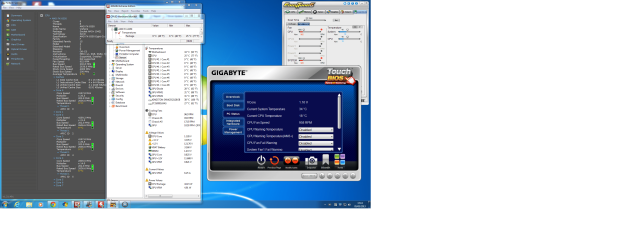
Unfortunately you have installed the Gigabyte software which is more trouble than it's worth. You will not be able to fully uninstall EasyTune, remnants will remain on your system and will be the cause of many crashes and I speak from bitter experience :cry: The only way to get rid of it is to do a fresh install of Windows, sorry.

In future DO NOT install any Gigabyte software, you do not need it.

Andy
 

My Computer

Computer type
PC/Desktop
Computer Manufacturer/Model Number
Titan 8900i Plasma MK II built by Overclockersuk
OS
Windows 7 Home Premium 64bit
CPU
Intel Core i5 3570K @ 3.40GHz
Motherboard
Gigabyte Z77-D3H (Intel Core i5-3570K CPU @ 3.40ghz
Memory
16.0 GB Dual-Channel DDR3 @ 762MHz (11-11-11-28)
Graphics Card(s)
NVIDIA GeForce GTX 670
Sound Card
ASUS Xonar DG
Monitor(s) Displays
Acer P246H
Screen Resolution
1920x1080@60Hz
Hard Drives
112GB INTEL SSDSC2CT120A3 ATA Device (SSD)
932GB Seagate ST1000DM003-1CH162 ATA Device (SATA)
1TB Seagate external HDD.
PSU
Corsair GS 600w PSU
Case
Antec 302 Three Hundred Two Ultimate Gaming Case
Cooling
Alpenfohn K2 Mount Doom CPU Cooler
Keyboard
Microsoft Sidewinder X4
Mouse
Anker 8000dpi gaming mouse
Internet Speed
12mb
Antivirus
Bitdefender Internet Security 2014
Browser
Chrome and IE11
Other Info
Malwarebytes, ADWCleaner, CCleaner, SUPERAntispyware Pro, Revo Uninstaller Pro

Adobe Photoshop CS6/Lightroom 5.3/NIK Software/Keyword Perfect
Back
Top