why at every boot i have this log V01.log ?

drugo

New member
Member
VIP
Local time
6:49 AM
Messages
476
Hi
i don't use explorer only firefox
but at every boot i find V01.log growing up

the folder is C:\Users\User\AppData\Local\Microsoft\Windows\WebCache

i check with ccleaner

do you have this file?
does it grow up at every boot?

thanks
 

My Computer My Computer

At a glance

windows 7 ultimate 64bit
Computer type
PC/Desktop
OS
windows 7 ultimate 64bit
Well I'm no expert on such things but I do have a idea.
Check and see if you have any programs that scan your system on a boot.
If you do these could be logs produced by such scans.
I don't have any such logs on my computer that I can find.
 

My Computer My Computer

At a glance

Windows 10 Pro. 64/ version 1709 Windows 7 Pr...Intel i7-6800K @ 4.3Corsair Platinum 16 gig @2400EVGA GTX 1070 OC
Computer type
PC/Desktop
Computer Manufacturer/Model Number
Home made Desktop
OS
Windows 10 Pro. 64/ version 1709 Windows 7 Pro/64
CPU
Intel i7-6800K @ 4.3
Motherboard
ASUS X-99 Deluxe II
Memory
Corsair Platinum 16 gig @2400
Graphics Card(s)
EVGA GTX 1070 OC
Monitor(s) Displays
Asus 27" LED LCD/VE278Q
Screen Resolution
1920-1080 or 1280-720 HDMI
Hard Drives
INTEL SSD 730-240 Gb Sata 3.0/
PSU
EVGA Platium 1200W
Case
Phanteks Luxe Tempered Glass 8 fans/ one radiator
Cooling
XSPC/ Water Cooled CPU
Keyboard
Das 4 Professional
Mouse
Logitech M705/MX Anywhere 2-S
Internet Speed
100 mbits
Antivirus
Microsoft Security Essentials/ Malwarebytes Premium 3.0/ SAS
Browser
I.E. 11 default/Firefox/ ISP Time Warner Cable/Spectrum
Other Info
LG BluRay Burner/
Sound system-KLipsch-THX/
Icy Dock ssd Hot Swap bays.
@Layback Bear,
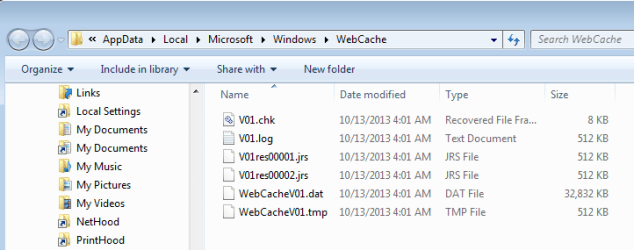
You should have that log file if you are using IE10:

webcache1.png

Code:
%userprofile%\AppData\Local\Microsoft\Windows\WebCache


@drugo,
You might have an app that uses IE without making an IE window.

If you use task manager to kill taskhost, then you can delete the entire WebCache folder. It will be recreated once you (or some app) uses IE or some part of IE. I've not noticed the log file getting bigger, but I have seen the DAT file grow.
 

My Computer My Computer

At a glance

W7 Pro SP1 64biti78GBIntel HD Graphics
Computer type
Laptop
Computer Manufacturer/Model Number
Employer provided Dell Latitude
OS
W7 Pro SP1 64bit
CPU
i7
Memory
8GB
Graphics Card(s)
Intel HD Graphics
Hard Drives
crappy SSD
Antivirus
Employer mandated Symantec Endpoint Protection
Browser
Pale Moon 64bit, IE11 64bit & Chrome 64bit
Okay I found it, size 512 kb.
Maybe this is why its small.

INTERNET PROPERTIES 10 13.PNG

I use this and found nothing in Windows explorer.

%userprofile%\AppData\Local\Microsoft\Windows\WebCache
 

My Computer My Computer

At a glance

Windows 10 Pro. 64/ version 1709 Windows 7 Pr...Intel i7-6800K @ 4.3Corsair Platinum 16 gig @2400EVGA GTX 1070 OC
Computer type
PC/Desktop
Computer Manufacturer/Model Number
Home made Desktop
OS
Windows 10 Pro. 64/ version 1709 Windows 7 Pro/64
CPU
Intel i7-6800K @ 4.3
Motherboard
ASUS X-99 Deluxe II
Memory
Corsair Platinum 16 gig @2400
Graphics Card(s)
EVGA GTX 1070 OC
Monitor(s) Displays
Asus 27" LED LCD/VE278Q
Screen Resolution
1920-1080 or 1280-720 HDMI
Hard Drives
INTEL SSD 730-240 Gb Sata 3.0/
PSU
EVGA Platium 1200W
Case
Phanteks Luxe Tempered Glass 8 fans/ one radiator
Cooling
XSPC/ Water Cooled CPU
Keyboard
Das 4 Professional
Mouse
Logitech M705/MX Anywhere 2-S
Internet Speed
100 mbits
Antivirus
Microsoft Security Essentials/ Malwarebytes Premium 3.0/ SAS
Browser
I.E. 11 default/Firefox/ ISP Time Warner Cable/Spectrum
Other Info
LG BluRay Burner/
Sound system-KLipsch-THX/
Icy Dock ssd Hot Swap bays.
Okay I found it, size 512 kb.
Maybe this is why its small.

View attachment 289583

I use this and found nothing in Windows explorer.

%userprofile%\AppData\Local\Microsoft\Windows\WebCache

Are protected operating system files unhidden?

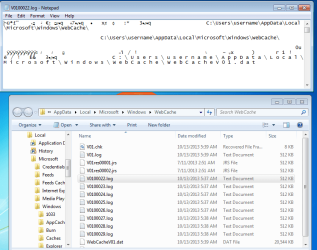
The log file does not seem to track temp files. It should stay at 512 KB. If it needs to grow, other log files of the same size are created. These log files seem to hold about the same info.

webcache2.png

The DAT file holds some history of websites visited (even if you clean history via the Internet Options/Properties interface). It is an NSA treasure trove. See the bottom of this webpage for a tool that may let you see inside of that DAT file: BrowsingHistoryView - View browsing history of your Web browsers
 

My Computer My Computer

At a glance

W7 Pro SP1 64biti78GBIntel HD Graphics
Computer type
Laptop
Computer Manufacturer/Model Number
Employer provided Dell Latitude
OS
W7 Pro SP1 64bit
CPU
i7
Memory
8GB
Graphics Card(s)
Intel HD Graphics
Hard Drives
crappy SSD
Antivirus
Employer mandated Symantec Endpoint Protection
Browser
Pale Moon 64bit, IE11 64bit & Chrome 64bit
Back
Top