Windows desktop manager fails at EVERY boot

Jeff869565

New member
Local time
10:01 PM
Messages
4
After installing the latest nvidia driver for the gtx580 I get the message,,,windows desktop manager had stopped working. It happens every boot. After searching the net...I reverted to an aero theme,,,same problem,,reinstalled the latest driver again, same problem, run sfc /scannow, no reported issues, but same problem. Checked under services and it is set for automatic setting. Any help is appreciated. Thank you.
 

My Computer My Computer

Computer type
PC/Desktop
Computer Manufacturer/Model Number
Custom build
OS
Windows 7 home premium
CPU
I7 2600k
Motherboard
Gigabyte ga p67a ud3
Graphics Card(s)
Nvidia gtx589
Antivirus
Security essentials
Can you System Restore to before you installed the driver?

Establish a Clean boot disabling the unneeded Nvidia bloatware and everything else in msconfig>Startup and >Services (after Hiding all MS Services) besides AV, any synch, stickies or Gadgets. The rest are freeloaders.

Work through the other Troubleshooting Steps for Windows 7
 
Greg,,thank you for the reply. I did restore to a prior point,,,only to have no video driver present,,,it then downloaded the current version, I did a clean boot as instructed,,,still have the same problem.
 

My Computer My Computer

Computer type
PC/Desktop
Computer Manufacturer/Model Number
Custom build
OS
Windows 7 home premium
CPU
I7 2600k
Motherboard
Gigabyte ga p67a ud3
Graphics Card(s)
Nvidia gtx589
Antivirus
Security essentials
Is there an earlier Restore Point that will revert to the previous Display driver before this one was updated causing the issue?

If not try reinstalling the older driver. Older drivers are queued in Device Manager>Display Adapter>Update Driver>Browse>Let me Pick
 
There was no earlier date,,,nor were there any older drivers,,,however I did the let me pick and chose the original off of the nvidia cd that came with the machine...it started but then I got a message that windows found the driver but encountered a problem and was not able to finish. Also went to the nvidia website,,,downloaded an earlier driver from there,,chose to install just the driver...it failed. So,,,I'm left with the latest driver,,,but the desktop manager still fails on boot. It appears that for now once I clear the message, things seem to run. I'm just Leary what's causing this.
 

My Computer My Computer

Computer type
PC/Desktop
Computer Manufacturer/Model Number
Custom build
OS
Windows 7 home premium
CPU
I7 2600k
Motherboard
Gigabyte ga p67a ud3
Graphics Card(s)
Nvidia gtx589
Antivirus
Security essentials
Enable Automatically deliver drivers via Windows Update (Step 3) then run all Important and Optional Windows Updates to completion. After each requested reboot check for more drivers until there are no more.

There may be a performance update required before driver will install so always install all Important and Optional Updates except Bing and Essentials which are truly optional.
 
Last edited:
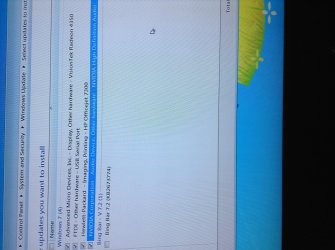
I installed all the updates...except for four that failed, picture attached, ironically one is an nvidia, but it's for audio and not sure if that's important. The error code is 800f0203. The other video card for vision tek fails also.
 

Attachments

  • image.jpg
    image.jpg
    749 KB · Views: 0

My Computer My Computer

Computer type
PC/Desktop
Computer Manufacturer/Model Number
Custom build
OS
Windows 7 home premium
CPU
I7 2600k
Motherboard
Gigabyte ga p67a ud3
Graphics Card(s)
Nvidia gtx589
Antivirus
Security essentials
I would make sure to delete every graphics card driver and try a clean driver install.

Therefore make sure that no older/broken driver for graphics card is stored in
C:\Windows\System32\DriverStore\(country code folder) and "File Repository" subfolder.

Also check with the Autoruns-tool from Sysinternals that no graphics driver is left loading in Autorun.
AutoRuns for Windows (there is a "drivers" tab)

You gotta be careful on both operations to not delete other drivers and you'll need to find exact names
for the drivers in both locations.

Autoruns lets you uncheck drivers that are loaded without deletion so you might start off with that.
Use Autoruns as Administrator.
 

My Computer My Computer

Computer type
PC/Desktop
Computer Manufacturer/Model Number
Custom Build
OS
Windows 7/8 Pro 64bit
CPU
i5-4670
Motherboard
Asus Gryphon
Memory
Corsair 16GB
Graphics Card(s)
Gigabyte GeForce 760
Hard Drives
Intel SSD - 180Gb
One of those Updates that failed is a Display driver. Try installing the failed Updates again repeatedly.

If the Display driver will not install, import it from the Support Downloads webpage for your model Display device. Don't install the full software package, just the driver. If it fails try an earlier driver. There are several generation WHQL and Beta drivers queued when I search for 580 driver at http://www.geforce.com/drivers. Use also the auto-detect function for both Graphics and if necessary Chipset.
 
Back
Top