Why does my windows gadgets use all my CPU?

Element7

Senior Member
Power User
Local time
12:06 PM
Messages
282
Location
inside your win32 folder
Hi, this is not really a problem but more curiosity. When I activate windows gadgets it shows my cpu usage at 100% all the time. I almost can get to a single gadgets options even if i only have the clock option.

I already found a alternative to windows sidebar.. Rainbar. It uses mostly ram and about no cpu. I just want to know why windows gadgets doesnt run smooth on my system. Is it because off my cpu? Its at 2004mhz. And is it maybe that windows sidebar only uses cpu resources and Rainbar only uses ram resources?
Marc
 

My Computer My Computer

Computer type
Laptop
Computer Manufacturer/Model Number
Acer V3-551G
OS
Windows 7 Ultimate 32bit
CPU
AMD Quad-Core A8-4500M with Turbo Core up to 2.80GHz
Memory
8 GB DDR 3
Graphics Card(s)
AMD Radeon HD 7640G + 7670M (2GB dedicated VRAM)
Sound Card
AMD HD Audio device / Realtek HD Audio
Monitor(s) Displays
15.6" HD LED
Screen Resolution
1366 x 768 (32bit)
Hard Drives
1 TB HDD
Antivirus
AVG 2013 free edition
Browser
Google Chrome
Other Info
WEI scores:

Base score= 5.9

-Processor 6.7
-Memory (RAM) 7.2
-Graphics 5.9
-Gaming Graphics 6.2
-Primary hard disk 5.9
Do you have any custom gadgets or just the built in ones?
 

My Computer My Computer

Computer Manufacturer/Model Number
Custom by me.
OS
Windows 7 64bit RTM
CPU
Intel Core i7 920 Nehalem Over clocked to 3.5 Ghz
Motherboard
EVGA 132-BL-E758-A1 LGA 1366 Intel X58
Memory
CORSAIR DOMINATOR 6GB (3 x 2GB) 240-Pin DDR3 SDRAM DDR3 1600
Graphics Card(s)
EVGA 01G-P3-1280-AR GeForce GTX 280 1GB
Sound Card
Soundblaster X-Fi Fatal1ty
Monitor(s) Displays
2 x 20in Dell Flatpanels 3200x1200
Screen Resolution
3200x1200
Hard Drives
150GB WD Velociraptor(C:), WD 750GB (D:Games), WD 1TB Black (E:Data1), WD 1TB Green (F:Data2)
PSU
CORSAIR HX1000 1000 watt
Case
Desktop
Cooling
Air
Keyboard
Logitech G15
Mouse
Logitech Revolution MX
Internet Speed
25 MB/s
E7

with 1,5 gigs of ram Im sure most of that is already used and gadget have to be written to pagefile and IO takes lots of cpu cycles. what % does sidebar use in task manager?

ken
 

My Computer My Computer

Computer Manufacturer/Model Number
HP Pavillion dv-7 1005 Tx
OS
Win 8 Release candidate 8400
CPU
[email protected]
Memory
4 gigs
Graphics Card(s)
Nvidia 9600M
Sound Card
HD built-in
Monitor(s) Displays
17" Wxga
Screen Resolution
1440x900
Cooling
none
Internet Speed
45Mb down 5Mb up
On my system, I found that certain gadgets are more CPU intensive than others. I disabled the ones that were using too much CPU and found substitutes online that operate more efficiently. Just look in Taskmanager to see which ones are hogging the CPU and eliminate those. For me, it was one of the ones that measures CPU activity and ram that was the main culprit. As I mentioned, I found another gadget that does the same thing more efficiently.
 

My Computer My Computer

Computer Manufacturer/Model Number
HP DV8t quad
OS
Windows 7 Ultimate x64 (Retail)
CPU
i7-Q 720
Motherboard
Motherboard Chipset Intel Ibex Peak-M PM55, Intel Lynnfield
Memory
6 GB
Graphics Card(s)
nVidia GeForce GT 230M (1GB)
Sound Card
IDT High Definition Audio CODEC
Monitor(s) Displays
18.4 inch HP Infinity FHD (Samsung 184HT03-001)
Screen Resolution
1920 x 1080
Hard Drives
Hitachi 500GB 7200 rpm (x2)
Seagate FreeAgent 1.5 TB External USB (x2)
Thermaltake BlacX eSATA/USB 2.0 3.5/2.5 HD dock
Cooling
Zalman NC-2000 notebook cooling pad
Keyboard
laptop
Mouse
Logitech VX Revolution
Other Info
Backup Unit: Lenovo T61p
Sidebar.exe fluctuates between 90-100%. And I am only using 500 mb ram according to task manager.
 

My Computer My Computer

Computer type
Laptop
Computer Manufacturer/Model Number
Acer V3-551G
OS
Windows 7 Ultimate 32bit
CPU
AMD Quad-Core A8-4500M with Turbo Core up to 2.80GHz
Memory
8 GB DDR 3
Graphics Card(s)
AMD Radeon HD 7640G + 7670M (2GB dedicated VRAM)
Sound Card
AMD HD Audio device / Realtek HD Audio
Monitor(s) Displays
15.6" HD LED
Screen Resolution
1366 x 768 (32bit)
Hard Drives
1 TB HDD
Antivirus
AVG 2013 free edition
Browser
Google Chrome
Other Info
WEI scores:

Base score= 5.9

-Processor 6.7
-Memory (RAM) 7.2
-Graphics 5.9
-Gaming Graphics 6.2
-Primary hard disk 5.9
It's fluctuating between 2 ~ 9 on my rig so something is not right.

I would try looking for the specific gadget processes and see if any of them are using a lot of CPU. Perhaps that would influence the sidebar.exe process.

Also, I would run the system file checker because maybe the problem is caused by some corrupt system file and this might fix it. To run SFC, from an administrative command prompt type sfc /scannow and let it complete which takes a few minutes. (There is a space between the sfc and the /.)
 

My Computer My Computer

Computer Manufacturer/Model Number
HP DV8t quad
OS
Windows 7 Ultimate x64 (Retail)
CPU
i7-Q 720
Motherboard
Motherboard Chipset Intel Ibex Peak-M PM55, Intel Lynnfield
Memory
6 GB
Graphics Card(s)
nVidia GeForce GT 230M (1GB)
Sound Card
IDT High Definition Audio CODEC
Monitor(s) Displays
18.4 inch HP Infinity FHD (Samsung 184HT03-001)
Screen Resolution
1920 x 1080
Hard Drives
Hitachi 500GB 7200 rpm (x2)
Seagate FreeAgent 1.5 TB External USB (x2)
Thermaltake BlacX eSATA/USB 2.0 3.5/2.5 HD dock
Cooling
Zalman NC-2000 notebook cooling pad
Keyboard
laptop
Mouse
Logitech VX Revolution
Other Info
Backup Unit: Lenovo T61p
If you want to monitor CPU, RAM, Network then try these gadgets: Add Windows Vista Gadgets

They are the lowest CPU using gadgets I've found for those tasks. On my computer CPU usage is pretty much 0 all the time. I have the 8 core CPU meter running, the wired network meter running, and the HDD meter running monitoring 5 HDD's
 

My Computer My Computer

Computer Manufacturer/Model Number
Custom by me.
OS
Windows 7 64bit RTM
CPU
Intel Core i7 920 Nehalem Over clocked to 3.5 Ghz
Motherboard
EVGA 132-BL-E758-A1 LGA 1366 Intel X58
Memory
CORSAIR DOMINATOR 6GB (3 x 2GB) 240-Pin DDR3 SDRAM DDR3 1600
Graphics Card(s)
EVGA 01G-P3-1280-AR GeForce GTX 280 1GB
Sound Card
Soundblaster X-Fi Fatal1ty
Monitor(s) Displays
2 x 20in Dell Flatpanels 3200x1200
Screen Resolution
3200x1200
Hard Drives
150GB WD Velociraptor(C:), WD 750GB (D:Games), WD 1TB Black (E:Data1), WD 1TB Green (F:Data2)
PSU
CORSAIR HX1000 1000 watt
Case
Desktop
Cooling
Air
Keyboard
Logitech G15
Mouse
Logitech Revolution MX
Internet Speed
25 MB/s
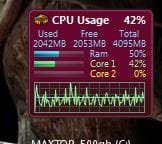
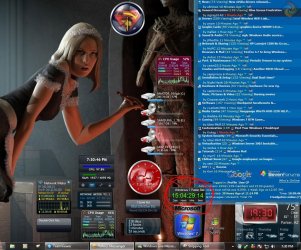
Last night I had 16 gadgets & 9 IE tabs open at the same time, Yahoo & WLM IM's running, also. :rolleyes:

42% Cpu usage, NO lag at all :)
 

Attachments

  • Cpu_Usage.JPG
    Cpu_Usage.JPG
    13.9 KB · Views: 2,202
  • Oct_6th_2009_75d_16days.JPG
    Oct_6th_2009_75d_16days.JPG
    189.3 KB · Views: 747

My Computer My Computer

Computer type
PC/Desktop
Computer Manufacturer/Model Number
Built them myself, Science Experiments !
OS
Win7 Enterprise, Win7 x86 (Ult 7600), Win7 x64 Ult 7600, TechNet RTM on AMD x64 (2.8Ghz)
CPU
AMD fx8350 4ghz, AMD-32 2400mhz, AMD-64 3200mhz, AMDx64 2.8G
Motherboard
SIS 755, ECS-K8M890M-M (Ult 7600), GigaByte & others
Memory
2gb, 4gb on the Ult 7600, 4gb on Technet RTM, 32gb on FX8350
Graphics Card(s)
Draw my own Graphics, several nVidia cards
Sound Card
on motherboard
Monitor(s) Displays
19" flat scr, 28" I-Inc widescr,22" Emprex Widescr, 23" Acer
Screen Resolution
1280 x 1024, 1440 x 900, 1920 x 1080
Hard Drives
6 pata Ide HD's & 2 Sata HD's
added 80gb external on Ult 7600 computer,
numerous extra 1tb, 2TB, 3Tb SATA HD's
A collection of ext HD Docks w/ HDs
PSU
430w, 550w, 600w, 700, 800, etc
Case
All Generic Full Towers
Cooling
Open Air & a few fans, some w/ colored LEDs
Keyboard
Compaq & Dell recycled from GoodWill
Mouse
Made in China Optical Wired Mouse
Internet Speed
Fast Cable InterNet
Antivirus
AVG Free on 24 different Desktops, NO Problems!
Browser
IE 8 is preferred, but use FireFox sometimes
Other Info
Linksys Routers, switches, & Hubs
Too Many USB Flash Drives to count, Biggest is 64GB !
Eight computers in my home network.
Sixteen computers at my business network.
Linked via TeamViewer !
Lots of old used spare computer parts everywhere!
If you want to monitor CPU, RAM, Network then try these gadgets: Add Windows Vista Gadgets

They are the lowest CPU using gadgets I've found for those tasks. On my computer CPU usage is pretty much 0 all the time. I have the 8 core CPU meter running, the

Swired network meter running, and the HDD meter running monitoring 5 HDD's

Stevecn

You check elements sys specs? He has a single core 2800 with 1.5 gigs of ram. BTW nice link for the gadgets

ken
 

My Computer My Computer

Computer Manufacturer/Model Number
HP Pavillion dv-7 1005 Tx
OS
Win 8 Release candidate 8400
CPU
[email protected]
Memory
4 gigs
Graphics Card(s)
Nvidia 9600M
Sound Card
HD built-in
Monitor(s) Displays
17" Wxga
Screen Resolution
1440x900
Cooling
none
Internet Speed
45Mb down 5Mb up
Back
Top