Why my laptop processor fan emits very hot air

ahieezer

New member
Local time
3:43 PM
Messages
10
Location
Chennai
Hi,
I am using Laptop 160GB HDD ,GB RAM, AMD TURION N550 processor.

My processor cooling fan runs very fastly from booting time and emitting hot air continually.

1. I changed bios settings as defaults.
2. Changed OS.
3. Cooling fan is clean and clear.
4. No dust in air Ventilaters.
5. CPU Temperature 54'C.

I don't know how to rectify this kindly help me anyone.

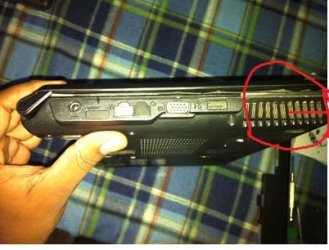
here i show my air outlet view of my laptop.
 

Attachments
  • IMG_0456+copy.jpg
    IMG_0456+copy.jpg
    27.9 KB · Views: 19

My Computer My Computer

At a glance

Windows 7 Ultimate x86 32bit
Computer type
Laptop
Computer Manufacturer/Model Number
hasee
OS
Windows 7 Ultimate x86 32bit
Cooling
PHP
Keyboard
HP
Mouse
HP
Antivirus
Avast
Browser
Firefox
You want your laptop to expel hot air otherwise is would overheat very quickly. I'm not sure about temperatures on laptop CPUs but I would hazard a guess that 57°C is OK, I'd get somebody to confirm or deny that though. Do you game on it?
 

My Computer My Computer

At a glance

W7 Pro x64 SP1 | W10 Pro IP x64 | W8.1 Pro x6...i7-4790k @ 4GHz (4.4GHz Boost)16GB DDR3 Kingston HyperX Fury @ 1600MHz CL 9...EVGA GTX 980 Classified
Computer type
PC/Desktop
Computer Manufacturer/Model Number
Custom Build
OS
W7 Pro x64 SP1 | W10 Pro IP x64 | W8.1 Pro x64 VM | Linux Mint VM
CPU
i7-4790k @ 4GHz (4.4GHz Boost)
Motherboard
ASUS Sabertooth Z87 (BIOS Rev 2004)
Memory
16GB DDR3 Kingston HyperX Fury @ 1600MHz CL 9-9-9-27
Graphics Card(s)
EVGA GTX 980 Classified
Sound Card
Realtek Onboard
Monitor(s) Displays
Samsung S27D390
Screen Resolution
1920 x 1080
Hard Drives
240GB Intel 520 Series SSD |
Samsung 850 EVO 120GB SSD |
2TB WD Caviar Black |
2TB WD Caviar Green
PSU
Corsair HX850-80 Gold Modular
Case
Cooler Master Silencio 650
Cooling
Corsair H80i w/2 x Corsair SP120 | 2 x 120mm Noctua NF-S12B
Keyboard
Microsoft Sidewinder X4
Mouse
Gigabyte M6900 optical
Internet Speed
152mb
Antivirus
F-Secure
Browser
Firefox 38.0
Other Info
Backup Rig: Win 7 Pro 64-bit | AMD A10-5800k | ASUS F2A85-V Pro | 8GB Samsung DDR3 @1600MHz | 120GB Toshiba SDD | 2TB Seagate HDD | Cooler Master Silencio 550
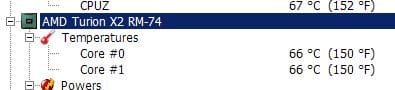
54 ain't that much in an AMD laptop (see picture of my old HP at low load, goes up to 90 sometimes!). Some ideas: you may want to evaluate a thermal paste job (use Google to read about it) which would include the Graphics Processor (very probably present, and may be the heat source), but no guarantee how it may turn out + a risk of breaking something. Also (in advanced power settings) try changing the processor cooling policy to active or passive (depending of what your current setting is) and see if it makes any difference. BTW, in task manager, do you see a constant high CPU usage? If so, look for the cause.
 

Attachments

  • lowload.JPG
    lowload.JPG
    14.1 KB · Views: 14

My Computer My Computer

At a glance

W7, W8.1
Computer type
Laptop
Computer Manufacturer/Model Number
Dell \ Lenovo\ HP \ Toshiba
OS
W7, W8.1
Antivirus
MSE, Malwarebytes
Browser
FF
I see there are vent ribbons in the bottom of your laptop. Make sure you place it on a flat, hard surface when using it, since if you have it on a soft surface those may be blocked, hindering a correct airflow.
 

My Computer My Computer

At a glance

W10 ProAMD Ryzen 5 2600X32 GB DDR4AMD Radeon RX 5600 XT
Computer type
PC/Desktop
Computer Manufacturer/Model Number
Main WKS/Gaming Sloth
OS
W10 Pro
CPU
AMD Ryzen 5 2600X
Motherboard
Asus TUF B450M-PRO-GAMING
Memory
32 GB DDR4
Graphics Card(s)
AMD Radeon RX 5600 XT
Sound Card
Generic Motherboard
Monitor(s) Displays
2 x Dell 24" LED P2415Q
Screen Resolution
2 x 3840 x 2160
Hard Drives
Samsung NVME
PSU
750 W
Case
Fractal Design
Cooling
Fractal Design
Keyboard
Roccat Horde AIMO
Mouse
Logitech G703
Internet Speed
ADSL 30 MBit
Antivirus
Bitdefender
Browser
Firefox
Back
Top